
A New Zealand shopper lands on your Australian Shopify store, sees NZD pricing, and buys. A German shopper lands on the same store, sees EUR pricing, and leaves. Both markets were switched on in the same afternoon, from the same admin screen, by the same person. Only one of them is actually working.
The difference is not currency. It is language, and more precisely it is the fact that Shopify Markets will cheerfully serve a German customer a euro price wrapped in English product copy, an English size guide, English shipping policy text, English form labels, and an English returns page. CSA Research surveyed 8,709 consumers across 29 countries and found 76% prefer to buy products with information in their own language, and 40% will not buy from a website in another language at all. That second number is the one that matters, because those visitors never fill in a survey. They just bounce.
Most Australian brands treat translation as an app install. Add Translate & Adapt, auto-translate the two free languages, tick the box, move on. Eight months later the market is doing 0.4% conversion against 2.1% at home and somebody decides Germany “just was not for us”. When we audit those stores, the translation quality is almost never the problem. The three layers underneath it are, and only one of them is visible in the Translate & Adapt interface.
Translation on Shopify Is Three Layers, Not One
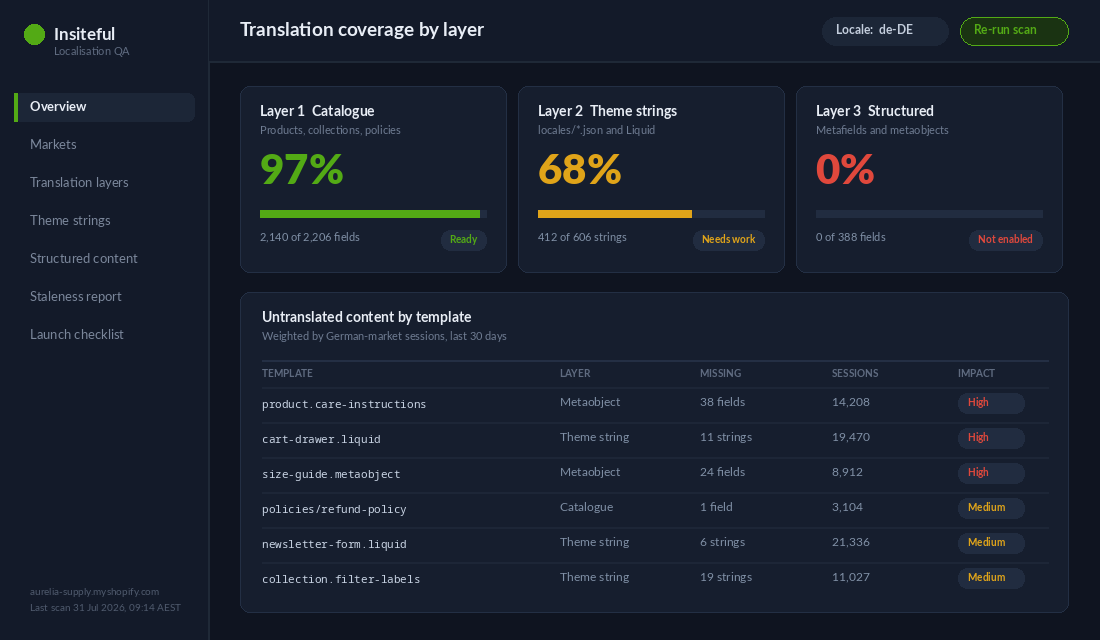
When a customer loads a localised product page, the words on that page come from three completely separate systems. They are stored differently, translated differently, and they fail differently. Any agency that treats them as one job will ship a market that is 70% translated and looks broken in exactly the places that carry buying intent.
- Layer 1: Catalogue content. Product titles, descriptions, option names, option values, collection copy, page and blog content, policies, email templates. Lives in the Shopify database, exposed through the translatable resources API. This is the layer Translate & Adapt handles well.
- Layer 2: Theme strings. Every word that ships inside the theme itself. Button labels, cart drawer copy, empty-state messages, form validation text, filter labels, “Add to cart”, “Sold out”, “Free shipping over”. Lives in JSON locale files in the theme repo. Translate & Adapt exposes some of it and silently misses whatever the theme hardcoded.
- Layer 3: Structured content. Metafields and metaobjects. Care instructions, ingredient lists, spec tables, FAQ blocks, size charts, sustainability claims, anything the brand built as reusable content. Translatable only if somebody explicitly turned that capability on before the content was created.
The scoring pattern we see on audits is consistent. Layer 1 comes back at 90 to 100% translated. Layer 2 comes back at 55 to 80%. Layer 3 comes back at zero, because nobody set the definitions to translatable and Shopify does not warn you. The customer experiences that as a German product page with an English “Pflegehinweise” block that still says “Machine wash cold, tumble dry low”. It reads like a scam site.
Layer 1: Catalogue Content and the Translatable Resources API
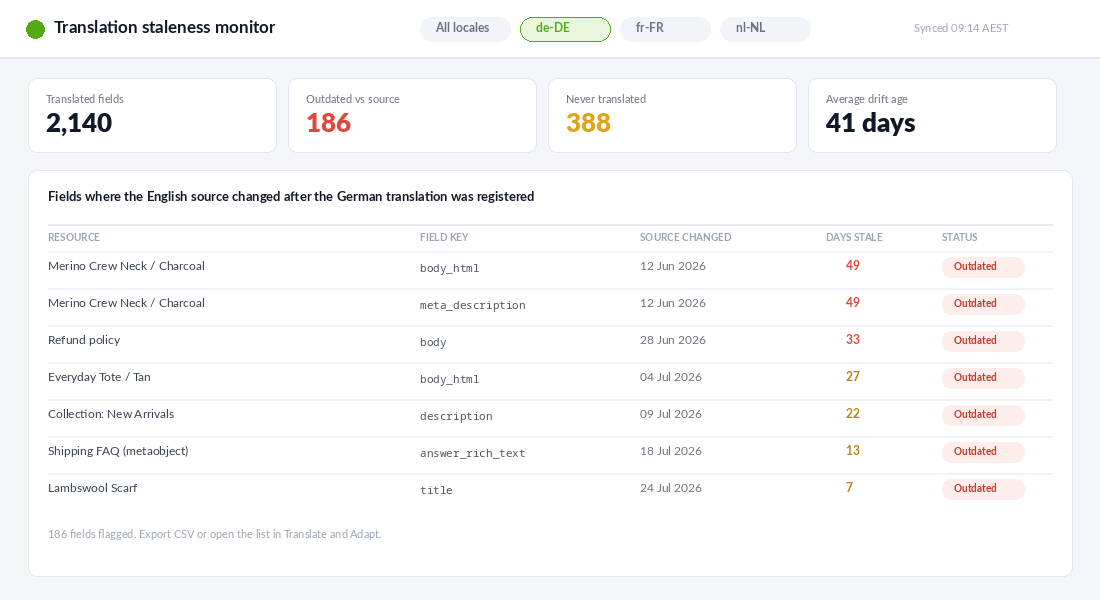
Shopify stores translations as separate records keyed to a resource, a field key, and a locale. They are not copies of the product. That distinction matters because it means a translation can go stale without breaking anything visible in the admin. Change the English description, and the German translation stays exactly as it was, still serving the old claim, still passing every automated check.
Shopify handles this with a digest. Every translatable field carries a hash of the source content at the time the translation was registered. When the source changes, the digest no longer matches and the translation is flagged as outdated. Translate & Adapt surfaces that in the UI, but only if somebody opens the app and looks. On a 900-SKU catalogue with weekly copy updates, nobody looks. We query it instead:
query OutdatedTranslations($cursor: String) {
  translatableResources(first: 100, after: $cursor, resourceType: PRODUCT) {
    edges {
      node {
        resourceId
        translatableContent { key value digest locale }
        translations(locale: "de") { key value outdated }
      }
    }
    pageInfo { hasNextPage endCursor }
  }
}
We run that on a schedule and push the count of outdated fields into the same dashboard the client uses for stock alerts. It is a five-line report that stops a market quietly rotting. Two other constraints are worth knowing before you plan a rollout: a shop is limited to 20 enabled locales and 20 published locales, and the free automatic translation in Translate & Adapt covers two languages. Beyond that you are paying for machine translation, paying humans, or writing it yourself.
None of that is a reason to avoid the native tooling. For catalogue content it is genuinely good, it writes to the same translatable resources every other well-built app writes to, and it costs nothing. The failure is treating it as the whole job. If you want the search side of this handled properly as well, we covered the URL and hreflang architecture separately in Shopify Markets International SEO.
Layer 2: The Theme Locale Files Most Builds Quietly Ignore
Every Shopify theme carries a locales directory. Inside it sits a default storefront file, usually en.default.json, holding every string the theme renders, plus a schema locale file such as en.default.schema.json holding the labels that appear in the theme editor for merchants. Only one default file is permitted. Add de.json alongside it and the theme has German.
Themes reference those strings through the Liquid translate filter. Done properly, a section looks like this:
{%- comment -%} locales/en.default.json {%- endcomment -%}
{
  "products": {
    "product": {
      "add_to_cart": "Add to cart",
      "sold_out": "Sold out",
      "low_stock": "Only {{ count }} left",
      "shipping_note": "Free shipping on orders over {{ threshold }}"
    }
  }
}

{%- comment -%} sections/main-product.liquid {%- endcomment -%}
<button name="add">{{ 'products.product.add_to_cart' | t }}</button>
<p>{{ 'products.product.low_stock' | t: count: variant.inventory_quantity }}</p>
Done badly, which is most of the time, somebody needed a promo banner at 4pm on a Thursday and typed the words straight into the Liquid. That string is now invisible to every translation tool on the market. It will render in English forever, in every locale, and no report will ever flag it.
The first thing we do on a localisation build is grep the theme for hardcoded strings before we touch anything else. On a typical three-year-old Australian store with a heavily customised Dawn derivative, we find between 40 and 200 of them. Custom sections built by a previous developer are the worst offenders, followed by app embed blocks and anything added during a BFCM rush. The fix is unglamorous: extract each string to a translation key, add it to the default locale file, replace the literal with a t filter call, and version the whole thing through the theme repo. We wrote up the workflow that makes this safe in Shopify theme development with GitHub.
One detail that catches people out: strings defined inside a section’s schema locales object are scoped to that section only. Anything global belongs in the theme’s locales directory. Mix those up and you get translations that work on the product page and vanish on the collection page, which is a genuinely miserable bug to chase.
Layer 3: Metafields, Metaobjects and the Content That Falls Through
This is where the money leaks. Modern Shopify builds push a lot of the persuasive content out of the product description and into structured fields. Ingredient panels, care instructions, technical specifications, FAQ entries, delivery promises by product type, sizing tables. It is the right architecture. It is also the layer that is invisible to translation by default.
A metafield or metaobject definition is not translatable until you say it is. Set the translatable capability on the definition and every field on it becomes eligible, appearing in the translatable resources API and in Translate & Adapt. Leave it off and the content is simply never offered for translation. There is no warning, no badge, no percentage-complete indicator that drops.
mutation MakeDefinitionTranslatable {
  metaobjectDefinitionUpdate(
    id: "gid://shopify/MetaobjectDefinition/1234567890",
    definition: { capabilities: { translatable: { enabled: true } } }
  ) {
    metaobjectDefinition { id name }
    userErrors { field message }
  }
}
Two constraints govern what you can actually do here. Only text-type fields are translatable: single line text, multi line text, and rich text. Reference fields, JSON fields, and file fields are not. And you cannot register a translation in the shop’s default language, because that content has to exist in the metaobject itself first. Both of those shape the content model, which is why the definition work has to happen before the content team starts populating it, not after.
Since the January 2024 API version, metaobjects are also exposed as a market localisable resource type, which means you can vary them by market and not only by language. That is a bigger deal than it sounds and it is the subject of the next section. If you are still deciding how to model this content in the first place, our piece on Shopify metaobjects covers the structure we recommend.
Market-Specific Content Is a Different Job to Translation
Here is the thing almost every Australian brand gets wrong on the first international build. They assume localisation only matters for non-English markets. Then they open the UK and the US on English, change nothing, and wonder why the return rate is high and the support inbox is full.
Shopify lets a translation be scoped to a market as well as a locale. Same language, different market, different content. That is how you serve a British customer “Free delivery over £75, dispatched from our Manchester 3PL, 2 to 3 working days” while an Australian customer on the identical page sees “Free shipping over $99, dispatched from Melbourne, 1 to 4 business days”. No second store, no duplicate product.
The content that should almost always vary by market, even inside one language:
- Delivery promises and thresholds. A free-shipping figure written in AUD on a US page is a conversion killer and, if the customer reads it as USD, a chargeback risk.
- Sizing conventions. AU 10 is UK 10 is US 6 is EU 38. Publishing one chart and hoping is how you end up with a 38% apparel return rate.
- Legal and compliance copy. Australian Consumer Law guarantees, UK statutory rights, EU 14-day withdrawal. Different obligations, different wording, real exposure if you get it wrong.
- Spelling and idiom. Customise against customize, colour against color, thongs against flip-flops. Small, but it is the tell that a shopper uses to decide whether you are a local brand or a drop-shipper.
- Duty and tax messaging. Whether the price includes import charges changes the entire framing of the offer, and it changed materially for Australian exporters in 2025. We went through that in detail in Shopify duties and import taxes.
Pair this with sensible price presentation and rounding rules, which we covered in Shopify multi-currency pricing, and an English-to-English market stops being a copy-paste job and starts being a real storefront.
Where Third-Party Translation Apps Help and Where They Hurt
We are not precious about native-only tooling. On catalogues past roughly 500 products with three or more languages, the native app becomes a workflow bottleneck fast, and a paid app earns its keep. What we are precious about is architecture, and translation apps split cleanly into two kinds.
The first kind writes to Shopify’s own translatable resources. Your translations live in Shopify, they render server-side, they survive you uninstalling the app, and they are visible to Google exactly like any other content. The second kind runs a proxy or a JavaScript layer that swaps text after the page loads, often on a separate subdomain. That approach demos beautifully and creates an ownership problem: cancel the subscription and the localised store evaporates.
Our filter when we assess one for a client is four questions:
- Does it write to translatable resources? If the translations do not survive an uninstall, it is a rental, not an asset. Price it that way.
- How does it price? Word-count plans look cheap at launch and get punishing at catalogue scale. We have seen quoted plans climb past $2,000 per month on large catalogues once every variant, metafield, and blog archive is counted. Model the bill at your real word count, not the sample.
- Does it translate metaobjects and metafields? Many still do not, which puts you straight back into the layer-three gap.
- What happens to other apps’ content? Reviews, subscription widgets, shipping calculators, and quiz apps frequently render their own strings without using Shopify’s translatable resource types. Those need to be handled inside each app’s own settings, and that work has to be in the project scope.
Machine translation quality is no longer the deciding factor. Modern engines handle product copy well enough for a soft launch. What still needs a human is the top 20 products, the homepage, the policy pages, and every call to action. That is usually 3,000 to 6,000 words, and having them professionally translated costs a fraction of what a mistranslated returns policy costs in disputes.
The Localisation QA Pass We Run Before a Market Goes Live
Translation percentage in the admin is not a launch signal. It counts fields, and fields are not weighted by how much revenue depends on them. A store can sit at 96% translated with the checkout thank-you page and the shipping estimator still in English, which are two of the highest-anxiety moments in the whole journey.
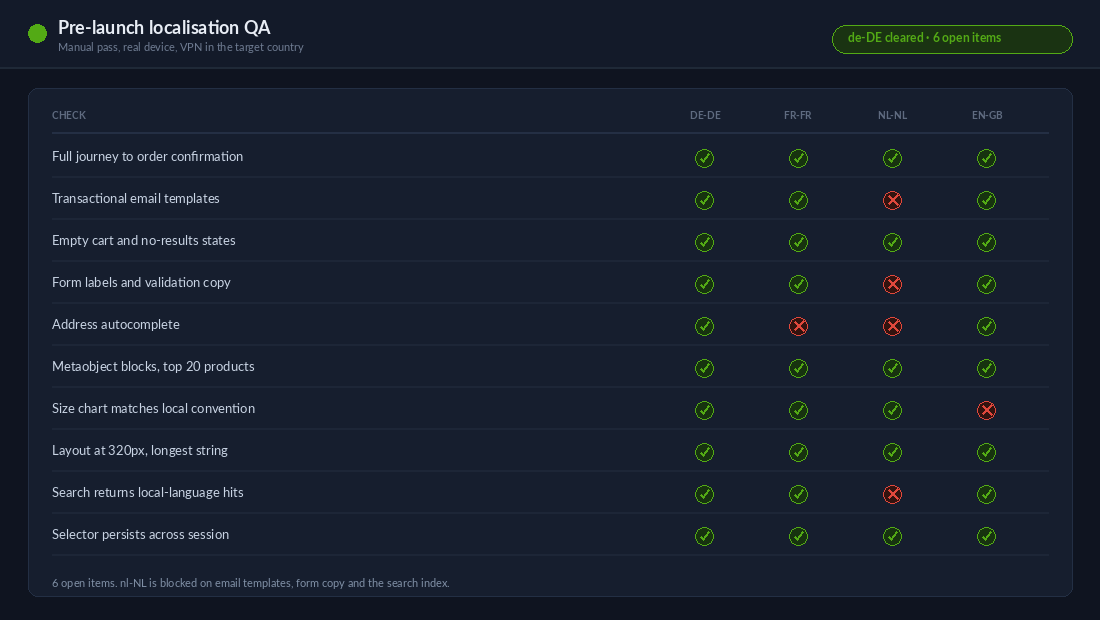
So we walk the journey in the target locale, on a real device, with a VPN in the target country, and we check the same list every time:
- Homepage to product page to cart to checkout to order confirmation. Every screen, in the target language, no exceptions. The confirmation email and the shipping notification email included, because those are separate templates.
- Empty and error states. Empty cart, no search results, out of stock, failed payment, invalid postcode. These are almost always hardcoded somewhere.
- Form labels and validation. Newsletter signup, contact form, address fields, and any app-rendered form. Address autocomplete in particular tends to stay stubbornly English.
- Structured content blocks. Every metaobject-driven block on the top 20 products, checked individually.
- Text expansion. German runs roughly 30% longer than English. Buttons break, nav items wrap, and price rows overflow on mobile. We check the layout at 320px width in the longest language, not in English.
- Search behaviour. Does the site search return results for a term in the local language? If the search index is only fed English, it does not.
- Routing. That the country and language selector actually holds the choice across a session, which we unpack in Shopify country selector and geolocation.
That pass takes a designer and a developer about half a day per locale. It catches things no dashboard will. On the last three international builds we shipped, it caught an untranslated shipping-threshold banner, a German size chart still showing AU sizes, and a returns page that had been translated once and never updated after the policy changed.
What Half-Localised Actually Costs an Australian Brand
Run the arithmetic on a brand doing $4M AUD a year that opens Germany expecting it to contribute 8% of revenue in year one. That is a $320,000 AUD target. If the market converts at 0.9% instead of the 2.2% the store manages at home, you are not collecting $320,000. You are collecting roughly $130,000 and paying full freight on the ad spend, the inventory allocation, and the support headcount that was budgeted against the higher number.
The remediation cost is real but small against that gap. Extracting hardcoded theme strings, setting metafield and metaobject definitions to translatable, backfilling structured content, and running a proper QA pass across two locales is a defined piece of work measured in days, not months. The expensive version is the one where the brand spends nine months buying traffic into a storefront that reads as foreign, concludes the market does not want the product, and pulls out.
There is a second cost that is harder to see. Every month a market runs half-localised, it is also collecting data that is not worth anything. The conversion rate is not a product signal, it is a build signal. Brands make inventory and marketing decisions off that number for a year before anyone questions it.
How We Do It at Insiteful
Localisation is a build phase for us, not an app install, and it runs in a fixed order because each step depends on the one before it.
- Content model first. Before a single word is translated we audit every metafield and metaobject definition and set the translatable capability where it belongs. Doing this after the content team has populated a market means redoing the work.
- String extraction. We grep the theme for hardcoded copy, extract every instance to a translation key in the default locale file, and ship it through the GitHub-connected theme workflow so the change is reviewable and reversible.
- Machine pass, then human pass. Machine translation across the full catalogue, then a professional human pass over the homepage, the top 20 products, all policy pages, and every call to action. That is the 20% of words carrying 80% of the buying decision.
- Market-level overrides. Delivery promises, sizing, legal copy, and duty messaging set per market, including for the English-to-English markets that most builds skip entirely.
- Manual QA in-locale. The full journey walked on device with a VPN in-country, checked against the list above, at 320px as well as desktop.
- Staleness monitoring. The outdated-translations query runs on a schedule and reports into the client’s existing dashboard, so a market cannot quietly drift out of date after handover.
The step everyone wants to skip is the first one, and it is the one that makes the other five cheap. Getting the content model right before translation starts is the difference between a two-week localisation phase and a two-month one.
Before You Switch On the Next Market
Open your store in your best-performing non-Australian market, on your phone, and walk from an ad click to the order confirmation screen. Count the English words a local customer should not be seeing. If the number is above zero on the cart, the checkout, or the shipping promise, the market is not launched. It is just switched on.
If you are weighing up a new market or trying to work out why an existing one is not converting, that is exactly the kind of call we help Australian brands make. See how we scope a build.