
There is a moment every growing Shopify brand goes through, usually on a Friday afternoon. Someone notices the price on the hero banner is wrong. A developer opens the code editor in the Shopify admin, fixes it on the live theme, and hits save. It works. Nobody writes it down. Three weeks later a scheduled release goes out, the deployed theme overwrites that file, the wrong price comes back, and nobody can explain why.
We see this constantly when we take over Australian stores from previous developers. The theme in production does not match any file anyone has on their machine. There are four themes in the library called “Live Copy”, “Live Copy FINAL”, “Dawn backup 2”, and “do not delete”. The last commit in the agency’s repository is from March. The store is effectively running unversioned code, and every change is a gamble.
This is a solved problem, and it has been for years. Shopify ships a first-party GitHub integration, a CLI that runs in continuous integration, a Liquid linter, and a Lighthouse action that scores every pull request. Wire those four things together with a branch model that matches how a retail business actually operates, and theme deployment stops being an event and becomes a routine. This article is the exact workflow we run on Insiteful builds, including the parts of it that are unintuitive and the two files that cause almost every merge conflict you will ever hit.
Duplicating the Live Theme Is Not Version Control
The default Shopify workflow is duplication. You copy the live theme, edit the copy, preview it, publish it. It feels safe because the original still exists. It is not version control, and it fails in three specific ways.
First, there is no diff. If your copy behaves differently from the live theme you have no way of seeing which of the 200 files changed and by how much. You are comparing rendered pages by eye. Second, there is no merge. If two people each duplicate the live theme on Monday and both publish on Thursday, the second publish silently discards the first person’s work in its entirety. Third, there is a ceiling. Stores on the Basic, Grow, and Advanced plans can hold a maximum of 20 themes; Shopify Plus stores get 100, per Shopify’s theme library documentation. That sounds generous until a busy trading year fills the library with campaign copies and a designer cannot add a theme the week before a sale.
The alternative is not more discipline about naming duplicates. It is putting Git underneath the store so that themes become disposable views of branches rather than precious artefacts nobody dares delete.
The Two-Way Sync Nobody Warns You About
Here is the single most important thing to understand before you connect a repository to a Shopify store, and it catches out developers who have used Git on every other platform.
The Shopify GitHub integration is bidirectional. It is not a deploy target. When a branch updates, the connected theme updates. But the reverse is also true: when anyone edits that theme through the Shopify admin, Shopify commits the change back to your branch as the shopify bot. Shopify’s own documentation is explicit that files are updated in GitHub whenever changes are made to a connected theme, and that this cannot be disabled.
That includes the theme editor. Every time a marketer drags a section, changes a colour, or saves a homepage layout, a commit lands in your branch. On a busy store this is dozens of commits a week that no developer wrote. If your mental model is “Git pushes to Shopify”, you will spend your first month fighting phantom changes and force-pushing over your client’s work.
The correct mental model is that the branch and the theme are two views of the same thing, kept in sync in both directions. Once you accept that, the workflow design writes itself: the branch connected to the live theme is shared with the merchant, so you never rewrite its history, and you always pull before you push.
One more constraint worth knowing before you plan a repository layout: only branches that match the default Shopify theme folder structure can be connected. A branch containing src and dist folders will not connect. Folders outside the expected theme structure are ignored entirely. And once a branch has been disconnected from a theme, you cannot reconnect it; reconnecting creates a new theme in the library instead.
The Branch Model We Use on Every Build
We run a trunk-based model with four kinds of branch, each mapped to a specific theme in the store library. The mapping is the whole design. Get it right and everyone in the business, technical or not, can look at the theme library and know exactly what they are looking at.
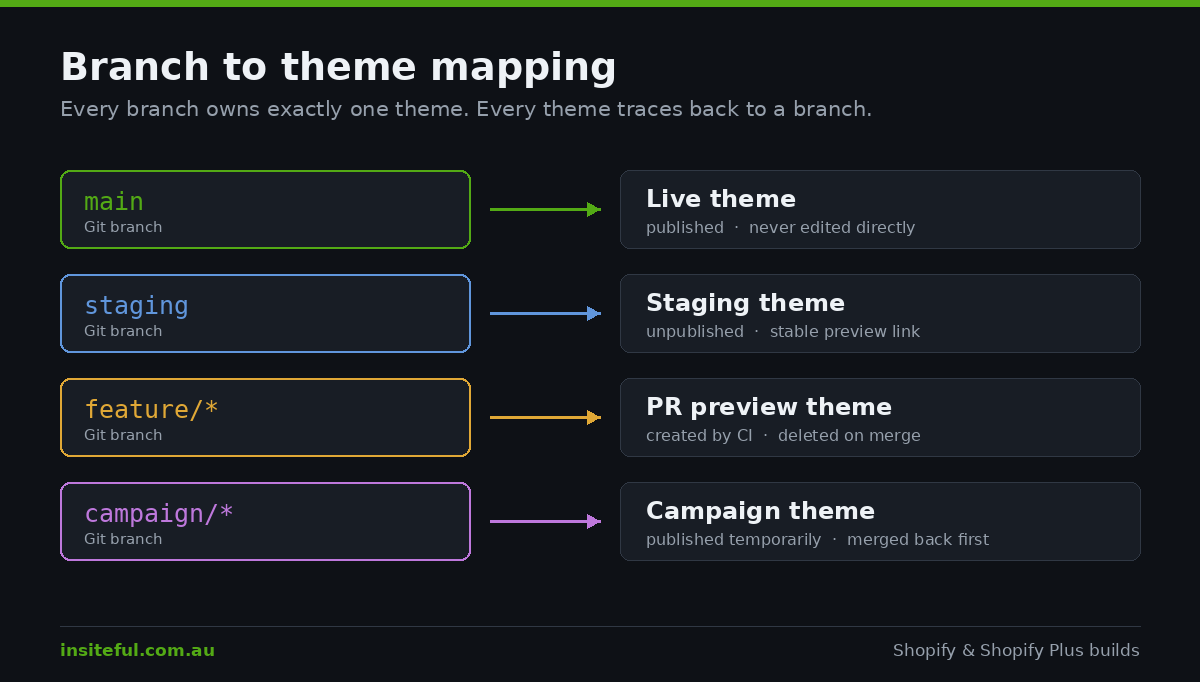
main. Connected to the published theme. This branch is always deployable and is never committed to directly. It receives merges from pull requests only, plus the automatic commits Shopify makes when someone saves in the theme editor.
staging. Connected to an unpublished theme with a stable preview link. This is where a full release sits for client sign-off before it goes live. Merchants bookmark this preview URL; it never changes, which matters more than it sounds when a client is reviewing on a phone in a warehouse.
feature/*. Short-lived branches, one per piece of work. These are not connected to themes permanently. Continuous integration creates a throwaway preview theme for each pull request and deletes it on merge, which keeps the 20-theme ceiling from becoming a problem.
campaign/*. Branched off main for a trading event, connected to a theme that gets published temporarily. Shopify’s own version control guidance recommends exactly this pattern: use non-main branches for events like sales, publish that theme temporarily, then republish the main-connected theme afterwards. Critically, the campaign branch is merged back to main before it is published, otherwise every theme-editor commit made during the sale is stranded on a branch you are about to abandon.
The rule that keeps this honest: a theme with no branch on its card gets deleted. If it matters, it is in Git. If it is not in Git, it does not matter. We apply that on day one of every takeover, and it usually takes the theme library from fourteen entries down to four.
The Two JSON Files Behind Almost Every Merge Conflict
If you take one practical thing from this article, take this section. The overwhelming majority of merge pain in Shopify theme work comes from two categories of file, and both are merchant-owned data rather than developer-owned code.
config/settings_data.json holds every global theme setting: colours, fonts, logo, spacing scale, everything a merchant touches in the theme editor’s settings panel. The JSON template files in templates/ hold the section arrangement of every page. Both change constantly through normal merchandising work, both are machine-generated, and both are large enough that Git cannot resolve a three-way merge sensibly. A designer changes a heading font in staging, a marketer rearranges the homepage in production, and the pull request comes back with a conflict spanning 400 lines of JSON that neither person can read.
The fix is to stop treating those files as code you own. Two mechanisms do the work.
First, tell Git how to resolve them. A .gitattributes entry paired with a trivial merge driver means the branch you are merging into always wins for merchant data, so a developer branch can never overwrite live settings.
# .gitattributes
config/settings_data.json merge=ours
templates/*.json          merge=ours
sections/*.json           merge=ours

# one-time local setup, per clone
git config merge.ours.driver true
Second, make pulling a ritual rather than a decision. Because Shopify commits merchant edits back to main continuously, any feature branch more than a day or two old is working against stale settings. We rebase feature branches on main every morning as a standing step, and our pull request template has a checkbox for it. It is a small habit that removes an entire class of failure.
There is a third option worth knowing for multi-store setups: exclude the settings and template JSON from deployment entirely and let each store own its own configuration, while still deploying settings_schema.json so that new settings you add in code become available to merchants. That is the right call when one codebase drives several storefronts with different branding, which is common for Australian brands running a separate New Zealand store.
Build Pipelines and the Compiled-Code Problem
Shopify’s folder structure has no concept of a build step. There is assets/, and whatever is in it is served. If you are writing TypeScript, or using PostCSS, or bundling with Rollup, your source layout will not match what the integration accepts.
Shopify documents four strategies for this, and recommends one: separate source code and compiled code using branches. You develop on branches with your src structure, then extract the compiled output to a dedicated deploy branch using git subtree, and connect that deploy branch to the theme. The production branch history stays clean because the only commits in it are production builds.
# build, then publish the compiled output to a deploy branch
npm run build
git add -f dist && git commit -m "build: release candidate"
git subtree push --prefix dist origin deploy/production
The alternative Shopify explicitly warns about is keeping only source code in version control and pushing compiled output straight to the store. It is the most common setup in the wild and the least defensible: compiled code is not versioned, merchant edits are invisible, and the whole approach is incompatible with the GitHub integration.
Our honest recommendation for most builds under about $60,000 AUD: skip the build pipeline. Modern Liquid, native CSS custom properties, and ES modules loaded as module scripts cover the vast majority of what a storefront needs. A buildless theme connects to Git directly, has no compilation step to break in CI, and can be edited by the next agency without a README. We reserve build pipelines for large multi-store codebases where shared component libraries genuinely earn their complexity.
Wiring Shopify CLI Into GitHub Actions
The GitHub integration handles sync. Continuous integration handles everything else: linting, performance scoring, preview themes, and scripted deploys. Shopify CLI is the tool that does the work, and it runs headlessly given the right credentials.
Authentication in CI does not use your developer login. You generate a Theme Access password through the Theme Access app, store it as a repository secret, and pass it to the CLI. Shopify’s CI/CD documentation requires CLI version 3.20 or higher and defines three environment variables: SHOPIFY_CLI_THEME_TOKEN for the Theme Access password, SHOPIFY_FLAG_STORE for the myshopify domain, and an optional SHOPIFY_FLAG_FORCE set to 1 to disable interactive prompts, which you want because a CI runner has nobody to answer them.
Here is the pull request workflow we install on builds. It lints, then pushes an unpublished preview theme, then posts the preview URL back to the pull request so a designer or client can review the actual change on a real Shopify URL rather than a screenshot.
# .github/workflows/pr-preview.yml
name: PR preview
on: pull_request

jobs:
  preview:
    runs-on: ubuntu-latest
    env:
      SHOPIFY_CLI_THEME_TOKEN: ${{ secrets.SHOPIFY_CLI_THEME_TOKEN }}
      SHOPIFY_FLAG_STORE: ${{ secrets.SHOPIFY_FLAG_STORE }}
      SHOPIFY_FLAG_FORCE: 1
    steps:
      - uses: actions/checkout@v4
      - uses: actions/setup-node@v4
        with:
          node-version: 20
      - run: npm install -g @shopify/cli
      - name: Lint Liquid and JSON
        run: shopify theme check --fail-level error
      - name: Push preview theme
        id: preview
        run: |
          shopify theme push --unpublished --json \
            --theme "PR-${{ github.event.number }}" > theme.json
          echo "url=$(jq -r '.theme.preview_url' theme.json)" >> $GITHUB_OUTPUT
      - name: Comment preview URL
        uses: peter-evans/create-or-update-comment@v4
        with:
          issue-number: ${{ github.event.number }}
          body: "Preview theme ready: ${{ steps.preview.outputs.url }}"
The deploy workflow is deliberately duller. On merge to main we do not push code at all, because the GitHub integration already syncs main to the live theme. What we do run is a pre-merge safety step: snapshot the current live theme into a dated backup before the merge lands, so rollback is a single publish click rather than a Git archaeology exercise.
# snapshot the live theme before a release
LIVE=$(shopify theme list --json | jq -r '.[] | select(.role=="main") | .id')
shopify theme pull --theme "$LIVE" --path ./rollback
shopify theme push --unpublished --path ./rollback \
  --theme "ROLLBACK $(date +%Y-%m-%d)"
On stores where the client prefers explicit deploys over automatic sync, we invert this: main is not connected to the live theme at all, and a manually approved GitHub Actions job runs shopify theme push --live. It trades the automatic merchant-edit capture for a hard gate. Which one is right depends entirely on how much the marketing team uses the theme editor, and that is a question worth asking before you architect anything.
Quality Gates on Every Pull Request
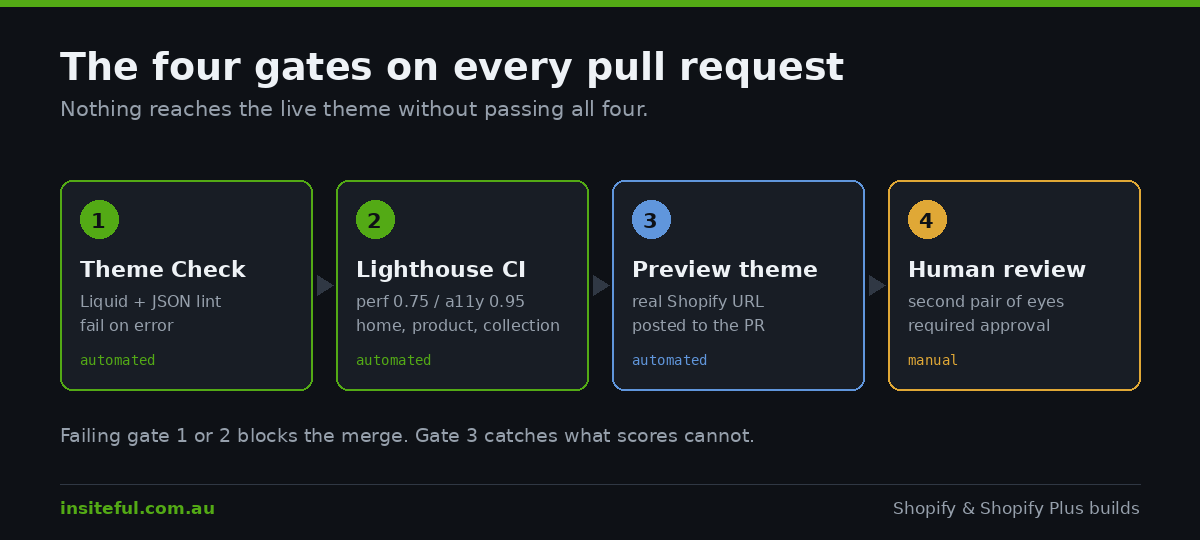
Gate one: Theme Check. Theme Check is Shopify’s linter for the Liquid and JSON inside a theme. It catches undefined objects, deprecated filters, missing translation keys, schema errors, and performance patterns like unparallelised asset loading. Run it locally through the VS Code extension and in CI with shopify theme check. Shopify shipped new Theme Check rules in July 2026 targeting Liquid-first themes, so if you have not updated your CLI this quarter you are linting against an older rule set.
Configure the severity so the pipeline is useful rather than noisy. We fail builds on errors, report warnings, and disable the handful of rules that fight with legitimate agency patterns.
# .theme-check.yml
extends: theme-check:recommended

TemplateLength:
  enabled: true
  max_length: 400
UndefinedObject:
  enabled: true
  severity: error
MissingTemplate:
  enabled: true
DeprecatedFilter:
  severity: error
Gate two: Lighthouse CI. Shopify maintains a Lighthouse CI GitHub Action built on Google’s Lighthouse CI. It runs an audit on every pull request against your theme’s home page, a product page, and a collection page. Its default thresholds are a performance score of 0.6 and an accessibility score of 0.9. Both are settable, and 0.6 is a floor rather than a target.
Two setup details matter more than the workflow file. It needs a dedicated development store populated with Shopify’s theme performance product data and no other products or collections, otherwise catalogue size differences make scores drift between runs. And it authenticates with a Dev Dashboard app carrying the read_products and write_themes scopes; the older custom-app access token path only applies to apps created before January 2026.
# .github/workflows/lighthouse.yml
name: Lighthouse CI
on: [pull_request]

jobs:
  lhci:
    runs-on: ubuntu-latest
    steps:
      - uses: actions/checkout@v4
      - uses: shopify/lighthouse-ci-action@v1
        with:
          client_id: ${{ secrets.SHOP_CLIENT_ID }}
          client_secret: ${{ secrets.SHOP_CLIENT_SECRET }}
          store: ${{ secrets.SHOP_STORE }}
          password: ${{ secrets.SHOP_PASSWORD }}
          lhci_min_score_performance: 0.75
          lhci_min_score_accessibility: 0.95
          lhci_github_app_token: ${{ secrets.LHCI_GITHUB_APP_TOKEN }}
We set performance to 0.75 and accessibility to 0.95 on new builds. Those numbers are chosen so the gate bites. A threshold everything passes is decoration, and the whole point is to catch the pull request that adds a 180KB carousel library before it reaches production rather than three months later during a speed audit. If you want the detail on what actually moves those scores, our writeups on layout shift and server response time cover the fixes we apply most often.
Gate three: the preview theme. Automated scores do not catch a broken variant picker on a phone. Every pull request gets a real preview URL, and the reviewer is expected to open it. Gate four is a human approving the pull request. Neither is optional.
Who Owns Which File
The workflow above only holds together if everyone agrees on ownership. Developers own code. Merchants own configuration. Apps own their own blocks. When those boundaries blur, Git fights the theme editor and somebody loses work.
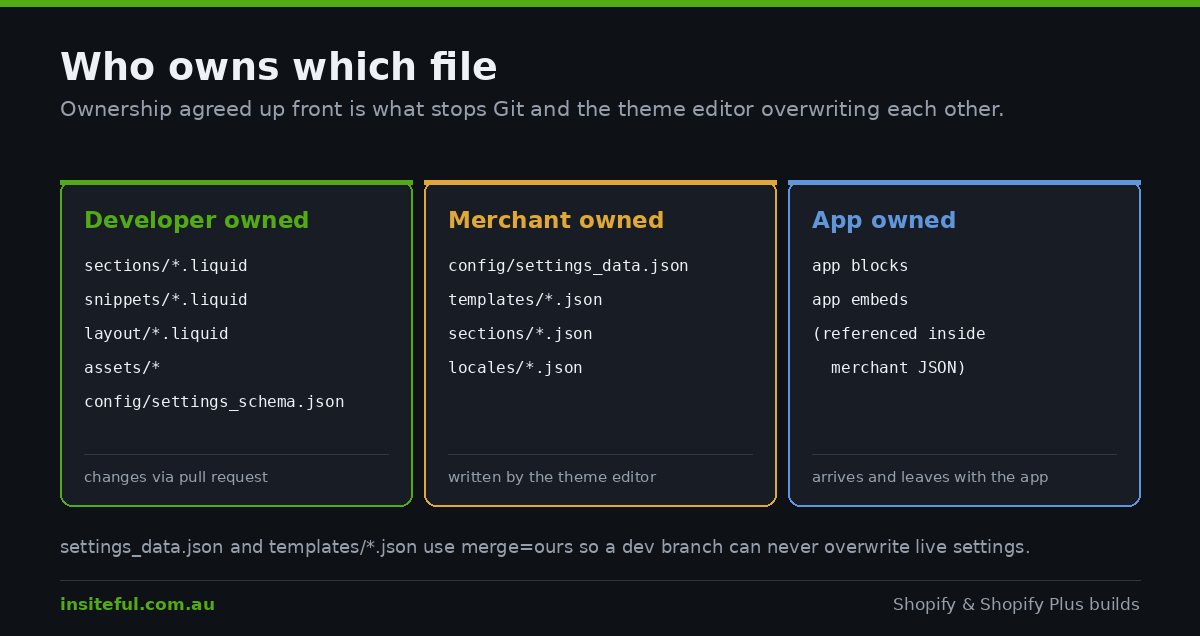
Developer-owned files are sections/*.liquid, snippets/*.liquid, layout/*.liquid, assets/*, and config/settings_schema.json. These move through pull requests. Merchants should never be editing them in the admin code editor, and on client stores we remove the code editor permission for non-technical staff for exactly that reason.
Merchant-owned files are config/settings_data.json, everything in templates/, and the locale files in locales/ once copy has been handed over. These are written by the theme editor, committed automatically by Shopify, and protected by the merge strategy from earlier.
App-owned files are the app block and app embed references that live inside the merchant-owned JSON. They arrive when an app is installed and disappear when it is uninstalled, and neither event should ever appear in a developer’s pull request. If you find app code pasted into main-product.liquid rather than referenced as an app block, that is technical debt with a specific cost: it will be silently dropped the next time the theme is updated. We covered the mechanics of that in our guide to updating a customised theme.
Writing this ownership map into the repository README, in plain English, does more for a client relationship than any amount of process documentation. It gives the marketing manager a straight answer to “can I change this myself” without needing to ask.
The Release Ritual
Releases should be boring. Ours run to a fixed sequence and take about twenty minutes of attention, most of which is waiting.
The staging branch is brought up to date with main first, so the client is signing off on the release as it will actually exist rather than on a branch that diverged a fortnight ago. The client reviews the stable staging preview link and replies in writing. The rollback snapshot job runs and produces a dated backup theme in the library. The pull request into main is merged, the GitHub integration syncs main to the live theme within seconds, and we watch the theme card’s version control log to confirm the commit landed rather than assuming it did.
Then we check the live storefront in a fresh browser session, on a phone, on the actual domain, not the preview URL. Shopify’s edge cache and any third-party caching layer mean the first load after a deploy can serve stale markup, so a cache-busting query string on the first check saves a genuinely confusing ten minutes.
If something is wrong, rollback is publishing the dated backup theme. That is the entire procedure. No revert commit, no rebuild, no scramble. The reason we take a snapshot every release even though it is almost never used is that the one time it is needed, it is needed at 9am on a sale day.
One caveat Shopify documents and that catches people mid-incident: the admin code editor has no conflict alerts. If someone edits a file there while a push is in flight, the code editor version wins and overwrites the GitHub version. During a release window, the code editor is closed. We say that out loud at the start of every deploy.
What This Costs and What It Saves
Setting this up on an existing store is roughly a day and a half of senior developer time: connecting the repository, reconciling whatever is actually live against whatever is in Git, writing the workflows, provisioning the Lighthouse development store, and running one supervised release with the client watching. Call it $3,000 to $4,500 AUD depending on how much archaeology the existing theme requires. On a new Insiteful build it is included, because we would not build any other way.
The return shows up in three places. Rework disappears: on stores we have taken over, “we already fixed that once” accounts for a meaningful share of billable hours, and versioned code makes it a non-event. Release anxiety disappears, which sounds soft until you notice a team shipping weekly instead of monthly because deploys stopped being frightening. And the performance gate keeps the storefront from degrading a hundred kilobytes at a time, which is the failure mode behind most of the emergency speed audits we get called into. One wholesale client came to us after a year of unversioned changes had pushed their product page weight past 4MB; the rebuild cost more than a year of the pipeline that would have prevented it.
There is a fourth benefit that only becomes obvious later. When a brand changes agencies, a versioned theme with a readable commit history transfers in an afternoon. An unversioned one gets rebuilt, at full cost, by whoever inherits it.
How We Do It at Insiteful
Every Insiteful build ships with this pipeline from day one, and it is set up before the first line of Liquid is written rather than bolted on before launch.
We start each project by connecting a fresh repository to the store and reconciling reality. On takeovers that means pulling the live theme with the CLI, committing it verbatim as the initial commit, and then comparing it against whatever the previous developer handed over. The diff between those two is the honest scope of the project, and it is frequently the most valuable artefact of the first week.
We keep our themes buildless wherever the brief allows, because a theme with no compilation step is a theme any competent developer can pick up in a year without our help. That is a deliberate positioning choice: we build native Shopify, we do not build stacks that require us. Our writeups on theme blocks and metaobjects show how far native architecture goes before you need anything custom.
Every pull request runs Theme Check and Lighthouse CI and produces a preview theme, and every one is reviewed by a second person. Our thresholds are tighter than Shopify’s defaults, and we tighten them further as a build matures rather than letting them slip. Release day follows the ritual above, including the rollback snapshot nobody expects to use.
At handover, the client gets the repository, the Theme Access credentials, the workflow files, and a README that says in plain language which files they can safely change in the admin and which ones they should ask a developer about. That last document takes twenty minutes to write and prevents most of the problems described at the top of this article.
Where to Start
If your store currently has more than five themes in its library and no repository, start with reconciliation rather than tooling. Pull the live theme, commit it, and connect the branch. That single step converts an unknown into a known, and everything else in this article becomes straightforward afterwards.
If you already have a repository but deploys still feel risky, the highest-value addition is the preview theme on every pull request. Reviewing a real URL instead of a description catches more problems than any linter, and it costs about an hour to set up.
If you would rather hand the whole thing over, that is what we do. We take Australian Shopify and Shopify Plus stores from unversioned and unpredictable to a pipeline where deploying is a routine part of the week, and we do it as part of a build or as a standalone engagement on an existing store. See how our build process works and request an assessment, and we will tell you honestly what shape your current setup is in before anyone talks about scope.