
A shopper in Auckland lands on your storefront from a Google search. The hero looks great. Then her eye hits the price: $189.00. No currency symbol she recognises, no “NZD”, no “AUD” – just a number that could mean anything. She does the maths in her head, gets it wrong, assumes it is expensive, and leaves. You never see her in your analytics as a lost sale. She is just one more bounce.
Multiply that by every international visitor who lands on the wrong version of your store, and you have one of the quietest revenue leaks in ecommerce. Cross-border now accounts for 31.2% of all global online sales and is projected to reach 58.1% by 2028, on a consumer market worth roughly $1.21 trillion in 2025. If a third of your addressable demand is crossing borders and your store greets them in the wrong currency and language, you are not competing for that revenue – you are declining it.
This is a build problem, not a strategy problem. At Insiteful we set up cross-border routing on Shopify for Australian brands selling into the US, UK, NZ, and the EU, and the difference between a routing setup that lifts conversion and one that quietly tanks your organic traffic comes down to a handful of technical decisions. This is exactly how we make them.
What geolocation routing actually does on Shopify
Before the country selector, before the popups, you need Shopify Markets configured underneath. A “market” is a group of one or more countries that share a currency, language set, catalogue, and pricing. Your storefront URL structure is the foundation everything else sits on, and Shopify gives you three topologies:
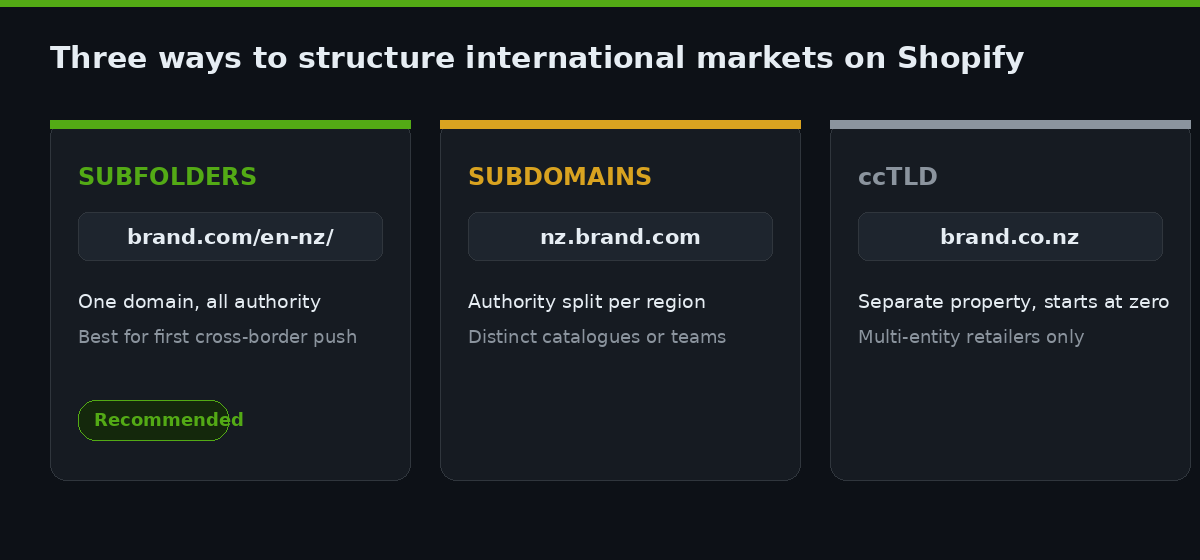
| Topology | URL example | Best for | SEO weight |
|---|---|---|---|
| Subfolders | brand.com/en-nz/ | Most AU brands starting cross-border | Consolidated to one domain – strongest |
| Subdomains | nz.brand.com | Distinct regional teams or catalogues | Split, weaker than subfolders |
| Country-code domains (ccTLD) | brand.co.nz | Established multi-entity retailers | Strong local signal, highest cost to run |
For a brand doing its first international push, we almost always recommend subfolders. They keep all of your domain authority on one property, they are the cheapest to maintain, and Shopify Markets manages the hreflang tags automatically so search engines understand that brand.com/en-nz/ and brand.com/en-au/ are regional variants of the same page rather than duplicate content.
The temptation for founders is to reach for ccTLDs early because a local domain “looks” more credible in each market. The problem is that every ccTLD is a separate property in Google’s eyes, so a new brand.co.nz starts from zero authority and has to earn its rankings from scratch, while a /en-nz/ subfolder inherits the authority the main domain has already built. Unless you are a multi-entity retailer with local warehouses and local marketing teams, the subfolder wins on almost every axis that matters for the first two years. We revisit the topology only when a market grows large enough that a dedicated local presence would genuinely pull its weight.
Routing sits on top of this structure. Geolocation detects where a visitor is and either sends them to the right market URL or suggests they switch. That word “or” is where most stores get it wrong, and it is worth slowing down on.
The redirect trap that quietly kills organic traffic
The instinct is obvious: detect the visitor’s country, then automatically redirect them to their market. A Kiwi hits brand.com and gets bounced to brand.com/en-nz/ without lifting a finger. Clean, right?
It is clean until Googlebot shows up. Google crawls almost entirely from US IP addresses. If your theme uses hard IP-based redirects, Googlebot lands on brand.com/en-nz/, gets detected as “US”, and is redirected to brand.com/en-us/. The New Zealand version is never crawled, never indexed, and never ranks. You have built an international store that is invisible to international search.
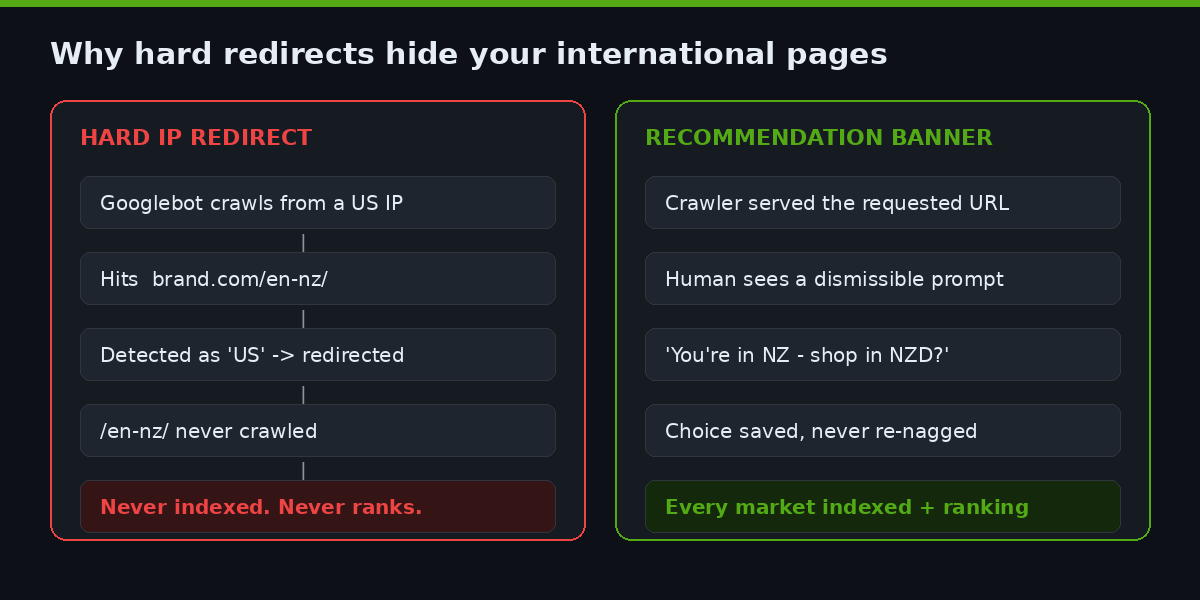
This is not a hypothetical. It is the single most common issue we find when we audit a store that “already has Markets set up but international traffic is flat”. The redirect logic works perfectly for humans and silently hides every regional page from the index.
The fastest way to catch it yourself is in Google Search Console. Open the URL Inspection tool, paste in one of your regional URLs such as brand.com/en-nz/, and use “Test Live URL”. If the crawler is being redirected away from the page, Search Console will report the tested page as a redirect rather than the page you submitted. Cross-reference that with the Pages report: if only your primary market’s URLs are showing as indexed and the regional subfolders are absent or flagged as “Page with redirect”, you have found the leak. We run this check on every store we inherit before we touch anything else, because there is no point optimising a market that Google cannot see.
Both Shopify and Google are explicit about the fix: use a recommendation, not a hard redirect. Google recommends language and currency switchers over automatic redirection because switchers do not confuse crawlers. Shopify’s own built-in redirection system is designed to exclude search engine bots, and its Geolocation app shows a recommendation banner (“It looks like you’re in New Zealand – shop in NZD?”) rather than forcing the move. The visitor stays in control, the crawler stays unblocked, and both versions get indexed.
Here is the decision we apply on every build:
| Visitor scenario | Right behaviour |
|---|---|
| New human visitor, detected in a different market | Show a dismissible recommendation banner. Do not force. |
| Returning visitor who already chose a market | Honour their saved choice. Do not re-prompt. |
| Search engine crawler | Never redirect. Serve the requested URL as-is. |
| Visitor clicks a paid ad with a market-specific URL | Respect the landing URL. The ad already did the routing. |
Setting up the country and region selector
The recommendation banner handles the first visit. The selector handles everything after – the traveller, the expat, the VPN user, the person who simply prefers to shop in USD. Every store needs a visible, manual selector, and Shopify’s localization forms make this a theme-level build rather than an app dependency.
In an Online Store 2.0 theme, the country selector is a section or block that posts to Shopify’s localization endpoint. The core of it looks like this:
{% form 'localization', class: 'country-selector' %}
  {% assign current = localization.country %}
  <button type="button" aria-expanded="false">
    {{ current.name }} ({{ current.currency.iso_code }})
  </button>
  <ul role="list">
    {% for country in localization.available_countries %}
      <li>
        <button type="submit" name="country_code" value="{{ country.iso_code }}">
          {{ country.name }} - {{ country.currency.iso_code }} {{ country.currency.symbol }}
        </button>
      </li>
    {% endfor %}
  </ul>
{% endform %}
Two things make this build good rather than merely functional. First, we always show the currency alongside the country name, because a shopper choosing “New Zealand” wants confirmation they will see NZD, not just a flag. Second, the selector is a real form submission to Shopify, which means the choice persists in the customer’s session and cart – the currency does not silently reset at checkout, which is a classic cause of last-step abandonment.
We pair the country selector with a separate language selector wherever a market supports more than one language, using localization.available_languages. Bundling country and language into one control confuses people; a Belgian customer picking “Belgium” still needs to choose French or Dutch.
Placement matters more than it looks. We put the selector in the header on desktop and inside the main menu drawer on mobile, never buried in the footer where an arriving international shopper will not find it before they bounce. On mobile in particular, the selector needs to be reachable in one tap from the first screen, because a visitor who cannot correct the market in the first few seconds does not go hunting for a control – they leave. We also make the current selection legible at a glance, so a returning customer can confirm they are still shopping in the right currency rather than having to open the selector to check.
Detection logic done right
Auto-detection decides what the recommendation banner says. Get it wrong and you annoy people with a banner that guesses badly; get it right and it feels like the store read their mind. The best-practice order is browser language first, IP geolocation as the fallback.
Browser language is more reliable than IP because it reflects an explicit preference the user has set, not just where their packets happen to route. IP-based geolocation is accurate at the country level around 95 to 99% of the time, which is plenty for a suggestion, but it misfires for VPN users, travellers, and corporate networks. That is precisely why detection should only ever recommend. The logic we implement:
function suggestMarket(detected, current) {
  // 1. Respect an explicit prior choice
  const saved = localStorage.getItem('market_choice');
  if (saved) return null; // already chose - stay silent

  // 2. Browser language is the primary signal
  const lang = navigator.language || navigator.userLanguage;

  // 3. IP-resolved country (from Shopify) is the fallback
  const geo = detected.country;

  // 4. Only prompt if they are clearly in the wrong market
  if (geo && geo !== current && lang) {
    return { suggest: geo, message: 'Shop in ' + geo };
  }
  return null;
}
When a visitor accepts or dismisses the banner, we write their decision to localStorage so they are never nagged twice. This one detail – remembering the choice – is the difference between a helpful prompt and a banner people learn to reflexively close. It also keeps the interaction off the critical rendering path, so it does not drag on interaction responsiveness on mobile, where most of this traffic lands.
Why local currency and language pull so hard on conversion
The routing work only matters because the payoff is large and well-documented. Showing prices in a shopper’s local currency is one of the highest-leverage changes you can make to an international storefront:
- 92% of global consumers prefer to buy from sites that display prices in their local currency.
- 33% of international shoppers will likely abandon a purchase if pricing is only shown in US dollars.
- Shopify reports that displaying local currencies can lift conversions by up to 40%, with other measurements putting the average increase around 24%.
- 75% of international shoppers want to buy in their native language, and 59% of non-English speakers rarely or never buy from English-only sites.
Those numbers are why we treat cross-border routing as a revenue project, not a tidiness project. A brand we worked with was doing roughly $180,000 AUD a year in unoptimised international orders – people who bought despite seeing Australian dollars and Australian shipping copy. Routing them into proper local markets, with local currency and market-specific shipping messaging, is the kind of change that moves that number materially without touching ad spend.
Shopify’s automatic currency conversion handles the exchange rate, but we always configure price rounding rules per market so a converted price reads as $49 rather than $48.73. Rounded prices look deliberate and local; raw converted prices look like a machine did the maths, which erodes exactly the trust local currency is meant to build.
Market-specific shipping, duties, and payment methods
Routing a shopper into the right currency is the visible half of the job. The half that decides whether they actually complete the order is what happens further down: shipping rates they understand, a clear position on duties, and a payment method they trust. A New Zealand customer who sees NZD pricing but then hits a US-only payment gateway and a shipping quote in the wrong currency has been given a worse experience than if you had never localised at all, because you raised the expectation and then broke it.
Three configuration decisions travel with every market we set up:
| Market element | What we configure | Why it matters |
|---|---|---|
| Shipping | Market-specific rates and thresholds, priced in the local currency | A “free shipping over $150” bar that silently means AUD confuses every non-AU shopper |
| Duties and import tax | Shopify Markets duties collection at checkout where the economics justify it | Unexpected customs charges on delivery are a top driver of cross-border chargebacks and refused parcels |
| Payment methods | Local wallets and methods surfaced per market | Familiar local payment options lift completion, especially outside card-first markets |
Duties are the one most brands underestimate. When a parcel crosses a border and the customer is hit with an unexpected import charge before the courier will release it, that is not a shipping problem in their mind – it is a betrayal by your brand. Shopify Markets can collect estimated duties and import taxes at checkout so the landed price is honest and there are no surprises on the doorstep. For higher-value orders into the US and EU, we almost always turn this on; the small friction at checkout is far cheaper than the refunds, chargebacks, and one-star reviews that surprise charges produce.
We treat these three settings as part of the routing build, not a separate project, because they share the same failure mode: a shopper who was correctly routed but then met an experience that did not match the promise the currency made.
Measuring whether the routing actually works
Routing that you cannot measure is routing you cannot defend at the next budget conversation. Before we ship, we make sure every market is a first-class dimension in analytics, not an invisible blur inside a single global number.
In GA4 we segment by the market subfolder path, so conversion rate, average order value, and revenue are all visible per market. The pattern we set up:
// GA4 - derive market from the URL path
// /en-nz/ -> "NZ", /en-us/ -> "US", default -> "AU"
const path = window.location.pathname;
const marketMatch = path.match(/^\/([a-z]{2})-([a-z]{2})\//i);
const market = marketMatch ? marketMatch[2].toUpperCase() : 'AU';

gtag('event', 'page_view', {
  market_code: market,
  currency: Shopify.currency.active
});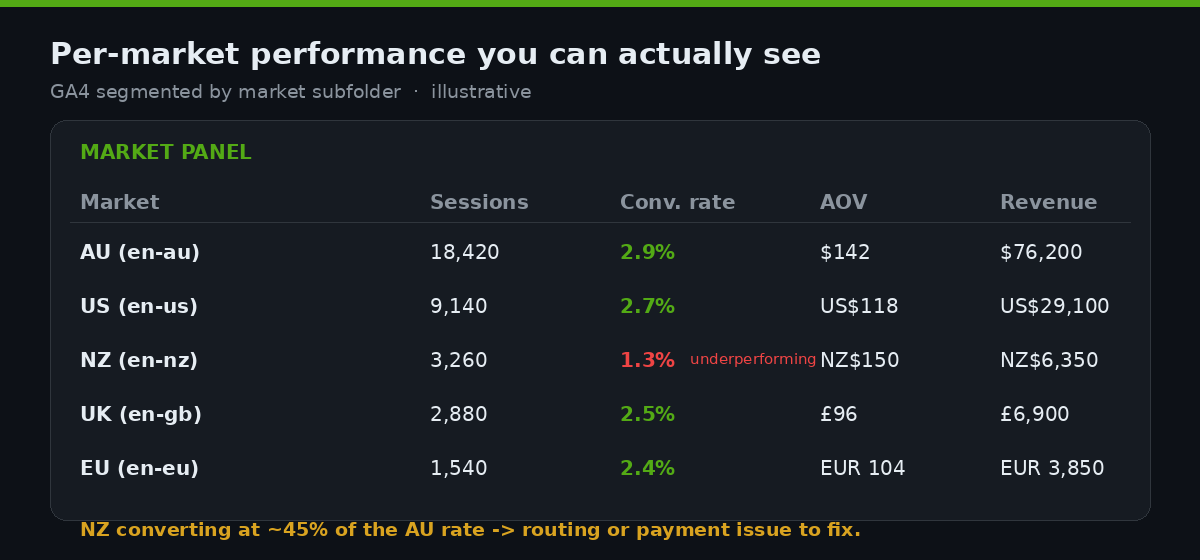
With that in place you can answer the questions that actually matter: is the NZ market converting at the AU rate, or half of it? Are US visitors accepting the recommendation banner or dismissing it? Is a specific market carrying a checkout drop-off that suggests a payment-method or shipping-rate problem? Without per-market segmentation, all of that hides inside one blended figure and you optimise blind.
The mistakes we fix most often
When a store comes to us with international traffic that is not converting, the culprit is almost always one of these five, and every one is a build fix rather than a strategy change:
- Hard redirects blocking the crawler. Regional pages exist but are not indexed because IP redirects hide them from Googlebot. We swap to recommendation banners and watch international impressions climb over the following weeks.
- No manual selector. The store auto-detects and offers no override, so a travelling customer is trapped in the wrong market with no visible way out.
- Currency resetting at checkout. The storefront shows local currency but the choice does not persist into checkout, so the shopper sees a different number at the final step and abandons.
- The banner that never forgets. No saved choice, so the recommendation fires on every single page load and trains people to close it on reflex.
- Ugly converted prices. No rounding rules, so USD converts to $48.73 and the store reads as foreign and untrustworthy in the exact moment it should feel local.
How we do it at Insiteful
Cross-border routing is one of the builds where the sequence matters as much as the components, so we run it the same way every time.
We start by mapping the market topology to the commercial reality – which countries are already ordering, which have the shipping and duty economics to support a dedicated market, and whether subfolders or ccTLDs fit the brand’s stage. Most Australian brands get subfolders on the primary domain, because it keeps domain authority consolidated and costs nothing extra to run.
Then we build the routing layer as native theme code and Shopify’s own localization forms, not a stack of overlapping geolocation apps. We have audited too many stores running three apps that each try to redirect the visitor and fight each other for control. One recommendation banner, one persistent selector, one saved choice, all in the theme where we can see and version every line of it.
We validate the crawler behaviour explicitly before launch – fetching regional URLs as Googlebot to confirm they resolve without redirecting – because an indexation problem you catch pre-launch costs an afternoon, and one you catch three months later has already cost a quarter of organic visibility. Finally we wire per-market analytics so the client can see, from week one, exactly what each market is worth. That is the whole point: cross-border should be a line you can grow on purpose, not a rounding error you discover by accident.
If your Shopify store is pulling international traffic that is not converting the way it should – or you are planning a cross-border push and want the routing built correctly the first time – book a build assessment and we will map your market topology and routing plan. You can also see how we approach technical Shopify builds across our recent work.