

Every growing Shopify store eventually hits the same wall. The catalogue expands, the marketing team wants richer product pages, and the merchandising team wants size guides, ingredient panels, care instructions, stockist lists and campaign landing blocks that all look consistent and update in one place. The default answer for years was to bolt on another app or, for the ambitious, to rip the storefront off Shopify entirely and go headless. Both routes cost money and both introduce fragility.
There is a third route that has quietly become the strongest option on the platform, and the Spring 2026 Editions release pushed it firmly into the mainstream. Metaobjects, connected to your theme through dynamic sources, now let you build structured, reusable, content-driven sections directly inside the theme editor without a single line of custom code in many cases, and with clean native Liquid when you do need to go deeper. For an agency like ours that refuses to build headless stores, this is the tooling that makes that stance easy to defend.
This guide walks through what metaobjects actually are, what changed in 2026, how dynamic sources bind them into your theme, and the exact build patterns we use for Australian merchants. It is written for store owners and in-house developers who want maintainable content architecture without the app tax.
What metaobjects actually are
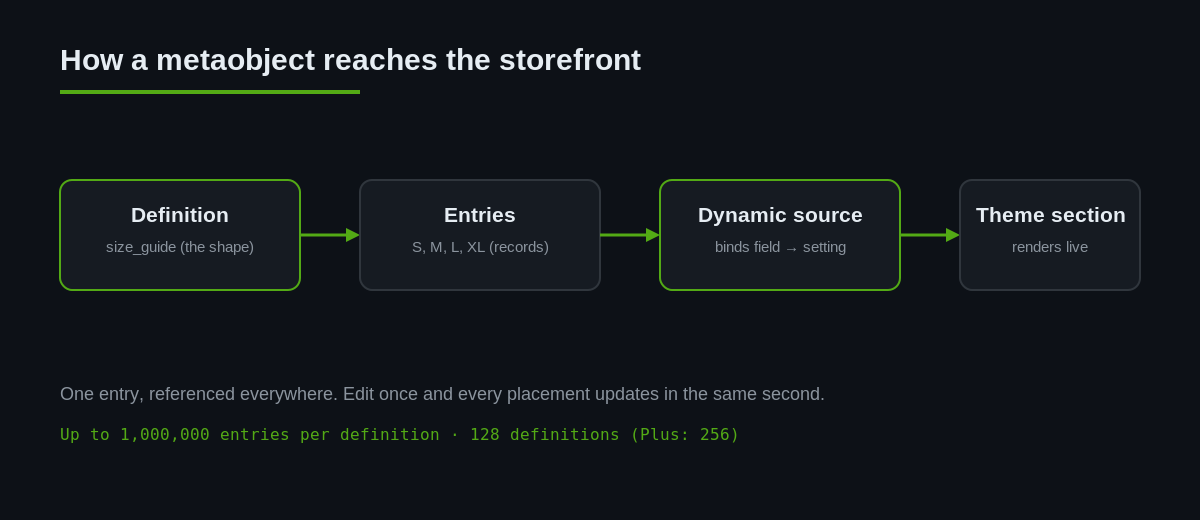
A metaobject is a custom content type you define yourself. If a Shopify product is a built-in object with a fixed set of fields, a metaobject is an object whose fields you decide. You create a definition (the shape) once, then create as many entries (the records) as you need against it.
Say you sell apparel. You define a Size guide metaobject with fields for a heading, a rich-text chart, a fit note and a linked product type. Every size guide in the store is now an entry of that definition. Update the entry once and every product page that references it updates too. That is the difference between structured content and copy pasted into a hundred product descriptions.
It helps to keep two words straight. A definition is the schema. An entry is one filled-in record. The limits matter when you are planning: Shopify allows 128 metaobject definitions on Basic, Shopify and Advanced plans, and 256 on Plus and Enterprise, with each installed app able to add up to a further 128 of its own. Each definition can hold up to 1,000,000 entries, a change that removed the old plan-based ceilings of 64,000 for non-Plus and 128,000 for Plus stores. In plain terms, you will run out of ideas long before you run out of metaobject capacity.
The reason this matters commercially is straightforward. GS1 US research found 77 percent of consumers say product information is important when making a purchase, and a 2025 Syndigo report found 44 percent of shoppers abandoned a purchase because of insufficient product information. Structured content is how you feed richer, consistent information into pages at scale instead of leaving it to whoever last edited the description.
Metaobjects or metafields?
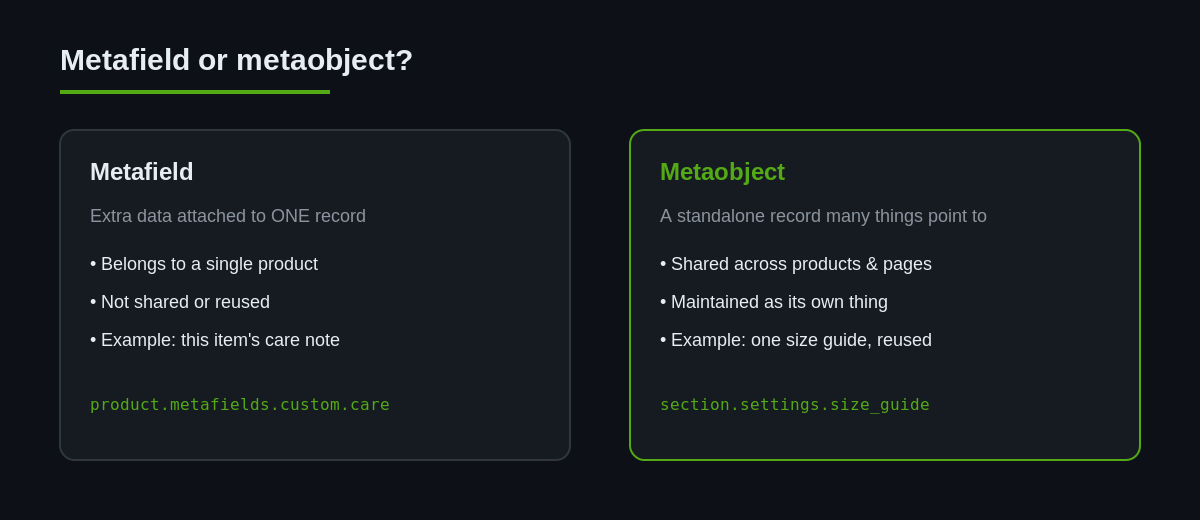
This is the question we field most often, and the distinction is simple once it clicks. A metafield attaches an extra piece of data to an existing record, so a product gets a metafield for its washing instructions. A metaobject is a standalone record in its own right that any number of products, pages or sections can point to. The rule of thumb we use is this: if the data belongs to one specific product and nowhere else, reach for a metafield; if the same data is shared, reused or maintained as its own thing, model it as a metaobject.
The size guide is the textbook case. Ten products in a range share one guide. As a metafield you would copy the same content onto ten products and update ten records every time the sizing changes. As a metaobject you create one entry, reference it from all ten, and edit it once. Reuse is the deciding factor, and most content that feels like it should be reusable genuinely is. The two mechanisms also work together happily, since a product metafield can itself be a reference to a metaobject entry.
What changed in the Spring 2026 Editions
Metaobjects have existed for a few years, but until recently connecting them to the storefront meant custom Liquid, developer time, and a fair bit of trial and error in the theme code. The Spring 2026 release closed most of that gap. Metaobjects can now be used globally in the theme editor, so their fields can be selected as dynamic sources inside any relevant section or block, without additional code.
Three specific changes are worth knowing before you plan a build:
First, the theme editor’s richtext, text and inline_text settings now accept metaobject references. That means a merchant editing a section in the customiser can point a text field straight at a metaobject field and have it stay in sync.
Second, Shopify raised the dynamic source ceilings. You can now attach up to 100 dynamic sources per template and 50 per static section in online store templates. On a content-dense homepage or a campaign template, that headroom is the difference between a clean build and a workaround.
Third, there are now dedicated metaobject and metaobject_list theme setting types. These let theme and app developers build sections and blocks that accept metaobjects of a specified type directly, which is the pattern we lean on most. Metaobject entries can also now be used in checkout Functions to drive custom discounts and rules, and app-owned metaobjects no longer require access scopes, so data migrates cleanly when an app is installed.
Dynamic sources: binding metaobjects without code
Dynamic sources are the connective tissue. A dynamic source links a section or block setting to live data from a resource, whether that is a product, collection, page, metafield or metaobject. The merchant makes the connection in the theme editor by clicking the dynamic source icon next to a setting and choosing the field to pull from.
For a lot of real work this removes the developer from the loop entirely. A store owner can build a page that displays a metaobject entry, wire a heading and an image block to that entry’s fields, and reuse the layout across templates. When the entry changes, every placement changes with it. No app, no deploy, no code review.
Walk through it concretely. A merchant wants a care-instructions block on every product in their homewares range. You create a Care instructions metaobject with a heading and a rich-text body, then add one entry per material type. On the product template the merchant adds a text block, clicks the dynamic source icon beside the content field, and selects the care-instructions entry that matches the product. The block now pulls live from that entry. When the wording changes for a whole material type, they edit the single entry and every product using it updates in the same second. The developer built the plumbing once; the merchant runs it forever.
The practical constraint is that dynamic sources can only be used where a compatible resource is in context. A metaobject field can feed a section on a product, collection, page, blog or blog post template when the types line up. Part of a good build is deciding which content belongs on which template so the sources resolve cleanly. Get that mapping right and the merchant experience is genuinely low friction.
Building a reusable metaobject section
When we want full control over markup, accessibility and performance, we build a section that declares a metaobject setting in its schema. This is the developer path, and it is the one that ages best because the logic lives in version-controlled theme code rather than in an app’s database.
Here is the schema for a size guide section that accepts a single entry of a size_guide metaobject definition:
{% schema %}
{
  "name": "Size guide",
  "settings": [
    {
      "type": "metaobject",
      "id": "size_guide",
      "metaobject_type": "size_guide",
      "label": "Size guide entry"
    }
  ]
}
{% endschema %}
The metaobject_type key constrains the picker so the merchant can only select entries of the right definition. That one line prevents a whole class of support tickets. Rendering the selected entry is ordinary Liquid, and every field you defined is available as a property:
{% assign guide = section.settings.size_guide %}
{% if guide %}
  <section class="size-guide">
    <h2>{{ guide.heading }}</h2>
    {{ guide.chart }}
    <p class="fit-note">{{ guide.fit_note }}</p>
  </section>
{% endif %}
For collections of records, such as a stockist list, an ingredient panel or a set of team bios, use the metaobject_list setting type and iterate. The .value accessor returns the referenced entries:
{% for stockist in section.settings.stockists.value %}
  <li>
    <strong>{{ stockist.name }}</strong>
    {{ stockist.suburb }}, {{ stockist.state }}
    <a href="tel:{{ stockist.phone }}">{{ stockist.phone }}</a>
  </li>
{% endfor %}
Notice what is not here: no third-party script, no external database call, no build step. It renders inside Shopify’s own Liquid pipeline, which is why it stays fast and why it survives theme updates. This is the native stack doing exactly what a headless front end is often sold to do, at a fraction of the operating cost. We wrote about that trade-off in detail in our piece on native Shopify stack performance without headless.
Where Australian merchants get the most value
Metaobjects earn their keep anywhere you have repeatable, structured content that appears in more than one spot. Across the Shopify stores we build and maintain in Australia, a handful of patterns come up again and again:
| Use case | Definition fields | Why a metaobject |
|---|---|---|
| Size and fit guides | heading, chart, fit note, product type | One edit updates every product that references it |
| Ingredient and compliance panels | title, ingredients, warnings, country of origin | Consistent, auditable content for cosmetics and food |
| Stockist and store locators | name, suburb, state, phone, hours | A single source of truth rendered anywhere on the store |
| Author and maker bios | name, role, photo, bio, socials | Reuse across blog, product and about pages |
| Reusable campaign blocks | headline, subtext, image, link, badge | Merchandising controls promos without touching theme code |
For an Australian food or cosmetics brand, the compliance panel pattern alone is worth the setup. Country-of-origin labelling and ingredient disclosure are not optional here, and having them structured means they render identically on every product and can be audited in one screen rather than scattered through free-text descriptions.
Metaobjects versus apps versus headless
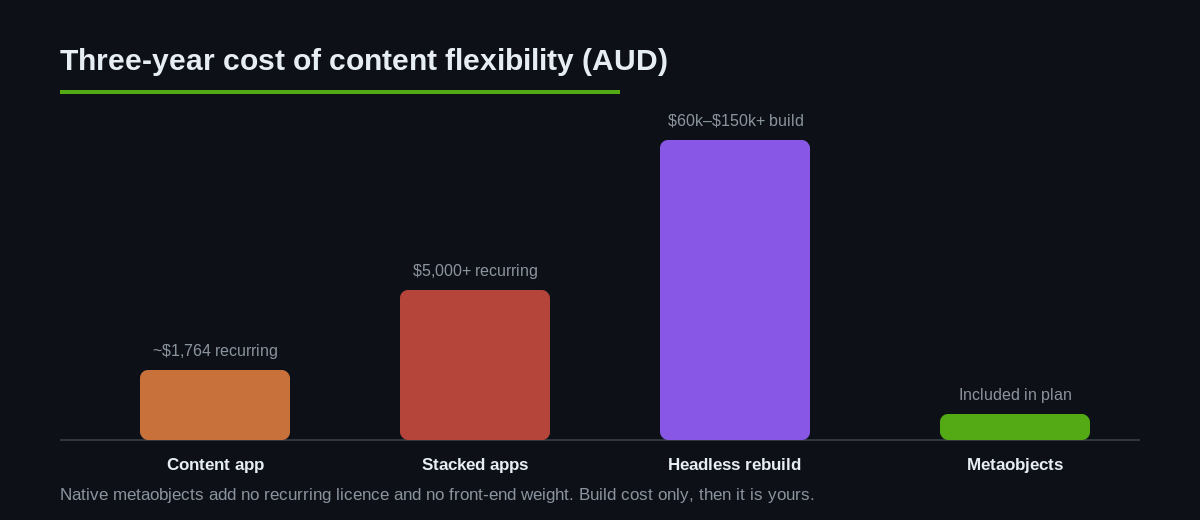
This is where the commercial case gets sharp. A content or metafield-management app typically costs somewhere between 20 and 100 Australian dollars a month, every month, and adds its own scripts to your storefront. Over three years a single 49 dollar per month app is roughly 1,764 dollars AUD, and most stores stack several. A headless rebuild is another order of magnitude entirely, often 60,000 to 150,000 dollars AUD in build cost plus ongoing hosting and a permanent developer dependency for content that a merchant used to edit themselves.
Metaobjects are included in your Shopify plan. There is a design and build cost to set the definitions and sections up properly, but no recurring licence and no added front-end weight. Because the content renders through native Liquid, it inherits Shopify’s caching and CDN rather than fighting them, which protects your Core Web Vitals. If you are weighing the bigger architectural question, our article on why we do not build headless Shopify stores lays out the full reasoning.
None of this means apps are wrong. There are jobs an app does best. But content modelling that lives in your theme, updates in one place and adds no runtime cost is a job metaobjects do better than almost anything you can install.
Speed, SEO and the traps to avoid
Metaobjects are powerful enough to create their own mess if you skip the governance. A few rules keep a build clean.
Name definitions and fields for humans, not for you on the day you built them. A field called fit_note is clear in a template a year later; a field called field_3 is a landmine. Decide your naming convention before you create the first definition, because renaming references after the fact is tedious.
Be deliberate about which metaobjects get their own web pages. Shopify can generate URLs for metaobject entries, which is excellent for content you want indexed, such as a stockist directory or a guide library. It is a liability for internal fragments like a reusable campaign block, which should never be a crawlable page. Set the online store visibility per definition on purpose.
On rendering cost, favour the metaobject and metaobject_list setting types over deeply nested metafield lookups where you can. They are cleaner to reason about and easier to cache. And keep image fields sized sensibly, because a metaobject that injects an unoptimised hero image will drag your Largest Contentful Paint down just as fast as any other oversized asset. The same discipline we apply to section rendering and theme blocks applies here.
One more habit saves pain later: build and test new definitions on a staging or development theme before they touch the live store. A metaobject wired into a live template with a missing field or the wrong type shows up as a broken block for every shopper at once. We stage the definition, populate a couple of real entries, confirm the section renders and stays within budget on mobile, and only then promote it. Treat content architecture with the same release discipline you would give any other theme change.
How we do it at Insiteful
When we take on a content-heavy Shopify build, metaobjects are part of the architecture conversation on day one, not a retrofit. Our process runs in a fixed order. We start by auditing the content that repeats across the store, because that repetition is the signal that a metaobject belongs there. We map each repeating content type to a definition, agree the field names and types with the client, and document them so the store is maintainable by their team, not just by us.
Then we build the sections in version-controlled theme code using the metaobject and metaobject_list setting types, wire the merchant-editable pieces through dynamic sources, and hand over a store where the marketing team can update a size guide or a stockist list without lodging a ticket. We test rendering against Core Web Vitals before launch so the new flexibility never costs speed. The result is a store that is genuinely easier to run twelve months after launch, which is the only measure of a build that matters. That is the same native-first standard we hold across every project, and it is why we do not reach for headless or an app when the platform already does the job.
The takeaway
Metaobjects have crossed the line from a developer curiosity into the default way to model structured content on Shopify. The Spring 2026 changes, global theme editor access, richer dynamic sources, higher limits and dedicated setting types, mean you can now give merchants real content flexibility without an app subscription and without the cost and fragility of going headless. Built with a little discipline around naming, page visibility and image weight, they make a store faster to run and cheaper to own. That is exactly the kind of native, durable architecture we build on.
Planning a content-heavy Shopify build?
We architect stores with metaobjects from day one, so your team edits content in one place and your storefront stays fast. See how we scope a build.