
There is a number almost nobody on an Australian ecommerce team has in front of them. Not conversion rate. Not average order value. Not even Largest Contentful Paint, which at least turns up in Search Console. The number is this: how long does it take to get from one page of your store to the next, and how many times does a buyer pay that cost in a single visit?
It matters more now than it did three years ago. The Australia Post eCommerce Report 2026 put national online spend at $82.6 billion for 2025, up 14 per cent year on year and now roughly a quarter of all retail. But the shape of that spending changed. The average online transaction has fallen to about $96 AUD, roughly ten dollars lower than it was in 2020, because shoppers are buying more often, in smaller baskets, across more brands. Smaller baskets bought more frequently means more sessions, and more sessions means more navigations. Every hop from a collection page to a product page to another product page is a moment where your store either feels immediate or feels like work.
The good news is that Shopify has been quietly fixing a large part of this for you since June 2025, and made it substantially better in May 2026. The less good news is that the platform default is deliberately conservative, it stops at your storefront boundary, and it knows nothing about how your particular catalogue is merchandised. That gap is where the build work lives, and it is the part we take on for clients.
What Shopify already does for you
Speculative loading is the browser fetching a page before the buyer asks for it. The idea is old. The native, standards-based way of doing it is not. The Speculation Rules API lets a site hand the browser a small JSON configuration describing which links to speculate on, which technique to use, and how aggressive to be. No custom JavaScript, no library, no route hijacking.
Shopify shipped a platform-wide configuration to all Liquid storefronts in late June 2025 after more than a year of experimentation. It is delivered as a Speculation-Rules response header on the main HTML document, pointing at an external JSON file of rules. That detail matters for anyone auditing a store: if you go looking for a speculation rules script tag in the theme and cannot find one, that is expected. The rules are not in your Liquid. They are in a header your theme never sees.
The initial configuration used prefetch with conservative eagerness across the safe storefront routes. Shopify measured it as an A/B test on real visitor traffic, restricted to same-site navigations in modern Chromium browsers, and reported an average improvement of 130ms on desktop and 180ms on mobile across all percentiles and across TTFB, First Contentful Paint and Largest Contentful Paint.
Two design decisions in that rollout are worth understanding before you change anything, because they explain most of the constraints you will hit later.
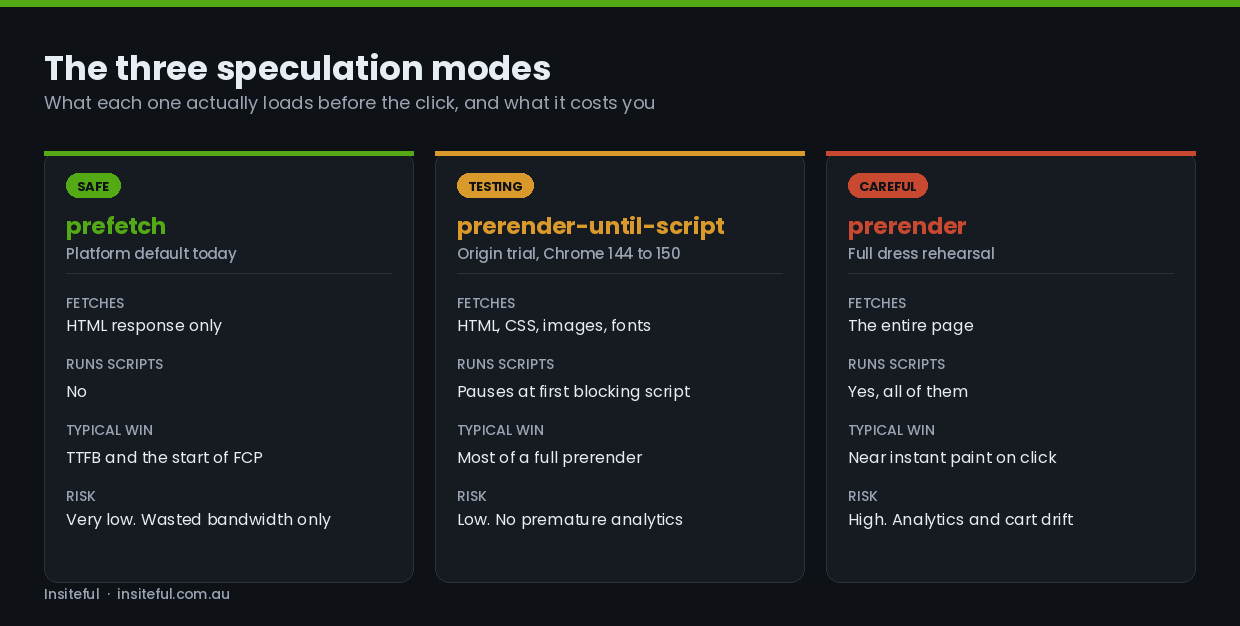
The first is the choice of prefetch over prerender. Prefetch retrieves the HTML response and holds it in a dedicated cache. Nothing executes. No scripts run, no pixels fire, no API calls go out. When the buyer clicks, the browser already has the document and skips straight to parsing. Prerender goes much further and effectively loads the page in a hidden tab, running every script on it. It is dramatically faster on click and dramatically more dangerous on a commerce site, for reasons we will get to.
The second is eagerness. Conservative eagerness triggers the fetch on pointerdown, the instant a mouse button goes down or a finger touches the screen, without waiting for the release that actually fires the navigation. That buys somewhere between 50 and 150 milliseconds depending on the input device. It is a small window, and it is why the original mobile numbers were better than desktop: tapping takes longer than clicking, so the browser had more time to work with.
What changed in May 2026
On 4 May 2026 Shopify switched the platform default from eagerness: conservative to eagerness: moderate on all Liquid storefronts. Moderate does not wait for a press. On desktop it triggers once the cursor has hovered a link for 200 milliseconds. On mobile, where hover does not exist, Chromium moved to a viewport-based heuristic in January 2026: a link becomes a candidate once it has been sitting in view near the buyer’s last interaction long enough to look like a plausible destination.
The desktop result is the one to pay attention to. Measured against the same-site conservative baseline, the median gain was 285ms on TTFB, 224ms on FCP and 228ms on LCP. Median TTFB for a speculated navigation is now close to zero, meaning the HTML response frequently lands before the buyer has committed to the click at all. For roughly one in ten speculated navigations, TTFB is exactly zero, because the response is already sitting in cache when the navigation fires.
Mobile gains were smaller and consistent rather than spectacular: 25ms TTFB, 20ms FCP, 24ms LCP, with no regression at any percentile. The viewport heuristic is currently cautious by design, because being aggressive with a mobile buyer’s data allowance is a real cost, not a theoretical one. Chrome is still tuning it, so this number should improve over time without anyone touching a theme.
There is a bill attached. At the same volume of real page views, moderate eagerness triggers close to four times as many speculated requests as conservative on desktop, while mobile volume barely moves. For Shopify that worked out to roughly a 14 per cent increase in total HTML requests from supported browsers. That is a platform absorbing the cost on your behalf. When you write your own rules on top, you are the one absorbing it, and the ratio on your store depends on your device mix and how much of your traffic is same-site browsing rather than single-page landings from paid social.
Where the default stops
The platform configuration is good. It is also, necessarily, generic. On a real client build we consistently find four gaps.
It is Chromium only, for now. Firefox support is still in development. Safari had prefetch support in Technology Preview, then disabled it over a race condition bug, which has since been fixed by Shopify’s own Yoav Weiss in WebKit and is expected to land in a Beta. Until that ships, a meaningful slice of Australian mobile traffic gets none of this. That has direct consequences for how you should think about perceived speed on iOS, and we cover it further down.
It stops at prefetch. Prefetch only caches the initial HTML response. Every stylesheet, script, font and image on the destination page still has to be fetched after the click. On a well-built theme that is fine. On a store carrying eleven apps that each inject a render-blocking script, the HTML arriving in zero milliseconds does not save you, because the paint is gated on everything that comes after. Speculation rules are a multiplier on an already-healthy page, not a substitute for one. If your server response times and image pipeline are not in order, this work is premature.
It does not know your merchandising. The platform rules operate on route patterns. They cannot know that on your store, 60 per cent of buyers who land on a collection page go to one of the first four products, or that your bestseller carousel on the homepage is responsible for a third of all first hops. That knowledge lives in your analytics, and it is the basis for a small, high-precision list rule that speculates a handful of known destinations eagerly rather than speculating everything moderately.
It does not cover what your theme does with JavaScript. Quick-add drawers, AJAX filtering, predictive search overlays and infinite-scroll collections all move buyers around without a document navigation. Speculation rules do nothing for those paths. Recognising which of your key journeys are real navigations and which are JavaScript state changes is the first diagnostic step, and it often reverses which optimisation is actually worth doing.
The four eagerness settings, decoded for storefronts
Every practical decision here comes down to picking a trigger point on a timeline. Trigger too early and you fetch pages nobody visits. Trigger too late and the response arrives after the buyer already sees a blank screen.
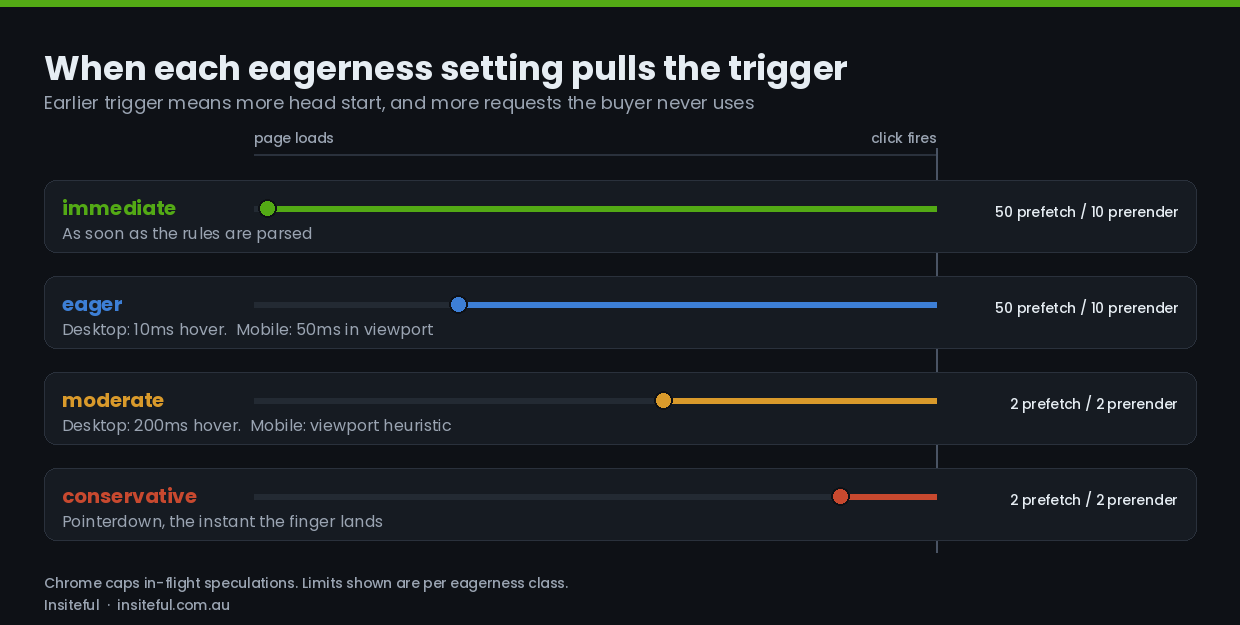
Immediate speculates as soon as the browser parses the rules. It is the default for list rules, where you have named specific URLs and are telling the browser you are confident. Wrong on a broad document rule, correct on a two-item list.
Eager triggers after 10ms of hover on desktop, and from January 2026 fires roughly 50ms after a link enters the viewport on mobile. This is the aggressive end of anything you would apply to a pattern.
Moderate is 200ms of hover on desktop and the viewport heuristic on mobile. It is now Shopify’s platform default, and for most storefront patterns it is the right answer.
Conservative waits for pointerdown. It is the safety setting, and the correct choice for anything you are not fully confident about.
Chrome enforces concurrency limits per eagerness class, and this is the part that trips people up. Immediate and eager share a budget of 50 in-flight prefetches and 10 prerenders. Moderate and conservative share a budget of just two prefetches and two prerenders, on a least-recently-used basis. If you write a moderate document rule expecting the browser to hold ten collection pages ready, it will not. It will hold two, and evict as the cursor moves. Designing around that limit is why a small immediate list rule often outperforms a broad moderate one.
The rules we ship on top
Because the browser treats every speculation rules configuration separately, adding your own does not override or cancel Shopify’s. You keep the platform default and layer intent on top of it. That is the whole design of the work: do not fight the generic rules, add the precision the generic rules cannot have.
This is the shape of what goes into a client theme, simplified but structurally accurate. It lives in a snippet rendered in the head, and the list rule is populated from whatever the template actually knows.
<script type="speculationrules">
{
  "prefetch": [
    {
      "source": "document",
      "where": {
        "and": [
          { "href_matches": "/*" },
          { "not": { "href_matches": "/cart*" } },
          { "not": { "href_matches": "/checkout*" } },
          { "not": { "href_matches": "/account*" } },
          { "not": { "href_matches": "/discount/*" } },
          { "not": { "selector_matches": "[data-no-speculate]" } },
          { "not": { "selector_matches": "[rel~=nofollow]" } }
        ]
      },
      "eagerness": "moderate"
    },
    {
      "source": "list",
      "urls": [
        "/collections/best-sellers",
        "/collections/new-arrivals"
      ],
      "eagerness": "immediate"
    }
  ]
}
</script>
Three things are doing the work there. The document rule inherits moderate eagerness and carves out everything that mutates state. The selector_matches exclusions give the theme an escape hatch, so any link a developer marks with a data attribute is permanently opted out without touching the rules again. And the list rule speculates two known-hot destinations immediately, because on this store the analytics said those two collections absorb most of the first hop from the homepage.
On a store with a merchandising team, we make the list rule dynamic rather than hardcoded, driven by the template so a seasonal collection swap does not require a theme deploy. On a store without one, two hardcoded URLs reviewed quarterly is honestly enough, and much easier to reason about six months later.
The route safety map
The exclusions above are not arbitrary. Each one represents a specific way a speculated fetch can damage a real session.
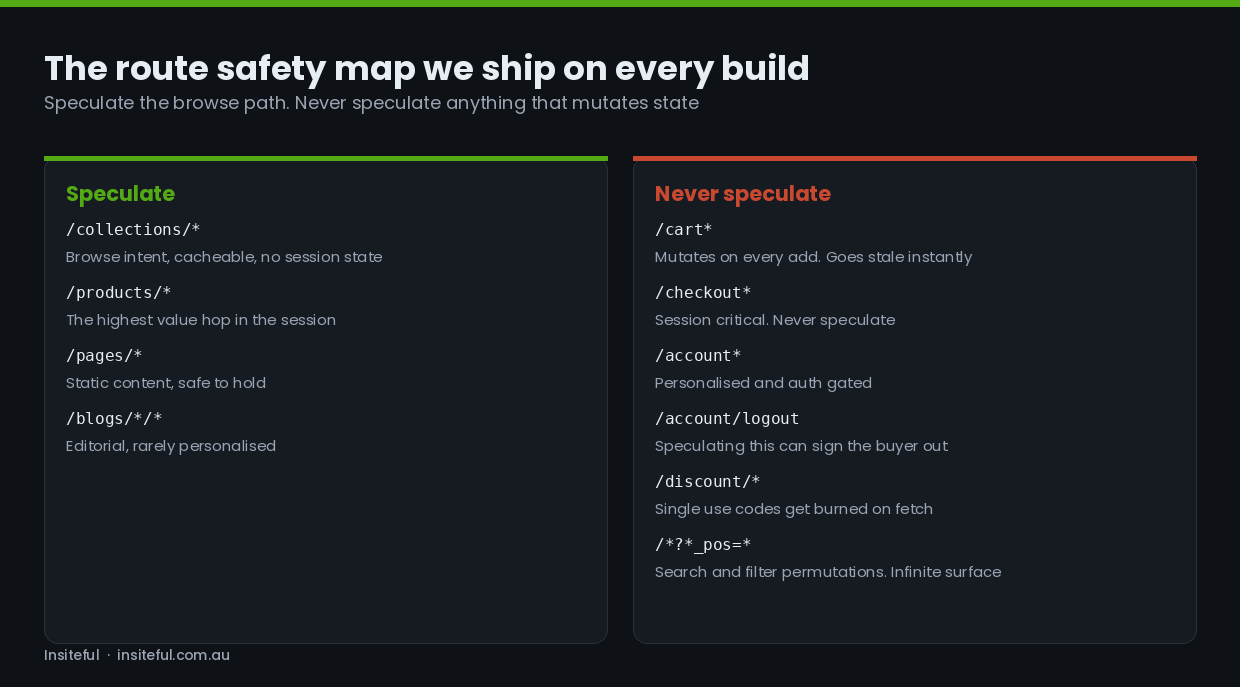
The logout route is the sharpest example. Speculating a link that ends a session can end the session. It is the canonical reason the Speculation Rules specification has exclusion syntax at all, and it is the first thing we check on any store with a custom account area.
Discount links are the second. A single-use discount URL that gets fetched speculatively can be consumed before the buyer ever arrives, which produces a support ticket that nobody traces back to a performance change three sprints earlier. Any route that performs an action as a side effect of a GET request is unsafe by definition, and most stores have at least one they have forgotten about.
Faceted search and filter permutations are the third, and this one is about volume rather than correctness. A collection page with six filter groups generates a combinatorial surface of URLs. Speculating them wastes bandwidth on the buyer’s connection and generates origin load for nothing. We exclude anything carrying filter or sort parameters and rely on the underlying page being fast instead, which is a different piece of work covered in our notes on faceted search architecture.
The stale content problem
Speculative loading creates a gap between when a page is fetched and when it is seen. Anything that can change inside that gap is a correctness risk, and on a storefront the list is short but expensive: cart contents, inventory state, and price.
Shopify handles the cart case at the platform level. All cart-mutating endpoints now return a Clear-Site-Data response header with the prefetchCache and prerenderCache directives, which tells the browser to purge those caches when the cart changes. Chrome added support for those two directives in version 138. Practically, that means a buyer who adds an item and then navigates to a previously speculated page will not see a header cart count from before the add.
What the platform cannot cover is anything you have built yourself. If your theme renders live inventory counts, a countdown timer, a customer-specific price from a B2B catalogue, or a market-specific currency block, all of those can be captured in a speculated response and shown later. On B2B builds this is the issue we watch hardest, because catalogue pricing is customer-specific by design and a stale price is a commercial problem, not a cosmetic one.
The pattern we use is to move genuinely volatile fragments out of the cached document and hydrate them on activation. For a page that has been prerendered, the browser exposes an event you can hang that work off.
if (document.prerendering) {
  document.addEventListener('prerenderingchange', hydrateVolatile, { once: true });
} else {
  hydrateVolatile();
}

function hydrateVolatile() {
  document.querySelectorAll('[data-volatile]').forEach(function (el) {
    fetch(el.dataset.endpoint, { headers: { 'Accept': 'text/html' } })
      .then(function (r) { return r.text(); })
      .then(function (html) { el.innerHTML = html; });
  });
}
With prefetch alone this is less urgent, because nothing executes until activation anyway and the document is only as old as the fetch. It becomes essential the moment anyone reaches for prerender.
Keeping analytics honest
This is where teams get hurt, and it is worth being blunt about it. A full prerender runs every script on the destination page, including your analytics and your marketing pixels. If ten pages get prerendered and one gets visited, a naive setup reports ten pageviews. Your session counts inflate, your pages-per-session inflates, your bounce rate collapses for the wrong reason, and your conversion rate appears to fall off a cliff because the denominator grew.
The defence has two layers. The first is that most mature analytics libraries are prerender-aware and use the document.prerendering property to defer until activation. Google Analytics and New Relic both do this. The second is that anything custom, including any tag you have hand-rolled in a theme or wired through a tag manager, needs the same guard applied explicitly. On Shopify specifically, marketing events belong in the Web Pixels sandbox rather than in the theme, which sidesteps a good deal of this by construction.
This risk is the single strongest argument for staying on prefetch as your default. It is also the reason we do not enable prerender on client stores as a matter of course. The measured upside is real, but it is not worth handing a client a quarter of unusable analytics to get it.
Prerender-until-script, the middle ground worth watching
The obvious question is whether there is something between a safe prefetch and a risky prerender. There now is. Chrome opened an origin trial from version 144 in January 2026, running through roughly version 150 in mid-2026, for a speculation action called prerender_until_script.
It fetches the HTML, begins rendering, and loads subresources including CSS, images and fonts, then pauses at the first blocking script tag. You get most of the paint preparation of a full prerender without any script side effects, which means no premature analytics and no premature API calls. Shopify advocated for this design in discussions with the Chrome team and has said publicly it is evaluating the trial, specifically to make use of the near-zero TTFB tail without the reporting problems that full prerender would create.
Our position for clients right now is to watch it rather than adopt it. Origin trials expire, the syntax can change before it stabilises, and committing production theme code to a feature with a scheduled end date is how you end up with a mysterious regression in six months. What we do instead is design the rules file so that swapping the action is a one-line change when the feature ships broadly. That is a cheap piece of forethought that costs nothing today.
Safari, Firefox, and what to do about perceived speed
Everything above applies to Chromium. On a typical Australian DTC store, a sizeable share of mobile sessions arrive in Safari on iOS, and those buyers currently get none of it. Firefox is a smaller number but the same story.
Rather than treat that as a dead end, we pair speculation rules with cross-document view transitions, which have very different browser support. The @view-transition at-rule runs in Chrome and Edge from version 126, and in Safari from 18.2, with Firefox in progress. It does not make navigation faster. It makes it feel continuous, by animating between the outgoing and incoming pages instead of flashing white.
@view-transition {
  navigation: auto;
}

@media (prefers-reduced-motion: reduce) {
  @view-transition { navigation: none; }
}

.product-media {
  view-transition-name: product-hero;
}
Two rules and a name on the product image gives you a collection-to-product transition where the thumbnail grows into the hero image. It is a progressive enhancement in the truest sense: browsers that do not support it navigate normally and nobody notices. The reduced-motion guard is not optional, and it is the same accessibility discipline we apply to every animation decision in a build.
Worth knowing before you promise a client a specific effect: image morphs are noticeably smoother in Chrome than in Safari, because Safari does more of the transition work on the main thread. Test the actual transition on an actual iPhone before it ships, not in a desktop simulator.
How we measure the gain
A change you cannot measure is a change you cannot defend at the next review, so the measurement layer goes in before the rules do.
Chrome DevTools has a dedicated Speculative loads panel under Application, which lists every rule set on the page, every speculation attempted, and critically the reason any speculation failed. Most of the debugging time on this work is spent there, and the failure reasons are specific enough to be genuinely useful.
For field data, the signal is whether a navigation was activated from a speculated state. The Navigation Timing entry exposes an activation start value that tells you exactly that, and it is worth pushing into your analytics as a dimension so you can compare metrics between speculated and normal navigations rather than looking at a single blended average.
const nav = performance.getEntriesByType('navigation')[0];
const wasSpeculated = nav && nav.activationStart > 0;

if (window.__analytics) {
  window.__analytics.setDimension('nav_type', wasSpeculated ? 'speculated' : 'standard');
}
Once that dimension exists, the conversation with a client changes. You stop arguing about whether a technique is worth it in general and start looking at what proportion of their sessions actually benefit, which on a store with heavy paid social traffic and few same-site hops can be genuinely low. We have talked a client out of this work on exactly that evidence.
What it costs, and when we dial it back
Speculation is a trade of bandwidth and origin load for latency. Shopify’s own figure of roughly four times the speculated requests on desktop for the move from conservative to moderate is the right order of magnitude to plan against, and their 14 per cent increase in total HTML requests is a reasonable ceiling for a broadly similar traffic profile.
Three situations make us dial it back. First, a store where most traffic lands on one page from paid ads and leaves, because there is no second navigation to speed up. Second, a store with heavy personalisation in the document, where the correctness risk outweighs a couple of hundred milliseconds. Third, a store whose origin is already under pressure at peak, where adding speculative HTML requests during a BFCM drop is a decision to make deliberately rather than by accident. In that last case we usually ship the rules with an on and off switch in the theme settings so the merchant can turn speculation down during a sale event without a deploy.
How We Do It at Insiteful
Speculation rules land in our performance workstream, not as a standalone job. On a build in the $8,500 to $25,000 AUD range this is a small line item measured in hours, and we sequence it deliberately so the client is not paying for a multiplier applied to a slow page.
The sequence is always the same. We start with a navigation audit: what proportion of sessions involve more than one document navigation, which hops are most common, and which apparent navigations are actually JavaScript state changes that speculation cannot touch. If fewer than about a third of sessions include a real second navigation, we say so and spend the budget elsewhere.
Then we fix the destination pages. Server response time, render-blocking resources, the image pipeline and layout stability all come first, because prefetching a slow page produces a slow page that arrives sooner. Our work on layout stability and interaction responsiveness is usually done before anyone writes a rules file.
Only then do the rules go in, as a versioned snippet in the theme rather than a paste into theme.liquid, reviewed through the same pull request process as every other change we ship. That workflow is described in our notes on version-controlled theme development, and it matters here because a speculation rules mistake is the kind of thing you want to be able to revert in one click.
We ship it with the exclusion list, the volatile-fragment hydration pattern, the analytics guard, the measurement dimension and a documented off switch. Then we come back after four weeks with field data comparing speculated and standard navigations, and we either widen the rules, narrow them, or leave them exactly as they are. On several client stores the honest answer at that review has been to leave them alone, and that is a perfectly good outcome.
The reason we treat it this way is the same reason we build on native Shopify rather than reaching for a headless rewrite. A 285 millisecond median improvement, delivered by the platform and sharpened by a snippet, is the kind of gain that a re-architecture is usually sold on. You can have it this sprint, for a fraction of the money, on the stack you already run.
Where to start
If you want a straight answer on whether this is worth doing on your store, the first thing to look at is your own navigation data. Pull the proportion of sessions with more than one page view, and the three most common page-to-page hops. If those numbers are healthy, the work pays for itself quickly. If they are not, you have a more valuable problem to solve first, and we would rather tell you that.
We run this as part of every performance engagement and every new build. If you want us to look at your store, start with our build assessment and we will tell you where the time is actually going.