
Shopify ends support for POS Go in September 2026. Sales of the device stopped in September 2024, and the recommended replacement is a Tap and Chip Reader paired with a phone, or a POS Terminal at the counter. For a lot of Australian retailers that means a hardware refresh is already scheduled for this financial year, and a hardware refresh is the moment every unresolved counter workflow surfaces at once.
The hardware is the easy part. What breaks is everything the staff had learned to work around: the trade customer whose pricing lives in a spreadsheet behind the register, the stock check that means walking to the back room and phoning the other store, the deposit taken on a special order that gets written on a docket book because nobody built it into the till. Those workarounds are invisible on a P&L and expensive in practice.
Shopify’s answer is POS UI extensions, and most Australian merchants have never been shown what they actually do. This article covers the build properly: the target model, the 2026 package rewrite that breaks older extensions, the 64 KB ceiling that dictates architecture, how extensions reach your data, and the four extensions we end up building most often for retailers here. There is code, there is a target matrix, and there is arithmetic in Australian dollars for what a counter workflow is worth.
Why the counter still carries the business
Online is 12.7 per cent of Australian retail turnover as at the June 2025 ABS release, up from 11.6 per cent a year earlier and 6.3 per cent in 2019. Online retail turnover was roughly $4.70 billion AUD in June 2025 alone, growing 13.0 per cent year on year. That growth story gets all the attention, and it hides the more useful number sitting next to it: something close to 87 per cent of Australian retail still happens with a person standing in a physical location.
Worth noting for anyone tracking this internally, the ABS announced in April 2025 that the monthly retail trade series would be discontinued after the June 2025 print. If your board pack pulls that series, it stopped updating. Quarterly Retail Trade and the Monthly Household Spending Indicator are the replacements.
The channel split matters commercially, not just as trivia. Businesses running strong omnichannel engagement retain an average of 89 per cent of their customers, against roughly 33 per cent for those with weak omnichannel execution. Omnichannel shoppers carry about 30 per cent higher lifetime value than single-channel shoppers. The counter is not a cost centre attached to the website. It is where the highest value customer relationships are either formed or lost, at a rate of about ninety seconds per transaction.
Which is why the software running on that counter deserves the same build attention as a product page. Most of the time it gets none.
What a POS UI extension actually is
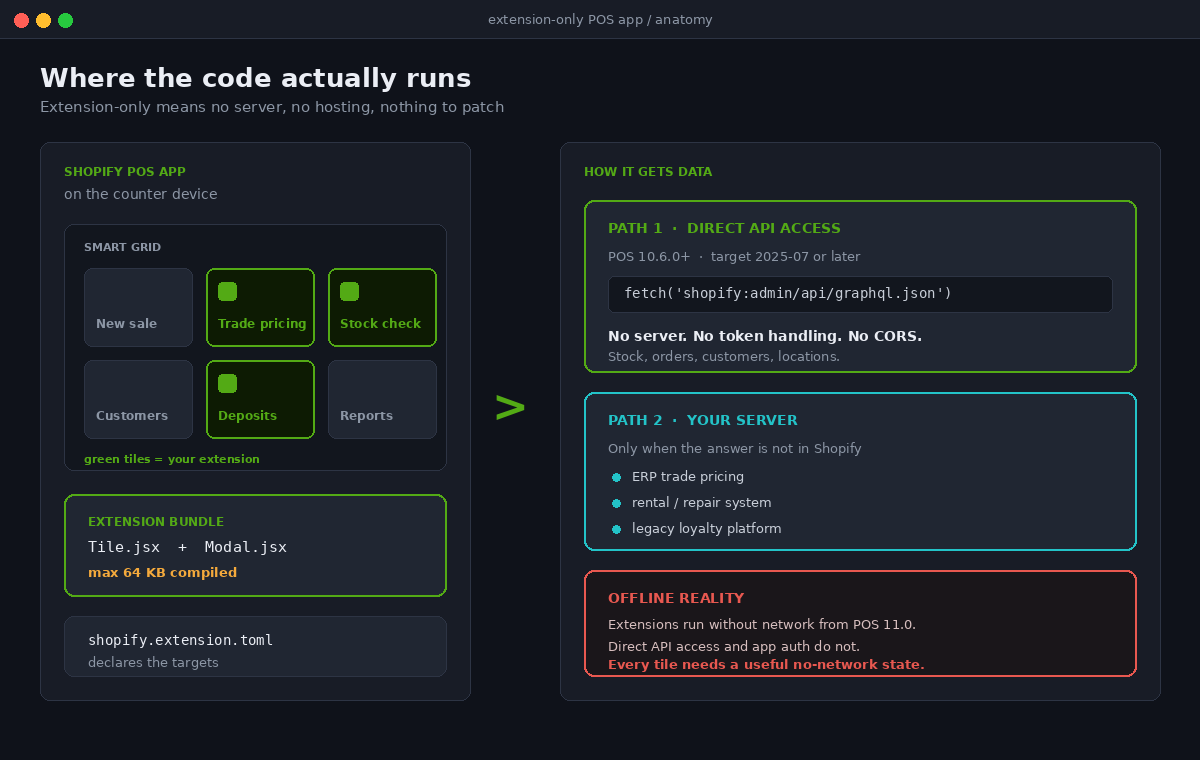
A POS UI extension is a small app that renders inside the Shopify POS mobile app. When all of the logic fits on the device you can build it as an extension-only app, which means there is no server to host, no infrastructure to run and nothing to keep patched. All of the code runs in the extension on the merchant’s device.
You scaffold one with the Shopify CLI. shopify app init with the extension-only option, then shopify app generate extension and pick POS smart grid. That produces three files that matter: a shopify.extension.toml configuration file declaring the extension’s targets, a tile module, and a modal module.
The smart grid is the POS home screen. It is the grid of tiles staff tap all day, and it is dynamic rather than static, so a tile can change its own state in response to what is in the cart or what the device knows. A tile that reads “Trade pricing” and greys itself out until a trade customer is attached to the cart is doing exactly what the surface was designed for.
Here is the minimum viable tile. This is the current shape of it, and it is worth reading closely because it does not look like the React code most Shopify developers were writing two years ago.
import {render} from 'preact';

export default async () => {
  render(<Extension />, document.body);
};

function Extension() {
  return (
    <s-tile
      heading="Trade pricing"
      subheading="Apply account rates to this cart"
      onClick={() => shopify.action.presentModal()}
    />
  );
}
Three things in that snippet signal where the platform has moved. The renderer is Preact, not React. The UI is web components, s-tile rather than an imported Tile. And the platform APIs hang off a global shopify object instead of arriving through a hook. If you have an extension in production written against the old pattern, it is now on borrowed time.
The targets decide what you can build
A target is the specific place in POS where your code renders, and it also determines which APIs your code is handed. Choosing the target is the actual design decision. Everything downstream follows from it.
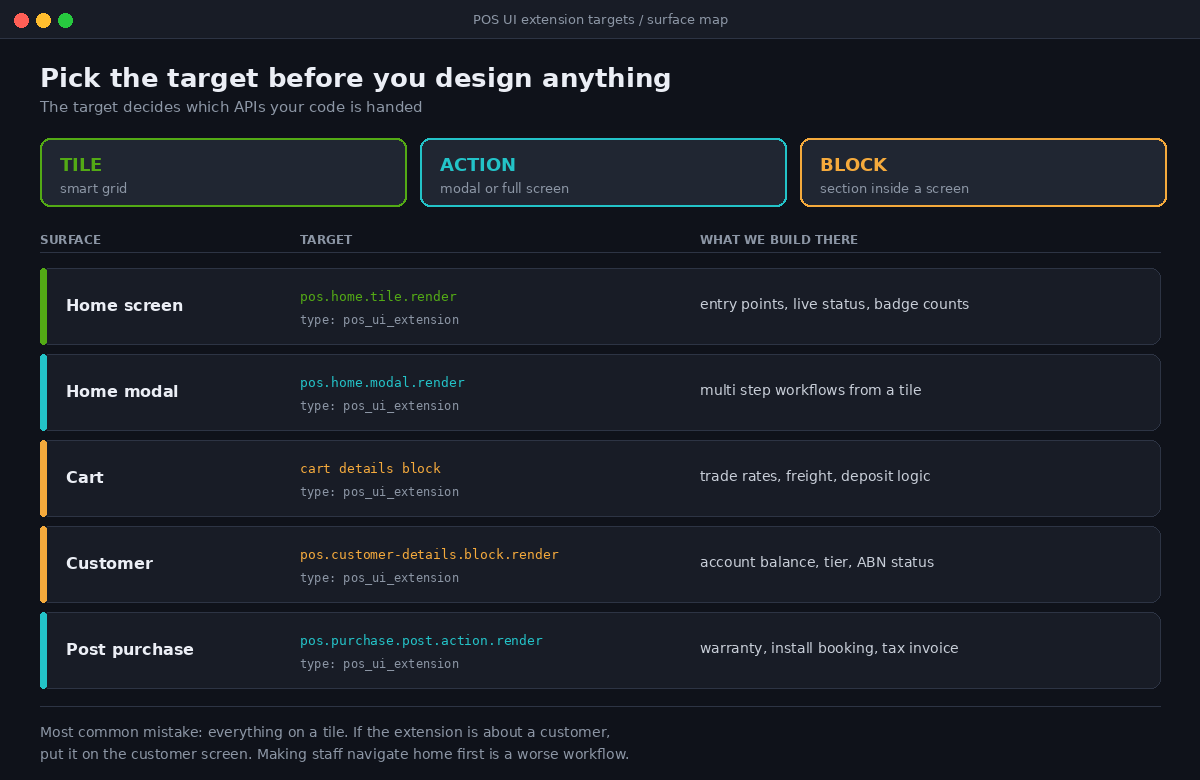
There are three shapes. Tiles render on the smart grid. Actions render a modal or full-screen view launched from a menu button. Blocks render a custom section embedded inside an existing POS screen. The extension type in your TOML is pos_ui_extension and each target maps to a module.
| Surface | Target | Shape | What we build there |
|---|---|---|---|
| Home screen | pos.home.tile.render | Tile | High frequency entry points, live status, badge counts |
| Home screen modal | pos.home.modal.render | Action | Multi step workflows launched from a tile |
| Cart | Cart details block | Block | Trade rates, freight quotes, order notes, deposit logic |
| Customer | pos.customer-details.block.render | Block | Account balance, loyalty tier, ABN and trade status |
| Post purchase | pos.purchase.post.action.render | Action | Warranty registration, install booking, tax invoice email |
The mistake we see most often is teams putting everything on a smart grid tile because it is the target the tutorial uses. A tile is for something staff need daily and can reach in one tap. A block belongs on the screen where the relevant data already is. If your extension is about a customer, it goes on the customer screen. Making staff navigate home, tap a tile, then search for the customer they already had open is a workflow you have made worse.
The 2026 rewrite that breaks older extensions
If you inherited a POS extension built in 2023 or 2024, budget for a rewrite rather than a patch. Several changes landed in sequence and they compound.
The @shopify/retail-ui-extensions and @shopify/retail-ui-extensions-react packages are deprecated. They are now maintained inside @shopify/ui-extensions and @shopify/ui-extensions-react. If you are staying on the React path, @shopify/ui-extensions-react does not support any version of React earlier than 18, so react and @types/react both have to move to 18 or later.
The useApi() hook is no longer required as of version 2025-10. The complete API object is available on the global shopify object. That is a small change to type but a large change to structure, because most existing extensions thread the API object down through props from a top level hook call. Removing the hook usually means flattening a component tree that only existed to carry it.
API version 2026-04 is the current supported version. Anything still targeting an earlier version needs a migration window booked. The upside in 2026-04 is @shopify/ui-extensions-tester, an official testing library that lets you write unit tests for extensions on any surface, POS included, without a running Shopify host. Until that shipped, testing a POS extension meant a phone, a QR code and a person tapping things. We now write the cart logic as pure functions with unit tests around them and keep the extension modules thin, which is the first architectural rule we apply to any POS build.
The 64 KB ceiling is an architecture constraint
A compiled UI extension bundle cannot exceed 64 KB. Shopify enforces it at deployment, so this is not a guideline you discover in a performance review. It is a hard failure at the point of shipping.
Sixty four kilobytes is generous for a well built extension and completely inadequate for a careless one. One date library, one charting package or one component kit imported wholesale will consume the budget on its own. The constraint pushes every serious POS build towards the same shape:
- Native date handling rather than a date library.
Intl.DateTimeFormatwith theen-AUlocale covers essentially everything a retail floor needs. - No charting inside the extension. If the counter genuinely needs a visual, render it server side as an image or move the reporting to Shopify admin where it belongs.
- Business logic on the server or in the Admin API, not bundled. The extension should orchestrate and display, not calculate.
- Named imports only, with tree shaking verified against the built artefact rather than assumed.
We add a bundle size assertion to CI on every POS project. It fails the build at 56 KB, which leaves a working margin before Shopify’s own limit rejects a deploy on a Friday afternoon.
#!/usr/bin/env bash
set -euo pipefail
LIMIT=57344
for f in extensions/*/dist/*.js; do
  SIZE=$(wc -c < "$f")
  echo "$f: $SIZE bytes"
  if [ "$SIZE" -gt "$LIMIT" ]; then
    echo "FAIL: over 56 KB working limit"
    exit 1
  fi
done
How an extension reaches your data
There are two ways for a POS extension to get information it does not already hold, and picking the wrong one is the most common cause of a POS project needing infrastructure it did not budget for.
Direct API access is available from POS version 10.6.0 for extensions targeting 2025-07 or later. The extension queries the GraphQL Admin API with a standard fetch() call against a special shopify:admin URL. No server, no token handling, no CORS. This is what makes true extension-only apps viable for real retail work, because looking up a customer’s order history or checking stock at another location no longer requires anything you have to host.
const response = await fetch('shopify:admin/api/graphql.json', {
  method: 'POST',
  headers: {'Content-Type': 'application/json'},
  body: JSON.stringify({
    query: `query StockByLocation($id: ID!) {
      productVariant(id: $id) {
        sku
        inventoryItem {
          inventoryLevels(first: 10) {
            nodes {
              location { name }
              quantities(names: ["available"]) { quantity }
            }
          }
        }
      }
    }`,
    variables: {id: variantId},
  }),
});
const {data} = await response.json();
The second path is a server. You need one when the answer lives in a system Shopify does not own, which in Australian retail is usually an ERP holding trade pricing, or a rental and repair system, or a loyalty platform that predates the Shopify build. For that path the Session API gives you the current POS session details and a session token you pass to your backend for authentication. Shop, staff user and location all come through the same API, which matters because location is what most multi-store logic pivots on.
One practical note that governs both. Using fetch() requires the network_access capability in your extension configuration, and while extensions themselves can run without network access from POS version 11.0 onwards, anything depending on Direct API access or app authentication will not function offline. On an Australian retail floor that is not a hypothetical. Regional stores, market stalls, pop-ups in a shopping centre with poor mobile reception and any store running an in-store event will all lose connectivity at some point.
So the design rule is simple and we apply it without exception. Every POS extension must render a useful state with no network. A tile that shows a spinner forever when the connection drops is worse than no tile, because staff will tap it, wait, and then serve the customer badly while looking at a phone.
The Cart API is where the commercial logic lives
The Cart API is the reason POS extensions are worth building rather than merely interesting. It lets an extension read the cart state, add and modify line items, apply discounts, attach or change the customer, and set cart level properties. It supports bulk operations as well as individual ones, which matters when you are applying a trade rate across a twenty line order.
One constraint to design around: cart line item data is read only through the Cart Line Item API. You cannot mutate a line in place. To change something you remove and re-add, which means any workflow touching multiple lines needs to be idempotent and needs to handle the intermediate state where the cart is briefly wrong. Write it as a single batched operation, not a loop with an await inside it.
Here is the shape of the trade pricing extension we build most often, reduced to its core. A trade customer is attached to the cart, their account tier comes back from the ERP, and a cart level discount is applied along with a property recording why, so the accounts team can reconcile it later.
const cart = shopify.cart;

async function applyTradeRate(customerId) {
  const tier = await lookupTier(customerId);
  if (!tier) return;

  await cart.applyCartDiscount(
    'Percentage',
    `Trade ${tier.code}`,
    String(tier.percentage)
  );

  await cart.addCartProperties({
    trade_account: tier.accountNumber,
    trade_tier: tier.code,
    applied_by: shopify.session.currentSession.staffMemberId,
  });
}
That cart property is the part that gets skipped and the part that pays for itself. Without it you have a discounted order and no record of the authority for the discount. With it, every trade sale carries the account number and the staff member who applied it, and that flows into the order, into your accounting export, and into any dispute six months later.
Four extensions Australian retailers actually need
Across the POS work we have scoped, the same four requirements come up regardless of vertical.
Stock across locations. A tile that takes a scanned barcode or a search and returns availability at every location, with the option to start a transfer or a ship from store order on the spot. Direct API access makes this an extension-only build. It is the single highest value extension for any retailer with more than one location, and it removes the phone call to the other store that currently costs two to four minutes and frequently ends in a lost sale.
Trade and wholesale pricing at the counter. Australian trade retail, and that covers building supplies, automotive, hospitality supply and workwear, runs on account customers with negotiated rates. Those rates almost never live in Shopify. A cart block that reads the account, pulls the rate and applies it with an audit property replaces the laminated price sheet behind the register.
Deposits and special orders. Layby is still normal here, as are deposits on made to order and special order goods. A modal that takes a deposit, records the balance, sets a fulfilment expectation and emails the customer a schedule stops that entire category of sale living in a docket book.
Compliant tax invoices. Business customers need a tax invoice with an ABN and the GST clearly shown. A post purchase action that captures the ABN, validates the format and emails a compliant invoice takes about a day to build and eliminates a recurring administrative task that currently lands on somebody’s inbox every week.
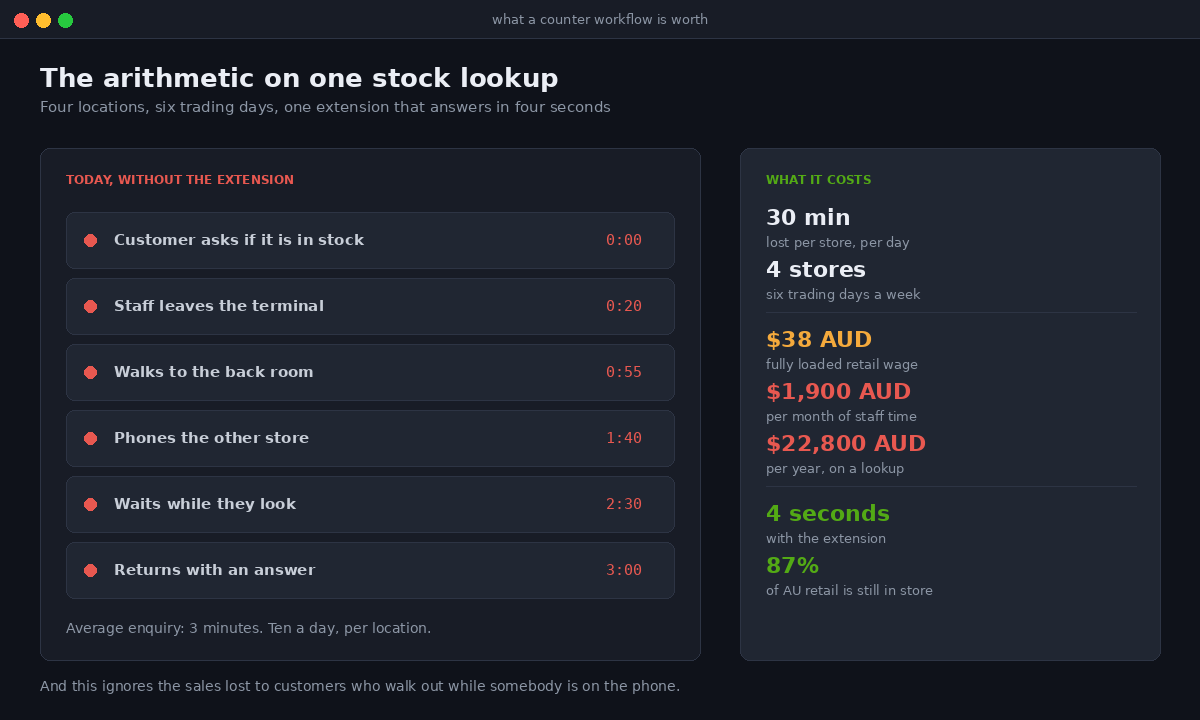
Put a number on the first one, because it is the easiest to defend. A store running 120 transactions a day where staff make ten stock enquiries daily at an average of three minutes each is spending thirty minutes a day on a lookup. Over a six day trading week across four locations, at a fully loaded retail wage of around $38 AUD an hour, that is roughly $1,900 AUD a month of staff time on a task an extension answers in four seconds. The extension pays for itself inside a quarter, and that ignores the sales recovered from customers who would otherwise have walked out while somebody was on the phone.
What we get wrong, and what we now check first
Two failures are worth naming because we caused both of them before we changed our process.
The first was building a beautiful modal workflow that assumed a stable connection. It demoed perfectly in the client’s flagship store on shop wifi and fell apart in their regional store on a congested mobile connection. Staff there stopped using it within a fortnight and nobody told us for two months. Every POS extension we build now gets tested with the device deliberately offline before it goes anywhere near a store.
The second was a bundle that passed locally and failed at deploy because a dependency pulled in a polyfill nobody had accounted for. We were 3 KB over. That is now a CI gate rather than a discovery.
The dev loop itself is also worth setting expectations on. Previewing an extension on a physical device runs through a Cloudflare tunnel, and network switches between wifi and mobile, tunnel timeouts, locking the phone or closing the POS app will all drop the extension off the home screen. It is not broken code. It is the preview mechanism. Set the device to never auto lock, keep POS in the foreground, and expect to restart the dev server more often than you would for a theme build.
How We Do It at Insiteful
We treat a POS extension project as an operations engagement that happens to produce software, not as a development ticket. The sequence is consistent.
We start behind the counter. Someone from our team stands in the store through a trading peak and counts. Not interviews, counts. How many times staff leave the terminal, how many times they open a second device, how many times they consult something that is not Shopify. That half day produces the requirements list, and it routinely contradicts the one the client sent us.
Then we decide the target before we design anything, because the target determines the available APIs and therefore what is buildable. Tile, action or block, decided against the actual workflow rather than against what is easiest to demo.
Then we establish whether it can be extension-only. If Direct API access covers the data, the client gets a build with no server, no hosting cost and no ongoing infrastructure. We push hard for this outcome because it is the difference between a one off build cost and a permanent line item. When an ERP or a legacy system is in the mix we scope the backend honestly rather than pretending the extension can do it alone.
Then we write the business logic as tested pure functions outside the extension modules, keep the modules thin, gate the bundle size in CI at 56 KB, and design the offline state as a first class screen rather than an error case.
Then we test on the actual hardware the store uses, on the actual network, standing in the actual store. A POS extension approved on a laptop is not approved.
POS extension work sits inside our standard build range of $8,500 to $25,000 AUD depending on scope, and a single well defined extension is usually toward the lower end of that. Our build process runs six to eight weeks end to end. We build native Shopify only, which for POS is not a limitation but the entire point: everything above runs on Shopify’s own surfaces, with no separate application to maintain and no integration layer to break when Shopify ships a new version.
Where to start
If you are already replacing POS hardware this year because of the September 2026 POS Go deadline, that project is the right time to fix the counter workflow as well. The staff retraining is happening regardless. Adding a tile to the smart grid during a rollout costs almost nothing in change management, and adding one eight months later costs a great deal.
If you are not replacing hardware, start with the count. Stand at the counter for half a day and record every time a staff member has to leave Shopify POS to answer a question. That list, ranked by frequency, is your build backlog, and the top item on it is almost always worth more than the next feature on the website.
If you want us to run that count for you and come back with a scoped build, our build assessment is the place to start. We will tell you honestly whether an extension is warranted, or whether the problem is a process one that no amount of code will fix.
Related reading from our POS and omnichannel work: running Shopify POS across multiple locations, ship from store fulfilment, click and collect architecture, POS Pro against POS Lite, and handling online returns in store. On the app side, see how we approach custom Shopify apps in 2026 and theme app extensions.