
Every retail brand that comes to us for a Shopify POS build asks the same question within the first fifteen minutes: do we actually need POS Pro, or is the free Lite tier enough? It sounds like a simple pricing question. It is not. The answer depends on how many locations you run, how your staff handle returns, whether you fulfil online orders from the shop floor, and what your card volume looks like. Get it wrong in one direction and you are paying roughly $1,548 AUD a year per location for features nobody opens. Get it wrong in the other direction and your staff are processing exchanges as manual refund-and-rebuy workarounds that quietly corrupt your inventory counts.
We have configured Shopify POS for single-store brands, pop-up operations, and multi-location retailers across Australia, and over 25 years and 200-plus client projects we have developed a straightforward decision framework for exactly this call. This article walks through it: what Lite actually covers, what Pro genuinely adds, the real AUD costs including hardware and card rates, and the specific triggers that tell us a client has outgrown the free tier.
Where POS Lite Ends: What the Free Tier Actually Covers
POS Lite is included with every Shopify plan at no extra charge, and for a specific kind of retailer it is genuinely all you need. Lite gives you payment processing through the Shopify POS app on a phone or tablet, product and order sync with your online store, basic inventory tracking at a single location, customer profiles shared with your ecommerce database, and standard email or SMS receipts.
When we set up a Melbourne homewares client for their first market stall season, Lite was the correct call. The setup we deployed: the Shopify POS app on an iPhone using Tap to Pay, a WisePad 3 reader as backup for chip cards, and a dedicated “Market Stall” location in Shopify admin so stock movements at the stall never touched warehouse counts. Total hardware spend was about $49 AUD for the reader. No monthly POS fee. The entire configuration took under an hour, most of which was assigning inventory to the new location under Settings, then Locations in Shopify admin.
The boundaries of Lite show up fast once trade becomes permanent, though. Lite cannot process an exchange as an exchange. It cannot give a casual staff member a restricted login. It cannot show a customer’s online browsing context at the counter, hold a saved cart, or run buy online, pick up in store. Every one of those gaps has a workaround, and every workaround costs staff time and data accuracy. That trade-off is the entire Pro-versus-Lite decision in miniature.
What POS Pro Adds (And Which Features Actually Matter)
The Pro feature list is long, but in real stores only a handful of items drive the upgrade decision. Here is the honest breakdown from our builds, ranked by how often each feature ends up mattering to the client’s P&L.
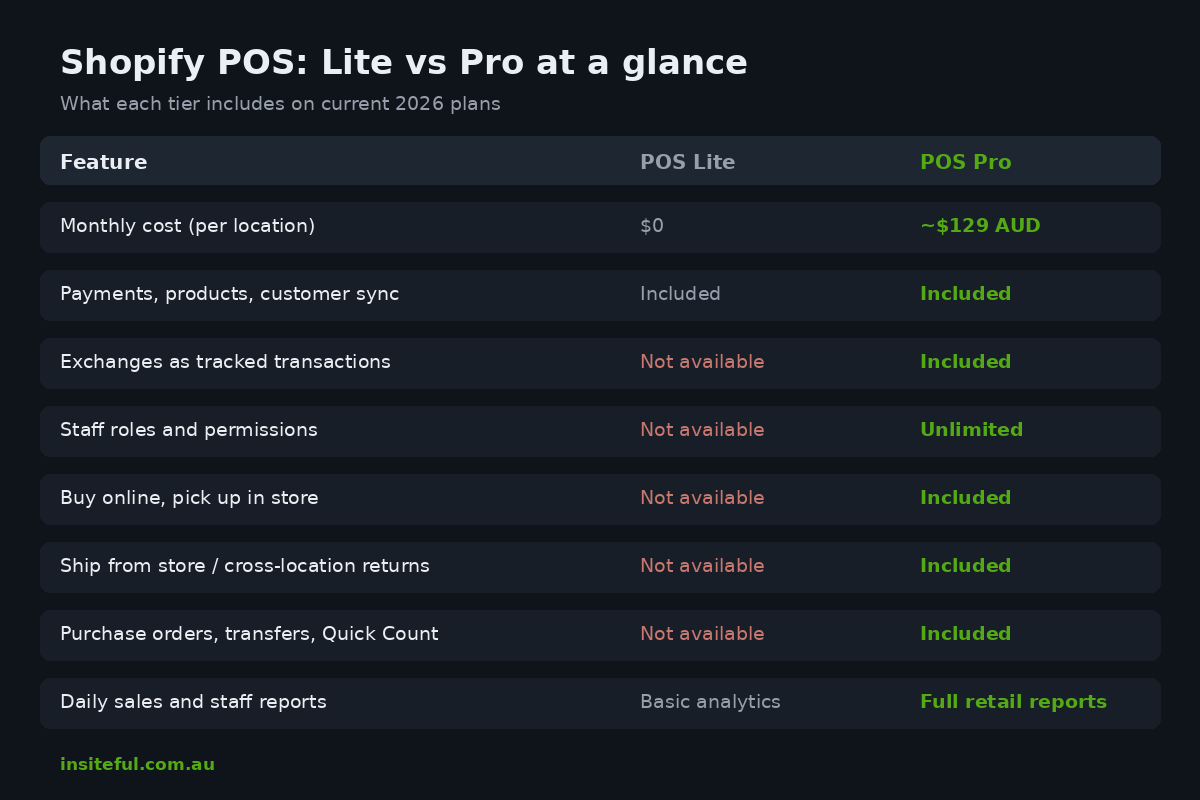
Exchanges and returns done properly. On Pro, a return or exchange is a first-class transaction: the original order is referenced, the refund is calculated against what was actually paid, exchanged stock re-enters inventory at the right location, and your reporting shows a return rather than a mystery refund. On Lite, staff refund the original order and ring up a new sale. Across a year of trading, that pattern makes your product-level return rate invisible, and return rate is one of the first numbers we ask for in any retail audit.
Staff roles and permissions. Pro supports unlimited POS staff with role-based permissions and per-staff sales attribution. You can stop a junior casual from applying arbitrary discounts or processing refunds above a threshold. For any store with more than two people behind the counter, this is a loss-prevention feature, not a convenience.
Omnichannel fulfilment. Buy online, pick up in store. Ship from store. Cross-location returns. These are the features that turn a shop into a fulfilment node, and they are all Pro-only. We cover the build side in detail in our click and collect implementation guide, but the short version is that none of it is available on Lite.
Inventory operations. Pro adds purchase orders, stock transfers, demand forecasting, and inventory counts inside the POS app itself. The Winter 2026 Shopify release added Quick Count, which lets floor staff scan-adjust inventory directly from the POS without a stocktake app. On Lite, inventory adjustments happen back in Shopify admin, which in practice means they happen at the end of the day, or not at all.
Store-level reporting. Pro produces daily sales summaries, cash tracking sessions, and per-staff performance reports scoped to the retail location. Lite reports in-person sales inside your general Shopify analytics, where they blend into online revenue unless you filter deliberately.
Features we find are overweighted in most comparison articles: saved carts (useful in furniture and jewellery, rarely used in fashion or food), custom printed receipts (nice branding, zero revenue impact), and demand forecasting (only as good as the sales history feeding it, so meaningless for a store in its first six months).
The Real Cost in AUD: Software, Hardware, and Card Rates
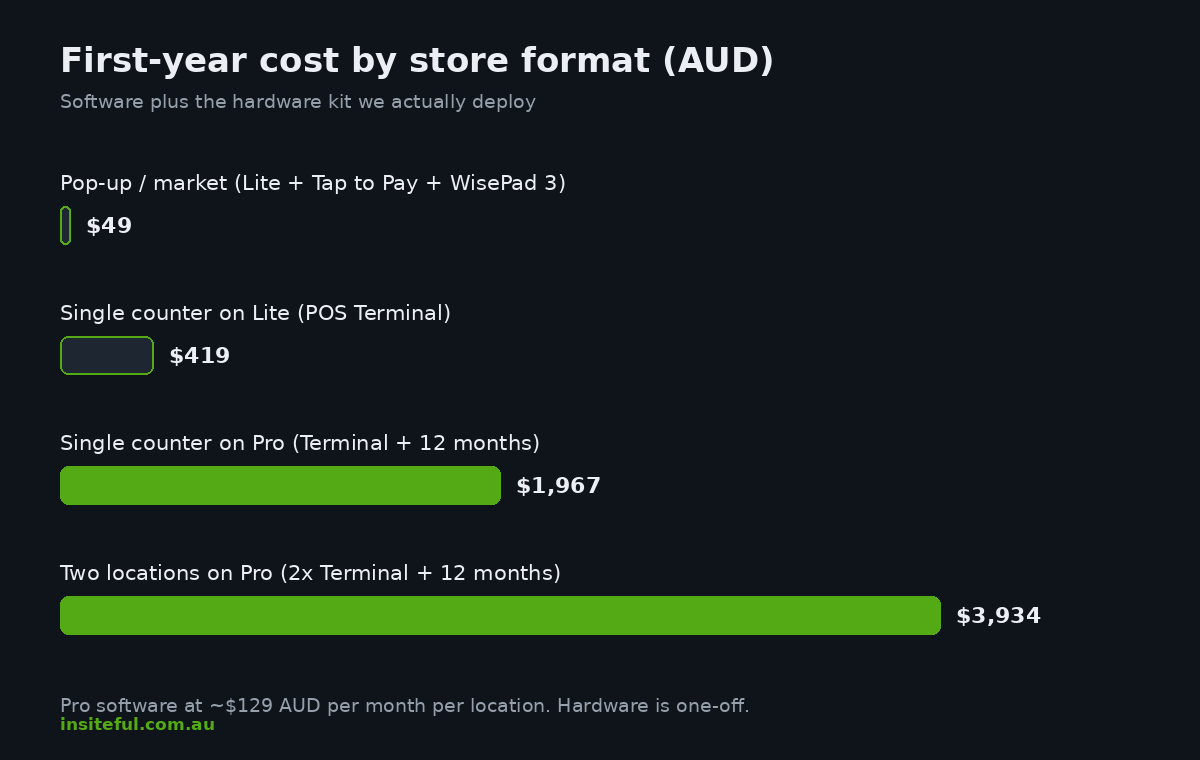
Shopify quotes POS Pro at $89 USD per month per location, or $79 USD on annual billing as of May 2026. For Australian merchants that lands at roughly $129 AUD per month per location on monthly billing. A single-store brand is therefore looking at approximately $1,548 AUD a year for Pro; a three-store brand at over $4,600 AUD a year. That number needs to earn its keep, which is exactly why we run the decision framework below rather than defaulting to the bigger plan.
One important exception: Shopify Plus includes POS Pro for your first 20 retail locations at no additional charge, provided each location runs Shopify Payments. If a client is already on Plus for their online operation, the Pro-versus-Lite question disappears entirely. We covered when Plus itself makes sense in our Plus multi-store architecture guide.
Hardware is a one-off cost and, in our experience, the place where clients most often overspend. Current AUD pricing for the kit we actually deploy:
| Hardware | Price (AUD) | When we specify it |
|---|---|---|
| Tap to Pay on iPhone or Android | $0 | Pop-ups, markets, queue-busting in store |
| WisePad 3 card reader | ~$49 | Backup reader, low-volume counters |
| Shopify POS Terminal | ~$419 | Permanent counters; includes customer-facing display |
| Receipt printer | $249 to $369 | Stores where paper receipts still matter |
| Cash drawer | $129 to $139 | Only if the store takes cash |
On payments, Shopify Payments in-person card rates in Australia currently run at 1.95 percent on the Basic plan, 1.85 percent on Grow, and 1.75 percent on Advanced for domestic cards. In-person rates are lower than the equivalent online rates because card-present fraud risk is lower. For a store processing $40,000 AUD a month over the counter, the gap between Basic and Advanced in-person rates is worth about $960 AUD a year, which is a real input when we are deciding whether a client’s total volume justifies a plan upgrade alongside the POS decision.
The Decision Framework We Run With Clients
This is the actual sequence we work through in a POS scoping session. It takes about twenty minutes with honest answers.
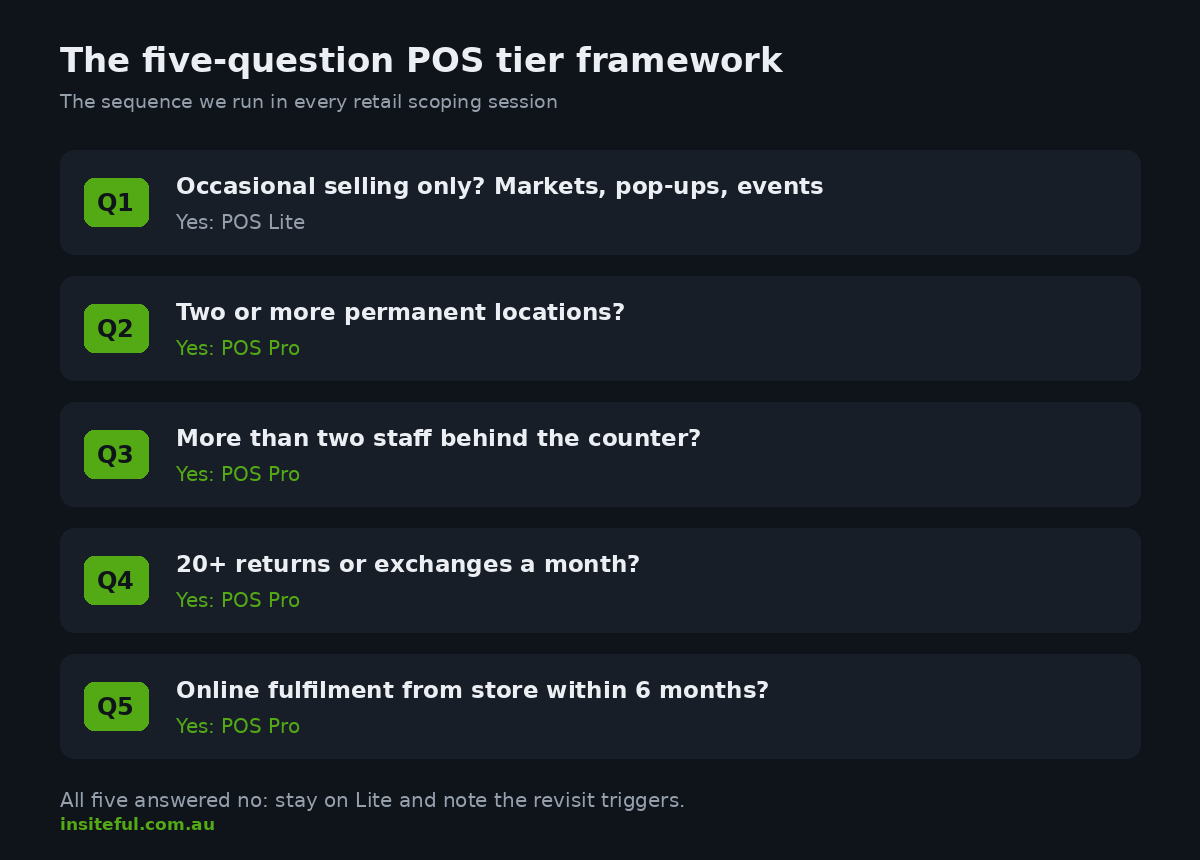
Question 1: Is in-person selling occasional or permanent? Markets, pop-ups, warehouse sales, one-off events: Lite, no hesitation. The free tier exists precisely for this pattern. A permanent shopfront moves you to question 2.
Question 2: How many locations? Two or more permanent locations is an automatic Pro recommendation from us. Stock transfers between stores, cross-location returns, and per-location reporting are not optional at that scale; the manual alternatives fail within a quarter. We walked through the mechanics of this in our multi-location POS build guide. One location moves to question 3.
Question 3: More than two staff behind the counter? If yes, Pro’s role-based permissions and per-staff attribution usually justify the fee on loss prevention alone. A sole trader or husband-and-wife floor team can defer.
Question 4: Do returns and exchanges exceed roughly 20 transactions a month? Below that, the Lite refund-and-rebuy workaround is annoying but survivable. Above it, the inventory drift and reporting blindness compound. Fashion and footwear clients almost always cross this threshold; consumables almost never do.
Question 5: Will the store fulfil online orders? If click and collect or ship from store is on the roadmap within six months, build on Pro from day one. Retrofitting omnichannel workflows onto a team trained on Lite habits is harder than starting with the workflows in place.
A client who answers “permanent, one location, two staff, low returns, no online fulfilment” stays on Lite with our blessing, and we note the triggers that should prompt a revisit. Everyone else gets Pro scoped into the build.
A worked example from a recent scoping session: a Brisbane skincare brand with one permanent store, a second store planned for autumn, four counter staff across the roster, and click and collect already live on the website. On paper the store was small enough that the owner assumed Lite. The framework said otherwise on three separate questions: the second location was inside the planning horizon, the staff count crossed the permissions threshold, and online fulfilment from the store was on the roadmap the moment location two opened. We scoped Pro from day one, configured the roles and fulfilment workflows during the initial build, and the second store launched as a two-week configuration exercise rather than a re-architecture. That sequencing is the entire value of deciding early.
The Hidden Costs of Staying on Lite Too Long
The failure mode we see most often is not choosing the wrong tier on day one. It is staying on Lite for a year after the business outgrew it, because the monthly fee is visible and the workaround costs are not. Three examples from audits we have run:
Inventory drift. A two-store apparel client was reconciling stock weekly in a spreadsheet because Lite could not transfer inventory between locations as a tracked movement. Staff were editing quantities directly in admin. Their stocktake variance was running at just over 4 percent of stock value, most of it phantom loss created by untracked transfers. Pro’s transfer workflow took the variance under 1 percent in two months.
Discount leakage. With no staff permissions, every team member at one client could apply unlimited manual discounts. Nobody was stealing; staff were simply generous under pressure. Manual discounting was running at 3.1 percent of counter revenue. Pro roles with a discount cap brought it to 0.8 percent, which on their volume recovered the annual Pro fee roughly seven times over.
Invisible returns. The refund-and-rebuy pattern meant one footwear client’s best-selling boot showed a healthy sales figure and no meaningful return data. The true return rate, reconstructed from refund matching during our audit, was 22 percent on that SKU driven by a sizing issue. They had been reordering it for three seasons without knowing.
The Omnichannel Case for Pro
If the store is part of a brand that also sells online, the Pro decision is usually less about the counter and more about connecting the two channels. The data here is unambiguous. Omnichannel customers spend around 16 percent more per order and carry roughly 30 percent higher lifetime value than single-channel buyers. In-store pickup is a proven basket builder: about 85 percent of buy online, pick up in store customers make an additional purchase when they come in to collect. And the channel itself keeps growing, with Australians spending $82.6 billion AUD online in 2025, up 14 percent year on year, representing about 24 percent of total retail spend.
Every one of the features that captures that behaviour sits on the Pro tier. On a recent single-store build for a Sydney lifestyle brand, we shipped click and collect and ship from store in the same phase as the POS rollout. Within a quarter, store-fulfilled online orders were 11 percent of location revenue, and the pickup counter was converting collection visits into add-on sales at a rate the owner described as the cheapest foot traffic he had ever acquired. The $129 AUD monthly fee was not a line item anyone questioned again.
The Winter 2026 release also brought Markets for retail onto Pro, which allows per-location pricing. For brands running stores in different regions, or an outlet store alongside a full-price flagship, this replaces what previously required either a second store or messy discount automation.
The Hardware Kit We Deploy in Australian Stores
Tier choice settles the software. The hardware build then follows the store format, and since the Winter 2025 Edition brought Tap to Pay to both iPhone and Android in Australia, the entry point is genuinely zero hardware dollars.
Pop-up and market format: a phone with Tap to Pay, plus a WisePad 3 in the kit bag for the rare chip-only card. Under $50 AUD all-in.
Single permanent counter: one Shopify POS Terminal at $419 AUD, which includes the customer-facing display Australian shoppers now expect for tap confirmation, paired with an iPad running the POS app. Add a receipt printer only if the customer base actually asks for paper; email receipts also feed your marketing list, which a thermal docket never will.
Multi-lane or high-volume: a POS Terminal per lane, one shared printer and cash drawer, and a phone with Tap to Pay as a queue-busting lane during peak trade. We specified exactly this for a client’s Boxing Day trade and the phone lane cleared 19 percent of transactions on the day.
One practical note for Australian deployments: order hardware through Shopify’s AU hardware store rather than grey-import equivalents. Locally sourced units carry AU warranty and are certified for Shopify Payments; we have twice been called in to rescue setups built on second-hand readers that could not be re-paired to a new Shopify account.
How We Do It at Insiteful
POS decisions at Insiteful sit inside a broader retail architecture engagement, not a standalone plan-picker conversation. When a client brings us a physical retail requirement, the first artefact we produce is a channel map: every location, every fulfilment path, every staff role, and every inventory movement the business runs today and plans to run within eighteen months. The Pro-versus-Lite call falls out of that map in minutes, because the map makes the trigger conditions visible.
From there, the build follows the same discipline as our online work. Locations and inventory assignment are configured before any hardware is unboxed. Staff roles are mapped to real job descriptions with discount and refund thresholds agreed by the owner, not left at defaults. Receipt templates, if used, carry the brand system we build for the storefront. And if the engagement includes omnichannel fulfilment, we stand up click and collect in a staging theme and run test orders through the full journey, including the failure paths like uncollected orders and partial pickups, before anything goes live. The result is a POS deployment that behaves like infrastructure rather than an app someone installed, which is the standard we hold every part of a build to.
Deciding Where Your Store Lands
If your in-person selling is occasional, take Lite and spend the savings on stock. If you run multiple locations, more than a couple of staff, meaningful return volume, or any ambition to fulfil online orders from the shop floor, Pro pays for itself faster than almost any other $129 AUD a month you will spend, and the case studies above show where the payback hides. If you are somewhere in the middle, the framework in this article will get you to an answer, and the triggers will tell you when to revisit it.
If you would rather have the decision made from your actual numbers, that is work we do every week. Book a build assessment and we will map your retail channel, scope the right POS tier, and hand you a deployment plan your team can run with.