
Seventy-two percent of Australian shoppers placed a click and collect order in the past year, yet most of the Shopify stores we audit treat it as a checkbox. They flick on “local pickup,” watch a few orders trickle through, and never look at it again. Then the complaints start: customers driving to a store for stock that was already sold online, staff with no clear queue of what to prepare, and a checkout that offers $12 shipping when the customer stood 400 metres from the shop.
Click and collect is not a toggle. It is a build. Done properly, it removes the single most expensive part of fulfilment, lifts in-store revenue through add-on purchases, and gives a multi-location retailer a genuine omnichannel spine. Done lazily, it manufactures oversells and refunds at scale. This is the exact build we ship for Australian retailers running Shopify and Shopify POS, written out the way our engineers actually configure it.
Why Click and Collect Is a Build Problem, Not a Checkbox
The economics are the reason this matters. The last mile is the most expensive leg of any retail supply chain, accounting for roughly 53% of total shipping costs. Every order a customer collects in person is one you never have to ship, which is why retailers that lean into click and collect can shave up to 28% off total transportation costs. For an Australian brand spending $250,000 AUD a year on parcel freight, shifting even a fifth of orders to pickup is a five-figure line off the cost base before you count a single extra sale.
Then there is the upside on the revenue side. ShopFully research found that 78% of Australian consumers often buy additional products when they collect an online order in store, and US data tracks the same behaviour, with about 75% of buy-online-pickup-in-store shoppers saying they are likely to add a purchase at collection. Click and collect already makes up an estimated 10.5% of US ecommerce in 2025 and is forecast to reach 13.5% by 2030. The channel is not a convenience feature you bolt on. It is a profit lever, and it behaves like one only when the inventory, checkout, notification, and in-store layers are wired together as a system.
That system has four moving parts: accurate multi-location inventory, a controlled checkout, an automated notification loop, and a tight in-store fulfilment workflow on Shopify POS. Miss any one and the whole thing leaks. The rest of this article walks each layer, with the configuration and code we use on live builds.
The Inventory Architecture That Stops Overselling
Oversells are the number one click and collect failure, and they are almost always an inventory architecture problem rather than a stock problem. The store has the units. It just cannot see them per location, so it sells the same jacket to an online courier order and an in-store pickup at the same time.
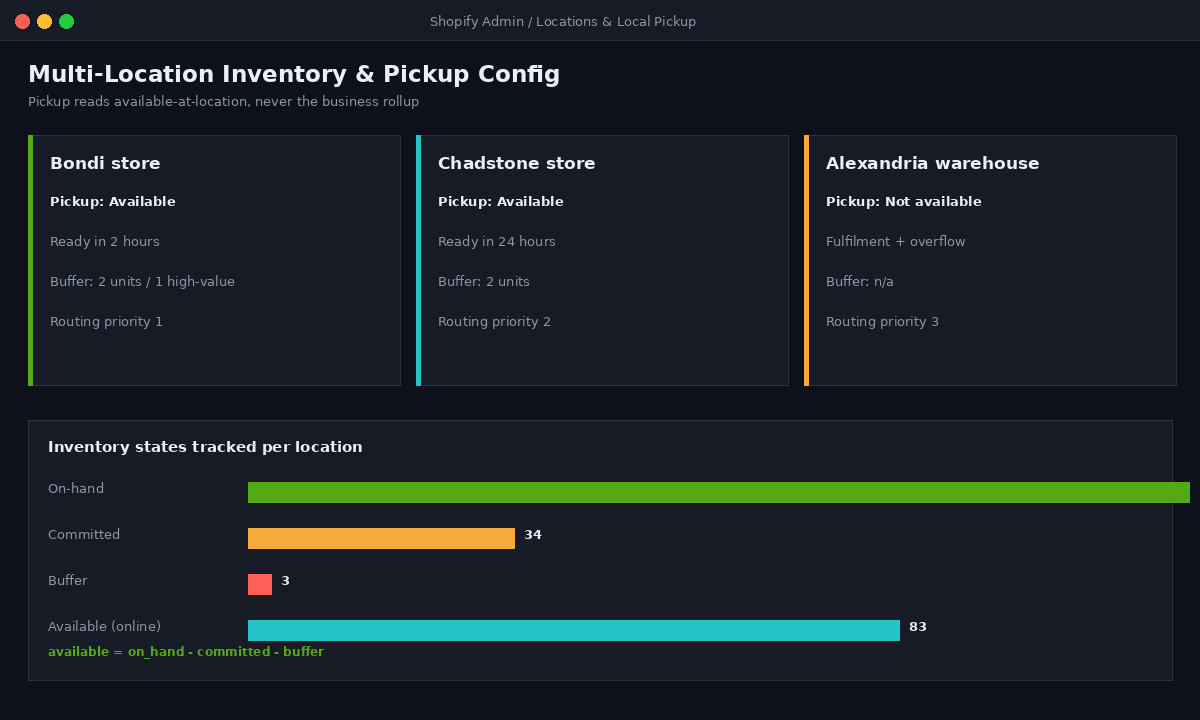
The first fix is making every selling location a real Shopify location with its own inventory states. Shopify tracks four states per location: available, committed, on-hand, and incoming. Pickup fulfilment has to read available at the pickup location, not aggregate available across the business. We set this explicitly and never trust the rollup number on the product page.
The second fix is a safety buffer per location so the shop floor always has a margin against the count drifting. We implement this with a small inventory reservation rather than editing the real count, so reporting stays clean. A typical configuration we deploy on a multi-store retailer looks like this:
Location: Insiteful Demo - Bondi
  Pickup enabled:        yes
  Available (online):    on_hand - committed - buffer
  Buffer (safety stock): 2 units on apparel, 1 on high-value
  Pickup eligibility:    available_at_location >= 1
  Routing priority:      1 (nearest-first for ship-from-store)

Location: Insiteful Demo - Warehouse (Alexandria)
  Pickup enabled:        no
  Role:                  online fulfilment + overflow
  Routing priority:      3
The third fix is order routing. Shopify lets you set fulfilment priority per location so online orders ship from the location nearest the customer, which keeps store stock from being drained by web orders that a warehouse should have covered. We pair that with the same nearest-first logic on the storefront so the pickup selector defaults to the customer’s closest enabled store. For brands running stock across stores and a third-party warehouse, this routing layer is the difference between a clean omnichannel build and constant stock firefighting, which is also why we treat it as part of the wider 3PL and fulfilment integration rather than a standalone setting.
Configuring Local Pickup the Right Way
Local pickup lives under Settings, then Shipping and delivery, then Local pickup, and it is configured per location. The defaults are fine for a single shop and dangerous for a chain, because Shopify will happily offer pickup at every location whether or not that location has staff to prepare orders. We treat pickup eligibility as an explicit decision per site, never a blanket on.
The settings that actually change customer behaviour are the expected preparation time and the pickup instructions, because both set the promise the customer holds you to. The configuration we hand to a client’s operations team reads like this:
Local pickup - per location
  Bondi store
    Pickup:               Available
    Expected ready time:  "Usually ready in 2 hours"
    Pickup instructions:  "Enter via Hall St. Collection counter
                           is at the rear. Bring your order email."
  Chadstone store
    Pickup:               Available
    Expected ready time:  "Usually ready in 24 hours"
  Alexandria warehouse
    Pickup:               Not available (fulfilment only)
We also surface pickup availability on the product page, not just at checkout. When a shopper can see “In stock, ready in 2 hours at Bondi” while they are still deciding, intent climbs and the pickup option stops being a checkout surprise. On a Shopify theme this is the pickup-availability web component reading the variant’s location-level inventory, which we wire into the product template so it renders live rather than on a cached delay. That product-page signal is the same conversion principle behind a well-built in-store POS and inventory setup: the customer trusts the number because the number is real.
Controlling the Checkout With Delivery Customization Functions
Out of the box, Shopify shows every eligible delivery option at checkout in the order it feels like. For a click and collect build that is a problem, because you want pickup presented clearly, irrelevant pickup locations hidden, and the cheapest sensible option surfaced first. This is a job for the Delivery Customization Function API, part of Shopify Functions, which lets you rename, reorder, and hide delivery options at checkout with code that runs on Shopify’s own infrastructure rather than a third-party app slowing the page.
A delivery customization is the only customization type that supports conditional rules, which is exactly what pickup logic needs. There are limits worth knowing before you design around it: you can activate a maximum of 25 delivery customization functions per store, and while you can hide individual pickup locations, you cannot hide the pickup method category wholesale. We design within those rails. A typical function we ship hides every pickup location except the ones nearest the customer and renames them with the ready time so the choice is obvious:
// delivery-customization/src/run.js
export function run(input) {
  const operations = [];
  const cart = input.cart;
  const buyerPostcode = cart.deliveryGroups?.[0]
    ?.deliveryAddress?.zip ?? null;

  for (const group of cart.deliveryGroups) {
    for (const option of group.deliveryOptions) {
      // Rename pickup options with their ready time
      if (option.title?.includes("Pickup")) {
        operations.push({
          rename: {
            deliveryOptionHandle: option.handle,
            title: `${option.title} - ready in 2 hours`
          }
        });
      }
      // Hide pickup locations outside the buyer's metro
      if (option.title?.includes("Perth") &&
          buyerPostcode && !buyerPostcode.startsWith("6")) {
        operations.push({
          hide: { deliveryOptionHandle: option.handle }
        });
      }
    }
  }
  return { operations };
}
The result is a checkout where a Sydney customer never sees a Perth collection point, pickup reads with a concrete promise, and nothing depends on an app that adds render-blocking weight to the most important page on the store.
The Pickup Notification Flow We Wire With Shopify Flow
The collection experience is a sequence of promises: order received, order ready, order reminder, order collected. Customers judge the whole channel on whether those messages arrive on time. We automate the entire loop with Shopify Flow so it never depends on a staff member remembering to send anything.
The core build is three workflows. The first confirms the pickup order and tags it for the right store queue. The second is the safety net that chases stale pickups so stock does not sit reserved for a customer who never comes. The third reconciles inventory once collection is marked complete. The ready-for-pickup notification itself is triggered by staff in POS, which keeps the human “your order is physically waiting” promise honest. A representative Flow we deploy:
Workflow: Pickup order intake
  Trigger:    Order created
  Condition:  Delivery method is "Local pickup"
  Actions:
    - Add order tag: "pickup" + "pickup-{location}"
    - Add order tag: "prep-queue"
    - Send internal Slack/email to store inbox

Workflow: Stale pickup chaser
  Trigger:    Scheduled time (daily 9am)
  Condition:  Tag contains "ready-for-pickup"
              AND fulfillment age > 3 days
  Actions:
    - Send customer reminder email (2nd notice)
    - If age > 7 days: tag "pickup-at-risk",
      notify store manager to release stock

Workflow: Collection reconciliation
  Trigger:    Order fulfilled
  Condition:  Tag contains "pickup"
  Actions:
    - Remove "prep-queue" tag
    - Add "collected" + collection timestamp metafield
The stale-pickup chaser is the workflow most stores never build and the one that pays for the whole project, because uncollected pickups quietly lock inventory and distort availability. Automating the release means the count self-heals instead of needing a manual stocktake.
Shopify POS Pro: The In-Store Half of the Build
Everything above is the online half. The in-store half runs on Shopify POS Pro, which is the tier that actually includes buy-online-pickup-in-store and ship-from-store. POS Pro is priced at USD $89 per location per month, which lands at roughly $135 AUD per location depending on the exchange rate, and for any retailer running pickup across more than one store it is non-negotiable, because the free POS tier cannot manage the pickup fulfilment flow.
The build work here is the staff workflow. When a pickup order lands, retail staff get a push notification in POS telling them a new collection order needs preparing. They pick and set aside the items, then send the customer the ready notification straight from POS, then mark it collected at handover. We make that flow fast by customising the POS Smart Grid so the pickup queue is one tap from the home screen rather than buried in menus:
POS Smart Grid - configured tiles (store device)
  Row 1:  [ Pickups: To prepare ]  [ Pickups: Ready ]
          Add tile > Fulfillment > "Pickup in-store"
  Row 2:  [ New sale ]  [ Search inventory ]
          [ Customer lookup ]
  Behaviour:
    "To prepare"  -> orders tagged prep-queue, oldest first
    "Ready"       -> staff taps to send ready notification
    On handover   -> "Mark as picked up" closes the order
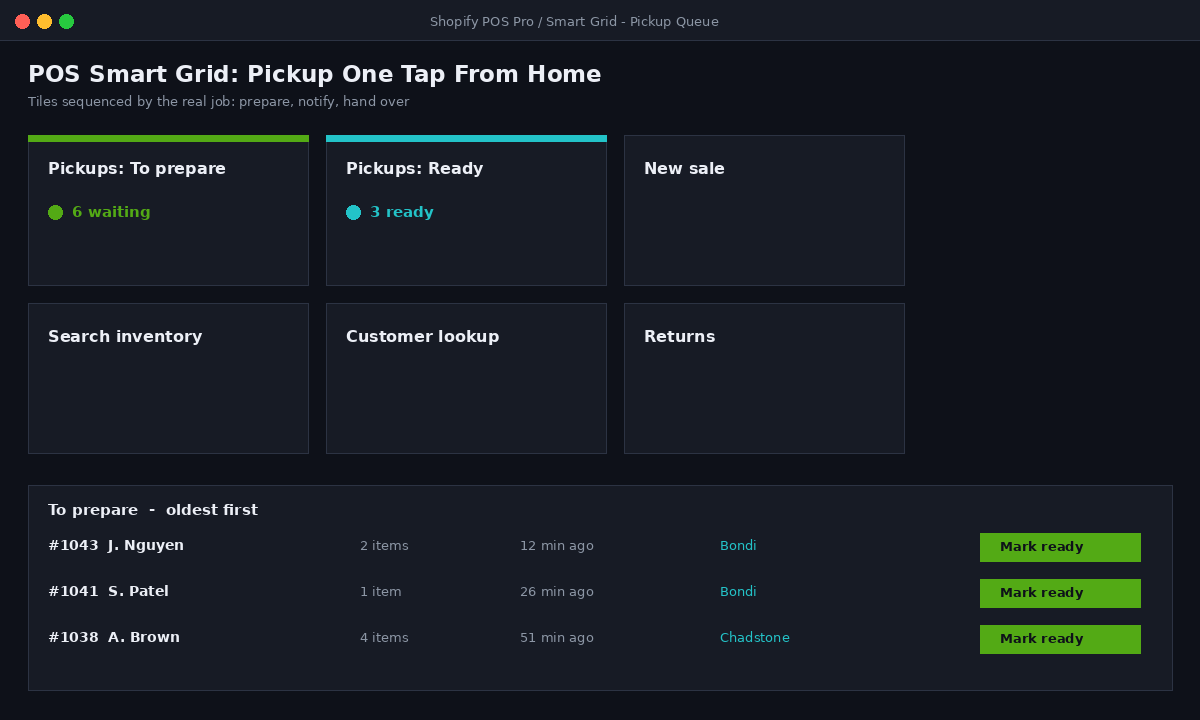
The detail that matters is sequencing the tiles by the actual job: prepare, notify, hand over. We have walked into stores where staff were processing pickups through three different screens and a paper notepad. Rebuilding the Smart Grid around the real workflow cut their average prep-to-ready time materially, which is the metric customers feel.
Designing the Collection Experience for Conversion
A click and collect build is also a design build, because the channel only earns its add-on revenue if the storefront and the store both nudge it. Three design moves do most of the work.
First, the product page. Showing real-time pickup availability per location while the customer is still browsing is the single highest-impact element, because it converts a “maybe later” into a “ready today near me.” Second, the cart and checkout. Presenting pickup as a clearly cheaper, faster option, with the ready time stated, reframes it from a fallback to the smart choice. Third, and most overlooked, the in-store collection point. Given that 78% of Australian collectors buy something extra at pickup, the counter placement and what sits between the door and the collection desk is a merchandising decision, not a fit-out afterthought.
We brief the in-store collection journey the same way we brief a landing page: what the customer sees first, what decision we want next, and what removes friction. A simplified version of the experience map we build from:
Collection journey - design brief
  1. Notification email/SMS
       -> "Ready now. Counter at rear, enter via Hall St."
       -> one-tap "Get directions" + order barcode
  2. Arrival
       -> clear in-store signage to collection point
       -> impulse range sited between entry and counter
  3. Handover
       -> staff scans barcode, confirms ID if high-value
       -> prompt: "Anything else while you're here?"
  4. Post-collection
       -> Flow tags "collected", triggers review request 24h later
None of this is decoration. Each step is a measurable point where the channel either captures the add-on sale or leaks it.
Measuring What the Build Earns
If you cannot attribute the result, you cannot defend the investment, so we instrument click and collect from day one. The metrics that matter are not vanity counts of pickup orders. They are the ones that prove the channel changed the economics.
We track four. Pickup share, the percentage of total orders collected rather than shipped, which drives the freight saving. Average prep-to-ready time, the operational promise customers feel. In-store attach rate, the proportion of collections that included an add-on sale rung through POS, tied back to the original online order via the customer record. And freight cost avoided, calculated as pickup orders multiplied by your average parcel cost. The reporting view we stand up for clients summarises it plainly:
Click and collect scorecard - 90 day rolling
  Pickup share of orders ............ 19%
  Avg prep-to-ready ................. 1h 48m
  In-store attach rate .............. 31% of collections
  Avg attach value (AUD) ............ $42
  Est. freight avoided (AUD) ........ $61,400
  Oversell incidents ................ 0 (buffer + routing)
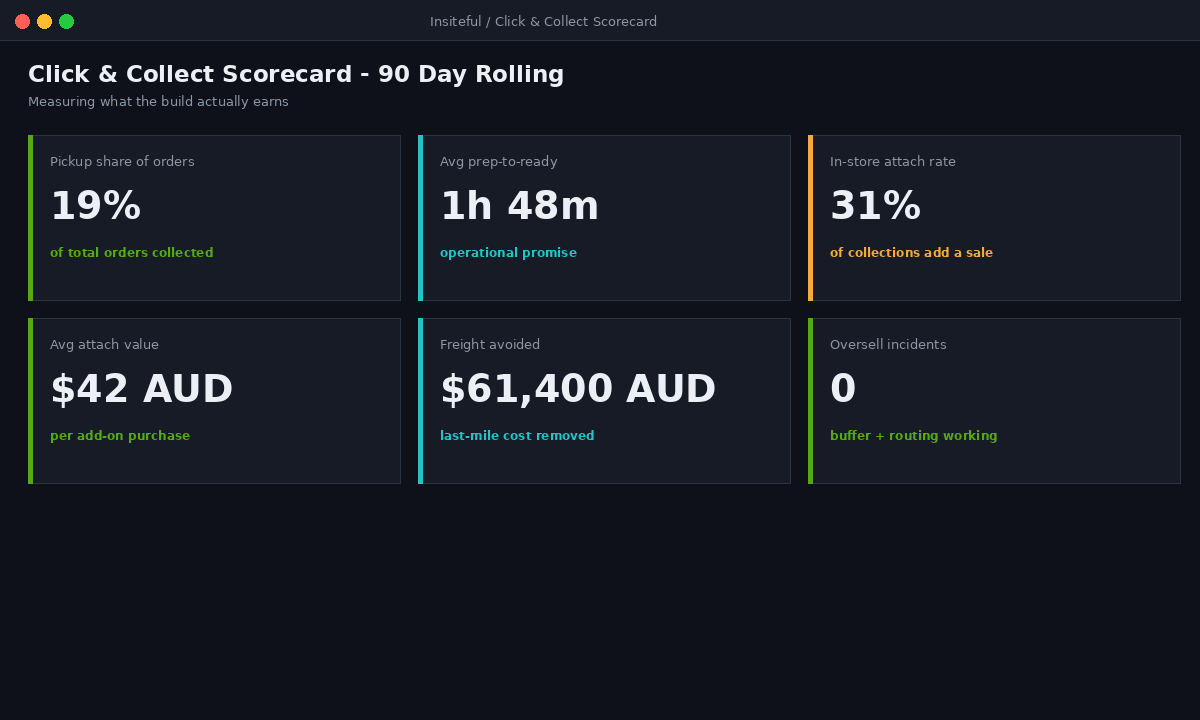
The oversell count being zero is not luck. It is the inventory architecture from the first section doing its job, and it is the line that turns a nervous operations manager into an advocate for expanding pickup to more stores.
How We Do It at Insiteful
When an Australian retailer comes to us for click and collect, we do not start in the Shopify admin. We start with their fulfilment economics and their store operations, because the build only pays off if it is shaped around how stock actually moves and how staff actually work. The first session maps every selling location, its real inventory accuracy, and who prepares pickups.
From there we build in the order this article lays out: inventory architecture and routing first so oversells are impossible, then local pickup configured per location, then the delivery customization functions to control the checkout, then the Flow automations for the notification loop, then the POS Pro Smart Grid and staff workflow, then the storefront and in-store design that captures the add-on revenue. We test the whole thing with real orders across locations before it goes live, because a pickup build that oversells on day one destroys staff trust for months.
We build on native Shopify and Shopify POS throughout. No headless layer, no fragile middleware between the website and the shop floor, because click and collect lives or dies on the inventory truth being identical online and in store, and every extra system in that chain is another place for the count to drift. That native-first discipline is the same one we bring to every build, and it is why our pickup implementations hold up under peak trading rather than falling over on the first big sale.
Build a Click and Collect System That Actually Earns
Click and collect is one of the highest-return builds a multi-location Australian retailer can commission, but only when the inventory, checkout, automation, and in-store layers are engineered as one system rather than switched on and hoped for. If your pickup is oversells and refunds today, the problem is almost never the stock. It is the architecture underneath it.
If you want a pickup channel that cuts freight, lifts in-store sales, and never sells the same unit twice, book a build assessment with Insiteful. We will map your locations, your fulfilment economics, and the exact build that turns click and collect from a liability into a profit channel.