
A customer walks into your Melbourne shop holding a shirt they bought online three weeks ago. Your staff member has the tag, the order number, and a queue of four people behind them. What happens in the next ninety seconds decides three things: whether that unit is sellable again tonight, whether your online storefront now thinks it has stock it does not have, and whether that customer buys again.
In most of the Shopify retail builds we inherit, all three of those go wrong. The unit gets restocked to whatever location the staff member happened to pick from a dropdown. The refund goes back to the card by default, so the money leaves the business permanently. And the reason for the return gets typed into a notes field that nobody reads.
Returns are not a policy problem at that point. They are an architecture problem. This is the build we run for Australian retailers who sell online and in store, and the specific Shopify objects, rules, and extensions that make it work.
Why the returns counter is where omnichannel actually breaks
Online returns run at roughly 20.8% of orders heading into 2026, against about 8.72% for physical retail, which puts web returns at two to three times the in-store rate (Richpanel). Apparel sits between 20% and 40%. Electronics runs 8% to 15%. Beauty is the outlier at 4% to 12%. Processing a single return costs somewhere between $10 and $65 once you count freight, labour, inspection, and restocking, and the US National Retail Federation put 2025 returns at 15.8% of annual sales, or $849.9 billion in merchandise. Return fraud alone runs over $100 billion a year globally.
For an Australian brand with an average order value between $95 and $150 AUD, a $22 AUD processing cost on a $120 AUD order is not a rounding error. It is most of the contribution on that sale.
Here is the part that gets missed. Every one of those numbers gets better when the return lands in a store instead of a satchel. You skip the return freight. You skip the 3PL receiving fee. You get the unit inspected by a human on the same day. And you get the customer standing in a room full of your product with money in their hand.
That upside only exists if the build supports it. What we find in audits, over and over, is that it does not. The five failure modes we see most often:
- One location for everything. The retail store and the warehouse share a single Shopify location, so a return in Sydney makes stock look available to a 3PL that does not physically have it.
- Manual restock selection. Staff choose the restock location at the counter. In one client audit we found 31% of store returns had been restocked to the wrong location over a six month window.
- Damaged units going straight back to sellable. No quarantine location exists, so a torn garment is immediately purchasable online.
- Refund defaults to card. Store credit is technically available but buried, so staff take the fast path and the cash leaves.
- Free text return reasons. Nothing aggregates, so nobody can tell merchandising that one style accounts for a third of the returns.
The four decisions every store return has to make
Strip a return down and it is four decisions, made in order, every single time. Origin channel. Physical condition. Restock destination. Refund instrument. Get those four resolved deterministically and the rest of the workflow is mechanical.
The first artefact we build on any omnichannel returns project is the routing matrix. Not a policy document. A table where every row maps to a real Shopify location handle and a real refund path.
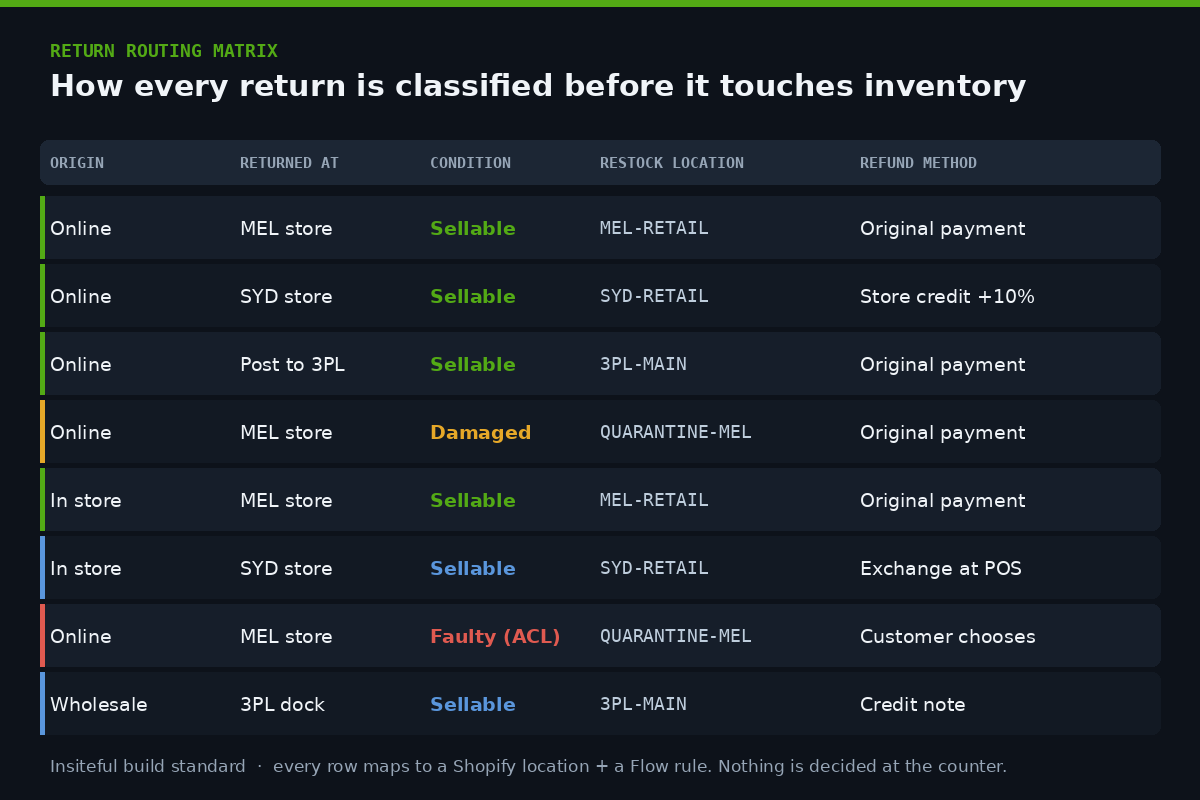
This matrix is signed off by the client before we touch a theme file or an app. It is the specification. If a row is not on it, staff do not have a path for it, and the return escalates to the CX queue instead of being improvised at the counter.
Two rows deserve a comment. The Sydney store row offers store credit with a 10% bonus, because that is a location where the client wanted to test credit capture without changing the Melbourne experience. And the faulty row deliberately says “customer chooses”, because under Australian Consumer Law that decision is not yours to make. We will come back to that.
Location architecture, and the part most stores get wrong
Shopify locations are the backbone of this whole build, and they are almost always under-modelled. A retailer with two shops and a 3PL typically has three locations. We usually end up with six.
The structure we deploy looks like this:
3PL-MAIN            fulfils online orders, sellable
MEL-RETAIL          Melbourne shop floor, sellable, POS-assigned
SYD-RETAIL          Sydney shop floor, sellable, POS-assigned
QUARANTINE-MEL      damaged / inspection hold, NOT sellable
QUARANTINE-SYD      damaged / inspection hold, NOT sellable
RETURNS-TRANSIT     units in transit back to 3PL, NOT sellable
The two quarantine locations and the transit location have “fulfil online orders” switched off. That single setting is what stops a damaged return from becoming an oversell forty minutes later. It costs nothing and we have never seen a store do it before we arrive.
RETURNS-TRANSIT matters more than it looks. When a store return needs to go back to the 3PL rather than onto the shop floor, that unit is real, it belongs to the business, and it is not sellable for four days. Without a transit location it either vanishes from inventory entirely or it sits falsely available. We have watched both cost real orders.
If you are running more than one shop, the location model interacts directly with fulfilment priority. We covered that ordering logic in our piece on Shopify POS across multiple locations, and the returns matrix has to agree with it. A return that restocks to MEL-RETAIL while your priority list sends every online order to 3PL-MAIN means that unit will sit in Melbourne until someone walks in and buys it.
Wiring the refund so store credit is the easy path
Shopify’s native store credit has quietly become one of the more useful retail features. Credit sits on the customer record rather than on a loose gift card code, it can carry an expiry set in your store’s timezone, and it is redeemable at checkout when the customer is logged in or using Shop Pay (Shopify). If a customer paid with credit, the refund can go back to credit.
The January 2026 retail release added a dedicated refund screen in POS so staff can send a refund to original payment, gift card, or store credit without leaving the flow, and return reasons are now category-specific rather than generic, so an apparel return offers “too big” and a food item offers “taste” (Shopify Retail Roundup).
The build decision is not whether store credit exists. It is whether the interface makes it the obvious choice at 4pm on a Saturday with a queue building.
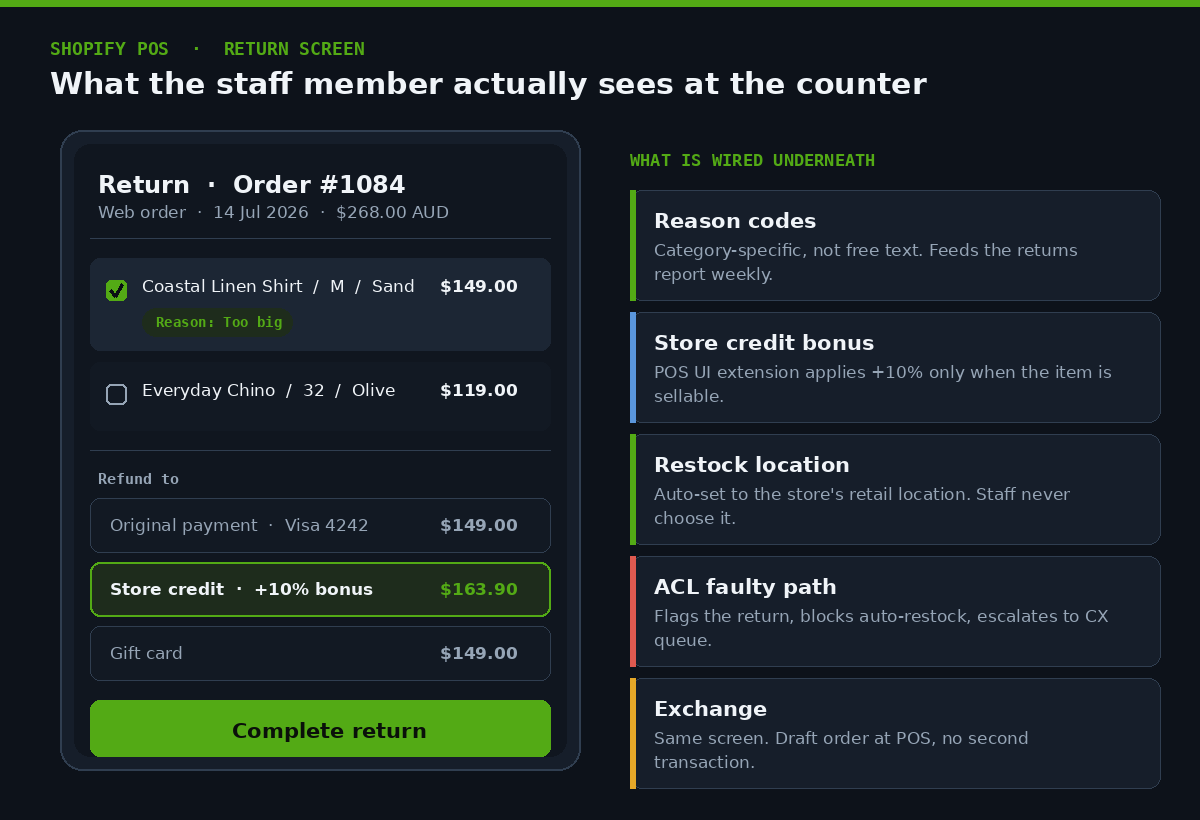
Note what is happening on that screen. The store credit option shows $163.90 AUD against a $149.00 AUD refund, because the bonus is applied and displayed rather than described. Staff do not have to sell it. They read the number out. In the first eight weeks after go-live on one client’s two-store build, 38% of eligible store returns took credit over cash refund, against 6% before the change.
Exchanges run through the same screen. Shopify lets you add exchange items directly to a return, so the customer walks out with a different size and there is no second transaction, no double-handling of the payment, and no gap in the order record (Shopify Help Centre).
Automating the restock with Shopify Flow
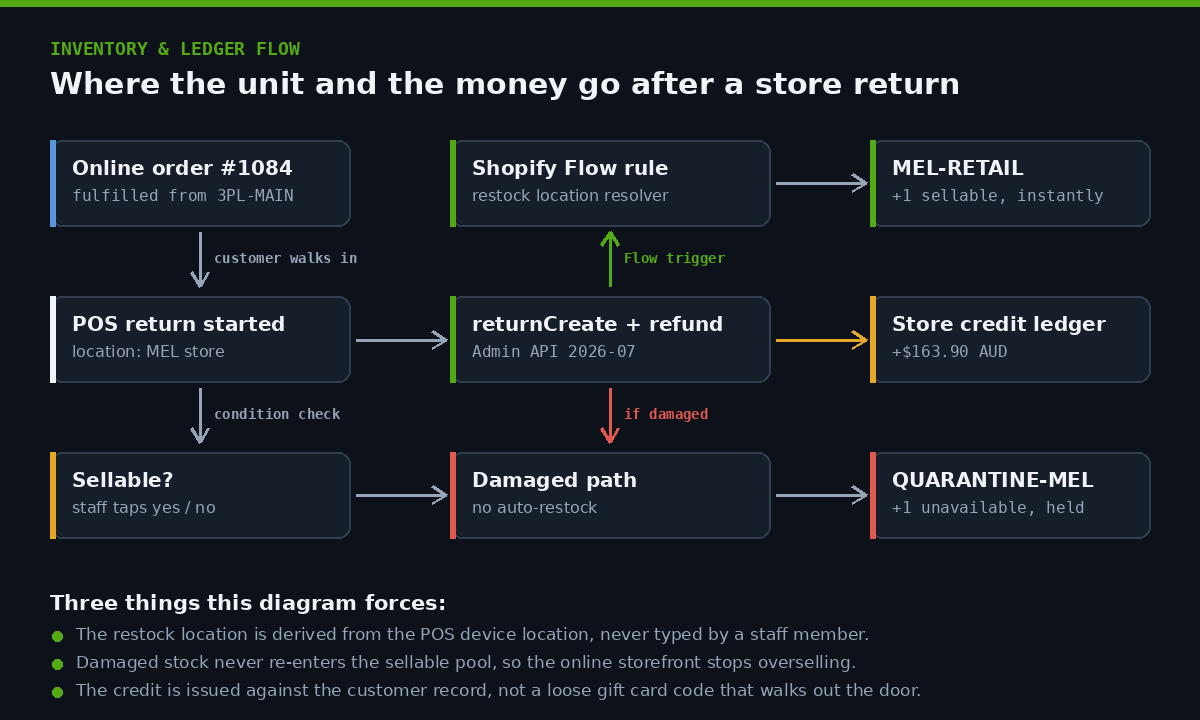
The routing matrix is only worth building if a machine enforces it. That is Flow’s job. We build one workflow per condition path, triggered on return creation, and the staff member never picks a location.
The logic we deploy, expressed as pseudocode before we build it in the Flow editor:
TRIGGER: Return created

IF return.location.name contains "MEL"
   AND return.lineItems.any(restockType == "RETURN")
   AND return.note does not contain "DAMAGED"
THEN
   restock to MEL-RETAIL
   tag order: return-mel-sellable

ELSE IF return.note contains "DAMAGED"
THEN
   restock to QUARANTINE-MEL
   tag order: return-quarantine
   send internal email to ops@client.com.au
   create task: inspect within 48h

ELSE IF return.reason == "DEFECTIVE"
THEN
   do not restock
   tag order: acl-review
   send to CX queue
Three rules, one per outcome. We keep them deliberately flat rather than nesting a single mega-workflow, because Flow runs are easier to debug when each path has its own run history. If a client asks in March why a unit ended up in quarantine in January, we can answer it from the run log in under a minute.
Flow also handles the reporting side. Every return writes a tag, and those tags are what make the weekly returns report possible without an app. We go deeper on the trigger and condition patterns in our write-up on building automation with Shopify Flow.
Where the Admin API takes over
Flow covers most retailers. It stops being enough the moment a return has to be approved outside Shopify, which happens when a client runs an ERP, a third party returns portal, or a warranty process with a supplier in the loop.
At that point we move to the Admin API. The returnCreate mutation builds a return against an order that has at least one fulfilled, unrefunded line item, and it is the right tool when approval or decline happens in another system (Shopify Dev). A trimmed version of what we send, against API version 2026-07:
mutation ReturnCreate($input: ReturnInput!) {
  returnCreate(returnInput: $input) {
    return {
      id
      status
      returnLineItems {
        edges { node { id quantity returnReason } }
      }
    }
    userErrors { field message }
  }
}

# variables
{
  "input": {
    "orderId": "gid://shopify/Order/1084",
    "returnLineItems": [
      {
        "fulfillmentLineItemId": "gid://shopify/FulfillmentLineItem/55",
        "quantity": 1,
        "returnReason": "SIZE_TOO_LARGE",
        "returnReasonNote": "MEL counter, sellable"
      }
    ],
    "notifyCustomer": false
  }
}
The field we care about most is returnReasonNote. We write the originating location and the condition assessment into it at creation time, which means the downstream Flow rule has everything it needs without a second lookup, and the ops team can filter on it later. Small detail, and it removes an entire class of race condition where a workflow fires before a human has tagged anything.
Always check userErrors before assuming a return exists. We have debugged more than one client integration that treated a 200 response as success while every mutation was silently failing validation.
Extending the POS screen itself
Native POS covers the standard return. Where clients need something native does not do, POS UI extensions are how we add it without pushing staff into a second app.
Extensions surface as tiles on the POS smart grid, and the grid is dynamic, so a tile can appear, change label, or disable itself based on what is in the cart or which location the device is assigned to (Shopify Dev). From API version 2026-04 you can also write unit tests for extensions with @shopify/ui-extensions-tester, which finally makes them maintainable rather than a thing nobody dares touch after launch.
A cut-down version of the tile we build for a returns inspection workflow:
import { reactExtension, Tile, useApi } from '@shopify/ui-extensions-react/point-of-sale';

export default reactExtension('pos.home.tile.render', () => <ReturnsTile />);

function ReturnsTile() {
  const api = useApi();
  const pending = api.session.currentSession.locationId;

  return (
    <Tile
      title="Returns inspection"
      subtitle="Assess condition before restock"
      enabled={true}
      onPress={() => api.action.presentModal()}
    />
  );
}
The modal behind that tile asks two questions, sellable or not, and reason category, then writes the answer to the return note so Flow can route it. Two taps. No typing. That is the entire design brief, and it is why the workflow survives contact with a busy Saturday.
The same pattern applies on the online side of the business. We used a comparable approach for post-purchase logic in our piece on checkout UI extensions, and the design principle carries across: put the decision where the person already is, and give them the smallest possible number of choices.
The Australian Consumer Law path you cannot automate away
This is where Australian builds diverge from the American playbooks most Shopify content is written against.
Under Australian Consumer Law, you are not required to refund a change of mind. Refunds, repairs, and replacements are required when a product fails a consumer guarantee, meaning it is faulty, unsafe, or not as described (ACCC). If you choose to offer a change of mind policy, you are free to set conditions, time limits, and restocking fees, but you must then honour the policy you published.
The ACCC reviewed more than 2,000 retail websites and found numerous examples of businesses potentially misleading customers about their return rights, including time limits applied to faulty products, blanket no refund conditions on sale items, and telling customers that faulty goods can only be resolved through a manufacturer warranty.
Two build consequences follow from that, and both are structural rather than legal advice.
First, faulty returns and change of mind returns are separate paths in the system, not two options in the same dropdown. A change of mind return can be automated end to end. A faulty return must stop, because for a major failure the customer chooses the remedy, not the retailer, and no Flow rule should be making that call. In our matrix the faulty row routes to quarantine, blocks auto restock, and drops into the CX queue.
Second, the restocking fee and time limit configured in Shopify’s return rules apply to your change of mind policy only. Shopify lets you set a default restocking fee and return window, and edit them per return or per item (Shopify Help Centre). We configure those rules, then we build the faulty path so it bypasses them entirely. If you apply a 15% restocking fee to a genuinely faulty product because that is what the default said, you have a problem the build created.
We are Shopify builders, not lawyers, and any client with a complex product category should have their policy reviewed properly. What we own is making sure the system cannot quietly do the wrong thing at 4pm on a Saturday.
What we report on after go-live
The build is not finished when the last Flow rule saves. It is finished when the client can see whether it is working. Four numbers, reported weekly, sourced from order tags rather than a paid app:
| Metric | How it is derived | What good looks like |
|---|---|---|
| Store capture rate | Returns tagged return-mel-sellable or return-syd-sellable as a share of all returns on online orders |
Rising. Every point is a return freight cost avoided. |
| Credit capture rate | Refunds issued to store credit as a share of eligible refunds | 30% or better once the bonus is displayed at the counter |
| Restock accuracy | Units restocked to a location that matches the matrix, sampled monthly | Above 98%. Manual selection typically sits near 70%. |
| Return reason concentration | Top three reason codes by SKU, from the category-specific reason data | Actionable. If one style drives 30% of returns, that is a product fix. |
That third row is usually the one that gets a reaction. Clients expect the credit number. They do not expect to find out that a third of their store returns were being restocked to the wrong place.
How we do it at Insiteful
Omnichannel returns sits inside a broader retail build for us, and the sequence rarely changes.
Week one, we map the physical reality. Not the Shopify account, the actual business. Which room does a damaged unit sit in. Who inspects it. How long until it goes back to the 3PL. What does the store manager do today when they are not sure. That conversation produces the location model, and the location model is the whole build.
Week two, we sign off the routing matrix. Every origin, condition, destination, and refund path on one page, agreed with the client’s ops lead and their most experienced store manager. We include the store manager deliberately. They are the person who knows the six edge cases that are not in anyone’s process document.
Weeks three and four, we build. Locations, return rules, Flow workflows, store credit configuration, and any POS UI extension the matrix demands. We test with real orders on a development store, including deliberately broken ones, because the failure paths are the ones nobody exercises before launch.
Week five, we train at the counter. Not a slide deck. We stand at the POS with the staff who will use it and run twenty returns. Whatever they hesitate on, we change. If a staff member has to think about which button to press, the build is wrong, not the staff member.
Week six onward, we watch the data. Restock accuracy in the first month tells you whether the automation is actually removing the decision or just moving it.
Every one of the artefacts in this article, the matrix, the location handles, the Flow pseudocode, the API payload, comes out of builds we have shipped for Australian retailers running physical stores alongside Shopify. Most of that work sits inside builds in the $8,500 to $25,000 AUD range, and the returns architecture is usually a fraction of the scope rather than a standalone project.
We build on native Shopify. No headless layer, no bespoke returns portal that has to be maintained forever. Locations, Flow, return rules, store credit, and POS UI extensions cover the overwhelming majority of what a retailer needs, and everything we configure survives a platform upgrade without us being called back.
If you are running stores and online and your returns process currently lives in a staff member’s head, that is worth fixing before your next peak season, not after it. We also work through the adjacent pieces, including click and collect fulfilment and the POS Pro and POS Lite decision, which both feed the same location model.
Get the returns architecture reviewed
If you sell online and in store on Shopify, we will map your current returns flow against the routing matrix in this article and show you exactly where units and money are leaking. It takes about forty five minutes and you keep the map either way.