
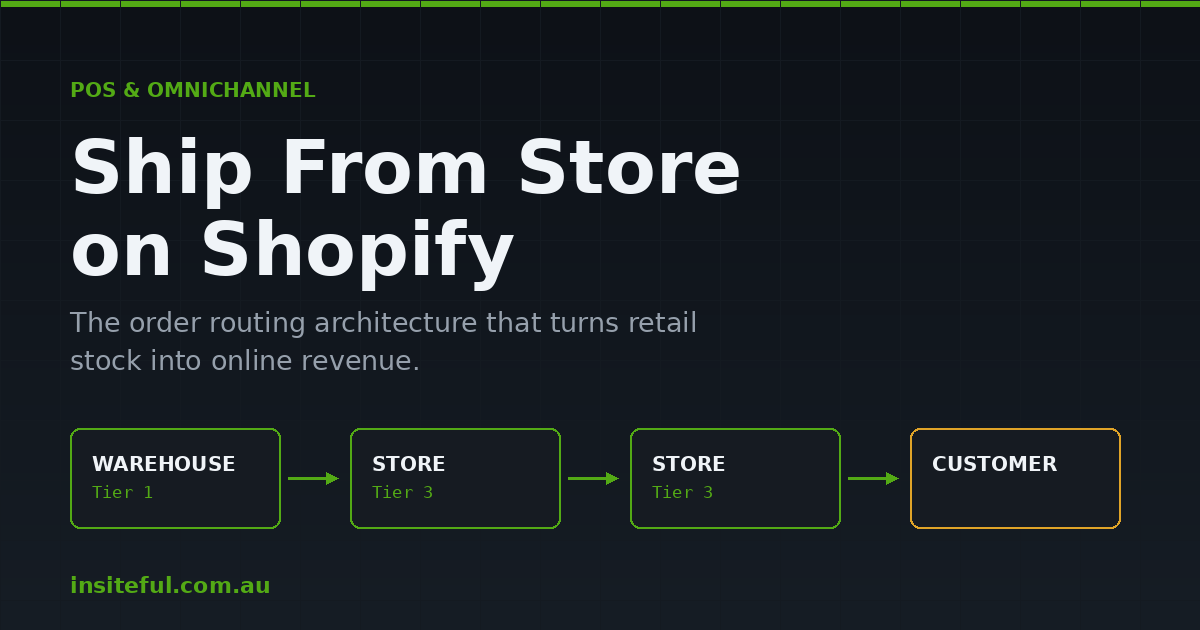
Walk into most Australian retail brands running Shopify and you will find the same quiet problem. There is stock on the shop floor in Fitzroy, stock in the stockroom in Bondi, stock in a 3PL in Truganina, and a product page online that says “Sold out.” The inventory exists. The customer wants it. The system just cannot see a path between the two.
That gap is expensive. NAB estimates Australians spent roughly $64.88 billion AUD online in the twelve months to July 2025, and a growing share of that demand arrives at brands that hold physical stock they never make available to the web. For a retailer carrying $400,000 AUD of inventory across four stores, having even 8 percent of that stock invisible to online buyers is a permanent, self-inflicted revenue leak.
Ship from store closes it. Done properly, it turns every retail location into a fulfilment node, shortens the distance between your stock and your customer, and lets you sell through slow-moving store inventory without discounting it. Done badly, it produces split shipments, angry store managers, oversold shop floors, and a delivery promise you cannot keep.
This is the build guide. Not the concept. The architecture, the routing rule ladder, the metafields, the safety stock maths, and the store-floor workflow we implement on retail builds.
What Ship From Store Actually Is Inside Shopify
Ship from store is not a feature you switch on. It is an outcome of three Shopify objects agreeing with each other.
Location. Every place that holds stock, whether it is a warehouse, a store, or a consignment partner. Shopify treats them identically at the data layer, which is exactly the problem and exactly the opportunity.
InventoryLevel. The quantity of a variant at a location, split across available, committed, incoming, and on-hand states. A store that has not been counted properly does not have inventory. It has a guess.
FulfillmentOrder. The instruction that says “these line items are to be fulfilled from this location.” Order routing is the logic that assigns fulfilment orders to locations at the moment the order is created.
The mistake we see most often is teams treating this as a shipping problem. It is not. Shipping is what happens after routing has already decided which four walls the parcel leaves from. If the routing logic is wrong, no carrier configuration rescues it.
The Three Decisions You Make Before You Touch Routing
Every retail build we run starts with three decisions made on a whiteboard, before anyone opens Settings.
1. Location taxonomy
Shopify gives you a flat list of locations. You need a structure. We name and tag every location so routing rules and reporting can group them without string matching on names.
| Location | Role | Fulfils online? | Routing tier |
|---|---|---|---|
| Truganina 3PL | Primary warehouse | Yes | 1 |
| Alexandria DC | Overflow warehouse | Yes | 2 |
| Fitzroy Store | Retail, high volume | Yes | 3 |
| Bondi Store | Retail, high volume | Yes | 3 |
| Adelaide Store | Retail, low staffing | Overflow only | 4 |
| Pop-up Chadstone | Seasonal | No | Excluded |
The tier column is not decorative. It becomes a numeric location metafield later, and that metafield is what carries the whole routing strategy.
2. Which stores are actually allowed to ship
Not every store should. A location with two staff on a Tuesday and a queue at the counter will not pick a parcel before close. We have watched retailers switch on ship from store across a fifteen store network and then spend six weeks unwinding it because four stores could not sustain the workload. Start with your two strongest stores, prove the workflow, then widen.
3. What “available” means in a store
A store’s on-hand count includes the jumper on the mannequin, the item in a fitting room, and the pair someone is carrying to the counter right now. Selling that unit online creates a cancellation. This is what safety stock buffers exist to prevent, and we cover the maths below.
The Routing Rule Ladder
Shopify’s order routing engine, configured under Settings then Shipping and delivery then Order routing, runs rules from top to bottom. Each rule filters the result of the one above it. The final surviving set of locations fulfils the order.
The five rules available are: minimise split fulfilments, stay within the destination market, ship from the closest location, use ranked locations, and use location metafields.
The order you stack them in is the entire strategy. Here is the ladder we deploy on most Australian multi-store retail builds:
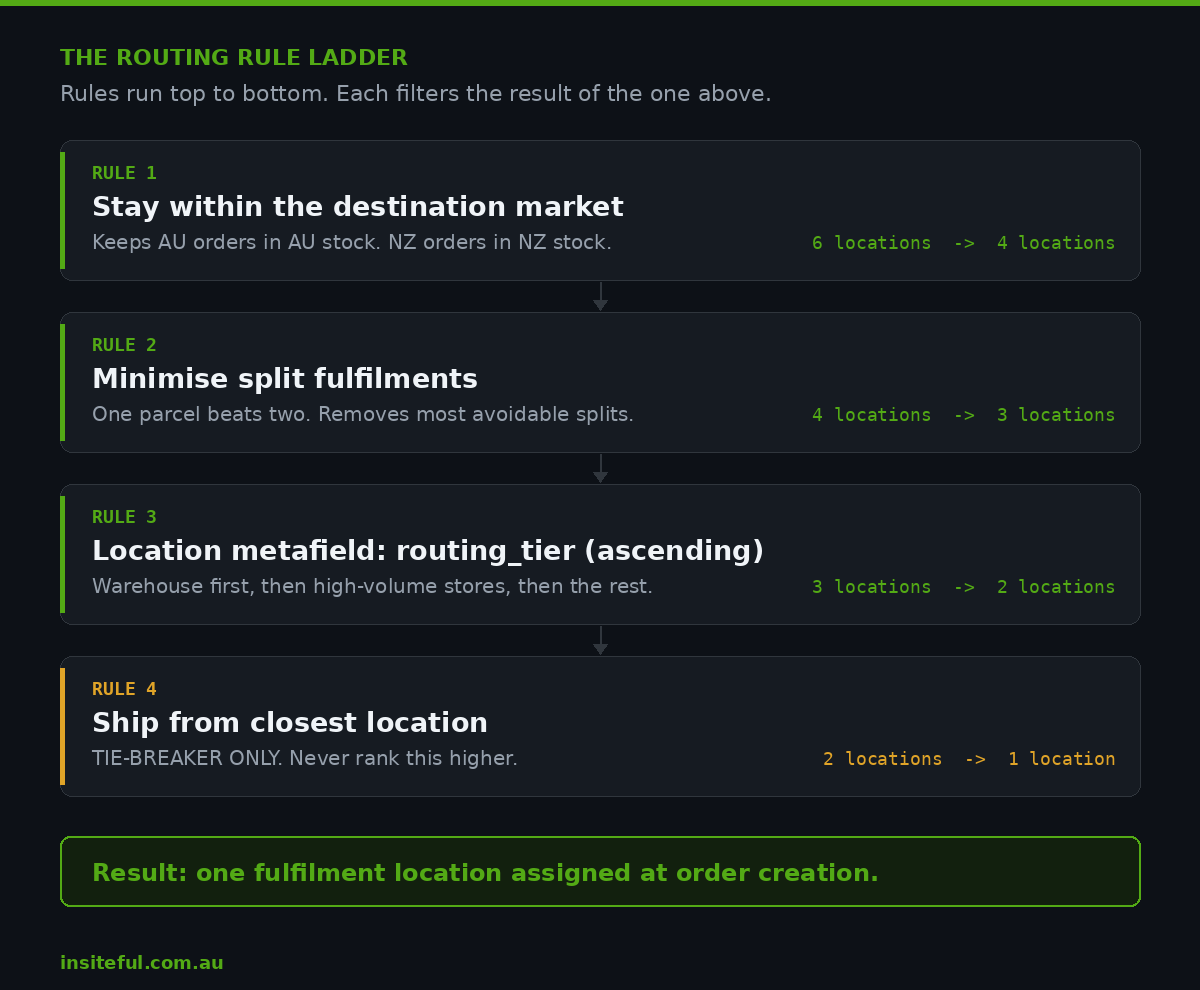
Rule 1  Stay within the destination market
        (keeps AU orders in AU stock, NZ orders in NZ stock)

Rule 2  Minimise split fulfilments
        (one parcel beats two, almost always)

Rule 3  Use location metafields: routing_tier (ascending)
        (warehouse first, then high-volume stores, then the rest)

Rule 4  Ship from closest location
        (tie-breaker only, never higher than this)
Two things about that stack matter more than the rules themselves.
Closest location belongs last. Shopify’s own guidance is to use proximity as a tie-breaker. Put it first and you will route a $12 AUD accessory to a busy flagship store because the customer lives four kilometres away, while a warehouse thirty kilometres further out could have shipped it same day at a third of the pick cost.
Minimise split fulfilments earns its place high. A two-line order split across a warehouse and a store costs you two picks, two labels, two parcels, and one confused customer receiving half an order. On a 3.2 items per order average, sitting this rule second typically removes most avoidable splits.
Location Metafields: The Rule That Does the Real Work
Rule 3 above is where the intelligence lives. Shopify supports boolean and numeric location metafields as a routing input, which means you can encode any business logic you can express as a number or a flag.
We define two on every retail build:
Namespace:  custom
Key:        routing_tier
Type:       number_integer
Owner:      Location
Values:     1 = warehouse, 2 = overflow DC,
            3 = high-volume store, 4 = low-volume store

Namespace:  custom
Key:        accepts_online_fulfilment
Type:       boolean
Owner:      Location
Values:     true / false
The boolean is the emergency brake. When a store manager calls on a Friday to say two staff are off sick, an ops lead flips accepts_online_fulfilment to false in the admin and that store drops out of routing within the next order. No developer, no deploy, no support ticket.
Setting the values in bulk is a single GraphQL mutation:
mutation {
  metafieldsSet(metafields: [
    {
      ownerId: "gid://shopify/Location/74381924",
      namespace: "custom",
      key: "routing_tier",
      type: "number_integer",
      value: "3"
    },
    {
      ownerId: "gid://shopify/Location/74381924",
      namespace: "custom",
      key: "accepts_online_fulfilment",
      type: "boolean",
      value: "true"
    }
  ]) {
    metafields { id key value }
    userErrors { field message }
  }
}
For brands on Shopify Plus, the Order Routing Location Rule Function API goes further again, letting you write custom routing logic that runs inside checkout. Most retailers do not need it. If your rules can be expressed as a tier number and a flag, stay in the admin where your ops team can change them without you.
Safety Stock: Stopping the Shop Floor From Overselling
This is the single most common reason ship from store gets switched off three months after launch. The store shows four units. Two are in fitting rooms, one is on display and shop-soiled, one is genuinely sellable. Online sells three. Two get cancelled. The customer never comes back.
The fix is a per-location buffer that hides a slice of store inventory from the online channel. The formula we use:
Buffer = ceil( avg_daily_instore_units x cover_days )

where cover_days =
   1.0  for stores counted daily
   2.0  for stores counted weekly
   3.0  for stores with open displays / high try-on rates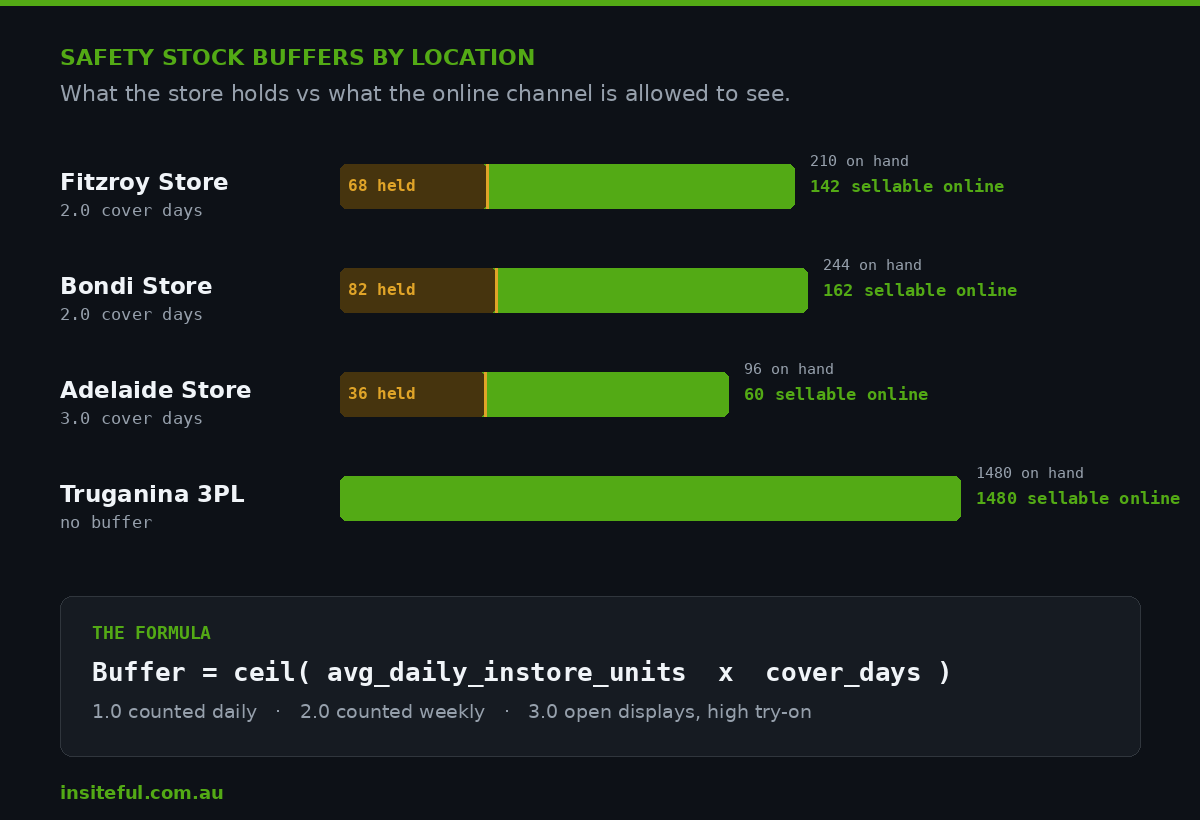
Applied to a real apparel network, that produces something like this:
| Location | Avg daily in-store units | Cover days | Buffer held back |
|---|---|---|---|
| Fitzroy Store | 34 | 2.0 | 68 |
| Bondi Store | 41 | 2.0 | 82 |
| Adelaide Store | 12 | 3.0 | 36 |
| Truganina 3PL | 0 | 0 | 0 |
Buffers are not free. Holding 68 units back at Fitzroy means those units are invisible online. That is the trade you are making: a small amount of suppressed availability in exchange for a cancellation rate low enough that customers keep trusting the delivery promise. We would rather show 4 units and ship 4 than show 7 and ship 5.
Review buffers monthly against actual cancellation data. If a store has not produced a single stock-out cancellation in eight weeks, its buffer is too conservative and you are hiding sellable stock.
The Store Side: What Happens at 3pm on a Thursday
Routing is a settings screen. Ship from store is an operational habit. The build only works if the store floor workflow is designed with the same care as the code.
What we specify on every retail build:
- A single daily cutoff. One time, same across the network. Orders routed to a store before cutoff ship that day. After cutoff, next business day. We usually land on 2pm local, which leaves room for a genuine pick before the carrier collection.
- A named owner per shift. Not “the team.” One person on the roster owns online picks for that shift. Ship from store fails in stores where the job belongs to everybody.
- A physical pick station. A bench, a label printer, satchels, and a tub. If staff have to walk to the office to print a label, picks get skipped when the store is busy.
- An auto-reassign escape hatch. If a fulfilment order sits unactioned for more than 90 minutes past cutoff, it reassigns to the primary warehouse automatically. Shopify Flow handles this without a line of custom code.
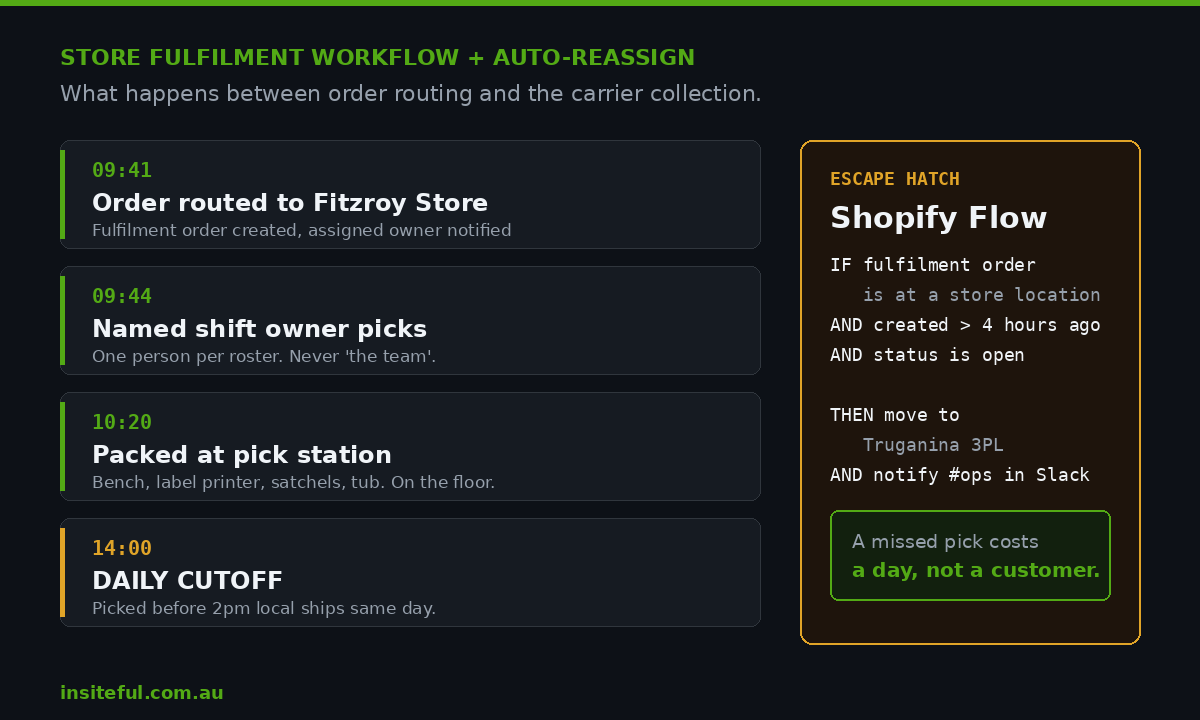
The Flow logic is short enough to describe fully:
Trigger:   Fulfillment order scheduled / hourly check
Condition: fulfillmentOrder.assignedLocation.name
             is not "Truganina 3PL"
       AND fulfillmentOrder.createdAt is more than 4 hours ago
       AND fulfillmentOrder.status is "open"
Action:    Move fulfillment order to "Truganina 3PL"
       AND Send internal Slack notification
That single automation is the difference between ship from store being a growth lever and being a source of late orders. It means a missed pick costs you a day, not a customer.
Endless Aisle: The Same Plumbing, Running Backwards
Once routing and buffers are correct, the reverse flow costs almost nothing to add. Endless aisle lets a staff member sell a product the store does not physically hold, taking payment at the counter and shipping from wherever the stock actually sits.
In Shopify POS this is the ship to customer flow: the associate adds the item to the cart, selects shipping at checkout, enters the customer’s address, takes payment, and the order routes through the exact same rule ladder you built above. Allbirds is the commonly cited example, using it so a customer asking for a size 14 in a colour the store does not carry walks out having already paid, with the pair on its way from a warehouse.
For Australian retailers with two or three stores and a long tail of sizes, this is often the fastest revenue win in the whole project. The stock already exists. The customer is already standing in front of you holding a card. All you are removing is the sentence “we don’t have that here, try the website.”
One configuration note: make sure your POS staff can see cross-location inventory. If the associate cannot confirm the item exists in Truganina before promising it, they will stop offering the option within a fortnight. We cover the permission and hardware side of this in our guide to Shopify POS Pro versus Lite.
The Delivery Promise You Can Actually Keep
Routing from a store changes your transit times, so it has to change what you say on the product page.
Australia Post Metro offers next business day delivery to same-state metro postcodes across Sydney, Melbourne, Brisbane, Perth and Adelaide, and the service had already moved more than 2.6 million parcels by mid-2024. In April 2026 Australia Post acquired Rendr to scale same-day capability further. For a retailer with a Fitzroy store, a Melbourne metro order routed to that store is a genuine next-day proposition in a way a Truganina 3PL pick with a 4pm cutoff sometimes is not.
Australia Post also reports that 85 percent of shoppers say a reliable delivery experience will be the most important factor in trusting online retailers over the next five years. Reliability, not speed. That is a routing instruction as much as a marketing one.
Practically, that means:
- Delivery profiles configured per location group, not one flat rate across the network
- A cart-level estimate that reflects the location most likely to be selected, not your slowest node
- Product page copy that promises the band you hit 95 percent of the time, not your best case
If you are also running collection, the same location data feeds it. Our click and collect build guide covers the pickup side of the same architecture.
The Numbers We Watch After Launch
Ship from store is measurable within a fortnight. These are the four metrics on the dashboard we hand over:
| Metric | What it tells you | Healthy range |
|---|---|---|
| Store fulfilment share | Percentage of online orders shipped from retail | 15 to 35 percent |
| Split shipment rate | Orders sent in more than one parcel | Under 6 percent |
| Stock-out cancellation rate | Buffer accuracy, by location | Under 1.5 percent |
| Store pick compliance | Picks completed before cutoff | Above 92 percent |
Store pick compliance is the leading indicator. When it slips below 90 percent for two consecutive weeks in one location, that store has an operational problem, not a technical one, and the answer is usually staffing or the pick station, never the routing rules.
Four Failure Modes We See On Every Retail Build
Counting discipline that has not caught up. Ship from store exposes inventory accuracy that a store could previously hide. If a location’s cycle counts are quarterly, fix that before you route a single order there. A store at 88 percent inventory accuracy will produce cancellations no buffer can absorb.
Proximity ranked too high. Covered above, and worth repeating because it is the most common misconfiguration we inherit. Closest is a tie-breaker.
No exclusion for pop-ups and consignment. Seasonal and partner locations get created for stock visibility and then quietly join the routing pool. Set accepts_online_fulfilment to false at creation, not after the first misrouted order.
Returns routed back to the wrong place. If an order ships from Bondi and the return goes to Truganina, that unit leaves the store’s stock position permanently and the store manager stops cooperating. Return routing has to mirror fulfilment routing, which is the architecture we walk through in our piece on buy online, return in store.
How We Do It at Insiteful
We have built and rebuilt Shopify stores for twenty-five years, at a rate of around 200 sites a year, and retail networks are where the gap between a store that looks finished and a store that works is widest.
On a ship from store build, our sequence does not change:
- Location audit first. Before any configuration, we pull inventory accuracy, staffing, and daily unit velocity for every location. Stores that cannot sustain the workflow do not go in phase one. This is usually the least popular meeting of the project and the one that saves it.
- Taxonomy and metafields. Routing tiers and the fulfilment flag get set across every location, so the rules operate on structured data rather than on whatever a location happened to be named in 2021.
- Rule ladder, then buffers. Routing goes live on two stores with conservative buffers. We run it for two weeks and read the cancellation data before widening.
- Store workflow and training. Cutoff, pick station, named owner, and the Flow escape hatch. We write the one-page SOP the store actually pins to the wall.
- Instrumentation. The four metrics above, reporting weekly, so the ops team can see a store drifting before customers do.
Typical retail builds of this shape sit in the $8,500 to $25,000 AUD range depending on network size, integration surface, and how much inventory remediation is needed first. The routing work itself is rarely the expensive part. The honest audit of which stores are ready is where the value sits, and it is the step most agencies skip.
If you are running multiple locations and have not yet mapped how they interact, our multi-location Shopify POS build guide is the right place to start before this one.
Where To Start This Week
You do not need a project to make progress. Three things you can do in the next few days:
- Export inventory by location and calculate what percentage of your total stock value sits in stores that currently cannot fulfil online. That number is your opportunity, in dollars.
- Pull your last 90 days of cancellations and tag them by cause. If stock accuracy is already producing cancellations from your warehouse, stores will make it worse before they make it better.
- Pick your two strongest stores by staffing and counting discipline. They are your phase one, regardless of which ones do the most retail revenue.
When you are ready to build it properly, start with a build assessment. We will look at your location data, your inventory accuracy, and your store operations, and tell you honestly whether ship from store is a three week configuration job or a six month inventory project. Both answers happen. Knowing which one you are facing before you start is the whole point.