
Baymard Institute puts the average cart abandonment rate at 70.22 per cent, a figure compiled from 50 separate studies. Most Shopify store owners read that number, wince, and go straight to work on their checkout. That instinct skips the surface where the decision actually happens. Before anyone reaches Shopify’s checkout, they open the cart. On most Australian stores we audit, that cart is either the theme’s untouched default drawer or a plugin bolted on in 2023 that nobody has looked at since.
The cart drawer is the highest-traffic piece of custom UI on your storefront. Every single buyer passes through it, usually more than once per session. It deserves the same design attention as the product page, and on Shopify it can be built natively, with no app subscription and no third-party JavaScript slowing the site down. This is how we approach it.
The cart is a decision point, not a container
Shoppers do three things in a cart: they confirm what they picked, they look for the total cost, and they decide whether to commit now or drift away. A drawer that treats itself as a list of line items serves the first job and ignores the other two.
The second job is where most stores bleed. In Baymard’s documented reasons for abandonment, 48 per cent of shoppers who abandoned during checkout did so because extra costs, meaning shipping, taxes and fees, came in too high. The fix is not hiding those costs. It is surfacing them earlier. A drawer that shows a shipping estimate, states the free shipping threshold, and confirms GST-inclusive pricing removes the surprise before it can kill the order at checkout.
The third job, commitment, is about friction and reassurance in the final 40 pixels: one unmistakable checkout button, express payment where it earns its place, and returns or delivery reassurance a glance away. Everything else in the drawer either supports those three jobs or gets cut.
Drawer or cart page: decide per device and per catalogue
The industry default has swung hard toward drawers, and for most catalogues that is right. A slide-out keeps the shopper in context, preserves scroll position on the collection they were browsing, and turns add-to-cart into a two-second confirmation loop instead of a full navigation. But we do not treat it as a religion, and the data does not either. Aggregated split tests across the CRO community show drawers winning most of the time, with meaningful exceptions on complex carts.
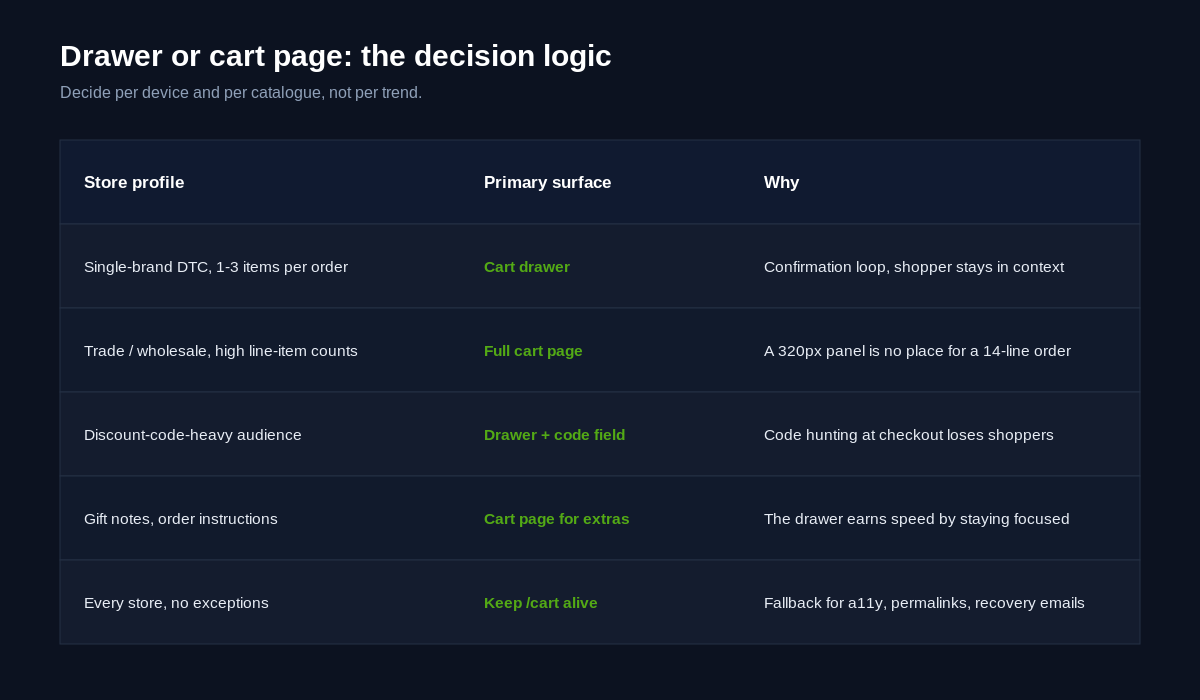
Here is the decision logic we apply on client builds:
- Single-brand DTC, one to three items per order: drawer, always. The cart is a confirmation step, not a workspace.
- High line-item counts, trade or wholesale buyers, quantity editing across many SKUs: keep a full cart page as the primary surface. A 320-pixel-wide panel is a miserable place to manage a 14-line order.
- Discount-code-heavy audiences: put the code field in the drawer. If shoppers must reach checkout to apply a code, some will leave to hunt for one and never come back.
- Either way, never delete the /cart page. It is the fallback for accessibility tools, the landing surface for cart permalinks and recovery emails, and the safety net when JavaScript fails. The drawer is an enhancement layered over it.
There is also a workable hybrid. Serve the drawer as the response to add-to-cart everywhere, and let the cart icon in the header link to the full /cart page. Impulse confirmation gets the fast loop, deliberate review gets the big surface, and shoppers self-select without you guessing. If you run gift options, order notes or delivery instructions, keep those on the page rather than cramming them into the panel. The drawer earns speed by staying focused.
The anatomy of a drawer that converts
Every converting drawer we ship contains the same nine elements, in roughly the same hierarchy. Treat this as a build checklist:
- Line items with full context. Product image, title, the variant options chosen, unit price and line price. Shoppers should never need to leave the drawer to remember what a line item is. We covered how variant clarity earns trust in our piece on Shopify variant picker design, and the same rule follows the product into the cart.
- Inline quantity and remove controls. Stepper buttons with a 44-pixel touch target, not a bare text input, and a remove link that works without a confirmation modal.
- A subtotal that tells the truth. GST-inclusive, with shipping expectation set directly underneath rather than discovered at checkout.
- Free shipping progress. “You are $18 away from free shipping” with a visual bar. It answers the extra-costs objection and nudges order value in the same element.
- One primary action. A full-width checkout button, colour-isolated so nothing else in the drawer competes with it.
- Express checkout, deliberately placed. More on this below.
- A single upsell slot. One or two relevant items, never a carousel of eight.
- Reassurance microcopy. Delivery window, returns period, secure payment. One line each.
- A designed empty state. An empty drawer that says “your cart is empty” is a dead end. Route shoppers to bestsellers or their recently viewed items.
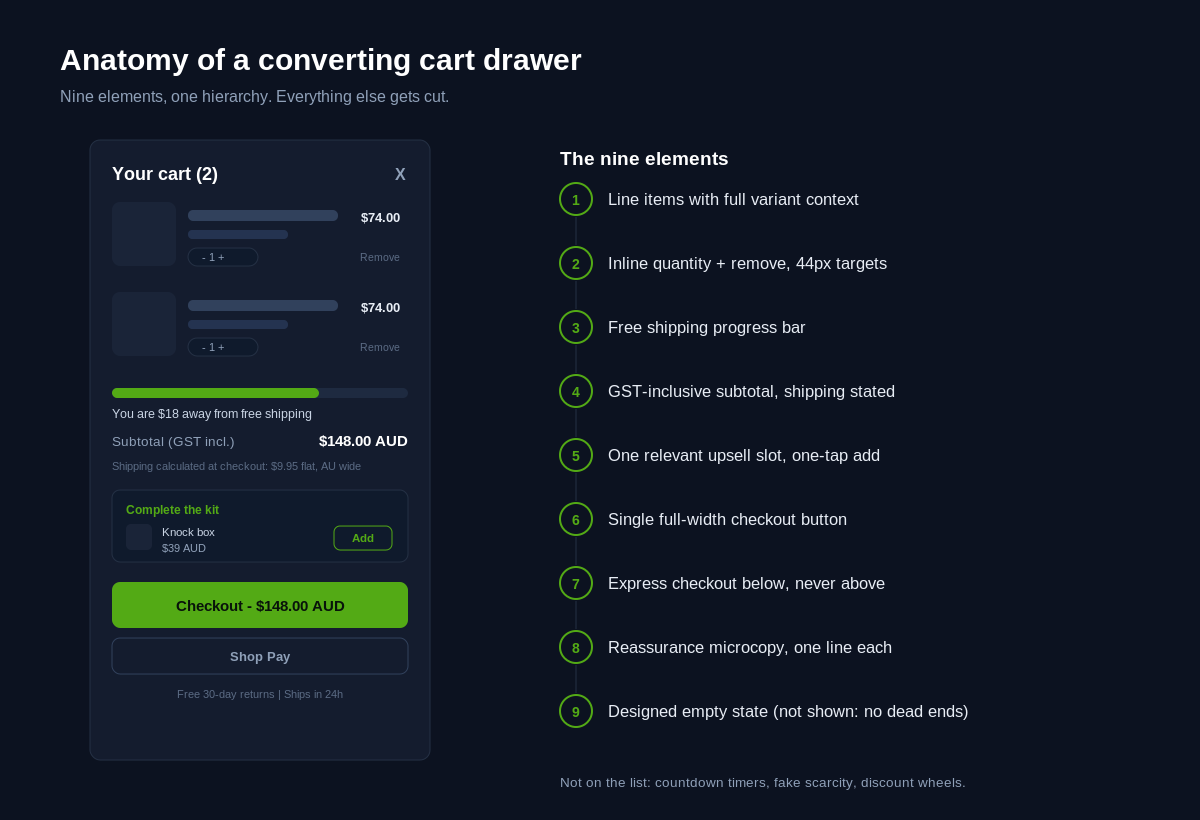
Notice what is not on the list: countdown timers, fake stock scarcity, spinning discount wheels. They cheapen the brand, and the shoppers they pressure into checkout return items at a higher rate. The drawer’s job is confidence, not panic. The same philosophy runs through our work on microinteractions that sell: subtle, honest cues outperform theatrics.
Build it on the Cart API and bundled section rendering
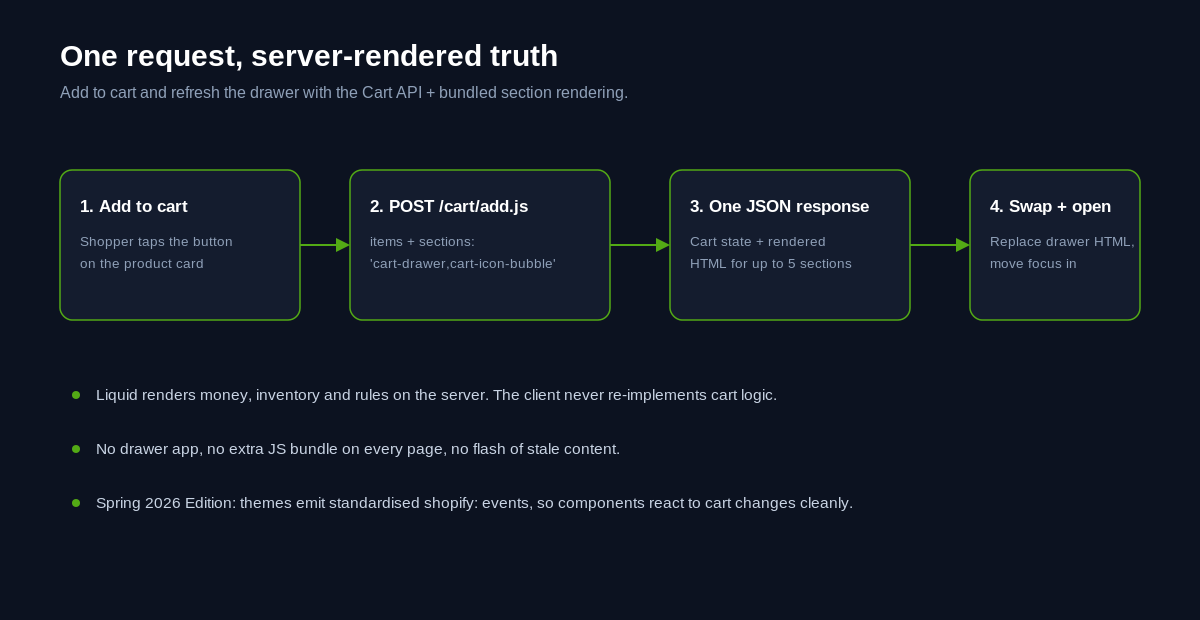
Here is the part most cart drawer apps do not want you to know: Shopify’s native tooling already does the hard work. The Ajax Cart API handles add, change and update operations, and bundled section rendering returns freshly rendered HTML for up to five sections of your theme in the same response. One request adds the item and hands back the updated drawer markup. No app, no separate state layer, no flash of stale content.
The core of a native drawer refresh looks like this:
const response = await fetch('/cart/add.js', {
  method: 'POST',
  headers: { 'Content-Type': 'application/json' },
  body: JSON.stringify({
    items: [{ id: variantId, quantity: 1 }],
    sections: 'cart-drawer,cart-icon-bubble'
  })
});
const data = await response.json();
document.querySelector('#CartDrawer').innerHTML =
  extractSection(data.sections['cart-drawer']);
document.querySelector('#CartIconBubble').innerHTML =
  data.sections['cart-icon-bubble'];
openDrawer();
The server renders the drawer section with real Liquid, real money formatting and real inventory rules, so the client never re-implements cart logic in JavaScript. That is the whole trick. Shopify’s current reference themes work exactly this way, reading section IDs from data attributes rather than hardcoding them, and the Spring 2026 Edition standardised storefront events under the shopify namespace so theme components and app embeds can react to cart changes without stepping on each other.
If your theme is a recent Online Store 2.0 build, you likely have 80 per cent of this wiring already. The build work is customising the drawer section itself: the layout, the progress bar, the upsell slot and the microcopy, all in Liquid and CSS you own.
Two upsells, native data, no app
Cart upsells earn their place when they feel like a considered suggestion rather than a pop-up ambush. Our rules: maximum two suggestions, relevant to what is already in the cart, priced below the average line item, and addable in one tap without closing the drawer.
You do not need an upsell app for this. Shopify’s Search & Discovery app is free and lets merchandisers define complementary products per item, which the storefront can read natively:
{% assign complements = cart.items.first.product
  | recommendations: intent: 'complementary', limit: 2 %}
{% for product in complements %}
  {% render 'cart-upsell-card', product: product %}
{% endfor %}
Complementary recommendations come from your own merchandising rules, so a customer with a $329 espresso machine in the cart sees the $39 AUD knock box and the milk jug, not a random bestseller. When the strategy is bigger than an add-on, for example a genuine post-purchase flow, that belongs after payment, which we broke down in our guide to post-purchase upsells on Shopify. The drawer is for low-consideration additions only.
Measure the slot like any other component. Attach rate, meaning the percentage of orders containing an upsold item, is the honest metric, and in our builds a well-targeted two-item slot settles between 6 and 12 per cent of orders. If yours reads near zero, the suggestions are wrong, not the pattern. And one hard rule: the upsell never interrupts checkout. No interstitial modals between the checkout button and Shopify’s checkout. Every extra step you insert at that moment re-opens a decision the shopper had already made.
Express checkout belongs in the drawer
Shopify’s own research, run with a major global consulting firm, found Shop Pay converts up to 50 per cent better than guest checkout, and that simply having it visible lifts lower-funnel conversion by around 5 per cent. For a returning customer on a phone, the drawer’s express button is the shortest path from decision to paid order that exists in ecommerce.
Placement discipline matters, though. The pattern we ship: primary checkout button first, express options underneath, separated by a quiet divider. When the express wallet buttons sit above the main CTA they fragment the decision, and shoppers who do not use Apple Pay or Shop Pay hesitate. When they sit below, they read as an accelerator for the people who want them and are invisible furniture to everyone else.
One caution from our audit work: dynamic wallet buttons are rendered by Shopify and third parties, and they load late. Reserve their space in CSS so the drawer does not reflow while the shopper is reaching for the checkout button. A layout shift at the moment of commitment is the most expensive 100 milliseconds on your site. Once they tap through, the handoff should feel continuous, which is why we pair drawer work with checkout branding so the drawer and checkout read as one system.
Mobile, motion and accessibility are the same build
Well over two-thirds of Australian ecommerce sessions are on phones, so the drawer is primarily a mobile component that happens to also work on desktop. That ordering changes design decisions. The drawer takes the full viewport width on mobile with a visible close affordance at thumb height. Quantity steppers and remove targets hit 44 pixels minimum. The checkout button sits inside the safe area, not behind a browser toolbar.
Accessibility is not a separate pass, it is the same work done properly:
- The drawer is a dialog:
role="dialog",aria-modal="true", labelled by its heading. - Focus moves into the drawer on open, stays trapped inside while it is open, and returns to the trigger on close.
- Escape closes it. The overlay click closes it. Both are announced.
- Line-item changes fire a polite live region update: “Quantity updated, subtotal $148 AUD”.
- The slide animation respects
prefers-reduced-motionand swaps to a simple fade.
These behaviours are exactly what WCAG asks for, and they are also just good interface engineering. A keyboard user who cannot escape your drawer and a screen reader user who never hears the subtotal change are both customers your analytics will quietly record as abandonment.
Count the performance cost before you install anything
The fastest way to ruin a cart drawer is to install one. Popular drawer and upsell apps inject their own JavaScript bundle, their own CSS, often their own copy of a framework, and they do it on every page of the site because the drawer is global. We have audited stores where cart apps contributed more blocking script than the theme itself, dragging interaction responsiveness down site-wide. The irony is brutal: an app installed to lift conversion suppressing it on every page.
A native drawer built into the theme adds a few kilobytes of Liquid-rendered markup and a small script you control. Before and after any cart work, measure: run the store through PageSpeed Insights, check INP and CLS on mobile, and profile what loads on a collection page that has nothing to do with the cart. Our performance methodology, covered in our image optimisation guide, applies here unchanged: the storefront earns speed by owning its critical UI instead of renting it.
Baymard estimates that better checkout flow and design alone represents a 35.26 per cent potential lift in conversion for the average large ecommerce site, worth some 260 billion US dollars in recoverable orders across the US and EU. The cart surface sits at the front of that flow. You do not capture any of it by adding weight, you capture it by removing friction.
What this is worth in dollars
Run the maths on a mid-size Australian store doing $2.4M AUD a year in online revenue at a 2.4 per cent conversion rate. Suppose the cart-to-checkout step currently passes 62 per cent of sessions that open the drawer, a typical figure we see in GA4 funnels for un-designed carts. A rebuilt drawer that lifts that step to 68 per cent, well within the range we observe after fixing cost transparency, express placement and mobile ergonomics, is worth roughly $230,000 AUD in incremental annual revenue before a single new visitor lands on the site.
That is the argument for treating the drawer as a design project rather than an app install. The surface is small. The traffic through it is total. Small percentage moves compound into real money, and the work, done natively, has no ongoing subscription bleeding the margin it created. Product page and cart work together as one system, which is why we usually scope them together, as covered in our product page design guide.
How We Do It at Insiteful
Cart drawer work at Insiteful is a structured mini-project inside a broader build, or a standalone conversion sprint on an existing store. The process:
- Funnel audit first. We pull the GA4 cart-to-checkout step rate, segment it by device, and screen-record real sessions. We do not redesign until we know exactly where the current drawer leaks.
- Design in the brand system. Emma’s team designs the drawer as part of the storefront’s component library: same type scale, same spacing tokens, same button hierarchy. It should look inevitable, not installed.
- Native build. Liquid section, Cart API with bundled section rendering, no third-party drawer app. Focus management, live regions and reduced-motion support are in the acceptance criteria, not a stretch goal.
- Measured release. We ship behind a theme A/B where traffic justifies it, or with before/after funnel measurement where it does not, and we report the step-rate change in plain numbers.
On a recent apparel build the drawer rebuild was a two-week workstream inside a larger theme project: audit in week one, design, build and accessibility QA in week two. The client’s mobile cart-to-checkout rate moved from 58 to 66 per cent within a month of release, with no change to traffic or offer. The drawer did not do anything clever. It stopped doing things wrong.
The takeaway
The cart drawer is the one interface every buyer touches, and on most stores it is the least designed thing on the site. Show costs before checkout does. Pick drawer or page per device and catalogue, not per trend. Build on the Cart API and bundled section rendering so the server stays the source of truth. Keep upsells native and restrained, put express checkout below the primary button, and treat accessibility as the spec, not the afterthought. Then measure the step rate and watch what a small, honest surface can do.
If your cart-to-checkout number is leaking and you want it engineered properly, book a build assessment and we will show you exactly where the drawer is costing you orders.