
Watch a session recording of almost any Shopify product page and you will see the same thing: the shopper’s cursor, or thumb, goes straight to the variant picker. Size, colour, finish, pack quantity. It is the single most-touched control on the highest-intent page of the store, and on most Australian Shopify sites it is still whatever the theme shipped with. A default dropdown, a row of unstyled buttons, no swatches, no availability logic, and an image gallery that does not follow the shopper’s selection.
That gap matters more here than almost anywhere. Australians spent a record $69 billion online last year according to Australia Post’s 2025 eCommerce Report, up 12% year on year, and online fashion alone reached $11.6 billion. Fashion and apparel is precisely the category where variant selection does the heaviest lifting: the wrong size picker experience does not just lose the sale, it creates the return that erases the margin on the next one. This is a build guide, from the design side of our studio, on how we engineer variant pickers that help people choose correctly the first time.
The most-touched control on the page is the least designed
The research on this is not flattering. Baymard Institute’s product page benchmark, built on more than 4,400 usability test sessions, rates 52% of desktop sites and 62% of mobile sites as having a mediocre or worse product page experience. Dig into the variant-specific findings and it gets sharper: 28% of sites have what Baymard classes as severe UX issues with how product data is synchronised across variations, meaning the price, imagery or availability shown does not correctly follow the option the shopper picked.
The commercial upside of fixing this is well documented. Industry testing consistently puts the add-to-cart improvement from replacing dropdown selectors with visible buttons and swatches in the 15 to 20% range, because a dropdown hides the decision behind a click while buttons show the whole option space at a glance. Shopify’s own product taxonomy work now supports this natively, which means most stores no longer need the swatch app they are paying for.
There is also a returns dimension that founders consistently underprice. Sizing issues drive around 45% of all ecommerce returns, and apparel return rates run between 20 and 40% of orders. For a $2M AUD apparel brand, every percentage point of return rate is roughly $20,000 AUD in revenue that comes back through the warehouse door, minus shipping both ways, inspection and restocking. A variant picker that communicates fit, availability and appearance accurately is returns prevention infrastructure, not decoration. Australia Post’s data backs the customer-experience angle too: 65% of Australian shoppers say friction-free returns contribute to a great online experience, and the cheapest return to process is the one that never happens.
Dropdowns, buttons or swatches: one decision per option type
The first design decision is which control renders each option, and the answer is different per option, not per product. Here is the decision table we apply on every build.
| Option type | Control we build | Why |
|---|---|---|
| Colour / pattern / material | Visual swatch (colour chip or image crop) | Shoppers evaluate colour visually; a text label called “Moss” means nothing on its own |
| Size (apparel, footwear) | Text pills, all visible, with an inline size guide link | The full range must be scannable at a glance; hiding sizes in a dropdown masks the stock story |
| Pack quantity / length / capacity | Text pills with unit pricing underneath | The comparison shoppers make is value per unit, so show it at the point of choice |
| Options with 20+ values | Dropdown, grouped and searchable if long | Past roughly 20 values, pills become a wall; a structured dropdown scans faster |
| Style variants with different imagery | Image swatches or combined listings | When colour alone does not tell the story, show the actual product thumbnail |
Two details in that table earn their place on real stores. Unit pricing under quantity pills matters because Australian shoppers comparing a 3-pack against a 5-pack are doing mental division anyway; doing it for them removes a hesitation you can watch disappear in session recordings. And the inline size guide link belongs inside the option group, not in a tab further down the page, because the moment of size doubt happens at the picker, and a shopper who leaves the picker to hunt for a size chart does not always come back.
The mistake we correct most often on incoming builds is a theme rendering every option as the same control. Dawn and most OS 2.0 themes let you set pips or dropdowns per option in the product-information section, but the setting is buried and the default is rarely right. The second most common mistake is swatch sprawl: image swatches for size options, where a photograph adds nothing and the grid becomes visual noise.
Native swatches without another app
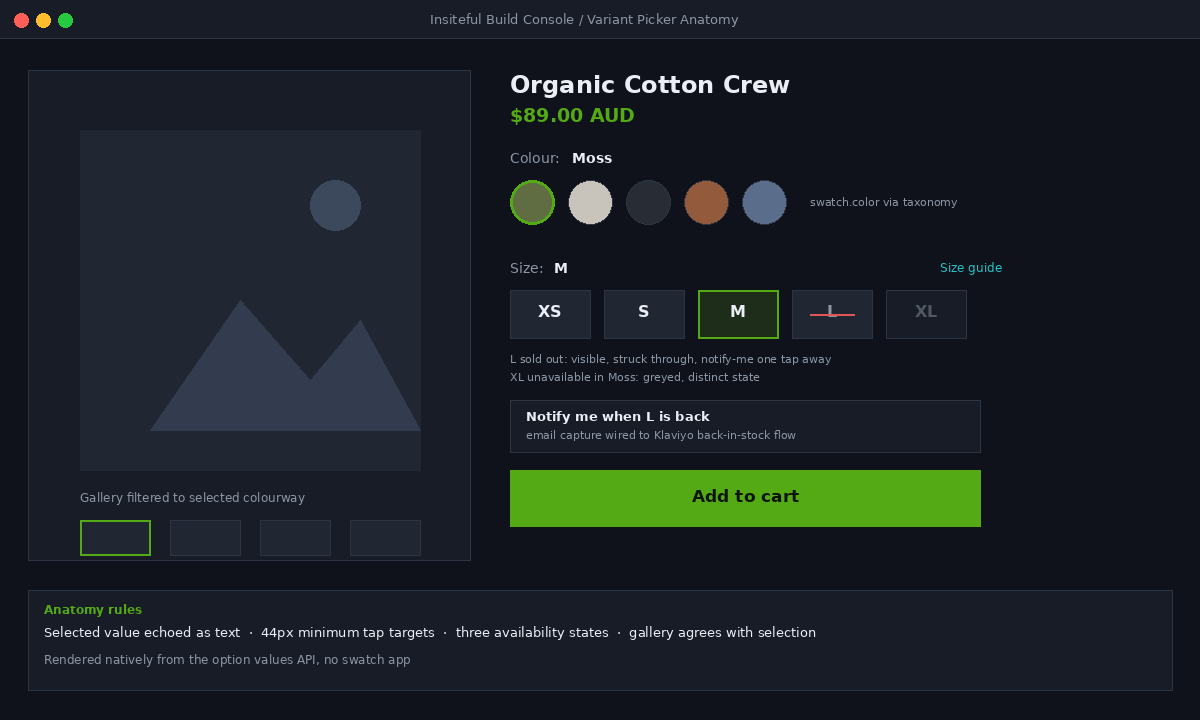
Since Shopify wired swatches into the product taxonomy, colour swatches are a data problem, not an app problem. Connect your colour option to the standard colour category metafield, assign each option value its taxonomy colour or upload a custom swatch image, and the swatch data becomes available to Liquid directly. No third-party script, no extra render-blocking stylesheet, no monthly fee.
The Liquid is compact. This is the core of the swatch loop we ship, trimmed to its essentials:
{% for value in option.values %}
  {% if value.swatch.image %}
    <label class="swatch swatch--image {% if value.available == false %}is-oos{% endif %}">
      <input type="radio" name="{{ option.name }}" value="{{ value | escape }}">
      <img src="{{ value.swatch.image | image_url: width: 96 }}" alt="{{ value }}" width="48" height="48" loading="lazy">
    </label>
  {% elsif value.swatch.color %}
    <label class="swatch" style="--swatch: {{ value.swatch.color }}">
      <input type="radio" name="{{ option.name }}" value="{{ value | escape }}">
      <span class="swatch__chip"></span>
      <span class="visually-hidden">{{ value }}</span>
    </label>
  {% endif %}
{% endfor %}
Two design rules ride along with that snippet on every build. First, the selected value is always echoed as text next to the option label, so the shopper never has to decode a chip. Baymard’s testing is blunt about colour-only communication, and so is WCAG: colour can never be the only signal. Second, swatch chips get a real border and a distinct selected state with more than a colour change, because a white swatch on a white card with no border is invisible, and we still see that on live Australian stores every week.
The three availability states shoppers need to see
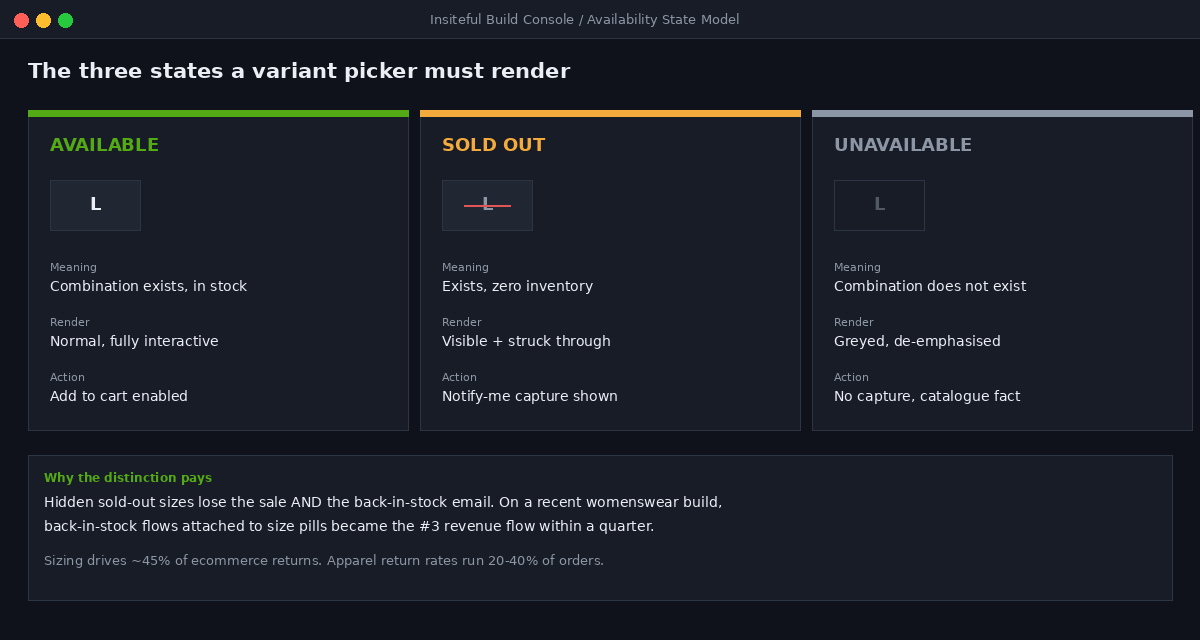
A variant picker has to communicate three different stock states, and most themes collapse them into two, which quietly misleads shoppers:
| State | Meaning | How we render it |
|---|---|---|
| Available | This combination exists and is in stock | Normal, fully interactive |
| Sold out | The combination exists but has zero inventory | Visible, struck through, still selectable, back-in-stock capture shown |
| Unavailable | The combination does not exist for the current selection | Greyed and de-emphasised, distinct from sold out |
The distinction between sold out and unavailable is the one that gets lost. If a shopper picks Moss and the Large pill greys out, they need to know whether Large never came in Moss or whether it sold through. One is a catalogue fact, the other is a demand signal with a recovery path. Hiding sold-out variants entirely is the worst option: the shopper who wanted that combination bounces without telling you, and you lose both the sale and the back-in-stock email that would have recovered it later. Keep the value visible, mark it clearly, and put a notify-me capture one tap away.
Modern OS 2.0 themes expose exactly this through the option values API, and the logic belongs in Liquid, not in a JavaScript patch on top:
{% for value in option.values %}
  {% assign state = 'available' %}
  {% unless value.variant %}{% assign state = 'unavailable' %}{% endunless %}
  {% if value.variant and value.variant.available == false %}{% assign state = 'soldout' %}{% endif %}
  <label class="opt opt--{{ state }}">
    <input type="radio" name="{{ option.name }}" value="{{ value | escape }}"
      {% if value.selected %}checked{% endif %}>
    {{ value }}
    {% if state == 'soldout' %}<span class="opt__note">Sold out, notify me</span>{% endif %}
  </label>
{% endfor %}
There is one exception worth designing deliberately: end-of-line stock. When a size or colour is discontinued rather than replenishing, the notify-me capture is a false promise, so the state needs different copy. We render discontinued values with a plain “final run” treatment and no capture form, because collecting emails for stock that will never return burns trust twice, once at signup and once when the email never arrives. The picker is a promise about the catalogue, and every state it renders should be one the fulfilment side can keep.
On apparel builds we pair the sold-out state with a Klaviyo back-in-stock trigger, and the numbers make the case on their own. On a recent womenswear build, back-in-stock flows attached to the size pills became the third highest revenue flow in the account within a quarter, behind only welcome and abandoned checkout. That revenue simply did not exist when sold-out sizes were hidden.
Variant images that follow the shopper’s selection
The second half of variant UX is the gallery. When a shopper taps the Moss swatch, the imagery must switch to Moss, and only Moss. Showing a 40-image gallery where the shopper has to scroll past every colourway to find theirs is one of the most common conversion leaks we find in audits, and it is entirely fixable on native Shopify.
For simple catalogues, assigning each variant a featured image and letting the theme jump the gallery on selection is enough. For serious colour-driven catalogues we group media per colour using alt-text conventions or metafield-attached media lists, so selecting a colour filters the whole gallery down to that colourway, not just the first frame. The shopper should never see imagery that contradicts their selection.
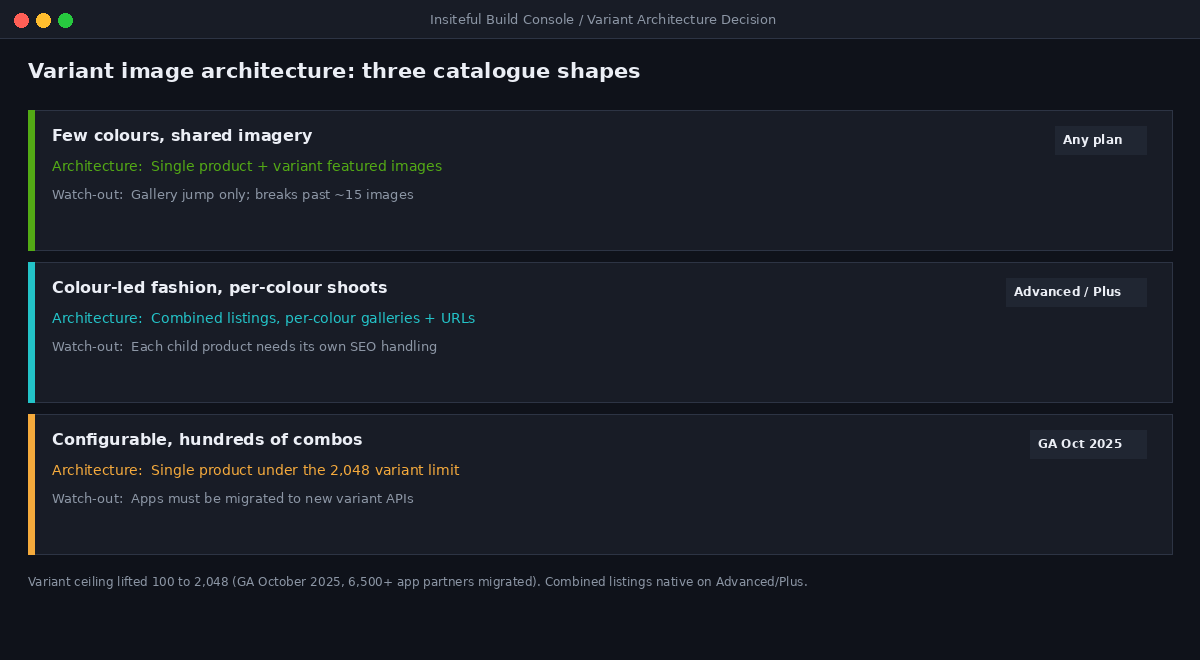
Then there is the structural option most Australian brands still have not heard of: combined listings. Since Shopify launched combined listings, separate products can be grouped into a single buying experience, so each colourway keeps its own URL, its own media gallery and its own description while presenting as one product with a unified picker. Together with the variant ceiling lifting from 100 to 2,048, which became generally available in October 2025 with more than 6,500 app partners migrated to the new APIs, the old workarounds of duplicated products and hacked-together colour linking are obsolete. Native combined listings require Advanced or Plus, and for brands below those plans we build the same experience with a lightweight linked-products metafield pattern rather than an app.
Which architecture to pick is a data-modelling decision we make deliberately on every build:
| Catalogue shape | Architecture | Watch-out |
|---|---|---|
| Few colours, shared imagery | Single product, variant featured images | Gallery jumping without filtering feels broken past ~15 images |
| Colour-led fashion, distinct shoots per colour | Combined listings (native on Advanced/Plus) | Each child product needs its own SEO handling |
| Configurable products, hundreds of combinations | Single product under the 2,048 limit | Apps and integrations must be on the new variant APIs |
One more gallery detail that separates a designed picker from a default one: preloading. When the shopper is hovering or focusing a colour swatch, the first image of that colourway should already be fetching, so the switch on selection is instant rather than a grey placeholder. It is a one-line responsive image hint per swatch, and it is the difference between a gallery that feels engineered and one that feels like a page reload wearing a costume. On 4G mobile connections, which is where a large share of regional Australian shoppers still sit, that preload is frequently the whole perceived-performance story.
Mobile and accessibility are the same fix
Two thirds of Australian ecommerce sessions are on a phone, and the variant picker is a thumb target. Our floor is a 44px minimum tap size on every pill and swatch, with real spacing between them, because a size grid where Medium and Large are 30px apart is how mis-taps become mis-orders become returns. The average Australian online basket is sitting at $95 according to Australia Post, and nobody spends $95 comfortably through a control they keep fat-fingering.
The accessibility work is not a separate job; done properly it is the same markup. We build every option group as a fieldset of radio inputs with visible labels, which gives keyboard navigation, screen reader announcements and form semantics for free:
<fieldset class="option-group">
  <legend>Size: <span data-selected-value>Medium</span></legend>
  <label><input type="radio" name="Size" value="Small"> Small</label>
  <label><input type="radio" name="Size" value="Medium" checked> Medium</label>
  <label><input type="radio" name="Size" value="Large"> Large</label>
</fieldset>
Radios inside labels, a legend that echoes the current selection, visible focus rings, and text alternatives on every swatch. That single pattern clears the WCAG requirements that matter here, including the use-of-colour rule the strikethrough sold-out treatment also respects, and it removes the div-soup click handlers that break back-button behaviour and screen readers alike. Accessible variant pickers are not a compliance line item. They are the robust version of the same control everyone else has a fragile version of.
Re-render, do not reload
Every variant selection triggers a data update: price, compare-at price, SKU, availability, imagery, sometimes shipping messaging. The wrong way to do this is a full page reload, which was the old default and still lurks in cheap themes. The right way is the Section Rendering API: fetch just the product-information section for the new variant, morph the changed nodes into place, and push the variant ID into the URL as a query parameter so the state is shareable, bookmarkable and survives refresh.
That URL detail earns its keep constantly: a shopper texts a link to the exact colour and size to their partner, your support team links the precise variant in a conversation, and your ads land on the selected combination rather than the default. It is a few lines of the picker’s JavaScript and it turns the variant picker into part of the store’s link infrastructure.
Performance is the other reason we keep this native. Swatch and variant apps routinely add 100 to 300KB of render-blocking JavaScript to every product page to redraw a control the theme already renders. We have removed variant apps in performance audits and watched product page LCP improve by half a second with zero functional loss, because the native taxonomy swatches and option values API now cover what those apps were built to patch. If a build goal can be met with platform primitives, the app does not go in.
The last piece is instrumentation, because a picker you cannot measure is a picker you cannot improve. We push a small set of events into GA4 on every build: option value selected, sold-out value tapped, notify-me submitted, and unavailable combination attempted. Those four signals tell you which sizes are being hunted after they sell through, which colours get tapped but never added to cart, and which combinations shoppers expect to exist but do not. On one AU homewares build, the unavailable-combination event surfaced a pattern within a fortnight: shoppers repeatedly trying a colour and size pairing the brand had never produced. That event stream became a purchasing signal, and the combination went into the next production run because the demand data was already sitting in the picker.
How We Do It at Insiteful
Variant picker work sits inside our conversion design scope on every build, and it follows the same sequence each time. First we audit the catalogue data: which options exist, how values are named, whether colour metafields are connected to the taxonomy, and where the variant counts sit against the catalogue’s real structure. Messy option data caps everything downstream, so it gets fixed first, in the product model, never patched in the theme.
Then we design the control set per option using the decision table above, wire the three availability states with back-in-stock capture on sold-out values, and group media so the gallery always agrees with the selection. On colour-led fashion catalogues we scope combined listings against plan level and SEO implications before committing. Everything renders through the fieldset-and-radio pattern, updates through the Section Rendering API, and writes the variant into the URL. Then we test it on a phone, with a keyboard, and with a screen reader, because the picker that works in all three is the one that works for everyone.
Because Insiteful builds exclusively on native Shopify, none of this involves a swatch app subscription or a headless rebuild. It is Shopify’s own product taxonomy, option values API and section rendering, engineered with intent. After 25 years and a couple of hundred sites a year through the studio, the pattern is consistent: the highest-return design work is rarely the redesign, it is the most-touched control finally being built properly.
The takeaway
The variant picker decides whether shoppers can choose confidently, and confident choices convert better and come back less. Show every option, render each one as the control its content demands, distinguish sold out from unavailable, capture demand on the ones that are gone, keep the imagery agreeing with the selection, and make the whole thing accessible and fast by building it on the platform’s own primitives. Every one of those is available on native Shopify today, most of them without a single app.
If your product page is still running the theme-default picker, there is almost certainly conversion and returns margin sitting in that one control. Scope a build assessment with Insiteful and we will show you exactly what your variant experience is costing, and what we would build instead.