
More than three quarters of the traffic hitting your Shopify store arrives on a phone. In Australia, smartphones now account for 77% of ecommerce site visits and 68% of online orders, and mobile commerce revenue is on track to pass $35 billion AUD this year, close to half of everything Australians spend online. Yet on almost every store we audit at Insiteful, the mobile product page converts at a third of the desktop rate. The traffic is mobile. The revenue still leans desktop. That gap is where the money leaks out, and it almost always leaks on one page: the product page.
The product page is the only page on your store where a shopper has decided they are interested and is looking for a reason to either buy or leave. Every other page is navigation. This one is the decision. And the decision is made in the part of the page a shopper sees before they scroll, on a screen roughly 390 pixels wide, held in one hand, with a thumb that can only comfortably reach the bottom two thirds of the glass. Most themes were not designed for that constraint. They were designed on a 27 inch monitor and then squeezed down.
This article is the product page design playbook our team works to. It covers what the heatmaps actually show us about how shoppers read a Shopify product page, the above-the-fold layout we build on every project, the seven design decisions that move conversion, and the mobile realities most themes get wrong. Every section has a spec, a snippet, or a number you can act on.
Why the product page is the page that decides your revenue
Start with the conversion maths, because it reframes everything. Across Shopify stores, mobile drives 74% to 78% of traffic but only 55% to 62% of revenue, because mobile converts at roughly 1.4% to 2.0% against desktop at 3.2% to 4.1%. Mobile cart abandonment runs at 83.7%, nearly 18 percentage points worse than desktop. None of that is a coincidence of the medium. It is the cumulative cost of friction, and most of the friction lives on the product page where the shopper is asked to commit.
Heatmaps make the problem visible. When we run scroll maps on a client product page, the pattern is consistent: around 90% of visitors see the hero area and the product title, but only 40% reach the description, and on a long mobile page the reviews block can sit so far down that as few as 22% of sessions ever reach it. That matters because the data also shows that shoppers who do reach the reviews section convert at a markedly higher rate, in our client data 30% to 40% higher, than shoppers who stop at the image. If your strongest persuasion sits below the point where four in five people stop scrolling, it is doing nothing.
The lesson is not “make the page shorter”. The lesson is that the order of information on a product page is a conversion lever, and the first screen carries a disproportionate load. Treat the above-the-fold zone as the page that sells, and everything below it as the page that confirms.
The above-the-fold anatomy we build on every store
On a 390 pixel wide mobile viewport you have roughly 600 to 700 vertical pixels before the fold. That is the entire budget for the first impression. We design that zone deliberately rather than letting the theme stack elements in whatever default order it shipped with. The target layout, top to bottom, is image, title, price with any social proof, variant selection, and the primary action either in view or one short scroll away with a sticky fallback.
Here is the build artefact we hand to developers as the mobile above-the-fold spec for a standard product:
MOBILE PDP - ABOVE THE FOLD (390 x 660px budget)
-------------------------------------------------
1. Product image            ~390px  (square, 1:1, swipeable gallery)
2. Title                     2 lines max, 20-22px, 600 weight
3. Price + compare-at        1 line, price 22px, strike compare-at
4. Star rating + count       1 line, tappable, jumps to reviews
5. Variant selector          buttons not dropdowns, 44px tall
6. Primary CTA               visible OR sticky bar appears on scroll
-------------------------------------------------
Tap targets: min 44 x 44px   Spacing between targets: min 8px
CTA position: lower 70% of viewport (thumb zone)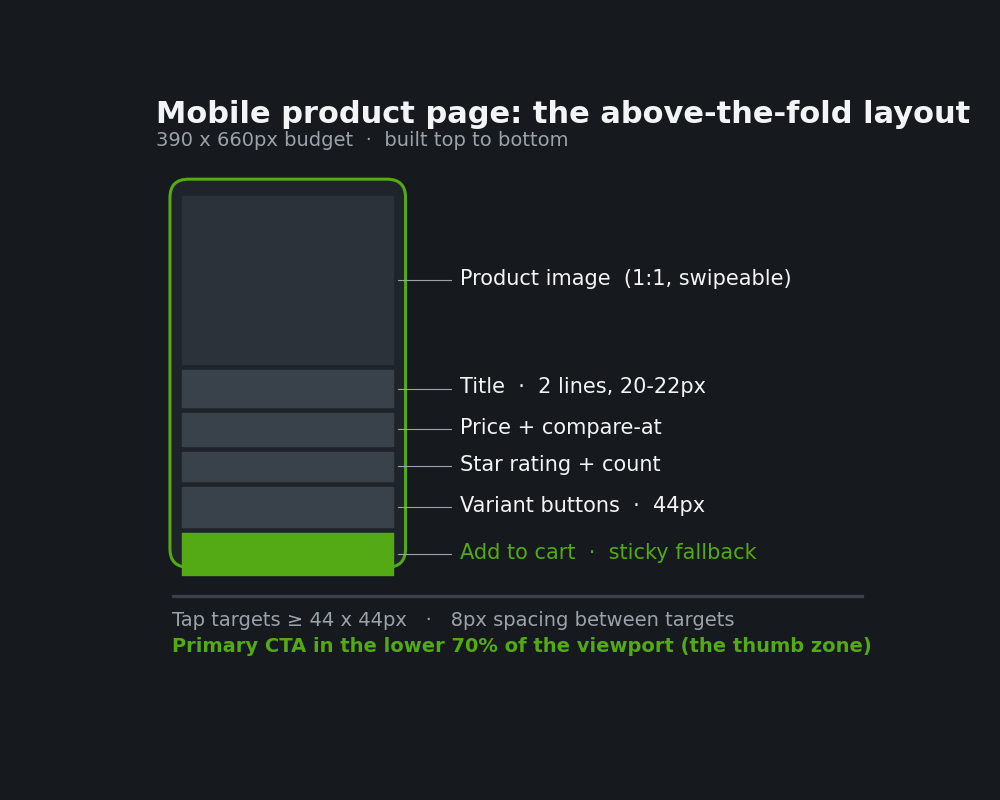
Two numbers in that spec are non-negotiable and worth stating plainly. Every interactive element is at least 44 by 44 pixels, the minimum touch target in Apple’s Human Interface Guidelines, with at least 8 pixels of spacing so a thumb does not misfire onto the element next to it. And the primary action sits in the lower 70% of the screen, the natural thumb zone, not stranded at the top where a one-handed shopper has to shuffle the phone to reach it. These are not aesthetic preferences. They are the difference between a tap that lands and a tap that misses, repeated across tens of thousands of mobile sessions.
The seven product page design decisions that move conversion
Every Insiteful product page build comes down to a set of repeatable decisions. These are the seven that consistently move the number.
1. Gallery as a swipeable square, not a stacked column. A 1:1 square image at full viewport width gives the product the most pixels on the smallest screen. We use a swipeable carousel with a visible dot indicator so shoppers know more images exist, rather than the desktop habit of a thumbnail rail that collapses badly on mobile. Lazy-load everything past the first frame so the largest contentful paint stays fast.
2. Variant selectors as buttons, never native dropdowns. A size dropdown hides the options and adds a tap, a scroll, and a second tap. Swatch and pill buttons show every option at once and each one is a clean 44 pixel target. This is the single most common change we make, and on one apparel client it removed a step that the heatmap showed 19% of mobile shoppers were abandoning at.
<fieldset class="variant-picker">
  <legend class="visually-hidden">Size</legend>
  {% for value in option.values %}
    <input type="radio" id="size-{{ value }}" name="Size"
           value="{{ value }}" class="variant-input">
    <label for="size-{{ value }}" class="variant-pill">
      {{ value }}
    </label>
  {% endfor %}
</fieldset>

.variant-pill { min-width: 44px; min-height: 44px;
  display: grid; place-items: center; border: 1px solid #d0d0d0; }
.variant-input:checked + .variant-pill {
  border-color: #53aa15; box-shadow: inset 0 0 0 1px #53aa15; }
.variant-input:focus-visible + .variant-pill {
  outline: 2px solid #53aa15; outline-offset: 2px; }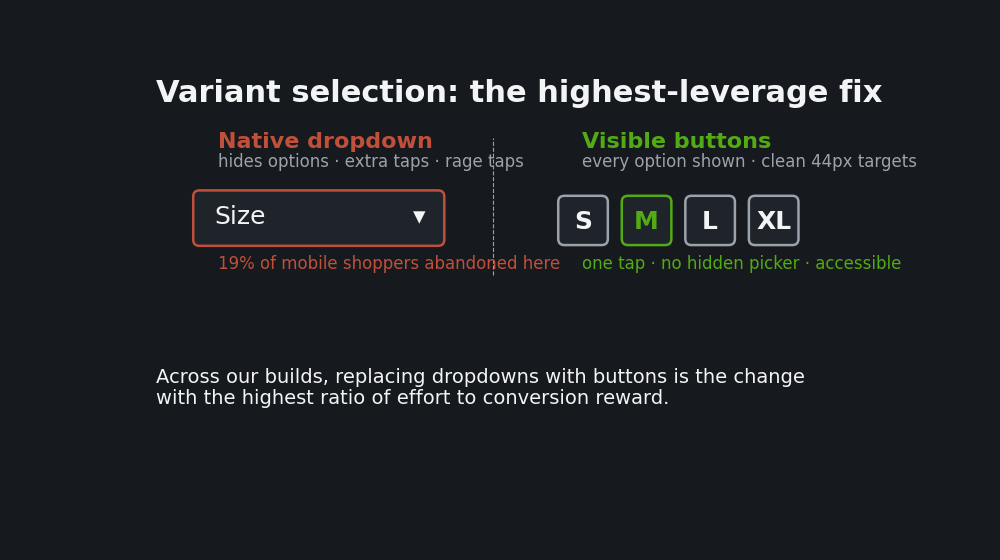
3. Price clarity with honest urgency. Price sits directly under the title at 22 pixels, with the compare-at price struck through beside it so the saving reads instantly. We avoid fake countdown timers, which Australian Consumer Law treats harshly when the scarcity is not real. Genuine signals work: low stock when stock is actually low, or a shipping cutoff that is true.
4. A sticky add to cart bar that follows the thumb. Mobile shoppers scroll far deeper into product pages than desktop shoppers, and without a sticky bar 60% to 80% of mobile product page sessions end with the add to cart button completely out of view at the exact moment the shopper has decided to buy. A persistent bar fixes that. We anchor it 100 to 150 pixels above the bottom edge with padding above the device gesture area so it never fights the home indicator.
.sticky-atc {
  position: fixed; left: 0; right: 0; bottom: 0;
  padding: 12px 16px calc(12px + env(safe-area-inset-bottom));
  background: #fff; box-shadow: 0 -2px 12px rgba(0,0,0,.08);
  transform: translateY(100%); transition: transform .2s ease;
}
.sticky-atc.is-visible { transform: translateY(0); }
.sticky-atc button { width: 100%; min-height: 48px;
  background: #53aa15; color: #fff; font-weight: 600; }
5. Social proof above the fold, not buried. A tappable star rating and review count next to the title gives the shopper instant reassurance and a one-tap jump to the reviews block far below. The heatmap insight here is decisive: the reviews are the highest-converting block on the page and the least-seen, so we surface a summary high and let the detail live low.
6. Shipping, returns, and payment certainty in the first screen. Australian shoppers abandon over unanswered questions more than over price. A single compact line under the CTA, free shipping over a threshold, easy returns, and the express wallet options, removes the three biggest hesitations before they form. Shop Pay alone converts at 1.72 times the standard checkout rate, and 1.91 times on mobile, so showing the express option early is a conversion decision, not a checkout one.
7. A description built for scanning, not reading. Below the fold, the description is structured as a short benefit summary, then specifications in a table, then an accordion for the detail. Shoppers scan in an F pattern on mobile and bounce off walls of text. Front-load the one sentence that answers “is this right for me” and let the rest expand on demand.
What the heatmaps actually tell us on real stores
We instrument every product page we build or inherit with a scroll and click map, usually through Microsoft Clarity or Hotjar, before we change a single pixel. The pre-work matters because it turns a design opinion into a measured decision. Three patterns show up on almost every store.
The scroll-depth profile below is a composite from recent mobile product page audits we have run for Australian stores. It is the shape we design against: heavy attention at the top, a steep fall through the middle, and the highest-converting block sitting where almost nobody reaches it.
MOBILE PDP SCROLL DEPTH (composite, pre-optimisation)
-----------------------------------------------------
Image + title          ~90% of sessions reach
Price + variants       ~82%
Add to cart (inline)   ~58%   <- many never see it
Description / specs     ~40%
Reviews block           ~22%   <- highest-converting, least-seen
-----------------------------------------------------
Shoppers reaching reviews convert ~30-40% higher
than those who stop at the image.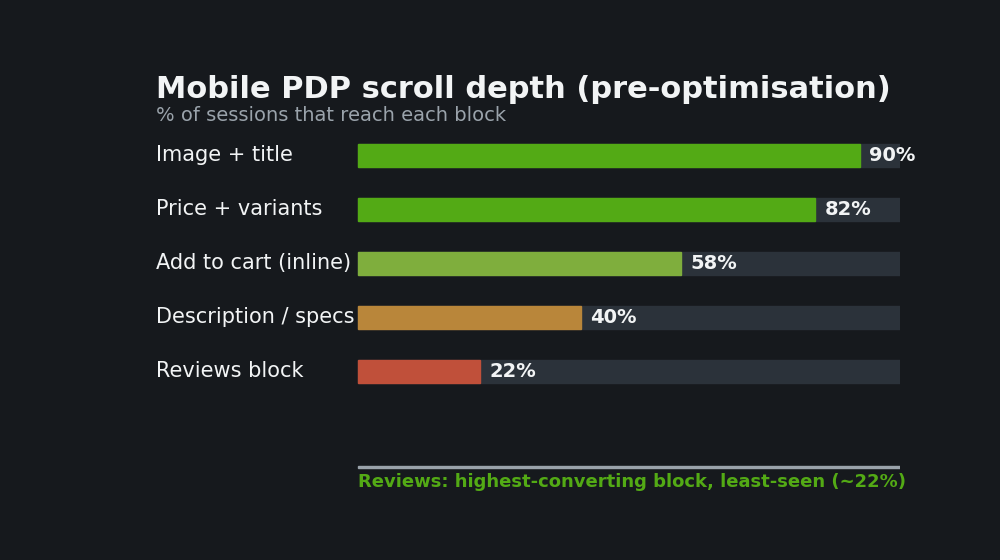
First, the fold is brutal. The scroll map below is representative of what we see on a mobile product page that has not been optimised. Ninety percent of sessions see the image and title, but engagement falls off a cliff through the middle of the page, and the content that would close the sale sits in the dead zone.
Second, dropdowns leak. Click maps repeatedly show a cluster of rage taps on native variant dropdowns where shoppers tap, get a clumsy native picker, and abandon. Replacing dropdowns with visible buttons is the change with the highest ratio of effort to reward we make.
Third, the sticky bar earns its keep. On stores where we add a sticky add to cart, the add to cart click map lights up well below the original button position, proving shoppers are converting at a scroll depth where, without the bar, the action would have been invisible. On one homewares client doing a little over $2 million AUD a year, restructuring the mobile product page around these patterns lifted the mobile conversion rate from 1.3% to 2.1% over eight weeks, which on their traffic was worth a six figure annual revenue swing without spending a dollar more on ads.
The mobile realities most Shopify themes get wrong
Even strong themes carry desktop assumptions into the mobile product page. These are the ones we correct on nearly every build.
Image zoom that needs a hover. Hover does not exist on touch. We replace hover zoom with a tap-to-open lightbox and pinch-to-zoom, so a shopper inspecting fabric or detail can actually do it. Thumbnail rails that wrap. The desktop thumbnail strip that looks tidy at 1440 pixels wraps into two ragged rows on mobile and pushes the title below the fold. We swap it for a single swipeable gallery with dots. Quantity steppers that are too small. The plus and minus controls often ship at 28 pixels, well under the 44 pixel minimum, so mobile shoppers mis-tap. We enlarge them. And accordions that hide critical information by default, where shipping or sizing is collapsed behind a tap that the heatmap shows most people never make. Anything that answers a buying question comes out of the accordion and into plain view.
One more, because it is quietly expensive: layout shift. When the price, badge, or gallery loads late and shoves the page down as the shopper is reaching to tap, they either mis-tap or lose trust. We reserve space for every above-the-fold element so the cumulative layout shift stays near zero, which protects both the conversion and the Core Web Vitals score Google now ranks on. If you want the deeper performance side of this, our team wrote it up in Core Web Vitals for Shopify in 2026.
How We Do It at Insiteful
Our product page process runs in four steps and it starts with measurement, not design. Step one, we install scroll and click tracking on the current product pages and let it gather a fortnight of real sessions, so the redesign is anchored to how this store’s actual shoppers behave rather than a generic template. Step two, we map the above-the-fold budget for the store’s two or three highest-traffic product templates and rebuild the element order to the spec in this article, designing mobile first and treating desktop as the easier case that follows.
Step three is build and instrument. We develop the page in a theme that uses native Shopify sections so the marketing team can manage it later, wire the variant pickers, sticky bar, and review summary, and confirm every tap target clears 44 pixels and every above-the-fold element has reserved space. Step four is verify. We re-run the heatmaps after launch, watch the scroll depth and add to cart maps shift, and read the conversion rate against the pre-build baseline. We do this on native Shopify, not a headless rebuild, because the conversion gains on a product page come from design and information order, not from a framework swap, and the native stack keeps the store maintainable for the client. We wrote about that trade-off in the native Shopify stack.
The companion craft pieces sit alongside this one. The small interaction details that make a rebuilt page feel considered are in microinteractions that sell, the broader mobile patterns in the mobile Shopify patterns that convert, and the accessibility layer, which overlaps heavily with good mobile design, in our WCAG fixes guide. A product page that is accessible is almost always a product page that converts better, because both come from clear hierarchy, real contrast, and honest tap targets.
A typical product page redesign across a store’s key templates runs in the $6,000 to $18,000 AUD range depending on the number of product types and the complexity of the variants and integrations. On the stores we have done this work for, the conversion lift has paid that back inside the first quarter, before any saving on ad spend is counted.
What to audit on your own product page this week
Three actions, in order. First, open your best selling product on your own phone, one handed, and do not scroll. Ask whether the title, price, a star rating, the variant choice, and a clear path to add to cart are all either visible or one short scroll from view. If the add to cart button is stranded off screen with no sticky fallback, that is your first fix.
Second, install Microsoft Clarity, which is free, and let it record a week of mobile sessions on your top three product pages. Look at the scroll map for where engagement collapses, and the click map for rage taps on variant dropdowns. You will see the leaks in days, not months.
Third, check your tap targets. Pull up the page on a phone and try to tap every variant, the quantity stepper, and the add to cart with a thumb, quickly. Anything you mis-tap is too small or too close to its neighbour, and every mis-tap is a shopper you are taxing on the way to buying.
The product page is where intent either becomes revenue or becomes a back button. On a market where most of your shoppers are on a phone and most of your competitors are still shipping a squeezed-down desktop layout, getting the first screen right is one of the highest leverage moves available to an Australian Shopify store. It costs design thinking, not ad budget, and the heatmaps will tell you in a fortnight whether it worked.
Want to know where your product page is leaking? Our team will run scroll and click maps across your highest-traffic product templates, rebuild the above-the-fold layout to convert on mobile first, and verify the lift against your baseline. Start with a build assessment and we will scope it from there.