
Most Shopify Functions we inspect on audit have no tests at all. The code was written against one hand-built cart, deployed to the dev store, clicked through once, and shipped. Then a customer with 140 line items, a metafield that is sometimes empty, or an address typed in an unexpected way meets it, and checkout either breaks or quietly does the wrong thing. By then the person who wrote the Function has moved on, and nobody can say what the input looked like.
Functions are the most testable code in a Shopify build. They are pure: the same input always gives the same output, there is no network, and Shopify records real inputs for you. This is the testing setup we use on Functions work, built on the tooling Shopify ships: Vitest unit tests, Wasm integration tests with fixtures, an instruction budget that fails the build, replay of production runs, and a CI pipeline that ties them together.
Everything below is current as of October 2026, and every number comes from Shopify’s own documentation unless stated.
Why Functions Fail Differently to Theme Code
A broken Liquid section shows up on a page you can look at. A broken Function shows up as a checkout that will not advance, a discount that never applies, or a delivery option that vanishes for one customer in two hundred. There are three properties that make Functions different, and each one shapes how you test.
First, they run as WebAssembly modules inside hard limits. Shopify documents a compiled binary cap of 256 kB, 10,000 kB of linear memory, a 512 kB stack, and for carts up to 200 line items an execution budget of 11 million instructions, a 128 kB input and a 20 kB output. Logs are truncated at 1 kB. A function that passes on a three-line cart can exceed the instruction budget on a large one, and nothing in your editor will warn you.
Second, the failure list is long. Shopify’s monitoring documentation names ten error types, from RuntimeError and InstructionCountLimitExceededError through InvalidOutputError, OutputTooLargeError and InputSizeLimitExceededError to InvalidInputQueryError and UnsupportedVersionError. It also lists the failure that raises no error: logic bugs that produce unexpected results. The second kind is the one that costs money.
Third, Functions are deterministic. Shopify says so directly, and it means a failing production run can be reproduced locally from its input. That single property is what the whole approach rests on. If you can capture the input, you can test it.
The stakes are not abstract. Baymard Institute’s aggregate of documented studies puts the average online cart abandonment rate at 70.22%. A shopper who reaches checkout has already done the hard part. A validation rule that wrongly blocks them, or a delivery rule that hides the option they wanted, is a leak at the most expensive point in the funnel. We cover the build side of those rules in our posts on checkout validation, delivery customisation and payment customisation. This post is about proving they work.
The Four Test Layers and What Each One Catches
No single test type covers a Function. Unit tests are fast but run in Node, not in WebAssembly. Integration tests run the real compiled module but only against fixtures you have collected. Production replay tells you what actually happened but only after the fact. We run all four, and each has a job.
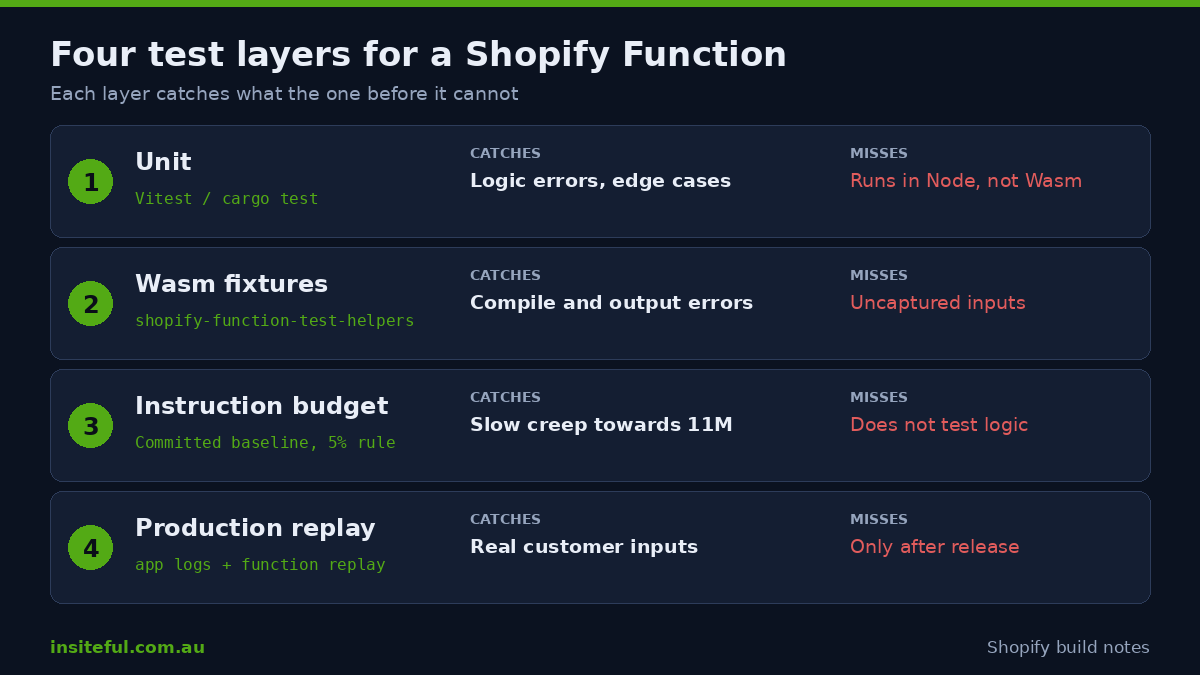
| Layer | Tool | Catches | Misses |
|---|---|---|---|
| 1. Unit | Vitest (JavaScript/TypeScript), cargo test with run_function_with_input (Rust) |
Logic errors, edge cases, regressions in rules | Wasm compile errors, serialisation problems, instruction overruns |
| 2. Wasm integration | @shopify/shopify-function-test-helpers with fixtures |
Compile failures, runtime crashes, invalid queries, output mismatches | Inputs you never captured |
| 3. Instruction budget | Baseline file, shopify app function run --profile |
Slow creep towards the 11M limit | Logic correctness |
| 4. Production replay | shopify app logs, shopify app function replay, Dev Dashboard |
Real-world inputs, scope problems, odd customer data | Anything before release |
Shopify is explicit about why layer 2 exists. Their documentation notes that unit tests do not run in WebAssembly, so results can rarely differ from production. The 10 December 2025 changelog that introduced the test helpers package makes the same point: tests run against the compiled binary that gets uploaded to Shopify’s infrastructure, which catches compilation errors, runtime crashes and serialisation issues that unit tests miss.
Layer 1: Unit Tests With a Worked Australian Example
We will use one Function through the rest of this post, because the rule has a real Australian failure mode. Express courier services cannot deliver to PO Boxes, Locked Bags or parcel lockers on a standard courier run. If a customer picks courier delivery and types a PO Box into the address line, the order ships, the courier fails the delivery, and someone reships and apologises. The fix is a cart validation that blocks the combination and tells the customer why.
The input query asks only for what the rule needs. Fewer fields means fewer instructions and a lower query cost, both of which we return to below.
query CartValidationsGenerateRunInput {
  cart {
    deliveryGroups {
      deliveryAddress {
        address1
        address2
        countryCode
      }
      selectedDeliveryOption {
        handle
        title
      }
    }
  }
}
The Function itself is short. The output uses the operations shape of current API versions; confirm the exact shape against the API version you have pinned, because the schema validation in layer 2 will fail loudly if it differs.
// extensions/po-box-guard/src/cart_validations_generate_run.js
const PO_BOX = /\b(p\.?\s?o\.?\s?box|gpo box|locked bag|parcel locker)\b/i;
const COURIER = /courier/i;

export function cartValidationsGenerateRun(input) {
  const errors = [];

  for (const group of input.cart.deliveryGroups) {
    const addr = group.deliveryAddress;
    const option = group.selectedDeliveryOption;
    if (!addr || !option || addr.countryCode !== "AU") continue;

    const lines = `${addr.address1 ?? ""} ${addr.address2 ?? ""}`;
    if (COURIER.test(option.title ?? "") && PO_BOX.test(lines)) {
      errors.push({
        message: "Courier delivery cannot go to a PO Box. Choose Standard Post or enter a street address.",
        target: "$.cart.deliveryGroups[0].deliveryAddress.address1",
      });
    }
  }

  return { operations: [{ validationAdd: { errors } }] };
}
The unit test is where most of the value sits, because it is where you write down every address a customer has ever typed. We build the table of cases from support tickets and past orders, not from imagination.
// extensions/po-box-guard/src/cart_validations_generate_run.test.js
import { describe, it, expect } from "vitest";
import { cartValidationsGenerateRun } from "./cart_validations_generate_run";

const cart = (address1, title, country = "AU", address2 = null) => ({
  cart: {
    deliveryGroups: [{
      deliveryAddress: { address1, address2, countryCode: country },
      selectedDeliveryOption: { handle: "opt-1", title },
    }],
  },
});

const errorsFor = (input) =>
  cartValidationsGenerateRun(input).operations[0].validationAdd.errors;

describe("PO Box guard", () => {
  it.each([
    ["PO Box 123", "Express Courier"],
    ["P.O. Box 77", "Express Courier"],
    ["GPO Box 4421", "Courier Next Day"],
    ["Locked Bag 9", "Express Courier"],
    ["Parcel Locker 12345", "Express Courier"],
    ["12 Collins St", "Express Courier", "AU", "PO Box 9"],
  ])("blocks %s on %s", (a1, title, country, a2) => {
    expect(errorsFor(cart(a1, title, country, a2))).toHaveLength(1);
  });

  it.each([
    ["12 Collins St", "Express Courier"],
    ["PO Box 123", "Standard Post"],
    ["PO Box 123", "Express Courier", "NZ"],
    ["Pomeroy Boxing Gym, 4 High St", "Express Courier"],
  ])("allows %s on %s", (a1, title, country) => {
    expect(errorsFor(cart(a1, title, country))).toHaveLength(0);
  });

  it("returns no operations error when the address is missing", () => {
    const input = { cart: { deliveryGroups: [{ deliveryAddress: null, selectedDeliveryOption: null }] } };
    expect(errorsFor(input)).toHaveLength(0);
  });
});
The “Pomeroy Boxing Gym” case earns its place. A loose pattern that matched “box” anywhere would have blocked a legitimate order. Every false positive in a validation rule is a customer who cannot buy, so the allow cases deserve as much attention as the block cases. Shopify’s guidance for complex Functions is to split logic into small units that you can test one at a time, and the same idea applies here: keep the pattern, the address check and the output builder as separate functions once the rule grows past this size.
For Rust Functions, the equivalent is the run_function_with_input utility in the shopify_function crate, run under cargo test. The structure of the tests is the same: a table of inputs, a table of expected outputs.
Layer 2: Wasm Integration Tests With Fixtures
Every Function extension template now ships a tests/ directory with a default.test.js and a fixtures/ folder. The test file uses four helpers from @shopify/shopify-function-test-helpers: buildFunction() compiles your source to WebAssembly, loadFixture() parses fixture JSON, validateTestAssets() checks your input query and fixtures against the GraphQL schema, and runFunction() runs the compiled module against each fixture.
Per Shopify’s documentation, a passing run proves four things: the function compiles to WebAssembly, the input query is valid for the schema, each fixture has valid input and output, and the module’s output matches the expected output. You do not write per-scenario test code. Drop a JSON file into tests/fixtures/ and it is discovered automatically.
A fixture has four fields wrapped in a payload object. The export and target values come from the function’s shopify.extension.toml.
{
  "payload": {
    "export": "cart_validations_generate_run",
    "target": "cart.validations.generate.run",
    "input": {
      "cart": {
        "deliveryGroups": [{
          "deliveryAddress": { "address1": "PO Box 123", "address2": null, "countryCode": "AU" },
          "selectedDeliveryOption": { "handle": "opt-1", "title": "Express Courier" }
        }]
      }
    },
    "output": {
      "operations": [{
        "validationAdd": {
          "errors": [{
            "message": "Courier delivery cannot go to a PO Box. Choose Standard Post or enter a street address.",
            "target": "$.cart.deliveryGroups[0].deliveryAddress.address1"
          }]
        }
      }]
    }
  }
}
The best fixtures are not written by hand. Run shopify app dev, trigger the Function on your dev store, and Shopify writes each execution’s input and output into the app’s .shopify/logs directory. Drag the log file into tests/fixtures/. The Dev Dashboard offers the same data for production runs, which you can copy across as input and output JSON. A fixture built from a real production run is worth more than ten that someone imagined.
Our fixture rules, learned the slow way:
- One fixture per failure we have ever seen, named for the cause (
po-box-courier.json,empty-address2.json), not for a ticket number. - One fixture for the largest realistic cart the store has taken, because instruction counts grow most there.
- One fixture with every optional field null, because that is the input that crashes sloppy code.
- Strip personal data from any fixture copied out of a production log before it enters version control. Customer names and street addresses do not belong in a repository.
Layer 3: An Instruction Budget That Fails the Build
Instruction count is the limit most teams hit last and fix worst. The ceiling is 11 million for carts up to 200 line items, and it scales proportionally for larger carts. Shopify’s optimisation guide gives a benchmark of 2.364917 million instructions for a 3.42 kB input, so a modest cart can already use about a fifth of the budget before any merchant customisation.
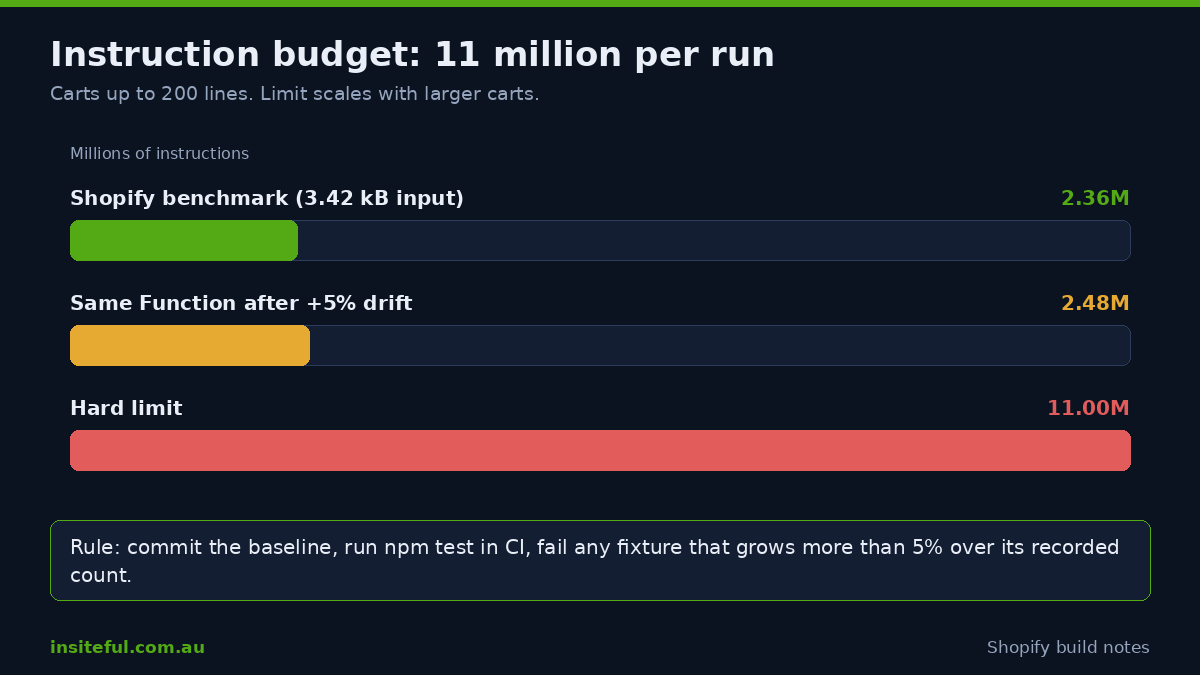
Because counts are deterministic, they can be asserted. From version 1.1.0 of the test helpers, runFunction returns the instruction count for each run, along with memoryUsageKiB and moduleSizeKiB. Shopify’s documented workflow is to record a baseline with one command, commit the generated JSON file, and let the test fail whenever a fixture exceeds its recorded count by more than 5%.
# Record or refresh the baseline after an intentional change
UPDATE_INSTRUCTION_BASELINE=1 npm test

# Normal run, fails on a 5% overrun against the committed baseline
npm test

# One-off benchmark of a single input, machine-readable
shopify app function run --export cart_validations_generate_run --input input.json --json

# Flame graph for Speedscope (needs strip = false and wasm_opt = false in Cargo.toml)
shopify app function run --export cart_validations_generate_run --input input.json --profile
The 5% rule matters because instruction creep is gradual. Nobody adds a loop that doubles the cost. Someone adds a string comparison here and a metafield parse there, and six months later a 150-line wholesale cart is over the line. A baseline in version control turns that into a failed pull request on the day it happens, with the author still around to explain it.
When the count is too high, Shopify’s guidance gives a clear order of attack. The table below is how we triage it.
| Lever | Effect | Effort |
|---|---|---|
| Move a JavaScript Function to Rust | Largest single reduction, because JavaScript runs on an engine linked at runtime through Javy | High, but can be done incrementally in the same extension |
| Query only the fields you read | Smaller input, less parsing | Low |
Use hasAnyTag and inAnyCollection booleans |
Shopify evaluates the condition, so your code does not search lists | Low |
Query jsonValue for JSON metafields |
No string parsing in your code | Low |
| Precompute configuration into a metafield when settings are saved | Lookups instead of calculation at checkout | Medium |
| Replace nested loops over lines with one pass and a map | Turns quadratic cost into linear | Medium |
| Remove production debug logging | Logging costs instructions even when the output is truncated | Low |
One honest caveat from the same guide: profiling a JavaScript Function shows only <unknown> frames, because Javy does not emit a WebAssembly function name section. Profiling is most useful on Rust. For JavaScript, you measure by changing one thing and re-running the benchmark.
The Input Query Is a Test Target Too
The input query has its own limits, and exceeding them fails at validation rather than at runtime. Shopify caps the query at 3,000 bytes excluding comments and a calculated cost of 30. Fields that return a Metafield, plus hasTags, hasAnyTag, inCollections, inAnyCollection and field(key:) on a metaobject, cost 3 each. Every selection is charged, so aliasing an expensive field repeatedly adds to the total. List-type arguments and variables are capped at 100 elements, and metafield values over 10,000 bytes are not returned at all.
That last limit is a silent one. A merchant stores a long configuration in a metafield, it crosses 10,000 bytes, and the Function sees nothing where it expected data. The rule appears to stop working. We add a fixture where the configuration metafield is null for exactly this reason, and we make sure the Function’s behaviour in that case is a deliberate choice rather than an accident.
The validateTestAssets() helper catches an invalid query in CI. A query that is valid but expensive is caught by the cost arithmetic, so we keep a running tally in a comment at the top of run.graphql. It is a small habit that has saved us from a surprise validation error at deploy time more than once.
Layer 4: Replaying Production Runs
Shopify made log streaming and replay generally available on 21 August 2024 with CLI version 3.66, and it is the fastest way to turn a customer complaint into a failing test. The workflow is short.
# Stream logs for one function from the dev store
shopify app logs --source extensions.po-box-guard

# See which log sources exist
shopify app logs sources

# Re-run a logged execution locally (six-character id from app dev output)
cd extensions/po-box-guard
shopify app function replay --log 9f1f0e
Replay re-executes as you change code, so you can edit the Function until the logged input produces the right output, then copy that log into tests/fixtures/. The bug is now a permanent test. For production, the Dev Dashboard lists every function run under Apps, then Logs, then Functions. Each run stores when it happened and which shop it ran on, and with the right access you can see the input, output and logs.
Two practical details trip people up. Run details depend on the access scopes the merchant granted: if the dashboard hides them, your app is missing scopes the input query needs, and the dashboard tells you which. And the 1 kB log limit means a verbose log tells you less than you expect, so rely on the captured input and output rather than on log lines.
Map the error types to the layer that should have caught them, and you can see where your pipeline has gaps.
| Production error | Layer that catches it before release |
|---|---|
InstructionCountLimitExceededError |
Layer 3, with a large-cart fixture |
InvalidOutputError, OutputTooLargeError |
Layer 2, fixture output validation |
InputSizeLimitExceededError, InputListSizeLimitExceededError |
Layer 2 with a large-cart fixture; query review |
InvalidInputQueryError, UnsupportedVersionError |
Layer 2, validateTestAssets(); API version policy |
InvalidModuleError |
Layer 2, buildFunction() |
RuntimeError |
Layer 1 and 2, with null-field fixtures |
StackMemoryLimitExceededError, LinearMemoryLimitExceededError |
Layer 3, memoryUsageKiB in the baseline |
| Logic bug, no error raised | Layer 1 only, and layer 4 once a customer reports it |
Decide Whether a Failure Blocks Checkout
Testing tells you how often a Function fails. A separate decision is what should happen when it does. For cart and checkout validations, Shopify’s validationCreate mutation includes a blockOnFailure field. The documentation states that it controls whether runtime exceptions, such as timeouts, also block checkout, and that validation errors always block checkout regardless of the setting.
mutation CreateValidation {
  validationCreate(validation: {
    functionHandle: "po-box-guard"
    enable: true
    blockOnFailure: false
  }) {
    validation { id }
    userErrors { field message }
  }
}
This is a business decision, not a technical one, and we put it in the scoping document. Our default is to fail open (blockOnFailure: false) for convenience rules like the PO Box guard, where a crash should let the order through and a human can sort out the address. We fail closed for rules with a legal or fraud consequence, such as age-restricted products or sanctions-related restrictions. Whichever you choose, write it down, because it determines how urgent a monitoring alert is.
Remember also that Shopify caps activations at 25 validation functions per store. If several apps each install their own, you share that budget, and a fixture-based test of your own Function will not tell you what the other 24 are doing to checkout.
What a Bug Costs: A Simple AUD Model
We use a back-of-envelope model to justify test time to merchants who would rather spend it on ads. The figures below are assumptions for illustration, not client data, so replace them with yours.
| Assumption | Value |
|---|---|
| Weekly revenue | $60,000 AUD |
| Average order value | $120 AUD (500 orders a week) |
| Share of orders affected by a faulty rule | 1.5% (7.5 orders a week) |
| Failed delivery plus reship plus support time, per order | $45 AUD |
| Cost if the rule is missing for 6 weeks before anyone notices | 7.5 x $45 x 6 = $2,025 AUD |
| Revenue at risk if the same fault wrongly blocks orders for 3 days | 3/7 of $60,000 x 1.5% = about $386 AUD, before lost repeat custom |
The numbers are modest on purpose. A rule with a bigger blast radius, such as a payment customisation that hides a gateway or a discount function that stacks wrongly during a sale, scales the same arithmetic by orders of magnitude. A day of fixture work costs less than one bad sale weekend. For a Plus store running a Launchpad-scheduled event, the case writes itself.
The CI Pipeline
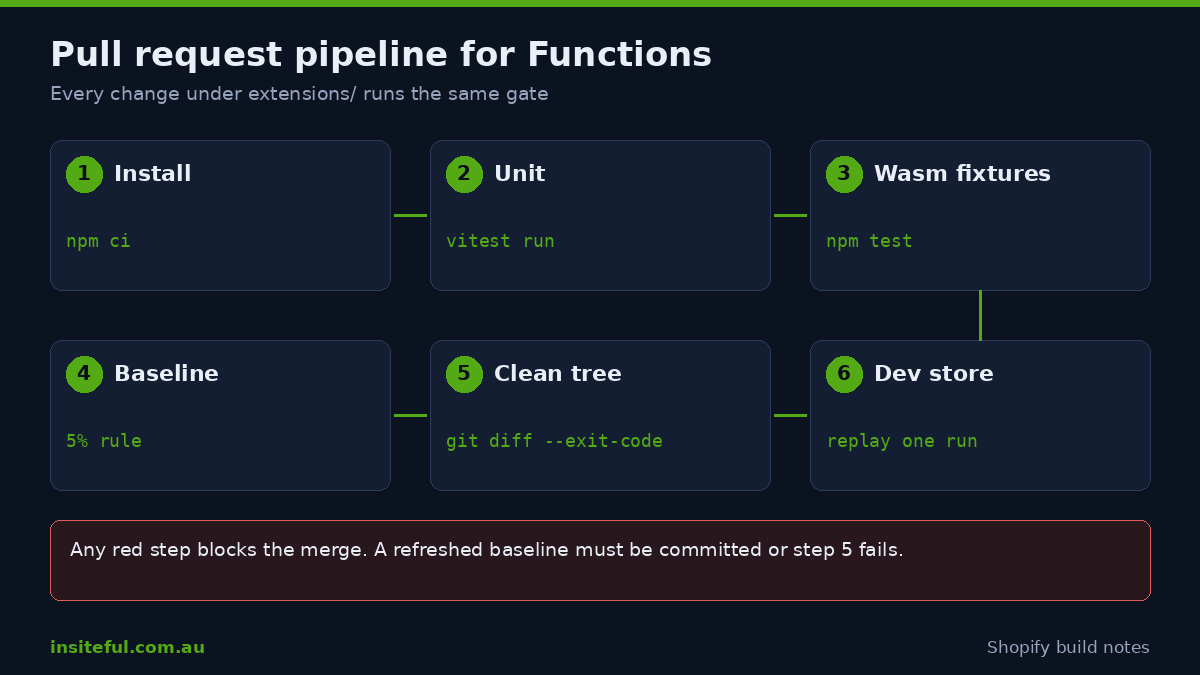
All four layers collapse into one workflow file. We run it on every pull request that touches an extensions/ directory, and the same branch protection rule applies as for theme code, which we describe in our GitHub workflow for themes.
name: functions-ci
on:
  pull_request:
    paths: ["extensions/**", "package.json"]

jobs:
  test:
    runs-on: ubuntu-latest
    strategy:
      matrix:
        fn: [po-box-guard, free-shipping-threshold]
    steps:
      - uses: actions/checkout@v4
      - uses: actions/setup-node@v4
        with: { node-version: 22, cache: npm }
      - run: npm ci
      - name: Unit tests
        run: npx vitest run
        working-directory: extensions/${{ matrix.fn }}
      - name: Wasm fixtures and instruction baseline
        run: npm test
        working-directory: extensions/${{ matrix.fn }}
      - name: Fail if the baseline file changed without being committed
        run: git diff --exit-code -- extensions/${{ matrix.fn }}/tests
The last step is the one people forget. If someone refreshes the baseline locally and does not commit it, CI passes on their machine and drifts silently on the next. Failing on a dirty working tree after the test run keeps the baseline honest.
A pipeline cannot test everything. It cannot tell you that a fixture is unrepresentative, that a merchant changed a metafield by hand, or that an app update changed the input to your Function. So the pipeline sits inside a routine. We review the Dev Dashboard’s function run list weekly during the first month after release, pull any run that errored, replay it, and turn it into a fixture. After that, the cadence drops to monthly and to after every platform API version change.
API Versions Are a Test Event
Shopify retires API versions on a fixed schedule, and a Function pinned to a removed version fails with UnsupportedVersionError until you upgrade and redeploy. Treat each quarterly release as a test event: bump the version on a branch, regenerate types, run the full suite, and read what validateTestAssets() says about your query and fixtures. If the output shape changed, the fixtures fail in CI, which is a far better place to find out than a live checkout. We put the pinned version for every extension in a table in the repository README and review it each quarter alongside our API deprecation audit.
How We Do It at Insiteful
Every Function we ship goes through the same gate, regardless of how small the rule looks. A Function is not marked ready for release until it has the following.
- A written failure policy: fail open or fail closed, who is told, and how quickly.
- A Vitest or
cargo testtable covering every block case, every allow case, and every null field in the input. - Wasm fixtures built from real dev-store runs, with personal data removed.
- A large-cart fixture and a committed instruction baseline, so the 5% rule applies from day one.
- A CI job that runs on every pull request touching the extension and blocks the merge on failure.
- A post-launch review of the Dev Dashboard function runs at one week and one month.
The gate is short because we want it followed on small jobs as well as large ones. A free-shipping threshold looks trivial until it meets a mixed cart of discounted and full-price lines, and that is the cart that the fixture folder exists for. On a Plus build, we also set the baseline for each Function against the heaviest catalogue and B2B pricing structure the store has, since a wholesale cart is the one most likely to approach the instruction ceiling.
We keep the test harness in the client’s repository, not ours, so the next developer inherits the fixtures and the baseline along with the code. A Function without a test harness is a liability that the next agency has to discover for themselves.
Common Mistakes We Fix on Audit
Most of what we find when we inherit someone else’s Functions falls into a short list.
- Tests that only cover the happy path. The suite passes, and the rule has never been run against an empty field.
- Fixtures written by hand to match the code. They prove the code agrees with itself. Capture real runs instead.
- Debug logging left in production. It costs instructions, and logs past 1 kB are truncated, so it adds cost without adding information.
- No large-cart fixture. The Function works for every test and fails on the one wholesale order that matters.
- Unit tests treated as proof of production behaviour. They run in Node, not WebAssembly, so the compiled module still needs its own test.
- An unrecorded failure policy. Nobody knows whether a crash should block the sale, so the setting is whatever the developer happened to leave.
Sources
Limits, error types, test helpers and CLI behaviour in this post come from Shopify’s documentation: Test and debug Shopify Functions, Shopify Functions limits, Optimize instruction counts, Monitoring and handling errors in production, app function run, validationCreate, and the changelog entries on log streaming and replay (21 August 2024) and binary testing (10 December 2025). The abandonment figure is from Baymard Institute. The AUD cost model is illustrative.
Want Your Functions Tested Before the Next Sale?
If your checkout runs on Functions nobody has tested, the cheapest time to fix that is before your next campaign. We can audit what you have, build the fixture and CI harness, and set baselines for each Function. See how a build assessment works on our process page.