
Most Shopify checkouts are built to let orders through. That is the entire design goal: reduce friction, remove fields, get the customer to the thank-you page as fast as possible. It is the right instinct most of the time. Australian cart abandonment now sits at roughly 70 percent, and climbs past 80 percent on mobile, so every removed obstacle matters.
But there is a category of order you actively want your checkout to stop. The wholesale buyer who tries to place a $90 AUD order on an account that has a $500 AUD minimum. The customer shipping a flammable product to a PO box that your freight carrier will reject. The reseller clearing your entire flash-sale allocation in one transaction. The fraudulent order using a mismatched billing address that becomes a $4,800 AUD chargeback three weeks later. A checkout with no rules is not “frictionless”, it is unguarded.
This is what Shopify checkout validation does, and since the retirement of checkout.liquid the way you build it has changed completely. At Insiteful we build these validation rules into nearly every Shopify Plus storefront we ship. This article walks through exactly how the Cart and Checkout Validation Function works in 2026, the rules worth enforcing, the trap that catches most stores, and the way we deploy validations without ever breaking a live checkout.
What “checkout validation” actually means on Shopify now
Validation is any rule that inspects the cart or checkout and decides whether the customer is allowed to proceed. Before 2024, a developer could drop arbitrary Liquid and JavaScript into checkout.liquid and enforce whatever they wanted. That era is over. Shopify deprecated checkout.liquid and replaced the entire customisation surface with Checkout Extensibility, which splits validation into two distinct mechanisms that most teams confuse.
The first is client-side validation using a checkout UI extension and the buyer journey intercept. It runs in the browser, can read what the customer types, and can block the “Continue” button with an inline message. The second is server-side validation using a Cart and Checkout Validation Function. It runs on Shopify’s own servers as part of the cart and checkout pipeline, evaluates the cart on every change, and returns errors that block progress regardless of how the customer got there.
The distinction is not academic. It determines whether your rule actually holds.
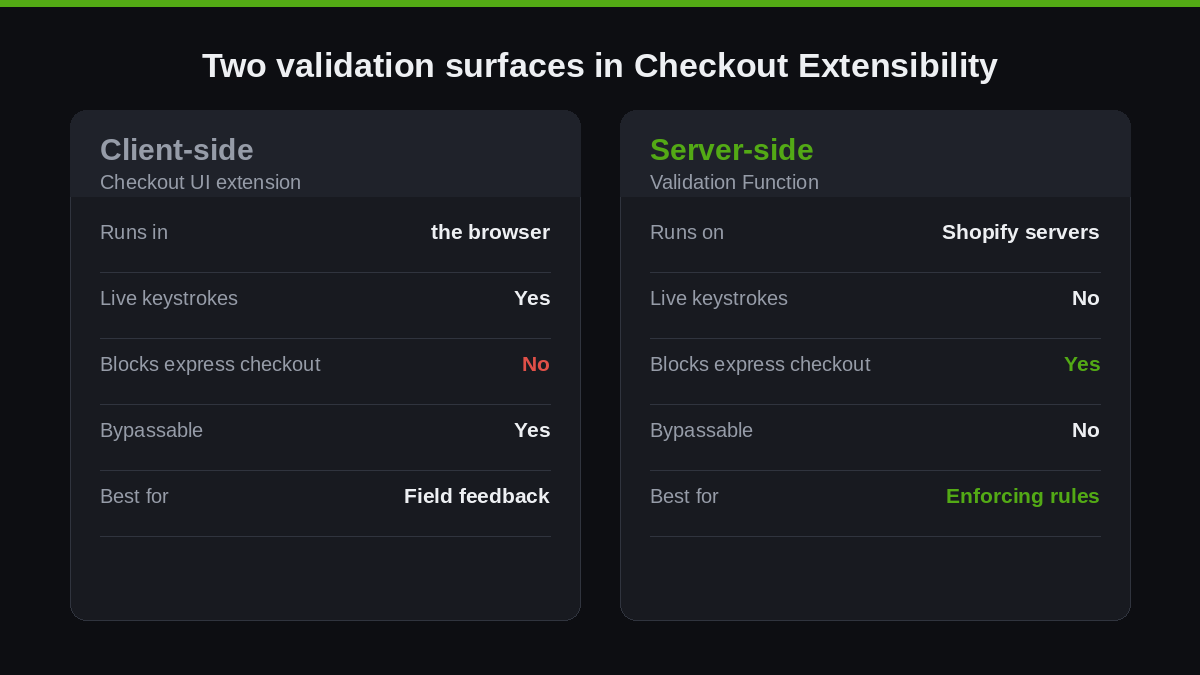
| Capability | Client-side (UI extension) | Server-side (Validation Function) |
|---|---|---|
| Where it runs | Customer’s browser | Shopify’s servers |
| Can read live keystrokes | Yes | No, only committed cart state |
| Blocks express checkout (Shop Pay, Apple Pay) | No | Yes |
| Can be bypassed by a determined buyer | Yes | No |
| Best for | Real-time field feedback | Enforcing business rules |
For a fuller breakdown of the component side of this, see our guide on Shopify checkout UI extensions. Here the focus is the server-side function, because that is the layer that genuinely enforces a rule.
Why client-side validation alone leaks revenue
Here is the trap. A store adds a checkout UI extension that blocks orders under a minimum quantity. It tests cleanly on desktop. It ships. Three days later a wholesale customer places an order well under the minimum, and nobody can work out how.
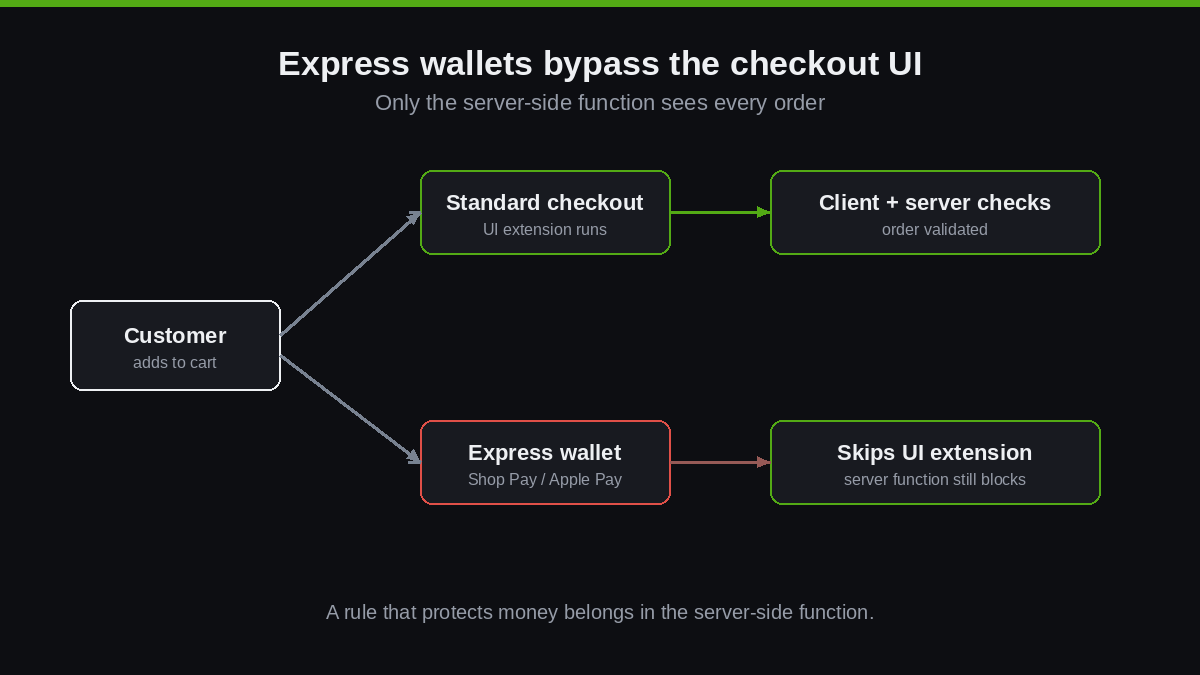
The answer is express checkout. When a customer taps Shop Pay, Apple Pay, Google Pay or PayPal from the cart or product page, they skip straight past the standard checkout steps where your UI extension lives. The intercept never runs. Around 73 percent of Australian consumer payments are now card-based and a large share of those flow through accelerated wallets, so this is not an edge case, it is the majority path on mobile.
Server-side validation closes that hole. The Cart and Checkout Validation Function is evaluated by Shopify as part of the cart pipeline itself, so it applies to standard checkout, every express wallet, and Shop Pay equally. Shopify’s own documentation is explicit that validation covers express checkouts including Shop Pay, PayPal, Google Pay and Apple Pay. If a rule protects money or inventory, it belongs in a function, not only in the browser.
We saw this exact failure on an apparel client doing well over $3M AUD a year. They had a single-pair purchase limit on a hyped sneaker drop, enforced in the theme and in a checkout UI extension. On launch day a handful of buyers used Shop Pay from the product page and pulled six and eight pairs each, draining the allocation in minutes while genuine customers saw “sold out”. The limit was real, it just lived in a layer that express checkout never touched. We rebuilt it as a server-side quantity cap and the next drop held cleanly. The rule did not change. The layer did.
The anatomy of a Cart and Checkout Validation Function
A validation function has two parts: an input query that declares the cart data you need, and a run function that returns validation errors. You scaffold it with the Shopify CLI, which wires up the configuration automatically.
shopify app generate extension
# select: Function - Cart and checkout validation
# select: JavaScript

shopify app dev      # live preview on a dev store
shopify app deploy   # push to production as a draft to activate
The input query lives in cart_validations_generate_run.graphql. You request only the fields your rule needs, which keeps the function fast. This example pulls the cart subtotal and whether the buyer is purchasing on behalf of a B2B company.
query RunInput {
  cart {
    cost {
      subtotalAmount {
        amount
      }
    }
    buyerIdentity {
      purchasingCompany {
        company { id }
      }
    }
  }
}
The run function reads that input and returns a list of operations. Each validationAdd operation carries an array of errors, and each error has a message plus a target that tells checkout where to display it.
// src/run.js
export function run(input) {
  const MINIMUM_AUD = 500.0;
  const subtotal = parseFloat(input.cart.cost.subtotalAmount.amount);
  const isWholesale = Boolean(input.cart.buyerIdentity?.purchasingCompany);

  const errors = [];
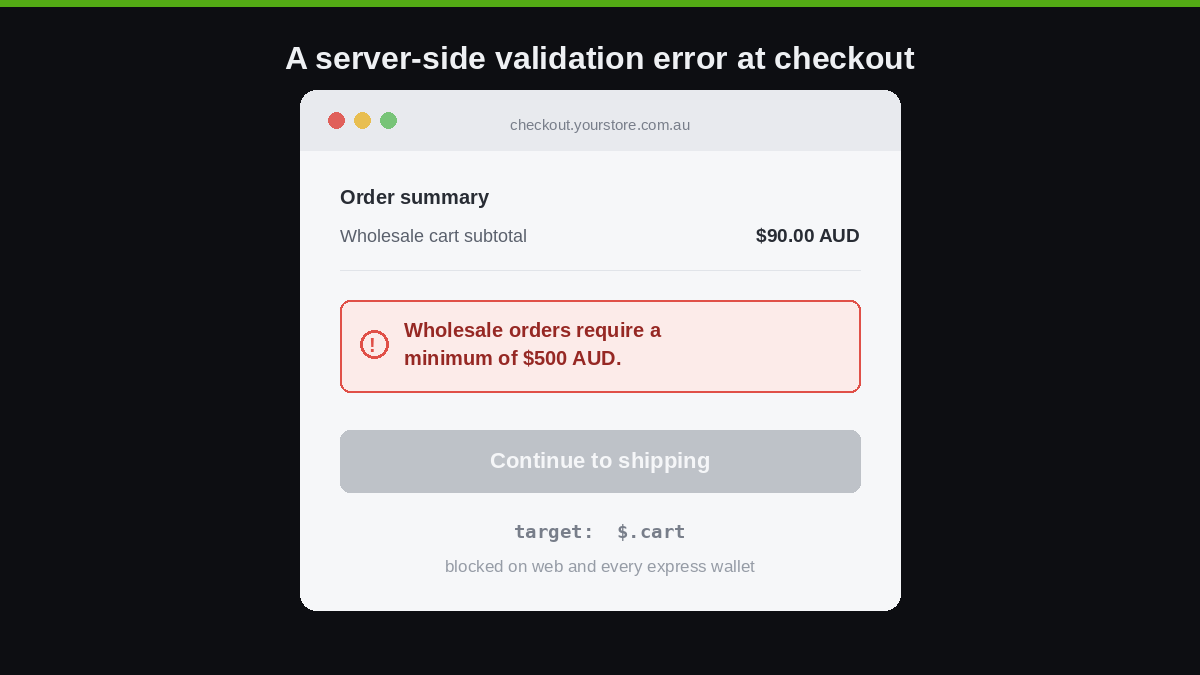
  if (isWholesale && subtotal < MINIMUM_AUD) {
    errors.push({
      message: "Wholesale orders require a minimum of $500 AUD.",
      target: "$.cart"
    });
  }

  return { operations: [{ validationAdd: { errors } }] };
}
That is the whole pattern. Shopify runs this on every cart change, and the moment a wholesale cart drops below $500 AUD, checkout shows the message and refuses to progress, on web and on every wallet. Because functions run inside Shopify’s pipeline rather than as a third-party app round trip, they execute in single-digit milliseconds, which is why we prefer them to app-based validation that adds network latency to checkout. If you are new to the broader runtime, our explainer on Shopify Functions covers how the model works across discounts, delivery and payments.
The validation rules we implement most often
Across the Australian Plus builds we run, a handful of rules cover the vast majority of real requirements. Each one maps to a concrete business risk, and each one targets a specific part of the checkout so the customer sees the error in the right place.
| Rule | Why it matters | Error target |
|---|---|---|
| B2B order minimum / maximum | Protects wholesale margin and credit limits | $.cart |
| Restricted product to PO box | Freight carriers reject dangerous goods to PO boxes | delivery address field |
| Flash-sale quantity cap | Stops resellers clearing limited allocation | specific cart line |
| Age or ID gate | Legal requirement for alcohol, vaping, knives | $.cart |
| Purchase order number required | B2B accounts that reconcile against PO numbers | checkout field |
| Billing and shipping mismatch | Early fraud signal on high-value orders | $.cart |
Shopify documents these same patterns directly: B2B product minimums, maximums and multiples, location order minimums and credit limits, flash-sale quantity limits, age verification, purchase order validation and billing address restrictions are all named use cases. We treat that list as a starting menu and tailor the thresholds to the client’s actual operations.
Targeting errors to the right field
A validation error that appears in the wrong place is almost as bad as no error at all, because the customer cannot tell what to fix. The target property uses a JSONPath-style pointer into the checkout. Targeting the whole cart is fine for an order-level rule like a minimum, but an address problem should point at the address field so the customer’s eye lands on it.
errors.push({
  message: "We cannot ship this item to a PO box. Please enter a street address.",
  target: "$.cart.deliveryGroups[0].deliveryAddress.postalCode"
});
This matters a great deal in Australia, where between 22 and 25 percent of cart abandonments trace back to customers struggling with the address step, and 39 percent of mobile shoppers abandon when personal information is hard to enter. A precisely targeted message turns a dead-end into a quick correction. A vague one sends the customer to a competitor.
The 25-function ceiling and how we consolidate
Shopify lets you activate a maximum of 25 validation functions per store. That sounds generous until a store accumulates one function per rule across years of bolt-on apps and ad-hoc builds. We have inherited stores already brushing the ceiling with redundant, overlapping logic.
Our approach is to consolidate related rules into a single, configurable function rather than ship one function per rule. A well-built validation function reads its thresholds from a metafield or metaobject, so the merchant can change a minimum from $500 to $750 AUD in the admin without a redeploy. One function, many rules, configured by the client.
// thresholds read from a shop metafield, not hard-coded
const config = JSON.parse(input.shop.metafield?.value ?? "{}");
const minimum = config.wholesaleMinimumAUD ?? 500.0;
const maxUnitsPerLine = config.flashSaleCap ?? 4;
This keeps the function count low, makes the logic auditable, and hands control back to the people running the store. It is the difference between a tidy validation layer and a tangle nobody dares touch.
Where validation functions stop, and what to pair them with
A validation function is powerful precisely because it runs on Shopify’s servers, but that placement also defines its limits, and pretending otherwise leads to bad builds. A function only sees committed cart state, not what the customer is mid-way through typing. It cannot give the live, keystroke-by-keystroke feedback that makes a phone number or email field feel responsive. It evaluates the cart and the checkout context, so it is the wrong tool for anything that depends on the payment method response or post-payment data.
The right architecture pairs the two layers deliberately. The server-side function is the enforcement floor, the rule that cannot be bypassed, the line that holds against Apple Pay. The client-side checkout UI extension is the experience layer on top, giving the customer fast inline feedback so they correct a field before they ever hit the wall. Build only the client side and express checkout walks past it. Build only the server side and the customer hits a hard stop with no warning. We build both, with the function as the source of truth and the UI extension as the friendly messenger. A rule worth enforcing is worth enforcing in the layer that cannot be skipped, and worth explaining in the layer the customer is actually looking at.
There is one more operational reality worth naming: validation runs on every cart change, so a function that is slow or over-fetches data taxes every customer, including the ones doing nothing wrong. This is why we request only the cart fields a rule actually needs in the input query, and why we keep external lookups out of the hot path wherever a metafield will do the job instead. A validation layer that protects margin but adds 300 milliseconds to every checkout has simply moved the cost somewhere harder to see.
Testing and deploying without breaking live checkout
Checkout is the one place on a store where a bad deploy costs money by the minute, so we never test validation logic against production. The CLI gives you a full local loop. shopify app dev runs the function against a development store and writes every execution, including your debug logging and a link to the full execution detail, to the terminal. You watch a rule fire before it ever touches a real customer.
To block progress during the checkout steps rather than only at the cart, the extension declares the capability in its configuration. Shopify requires you to set this explicitly, and to surface a clear reason to the buyer when navigation is blocked.
# shopify.extension.toml
[[extensions]]
type = "function"
name = "order-rules"
handle = "order-rules"

[extensions.capabilities]
block_progress = true
When we deploy, the function lands as a draft version first. We activate it on a single rule with a known-safe threshold, confirm checkout still completes for a normal order, then layer the stricter rules in. The deprecation of checkout.liquid means there is no longer any safe way to “just edit the checkout”, so this staged activation is how you change checkout behaviour without gambling with live revenue. For the wider context on what changed, our piece on Shopify checkout extensibility covers the migration in full.
How we do it at Insiteful
Validation is rarely the reason a client comes to us. It surfaces during the build, usually when we map the real operational rules behind a storefront: the wholesale tiers, the dangerous-goods freight restrictions, the limited drops, the B2B accounts that will not pay an invoice without a PO number on it. Those rules almost always live in someone’s head or a spreadsheet, not in the checkout.
Our process starts by auditing where the current store leaks. On nearly every Plus account we take on, we find a client-side rule that express checkout walks straight past, or an app-based validation adding latency to checkout for a rule that should be a free, instant function. We rebuild those as consolidated, metafield-configurable validation functions, test them on a dev store, and stage the activation so checkout never goes dark.
We have been building and migrating Shopify stores for over 25 years across more than 200 sites, and the pattern holds: the stores that convert best are not the ones with the fewest rules, they are the ones where every rule sits in the right layer. A minimum that holds against Apple Pay. An address message that points at the address. A flash-sale cap that the merchant can change without a developer. That is what a validation layer should be, and it is the kind of unglamorous engineering that quietly protects margin on an eight-figure store. If you want to know how we approach a build end to end, our build process lays out exactly how we work.
Stop the orders that cost you money
A frictionless checkout and a well-guarded checkout are not opposites. The same Shopify Function model that powers discounts and delivery rules will quietly enforce every commercial rule your business runs on, on web and on every wallet, in milliseconds, without an app subscription. Most stores are running half of it, the client-side half that express checkout ignores. Closing that gap is one of the highest-return, lowest-visibility jobs on a Shopify Plus store.
If you are not certain your checkout is enforcing the rules you think it is, that is worth finding out before the next chargeback or the next flash sale. Start a build assessment with Insiteful and we will show you exactly where your checkout is leaking and how we would close it.