
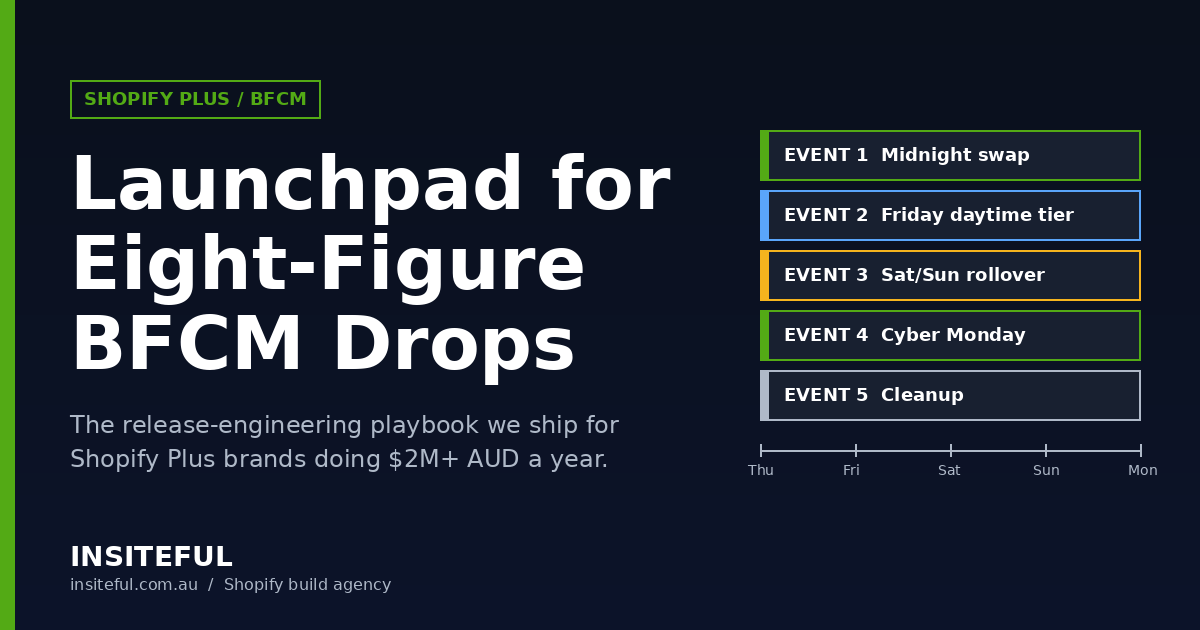
When Shopify merchants generated a record $14.6 billion in BFCM 2025 sales and peak velocity hit $5.1 million per minute at 12:01pm EST on Black Friday, the brands that captured a disproportionate share weren’t the ones with the biggest ad budgets. They were the ones whose midnight switchover was already on rails. The theme had swapped. The prices had moved. The discounts had armed. The bot wall had dropped. The Slack channel was lit with green status pings, not red error logs.
That is what a properly built Launchpad event looks like. And that is what most Plus brands still get wrong.
We build BFCM event infrastructure for Shopify Plus merchants doing $2M to $80M AUD in annual revenue. Every year we run the same pre-flight pattern across 30+ live drops, refine the gaps, and ship it back into the next season’s playbook. This article is the working version of that playbook — the Launchpad architecture we deploy, the migration work we ship before every drop, the war-room setup we leave behind, and the artefacts a serious Plus brand needs to keep when the agency walks away.
If you are evaluating whether your current Launchpad setup can survive 27% YoY volume growth and a partially-deprecated Scripts environment, this is the technical anatomy of the answer.
What Launchpad actually does (and what merchants keep confusing it with)
Launchpad is the Shopify Plus event scheduler. It is not a marketing tool. It is not a promotion engine. It is a state machine that flips six things on at a defined timestamp and flips them back off at a defined timestamp, with no human in the loop.
According to Shopify’s Launchpad documentation, a single event can schedule:
1. Theme publication — swap from a year-round theme to a BFCM theme, then swap back. 2. Product visibility — publish hidden doorbuster products at midnight, hide them at end. 3. Price changes — alter variant pricing during the event window. 4. Discount activation — turn discount codes and automatic discounts on at start. 5. Script activation — fire line-item and shipping Scripts for the event duration (this is the one with a hard deadline — more below). 6. Bot protection — engage the high-traffic checkpoint, limited to a 60-minute window per Shopify’s own bot protection guidance.
What it does not do: send marketing emails, post to social, notify your warehouse, or pause your paid traffic if you sell through inventory. That work lives in Shopify Flow and your CDP. We will get to that stack later.
The artefact we leave with every Plus client: a one-page Launchpad scope sheet that maps each of the six levers to a specific change record (theme file ID, product handle list, discount IDs, Script IDs or Function IDs, bot protection window). When a senior merchant asks “what is Launchpad actually changing at midnight?”, they should be able to pull up one PDF and answer in 30 seconds.
The seven-week build calendar (T-49 to T-0)
Most agencies start BFCM build work at T-21 days. That is when the ad accounts hit their warm-up budget and the founder finally sets a meeting. The result is a rushed theme, an untested discount stack, and a launchpad event nobody has dry-run in production.
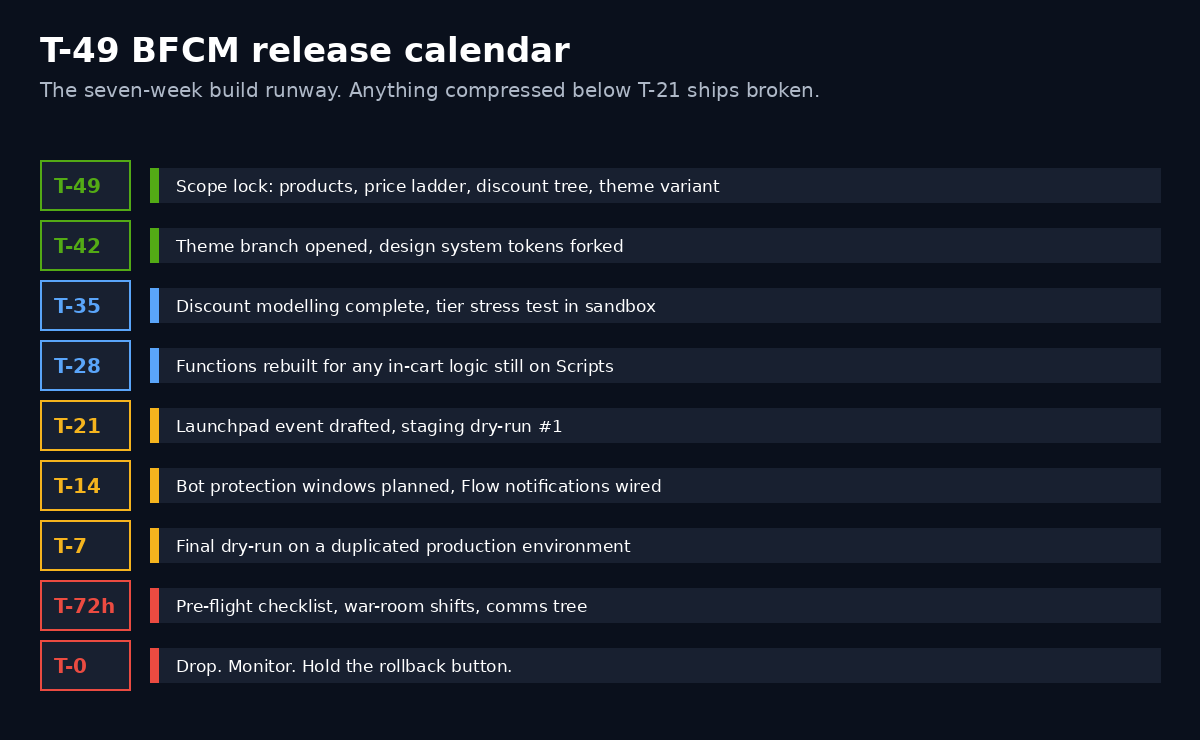
We run BFCM builds on a T-49 calendar. Seven weeks before the event, the scope is locked. Six weeks before, the theme branch is open. Five weeks before, the discounts are modelled in a sandbox store. Three weeks before, every Script that touches checkout is rebuilt as a Function (because Shopify confirmed in the April 2025 Scripts deprecation notice that Scripts cannot be edited or published after April 15, 2026, and stop executing entirely on June 30, 2026 — meaning anything you ship for BFCM 2026 should already be Function-native).
The calendar we hand over:
| Week | Milestone | Owner |
|---|---|---|
| T-49 | Scope lock: products, price ladder, discount tree, theme variant | Brand + Insiteful |
| T-42 | Theme branch opened, design system tokens forked | Insiteful frontend |
| T-35 | Discount modelling complete; tier overlap stress-tested in sandbox | Insiteful CRO |
| T-28 | Functions rebuilt for any in-cart logic still on Scripts | Insiteful engineering |
| T-21 | Launchpad event drafted, staging dry-run #1 | Insiteful + brand ops |
| T-14 | Bot protection windows planned, Flow notifications wired | Insiteful engineering |
| T-7 | Final dry-run on a duplicated production environment | Insiteful + brand ops |
| T-72h | Pre-flight checklist, war-room shifts, comms tree | Brand ops |
| T-0 | Drop. Monitor. Hold the rollback button. | War room |
This is not a marketing calendar. This is a release calendar. The shift in mindset is the entire point.
Build artefact: the calendar above ships as a Notion or Linear project template inside the client workspace. Every milestone gets a checklist and a sign-off. The brand owns it after handover so next year’s BFCM starts from a real T-49.
The Launchpad event architecture we actually deploy
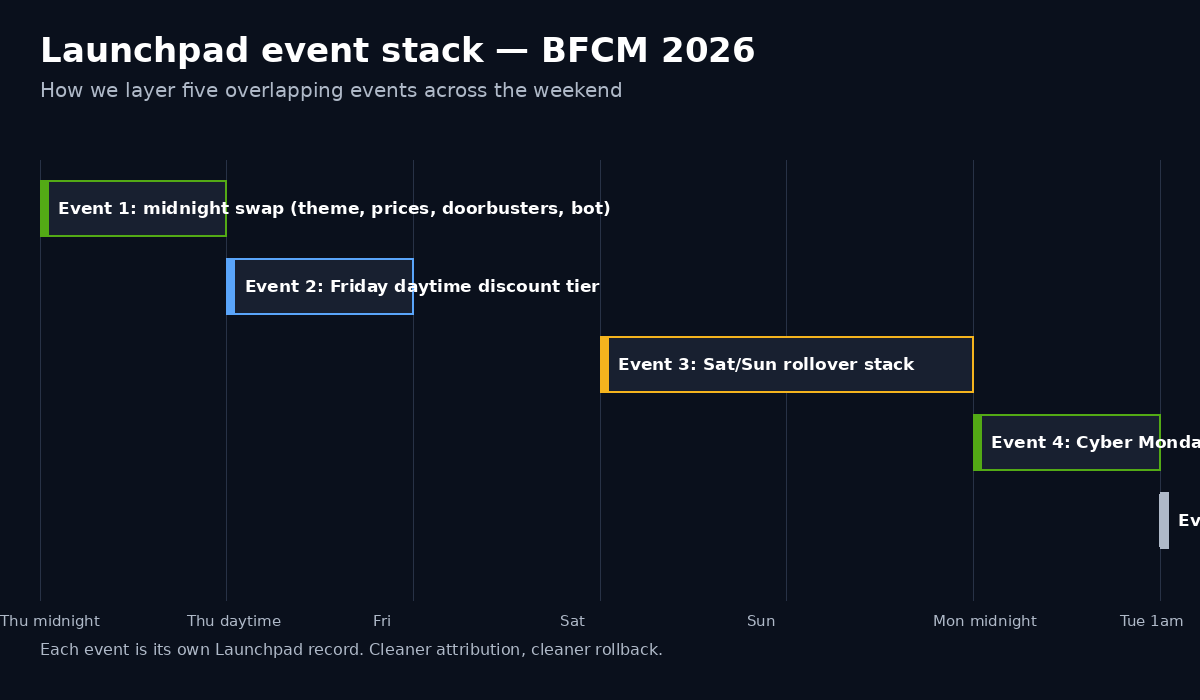
A single Launchpad event is rarely enough for an eight-figure drop. We typically stack three to five overlapping events to handle the day’s choreography.
Event 1 — The midnight swap. Theme swap, price changes, doorbuster product publish, primary discount tree on, bot protection engaged for the first 60 minutes. This event runs midnight Thursday AEDT to 1:00am Thursday AEDT (the bot protection cap).
Event 2 — The Friday daytime tier. No theme change. Tiered discount escalation (the 30% Friday daytime SKUs vs the 40% evening doorbusters). Runs 1:00am Thursday to 11:59pm Thursday.
Event 3 — The Saturday/Sunday rollover. Different discount stack, sometimes a featured-product reshuffle. Runs Saturday midnight to Sunday 11:59pm.
Event 4 — The Cyber Monday extension. Often a completely different price ladder, different discount codes, different homepage banners. Runs Sunday midnight to Tuesday 1:00am.
Event 5 — The cleanup. Reverts theme, hides doorbusters, archives discount codes. Runs Tuesday 1:00am.
Stacking like this lets us A/B different discount architectures within the same weekend without a developer touching the store at 3am. It also gives us clean attribution: each event has its own start and end, so reporting can isolate Friday daytime conversion against Friday evening conversion against Saturday conversion without manual time-slicing.
Build artefact: the event stack ships as an annotated screenshot of the Launchpad calendar view, plus a CSV of event IDs and triggered objects. Every event lives in the client’s runbook so it can be recreated by a new ops hire next year.
Why Scripts-to-Functions is the most important pre-BFCM build of 2026
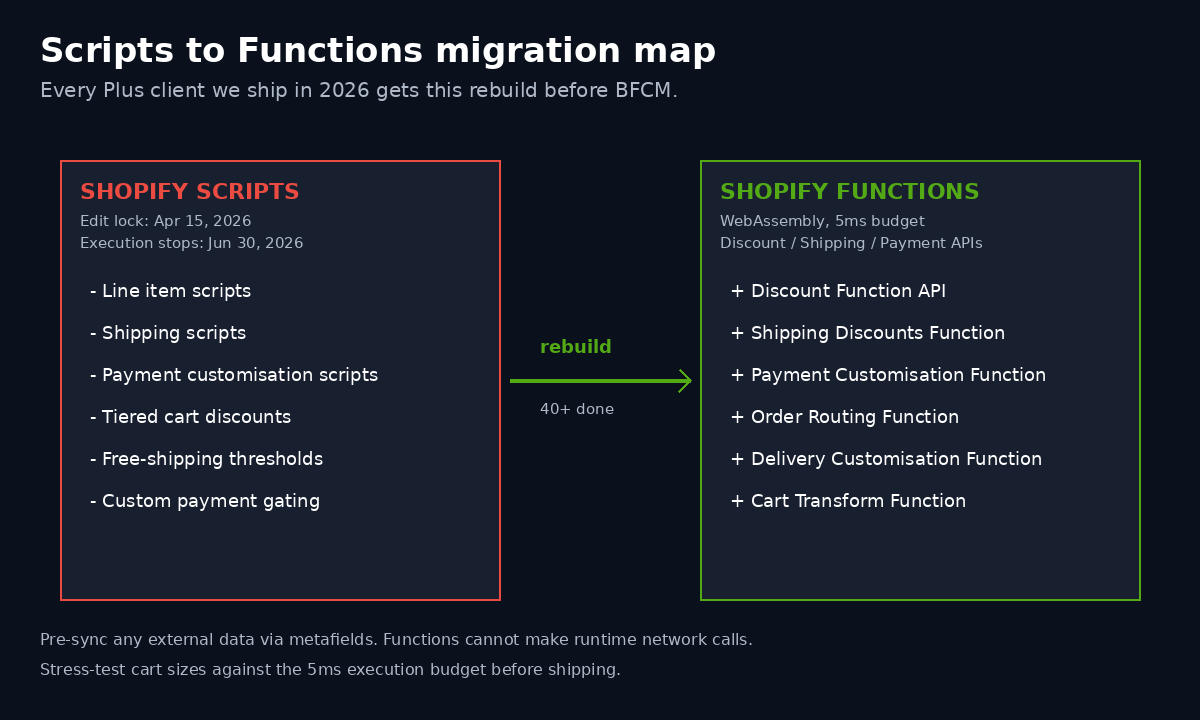
This is the work we are quietly doing for every Plus client this year, whether they asked for it or not. If your BFCM 2026 launch relies on any of the following, it will break:
- Tiered discount logic at the cart level (buy 3 get 1 free, spend $200 AUD get 20% off, bundle pricing) currently shipped via Shopify Scripts.
- Free shipping thresholds calculated at cart level via Shopify Scripts.
- Custom payment method gating (e.g. hide AfterPay over $2,000 AUD) via Shopify Scripts.
- Any Launchpad event that points to a Script ID.
Per Shopify’s official deprecation timeline, Scripts stop being editable on April 15, 2026, and stop executing on June 30, 2026. That means by the time BFCM 2026 rolls around, every piece of in-cart and in-checkout logic must already be running on Shopify Functions.
The migration is not a one-to-one port. Functions runs as WebAssembly in Shopify’s hot path. It has different constraints than Scripts: it cannot make runtime network calls, each product line item can only receive one discount by default, and very large carts or broad collection scans require optimised logic or a Rust toolchain rather than JavaScript. We have rebuilt 40+ Scripts environments into Functions for clients in the last 12 months, and the pattern we apply now is:
1. Inventory the live Scripts — pull every Script in the admin, categorise as line-item, shipping, or payment. 2. Map each Script to a Function target API — Discount Function for cart-level price logic, Shipping Discounts Function for free-shipping thresholds, Payment Customisation for payment method gating. 3. Pre-sync any external data via metafields — because Functions cannot make runtime network calls, anything the Script used to fetch live needs to be materialised into product or customer metafields, refreshed by Flow on a schedule. 4. Stress-test cart sizes — Functions has a 5ms execution budget. Carts with 100+ line items need careful logic to stay under it. 5. Ship behind a feature flag — toggle the new Function on for staff IPs first, run for 72 hours, then promote to global.
Build artefact: a Functions migration report, one row per legacy Script, showing the target API, the metafield sync plan, the test coverage, and the cutover date. This ships with every Plus engagement now as a non-optional deliverable.
Bot protection: the 60-minute window strategy
Shopify’s bot protection is a Plus-only feature that gates the checkout for limited windows during high-traffic events. The constraint that nobody reads until day-of: only one bot protection event can be scheduled at a time, and the maximum duration is 60 minutes.
This is by design. Shopify does not want bot protection running 24/7 because the friction degrades real customer conversion. But it means you cannot just turn it on at midnight and leave it on through Sunday.
The pattern we deploy:
- Window 1: 11:55pm to 12:55am Thursday/Friday — the peak inventory rush. Doorbusters drop, bot armies attempt to scrape and snipe.
- Window 2: 6:00pm to 7:00pm Friday — second wave when the US wakes up and traffic doubles. AU brands selling cross-border feel this hardest.
- Window 3: 11:55pm Sunday to 12:55am Monday — Cyber Monday rollover.
Three discrete one-hour windows, each scheduled as its own Launchpad event, each documented in the runbook so next year’s ops team knows exactly when to expect the CAPTCHA gate.
We pair this with Cloudflare or a dedicated WAF in front of the storefront because Shopify’s bot protection only covers checkout, not browse and add-to-cart traffic. Cart abandonment numbers during BFCM are usually inflated by bot sessions that never made it to checkout, and the bot traffic problem inflates analytics across the board. A storefront-level filter pays for itself in clean attribution alone.
Build artefact: a bot protection schedule, three windows defined, with the cart abandonment baselines from the prior 30 days and the expected delta. Brand ops carries this into the post-event review.
Flow + Launchpad: the comms and ops backbone
Launchpad flips the store. Flow tells everyone else.
The Flow workflows we wire to every BFCM Launchpad event:
Workflow A — Customer comms. When event starts, trigger a Klaviyo or Mailchimp campaign send to a pre-built BFCM segment. We do not let the brand rely on a manually-scheduled email at 11:59pm. The Launchpad event is the trigger, the email send is the consequence. If the event slips, the email slips with it.
Workflow B — Internal Slack. When event starts, post to #bfcm-warroom with the event ID, the theme version, the active discount IDs, and a link to the live storefront. When event ends, post the closing summary.
Workflow C — Inventory cutoff. When a doorbuster SKU hits 10% of allocated stock, trigger a Flow that hides the product, posts to Slack, and emails the warehouse to confirm physical count. This is the single most important automation in the stack. Selling 200 units of a product you only have 150 of is the moment BFCM turns from a win into a refund storm.
Workflow D — Payment exception alerting. When a checkout fails with a payment error, log to a Google Sheet via Flow and ping the finance lead. Payment provider rate-limiting during BFCM is real and you want to know within seconds, not the next morning.
Workflow E — Plus channel surge. When session count exceeds 3x baseline, escalate to the on-call engineer. Most stores can absorb 10x traffic without an issue, but the apps you run cannot. Surge alerting is how you catch a third-party app falling over before customers do.
Build artefact: five Flow exports, JSON files, dropped into the brand’s .shopify/flow/ directory in their internal repo. Brands that don’t keep a flow repo get a Notion page with the workflow logic transcribed step-by-step.
The pre-flight checklist we ship at T-72 hours
72 hours before the drop, we send the brand ops lead a one-page pre-flight checklist. It is the same checklist every time, refined across 30+ drops. If anything on it cannot be ticked, the event does not go live.
- Theme branch deployed to a duplicate Plus store and tested end-to-end at the exact event timestamp using a sandbox clock.
- Discount tree exported as JSON and committed to source control. Every code documented with target audience, validity window, and stacking rules.
- All Functions deployed, version-pinned, with rollback functions tested.
- Bot protection windows scheduled. Confirm each window is exactly 60 minutes or less.
- Inventory cutoff workflow tested with a deliberately under-stocked SKU.
- Customer comms templates approved by brand and pre-scheduled.
- Klaviyo Flow paths and exit conditions audited for “during BFCM” exclusions.
- Paid media spend caps confirmed for the event window.
- War-room Slack channel created with on-call rotation, escalation contact, and a pinned rollback procedure.
- Rollback theme tagged and tested. The previous theme version sits on a one-click revert.
- Status page updated, support team briefed, return policy temporarily lengthened if applicable.
The brand signs the checklist. We countersign. The signed PDF goes into the engagement folder. This is how we close the loop on accountability before a drop where one mistake costs six figures.
The eight-figure war-room setup
When the timer hits T-0 on a real eight-figure drop, the war room is already running. We staff or co-staff every BFCM war room for our retained Plus clients. The setup:
Physical or virtual room with three monitors visible to everyone: live Shopify analytics dashboard, the storefront homepage, and the war-room Slack channel.
Rotation roles — at minimum: drop captain, frontend engineer, backend/Functions engineer, ops lead, customer support lead, paid media operator. For a 72-hour drop we run three 8-hour shifts with handover at each transition.
Decision log — a running Google Doc where every change made during the drop is timestamped and signed. If we move a discount tier, increase a free-shipping threshold, or pause an ad set, it gets logged. Post-event reviews are written from this doc.
Rollback authority — exactly one person at any given moment holds rollback authority. That person can push the previous theme, disable Functions, or kill discount stacks unilaterally. We pre-agree the rollback triggers with the brand so the call is mechanical, not political.
The numbers we watch in real time: session count vs forecast, add-to-cart rate, checkout success rate, average order value, payment provider latency, third-party app response time, inventory levels per doorbuster SKU, gross merchandise value running total.
We are not optimising for revenue inside the war room. We are optimising for zero unexpected events. The strategic work was done at T-49. Inside the drop, our job is to keep the rails warm and respond to anomalies.
How we do it at Insiteful
Insiteful has been building Shopify and Shopify Plus stores for Australian and US brands since 2001. Over 25 years and 200+ builds, we have run more BFCM drops than we can count, and the playbook above is the distilled version of what survives across every brand size, every vertical, and every retail calendar.
The way we engage on a BFCM build at Insiteful:
We start with a build assessment rather than a quote. The assessment is a paid two-week diagnostic where we audit the current Plus environment — Launchpad history, Scripts inventory, Flow workflows, Function readiness, war-room maturity — and produce a gap report against where the store needs to be by T-49 for the next major sale event. If the brand engages us for the build, the assessment fee is credited.
The build itself runs across six to eight weeks. Discovery and scope-lock happen in week one. Theme and event architecture get built in weeks two through four. Functions migration and Flow wiring happen in weeks four through six. Pre-flight, dry-runs, and war-room rehearsal happen in weeks six through eight. We do not start work without a locked T-49 calendar, and we do not ship to production without two staging dry-runs that hit the exact event timestamp.
Our Plus clients keep us on a retainer through the BFCM weekend and the Cyber Monday rollover. The retainer covers war-room coverage, real-time engineering response, and a post-event review delivered within 14 days. The review is the most underrated artefact in the engagement — it is what turns this year’s drop into next year’s playbook, and it is what compounds across multiple retail seasons.
We are deliberate about the brands we take on. Our standard BFCM engagement starts at $25,000 AUD for a single-event build on an existing Plus store, scaling to $80,000 AUD or more for multi-event drops with full Scripts-to-Functions migration. The brands that get the most from this work are doing $5M AUD or more in annual revenue with a credible plan to do $10M AUD or more in the next 18 months. Below that floor, the ROI of agency-led event engineering is harder to justify, and we will say so.
Where this leaves your BFCM 2026 build
The 2025 BFCM Shopify GMV record of $14.6 billion was set by a network of merchants who treated the weekend as a release event, not a marketing event. The brands that out-grew the network average were the ones whose technical foundation could absorb the volume without operator intervention.
If your store is still on Scripts, still on a single Launchpad event, still relying on a developer to manually flip a theme at midnight, you are running 2019 infrastructure into a 2026 traffic profile. That gap will widen this year because of the Scripts deprecation, and it will widen further as bot pressure on checkout climbs.
Three things to do this week if you are running BFCM 2026 yourself:
First, audit every Script in your admin and pick which Function target API replaces it. If you cannot map them in an afternoon, you do not have time to do it yourself in 2026.
Second, draft a T-49 calendar for your next major sale event. Even if the dates are notional, the discipline of mapping the milestones backwards changes how the team works the build.
Third, set up a Launchpad dry-run in staging this month using a fake event. Watch what breaks. The cost of finding a broken Function in October is a coffee. The cost of finding it at 12:03am Black Friday is a six-figure refund weekend.
If you would rather not run the build yourself, that is what we do at Insiteful. The fastest way to start a conversation is to book a build assessment via our contact page and tell us your next major sale event date. We will tell you within five business days whether your current Plus environment can hit it.
Sources:
- Shopify Merchants Generate Record-Breaking $14.6 Billion in BFCM Sales
- Shopify Launchpad — Help Center
- Shopify Launchpad Options — Help Center
- Shopify Scripts Deprecation — Changelog
- Shopify Functions Discount API
- Shopify Bot Protection — Help Center
- Bot Traffic Is Affecting Shopify Metrics After BFCM — Consentmo