
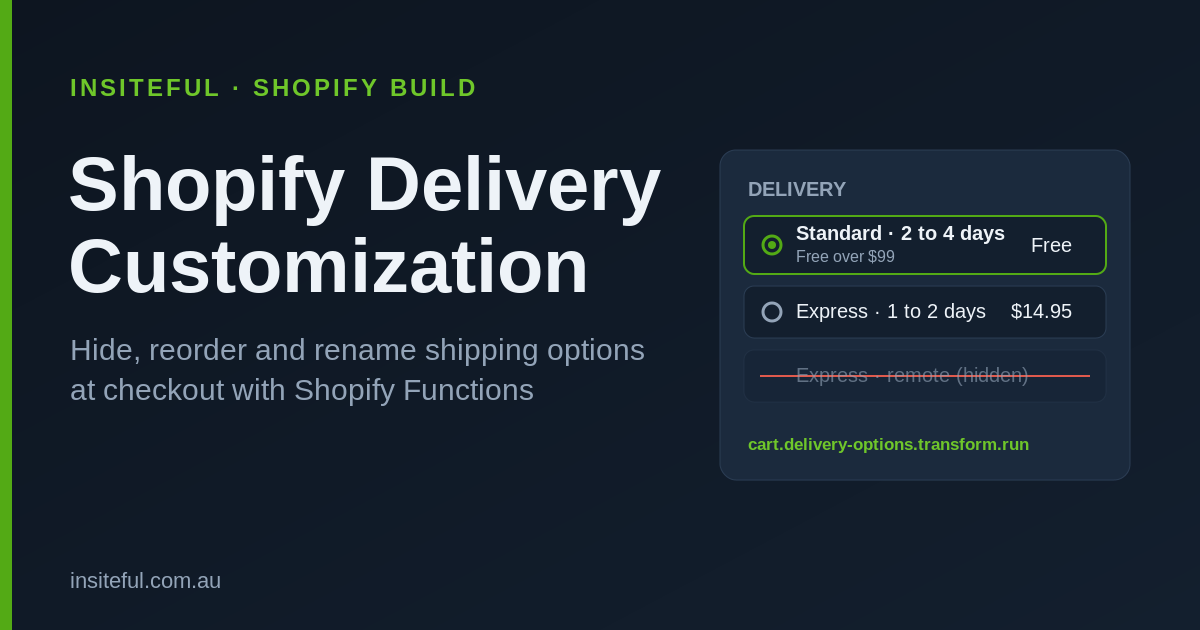
Almost every Shopify store we audit is losing revenue at the one screen it can least afford to: the delivery step of checkout. The default behaviour is blunt. Every shipping rate the store has configured gets dumped in front of the buyer in whatever order Shopify feels like, with carrier names most Australians do not recognise, no delivery estimate, and express options showing for postcodes the courier will never reach on time. Then we wonder why the cart is abandoned.
The numbers back this up. The average cart abandonment rate in 2025 sat at 70.19%, and unexpected costs at checkout, mostly shipping, remained the number one abandonment trigger. A 2026 PwC survey of 14,000 shoppers across 11 countries put unexpected costs at the top of the list at 51.3%, with shipping fees making up 67% of those surprise charges. Separately, 22% of shoppers walk because of delivery times, and around 70% name free shipping as the single most important delivery factor. The delivery step is not a formality. It is a conversion event.
For years the only way to reshape that screen was a third-party shipping app bolted onto checkout.liquid, or paying for carrier-calculated rates and hoping. Since checkout.liquid was retired, the clean, native way to control delivery options is Shopify Functions. This is the exact build we ship for Plus clients who need the delivery step to behave like a designed experience rather than a data dump. Here is how the Shopify delivery customization function works, what it can and cannot do, and how we implement it.
What a delivery customization function actually is
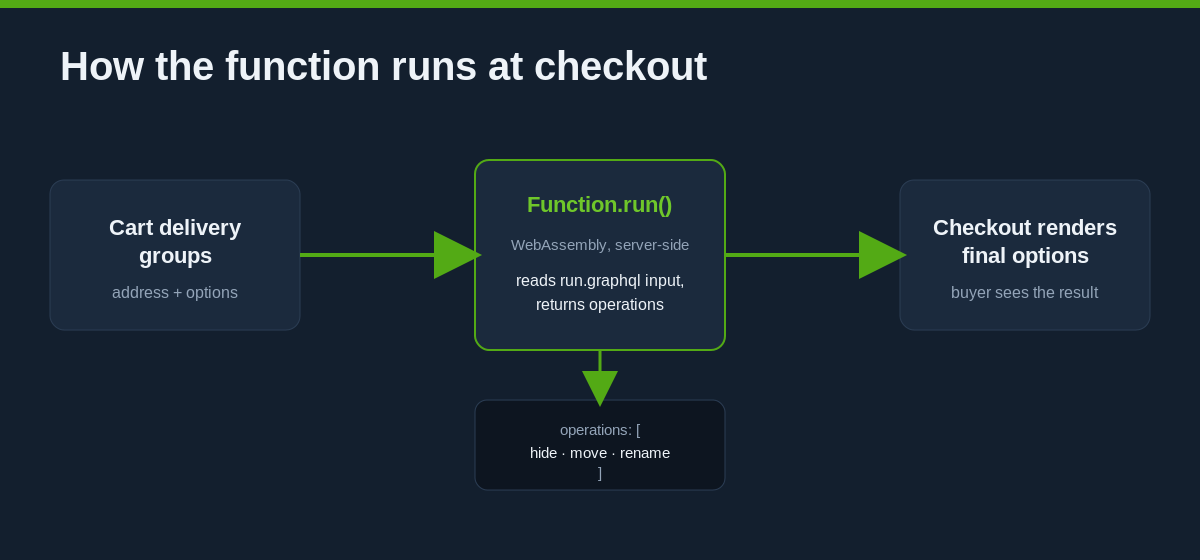
A delivery customization is a Shopify Function that runs server-side at checkout, inside the Functions runtime, on the cart.delivery-options.transform.run extension target. When a buyer reaches the shipping step, Shopify hands your function the cart’s delivery groups and the list of delivery options it was about to render. Your function returns a small list of operations, and Shopify applies them before the options are shown. The whole thing executes in single-digit milliseconds because it runs as WebAssembly on Shopify’s own infrastructure, not as an external API call your checkout has to wait on.
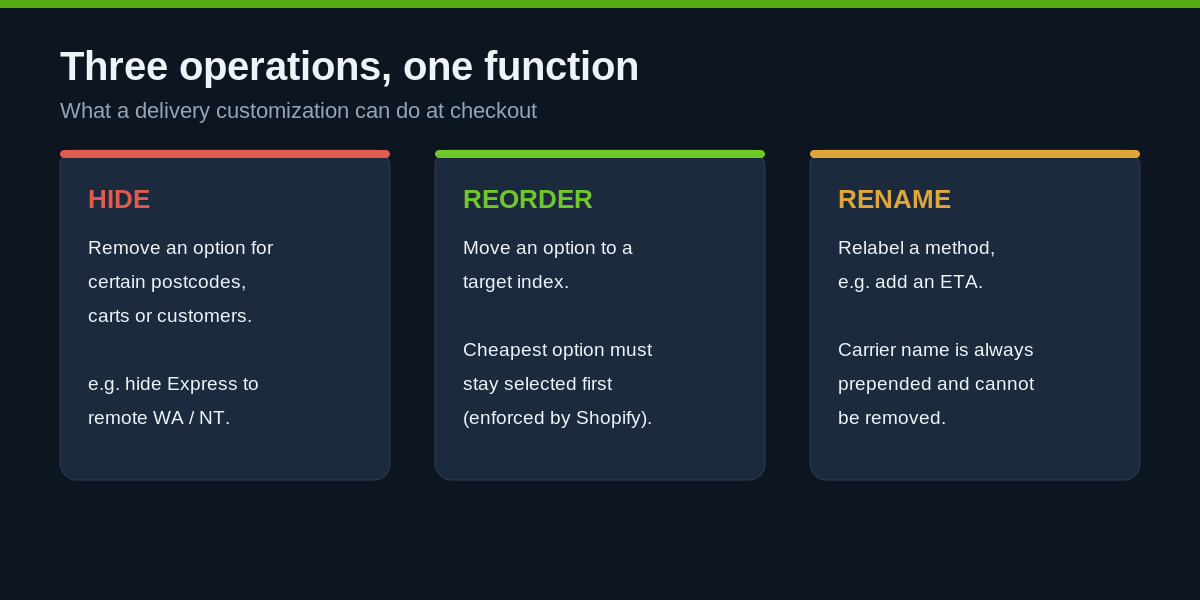
There are exactly three operations available, and understanding their limits is the difference between a build that ships and one that gets rejected at checkout:
- Hide: remove a delivery option for certain carts, postcodes, or customers.
- Reorder (move): change the position of a delivery option in the list, by target index.
- Rename: change the label a buyer sees, for example to add a delivery estimate.
Delivery and payment customizations are a Plus-tier capability. If you are on standard Shopify, this specific lever is not available to you, which is one of the honest reasons a growing brand eventually outgrows the standard plan. You can activate a maximum of 25 delivery customization functions on a single store, so we treat that budget as a design constraint and consolidate logic rather than spawning a function per rule.
The three operations, and the constraints nobody warns you about
The operations look simple in a demo and then bite you in production, because Shopify enforces two rules that protect the buyer and quietly override your intent if you ignore them.
Rename cannot strip the carrier name. When you rename an option, the carrier name is automatically prepended to the method title and cannot be altered or removed through the API. If the carrier is Australia Post and the method is Standard, you can turn Australia Post Standard into Australia Post Standard - 2 to 4 business days, but you cannot turn it into Standard Delivery. This trips up a lot of first-time builds where the brief was “just call it Standard Shipping”. You cannot. Plan the copy around the carrier prefix, not against it.
Reorder cannot upsell the buyer by default. If you move options around, you are prohibited from making a higher-priced option the default selection. The cheapest delivery option must always be the one selected first. You can promote a faster paid option visually, but Shopify will still land the buyer’s default on the cheapest rate. We design the reorder logic to sit inside that rule rather than fighting it, because a rejected customization is worse than none.
Here is the shape of a move and a hide operation as the function returns them:
{
  "operations": [
    { "deliveryOptionMove": { "deliveryOptionHandle": "standard-au-post", "index": 0 } },
    { "deliveryOptionMove": { "deliveryOptionHandle": "express-au-post", "index": 1 } },
    { "deliveryOptionHide": { "deliveryOptionHandle": "pickup-warehouse" } }
  ]
}
Every operation keys off a deliveryOptionHandle. That handle is stable per option within a checkout, which is what lets you target one specific rate without hard-coding titles that a merchant might rename in the shipping settings next week.
Defining the input: run.graphql
A Function only receives the fields it asks for. The run.graphql file is where you declare exactly what the function needs from the cart, and keeping it lean is a real performance decision because the input is serialised on every checkout. For most Australian delivery logic we need the destination and the options, including cost so we can respect the cheapest-first rule when reordering:
query RunInput {
  cart {
    deliveryGroups {
      deliveryAddress {
        provinceCode
        countryCode
        zip
      }
      deliveryOptions {
        handle
        title
        cost {
          amount
        }
      }
    }
  }
}
The provinceCode gives us the state (NSW, VIC, QLD, WA, SA, TAS, ACT, NT), zip gives us postcode-level control for remote-area logic, and cost.amount lets the function reason about price. You must be on API version 2025-07 or higher for delivery customization functions. From 2025-10 onward you no longer query for a function ID at all, you reference a stable function handle that stays consistent across every environment, which makes the deploy pipeline far less brittle.
The function logic we actually ship
Below is a trimmed version of a real pattern we deploy for Australian retailers: hide express to genuinely remote postcodes where the courier cannot honour the promise, and add a plain-English delivery estimate to the standard option so the buyer is not left guessing. We write production functions in Rust for the performance headroom, but the JavaScript reads more clearly for illustration:
export function run(input) {
  const REMOTE_PREFIXES = ["0872", "0880", "6743"];
  const operations = [];

  for (const group of input.cart.deliveryGroups) {
    const zip = group.deliveryAddress?.zip ?? "";
    const isRemote = REMOTE_PREFIXES.some(prefix => zip.startsWith(prefix));

    for (const option of group.deliveryOptions) {
      const title = option.title ?? "";

      if (isRemote && /express/i.test(title)) {
        operations.push({
          deliveryOptionHide: { deliveryOptionHandle: option.handle }
        });
        continue;
      }

      if (/standard/i.test(title)) {
        operations.push({
          deliveryOptionRename: {
            deliveryOptionHandle: option.handle,
            title: isRemote
              ? `${title} - 5 to 8 business days`
              : `${title} - 2 to 4 business days`
          }
        });
      }
    }
  }

  return { operations };
}
Notice there is no third-party network call, no app to slow the page, and no title matched by a fragile string that breaks when the merchant edits a rate. The logic is legible, testable, and it runs where the decision is made.
Activating the function with deliveryCustomizationCreate
Writing the function is only half the job. Nothing happens at checkout until you register the customization on the store, which you do with a single GraphQL Admin mutation. From API version 2025-10 you pass the function handle directly rather than looking up an ID:
mutation {
  deliveryCustomizationCreate(deliveryCustomization: {
    functionHandle: "delivery-customization"
    title: "Hide express to remote postcodes, add ETAs"
    enabled: true
  }) {
    deliveryCustomization {
      id
    }
    userErrors {
      field
      message
    }
  }
}
Once that returns an ID with no userErrors, the customization appears in the Shopify admin under Settings, Shipping and delivery, in the Delivery customizations section, where a merchant can toggle it on or off without touching code. That handoff matters: we build the engine, the client keeps the controls.
The scenarios we build this for
The tutorial version renames one option for one state. The real value shows up when the logic maps to how an Australian brand actually ships. These are patterns we have implemented on live stores:
Hiding express where it is a lie. A homewares client doing around $6M AUD a year was offering express to every postcode, including remote WA and NT, where the courier’s actual transit time was five days. Buyers paid the express premium, then lodged complaints and requested refunds. We hid express for the affected postcode ranges and left standard with an honest estimate. Support tickets tied to late express dropped sharply within a fortnight.
Adding delivery estimates without an app. Retailers who show total landed cost and delivery timing earlier see materially less late-stage drop-off, one study measured a 22.4% reduction. The rename operation lets us append a realistic ETA to each carrier method at the moment of decision, which is where it counts, rather than only on the product page.
Reordering to match the promise, not the price war. For a brand offering free shipping over $99 AUD alongside a paid next-day option, we reorder so the free threshold rate reads cleanly at the top while still respecting the cheapest-first default rule. The buyer sees the value option framed first.
Hiding pickup for the wrong customers. A brand running both retail and wholesale did not want local pickup shown to trade accounts shipping to a different state. Because the function can read the destination and cart, we suppress pickup where it makes no sense and keep the checkout uncluttered.
Why a native function beats the app or the carrier-rate workaround
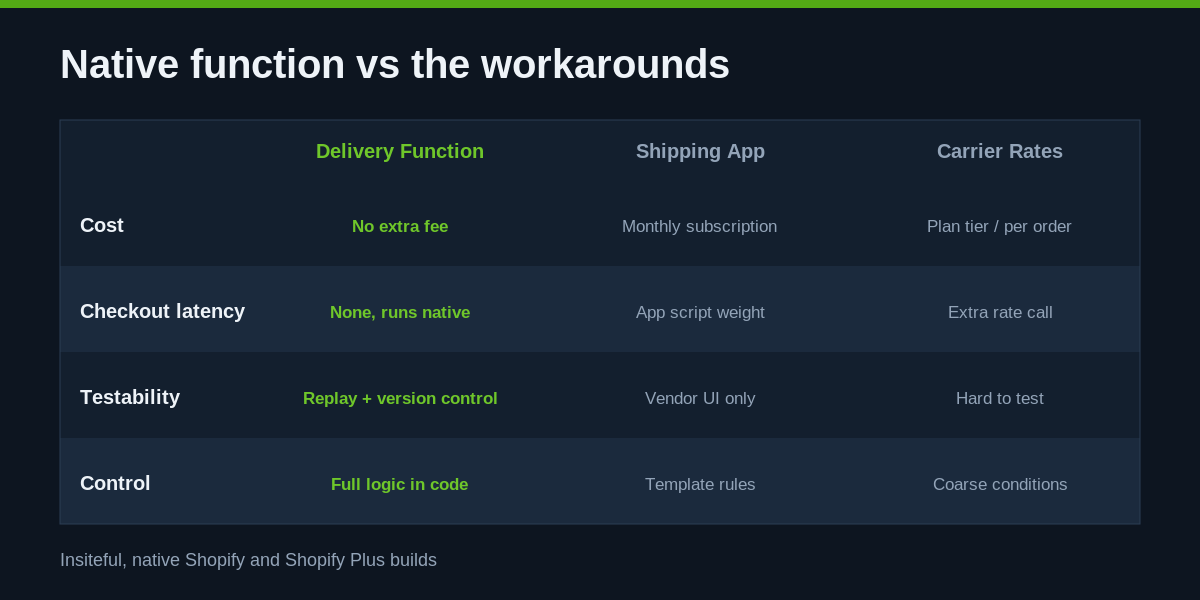
There are three common ways teams try to solve this, and two of them cost more than they look. A third-party shipping-rules app adds another vendor, another monthly fee, and another script the checkout has to account for. Carrier-calculated rates can express some conditional logic but are coarse, harder to test, and often locked behind higher plan tiers or per-order fees. A delivery customization function has none of that overhead: it runs on Shopify’s infrastructure, adds zero external latency, is version-controlled in your app repo, and is testable in isolation.
Worth naming the trap we see most often: teams treat the delivery step as a shipping-settings problem when it is really a logic problem. Shipping settings decide which rates exist. A function decides which of those rates a specific buyer should see, in what order, described in what words. Those are different jobs, and conflating them is why so many stores end up with a checkout that technically works and commercially leaks. Once a brand separates the two, the delivery step stops being a static list and starts behaving like part of the conversion path it sits on.
The performance point is not academic. Every app you remove from the checkout path is weight you stop carrying on the highest-intent page in the funnel. When we consolidate three overlapping shipping and checkout apps into one function, the client saves the subscription cost and the store gets faster where speed converts hardest.
Testing, logs, and the gotchas that cost a day
Delivery functions are easy to get 90% right and then lose an afternoon on the last 10%. A few things we check on every build:
Province code is not postcode. If your rule is genuinely remote-area, you need zip, not provinceCode. WA as a whole is not remote; a handful of postcode ranges are. Building on state alone hides express from Perth, which is a real conversion mistake.
Replay before you trust it. The Shopify CLI app function replay command lets you re-run a real function execution locally against captured input, so you can debug the exact cart that misbehaved without rebuilding it by hand at checkout. We wire this into review for any non-trivial logic.
Watch the operations budget. With a 25-customization ceiling per store, we keep related rules inside one well-structured function rather than sprawling. It is easier to reason about and it leaves headroom for future needs.
Mind the cheapest-first and carrier-prefix rules from day one. Both are enforced silently. A reorder that tries to default to a paid rate, or a rename that assumes it can drop the carrier name, will not error loudly, it will just not do what the brief asked. We design to the constraints up front.
The sibling lever: payment customizations
Delivery customizations shipped alongside a near-identical sibling, the Payment Customization API, and the two are worth understanding together because the same brands need both. A payment customization runs on the purchase.payment-customization.run target and gives you the same three moves, hide, reorder and rename, applied to payment methods instead of shipping options. The classic Australian use cases are hiding cash-on-delivery above a risk threshold, suppressing an express-checkout wallet for B2B accounts that pay on terms, and reordering so your lowest-fee method sits first.
We frequently deploy the pair as one coherent checkout policy. When a wholesale customer hits checkout, the delivery function hides retail pickup and the payment function hides consumer wallets, so the trade buyer sees a checkout tuned to how they actually purchase. Built natively, both functions run in the same millisecond budget and neither adds an app to the store. For a client processing more than $12M AUD a year through checkout, keeping that logic native rather than spread across two or three apps was both a performance win and a real line-item saving on subscriptions.
Measuring whether it worked
We never ship a checkout change without a way to read the result. Before deploying a delivery customization we baseline the checkout completion rate, the abandonment rate at the shipping step specifically, and the volume of support tickets mentioning delivery or the words late and express. After the function goes live we watch the same three signals for a fortnight against the prior period. A hide rule that removes an option nobody could honour should show up as fewer complaints and a steadier completion rate, not a drop in orders. If a change moves the wrong number, the function is version-controlled and the customization is a single toggle, so rolling back is immediate rather than a redeploy scramble. That discipline, treating the delivery step as a measurable surface rather than a set-and-forget setting, is what separates a real build from a demo.
How we do it at Insiteful
When a client comes to us with a messy delivery step, we do not start by writing a function. We start by mapping the actual shipping reality: which carriers, which zones, which postcodes genuinely fall outside the promise, and what the delivery step is costing in abandonment today. Only then do we decide what belongs in a function, what belongs in the shipping settings, and what should be retired entirely.
From there we scaffold the customization as a versioned function in the client’s Shopify app, define a lean run.graphql input, and write the logic in Rust so it stays well inside the platform’s execution limits. We test with real captured checkouts using function replay, deploy against a stable function handle so the same build promotes cleanly from dev to production, and register it with deliveryCustomizationCreate so the merchant keeps a simple on/off toggle in admin. Every rule is documented against the business reason it exists, so the next person who opens the store knows why express is hidden from a given postcode.
This is the pattern across everything we build on native Shopify and Shopify Plus: solve it at the platform level, keep the checkout fast, remove the apps that were papering over gaps, and hand back controls the client can actually run. A delivery customization function is a small piece of code with an outsized effect on the one screen where intent turns into revenue.
Get your checkout delivery step reviewed
If your delivery step is showing options that confuse buyers, express rates you cannot honour, or a wall of carrier names with no estimates, it is quietly costing you conversions. We can map exactly what is happening and scope the build to fix it. See how we scope a build and we will show you what a properly engineered checkout delivery experience looks like on your store.