
Most Shopify performance work is archaeology. The store is slow, somebody runs PageSpeed Insights, finds a 4.1 second LCP on mobile, and a developer spends three weeks excavating the causes. The numbers come good. Then, eight months later, the store is slow again.
The re-slowing is the part nobody budgets for, and it is the only part that matters. It is the predictable outcome of shipping changes to a storefront with no mechanism capable of saying no. Every optimisation project without a budget attached is a one-off cleanup, and cleanups decay.
A performance budget is that mechanism: a set of numbers your storefront is not permitted to exceed, enforced automatically, at the moment code is proposed rather than the moment a merchant notices. This article covers how to set those numbers, how to wire three layers of enforcement, and what to do when the budget is breached, which it will be.
Why Shopify Stores Get Slower on a Schedule
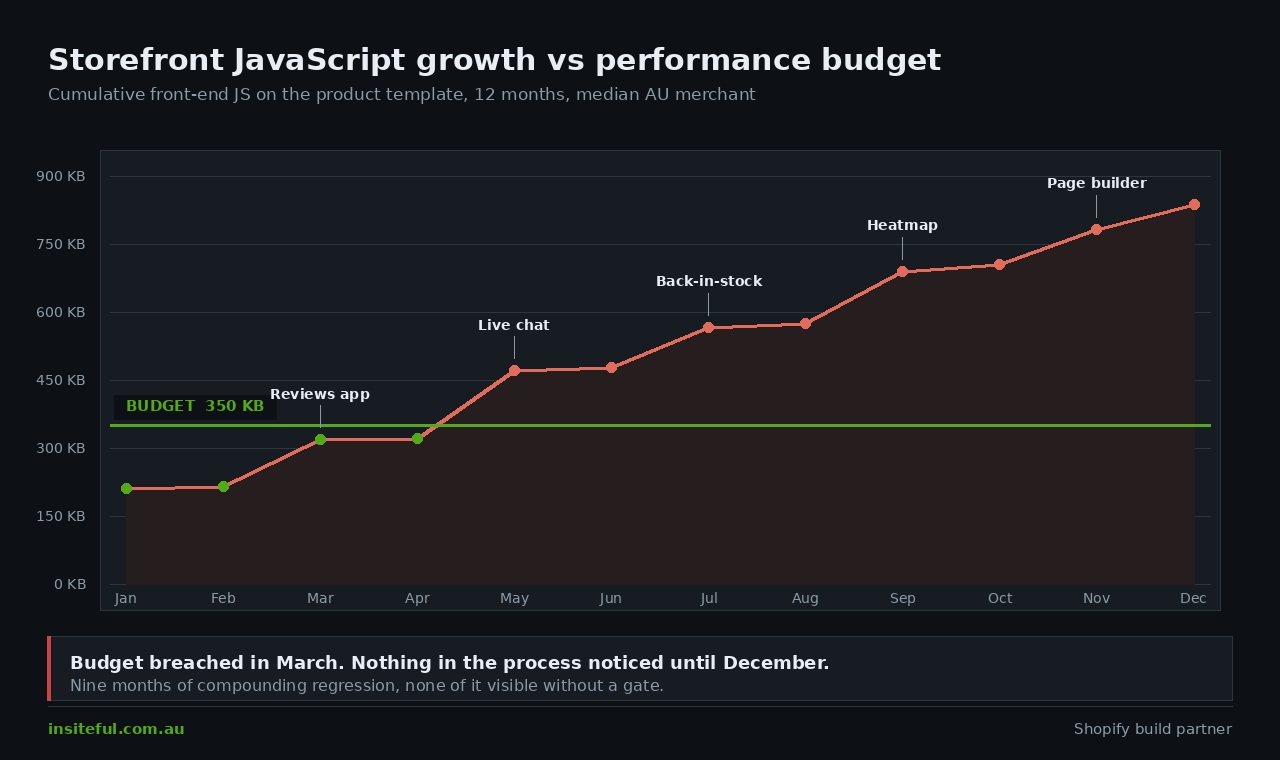
Storefront decay is not one catastrophic decision. It accumulates. A review widget in March, a live chat bubble in May, a back-in-stock notifier in July, a heatmap tool in September because someone wanted session recordings. Each install is individually defensible. The aggregate is not.
The data is unambiguous about where the weight comes from. The average Shopify store now runs 15 to 20 apps, each adding between 100 and 500 milliseconds of JavaScript to every page load. Third-party scripts account for roughly 62% of total JavaScript on a typical store. Stores running more than eight front-end apps typically post a mobile LCP above 3 seconds; stores with three or fewer usually stay under 2 seconds.
The gap between a clean theme and a loaded one is brutal. A default Shopify theme without customisation commonly scores around 70 on mobile Lighthouse. The same store carrying a mature app stack routinely drops into the 20s. Nobody chose that. It was the sum of eighteen small yes decisions with no counterweight.
Here is the weight profile we see most often auditing an established Australian store, as median added transfer and added main-thread blocking on a mobile product page:
| App category | Added JS (gzipped) | Added TBT | Loads on |
|---|---|---|---|
| Live chat / helpdesk widget | 180 to 400 KB | 250 to 600 ms | Every template |
| Reviews with photo and video galleries | 120 to 300 KB | 200 to 450 ms | Product, collection |
| Page builder runtime | 90 to 250 KB | 150 to 400 ms | Every template |
| Pop-up and email capture | 60 to 160 KB | 80 to 220 ms | Every template |
| Heatmap and session recording | 50 to 140 KB | 100 to 300 ms | Every template |
| Upsell and bundle widgets | 40 to 120 KB | 60 to 180 ms | Product, cart |
Note the fourth column. The damage is rarely the app itself. It is an app that earns its keep on the product page loading its full runtime on the home page, the blog and the 404.
What a Performance Budget Actually Is
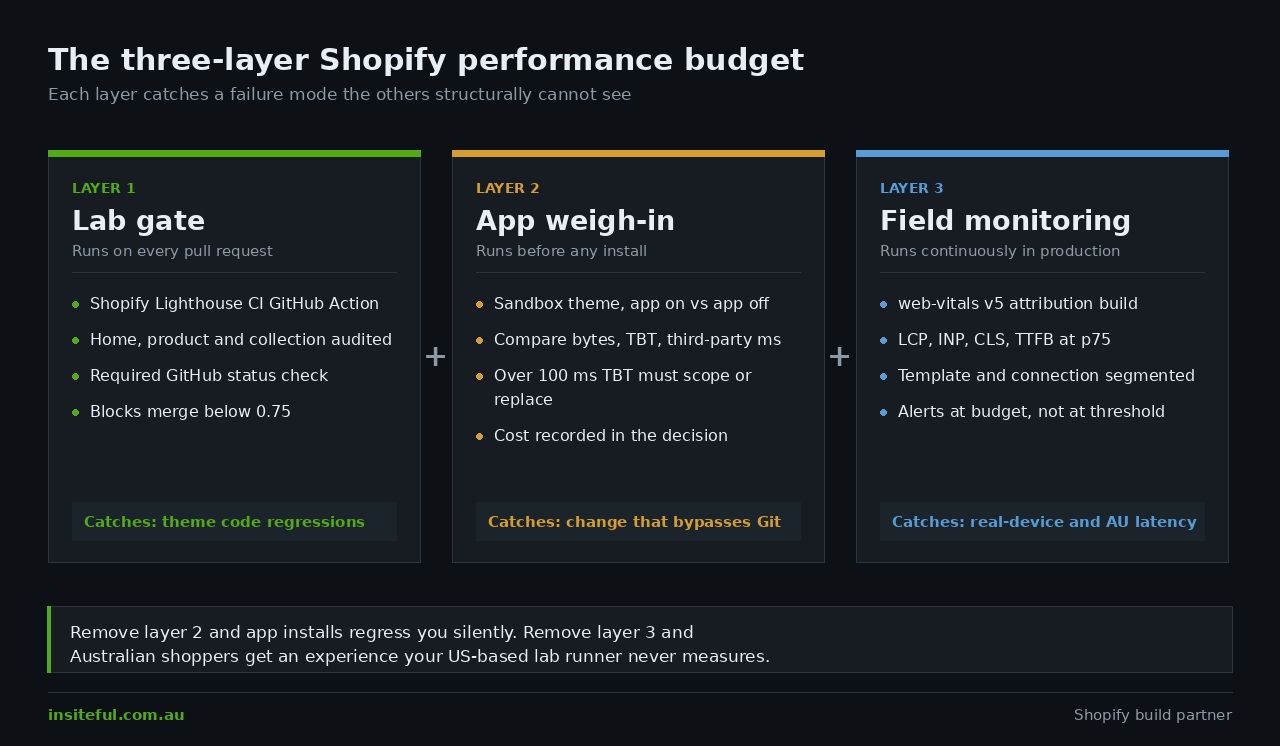
The term gets used loosely, usually meaning a vague aspiration to be fast. A real budget is three distinct constraints, and you need all three because each catches failures the others miss.
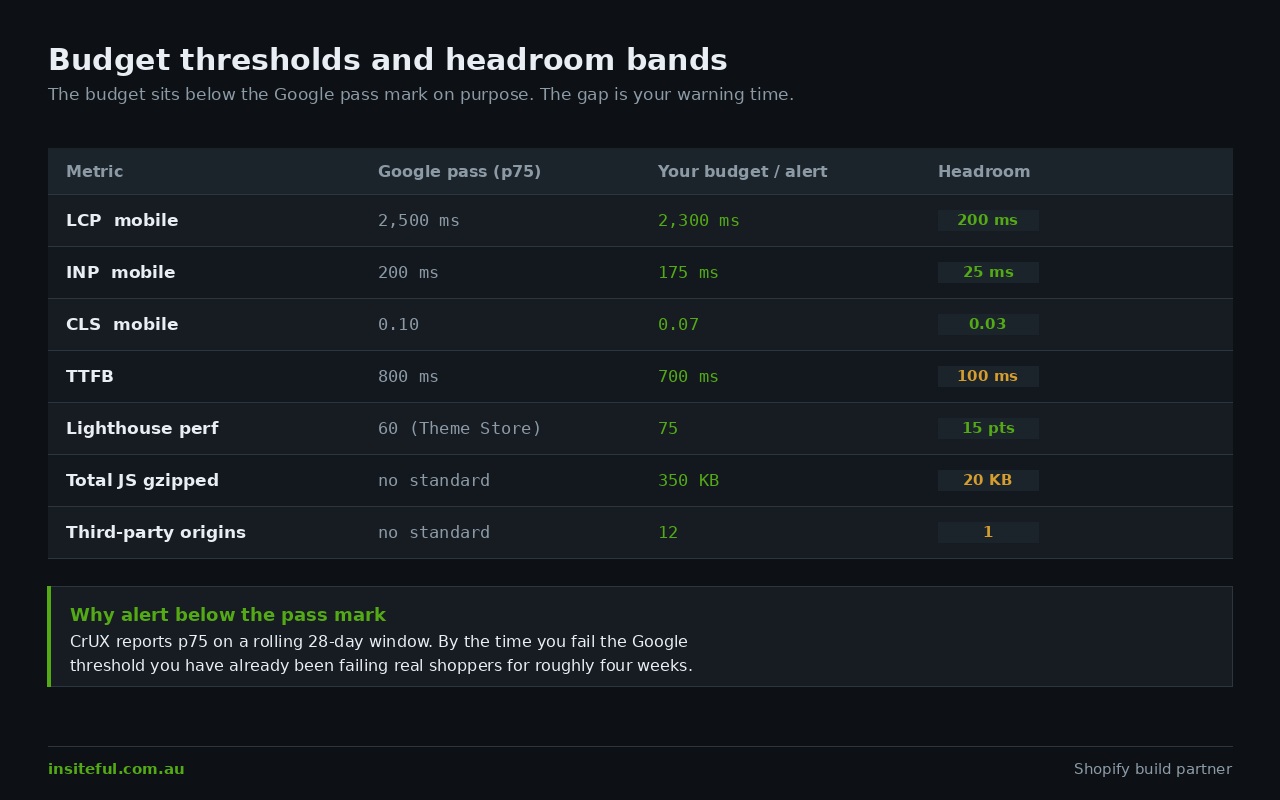
Metric budgets cap an outcome: LCP under 2.5 seconds, INP under 200 milliseconds, CLS under 0.1. These are what Google measures and what correlates with revenue, but they are lagging indicators. By the time a metric budget fails, the cause is already merged.
Quantity budgets cap an input: total JavaScript under 350 KB gzipped on the product template, no more than four render-blocking requests, under 12 third-party origins. These are leading indicators that fail loudly and early, which is what you want in a pull request.
Rule budgets cap a behaviour: no synchronous third-party script in the head, every above-fold image carrying explicit width and height, no app embed loading on templates where it does nothing. Rules are cheapest to enforce and prevent the largest class of regressions.
Written as a single artefact you can commit to the theme repo, a working budget for a mid-market Australian storefront looks like this:
| Type | Constraint | Threshold | Enforced by |
|---|---|---|---|
| Metric | LCP, mobile, product template | < 2,500 ms at p75 | Field monitoring |
| Metric | INP, mobile, all templates | < 200 ms at p75 | Field monitoring |
| Metric | CLS, mobile, all templates | < 0.1 at p75 | Field monitoring |
| Metric | Lighthouse performance score | ≥ 75 | CI gate on every PR |
| Quantity | Total JS, product template | ≤ 350 KB gzipped | CI gate on every PR |
| Quantity | Distinct third-party origins | ≤ 12 | CI gate on every PR |
| Quantity | Total Blocking Time | ≤ 200 ms | CI gate on every PR |
| Rule | Synchronous third-party in head | Zero | Code review + Theme Check |
| Rule | Above-fold images with dimensions | 100% | Code review + Theme Check |
| Rule | App embeds scoped to templates | 100% | App weigh-in gate |
The Lighthouse threshold of 75 is deliberate and higher than Shopify requires. A theme needs a minimum average score of 60 across home, product and collection pages to enter the Shopify Theme Store. Sixty is a floor for distribution, not a target for a store that sells things. Setting the gate at 75 gives you 15 points of headroom, and headroom is the entire point of a budget.
Setting the Numbers Without Making Them Up
A budget nobody can hit gets switched off in a fortnight. A budget that is trivially met catches nothing. The number has to come from somewhere defensible, and there are three legitimate sources.
Your own current p75. Pull the last 28 days of field data, take the 75th percentile, and set the initial budget at that value minus a small margin. That guarantees it is achievable today and immediately prevents backsliding, which is the correct starting point for an established store.
The Core Web Vitals thresholds. LCP at or under 2,500 ms, INP at or under 200 ms, CLS at or under 0.1, all measured at the 75th percentile, and all three required simultaneously to pass. As of the May 2026 CrUX data, only 55.9% of origins globally clear all three at once. That is the bar you are actually competing against.
Your best-performing competitor. CrUX is a public dataset covering roughly 15 million origins, so any competitor with enough Chrome traffic is queryable. If the strongest player in your category posts a 1,900 ms LCP, a 2,400 ms budget is not ambition, it is a plan to stay second.
One constraint governs all of this and catches teams out constantly: CrUX reports at p75 over a rolling 28-day window. A fix shipped on Monday is not fully reflected in field data for about four weeks. So you cannot use field data as your merge gate, and you cannot declare a fix successful for a month. Every performance conversation needs a lab number for feedback speed and a field number for truth.
That limitation is why a budget has to be enforced in layers.
Layer One: The Lab Gate on Every Pull Request
The first layer runs before code merges. Shopify ships a purpose-built tool: the Shopify Lighthouse CI GitHub Action, a wrapper around Google Lighthouse CI that audits your theme home page, a product page and a collection page on every pull request.
Three setup requirements are worth getting exactly right, because getting them approximately right produces noisy results the team learns to ignore. First, a dedicated development store used only for performance testing, not a staging store that also hosts content review, because theme editor sessions and draft orders introduce variance. Second, the store must be populated with Shopify’s theme performance test product CSV and nothing else. This is the same dataset Shopify uses to vet Theme Store submissions, and identical data is what makes run-to-run comparison meaningful. Third, API credentials from a Dev Dashboard app carrying the read_products and write_themes scopes.
That third point changed recently and trips up older setups. Apps created from January 2026 onward authenticate with client_id and client_secret. The access_token argument is now legacy and applies only to custom apps created before that date. If you copied a workflow file from a 2024 blog post, it will fail on a store set up this year.
The working configuration:
name: Shopify Lighthouse CI

on:
  pull_request:
    branches: [main]

jobs:
  lhci:
    name: Lighthouse
    runs-on: ubuntu-latest
    steps:
      - uses: actions/checkout@v4
      - name: Lighthouse
        uses: shopify/lighthouse-ci-action@v1
        with:
          client_id: ${{ secrets.SHOP_CLIENT_ID }}
          client_secret: ${{ secrets.SHOP_CLIENT_SECRET }}
          store: ${{ secrets.SHOP_STORE }}
          password: ${{ secrets.SHOP_PASSWORD }}
          collection_handle: all-products
          product_handle: budget-test-product
          lhci_min_score_performance: 0.75
          lhci_min_score_accessibility: 0.9
          lhci_github_app_token: ${{ secrets.LHCI_GITHUB_APP_TOKEN }}
Three details do the real work. Running on: pull_request rather than on: push gates the merge instead of reporting after the fact. Pinning collection_handle and product_handle removes the variance you get when the action defaults to whichever product happens to be first. And lhci_min_score_performance: 0.75 overrides the default of 0.6, the Theme Store floor rather than your standard.
Adding the lhci_github_app_token promotes the result to a GitHub status check, the step that converts the budget from advice into enforcement. Combined with a branch protection rule, a pull request costing 8 Lighthouse points is blocked rather than merged with a shrug. If you have not set up theme version control yet, our walkthrough of the Shopify theme GitHub workflow covers the branch structure this assumes.
Layer Two: The App Weigh-In
The lab gate has a blind spot large enough to drive a storefront through. Most Shopify apps do not arrive via pull request. A merchant installs one from the App Store, it injects a theme app extension or script tag, and CI never sees a diff. Your budget is enforced on the 10% of change that flows through Git and blind to the 90% that does not.
The fix is procedural, not technical: no app reaches the live theme until it has been weighed on a sandbox. It takes fifteen minutes and it is the highest-leverage habit in storefront performance work.
# Weigh-in: measure a candidate app BEFORE it reaches main.
# Run against the sandbox theme with the app installed, then without.

npx lighthouse https://sandbox-store.myshopify.com/products/budget-test-product \
  --only-categories=performance \
  --preset=perf \
  --form-factor=mobile \
  --throttling-method=simulate \
  --output=json \
  --output-path=./with-app.json \
  --chrome-flags="--headless"

# Extract the three numbers that decide the vote
node -e "
  const r = require('./with-app.json');
  const a = r.audits;
  console.log('Total JS bytes:', a['total-byte-weight'].numericValue);
  console.log('Main-thread blocking (TBT):', a['total-blocking-time'].numericValue);
  console.log('Third-party wasted ms:', a['third-party-summary'].details?.summary?.wastedMs);
"
Run that with the candidate app installed, then run it again with the app uninstalled, and compare three numbers: total byte weight, Total Blocking Time, and third-party wasted milliseconds. You now have a cost. The decision stops being “does marketing want reviews” and becomes “are photo reviews worth 280 ms of TBT on every product page”, which is a question a business can actually answer.
We hold candidates against a simple rule. An app adding more than 100 ms of TBT must either be scoped to specific templates or replace something already installed. Net additions to the global bundle need a named owner and a metric they are expected to move. In practice this kills roughly a third of proposed installs before anyone spends money on them.
Scoping is usually the answer rather than rejection. Most vendor scripts can be deferred and template-limited from the theme side:
{% comment %}
  snippets/app-embed-guard.liquid
  Loads a non-critical vendor script only after the main thread is idle
  AND only on templates where it earns its weight.
{% endcomment %}

{% assign heavy_templates = 'product,cart' | split: ',' %}
{% if heavy_templates contains template.name %}
  <script>
    // requestIdleCallback keeps this off the critical path entirely
    const loadVendor = () => {
      const s = document.createElement('script');
      s.src = "{{ 'vendor-reviews.js' | asset_url }}";
      s.defer = true;
      document.head.appendChild(s);
    };
    if ('requestIdleCallback' in window) {
      requestIdleCallback(loadVendor, { timeout: 4000 });
    } else {
      window.addEventListener('load', () => setTimeout(loadVendor, 2000));
    }
  </script>
{% endif %}
Applied to four or five non-critical vendors, that pattern routinely recovers 300 to 500 ms of Total Blocking Time on the home page without removing a single app. We walked through the full exercise in our Shopify app audit LCP case study, where template scoping alone moved mobile LCP by more than a second.
Layer Three: Field Monitoring That Names the Culprit
Lab data is reproducible but synthetic. It runs on a simulated device over a simulated network, and cannot tell you your budget is fine in Sydney and failing in Perth on a four-year-old Android. Field data is the truth and lab data the proxy, so the third layer measures real sessions.
CrUX gives you this free, but with the 28-day lag and only at origin or high-traffic-page granularity. To know within hours rather than a month, collect it yourself with the web-vitals library. The critical choice is the attribution build over the standard one. The standard build tells you LCP was 3,400 ms. The attribution build tells you which element it was, which is the difference between a number and a fix.
// layout/theme.liquid, immediately before </body>
// Ships roughly 2.5 KB gzipped. Never blocks render.
import {
  onLCP, onINP, onCLS, onTTFB
} from 'https://unpkg.com/web-vitals@5?module';

const BUDGETS = { LCP: 2500, INP: 200, CLS: 0.1, TTFB: 800 };

function report(metric) {
  const overBudget = metric.value > BUDGETS[metric.name];
  const body = JSON.stringify({
    metric: metric.name,
    value: Math.round(metric.value * 1000) / 1000,
    rating: metric.rating,
    overBudget: overBudget,
    template: window.Shopify?.template || 'unknown',
    // attribution build tells you WHAT caused it, not just that it happened
    culprit: metric.attribution?.element
          || metric.attribution?.largestShiftTarget
          || metric.attribution?.interactionTarget
          || null,
    connection: navigator.connection?.effectiveType || null,
    id: metric.id
  });

  // sendBeacon survives the page unload that fires these callbacks
  navigator.sendBeacon('/apps/vitals-collector', body);
}

onLCP(report);  onINP(report);  onCLS(report);  onTTFB(report);
Roughly 2.5 KB gzipped, non-blocking, and it turns your budget into something with an alarm attached. The fields worth keeping are in that payload: template name, so you can see only the collection page regressed; connection type, so you can separate a real regression from a shift toward slower networks; and the attribution target, which is the actual answer.
For INP, the attribution build exposes the per-interaction breakdown across input delay, processing duration and presentation delay. Those phases have different remedies, and without the breakdown you are guessing. Our guide to Shopify INP optimisation covers what each phase points at.
Set the alert threshold at the budget, not the Core Web Vitals threshold. If your LCP budget is 2,300 ms and you alert at 2,500 ms, you have given away your headroom and will be firefighting rather than steering.
Triaging a Breach Without Guessing
A budget that fires and gets muted is worse than no budget, because it teaches the team the signal is noise. Breaches need a fixed triage path, and the first question is always the same: did the input change, or did the population change?
A population shift is when your numbers move because your traffic moved. A Meta campaign sends a wave of older Android devices on mobile data and INP degrades without a line of code changing. A genuine regression is when the same population gets a worse experience. The connection and device fields in your RUM payload let you tell these apart in five minutes rather than five days.
| Signal | Most likely cause | First check |
|---|---|---|
| LCP up, one template only | Hero asset or section change | Image dimensions, preload hint, section render cost |
| LCP up, every template | New global blocking resource | Third-party origin count, head scripts, font loading |
| INP up, product page only | New event handler or variant script | INP attribution phase breakdown |
| CLS up after a deploy | Late-injected banner or widget | Largest shift target from attribution |
| TTFB up, no theme change | Liquid render cost or app proxy | Theme Inspector, section rendering profile |
| All metrics up, uniformly | Population shift, not regression | Connection type and device mix, week over week |
Each row has a corresponding deep dive: hero rendering in Shopify image optimisation, layout stability in Shopify CLS optimisation, and server-side render cost in Shopify TTFB optimisation. The triage table exists so that you reach the right one immediately instead of running a general audit every time a number moves.
The Australian Distance Problem
Australian stores carry a structural handicap that budgets set from northern-hemisphere benchmarks quietly ignore. Shopify serves your storefront from a global CDN, which handles static assets well. What it does not solve is the round trip for anything dynamic, and it does not solve third-party vendors at all.
A large share of Shopify app vendors host their endpoints in North America or Europe. Every such origin costs an Australian shopper a DNS lookup, a TCP handshake and a TLS negotiation across a link carrying 150 to 250 ms of baseline latency. Four vendors on the critical path is most of a second before a byte of useful content arrives. The same store, tested from a US-based Lighthouse runner, looks fine.
Two consequences follow. Your third-party origin budget matters more here than in the northern hemisphere, because each origin costs an Australian shopper more. And your lab gate is directionally useful rather than absolutely accurate, which is why the field layer is not optional for an AU merchant.
The commercial case is easy to size and worth writing down before you ask anyone to fund the work. Take a store turning over $4M AUD a year at a 2.1% conversion rate. Field studies consistently put the conversion impact of load time in the range of several percent per additional second on mobile. A conservative 6% relative conversion lift from moving mobile LCP from 3.4 seconds to 2.3 seconds is roughly $240,000 AUD in additional annual revenue. Holding that gain is worth more than achieving it, because achieving it is a project and holding it is a budget. The budget costs perhaps $6,000 AUD to install and close to nothing to run.
Set against that, the eight months of quiet decay following an unprotected optimisation project are not a technical problem. They are a $240,000 AUD problem that recurs.
How We Do It at Insiteful
Every storefront we build ships with the budget already installed, because retrofitting one onto a slow store means arguing about the number and the cleanup at once, and that argument tends to end with no budget.
The budget is committed to the theme repository as a plain markdown file next to the code. It names each threshold, who set it, and the date it was last reviewed. Numbers with an author get defended. Numbers in a Slack thread get forgotten.
We run the lab gate on pull requests with the performance minimum at 0.75 rather than the default 0.6, wired to a required GitHub status check. A pull request that breaches it does not merge, and there is no override path, because an override path is the same thing as no gate.
Every client build gets a dedicated performance development store loaded with Shopify’s test product CSV and nothing else, kept clean so measurements stay comparable across months. Every candidate app is weighed on a sandbox first, and the cost in milliseconds is written into the decision rather than discovered afterwards. Field collection runs from day one using the attribution build, alerting at the budget rather than at the Google threshold so there is margin between the first warning and an actual failure. We review the budget file quarterly, because a threshold set against 2024 hardware is not a threshold, it is a souvenir.
Across roughly 200 sites a year and 25 years of building for merchants, the pattern holds. The stores that stay fast are not the ones with the best performance engineer. They are the ones where a number said no on a Tuesday afternoon and someone found a lighter way to do the thing. We build on native Shopify because the platform gives you these controls without the operational weight of a separate front-end stack, an argument we set out in native Shopify stack performance without headless.
Where to Start This Week
You do not need all three layers to get value, and building them at once is how this stalls. Pull your current p75 for LCP, INP and CLS from CrUX and write those numbers into a file in the theme repo. Twenty minutes, and it is the whole foundation, because backsliding is now visible.
Then add the Shopify Lighthouse CI action on pull requests, with the minimum score set just below where you sit today. It will catch the next regression, which is the only one you can still prevent. Add the web-vitals attribution snippet after that, and give it four weeks to build a baseline before setting alert thresholds, because the 28-day window applies to your own data too.
Institute the weigh-in last. It needs no code, catches the most damage, and is the one most teams skip.
If your store has already been through an optimisation project and quietly slid backwards, the problem is not the work that was done. It is that nothing was left behind to hold it. That is a fixable structural gap, and one of the first things we look at in a build assessment.