
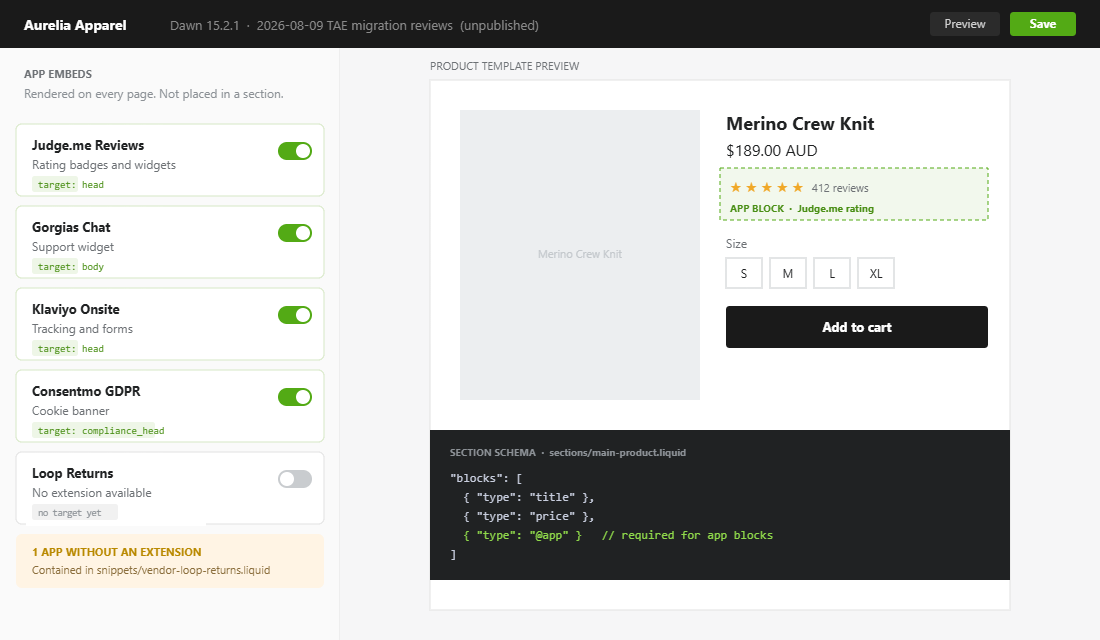
Open your theme.liquid file and scroll to the bottom. On most Australian Shopify stores we audit, the last forty lines read like a graveyard. A reviews widget script from an app uninstalled two years ago. Two copies of the same currency converter. A sizing chart snippet whose subscription lapsed in March. A stray script tag with a minified URL nobody on the team can identify. Every one of those lines still downloads, parses and executes on every single page view.
That graveyard has a measurable cost. Third-party app code is now the single biggest cause of slow Shopify storefronts, ahead of the platform itself, ahead of image weight, ahead of theme quality. Each installed app adds roughly 50 to 200 milliseconds of overhead on average, and a heavy one contributes 100 to 500 milliseconds of JavaScript to every page load. Industry analysis attributes 60 to 80 percent of Shopify slowdowns to app scripts. A clean Shopify theme that scores around 70 on mobile routinely falls into the 20s once a typical stack is bolted on top.
The fix is not another speed app. It is architectural, and Shopify has already built it. Over the last three years the platform has moved app code out of theme files and into theme app extensions: a sandboxed extension type that installs and uninstalls cleanly, cannot be silently overwritten, and does not survive an app removal. Most merchants have never been told the migration exists. This is the exact audit and migration we run on every Shopify build that arrives with a theme older than about eighteen months.
Why App Code Ended Up In Your Theme In The First Place
Before theme app extensions, an app that needed to render something on your storefront had exactly one option: write into your theme files. That happened in three distinct ways, and each leaves a different mess behind.
| Injection pattern | How it got there | What it leaves behind on uninstall |
|---|---|---|
| Asset API write | The app called the Admin Asset API on install and wrote or modified theme.liquid, product.liquid or a new snippet file | Orphaned snippet files and live script tags. Shopify never removes these. |
| Copy-paste install guide | A support article told your developer to paste a Liquid block into a specific template | Untracked edits in templates, often duplicated across theme copies |
| ScriptTag API | The app registered a remote JavaScript file loaded on every storefront page | Usually removed on uninstall, but frequently duplicated by re-installs |
The Asset API pattern is the one that hurts. It was designed for convenience, and it worked beautifully at install time. The problem is the reverse direction. When a merchant uninstalls an app, Shopify deactivates the app and revokes its API access, but it does not reach back into the theme and undo the file writes. The code stays. The vendor endpoint it calls may go offline, so now you have a script tag that fails a DNS lookup on every page view.
Multiply that by the app churn on a typical store. Data on the Shopify app ecosystem puts the average merchant somewhere between 6 and 20 installed apps depending on the sample, with around 12 percent of stores running ten or more. A store that has been trading for four years has almost certainly installed and removed two or three times its current count.
What Shopify Changed, And Why It Matters To You
Shopify closed the door deliberately. From the 2023-04 Admin API release onward, Asset API access to create, update and delete theme assets is no longer available to public apps, and Shopify has continued to tighten the approval scope required for any app requesting it. The platform position is now unambiguous: apps extend the storefront through theme app extensions, not by editing your files.
Three consequences follow from that, and they are the reason this migration is worth your Friday afternoon.
- Uninstall is clean. A theme app extension lives in the app, not the theme. Remove the app and the blocks, assets and snippets disappear with it. There is nothing left to grep for six months later.
- Theme updates stop being terrifying. When app code sits inside your templates, every theme version bump becomes a manual merge exercise. Move that code into extensions and the diff between your theme and the upstream release shrinks to the customisations you actually made. We cover the mechanics of that in our guide to updating a customised Shopify theme.
- Merchants get control back. App blocks appear in the theme editor with real settings. Your marketing coordinator can move the reviews widget above the buy button without raising a developer ticket.
There is one hard prerequisite. App blocks only work on Online Store 2.0 themes. If you are still running a vintage theme, the migration path is a theme rebuild first, extensions second. That is not a small piece of work, but it is the same work you need to do to get theme blocks and metaobjects, so it rarely sits on the roadmap alone.
App Blocks And App Embed Blocks: The Two Shapes
A theme app extension is a bundle. Inside it sit app blocks, app embed blocks, assets and snippets. The distinction between the two block types decides where the app is allowed to render, and getting it wrong is the most common reason a migration stalls halfway.
App blocks render inline, inside a section
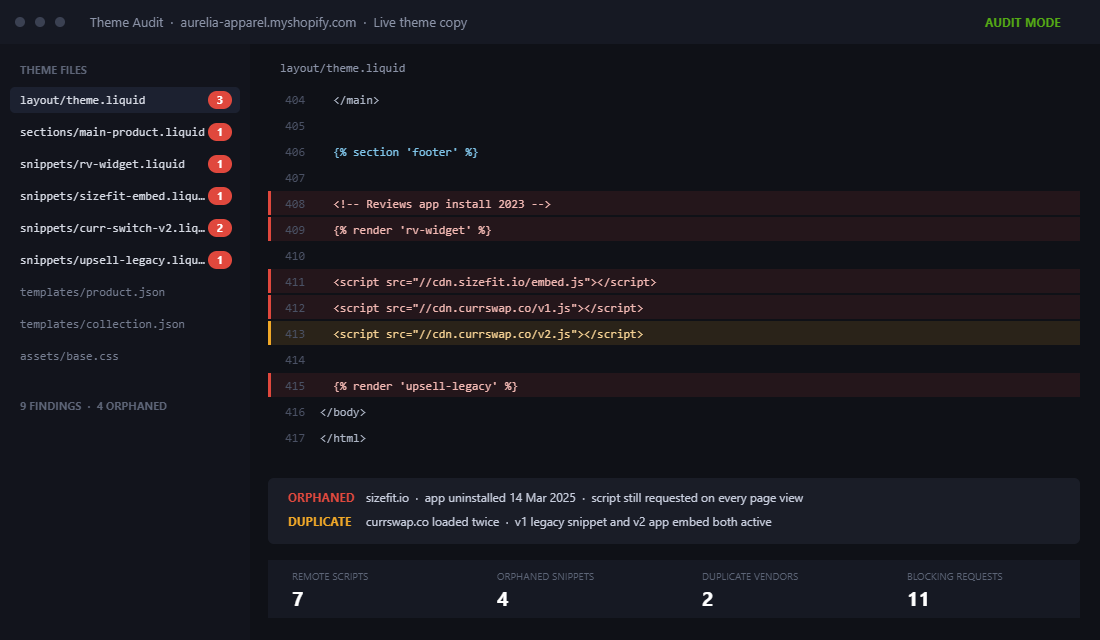
These are the ones with visible UI in the page flow: a star rating under the product title, a size guide accordion, a bundle builder on the product page. The merchant drags them into a section in the theme editor and controls their position. Your theme has to opt in by declaring support for blocks of type @app in the section schema.
{% comment %} sections/main-product.liquid {% endcomment %}
{% schema %}
{
  "name": "Product information",
  "blocks": [
    { "type": "title" },
    { "type": "price" },
    { "type": "@app" }
  ]
}
{% endschema %}
If "type": "@app" is missing from a section, no app block can ever be placed there. On themes we inherit, this single omission is why a merchant swears the reviews app “does not work” on their collection page.
App embed blocks render globally, with no inline UI
Chat widgets, tracking pixels, consent banners, floating cart drawers. Anything that positions itself rather than sitting in the document flow. These target head, body or compliance_head and are toggled on once in the theme editor under App embeds.
{% comment %} extensions/my-app/blocks/tracker.liquid {% endcomment %}
{% schema %}
{
  "name": "Analytics tracker",
  "target": "head",
  "settings": [
    { "type": "text", "id": "site_key", "label": "Site key" }
  ]
}
{% endschema %}
The practical rule we use: if a merchant would ever want to move it, it is an app block. If it should just exist everywhere, it is an app embed. Vendors get this wrong constantly, which is worth knowing before you assume the app is broken.
Auditing A Theme For Orphaned App Code
You cannot migrate what you have not inventoried. The audit takes about ninety minutes on a typical store and it is entirely mechanical. Pull the live theme locally, then run a fixed set of searches. We use the Shopify CLI rather than the code editor in admin, because the code editor will not search across every file at once.
shopify theme pull --store yourstore.myshopify.com --path ./audit-theme
cd audit-theme

# 1. Every remote script the theme loads
grep -rn "script src" --include="*.liquid" . | grep -v "asset_url"

# 2. Every rendered snippet, so you can spot app-named files
grep -rn "render '\|include '" --include="*.liquid" .

# 3. Snippet files that nothing renders (orphans)
ls snippets/ | sed "s/.liquid//" | while read s; do
  grep -rq "render '$s'\|include '$s'" --include="*.liquid" . || echo "ORPHAN: $s"
done
Now build the register. One row per finding, and resist the urge to fix anything until the table is complete. Half-finished migrations are how stores end up with the reviews widget rendering twice.
| Column | What goes in it | Why it matters |
|---|---|---|
| File and line | layout/theme.liquid:412 | So a second person can verify without re-running the audit |
| Vendor guess | Domain in the script URL, or the snippet filename prefix | Most app code names itself if you look |
| App still installed? | Yes / No / Unknown | A No is a straight deletion, not a migration |
| Extension available? | Check the app listing and the theme editor App embeds list | Decides migrate versus contain |
| Blast radius | Which templates render it | Tells you what to regression test |
Two findings show up on almost every audit. The first is duplicate loading, where the same vendor script is pulled in by both a legacy snippet and a newly enabled app embed, so the store is paying for it twice. The second is dead weight from uninstalled apps, which on the stores we have measured typically accounts for somewhere between four and eleven orphaned files. Neither is exotic. Both are invisible until somebody looks.
The Migration: Snippet By Snippet
Work one vendor at a time on an unpublished duplicate theme. Never in the live theme, and never two vendors in the same pass, because when something breaks you want a single suspect.
- Duplicate the live theme and name it with the date and the vendor, for example
2026-08-09 TAE migration reviews. If your team works in version control, branch instead. Our Git and CI workflow for Shopify themes covers that setup. - Enable the app embed or place the app block first, before removing anything. You want the new path live and rendering while the old one is still in place, so you can compare them side by side in the same preview.
- Confirm the duplicate. Load a product page in the theme preview and look for two instances of the widget, or open the network panel and check whether the vendor script is requested twice. Seeing the duplicate is the proof the new path works.
- Remove the legacy code. Delete the snippet file and the render call together. Do not comment it out. Commented Liquid still ships in the theme and the next developer will assume it is needed.
- Regression test the blast radius from your audit table. Product page, collection page, cart, and any custom template that rendered the snippet. Check on a real handset, not just a resized desktop window.
- Re-run Lighthouse or your field data tool on the same three URLs before and after, on the same connection profile. Record the numbers in the audit table.
- Publish, then watch. Give it twenty four hours before starting the next vendor.
A full migration on a store with eight to twelve apps takes us roughly two to three days of developer time spread across a fortnight. It is not glamorous work. It is the kind of work that makes every subsequent piece of work cheaper.
The Limits Nobody Mentions Until You Hit Them
Theme app extensions are a sandbox, and sandboxes have walls. If you build apps, or you are commissioning a private app for your store, these constraints shape the design before a line of Liquid is written.
| Constraint | Ceiling | What it means in practice |
|---|---|---|
| Settings per block | 25 | Complex configuration has to move into the app admin, not the theme editor |
| Total Liquid across the extension | 100KB | Extensions are for rendering, not for business logic |
| Sections per template | 25 | Shared budget with your own theme sections |
| Blocks per template | 1250 across all sections | Rarely binding, but collection grids with per-card app blocks can approach it |
| App embed ordering | Not merchant-controllable | You cannot force your consent banner to load before another vendor pixel |
The settings ceiling is the one that bites hardest. Twenty five sounds generous until you build a bundle block that needs product pickers, tier pricing, copy overrides and styling controls. The right answer is almost always to keep merchant-facing choices in the theme editor and push everything structural into app configuration or a metaobject.
The 100KB Liquid budget is shared across every block in the extension, not per block. Teams building a multi-feature app hit this by accident when they inline templates that should have been assets. Assets are served separately and do not count against the Liquid budget, so heavy markup belongs in an asset file rendered by a light block.
One more that is easy to miss: an app embed block cannot control where in the head it lands relative to other apps. If load order matters for your tracking or consent setup, an extension will not give you deterministic control, and that is a genuine reason to keep a small, deliberate, well-documented theme snippet instead.
When An App Has No Theme App Extension Yet
Plenty of apps, particularly smaller Australian-built tools and anything with a long tail of legacy installs, still ship copy-paste instructions. You cannot migrate what does not exist. What you can do is contain it so the next audit takes ten minutes instead of ninety.
We use a single convention. Every piece of vendor code that has to live in the theme goes into one namespaced snippet, with a header comment that answers the four questions the next developer will ask.
{% comment %}
  VENDOR: Loop Returns
  ADDED:  2026-08-09 by Insiteful
  WHY:    No theme app extension available as of this date
  REMOVE: Delete this file and the render call in theme.liquid
          when the vendor ships an app embed block
{% endcomment %}

<script src="https://cdn.vendor.example/loop.js" defer></script>
Then render it once, from one place, behind a condition where that makes sense.
{% comment %} layout/theme.liquid, immediately before closing body {% endcomment %}
{% render 'vendor-loop-returns' %}
Three rules make this hold up over time. Always use defer or async on vendor scripts unless the vendor documents a specific reason not to. Never place a vendor script above your own critical CSS. And keep a plain markdown register of these snippets in the repository, because the header comments are only findable if somebody already knows to look.
Finally, treat “no extension available” as a procurement signal. When we assess an app stack we score extension support alongside price and features, because an app that still asks for theme edits in 2026 is telling you something about its engineering roadmap. Our take on the Shopify app stack worth running weighs this the same way.
Measuring The Result: Speed And Update Velocity
Two numbers justify this project to a founder, and they are not the same number.
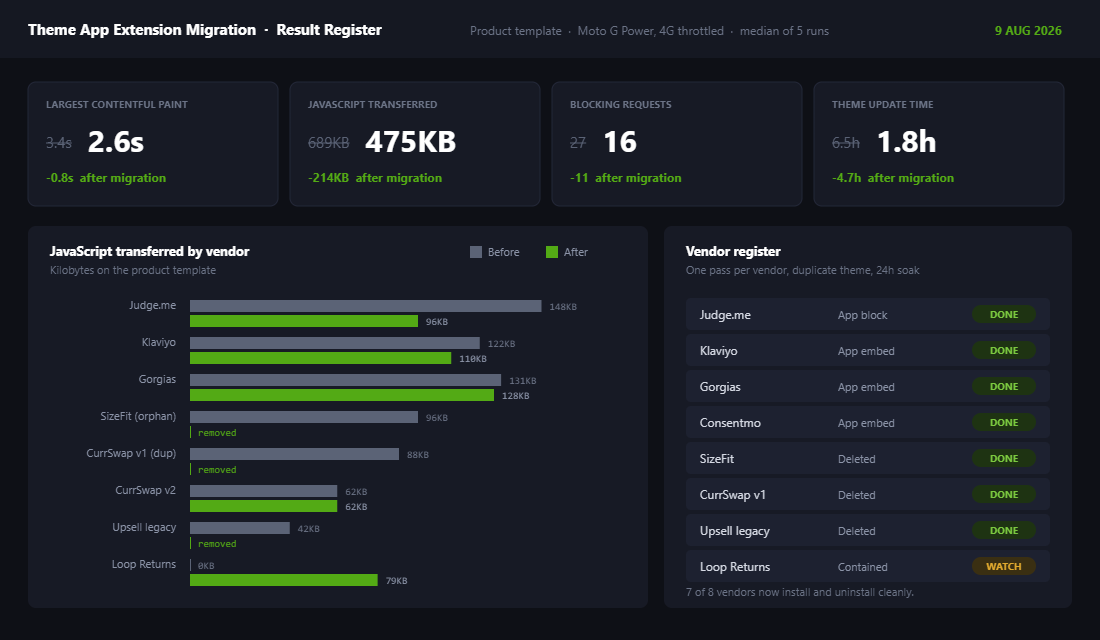
The first is storefront speed. Removing duplicate and dead vendor scripts is one of the few changes that improves Core Web Vitals without any design compromise, because you are deleting work rather than reorganising it. On a recent Melbourne apparel client we cut 214KB of JavaScript and eleven blocking requests from the product template, which moved mobile LCP from 3.4 seconds to 2.6. For a store turning over $180,000 AUD a month, that band of improvement is worth real money, and it compounds with every paid click you send to the page. We break the measurement methodology down in our guide to Core Web Vitals on Shopify.
The second number is the one founders underrate: how long a theme update takes. Before the migration, a typical merge of an upstream theme release on a heavily customised store costs a developer the better part of a day, because app edits are scattered through templates that the vendor also changed. After the migration, the diff contains only your intentional customisations. We consistently see that job drop from a day to under two hours, which is the difference between updating the theme quarterly and never updating it at all.
Track both. Record LCP, total JavaScript transferred and blocking request count on three representative URLs before you start, and re-measure after each vendor. Record the time your last theme update took, and the time the next one takes. The speed number sells the project once. The update velocity number is what keeps the store maintainable for the next three years.
How We Do It at Insiteful
Theme app extension auditing is a fixed step in our build and takeover process, not an optional extra. When a new Shopify or Shopify Plus store comes to us, we run it before we touch design, because there is no point optimising a product page that is carrying four years of vendor sediment.
- We pull the live theme into version control on day one. Every store we run gets a Git repository and a staging theme before any change is made. That gives us a diff, a rollback and an audit trail. Nothing goes into the live theme by hand.
- We produce the register, not just the fix. The client receives the audit table with every finding, the vendor, the file reference and the recommendation. It is theirs to keep, and it is what makes the next agency or in-house developer productive on day one rather than week three.
- We migrate one vendor per pass, on a duplicate theme. Slower to schedule, dramatically faster to debug. When a bundle widget breaks a variant picker, we know exactly which change caused it.
- We measure before and after on the same three URLs. Home, a high-traffic collection, and the best-selling product page. Same throttling profile, same time of day, recorded in the register.
- We score extension support during app selection. Any app we recommend for a client build has to ship a theme app extension or have one on a published roadmap. It is a maintainability requirement, not a preference.
We build natively on Shopify. No headless layer, no bolted-on front-end framework, no abstraction between the merchant and the theme editor. That decision is exactly why extension hygiene matters so much to us: when the theme is the product, the theme has to stay clean.
If your theme.liquid has a bottom section nobody wants to touch, that is the symptom, and it is a fixable one. We run this audit as a standalone piece of work as well as inside a full build. Talk to the Insiteful team about a theme audit and we will tell you what is actually loading on your storefront.