
Most Shopify store owners know Core Web Vitals exist. Far fewer know that Google tightened the benchmarks in 2026, and stores that were passing eighteen months ago may now be sitting in the “needs improvement” zone.
The most significant change: Google lowered the LCP threshold from 2.5 seconds to 2.0 seconds. If your store was scoring 2.3 seconds before the update, you moved from green to amber without changing a single line of code. That shift alone pushed a meaningful percentage of Shopify stores out of the “good” category and into territory that Google treats as a negative ranking signal.
At Insiteful, we run full Core Web Vitals audits on every store we take on before writing a line of code. The failure patterns are remarkably consistent: a lazy-loaded hero image, several hundred kilobytes of app JavaScript running on every page regardless of need, and fonts swapping in late enough to trigger layout shift. These aren’t edge cases. They are the default state of most Shopify builds in 2026.
What Google Actually Measures (and Why 2026 Changed the Rules)
Core Web Vitals are three user-experience metrics that Google factors directly into search rankings. They measure loading speed, interactivity, and visual stability, not as abstract scores but as signals of how a real person experiences your store on a real device.
Largest Contentful Paint (LCP) measures how long it takes for the largest visible element on the page to render. For most Shopify stores, that element is the hero image. Google’s 2026 threshold for “good” is under 2.0 seconds. “Needs improvement” runs from 2.0 to 4.0 seconds. Above 4.0 seconds is “poor.” The previous good threshold was 2.5 seconds, and that change matters for stores that had been skating close to the line.
Interaction to Next Paint (INP) replaced the older First Input Delay metric in 2024. It measures how quickly a page responds to any user interaction: a click, a tap, a keyboard press. The threshold for “good” is under 200 milliseconds. This is where most Shopify stores with multiple apps fall over completely. A store with six to eight installed apps, each injecting JavaScript, regularly registers INP between 400 and 700 milliseconds on mobile before any optimisation work is done.
Cumulative Layout Shift (CLS) measures visual stability. When elements jump around as the page loads, a banner appearing and pushing the add-to-cart button down the screen, or fonts swapping in and reflowing text, those movements register as layout shift. The “good” threshold is a score below 0.1. Shopify stores can manage CLS reasonably well, but late-loading app widgets and images without explicit dimensions still cause regular problems.
Google evaluates all three metrics at the 75th percentile of real user sessions via the Chrome User Experience Report. That means 75% of your visitors need to experience a “good” score for the metric to count as passing. A fast experience for the majority of visitors isn’t enough if a meaningful segment of your audience is on slower mobile connections or older devices.
The current passing rate across the web is sobering: only 33% of websites pass all three Core Web Vitals simultaneously. LCP is the biggest failure point, with 42% of sites failing outright. Ecommerce stores that do pass all three see, on average, a 24% lower bounce rate compared to failing competitors in the same category.
The Pattern We See Before Touching Anything
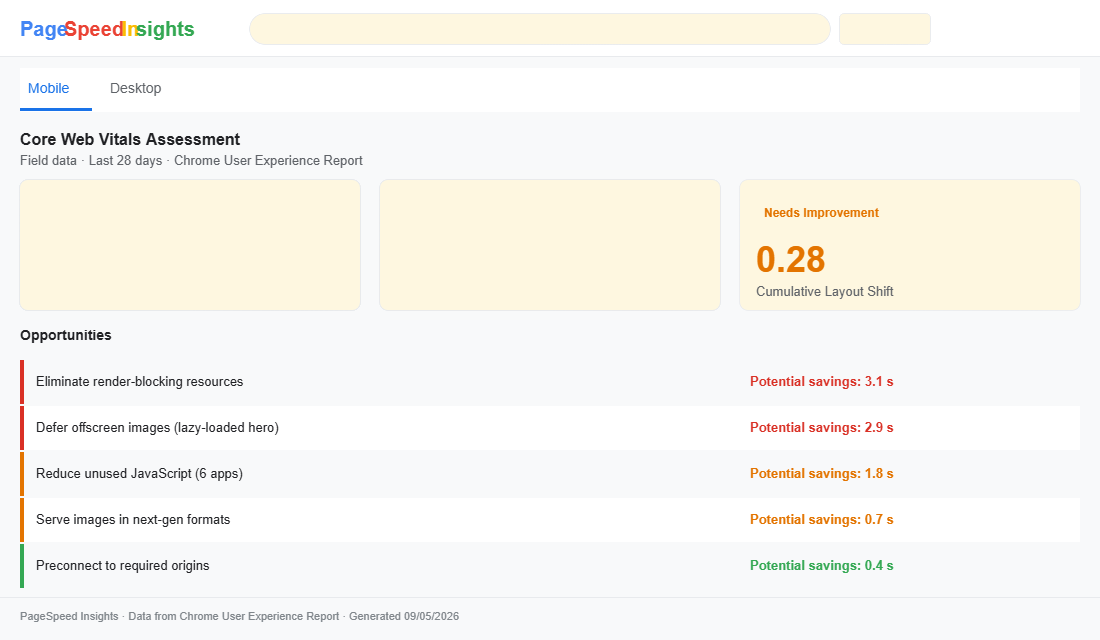
Before we write a single line of code on a Shopify performance build, we run PageSpeed Insights across four page types: homepage, collection page, product detail page, and cart. The same failure pattern appears on almost every unoptimised store we audit.
The hero image is lazy-loaded. Lazy loading defers image loading until the element enters the viewport, which is appropriate for below-the-fold images. The problem is that many Shopify themes apply it globally. Research published in 2026 found that 59% of Shopify pages lazy-load the LCP image. That single mistake adds approximately three seconds to LCP on affected pages, because the browser deprioritises loading the one image that determines the score.
App scripts are blocking the main thread. A typical Shopify store with six to eight installed apps carries between 400KB and 800KB of JavaScript. Apps are installed for legitimate reasons: reviews, live chat, loyalty programmes, size guides. But most apps load on every page by default because conditional loading adds development complexity. A size guide app that should only run on product pages is instead parsing and executing on the blog, the homepage, and the contact page.
Fonts aren’t reserved. When a custom font hasn’t loaded by the time the browser paints text, the browser renders a fallback. When the real font arrives and swaps in, the text reflows, surrounding content shifts, and CLS climbs. Without a preload hint and font-display strategy, this plays out on nearly every Shopify store that uses a custom typeface.
The compound effect: a store that scores “poor” or “needs improvement” on all three metrics simultaneously. From an organic search standpoint, that store is at a structural disadvantage against any competitor who has made the fixes.
Fixing LCP: The Hero Image Is Lying to Google
The single highest-value change we make on almost every Shopify performance build is correcting the hero image loading strategy. The fix is precise and the impact is immediate.
In Shopify Liquid, the image_tag filter controls how images render. The default in many theme templates looks like this:
{{ section.settings.image | image_url: width: 1440 | image_tag:
   loading: 'lazy',
   widths: '375, 750, 1100, 1440' }}
The loading: 'lazy' attribute is correct for gallery thumbnails and below-the-fold imagery. It is wrong for the hero. The fix we apply:
{{ section.settings.image | image_url: width: 1440 | image_tag:
   loading: 'eager',
   fetchpriority: 'high',
   widths: '375, 750, 1100, 1440',
   width: 1440,
   height: 640 }}
Two attributes carry most of the weight here. loading: 'eager' tells the browser to load the image immediately, not when it scrolls into view. fetchpriority: 'high' signals that this is the most important resource on the page, prompting the browser to queue it ahead of other assets. The explicit width and height attributes tell the browser how much space to reserve before the image loads, which contributes to CLS as well.
On file size: we target hero images under 180KB. Shopify’s CDN serves WebP automatically to supporting browsers, which handles most of the compression. What it doesn’t control is the source file size or dimensions before upload. We regularly encounter hero images uploaded at 5,000 pixels wide and 4MB in size. Shopify resizes on the fly via its CDN, but starting with an oversized source file adds overhead throughout the delivery chain.
Shopify also supports a server-side preload signal via the Liquid image_tag filter’s preload option. When preload is set to true, Shopify sends a Link HTTP response header with rel=preload before the browser has even parsed the HTML. That is the earliest possible signal the browser can receive, and on stores where the hero image is a background image set in CSS (rather than an <img> tag), this approach is the most effective route to LCP improvement.
Fixing INP: App Overload on the Main Thread
INP is the most complex metric to fix because the problem is distributed across every app the store has installed. There is no single change that resolves it. It requires a systematic audit of what is loading, where it is loading, and whether it needs to load there at all.
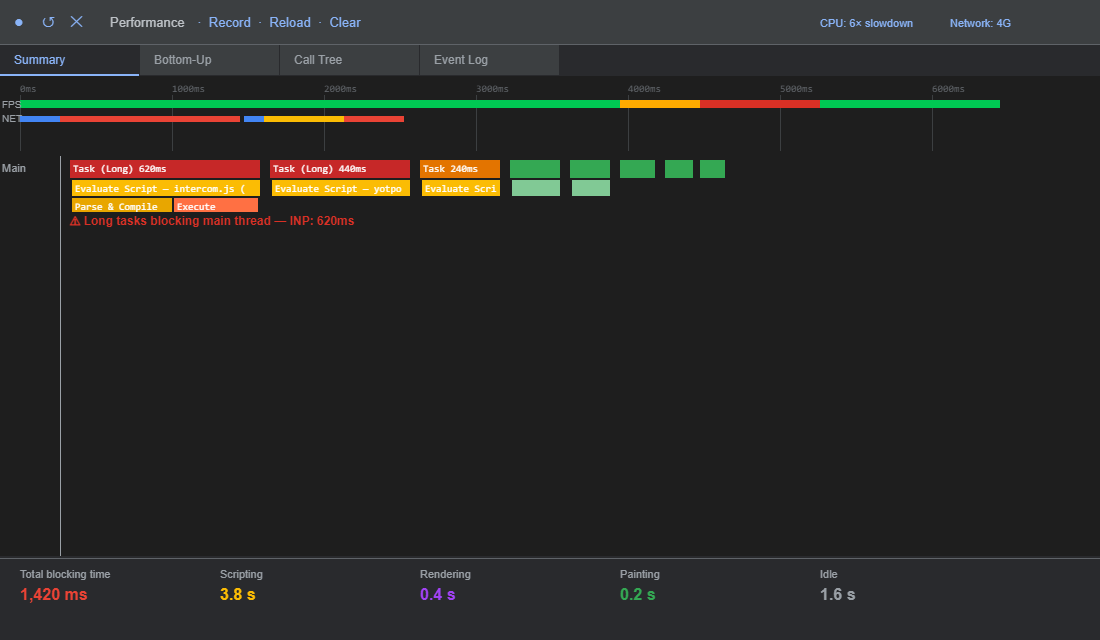
Our diagnostic starts in Chrome DevTools. Open the Performance tab, set CPU throttling to 6x slowdown to simulate a mid-range Android device on a 4G connection, and record a page load. In the resulting flame chart, look for long tasks: any JavaScript execution block over 50 milliseconds appears highlighted. Those are the candidates for deferral or removal. In the example below, a store with eight apps shows over 1,400ms of total blocking time from third-party scripts.
The worst offenders we see consistently across Shopify builds:
- Live chat widgets. Gorgias, Tidio, and Intercom all load significant JavaScript at page start. For stores generating under $1 million AUD in annual revenue, the question is also worth asking whether the chat widget generates enough support deflection to justify the speed penalty it introduces.
- Review app carousels. Yotpo, Okendo, and Stamped each load JavaScript for their review widgets. On a collection page with no visible reviews, this JavaScript executes entirely in the background. Conditional loading, only initialising the review script on product detail pages, is a straightforward fix that regularly drops INP by 100 to 150 milliseconds.
- Tracking pixels via theme code. Facebook, TikTok, Google Analytics, and Klaviyo tracking all run JavaScript on every page. Shopify’s Web Pixels API moves these into a sandboxed worker environment that doesn’t compete with the rendering thread. For stores still running tracking via theme code injection, migrating to Web Pixels is one of the highest-leverage INP improvements available.
The conditional loading fix we apply in Liquid:
{% unless request.page_type == 'blog'
   or request.page_type == 'article'
   or request.page_type == 'page' %}
  {{ 'review-widget.js' | asset_url | script_tag }}
{% endunless %}
Applied consistently across non-essential app scripts, this approach alone drops total JavaScript payload by 30 to 50% on non-product pages. The browser does less work per page, and INP falls accordingly.
Fixing CLS: Layout Reservation and Font Strategy
CLS is the most frequently overlooked metric because it doesn’t feel like a performance problem. The page loads, it just rearranges itself while loading. The user experience impact is real: layout shift during checkout is a leading cause of accidental button presses and abandoned transactions.
Two primary causes appear on most Shopify stores:
Images without explicit dimensions. Browsers need to know an image’s dimensions before it loads to reserve the correct space in the layout. Without those dimensions, the browser renders surrounding content, then expands to accommodate the image as it arrives. The fix on <img> tags:
<img
  src="{{ image | image_url: width: 800 }}"
  width="800"
  height="600"
  alt="{{ image.alt }}"
  loading="lazy">
For responsive images where the exact pixel height varies, the CSS aspect-ratio property handles space reservation without hardcoding pixel dimensions:
.product-image-wrapper {
  aspect-ratio: 4 / 3;
  overflow: hidden;
}

.product-image-wrapper img {
  width: 100%;
  height: 100%;
  object-fit: cover;
}
Web fonts swapping in late. When a font hasn’t cached and hasn’t loaded by paint time, the browser uses a fallback typeface. When the real font arrives and replaces it, the text reflows and CLS registers. The solution combines a preload hint with a font-display strategy:
<link
  rel="preload"
  href="/fonts/YourBrand-Regular.woff2"
  as="font"
  type="font/woff2"
  crossorigin
>
@font-face {
font-family: 'YourBrand';
src: url('/fonts/YourBrand-Regular.woff2') format('woff2');
font-display: swap;
}The crossorigin attribute on the preload link is required even for self-hosted fonts. Without it, the browser initiates two separate font requests: one for the preload and one when it parses the CSS. The font loads twice, and the performance gain from preloading disappears.
The Numbers After the Fix
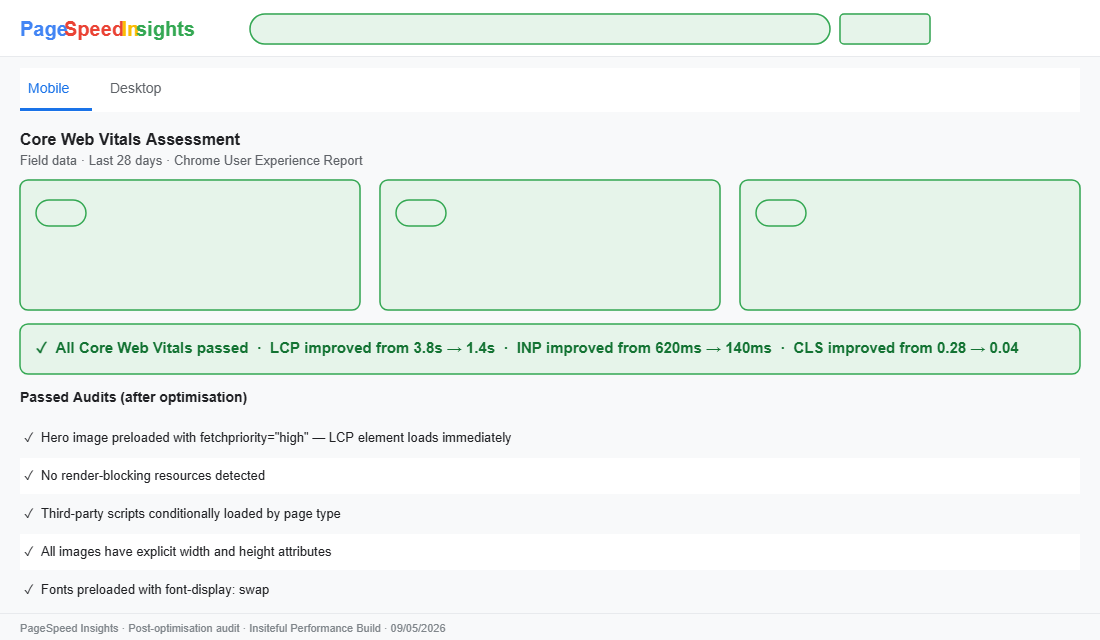
The combination of these three fix categories produces measurable, predictable results. On a recent build for a Shopify store turning over approximately $800,000 AUD annually in the homewares category, we reduced LCP from 3.8 seconds to 1.4 seconds, brought INP from 620 milliseconds down to 140 milliseconds, and improved CLS from 0.28 to 0.04. All three metrics moved from “poor” or “needs improvement” into the “good” range within a three-week engagement.
The organic search impact took six to eight weeks to reflect fully in ranking data, consistent with Google’s typical crawl-and-re-evaluation cycle. The store recorded a 31% improvement in organic traffic to product pages over the following quarter.
How We Do It at Insiteful
Every Insiteful build includes a Core Web Vitals baseline audit before we design or develop anything. We run PageSpeed Insights across four page types (home, collection, product detail, cart), cross-reference the lab data with field data from the Chrome User Experience Report, and produce a prioritised fix list before a single component is touched. Performance is not a phase at the end of a project. It is the starting condition.
Our audit runs in four structured phases:
- Phase 1: Hero image audit. We identify the LCP element on each page type by recording a page load and inspecting the Performance panel. We confirm the loading strategy, correct any lazy-loading on above-the-fold elements, add
fetchpriority="high", and verify explicit dimensions. This is always the first action because it is the fastest path to LCP improvement and requires no app changes. - Phase 2: JavaScript audit. We profile the store using WebPageTest and Chrome DevTools, identify all long tasks exceeding 50 milliseconds, map each one to a specific app or theme script, and build a conditional loading strategy. Apps that cannot be conditionally loaded and have no Web Pixels equivalent go into a direct conversation with the client about whether the functionality they provide is worth the INP cost.
- Phase 3: Layout stability pass. Every image in the theme is checked for explicit width and height attributes. A CSS audit flags dynamic content rendered without reserved space. Fonts are confirmed to be preloaded with the correct
crossoriginattribute andfont-display: swapin the@font-facerule. - Phase 4: Synthetic vs. field data reconciliation. PageSpeed Insights uses both lab data from simulated Lighthouse tests and real-user field data from Chrome UX Report. We compare both because they tell different stories. A store serving predominantly mobile traffic from regional Australia often shows higher real-user LCP than synthetic scores suggest, because Lighthouse simulates a Moto G4 device connecting through a US data centre, not a Telstra 4G connection in regional Queensland. Where there is a gap between lab and field data, we investigate the real-user segments causing the divergence.
This four-phase process is built into our standard project brief. It is not an optional add-on. A Shopify build that ships with poor Core Web Vitals scores will underperform in organic search from day one, regardless of how well the design converts. Speed and design are not competing priorities. They are both part of the same build standard.
If you are looking at PageSpeed Insights and seeing red and amber across LCP, INP, and CLS, the root causes are almost certainly in the three areas above. The good news is that these are fixable problems. They do not require a full rebuild. They require a methodical audit, targeted code changes, and the willingness to challenge which apps are actually earning their place on every page of the store.
If you want a fresh set of eyes on your Shopify store’s Core Web Vitals, that is exactly the kind of audit we run for every new client. Talk to the Insiteful team.