
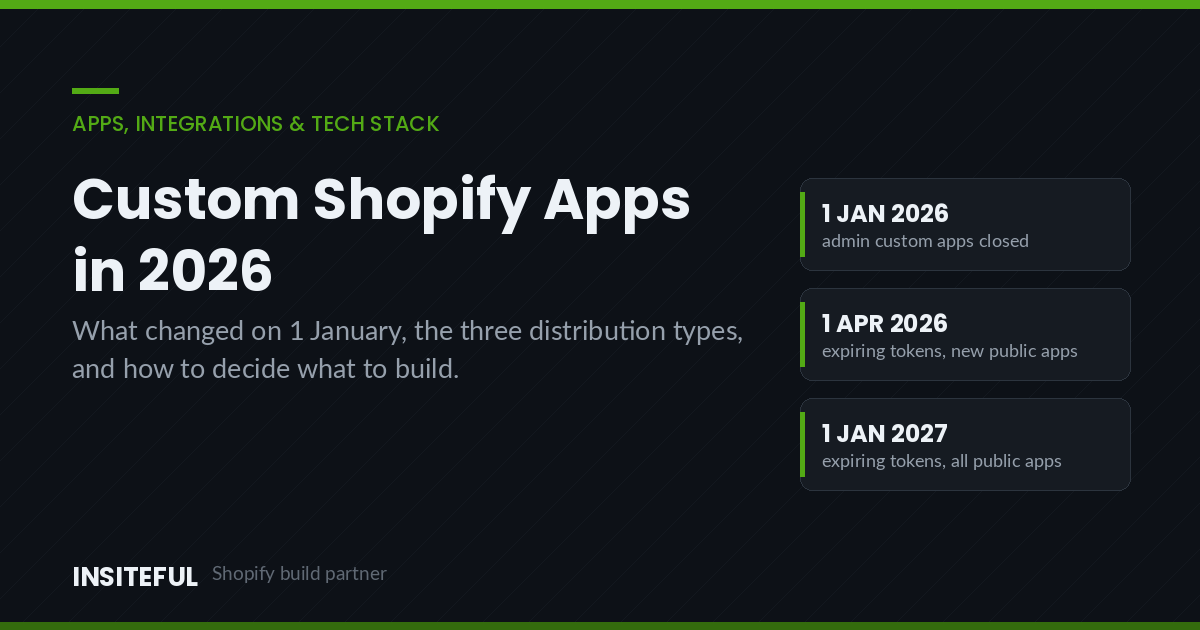
On 1 January 2026, Shopify quietly closed a door that thousands of Australian merchants had been walking through for years. You can no longer create a new custom app from the Shopify admin. The changelog entry is four sentences long. The consequences are not.
We found out the way most agencies did. A client on a $180,000 AUD replatform had a warehouse integration scoped around the old flow: create a custom app in Settings, tick the scopes, copy the shpat_ token, paste it into the middleware, done in twenty minutes. That path no longer exists for new apps. The build now starts in the Shopify Dev Dashboard, ships through OAuth, and needs somewhere to run.
If you are a merchant who has been told “we’ll just spin up a custom app for that”, this article is the briefing you should have had. It covers what actually changed, the three distribution types and which one fits your situation, the test we run before we agree to build anything custom, and the real cost of owning a private app for three years. Every section has something you can act on rather than a summary of a Shopify help page.
The 1 January 2026 Change, in Plain Terms
Three things are true, and merchants keep confusing them.
Existing custom apps keep working. If you created a custom app from the admin before 1 January 2026, nothing broke. The token still authenticates, the scopes still apply, the integration still runs. Shopify was explicit about this. Do not let anyone talk you into an emergency migration you do not need.
New custom apps cannot be created from the admin. The “Develop apps” section that used to let a store owner mint an app and an access token in the same screen no longer produces new apps. That is the whole change.
The replacement is custom distribution through the Dev Dashboard. You create the app in the Dev Dashboard, generate a one-off install link, and install it on the store. The app is still private to that store. It just authenticates through OAuth instead of a permanent token pasted into a config file.
The practical effect is that the “no-developer” custom app is gone. Under the old flow, a merchant with a Zapier-shaped problem could create an app themselves. Under the new flow, someone has to configure an app in the Dev Dashboard, handle an OAuth callback, and store a token. That is developer work, even when the app itself is fifty lines.
Here is the migration decision, compressed:
| Your situation | What to do | Urgency |
|---|---|---|
| Legacy custom app created before 1 Jan 2026, working fine | Nothing. Document the scopes and the token owner. | None |
| Legacy custom app, but you need to add a new API scope | You can still edit scopes on existing apps. Test in a dev store first. | Low |
| New integration scoped around the old admin flow | Rescope to custom distribution. Budget for OAuth and hosting. | High if mid-build |
| Third-party middleware that asks you to “create a custom app” | Ask the vendor for their Dev Dashboard install link. Many have not updated their docs. | Medium |
| Plus organisation with several stores sharing one integration | Custom distribution covers multiple stores in the same Plus org. Use it. | Low |
That fourth row is where most of the pain has landed this year. A large share of Australian 3PL, ERP and accounting connectors still ship setup documentation that begins “in your Shopify admin, go to Apps, then Develop apps”. If a vendor’s onboarding still says that in August 2026, it is a signal worth acting on. We have had two clients this year discover their fulfilment vendor had no OAuth install path at all and had to be pushed to build one.
The Three Distribution Types, and Which One You Actually Need
Shopify’s own distribution documentation lists three live options plus two deprecated ones. Merchants routinely pick the wrong one because the names do not describe the difference. The difference is not what the app does. It is who can install it and how it authenticates.
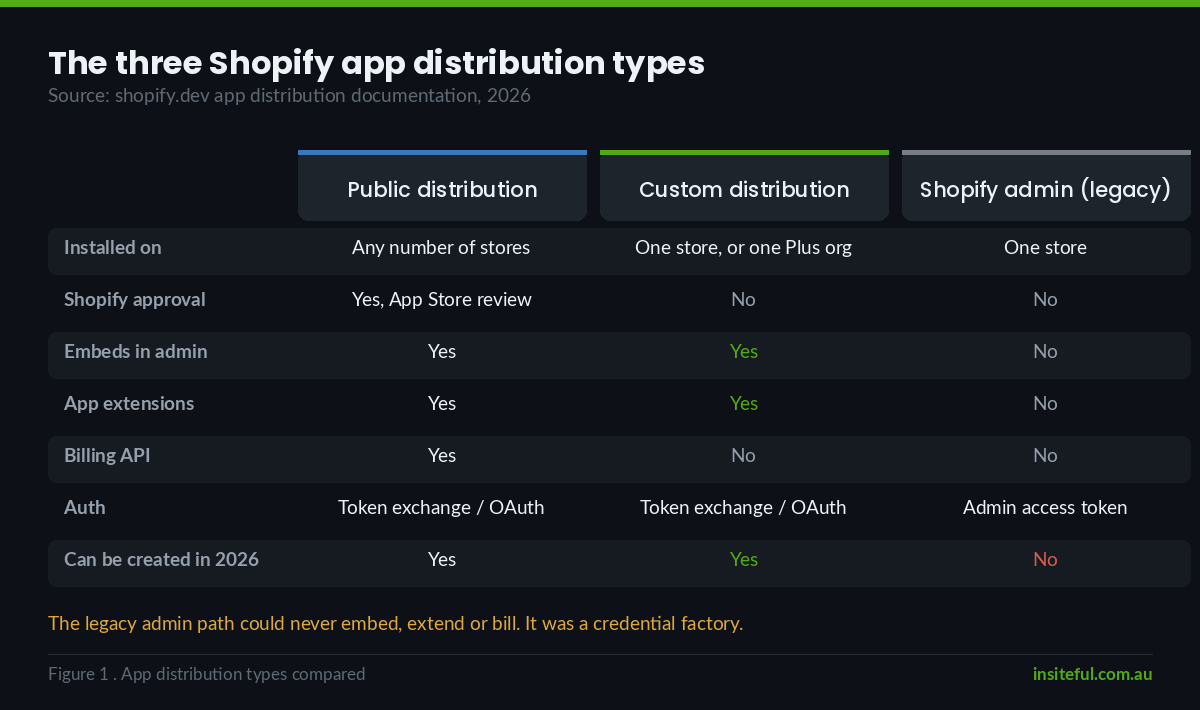
| Public distribution | Custom distribution | Shopify admin | |
|---|---|---|---|
| Installed on | Any number of stores | One store, or all stores in one Plus organisation | One store |
| Shopify approval | Yes, App Store review | No | No |
| Auth | Token exchange if embedded, otherwise authorization code grant | Token exchange if embedded, otherwise authorization code grant | Admin-generated access token |
| Embeds in admin | Yes | Yes | No |
| App extensions | Yes | Yes | No |
| Billing API | Yes | No | No |
| Can be created new in 2026 | Yes | Yes | No |
Read the bottom three rows together and the picture gets clear. The old admin-created app was never a real app. It was an API key with a user interface. It could not embed in the admin, could not ship a theme app extension, could not add a checkout UI extension, and could not charge anyone. It was a credential factory for middleware.
Custom distribution is a genuine app that happens to be installed on one store. That is a meaningful upgrade. The same build can now put a settings screen inside the Shopify admin, drop a configurable block into the theme editor for the merchant’s marketing person to position, and validate something at checkout. None of that was available on the old path.
The one real loss is the Billing API. Custom distribution apps cannot charge through Shopify. For a private app built for one merchant that is irrelevant, since the merchant is paying you directly. It only matters if you were planning to quietly commercialise a client build later.
The version nobody mentions: Plus organisations
Custom distribution installs on “a single Shopify store, on multiple stores that belong to the same Plus organisation, or any transfer-disabled development stores”. For an Australian brand running separate AU, NZ and US stores under one Plus organisation, that single line removes an entire class of problem. One app, one codebase, one deploy, installed across all three. We used to solve this with three legacy custom apps and three sets of credentials in a secrets manager. That approach is now both harder to create and worse to operate.
The Build-or-Buy Test We Run Before Writing a Line of Code
The App Store passed 17,600 listings in April 2026, and the average merchant installs around six apps at an average of roughly $58 USD per month each. Most requests that arrive at our door described as “we need a custom app” are solved by an app that already exists, or by Shopify Flow, or by a metafield and forty lines of Liquid.
So before we quote a build we run five tests in order. The first “no” stops the process.
Test 1: Does an existing app do 80 percent of this? Not 100. Eighty. If a $79 USD per month app covers eight of your ten requirements, the correct move is almost always to buy it and either drop the other two or handle them with Flow. A custom build to recover two edge cases rarely returns the money. We keep a running view of this in our Shopify app stack breakdown.
Test 2: Is the logic actually unique to this business? “We need custom shipping rules” usually is not unique. “We need to allocate stock across four warehouses based on a freight-cost matrix our operations manager maintains in a spreadsheet” usually is. Unique operational logic is the strongest case for a build. Configuration preferences are the weakest.
Test 3: Can Shopify Flow, Functions or metaobjects do it natively? Shopify Functions handle discount, delivery, payment and cart logic at checkout without an app server, and we cover the boundaries in our guide to what Shopify Functions can and cannot do. Flow handles event-driven automation. Metaobjects handle structured content. Between the three, a surprising amount of “custom app” work has no app in it.
Test 4: Does it need to hold state or run on a schedule? This is the line where an app becomes unavoidable. If something has to remember what it did yesterday, reconcile two systems, retry a failure, or run at 2am, you need a server. That is an app. If it only has to react to a single event and write a tag, it is probably Flow.
Test 5: Who owns it in three years? The question that kills more custom app projects than any other, and the one merchants never ask up front. A custom app is a piece of software with an API version deadline attached to it. Shopify releases quarterly API versions and supports each for twelve months. If nobody owns the upgrade, the app breaks on a schedule you did not choose.
Roughly one in four requests survives all five tests. The other three get solved for a fraction of the money, and the client keeps the difference.
What a Custom App Is Actually Made Of in 2026
If the request survives the five tests, here is what you are commissioning. This has changed more than most merchants realise, because the official template moved off Remix.
The current Shopify app template is built on React Router 7, and the supporting package is @shopify/shopify-app-react-router. Scaffolding is one command:
shopify app init --template=https://github.com/Shopify/shopify-app-template-react-routerThe template arrives with OAuth, session storage, App Bridge, Polaris components and a webhook handler already wired. Configuration lives in one server file:
import {
  ApiVersion,
  LogSeverity,
  shopifyApp,
} from '@shopify/shopify-app-react-router/server';

const shopify = shopifyApp({
  apiKey: process.env.SHOPIFY_API_KEY!,
  apiSecretKey: process.env.SHOPIFY_API_SECRET!,
  appUrl: process.env.SHOPIFY_APP_URL!,
  apiVersion: ApiVersion.July25,
  distribution: AppDistribution.SingleMerchant,
});

export default shopify;
The line that matters for a private build is distribution. Set it to AppDistribution.SingleMerchant for custom distribution. The legacy admin-created app used AppDistribution.ShopifyAdmin, which cannot embed in the admin, cannot use app extensions, and is not compatible with the Shopify CLI. Shopify’s own documentation for that mode tells you to start the app directly rather than through the CLI, which tells you everything about how much future it has.
The rest of the app config is a TOML file that Shopify reads on deploy. Scopes belong here rather than in a dashboard checkbox, which is the change that makes app permissions reviewable in a pull request:
name = "warehouse-allocator"
client_id = "0000000000000000000000000000"
application_url = "https://allocator.example.com.au"
embedded = true

[access_scopes]
scopes = "read_products,write_inventory,read_locations,read_orders"

[webhooks]
api_version = "2026-07"

  [[webhooks.subscriptions]]
  topics = [ "orders/create", "inventory_levels/update" ]
  uri = "/webhooks"

[auth]
redirect_urls = [ "https://allocator.example.com.au/auth/callback" ]
Four things in that file are worth arguing about in a scoping meeting. The scope list is the security surface, and it should be the shortest list that works. The API version is a dated commitment you will need to bump. The webhook topics determine your infrastructure cost more than any other decision. And embedded = true decides whether the merchant experiences this as part of Shopify or as another login they will forget.
Authentication, and the Token Clock That Started in April
Shopify now has a clear recommended path and it is worth stating plainly: apps rendered in the Shopify admin should use token exchange, and all apps should use Shopify managed installation. Standalone apps that are not rendered in the admin use the authorization code grant.
Token exchange works by taking the session token that App Bridge already has inside the embedded iframe and swapping it for an access token, with no redirect dance. In the React Router template you never see the mechanics:
import { authenticate } from '../shopify.server';

export const loader = async ({ request }) => {
  const { admin, session } = await authenticate.admin(request);

  const response = await admin.graphql(`
    query InventoryByLocation {
      locations(first: 10) {
        nodes { id name }
      }
    }
  `);

  return { data: await response.json(), shop: session.shop };
};
Two dates now sit on the calendar for anyone building or buying apps.
1 April 2026: all new public apps must request and use expiring offline access tokens. Offline tokens now live for 60 minutes and refresh automatically, with refresh tokens valid for up to 90 days.
1 January 2027: that requirement extends to all public apps, including ones created before April 2026. Apps still using non-expiring offline tokens after that date get authentication errors.
The merchant-facing version of this: if any app in your stack is unmaintained, 1 January 2027 is the day it stops working. Not degrades. Stops. We are already running this check across client stacks, and it is a good excuse to remove the four apps nobody remembers installing. If you want the performance argument for the same exercise, we documented one in our app audit and LCP case study.
For custom distribution apps the deadline does not formally apply, because the requirement is written against public apps. Build to it anyway. Expiring tokens with automatic refresh are twenty lines of difference at build time and the difference between a contained incident and a full credential rotation if a token ever leaks.
Where the App Shows Up: Admin, Theme, Checkout and POS
A custom app in 2026 is not one interface. It is a small set of extensions, each of which renders somewhere different and has its own rules. Scoping goes badly when a merchant pictures “a dashboard” and the actual requirement is a block in the theme editor.
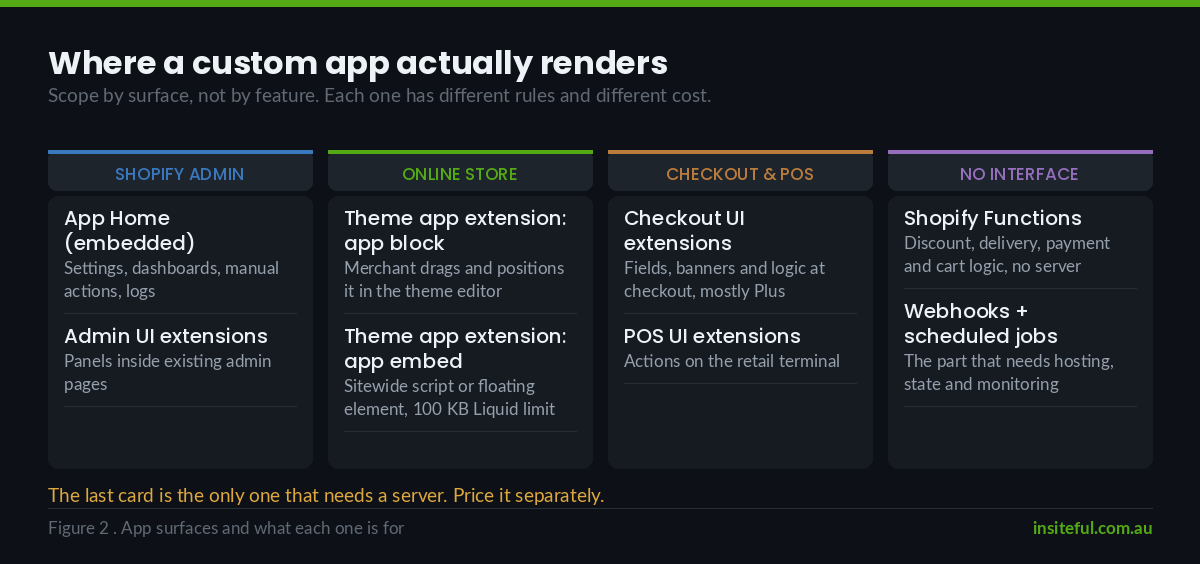
| Surface | What it is for | Who touches it | Watch out for |
|---|---|---|---|
| App Home (embedded admin) | Settings, dashboards, manual actions, logs | Ops and admin staff | Build it in Polaris or it will look foreign and get distrusted |
| Admin UI extensions | Small panels inside existing admin pages, e.g. on the order detail screen | Ops staff mid-workflow | Far better adoption than a separate app page for anything order-level |
| Theme app extension: app block | Merchant-positionable storefront block in the theme editor | Marketing, without a developer | 100 KB Liquid size limit per extension |
| Theme app extension: app embed block | Sitewide script or floating element, toggled on or off | Marketing | This is the modern replacement for injected script tags |
| Checkout UI extensions | Fields, banners and logic at checkout | Customers | Plus only for most placements; design rules apply to custom apps too |
| POS UI extensions | Actions on the POS terminal | Retail staff | Different interaction model, needs its own testing pass |
| Shopify Functions | Discount, delivery, payment and cart logic | Nobody, it just runs | No server needed, so no hosting cost for this part |
The theme app extension row is the one merchants underrate. An app block is a Liquid file plus assets that appears in the theme editor as a draggable block, so the marketing team can place it, configure it through a schema, and remove it, all without a deploy. That is a real operational win, and it is also the reason we push app-injected functionality out of custom Liquid edits and into extensions wherever we can. Extensions survive theme upgrades. Direct edits to a theme file do not, which is why we run theme work through the Git and CI workflow we documented here.
The 100 KB Liquid limit on theme app extensions is real and it bites on anything template-heavy. If your app has custom distribution, or has earned Built for Shopify status in the App Store, you can request an exception through Shopify’s form. Design so you do not need to.
The Hard Limits That Shape the Build
Every custom app we have ever built has hit at least one of these. They are published, they are not negotiable, and they should be in the technical brief rather than discovered in week six.
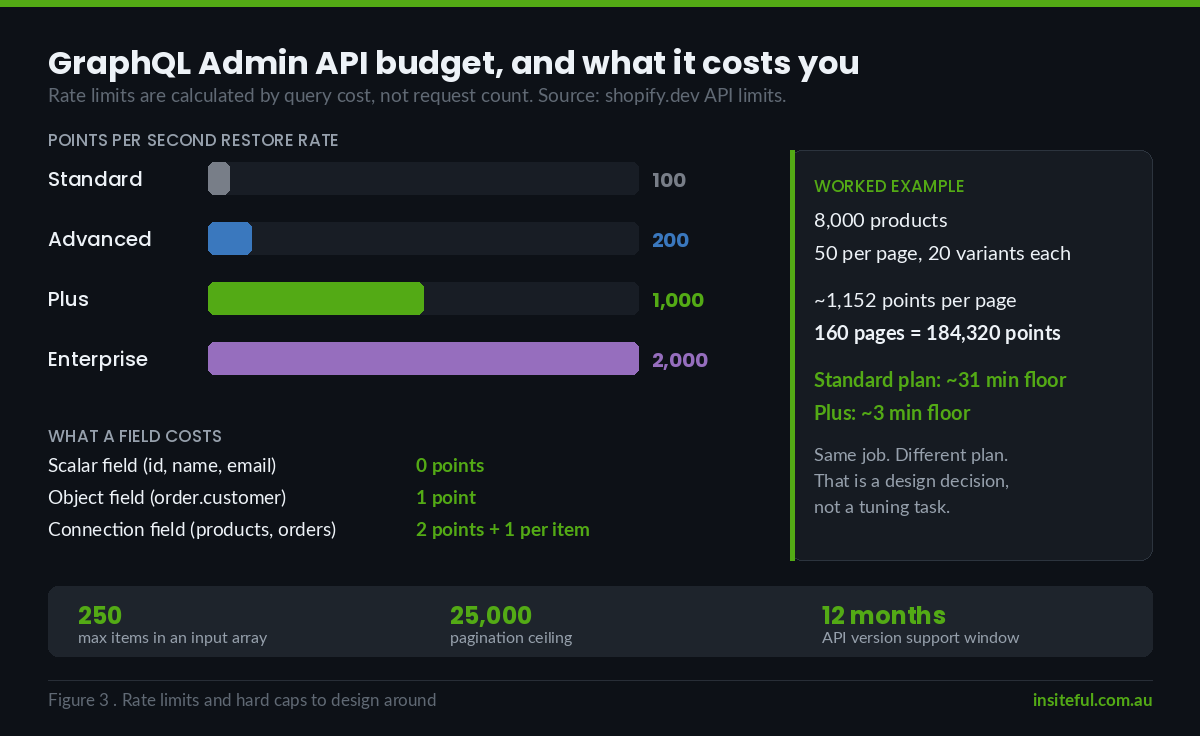
GraphQL Admin API rate limits are calculated by query cost, not request count. The published ceilings are 100 points per second on standard plans, 200 on Advanced, 1,000 on Plus, and 2,000 on Shopify for enterprise. Scalar fields cost nothing, single related objects cost one point, and paginated connections cost two points plus one per returned item. A badly shaped query that pulls 250 orders with line items and customers attached can burn a second of budget in a single call.
Input arrays max out at 250 items. Any mutation that takes an array rejects anything larger. Bulk operations need chunking and a queue, not a bigger loop.
Pagination stops at 25,000 objects. Counts are accurate to 25,000 and then return 25,001 to signal “more than that”. If your app needs to walk a 90,000-product catalogue, it needs filters or the Bulk Operations API, and that is an architectural decision made on day one rather than a patch in month three.
API versions expire. Shopify ships quarterly versions and supports each for a minimum of twelve months. Pinning 2026-07 today means a mandatory review before mid-2027. Put it in a calendar with a named owner, not in a README.
The rate limit maths is worth doing before you commit to an architecture. Here is the shape of the calculation we run:
// Sync 8,000 products, 50 per page, each page requesting
// variants(first: 20) with 6 scalar fields per variant.
//
// Per page cost:
//   products connection      = 2
//   + 50 returned products   = 50
//   + 50 variants connections= 100
//   + 1000 returned variants = 1000
//   ~ 1152 points per page
//
// Standard plan bucket: 100 points/second restore.
// 160 pages x 1152 points = 184,320 points
// 184,320 / 100 = ~31 minutes of pure rate-limit floor.
//
// Same job on Plus at 1000 points/second: ~3 minutes.
That single calculation has changed the scope of more projects than any performance test we run. A nightly full-catalogue sync that is fine on Plus is a half-hour job on a standard plan, and if the client is on standard and needs it hourly, the design has to change to delta syncs driven by webhooks. Which is exactly why webhook reliability is not optional, and why we wrote up how to build webhooks that do not silently fail.
The Running Cost Nobody Budgets For
Merchants budget the build. Almost nobody budgets the next three years. Here is the honest shape of it for a mid-complexity private app: an embedded admin screen, one theme app extension, a handful of webhook topics and a scheduled reconciliation job.
| Line item | Year 1 (AUD) | Years 2 and 3, each (AUD) | Note |
|---|---|---|---|
| Discovery and technical design | $4,000 – $8,000 | – | Where the five tests get run properly |
| Build and QA | $18,000 – $45,000 | – | Wide range because extension count drives it |
| Hosting and database | $600 – $3,600 | $600 – $3,600 | Webhook volume is the main driver |
| Error monitoring and logging | $400 – $1,200 | $400 – $1,200 | Non-negotiable for anything touching orders |
| API version upgrades | Included | $2,500 – $6,000 | At least one mandatory bump per year |
| Small changes and support | Included | $3,000 – $9,000 | Assume the business will change |
Call it $25,000 to $58,000 AUD in year one and $6,500 to $19,800 AUD a year after that. Set that against a $79 USD per month app and the app has to be wrong for roughly a decade before the build wins on cost alone. Which is the point. A custom app should never be justified on cost. It is justified when the logic is genuinely yours, when the alternative is people doing it by hand, or when the off-the-shelf option would force you to change how the business actually works.
The version of this argument that does win is labour. A four-warehouse allocation job that occupies an operations coordinator for two hours a day is roughly $28,000 AUD a year in loaded salary before you count the errors. Automate that properly and the build pays back inside eighteen months and keeps paying. We have seen exactly that outcome on stock allocation, on wholesale order entry, and on the reconciliation work that sits between Shopify and the accounting system, which we broke down in our Shopify to Xero integration guide.
The failure mode to plan around
The most common way a custom app fails is not a bug. It is orphaning. The developer who built it moves on, nobody bumps the API version, a quarterly release removes a deprecated field, and the app starts throwing errors on a Tuesday morning eighteen months after launch. The merchant’s first sign is that inventory has stopped syncing.
Three things prevent it, and all three are cheap compared to the recovery. Put the app in the merchant’s own repository under the merchant’s own account, not the agency’s. Write down the scopes, the API version, the hosting provider and the renewal dates in one page that lives with the business. And schedule the version review as a calendar event with a person’s name on it. If your agency will not do those three things, that tells you what happens when they lose the account.
How We Do It at Insiteful
We have been building on Shopify for over 25 years across more than 200 sites a year, and we build native. No headless, no composable rebuild, no framework that puts a layer between the merchant and their own store. That position shapes how we approach custom apps too, and we have written about why we do not build headless Shopify stores and what a native stack can actually do on performance.
On custom apps, our process runs like this.
We try to talk you out of it first. The five tests are a real gate, not a formality. Roughly three in four requests get solved with an existing app, Shopify Flow, Functions, metaobjects or a small theme change. We would rather sell you a two-week integration than a four-month build you did not need, because the two-week version is the one you are still happy about in year three.
We scope by surface, not by feature. Every requirement gets mapped to where it renders: App Home, admin extension, theme app extension, checkout, POS or a Function. That mapping is what makes an estimate honest, because a requirement that needs a checkout UI extension and a Function costs very differently to one that needs a settings page.
We do the rate limit maths in discovery. Before the estimate goes out, we calculate the query cost of the heaviest recurring job against the client’s actual plan. If a nightly sync does not fit inside the budget on their plan, we redesign it to delta syncs and webhooks in discovery rather than discovering it in QA.
We build to custom distribution with expiring tokens. Even though the January 2027 token deadline is written against public apps, every private app we ship uses expiring offline tokens with automatic refresh, managed installation and token exchange. It is a small amount of extra work now and it removes a class of future emergency.
We hand over ownership properly. The repository sits under the client’s organisation. The hosting account is in the client’s name with our access as a collaborator. The handover pack lists scopes, API version, webhook topics, environment variables and the next mandatory upgrade date. If you replace us, the app keeps working, and we think that is the correct incentive for us to be worth keeping.
The same discipline runs through the rest of our integration work, whether that is wiring a 3PL, connecting a PIM or running an ERP integration.
Where to Start
If you have a custom app request sitting in a scoping document right now, do these four things this week.
One: check whether anything in your current stack was created as a legacy custom app from the admin, and make sure someone knows the scopes and who holds the token. Two: run the five tests against the request honestly, and be willing to lose the argument to Shopify Flow. Three: if it survives, get the query cost calculated against your actual plan before you accept an estimate. Four: audit your installed apps for anything unmaintained, because 1 January 2027 will remove the ones nobody is looking after.
If you want a second opinion on whether a build is the right call, that is the sort of question we answer in a build assessment. See how our process works and bring the scoping document with you. We will tell you if the answer is an app you can buy for $79 USD a month, because that is a better outcome for both of us than a build you regret.