
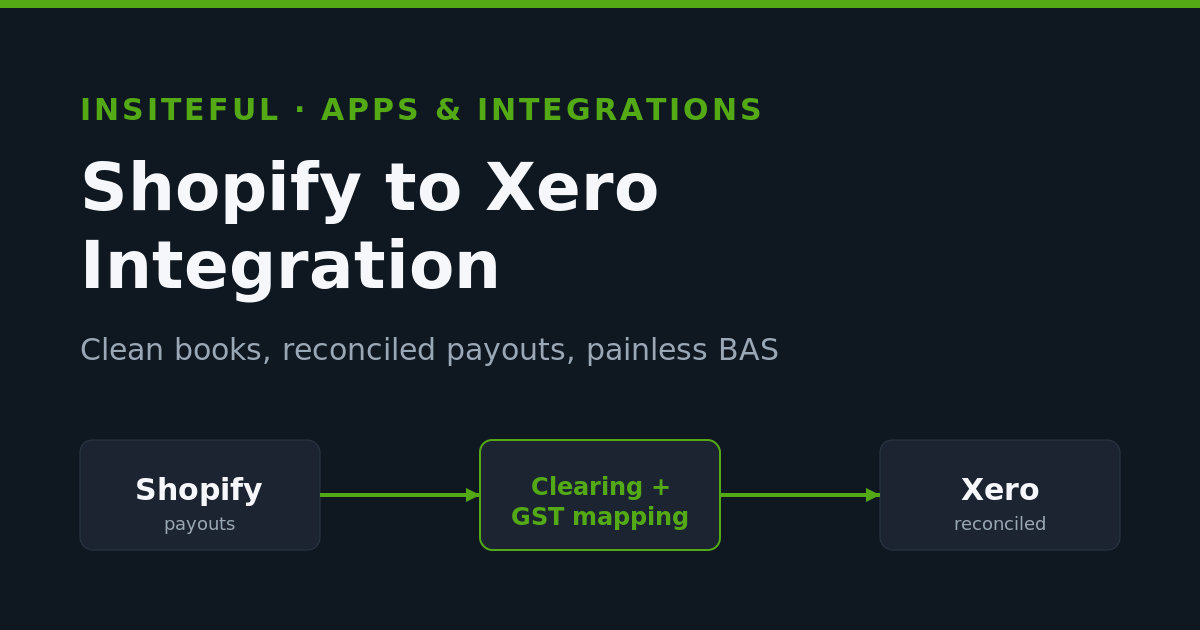
Every fast-growing Shopify store in Australia hits the same wall around the time it clears its first million in revenue. The store is humming. The marketing works. But the books are a mess, the bookkeeper is charging by the hour to untangle Shopify payouts, and nobody can answer a simple question: what did we actually make last month? The culprit is almost never the accounting software. It is the join between Shopify and Xero, and it is one of the most common jobs we get called in to fix.
At Insiteful we build and maintain Shopify and Shopify Plus stores for Australian brands, and a clean accounting pipeline is part of the build, not an afterthought. This is the exact playbook we use to wire a Shopify store into Xero so the numbers reconcile to the cent, GST maps correctly for BAS, and the founder gets a monthly P&L they can trust. If your books only make sense after your bookkeeper spends a day on them, this is for you.
Why Shopify to Xero Matters More in Australia Than Anywhere Else
Xero is not just popular here, it is the default. Xero reported roughly 1.77 million Australian subscribers as of March 2024, up 13 percent year on year, and holds an estimated 60 percent of the Australian online accounting software market, well ahead of MYOB and QuickBooks. If you run a Shopify store in Australia and you use an accountant, the odds are overwhelming that your books already live in Xero. So the integration question is rarely “which accounting platform,” it is “how do we get Shopify data into Xero without breaking it.”
The stakes are higher here because of GST and BAS. Australian businesses must register for GST once annual turnover hits or is expected to hit $75,000 AUD, and most ecommerce businesses under $20 million in GST turnover lodge a Business Activity Statement quarterly, due on the 28th of the month after each quarter. That means four times a year the ATO wants an accurate GST figure derived from your sales, your refunds, and your fees. If the Shopify to Xero connection is wrong, every BAS is wrong, and the errors compound. Getting this right is not a nice-to-have, it is a compliance obligation.
There is a payoff beyond compliance. Shopify merchants who move from manual bookkeeping to a proper accounting automation typically save up to 30 hours a month of data entry and reconciliation. For a brand where the founder is still doing the books at 11pm on a Sunday, that is the difference between running the business and drowning in it.
The Real Problem: A Shopify Payout Is Not an Accounting Entry
Here is the mistake that breaks more Australian Shopify books than any other. A founder connects their bank feed to Xero, sees a Shopify Payments deposit of, say, $8,412.55, and codes the whole lot to a “Sales” account. Done. Except it is completely wrong, and it silently corrupts both revenue and GST.
A Shopify Payments payout is a net figure. It is gross sales, minus refunds, minus processing fees, minus chargebacks, plus or minus a dozen other adjustments, all rolled into one number and dropped into your bank a few days later. Recording that net payout as gross revenue understates your true sales and overstates your GST credits, because the fees and refunds embedded in it never get accounted for separately. The anatomy of a single payout looks more like this:
Shopify Payout - 14 July 2026            AUD
-----------------------------------------------
Gross product sales                   9,140.00
Shipping charged to customers           412.00
GST collected (10%)                     955.20
Discounts applied                      -318.00
Refunds issued                         -602.00
Shopify Payments processing fees       -274.65   (1.75% + 30c)
Chargeback + dispute                   -100.00
-----------------------------------------------
Net deposited to bank                  8,412.55
Every line in that breakdown
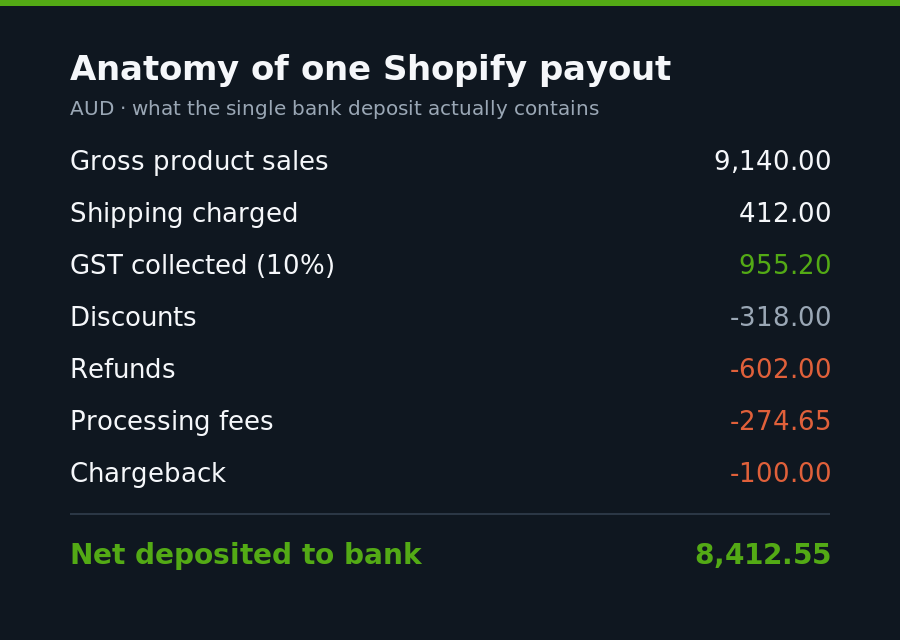
Every line in that breakdown belongs in a different Xero account, and the GST line has to be isolated so it flows to your BAS. Code the whole $8,412.55 to Sales and you have just hidden $274.65 of fees, $602.00 of refunds, and misstated $955.20 of GST. Do that across a year of daily payouts and the gap is enormous. This is why the integration method you choose matters so much.
The Three Ways to Connect Shopify to Xero
There are three broad approaches, and we use them in very different situations depending on order volume and how the client sells.
1. Manual entry. Export Shopify reports, key summary journals into Xero by hand. We only ever recommend this for a brand doing a handful of orders a week, and even then only as a stopgap. It does not scale and it invites error.
2. Order-level sync apps. Connectors that push every individual Shopify order into Xero as an invoice. These feel appealing because they are granular, but at volume they flood Xero with thousands of tiny invoices, slow the ledger to a crawl, and make reconciliation harder, not easier. We use these rarely and only for low-volume, high-value B2B stores where each order genuinely needs to be an invoice.
3. Payout-level summary apps. Tools like A2X, Amaka and Link My Books group transactions into a single summarised journal per Shopify payout, split cleanly across the right accounts and tax rates, designed to match your bank deposit exactly. For the vast majority of Australian DTC brands, this is the correct architecture. It is the method we deploy on almost every build.
The decision usually comes down to volume. Here is the rough rule we apply:
Orders / month     Recommended sync method
------------------------------------------------
Under ~50          Manual summary or order-level
50 - 500           Payout summary (daily)
500 - 5,000        Payout summary (per-payout)
5,000+             Payout summary + custom mapping review
Note the switch to daily summaries at higher volume: pushing per-order data at scale is the fastest way to bog down both the connector and Xero itself.
The Clearing Account Architecture We Build
This is the part most integrations get wrong, and it is the single biggest driver of “my Shopify deposits will not reconcile.” The concept is the clearing account, a temporary holding account that tracks funds in transit between the payment provider and your bank.
For Shopify Payments the good news is that A2X summaries are designed to match your bank deposit exactly, so you generally do not need a clearing account for Shopify Payments alone: the summary lands, the bank deposit lands, you reconcile them one to one. The trouble starts when a store takes payment through more than one gateway, which nearly all Australian stores do, because Afterpay, PayPal and Shop Pay are effectively mandatory here.
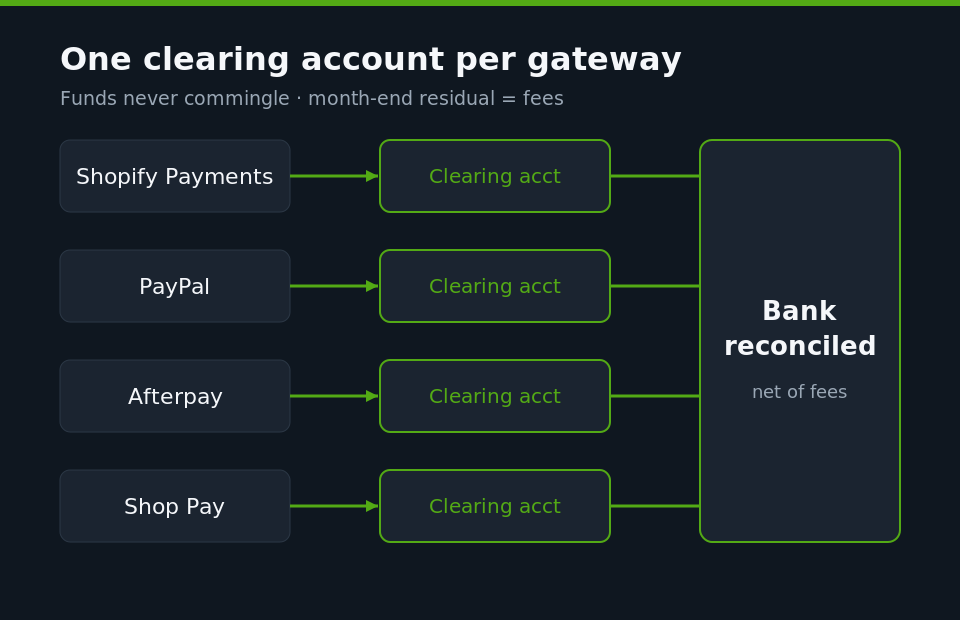
Every additional gateway deducts its own fees before depositing, and pays out on its own schedule. That means the amount the connector records will not match the bank deposit unless you route each gateway through its own dedicated clearing account. We set up one clearing account per gateway so funds never commingle:
Xero Chart of Accounts - payment clearing
------------------------------------------------
620   Shopify Payments Clearing
621   PayPal Clearing
622   Afterpay Clearing
623   Shop Pay Installments Clearing
624   Gift Card / Store Credit Clearing
The mechanics run like this across a month. The connector posts each payout summary into the relevant clearing account. As real deposits hit the bank, net of fees, you allocate them against that same clearing account to offset the balance. At month end, the residual balance sitting in each gateway clearing account is essentially the fees, and a single journal moves that total from the clearing account to your payment fees expense account. Reconciliation stops being a hunt and becomes a two-minute check.
Mapping GST Correctly So Your BAS Is Right
This is where Australian stores differ sharply from US ones, and where generic overseas setup guides will actively harm you. Shopify collects 10 percent GST on applicable domestic sales when you configure it correctly under Settings, then Taxes and duties, then Australia, with your ABN entered. But collecting it is only half the job. Xero has to receive that GST on the right tax rate so it lands in the right box on your BAS.
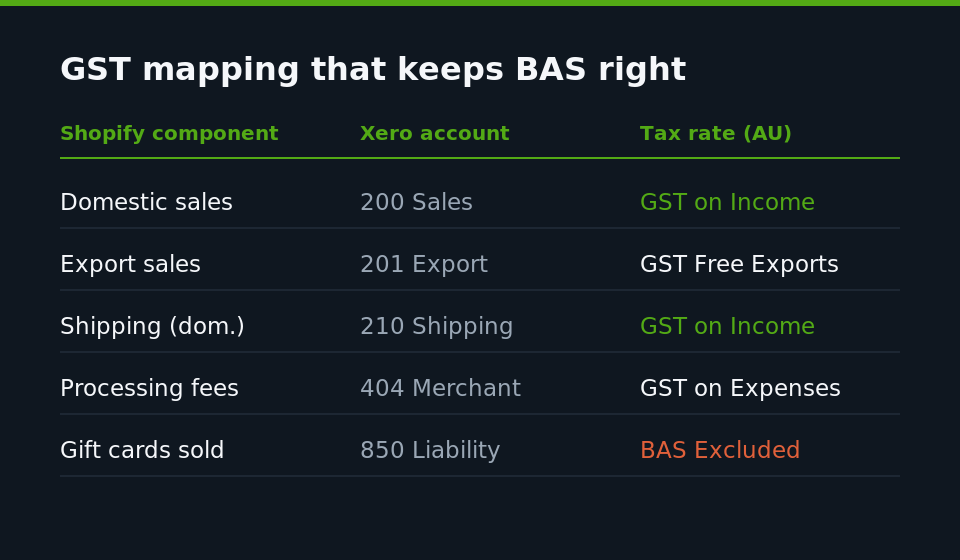
The core mapping we set is straightforward, but the edge cases are where money leaks. International sales are GST-free, not GST-inclusive, so exports must be mapped to a zero-rated tax treatment or you will overstate GST collected and effectively pay the ATO tax you never charged. Shipping charged to Australian customers is generally taxable. Payment processing fees carry GST in Australia. Here is the mapping skeleton we apply in the connector:
Shopify component        Xero account        Tax rate (AU)
--------------------------------------------------------------
Domestic product sales   200 Sales           GST on Income
Export product sales     201 Export Sales    GST Free Exports
Shipping (domestic)      210 Shipping Income  GST on Income
Shipping (export)        211 Shipping Export GST Free Exports
Discounts                260 Discounts        GST on Income
Refunds                  200 Sales (contra)  GST on Income
Processing fees          404 Merchant Fees   GST on Expenses
Gift cards (sold)        850 Gift Card Liab.  BAS Excluded
The gift card line is a common trap. A gift card sale is not revenue, it is a liability until redeemed, and it is BAS-excluded at the point of sale. Map it to income and you inflate both revenue and GST in the quarter it was sold. We check this on every build because Shopify treats gift cards as a product by default.
The Chart of Accounts We Set Up First
A clean integration depends on a clean foundation, and that means preparing ecommerce-ready accounts in Xero before you connect anything. Bolting a connector onto a generic chart of accounts is how you end up with everything dumped into “Sales” and “General Expenses.” We build a dedicated ecommerce structure so the P&L actually tells the founder something:
Revenue
  200  Product Sales (Domestic)
  201  Product Sales (Export)
  210  Shipping Income
Cost of Sales
  310  Cost of Goods Sold
  320  Inbound Freight
  330  Payment Processing Fees
  340  App + Platform Subscriptions
Operating Expenses
  400  Advertising (Meta / Google / TikTok)
  410  Email + SMS (Klaviyo)
Clearing / Balance Sheet
  620  Shopify Payments Clearing
  621  PayPal Clearing
  622  Afterpay Clearing
The reason we split payment fees, freight and COGS out of general expenses is that these are the levers that decide whether a growing store is actually profitable. When a founder can see merchant fees creeping from 1.9 to 2.4 percent of revenue as Afterpay volume grows, they can make a decision. When it is buried in a $40,000 AUD “expenses” blob, they cannot.
Handling Multi-Currency and Shopify Markets Payouts
A growing number of the Australian brands we build for sell into the US and New Zealand through Shopify Markets, and multi-currency is where a lot of Xero integrations quietly fall apart. When a customer pays in USD, Shopify settles that payout in your currency, but the foreign sale, the conversion and any rounding all need to land correctly or you end up with phantom foreign exchange gains and losses cluttering the P&L.
The rule we follow is that the connector must record each payout at the actual conversion Shopify applied on that payout, not at a month-average or a bank-feed rate. When those two rates disagree, Xero manufactures an FX difference that never really happened. We map the genuine conversion spread to a dedicated realised FX account so it is visible and explainable rather than smeared across revenue:
Multi-currency payout mapping
------------------------------------------------
Foreign sales value      200 Product Sales (settled AUD)
Conversion difference    495 Realised FX Gain/Loss
Export GST treatment     GST Free Exports
Two things matter for BAS here. First, exports are GST-free, so a USD sale to an American customer must never carry 10 percent GST, and we test this on the live checkout before go-live. Second, the FX account has to be excluded from GST entirely, because a currency difference is not a taxable supply. Get either wrong and your quarterly GST figure drifts from reality, which is exactly the kind of error that turns a routine BAS into an ATO query.
The Failures We Get Called In to Fix
Most of our Xero integration work is not greenfield, it is repair. The same failures recur, and they are worth naming so you can check your own setup against them.
Net payouts booked as gross revenue. The single most common issue, described above. Symptom: revenue in Xero does not match Shopify analytics, and it is always lower.
No clearing accounts for secondary gateways. Afterpay and PayPal deposits that never reconcile, leaving a bookkeeper to force-match them. Symptom: a growing pile of unreconciled bank lines and a suspense account that only goes up.
Multi-currency sales flattened to AUD at the wrong rate. Stores selling into the US or NZ via Shopify Markets record foreign payouts, and if the integration does not handle the conversion at the payout rate, you get phantom foreign exchange gains and losses. Symptom: unexplained FX movements at month end.
Refunds and chargebacks unaccounted. When refunds are not split out, both revenue and GST are overstated in the period the original sale landed. Symptom: BAS GST that is consistently higher than it should be.
App subscriptions and Shopify fees ignored. Shopify bills your subscription and some app charges directly, often against your Shopify balance, and these never appear in a bank feed. Symptom: understated software expense and a fuzzy true cost of the platform.
How We Do It at Insiteful
When we take on a Shopify to Xero build, whether as part of a new store or a remediation, we run a fixed sequence rather than plugging in a connector and hoping.
First, we audit the existing Xero file and the Shopify payment stack together. We list every active gateway, because that list dictates how many clearing accounts we need. Second, we rebuild the chart of accounts into the ecommerce structure above, migrating history where it is worth it. Third, we install the payout-summary connector, usually A2X or Amaka for Australian and New Zealand sellers, and complete the accounts and tax mapping line by line rather than accepting defaults. Fourth, we reconcile a full historical month end to end as a proving run, so we know the pipeline matches to the cent before we hand it over. Fifth, we document the monthly reconciliation routine so the client’s bookkeeper or accountant can run it in minutes.
Because we also own the storefront, we can fix problems at the source that a pure accounting firm cannot. If gift cards are mis-typed, if a checkout is firing GST on an export, if a new payment app has been added without a matching clearing account, we handle it in Shopify and in Xero as one job. That is the advantage of having the people who build your store also own the integration: nothing falls in the gap between the developer and the accountant, because there is no gap.
We treat the accounting pipeline as part of store quality, in the same category as ERP integration, 3PL fulfilment sync and product information management. A store that sells beautifully but cannot produce trustworthy numbers is only half built.
Get Your Shopify and Xero Talking Properly
If your Shopify payouts do not reconcile, your BAS feels like a guess, or your bookkeeper is quietly charging you to clean up the same mess every quarter, the integration is the problem and it is fixable. We build Shopify and Xero pipelines that reconcile to the cent and map GST correctly the first time, for Australian brands that would rather grow than do data entry.
See how our build process works and book a build assessment, and we will show you exactly what a clean Shopify to Xero pipeline looks like for a store your size.