
Watch a shopper on a mid-range Android load a Shopify product page on a shopping-centre 4G connection. The hero image pops in and shoves the price down. A review-stars widget renders and pushes the buy box another 60 pixels. The shopper goes to tap Add to Cart and hits the size guide link instead. That whole mess has a name, Cumulative Layout Shift, and Google scores every real session of your store on it.
CLS is the most fixable of the three Core Web Vitals. In the May 2026 CrUX dataset, 81.3 per cent of measured origins record a good CLS, against 68.6 per cent for LCP. So if your store is failing CLS in 2026, you are behind a bar that most of the web now clears, and the causes are almost always the same handful of theme and app defects. Shopify’s own performance team lists unsized images, injected app content and lazily loaded CSS as the three most common culprits they see across the platform.
This is the build playbook we run at Insiteful when a storefront fails CLS. It pairs with our INP playbook and image optimisation guide to complete the three Core Web Vitals. Every fix below is native Liquid, CSS or theme configuration. No apps required to fix what apps usually break.
What CLS actually measures, and where the 0.1 bar sits
CLS is not a load-time metric. It is a stability score that accumulates whenever visible content moves without the user asking it to. Each unexpected movement is scored by multiplying two numbers. The impact fraction is the share of the viewport occupied by unstable elements across the two frames. The distance fraction is the greatest distance any of those elements moved, as a share of the viewport’s longest dimension.
Worked example. A free-shipping banner injects at the top of an 800 pixel tall mobile viewport and pushes down content that fills 75 per cent of the screen by 100 pixels. Impact fraction 0.75, distance fraction 100 divided by 800, so 0.125. That single shift scores 0.75 times 0.125, which is 0.094. One late banner and you have nearly spent your entire budget, because the thresholds are tight.
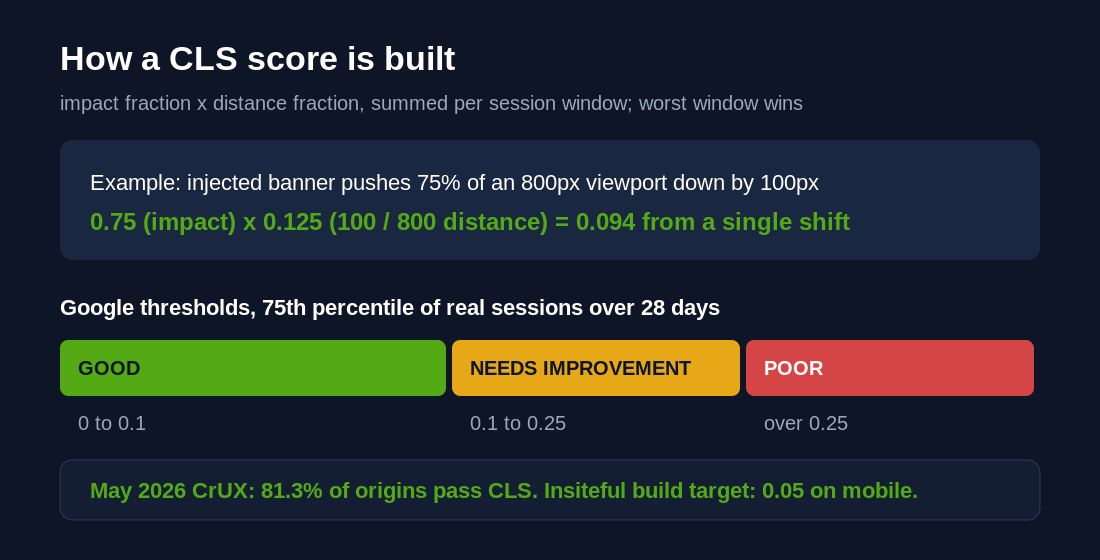
Good is 0.1 or less, poor is above 0.25, and Google takes the 75th percentile of real user sessions over 28 days. Shifts are grouped into session windows, up to five seconds long with a maximum one-second gap between shifts, and your CLS is the worst window in the page view. Two details matter for builders. Shifts within 500 milliseconds of a user interaction are excused, which is why a cart drawer opening on tap does not hurt you. And the score is viewport-relative, which is why the same theme can pass on desktop and fail on mobile, where every pixel of movement is a bigger fraction of the screen.
The commercial case is not academic. Rakuten 24’s engineering team documented a 53.37 per cent increase in revenue per visitor and a 33.13 per cent lift in conversion rate after a Core Web Vitals programme in which CLS improved by 92.72 per cent. The 2025 Web Almanac points the same direction, and its data shows only 48 per cent of mobile origins pass all three vitals against 56 per cent on desktop. Mobile is where your CLS problem lives, and mobile is roughly 62 per cent of ecommerce traffic.
Why Shopify storefronts fail CLS
Across the audits we run, layout shift on Shopify traces back to five defects, in descending order of frequency.
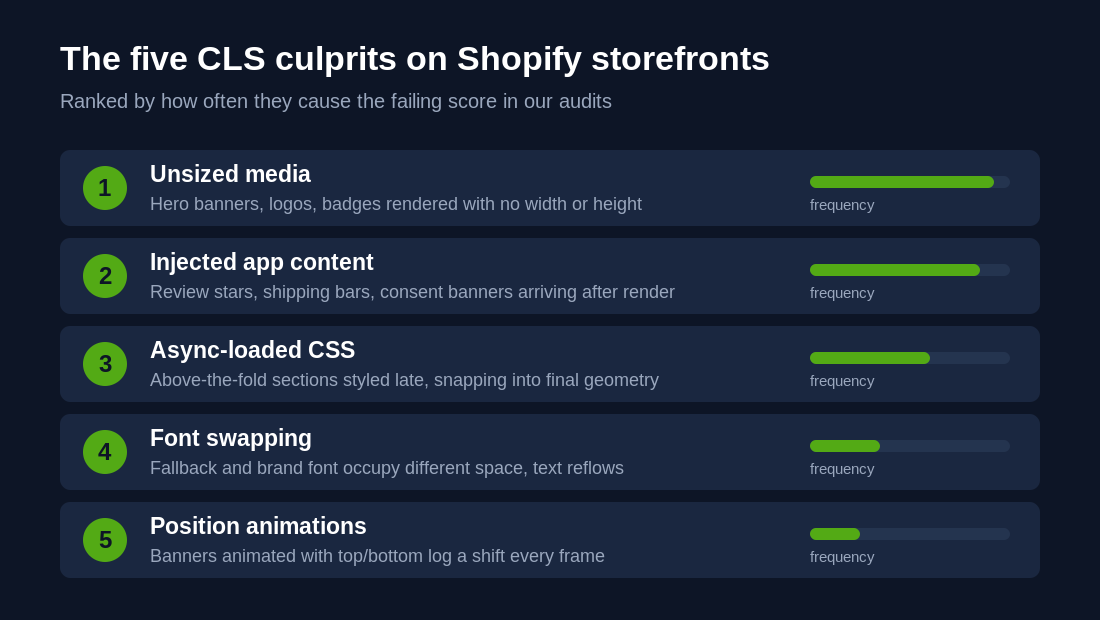
Unsized media. Product grids are usually safe because Online Store 2.0 themes size those images correctly. The misses are hero banners, logos, trust badges, payment icons and anything a developer hand-wrote with a bare img tag. The browser renders those at zero height until the file arrives, then reflows everything below.
Injected app content. Review stars on the product page, free-shipping bars, cookie consent banners, back-in-stock buttons, size charts. Apps inject these with JavaScript after first render, and most reserve no space. A single announcement bar arriving late at the top of the page shifts the entire document.
Asynchronously loaded CSS. A popular theme pattern splits CSS per section and lazy-loads it. Sections render unstyled or partially styled, then snap into their final geometry when the stylesheet lands. Above the fold, that pattern is a CLS machine.
Font swapping. The fallback font renders, the brand font arrives, line lengths change, and text below reflows. Worst when headings wrap to a different number of lines.
Position-based animations. Sliding banners or cookie notices animated with top and bottom properties register every animation frame as a layout shift. The Shopify performance team calls this one out specifically because it produces enormous CLS numbers from an element that looks harmless.
Note what is not on the list, your hosting, your server, your plan tier. CLS is a front-end defect. It is fixed in the theme codebase and the app stack, which is exactly why it responds so quickly to focused work. A store failing CLS can usually pass within days, unlike LCP which can require infrastructure and asset work, as we covered in our app audit case study.
Diagnose before you touch a line of Liquid
Do not fix from a hunch. Layout shift has specific causal elements and the tooling names them.
Slow the page down and watch it. In Chrome DevTools, Network tab, disable cache and throttle to Fast 4G. Reload the page five times and watch what moves. This catches the bulk of problems with the naked eye, on the connection profile your real shoppers use, not your office fibre.
Filter PageSpeed Insights to CLS. Run your key templates, home, collection, product, through PageSpeed Insights and use the CLS filter above the diagnostics. Expand each audit and it will usually show a screenshot of the offending element.
Map every shift in WebPageTest. Run a mobile test, open the Web Vitals view, and every shift frame is listed with the displaced content highlighted in pink. The pink areas are the victims. The element above or beside them is your cause.
Instrument the field. Lab tools miss shifts that only happen on real devices, real apps and real consent states. Drop a PerformanceObserver into theme.liquid on a preview theme and log what actually moves for real sessions.
new PerformanceObserver((list) => {
  for (const entry of list.getEntries()) {
    if (entry.hadRecentInput) continue;
    console.log('CLS shift', entry.value.toFixed(4),
      entry.sources.map(s => s.node));
  }
}).observe({ type: 'layout-shift', buffered: true });
Sort the console output by value, and the largest sources are your worklist, ranked. On client audits we pipe the same data into analytics with the web-vitals attribution build so every shift is tied to a template, an element selector and a device class. Our site speed diagnostic walkthrough covers the wider measurement stack.
Fix one, reserve space for every image
The browser can only hold space for an image if the markup tells it the geometry up front. On Shopify the cleanest path is the Liquid image_tag filter, which writes correct width and height attributes automatically from the source image.
{{ section.settings.image
  | image_url: width: 2000
  | image_tag:
      widths: '400, 800, 1200, 1600, 2000',
      sizes: '100vw',
      loading: 'eager',
      fetchpriority: 'high' }}
Pair it with base CSS so the reserved box scales responsively instead of rendering at the intrinsic size.
img {
  max-width: 100%;
  height: auto; /* keeps the reserved aspect ratio */
}
With width and height present, the browser computes the aspect ratio before a single byte of the image arrives and reserves exactly the right box. For design-led sections where the crop matters more than the intrinsic ratio, set the geometry on the container and let the image fill it.
.hero__media {
  aspect-ratio: 16 / 7;   /* box exists before the file arrives */
}
.hero__media img {
  width: 100%;
  height: 100%;
  object-fit: cover;
}
Audit targets in order: hero and slideshow banners, the header logo, trust badge rows, payment icons, blog featured images, and any section a past developer built with a hand-written img tag. Product grid cards in a current OS 2.0 theme are normally already correct. While you are in there, confirm loading and fetchpriority attributes are right too, since the same markup drives your LCP, and our image optimisation playbook covers that half of the job.
Fix two, contain injected app content
You will not stop apps injecting content, that is what you installed them for. The job is to make the injection land in a box that already exists.
App blocks get a minimum height. For apps built as Online Store 2.0 app blocks, select the parent section in the theme editor and add custom CSS that reserves the block’s rendered height.
/* Theme editor > section > Custom CSS */
.shopify-app-block {
  min-height: 24px; /* measured height of the review stars row */
}
Measure the rendered height in DevTools first, then set min-height to match. If the height varies by product, reserve the most common height. Partial reservation still cuts the shift distance and every pixel you reserve comes straight off the score.
Announcement and shipping bars get a fixed slot. If a promo bar injects at the top of the document, give its mount point an explicit height in the theme so the page is born with the gap already open. If the bar is static text, rebuild it as a native section and delete the app. A hard-coded announcement bar in Liquid costs nothing and cannot shift anything.
Legacy script injections get quarantined. Apps still using the deprecated ScriptTag pattern inject wherever they like, and CSS workarounds against them are brittle. Our standing rule from client audits is blunt. If an app injects above the fold, cannot be contained and will not fix it, it gets replaced with an app-block equivalent or moved below the fold, where a shift displaces little or nothing visible. During every app stack audit we log which apps inject into the document flow, and that list decides who stays.
Consent banners overlay, never push. With the Privacy Act reforms rolling through, Australian stores are adding consent tooling fast. Render consent as a fixed-position overlay at the bottom of the viewport. Overlays do not displace document content and score zero shift. A consent bar that pushes the page down from the top is the single worst pattern we see, it fires on first visit for every new shopper, exactly the sessions Google samples.
Fix three, stop lazy-loading the CSS your first paint needs
Render-blocking CSS is not the enemy. Browsers block rendering on stylesheets precisely because painting first and styling later produces a flash of wrong layout, which is a layout shift by definition. The theme pattern that asyncs every section stylesheet trades a few milliseconds of first paint for a broken stability score.
The rule we build to: above-the-fold sections load CSS normally, below-the-fold sections may keep the async pattern. Shopify ships a Liquid property for exactly this, section.index.
{% if section.index > 3 %}
  <link rel="stylesheet" href="{{ 'section-slideshow.css' | asset_url }}"
        media="print" onload="this.media='all'">
{% else %}
  {{ 'section-slideshow.css' | asset_url | stylesheet_tag }}
{% endif %}
The first three sections on the page, header, hero, and whatever sits under it, get render-blocking CSS and paint correctly the first time. Everything deeper keeps the deferred pattern, where a late style snap displaces nothing the shopper can see. Test the change in WebPageTest before and after. On most themes we measure no meaningful first-paint cost and a large CLS win, because the async pattern was never buying the speed the theme vendor thought it was.
Fonts and animations, the last ten per cent
If images, injections and CSS are fixed and you are still above 0.1, the remainder is usually type and motion.
Tune the fallback font to the brand font’s metrics. Font swap shifts happen because the fallback and the web font occupy different space, so text reflows on swap. Modern CSS lets you resize the fallback so the swap is geometrically silent.
@font-face {
  font-family: 'brand-fallback';
  src: local('Arial');
  size-adjust: 105.3%;
  ascent-override: 91%;
  descent-override: 22%;
  line-gap-override: 0%;
}
body {
  font-family: 'BrandSans', 'brand-fallback', sans-serif;
}
The size-adjust and override descriptors squeeze the fallback to the web font’s metrics, so when the swap happens, line counts hold and nothing below the text moves. Generate the values with a fallback generator tool rather than eyeballing them, and keep font-display swap so text stays visible. We covered loading strategy end to end in our custom fonts guide, including preloading the one or two families used above the fold.
Animate with transform, never with position. Any element that slides in by animating top or bottom logs a shift on every frame. Rebuild with a hardware-accelerated transform.
/* Before: fires a layout shift every frame */
.notice { animation: slide-up-bad 300ms; }
@keyframes slide-up-bad { from { bottom: -80px; } to { bottom: 0; } }

/* After: zero layout shift, GPU accelerated */
.notice { transform: translateY(100%); transition: transform 300ms; }
.notice.is-visible { transform: translateY(0); }
@media (prefers-reduced-motion: reduce) {
  .notice { transition: none; }
}
Same visual result, zero layout shift, smoother motion, and it respects shoppers who have asked their device to reduce motion. Cookie notices, slide-in carts and floating chat launchers are the usual offenders.
Prove it in field data, not just the lab
Lab scores move the day you deploy. Your ranking signal does not, because Google reads the 75th percentile of real Chrome sessions across a 28 day rolling window. Wire the verification loop before you ship.
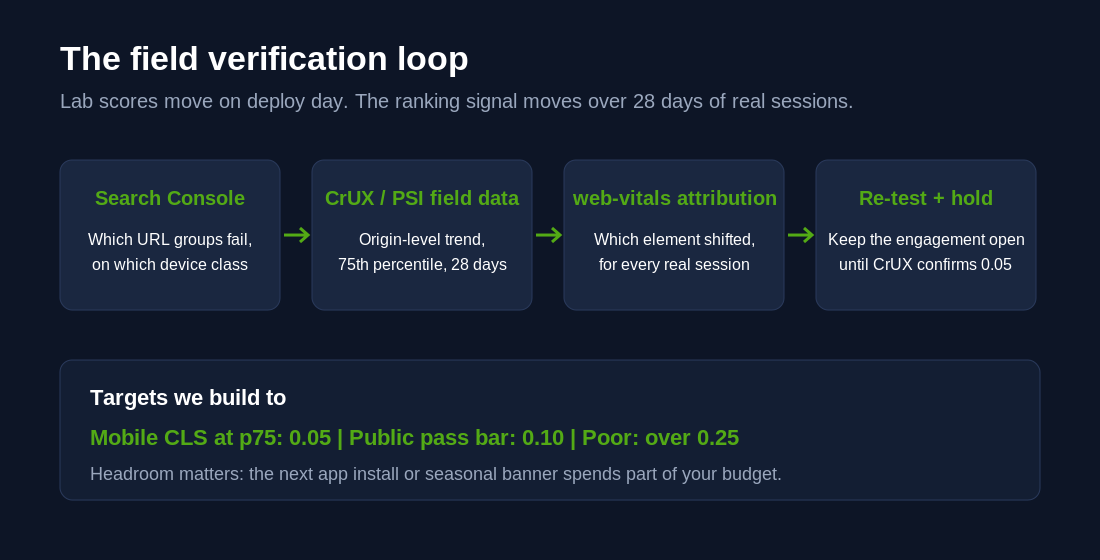
Search Console’s Core Web Vitals report tells you which URL groups are failing and on which device class. CrUX, via PageSpeed Insights field data or the BigQuery dataset, gives you the origin-level trend. The web-vitals JavaScript library, in its attribution build, tells you which element shifted for every real session, which turns arguments with app vendors into two-line emails with a selector attached.
Set the internal target below the public bar. We build to 0.05 at the 75th percentile on mobile, which leaves headroom for the app you install next quarter and the seasonal banner marketing adds without telling anyone. Against a platform-wide pass rate of 81.3 per cent for CLS, treating 0.1 as the finish line means building to the middle of the pack.
How we do it at Insiteful
CLS work is the highest-certainty performance engagement we run, because the causes enumerate and the fixes verify. After 25 years and more than 200 builds, our process is fixed.
Shift inventory first. Mobile WebPageTest runs across home, collection, product and cart, plus 28 days of CrUX. Every shift gets a row: causal element, template, viewport share, estimated score cost. The inventory is sorted by score cost, not by how easy the fix looks.
Theme fixes in version control. Image geometry, CSS loading order, font descriptors and animation rewrites land as reviewed pull requests on the theme repository, tested on a preview theme with the PerformanceObserver harness above before anything touches the live store.
App stack ruling. Every injecting app is measured, contained where possible, and flagged for replacement where not. The client gets the list with the score cost of each app in writing. Most stores are carrying at least one app whose entire CLS cost buys a feature a native section could deliver for free.
28 day verification. We hold the engagement open until CrUX confirms the field score, not just the lab score. For a Melbourne apparel client doing about $180,000 AUD a month, that loop took a mobile CLS of 0.31 to 0.04 in one release cycle, with the largest single win coming from one announcement bar app replaced by a native section. Add to cart clicks on mobile rose 11 per cent in the following month without a single visual design change.
That is the difference between reading about Core Web Vitals and shipping them. The full three-metric picture, including how CLS interacts with LCP and INP work, is in our Core Web Vitals guide for 2026.
Fix the storefront that moves under your shoppers
A storefront that jumps is a storefront that mis-sells. Every shift above the fold is a mis-tap waiting to happen on the device where most of your revenue already lives. The fixes are not exotic. Size every image, reserve space for everything JavaScript injects, let critical CSS block, tune the fallback font, animate with transforms. Then verify in field data and hold the line at 0.05.
If your Search Console is showing failing URLs and you want the shift inventory done properly, start with a build assessment. We will tell you exactly what is moving, what it costs you, and what it takes to make it stop.