
An Australian brand we audited last quarter was running paid traffic into the United States and converting at a third of its home-market rate. The product was right, the ads were right, the landing pages were right. The problem showed up at the price. A shopper in Ohio landed on a product page and saw $129.00 with no currency symbol context, processed it as US dollars, then hit a checkout that charged in Australian dollars and added a foreign transaction fee on their card. Most of them left. The ones who bought often charged back when the bank statement looked nothing like the price they thought they agreed to.
Multi-currency pricing is not a nice-to-have for brands selling across borders. It is the difference between an international market that quietly leaks money and one that pays for the build inside a quarter. This is the exact playbook we use to set it up on Shopify: how the two pricing methods work, how rounding makes prices sellable, where local payment methods fit, and the storefront details most stores get wrong.
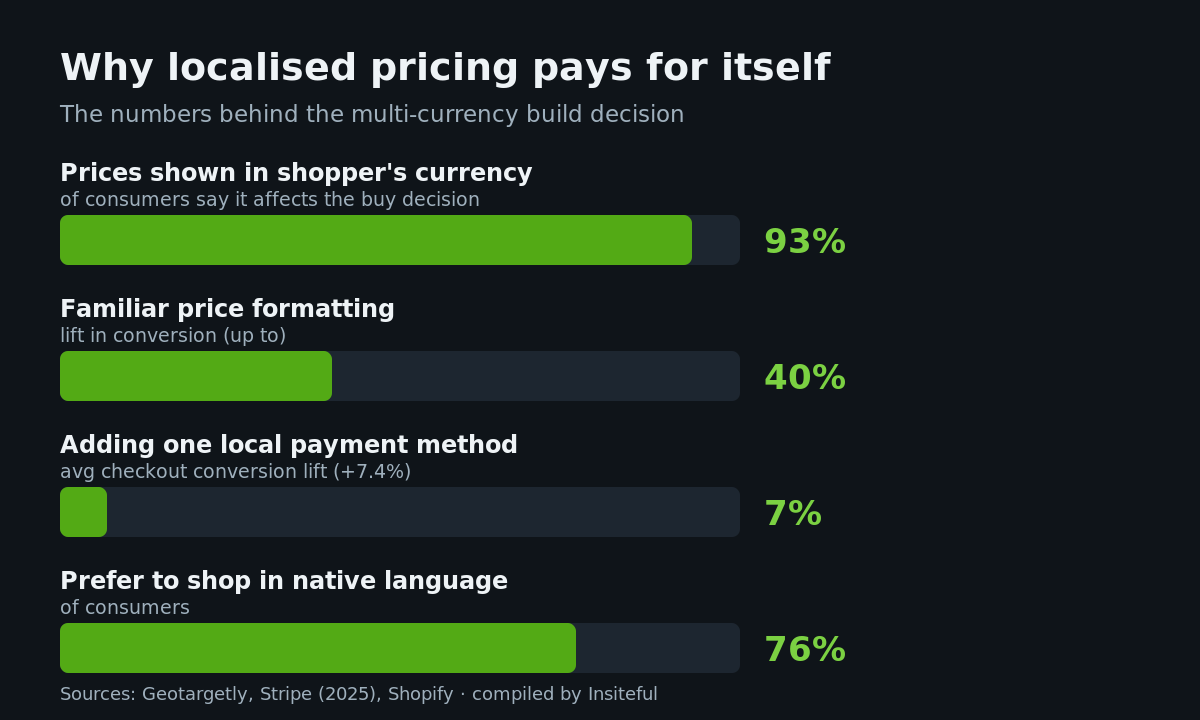
The research is blunt. Geotargetly reports that 93% of consumers say pricing in their local currency affects their purchase decision, and that stores displaying prices in familiar formats can lift conversion by up to 40%. A 2025 Stripe study found that adding a single relevant local payment method lifted checkout conversion by an average of 7.4%. With global ecommerce on track to pass US$6.86 trillion by the end of 2025, the cost of showing the wrong number to the wrong shopper compounds fast.
What multi-currency actually means on Shopify in 2026
Shopify Markets is the engine. It is included on every Shopify plan at no extra monthly cost, and by default it converts your store’s base price into the shopper’s local currency using a live exchange rate. A brand based in Australia keeps AUD as its store currency, and a customer browsing from Germany sees euros, a customer in the UK sees pounds, and a customer in Japan sees yen, all without you maintaining a separate price for each.
Two things matter before you switch it on. First, to charge a customer in their own currency you need Shopify Payments or Adyen as your primary gateway. If you are on a third-party gateway, Markets will still show local prices, but the charge lands in your store currency, which reintroduces the foreign-fee problem we just described. Second, currency conversion carries a transaction-based fee that scales by plan.
| Plan | Currency conversion fee | What it means on a $200 order |
|---|---|---|
| Basic | 1.5% | ~$3.00 |
| Shopify | 1.0% | ~$2.00 |
| Advanced / Plus | 0.5% | ~$1.00 |
There is one change worth flagging because it caught a few of our clients out. From 6 April 2026, Shopify calculates currency conversion and multi-currency payout fees on the gross order amount, before any deductions, so the stated rate now matches the actual rate you pay. If you modelled your international margins before that date on a net calculation, re-check them. On a brand doing $2.4M AUD a year with 30% of revenue cross-border, the difference between an assumed and actual conversion fee is real money over twelve months.
One Shopify store or many? The architecture call
Before any of the pricing detail matters, there is a structural decision: do you run every market from a single Shopify store using Markets, or do you stand up separate stores per region? For the overwhelming majority of brands we work with, one store with Markets is the right answer. You keep a single catalogue, a single inventory source, a single set of customer data and one theme to maintain, while still presenting local currency, local pricing and local payment methods on top.
Separate stores only start to make sense at genuine scale, when a region needs a materially different catalogue, a local entity for tax and banking, or a fully distinct brand presentation that a single theme cannot flex to. The trade is steep: every store is another build to maintain, another app stack to license, and another set of numbers to reconcile. We walk through where that line actually sits, with the operational cost of each path, in our breakdown of Shopify Markets versus multi-store. Get this call right first, because retrofitting it after you have launched four storefronts is one of the more expensive corrections in ecommerce.
The two ways to price across markets
Every multi-currency build we ship is a deliberate mix of two methods. Getting the split right is most of the work.
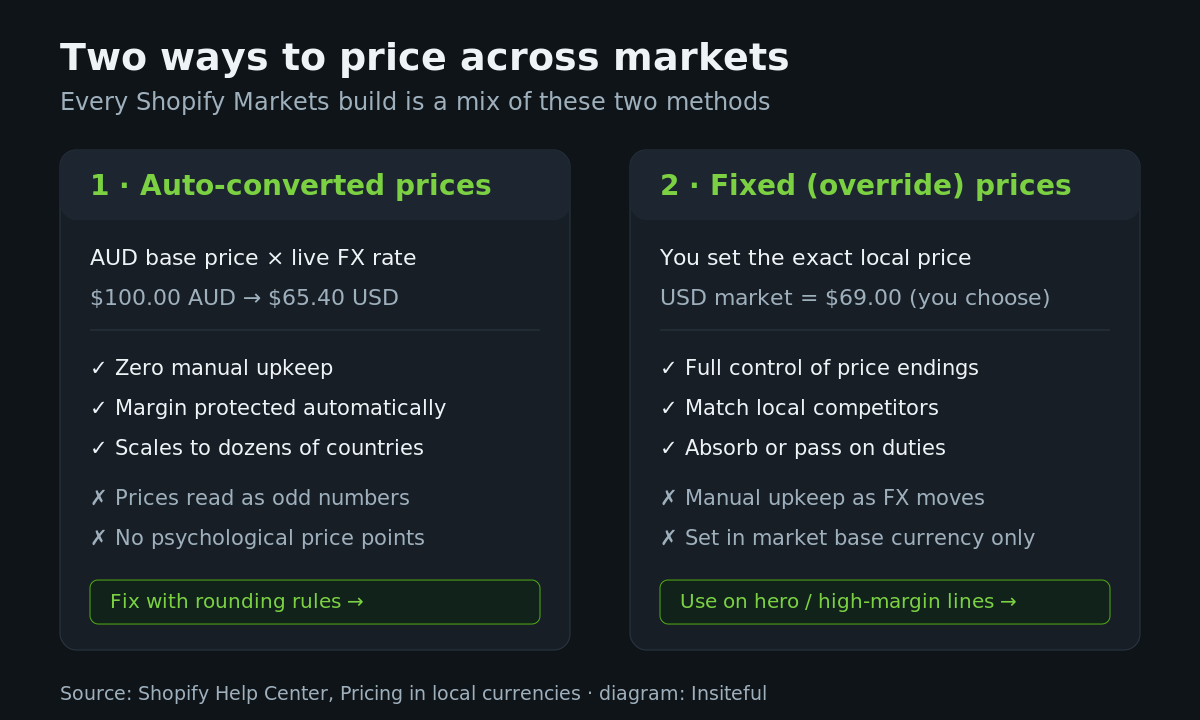
Auto-converted prices are the default and the right choice for the long tail of your catalogue. You set one AUD price, Shopify multiplies it by the live rate, and your margin is protected automatically as exchange rates move. The downside is cosmetic but real: a $100.00 AUD product converts to something like $65.40 USD, which reads as an odd, machine-generated number rather than a price a human chose. That is what rounding fixes, and we will get to it.
Fixed prices are overrides you set per market. Instead of letting Shopify convert, you decide the US price is exactly $69.00. This is the method for your hero products, your high-margin lines, and any product where you need to match a local competitor or sit on a clean price point. Two constraints to design around: in a market that contains multiple countries you can only set a fixed price in the market’s base currency, and fixed prices need manual upkeep because they do not move with the exchange rate.
For catalogues of any size you do not set these by hand. Shopify supports bulk fixed pricing through CSV import, and in the newer catalog-based Markets experience the Fixed Price field is required on the catalog import. A trimmed example of the structure we upload:
Handle,Command,Market,Price,Compare At Price
merino-crew-knit,MERGE,United States,69.00,89.00
merino-crew-knit,MERGE,United Kingdom,55.00,72.00
alpine-shell-jacket,MERGE,United States,219.00,
alpine-shell-jacket,MERGE,United Kingdom,175.00,
We keep the override list small on purpose. The more fixed prices you carry, the more maintenance you sign up for every time the dollar moves. Fixed where it matters, auto-converted everywhere else.
Rounding rules, the detail that makes prices sellable
This is the step most stores skip, and it is the one that quietly costs conversions. When Shopify converts $100.00 AUD to $65.40 USD, that price looks computed because it is. Currency rounding rules clean up every converted price so it lands on a number a shopper trusts.
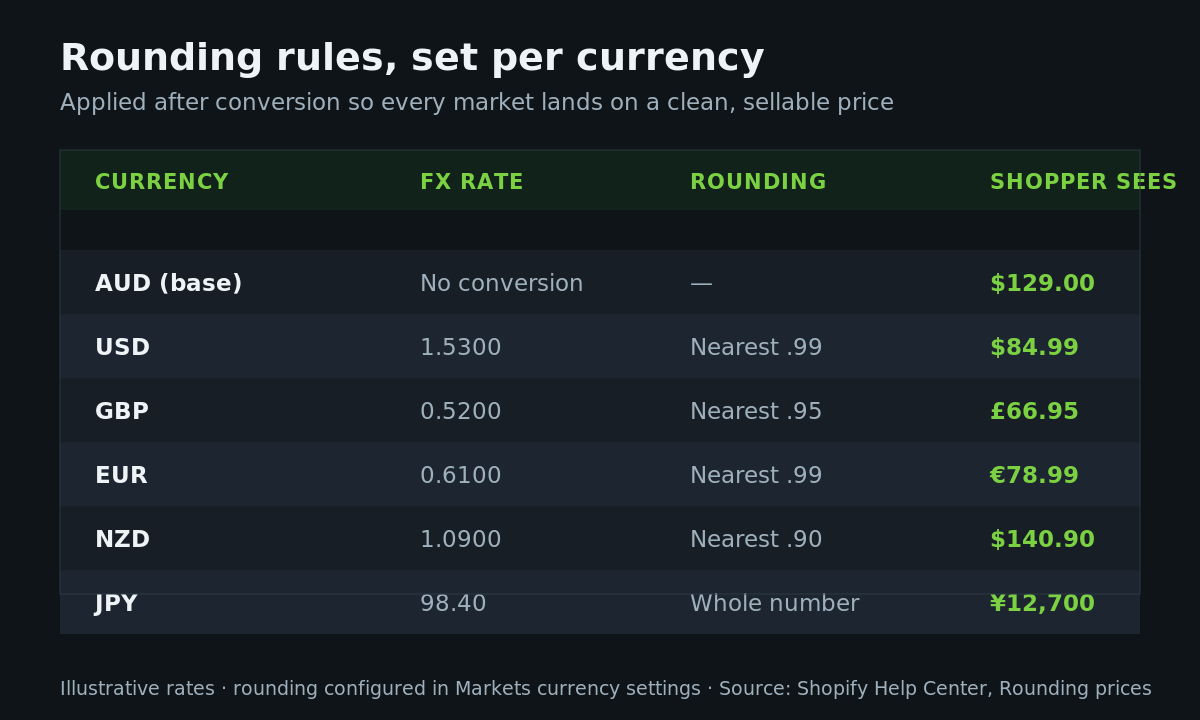
Rounding is configured per currency inside your Markets currency settings and applied after the conversion and any price adjustments. The convention shifts by market: USD and EUR usually land on a .99 ending, GBP on .95 or .99, and JPY rounds to whole numbers because the yen does not use minor units the way the dollar does. Set it once and it governs every product in that currency, so you are not chasing individual prices.
The table above shows how we map it for a typical Australian export brand. The base AUD price flows through the live rate, the rounding rule snaps the result to the local convention, and the shopper sees a price that looks chosen rather than calculated. It is a five-minute configuration that touches every international order you take, which is exactly the kind of high-leverage detail that earns its place in a build.
A small operational note that saves confusion later: because rounding is applied after conversion, it interacts with any sale or discount logic you run per market. Test your price endings with an active discount before a major sale event, not during one. We have seen a 20% promotion turn a tidy €78.99 into an untidy converted number on the storefront simply because the rounding step was not re-checked against the discounted base. It is a two-minute verification that belongs on every pre-sale checklist.
Local payment methods, the second half of localisation
Showing the right currency gets a shopper to the checkout. Offering the right way to pay gets them through it. The Stripe figure is worth repeating because of how cheap the change is to implement: one relevant local payment method, on average, a 7.4% lift in checkout conversion.
When a market includes a country eligible for local payment methods, Shopify surfaces them in your market settings. The pattern we see convert is matching the method to the region rather than bolting on everything available.
| Market | Methods that move the needle | Why |
|---|---|---|
| United States | Shop Pay, Apple Pay, Google Pay | Accelerated wallets dominate mobile checkout |
| Netherlands / Belgium | iDEAL, Bancontact, Wero | Bank-transfer methods are the default, not cards |
| Germany | Klarna, PayPal, SEPA | Pay-later and bank debit carry strong trust |
| China | Alipay | Wallet-first market; cards are the exception |
| India | Paytm, UPI | Real-time bank rails over card networks |
The gating detail again: local-currency processing and most of these methods require Shopify Payments or Adyen as the primary gateway. This is one of the reasons we audit the payment stack before we touch the currency settings. There is no point localising the price if the charge cannot follow it through to settlement.
The storefront layer, currency display and country selection
The admin settings do half the job. The other half lives in the theme, where the shopper actually experiences the currency. Three things have to be right.
First, prices must render through Shopify’s currency-aware filters so they display in the active market’s currency and format, not hard-coded AUD. In Liquid that means using the money filters rather than printing raw values:
<span class="price">
  {{ product.price | money_with_currency }}
</span>

{%- comment -%} country / currency selector {%- endcomment -%}
{%- form 'localization', class: 'market-selector' -%}
  {{ form.country_label }}
  <select name="country_code">
    {%- for country in localization.available_countries -%}
      <option value="{{ country.iso_code }}"
        {%- if country.iso_code == localization.country.iso_code %} selected{% endif -%}>
        {{ country.name }} ({{ country.currency.iso_code }} {{ country.currency.symbol }})
      </option>
    {%- endfor -%}
  </select>
{%- endform -%}
Second, give the shopper a visible country and currency selector. If your theme does not ship one, this is the single legitimate case for a third-party geolocation app from the Shopify App Store. We keep the app stack lean, but a selector that lets a shopper confirm their own market is worth the weight. If you are reviewing what else is on your store, our 2026 Shopify app stack covers what we keep and what we strip.
Third, do not hard-redirect shoppers based on IP. Auto-redirecting a UK visitor to a different URL because of their location creates duplicate-content and crawling problems for Google and frustrates anyone using a VPN or shopping from abroad. Suggest the right market, let them choose. The clean way to keep international URLs and rankings separated is the hreflang and URL structure we detail in our guide to Shopify Markets international SEO.
Landed cost, so the price they see is the price they pay
Currency is only the first surprise an international shopper can hit. The second is duties and import tax at the border. If a customer buys at a clean localised price and then gets a courier invoice for unexpected duty, you have spent the conversion goodwill twice over and earned a support ticket on top.
Shopify lets you collect duties and import taxes at checkout so the shopper pays a delivered-duty-paid price up front. For an Australian brand shipping into the US, UK and EU, this is the setup that keeps the checkout price honest and the post-purchase experience clean. The currency, the rounding and the duties have to be designed together, not bolted on one at a time. We cover the tax, shipping and currency stack for the most common Australian export lane in our walkthrough on selling into the US from Australia.
For brands that want the duty and tax handling managed end to end, Shopify Managed Markets extends this further, calculating and remitting duties and handling international tax registration so you are not manually tracking thresholds in every country you ship to. Whether you need it depends on volume: a brand sending a handful of international parcels a week is well served by collecting duties at checkout, while a brand pushing serious cross-border volume into multiple tax jurisdictions benefits from offloading the compliance overhead entirely. Either way, the principle holds: the number the shopper agrees to at checkout should be the total they pay, with nothing waiting for them at the door.
The mistakes we fix on multi-currency audits
When a brand comes to us with international sales underperforming, the same handful of issues show up. This is the checklist we run:
- Local prices on, but a third-party gateway underneath. Shoppers see euros, get charged in AUD. The fix is moving the primary gateway to Shopify Payments or Adyen.
- No rounding configured. Converted prices read as random numbers like €78.43. Five minutes of configuration recovers the psychological price points.
- Hard IP redirects. Hurting SEO and annoying travellers. Replace with a suggestion plus a selector.
- Hard-coded AUD in the theme. Custom sections that print raw prices instead of using money filters, so they ignore the market entirely.
- Fixed prices everywhere. A maintenance burden that goes stale the moment the dollar moves. Reserve overrides for hero lines.
- No local payment methods. Leaving the cheapest available conversion lift on the table.
- Duties ignored. Clean checkout price, ugly courier invoice, chargebacks and tickets.
None of these are exotic. They are the predictable result of switching Markets on without designing the full pricing experience around it.
How We Do It at Insiteful
We treat multi-currency as a build, not a toggle. Before we change a single setting we audit the payment gateway, the theme’s price rendering, the app stack and the brand’s actual cross-border order data, so we know which markets earn the effort. Then we sequence it: gateway and currencies first, rounding rules per market, fixed-price overrides on the hero range, local payment methods matched region by region, the storefront selector and money filters, and duties at checkout last so the displayed price is the price the shopper pays.
Every one of those steps is a real configuration or a line of Liquid, which is why we build on native Shopify rather than chasing a headless rebuild for problems the platform already solves. If you want the reasoning behind that, we wrote it up in the native Shopify stack. The result for an Australian brand is an international storefront that reads as local in every market it sells to, from the price on the product page to the receipt in the inbox. For a brand turning over a few million AUD with a meaningful share of offshore demand, that is usually the highest-return work we can do in a quarter.
To put a number on it: the Australian brand from the opening of this article was converting US traffic at roughly a third of its home rate. After we moved the gateway to Shopify Payments, configured local pricing with proper rounding across four currencies, added Shop Pay and Apple Pay, and switched on duties at checkout, US conversion closed most of that gap inside two months on the same ad spend. None of the individual changes were dramatic. The result came from doing all of them, in the right order, as one coherent build.
Build it once, build it right
Multi-currency pricing rewards brands that treat it as a system. Auto-converted prices for the catalogue, fixed overrides where control matters, rounding so every price looks chosen, local payment methods matched to each market, a storefront that renders currency correctly, and duties handled at checkout. Do all six and your international markets stop leaking and start compounding.
If you are selling across borders on Shopify and suspect your pricing setup is costing you conversions, that is exactly the kind of build we scope every week. Start a build assessment with Insiteful and we will tell you where your multi-currency setup is leaking and what it would take to fix it.