
You sell the same trail runner in Sand, Slate and Olive. Merchandising wants all three colours on one product page so a customer can flick between them without a page reload. SEO wants each colour to keep its own indexed URL, its own images and its own link equity. Historically on Shopify you could have one or the other, never both. Collapse the colours into variants on a single product and you throw away two-thirds of your ranking pages. Keep them as separate products and the storefront experience fragments.
Combined Listings is Shopify’s answer to that trade-off, and it is a genuinely different tool to the variant model most stores already run. It is also a Shopify Plus and enterprise-only capability, which means the moment a brand asks for it, the conversation is no longer about a quick theme tweak. It is about catalogue architecture. This guide covers what a combined listing actually is under the hood, the hard limits you design around, the Admin API calls that create one, and the theme work that decides whether the build ships clean or ships broken.
What a combined listing actually is
A combined listing is a product type that connects several separate products into one storefront listing, joined by a shared option such as colour, model or dimension. It has a parent product and one or more child products. The parent is the listing customers land on. The children are the real, purchasable products underneath it.
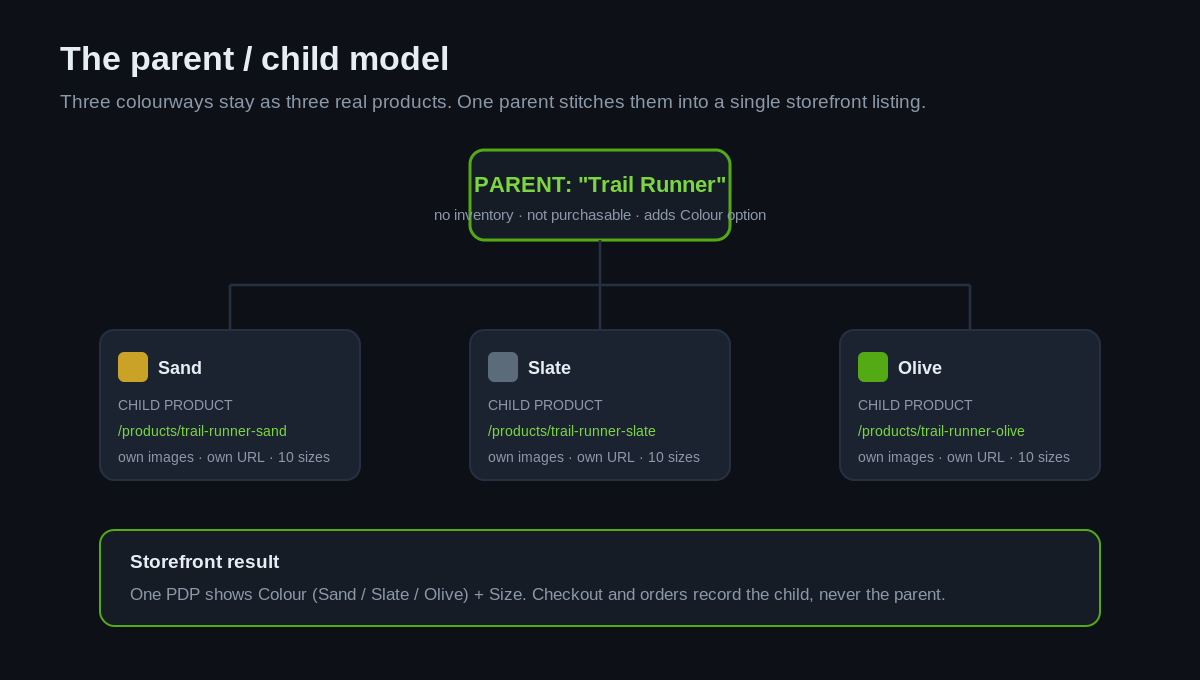
The distinction that trips teams up is what the parent can and cannot do. Per Shopify’s documentation, a parent product cannot be purchased, holds no inventory, and has no sales data of its own. It exists purely to add options and present the group. Every child product keeps its own images, its own URL handle and its own inventory, and can be merchandised on its own. When a customer adds to cart, the line item is the child, not the parent. When the order lands, the order line records the child. The parent never touches the money.
That is why combined listings are not a cosmetic swatch app. They are a structural change to how a product is modelled, and they behave differently at every stage of the lifecycle: admin, storefront, checkout and orders. Treat them like a front-end trick and you will get the reporting wrong, because a merchant who expects sales figures on the parent will find them all sitting on the children.
The SEO argument that makes this an enterprise decision
The reason combined listings matter to a brand doing serious revenue is search, not aesthetics. Consider an apparel label turning over roughly $8M AUD a year with forty styles, each in four to six colourways. Modelled as variants on single products, that catalogue is forty indexable product pages. Modelled as separate colour products, it is closer to two hundred. Those extra pages carry their own titles, their own imagery, their own backlinks and their own long-tail rankings for queries like “olive trail runner”.
Combined listings let a brand keep all two hundred URLs indexed while presenting them as forty unified listings on the storefront. Per the Help Centre, child products retain distinct URLs and can continue to appear in collections and search independently. You get the merchandising of a single page without demolishing the SEO footprint of the separate ones. We have seen brands quietly hand back the equivalent of $40,000 AUD a year in organic value by collapsing colour products into variant swatches during a replatform, because nobody costed the lost ranking pages. Combined listings are how you avoid that.
There is a nuance worth building around. The parent supports an Unlisted status, which hides the parent from collections and storefront search but keeps it reachable by direct URL. That gives you control over whether the group page or the individual colour pages are the ones competing in search results. On enterprise catalogues, that single setting is the difference between cannibalising your own listings and consolidating them deliberately.
The limits you design the catalogue around
Every combined listing constraint is a hard ceiling, and each one is a decision you make before a single product is built, not a surprise you hit halfway through. These are not soft guidelines. Architect the catalogue against them up front.
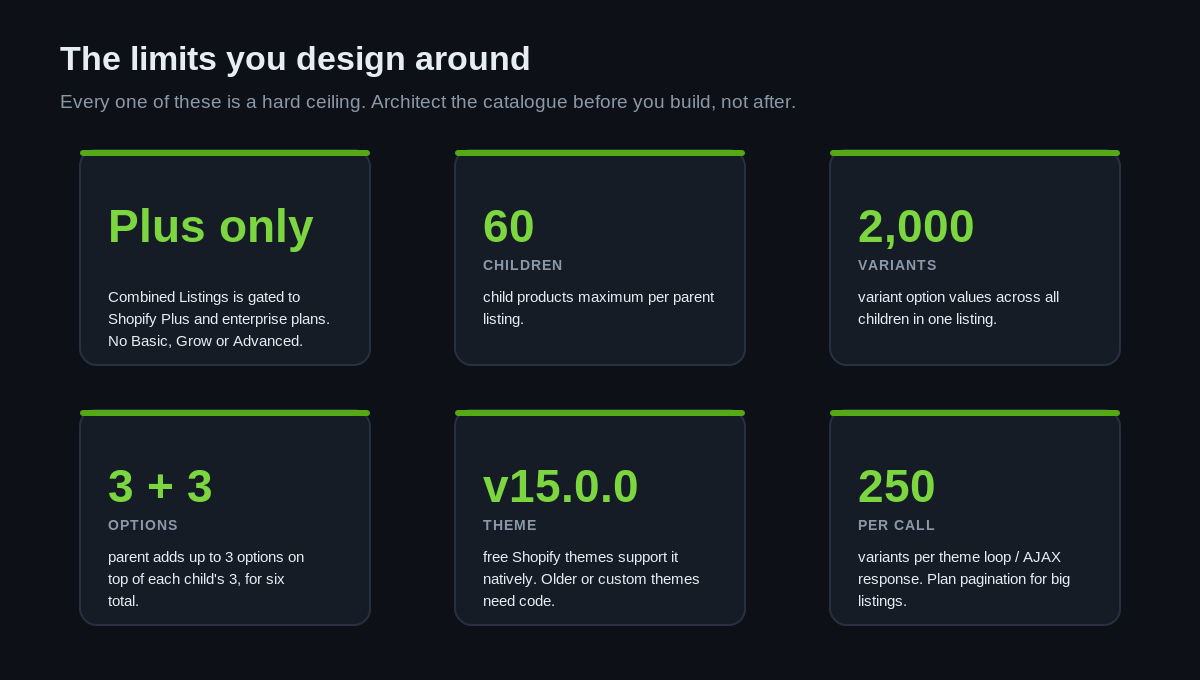
| Constraint | Ceiling | What it means for the build |
|---|---|---|
| Plan | Shopify Plus / enterprise only | Not available on Basic, Grow or Advanced. Gate the feature behind a Plus contract. |
| Child products | 60 per parent | A style with more than 60 colourways needs to be split across listings. |
| Variant option values | 2,000 across all children | Colours multiplied by sizes must stay under 2,000 in total, not per child. |
| Parent options | 3, on top of each child’s 3 | Six options in total. Plan which live on the parent and which on the child. |
| Theme version | Free themes v15.0.0+ | Older or custom themes need code changes to render the listing. |
| Variants per response | 250 per loop / AJAX call | Large listings must paginate the picker, not load it in one payload. |
The one that bites hardest in practice is the 2,000 variant ceiling being a total across children, not a per-product figure. A brand with a shirt in 15 colours and 12 sizes is already at 180 variants for that one listing, which is comfortable. The same shirt across 40 colours and 12 sizes is 480, still fine. But stack several high-colour styles into a single group and you close in on the ceiling faster than a spreadsheet suggests. The default Shopify variant cap is 100 per product across three options; combined listings are the sanctioned path to the higher 2,048 territory, but the total-across-children rule is the number to model against.
Building the listing with the Admin API
You can build combined listings by hand in the app, but on an enterprise catalogue you build them programmatically. It is a two-step flow on the GraphQL Admin API, and it requires the write_products scope. Note that the combined listing mutations currently sit on the unstable API version, so pin your version deliberately and retest when it promotes.
Step one creates the parent. You use productSet with a combinedListingRole of PARENT. This creates the parent but does not yet attach any children.
mutation createCombinedListingParent($input: ProductSetInput!) {
  productSet(input: $input) {
    product { id title combinedListingRole status }
    userErrors { field message }
  }
}

# variables
{
  "input": {
    "title": "Trail Runner",
    "status": "ACTIVE",
    "combinedListingRole": "PARENT"
  }
}
Step two attaches the children and defines the shared options. The combinedListingUpdate mutation takes the parent’s ID, the products you are adding, and the options and values that distinguish them. You can add children, change options and remove children in a single call, which matters when you are syncing a listing against a PIM feed rather than editing by hand.
mutation addChildren(
  $parentProductId: ID!
  $productsAdded: [ChildProductRelationInput!]
  $optionsAndValues: [OptionAndValueInput!]
) {
  combinedListingUpdate(
    parentProductId: $parentProductId
    productsAdded: $productsAdded
    optionsAndValues: $optionsAndValues
  ) {
    product {
      combinedListing {
        combinedListingChildren(first: 25) {
          nodes { product { id title } }
        }
      }
    }
    userErrors { field message }
  }
}
Wiring this into a nightly sync is where combined listings earn their keep on a large catalogue. When your product data lives in metaobjects or category metafields, you can populate the combined listing option values straight from that source rather than typing colour names twice. The app supports connecting a category metafield to auto-populate option values, so the same taxonomy that drives your filters can drive your listings. That is the difference between a combined listing rollout that survives contact with a 5,000-SKU catalogue and one that becomes a manual maintenance burden.
Where the build actually breaks: the theme
The admin side is a mutation and a publish. The storefront side is where an untested build ships broken product pages to real customers. Combined listings display natively on free Shopify themes from version 15.0.0 onward. Every other theme, including most custom and premium builds, needs code changes to render the parent’s combined options and swap child media and pricing on selection.
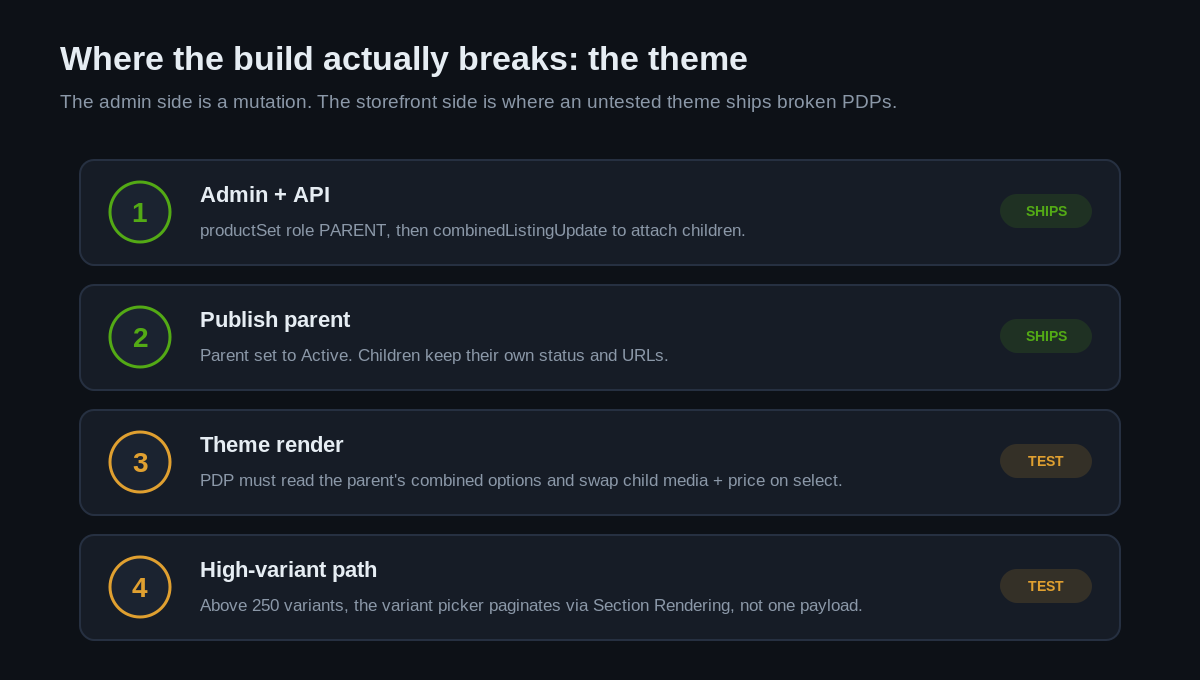
The trap is variant volume. Shopify caps theme loop and AJAX responses at 250 variants at a time. A combined listing that comfortably clears that ceiling cannot load its entire variant set in a single payload; the picker has to paginate, typically through the Section Rendering API, fetching option values as the customer narrows their selection. A theme that assumes it can iterate every variant in one Liquid loop will silently truncate or slow to a crawl on exactly the high-variant listings combined listings are built for.
A defensive product template branches on variant count rather than assuming the small-catalogue path:
{%- liquid
  assign variant_count = product.variants.size
  if variant_count > 250
    # paginate the picker via the Section Rendering API
    render 'variant-picker-paginated', product: product
  else
    render 'variant-picker', product: product
  endif
-%}
This is the same discipline we apply across native Shopify performance work: keep the fast path fast for the 95 percent of listings that are small, and only pay the pagination cost on the listings that genuinely need it. Test the render on the largest listing in the catalogue, not the first one in the collection, because the first one always looks fine.
Migrating a catalogue that already fragmented its colour SEO
The most common way combined listings enter a project is not a greenfield build. It is a rescue. A brand replatformed onto Shopify a year or two ago, the migration collapsed every colour product into variant swatches to keep the catalogue tidy, and organic traffic to those colour pages evaporated with the URLs that used to carry it. Now they want the pages back without losing the clean storefront.
That migration has a defined shape. You rebuild each colour as its own child product, restoring a distinct handle for every colourway, and you redirect the old collapsed variant URLs to the appropriate child so the historical link equity lands somewhere real. Then you group the children under a parent so the storefront experience stays unified. The order matters: children and redirects first, parent second, theme last. Skip the redirect step and you strand whatever authority the original pages accumulated. We treat this as part of any structured Shopify migration, mapping the old URL set against the new child handles before a single product is created, because a redirect discovered after go-live is a redirect that already cost rankings.
The payoff is measurable in the same currency as the loss. Restoring 160 indexed colour pages to a catalogue that had cut down to 40 is not a cosmetic change; it is rebuilding the surface area that ranks for every colour-plus-style query the brand used to own. For a store where organic drives even a modest share of a seven-figure AUD revenue line, that surface area is the asset the whole exercise exists to recover.
The trade-offs nobody warns you about
Combined listings are powerful precisely because they are structural, and that structure comes with real incompatibilities. These are the ones that turn into support tickets three weeks after launch if they are not designed for:
- Online Store only. Combined listings sell exclusively through the Online Store channel. They cannot be sold through Shopify POS, third-party sales channels, or as subscription products. A brand running retail and wholesale through multiple channels needs to know the group listing is a web-only construct.
- No bundles, no subscriptions. A combined listing product cannot be a bundle, and a combined listing cannot be nested inside another combined listing. If bundles or subscriptions are on the roadmap for those SKUs, the models collide.
- Search and Discovery filtering. When you filter product options with the Search and Discovery app, the child products of a combined listing are not included in the filter results by default. On a faceted catalogue, that changes how customers find colours, and it needs configuring deliberately.
- Reporting sits on children. Because the parent has no sales data, every analytics view, export and reconciliation reads at the child level. Any dashboard or feed built to expect a single product row will need adjusting.
- Featured product blocks. A combined listing parent cannot be used as a featured product in a theme section, so homepage and landing modules that spotlight it need the child or a collection instead.
None of these are dealbreakers. They are design inputs. The failure mode is discovering them in production because the build treated combined listings as a swatch plugin rather than a change to the product model.
When a combined listing is the right call
Combined listings are not the answer to every “show the colours on one page” request. The honest decision tree is short. If the colours genuinely warrant their own URLs, imagery and rankings, and the store is on Plus, a combined listing is the correct tool because it preserves that SEO footprint while unifying the storefront. If the colours are minor variations that never needed separate pages, standard variants with a swatch picker are simpler, cheaper and channel-agnostic. And if the products need to be sold through POS, sold as subscriptions, or bundled, combined listings are ruled out by their own constraints and you stay with the variant model.
The question we ask first is never “can we build it”. It is “what does this brand lose if we collapse these into variants, and is that loss worth more than the storefront polish”. On a catalogue with real organic traffic, the answer is usually yes, combined listings are worth it. On a small catalogue with thin rankings, the swatch picker wins on total cost. Deciding that before you build is worth more than any snippet in this article.
How we do it at Insiteful
When we scope a combined listings build, we start with the catalogue, not the theme. We map every style, colourway and size against the six ceilings above, because the fastest way to a failed rollout is discovering the 60-child or 2,000-variant limit halfway through data entry. That mapping tells us how the catalogue splits into listings before anyone writes a mutation.
From there we build the parent and child relationships through the Admin API and drive the option values from the brand’s existing product data, so the listings are reproducible and survive a PIM sync rather than being hand-assembled and fragile. We treat the theme as a first-class deliverable, not an afterthought: we test the variant picker against the largest, most colour-dense listing in the catalogue, confirm the Section Rendering pagination holds above 250 variants, and check every incompatibility, from Search and Discovery filtering to reporting, against how the brand actually operates. Because we build exclusively on native Shopify rather than headless, the storefront reads the combined listing the way Shopify intends, which keeps it upgrade-safe as the app moves off the unstable API. Every build ships with the reporting caveat documented, so the finance team is never surprised that sales sit on the children.
Get a combined listings build scoped properly
Combined listings are one of the highest-leverage merchandising tools on Shopify Plus, and one of the easiest to implement badly. If you are weighing up whether to combine colourways into unified listings, replatforming a catalogue that already fragmented its colour SEO, or trying to work out whether your theme will even render them, the build starts with the catalogue architecture, not the code.