
Every multi-store brand we inherit arrives with the same hidden tax. Three storefronts, three themes that drifted apart eighteen months ago, two apps doing the same job under different names, and a discount that works on the AU store but silently fails on the US one because nobody remembers which Script it lived in. The brand isn’t running a portfolio. It’s running three businesses that happen to share a logo, and the cost of that sprawl shows up in dev hours, missed releases, and a checkout that behaves differently depending on where the customer lands.
Shopify Plus hands you the raw capability to run up to ten storefronts under one roof. What it does not hand you is the architecture to keep them coherent. That part is a design decision, and it is the difference between a multi-store setup that compounds and one that quietly eats your margin. This is the playbook we use at Insiteful to architect a portfolio of Shopify Plus stores so it stays fast, governable, and cheap to change.
What Shopify Plus actually gives you for multi-store
A single Shopify Plus subscription includes your primary store plus up to nine expansion stores at no additional platform fee, giving you ten storefronts managed from one centralised Organization Admin. Every store inherits the full Plus feature set: checkout customisation, Shopify Functions, Flow, Launchpad, and higher API limits. On paper that reads like a free portfolio. In practice the platform fee is the smallest line in the total cost, because each store you stand up replicates tooling, releases, QA, and operational overhead.
That is the trap. The nine “free” expansion stores feel like permission to spin up a storefront for every idea: a separate outlet store, a B2B instance, a store per country, a microsite for a single product drop. Six months later you are maintaining nine themes and the brand has no single source of truth. The capability is real. The discipline has to be designed in.
The cost that catches brands out is operational, and it multiplies rather than adds. Every store is another theme to update when the brand refreshes, another set of apps to keep on the same version, another checkout to QA before a big sale, another integration to monitor, another place a bug can hide. Two stores is not twice the work of one, because the coordination overhead between them grows on top of the duplicated work. By the time a brand is at four or five storefronts run without a shared architecture, a meaningful slice of the ecommerce team’s week goes to keeping the stores in sync rather than to growth. That is the specific failure mode this playbook exists to prevent, and it is why the architecture decisions below matter more than the store count itself.
The first question: do you even need multiple stores?
Before we architect anything, we pressure-test whether a second store should exist at all. The 2026 trend across mature Plus brands is consolidation, not expansion. A large share of the agencies and brands we talk to are actively collapsing store counts back down, because the operational cost of parallel storefronts caught up with them. The default recommendation now is one Plus storefront inside Shopify Markets wherever it is viable.
Here is the decision filter we run with clients. If the only reason for a second store is “we want to sell in the UK,” you almost certainly want Shopify Markets, not an expansion store. Markets gives you localised currency, pricing, domains, and translations on a single storefront and a single codebase. An expansion store earns its keep only when you need something a single storefront physically cannot give you.
| Driver | Shopify Markets (one store) | Expansion store (separate store) |
|---|---|---|
| Sell in a new country / currency | Yes, the default | Overkill |
| Localised pricing, tax, domains | Native | Manual per store |
| Independent release cycle / theming | Limited | Full isolation |
| Per-store app licensing and config | Shared | Independent |
| Store-scoped integration (separate ERP/3PL) | Hard | Clean |
| Local settlement / separate legal entity | Constrained | Supported |
| Isolating P&L, risk, vendor by region | Blended | Clean separation |
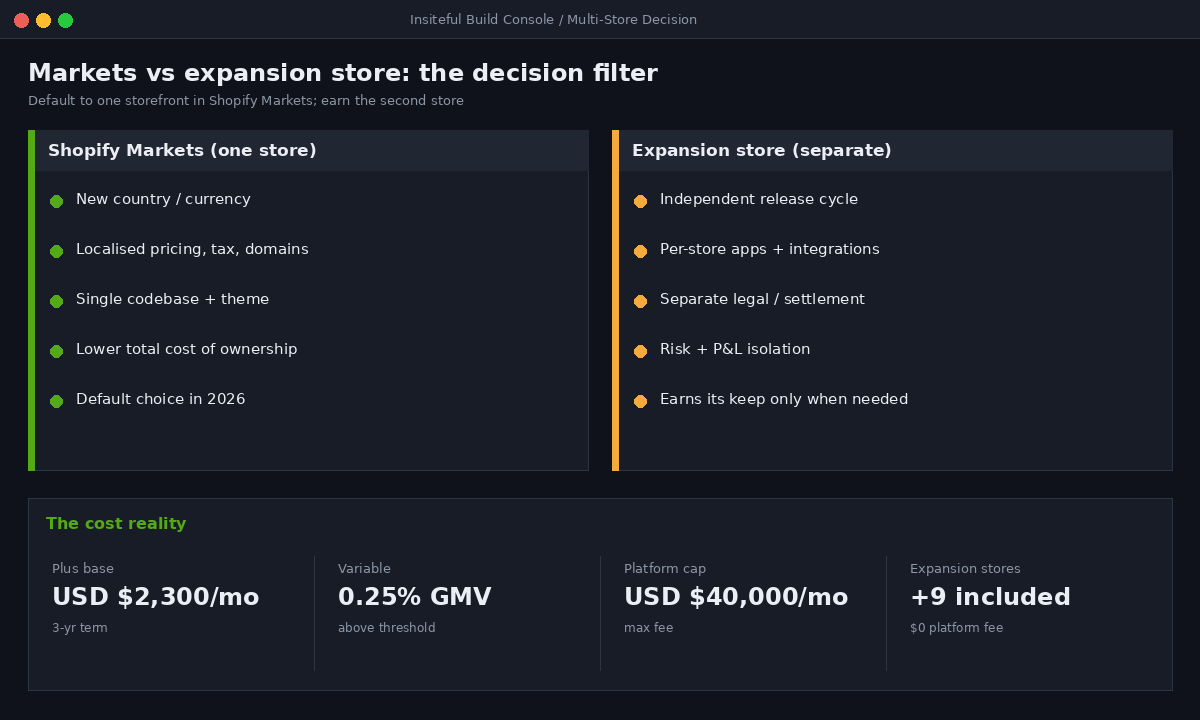
The use cases where an expansion store genuinely earns its place are narrower than most brands assume. A separate legal entity that needs its own settlement and tax registration is a real one. A wholesale or B2B operation with a fundamentally different catalogue, pricing logic, and buyer workflow is another. An outlet or clearance channel that you deliberately want to keep visually and commercially separate from the flagship can justify it. A brand house running several distinct brands that share an owner but not an identity is the textbook case. What does not justify a separate store is a single new country, a seasonal campaign, or a product line that could live as a collection. We have walked clients back from four planned expansion stores to one, because three of the four were solving problems that Markets, metafields, or a well-built collection already solved.
We covered the international side of this decision in depth in our guide to Shopify Markets versus multi-store for international brands. The short version for portfolio planning: reach for an expansion store when you need independent release cycles, store-scoped integrations, separate legal settlement, or genuine risk isolation. Reach for Markets for everything else. Most brands we audit end up with fewer stores than they started with, plus a Markets layer doing the heavy lifting.
Governance before stores: the Organization Admin layer
The mistake we see most often is teams standing up stores first and worrying about who can touch them later. We do it the other way around. The Organization Admin is the control plane for a Plus portfolio, and we configure it before a second storefront exists.
By default, Plus stores have access to organisation features. Once you have multiple stores, you create an organisation to view and manage them centrally, with shared user management and billing. The two roles that matter most for a clean setup are the Organization administrator, a high-trust role that grants permissions across almost all features and every store in the organisation including user management, and the Organization user administrator, which grants user-management permissions across all stores without handing over the keys to commerce settings. That split lets your ops lead manage who has access to what, without that person also being able to change tax settings on the German store.
We map every human and every agency to a role matrix before go-live. A representative cut for a four-store brand looks like this.
| Person / team | Org role | Store access | Can do |
|---|---|---|---|
| Founder / CEO | Organization administrator | All stores | Everything, including billing and users |
| Ecommerce manager | Store-level admin (custom group) | AU + US | Products, orders, marketing; no user mgmt |
| Ops lead | Organization user administrator | All stores | Manage users and roles only |
| Insiteful (build) | Custom dev group | All stores | Themes, apps, checkout; no customer data export |
| Finance | Custom group | All stores | Reports and payouts only |
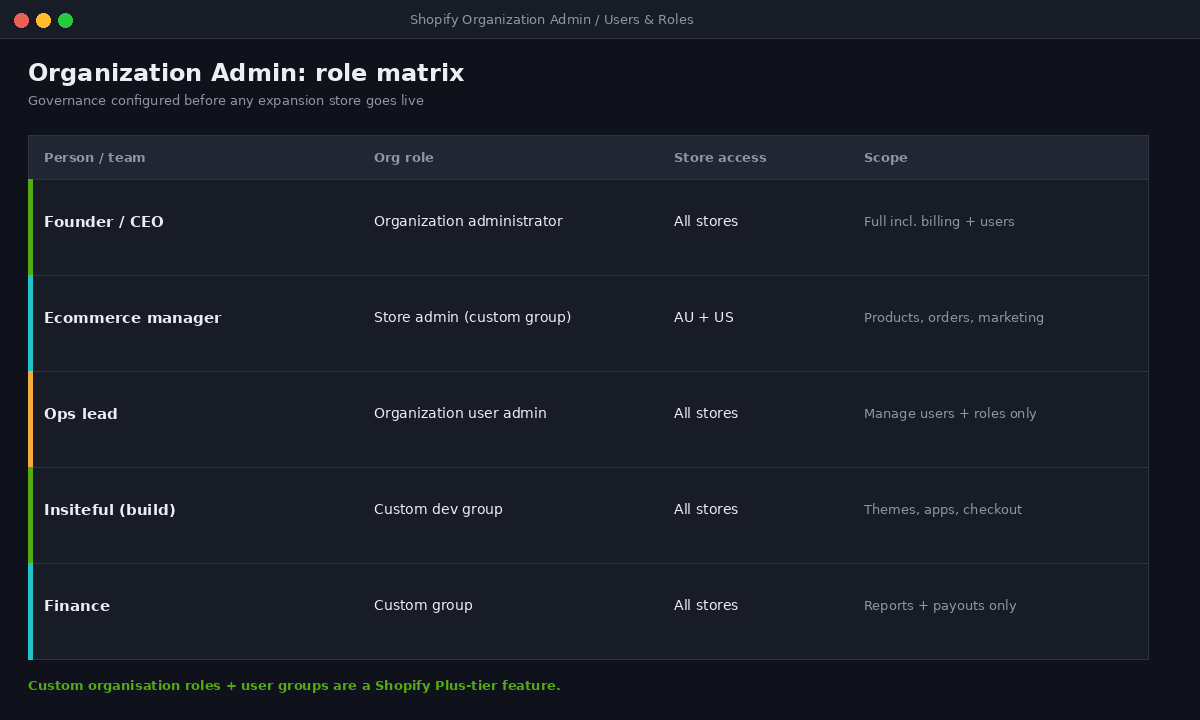
Custom organisation roles and user groups are a Plus-tier feature, and they are the single highest-impact thing you can configure on day one. Get the role matrix right and onboarding a new team member or a new agency takes minutes and never over-grants access. Get it wrong and you spend the next two years with everyone holding full admin because nobody wanted to figure out permissions.
Store architecture: what is shared and what is scoped
Once the governance layer exists, we draw an explicit line through every part of the stack: is this shared across the portfolio, or scoped to one store? Writing this down as a contract is what stops the drift. Below is the default split we start from, then adjust per client.
| Layer | Shared across portfolio | Scoped per store |
|---|---|---|
| Brand design system / tokens | Yes (one source) | No |
| Theme codebase | One repo, branched | Store-specific overrides only |
| Checkout logic (Functions) | Shared where identical | Per store where rules differ |
| App stack | Standardised list | Only where a store needs it |
| Product catalogue | Synced if overlapping | Independent if distinct |
| ERP / 3PL integration | Where one entity | Where separate entities |
| Analytics / reporting | Rolled up at org level | Store dashboards |
The discipline here is ruthless standardisation of everything that can be shared, and deliberate isolation of everything that genuinely differs. A second app doing fuzzy search on store two when store one already has one is not flexibility, it is debt. We keep a single approved app list at the org level, and a store only deviates from it with a documented reason.
Theme governance: one codebase, many storefronts
This is where most multi-store builds fall apart, and where the biggest savings live. The pattern we refuse to run is three disconnected themes maintained by hand. Instead we run one theme codebase in Git, with the native Shopify GitHub integration connecting branches to themes. The integration has replaced manual theme zipping entirely: connect a branch to a theme and changes sync automatically, so pushing to a connected branch deploys to that store.
For a portfolio, we structure the repo so shared logic lives in one place and per-store differences are explicit overrides, not forks. Each store maps to its own branch and its own connected theme, and store-specific values live in theme settings and metafields rather than in divergent code.
repo: brand-shopify-theme
  main            -> AU store  (production theme)
  store/us        -> US store  (production theme)
  store/nz        -> NZ store  (production theme)
  develop         -> shared staging across stores
  feature/*       -> dev branches, PR-reviewed

# per-store config stays in settings_data.json + metafields,
# NOT in forked liquid. Shared sections live once in /sections.
For programmatic work and CI, each store needs its own Theme Access password generated through the Theme Access app, which lets Shopify CLI authenticate against that specific store. A trimmed deployment workflow looks like this.
# .github/workflows/deploy.yml (per store, simplified)
- name: Lint and check theme
  run: shopify theme check

- name: Push to staging theme
  run: shopify theme push --theme "STAGING" --store "brand-au.myshopify.com"
  env:
    SHOPIFY_CLI_THEME_TOKEN: ${{ secrets.AU_THEME_TOKEN }}

# production push runs only after QA approval gate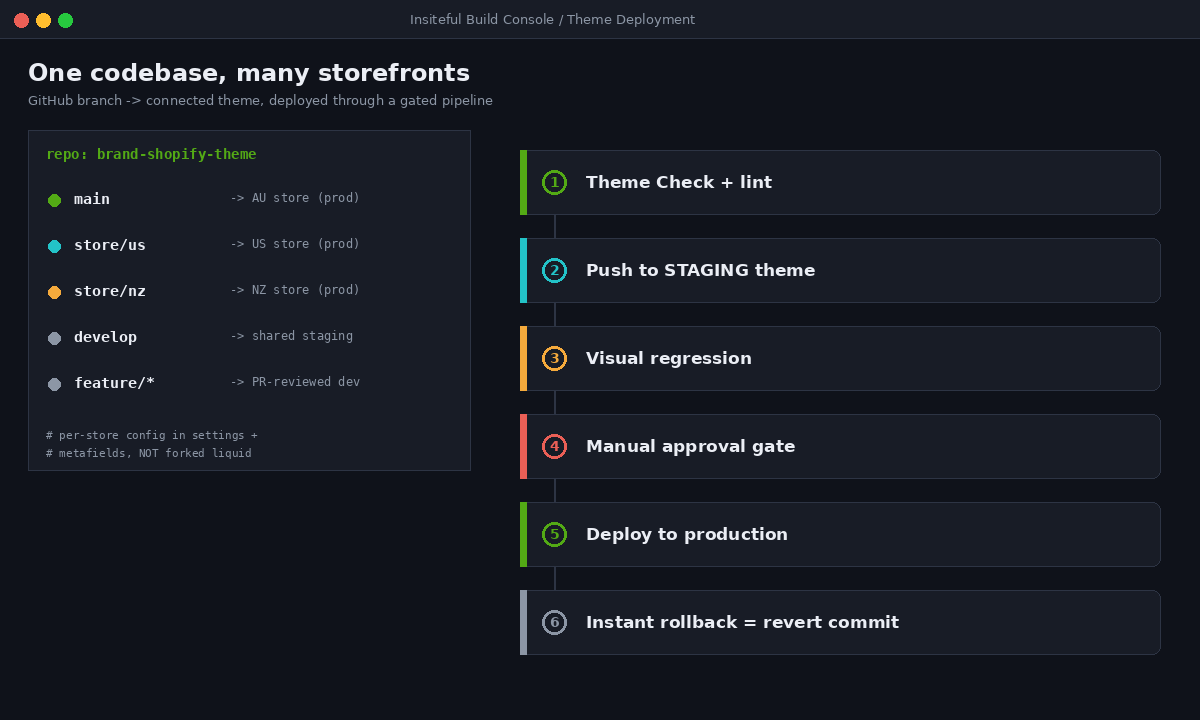
A sane pipeline runs linting and Theme Check, pushes to a staging theme, runs visual regression, then deploys to production behind a manual approval gate, with instant rollback by reverting the commit. The payoff is concrete: a content or design change made once in the shared sections propagates to every store through a controlled release, instead of three engineers making the same edit three times and one of them getting it wrong. On a recent four-store build, moving the client off hand-maintained themes onto a single branched codebase cut their average release time from most of a day to under an hour.
Discounts, automation and cross-store logic
Promotions are the classic place a multi-store portfolio leaks revenue, because the logic was historically duplicated per store and then drifted. We rebuild this on Shopify Functions so the discount and checkout rules are versioned code, deployed the same way the theme is, rather than fragile per-store configuration. If you want the full picture on why Functions matter here, we wrote a deep dive on Shopify Functions and the apps they replace.
For operational automation across stores, Shopify Flow does the repetitive work that otherwise becomes a person’s job: tagging high-value orders, routing wholesale signups, flagging fraud risk, syncing inventory thresholds. We standardise a core set of flows at the portfolio level and clone them per store, so a new expansion store inherits the brand’s operational rules on day one instead of starting from a blank slate. Our breakdown of Shopify Flow automation covers the patterns we reuse most.
The rule we hold to: anything that has to behave identically across stores should be expressed as code or a templated automation that deploys, not as settings a human re-enters per store. Settings drift. Deployed logic does not.
A concrete example of how this goes wrong: a brand we audited last year ran a free-shipping threshold across three stores. Two of them had the threshold set at $99 and the third, set up nine months later by a different contractor, sat at $75. Nobody noticed until the margin on that store came in light for two quarters running. The fix was trivial once we found it, but the cost of running the same rule as three separate manual settings rather than one deployed Function was real money quietly lost. That is the entire argument for treating cross-store logic as versioned code: it is not about elegance, it is about every store telling the customer the same truth.
Reporting: one view of the portfolio
A portfolio you cannot see as a whole is a portfolio you cannot manage. The Organization Admin rolls reporting up across stores, but the default dashboards rarely match how a brand actually thinks about its numbers. We define the consolidated metrics that matter to the client, usually blended revenue, contribution by store, and cross-store customer overlap, and build the reporting so the founder gets one portfolio view and each store owner gets their own dashboard. The org-level structure is what makes this possible without exporting everything to a spreadsheet every Monday.
The metric that consistently changes how a brand thinks is cross-store customer overlap. When a founder runs an AU store and a US store as if they were two separate businesses, they almost always assume the customer bases are distinct. Pull the data at the org level and the overlap is frequently larger than expected, which reframes the whole portfolio: those are not two audiences, they are one audience shopping in two places, and the marketing, loyalty, and retention strategy should reflect that. We surface this overlap as a standing report rather than a one-off analysis, because it is the number that tells you whether a second store is genuinely serving a different market or just fragmenting attention you already paid to acquire.
We also wire store-level alerting into the same layer, so a sudden conversion drop or a checkout error on the NZ store reaches the right person without anyone manually watching three dashboards. The point of consolidated reporting is not prettier charts. It is that a portfolio operator gets the same situational awareness over ten storefronts that a single-store owner has over one.
The cost reality nobody quotes upfront
Multi-store on Plus looks free and is not. Shopify Plus starts at roughly USD $2,300 per month on a three-year term or USD $2,500 on a one-year term, shifting to 0.25% of monthly platform GMV once you cross the revenue threshold, capped so you never pay more than USD $40,000 per month in platform fees. The expansion stores add no platform fee. Everything else does.
For an Australian brand turning over $12M AUD a year across three storefronts, the platform fee is a rounding error next to the real cost: every store replicates apps, every store needs QA, every release multiplies, and every integration is another thing to maintain. We have seen brands spending tens of thousands of dollars a year in duplicated app subscriptions alone because each store licensed its own copy of the same tools. The total cost of a multi-store setup scales with store count far faster than the Shopify line item suggests, which is exactly why our first move is usually to reduce store count, not grow it. For the full economics of the platform itself, we broke down Shopify Plus pricing and total cost of ownership separately.
The honest framing we give clients: a second store should pay for its own operational overhead through revenue or capability it genuinely could not get any other way. If it cannot, it is a Markets configuration wearing a store’s costume, and it will bleed you slowly.
How we do it at Insiteful
When a brand comes to us with multi-store sprawl, or is about to create it, we run the same sequence every time. First, an architecture audit: we map every existing store, theme, app, and integration and mark what is shared versus drifted. That audit alone usually surfaces a store or two that should not exist. Second, we design the Organization Admin layer, the role matrix and the shared-versus-scoped contract, before touching any storefront. Third, we consolidate the theme into a single branched codebase wired to GitHub, so releases become controlled deployments instead of manual edits. Fourth, we rebuild the cross-store logic, discounts, checkout rules and operational flows as deployable code rather than per-store settings. Fifth, we stand up consolidated reporting so the portfolio is visible as one thing.
The outcome we hold ourselves to is not “more stores.” It is a portfolio that is cheaper to change than it was before we arrived, where a brand update ships everywhere in one controlled release, where access is governed by design, and where every store that exists has a reason that survives scrutiny. With twenty-five years building ecommerce and more than two hundred Shopify stores behind us, the pattern is consistent: the brands that win on Plus are not the ones running the most storefronts, they are the ones whose storefronts share a spine.
Architect the portfolio, not just the stores
Shopify Plus will happily let you run ten storefronts. Whether that becomes an advantage or a liability comes down to the architecture underneath: governance configured first, a hard line between shared and scoped, one theme codebase deployed through Git, cross-store logic expressed as code, and reporting that shows the whole picture. Get those right and a multi-store portfolio compounds. Skip them and you are paying to maintain the same business three times over.
If you are running multiple Shopify stores, or you are about to, and you want a portfolio that stays fast and governable as it grows, book a build assessment with Insiteful. We will map your current architecture, show you which stores should consolidate, and design the governance and deployment layer that keeps the whole thing coherent.