
On 2 April 2026 Shopify moved its core B2B features off the Plus paywall. Merchants on Basic, Grow and Advanced can now run up to three active B2B catalogs assigned through Markets, create company profiles, set payment terms and apply volume pricing, at no extra cost. Unlimited catalogs, direct catalog assignment to companies and locations, partial payments and deposits stayed with Plus.
That single change reset the queue at our end. Brands who had been quoting wholesale orders over email for a decade suddenly had a native ordering surface available to them, and the first question every one of them asked was some version of the same thing: can my reps actually place a 200 line order on this thing without losing their minds?
The honest answer is that Shopify gives you a genuinely useful starting point, and then stops well short of where a real wholesale order gets placed. This is a walkthrough of exactly where that line sits, what the native quick order list does and does not do, and the order pad architecture we build on top of it when a customer is buying across forty products in one sitting rather than picking one.
Why the order pad is the whole B2B build
Retail ecommerce design optimises for discovery. You are trying to help someone who does not yet know what they want to find something they like. Wholesale is the inverse problem. The buyer already knows the catalogue better than your merchandising team does. They have a spreadsheet, a stock count, and about eleven minutes between deliveries.
McKinsey’s B2B Pulse research puts numbers on how far that has moved. Thirty-nine per cent of B2B buyers now place orders worth USD 500,000 or more through self-service or remote digital channels, up from 28 per cent two years earlier, and buyers use an average of more than ten channels across a buying journey. The rep-mediated phone order has not disappeared, but it is no longer the default even at large order values.
Locally the pressure is the same shape. Mordor Intelligence values the Australian ecommerce market at USD 51.22 billion in 2026, growing at 12.07 per cent CAGR to USD 90.57 billion by 2031, with the B2B segment forecast to grow faster than B2C at 13.12 per cent CAGR through 2031. For an Australian brand carrying 900 SKUs and 60 stockists, the ordering interface is not a feature of the wholesale channel. It is the wholesale channel.
Which is why we treat the order pad as the primary design surface on a B2B build, ahead of the homepage, ahead of the collection templates, ahead of everything except the account structure it sits inside. If a rep can place a repeat order in four minutes, the channel compounds. If it takes forty, they will email a spreadsheet and your payment terms and credit controls never get exercised because the order never enters Shopify in the first place.
What Shopify’s native quick order list actually does
Shopify ships a quick order list in its reference themes. B2B rendering landed in Horizon themes on 10 December 2025, and in the free theme line quantity rules render from version 8.0.0 onward with volume pricing from version 11.0.0. So if a client is on a reasonably current Dawn or Horizon build, they already have this. It is worth knowing precisely what “this” is before you scope anything.
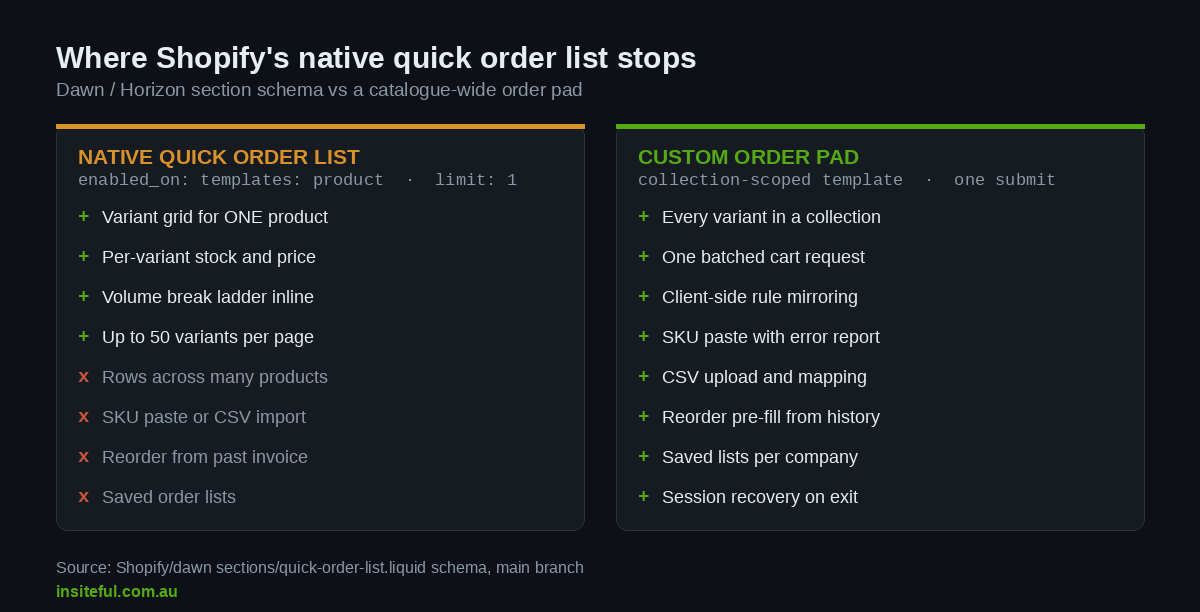
The section file itself is short and the schema tells you everything:
{% schema %}
{
  "name": "t:sections.quick-order-list.name",
  "limit": 1,
  "enabled_on": {
    "templates": ["product"]
  },
  "settings": [
    {
      "type": "range",
      "id": "variants_per_page",
      "min": 5,
      "max": 50,
      "step": 1,
      "default": 50
    },
    { "type": "checkbox", "id": "show_image", "default": false },
    { "type": "checkbox", "id": "show_sku",   "default": false }
  ]
}
{% endschema %}Three lines in that schema define the entire scope of the native feature. limit is 1, so one instance per template. enabled_on.templates is product, so it renders on a product page and nowhere else. And variants_per_page caps at 50.
Put plainly: Shopify’s quick order list is a variant matrix for a single product. It is excellent at what it does. If you sell a work shirt in six colours and eight sizes, a buyer lands on that one product page and fills in a 48 cell grid with per-variant stock, per-variant pricing and volume breaks rendered inline. That is a real job done well, and on a lot of apparel and footwear catalogues it is most of what a buyer needs.
What it is not is a catalogue-wide order pad. A hospitality supplier whose buyer orders twelve chemicals, nine paper lines and four dispensers has no single product page to land on. Under the native feature that buyer visits twenty-five product pages, adds to cart twenty-five times, and reloads the page in between. That is the gap we get called about.
Four ordering behaviours, not one
Before writing any code we map which of four behaviours the account actually uses, because building all four when the buyer only uses two is how a B2B build turns into a six month project.
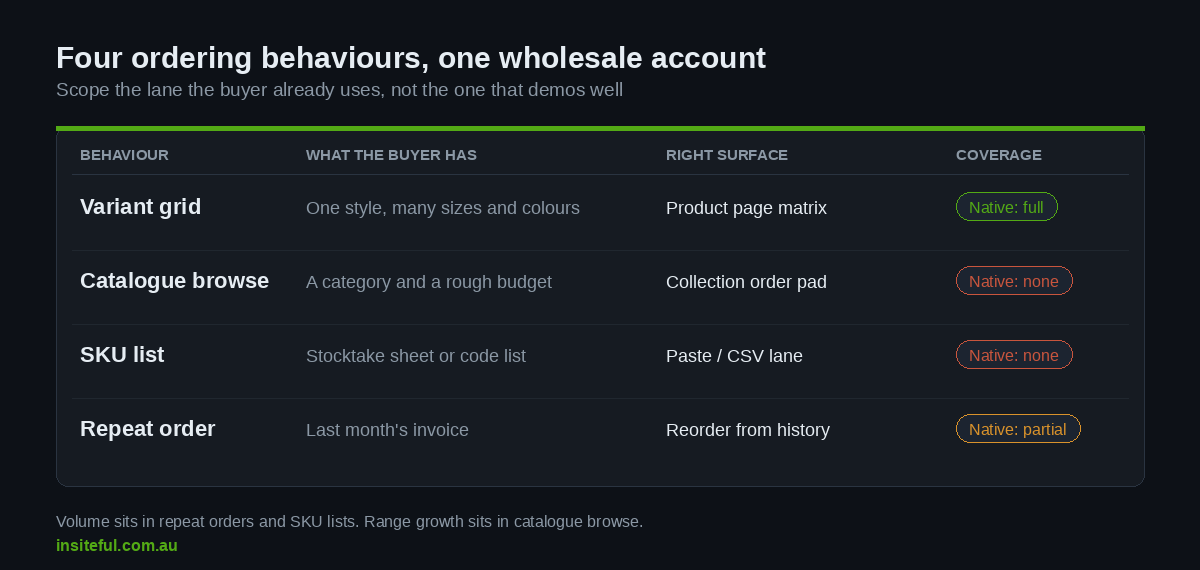
| Behaviour | What the buyer has in hand | Right surface | Native coverage |
|---|---|---|---|
| Variant grid | One style, many sizes and colours | Product page matrix | Full, ships in Dawn and Horizon |
| Catalogue browse | A category and a rough budget | Collection level order pad | None |
| SKU list | A stocktake sheet or supplier code list | Paste or CSV lane | None |
| Repeat order | Last month’s invoice | Reorder from order history | Partial, order history only |
In our experience with Australian wholesale accounts, repeat ordering and SKU lists carry the volume, and catalogue browse carries the range expansion. The variant grid matters enormously in apparel and barely at all in food service. Scoping starts by asking the two or three top-spending stockists how they build an order today, then building the lane they already use rather than the lane that demos well.
Architecture of a catalogue-wide order pad
The build we ship most often is a collection-scoped order pad: one template, driven by a collection, rendering every variant in that collection as a row with a quantity input, and submitting the whole thing to the cart in a single request.
The line source is the important decision. We drive it from the collection so merchandising stays in the admin where the client already works, and so B2B catalog visibility rules apply automatically. If a product is not in the buyer’s assigned catalog, it is not in collection.products for that session, and the pad simply does not render the row. No custom permission layer, no divergence between what the pad shows and what checkout will accept.
The row markup carries everything the client-side logic needs as data attributes so no second fetch is required to validate:
{%- for product in collection.products -%}
  {%- for variant in product.variants -%}
    <tr class="pad-row" data-variant-id="{{ variant.id }}">
      <td class="pad-sku">{{ variant.sku }}</td>
      <td class="pad-title">{{ product.title }} / {{ variant.title }}</td>
      <td class="pad-price" data-unit-price="{{ variant.price }}">
        {{ variant.price | money_with_currency }}
      </td>
      <td class="pad-qty">
        <input
          type="number"
          inputmode="numeric"
          name="qty"
          value=""
          min="{{ variant.quantity_rule.min }}"
          step="{{ variant.quantity_rule.increment }}"
          {% if variant.quantity_rule.max %}max="{{ variant.quantity_rule.max }}"{% endif %}
          data-available="{{ variant.available }}"
          aria-label="Quantity for {{ variant.sku }}"
        >
      </td>
      <td class="pad-line-total" aria-live="polite"></td>
    </tr>
  {%- endfor -%}
{%- endfor -%}Rendering 900 rows of that markup is fine. Liquid handles it, and a table of that size gzips to very little. The problems start the moment someone wires a fetch to every keystroke.
Why one submit beats two hundred
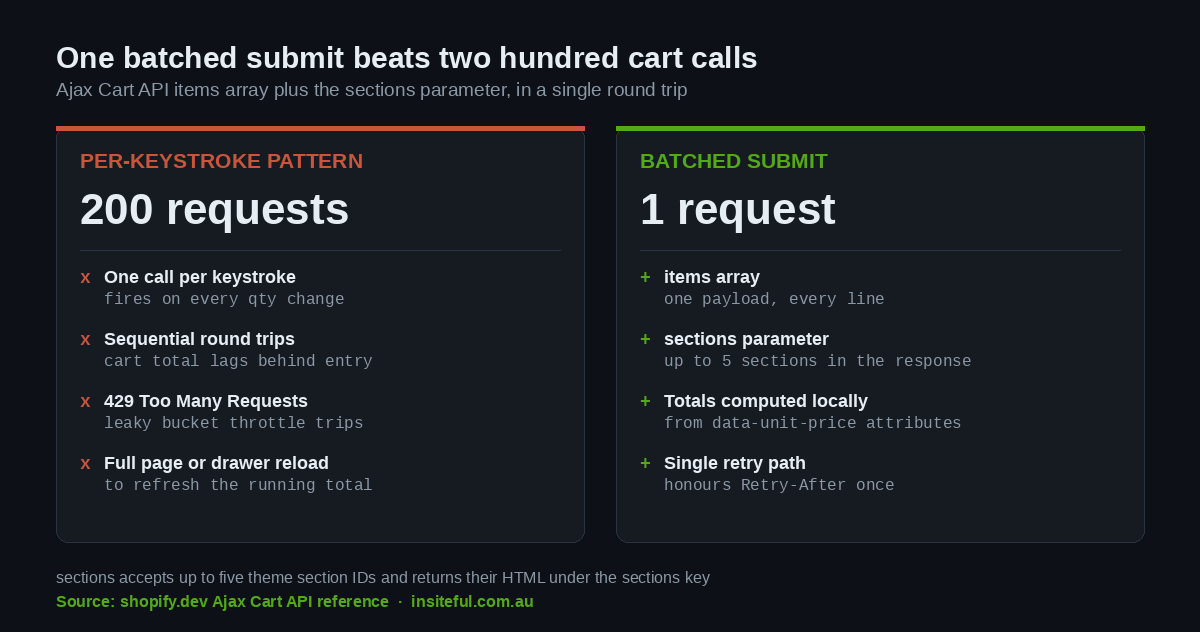
The most common failure we inherit on B2B rebuilds is a pad that calls /cart/add.js on every quantity change. It feels responsive in a demo with four rows. With a buyer tabbing down sixty rows it produces sixty sequential cart mutations, a visibly lagging cart total, and eventually a throttle. Shopify’s platform rate limiting uses a leaky bucket, and when a client exceeds it the response is a 429 with a Retry-After header telling you how long to wait. Merchants have reported hitting 429s on the storefront cart endpoint under exactly this pattern.
The Ajax Cart API already solves this properly. POST /cart/add.js accepts an items array, so one request adds the entire order. The same request accepts a sections parameter, a comma separated list of up to five theme section IDs, and returns their rendered HTML under a sections key in the JSON response. That means the cart drawer, the header count and the pad’s own summary bar all refresh from the same round trip, with no second fetch and no full page reload.
So the pad holds state locally and submits once:
async function submitPad(form) {
  const items = [...form.querySelectorAll('.pad-row')]
    .map((row) => ({
      id: Number(row.dataset.variantId),
      quantity: Number(row.querySelector('input[name=qty]').value || 0)
    }))
    .filter((line) => line.quantity > 0);

  if (!items.length) return;

  const res = await fetch('/cart/add.js', {
    method: 'POST',
    headers: { 'Content-Type': 'application/json' },
    body: JSON.stringify({
      items,
      sections: 'cart-drawer,cart-icon-bubble,order-pad-summary',
      sections_url: window.location.pathname
    })
  });

  if (res.status === 429) {
    const wait = Number(res.headers.get('Retry-After') || 2);
    await new Promise((r) => setTimeout(r, wait * 1000));
    return submitPad(form);
  }

  const data = await res.json();
  if (!res.ok) return renderLineErrors(data);
  hydrateSections(data.sections);
}Line totals, order subtotal and volume break progress are all computed in the browser from the data-unit-price attributes already on the page. There is no reason to ask the server what 12 times $18.40 is. The server is the authority on what the order costs at checkout, and the pad is the authority on what the buyer is currently looking at. Keeping those two jobs separate is what keeps a 900 row pad feeling instant.
Two details we always add. First, the input listeners are debounced at roughly 150ms before recalculating the summary bar, so holding down an arrow key does not trigger 40 layout passes. Second, the submit button carries a running count and value so the buyer sees “Add 47 lines, $9,340 AUD” before they commit, which cuts the abandoned pad rate more than any other single change we make.
If you are rendering the summary bar and cart drawer from the same response, the mechanics are the same ones covered in our write-up on the Section Rendering API, and the drawer behaviour itself follows the patterns in our cart drawer build guide.
Enforcing quantity rules before checkout does
B2B catalogs let you set a minimum, a maximum and an increment per variant, plus volume price breaks. Shopify enforces all of it server side, which is correct and non-negotiable. The problem is where the buyer finds out.
If the pad does not enforce the rules, a buyer fills in 200 rows, hits add, and gets a rejection on a case pack rule for row 143. They now have to find row 143 in a table they have scrolled past. That is the single fastest way to lose a wholesale account to a phone order.
The Liquid objects give you everything you need to mirror the rules client side. variant.quantity_rule.min, .max and .increment render straight into the input attributes, and variant.quantity_price_breaks gives the tier ladder for live pricing feedback. Shopify’s own theme code checks product.quantity_price_breaks_configured? before rendering any volume pricing UI, and we follow the same guard so the pad stays clean for products with flat pricing.
The validation we run on blur, per row:
function validateRow(input) {
  const qty  = Number(input.value || 0);
  const min  = Number(input.min || 1);
  const step = Number(input.step || 1);
  const max  = input.max ? Number(input.max) : Infinity;

  if (qty === 0) return clearError(input);

  if (qty < min) {
    return setError(input, 'Minimum order is ' + min + ' units');
  }
  if (qty > max) {
    return setError(input, 'Maximum order is ' + max + ' units');
  }
  if ((qty - min) % step !== 0) {
    const up = qty + (step - ((qty - min) % step));
    return setError(input, 'Sold in packs of ' + step + '. Try ' + up + '.', up);
  }
  return clearError(input);
}Note the third branch. When an increment rule is violated we do not just report the failure, we compute the next valid quantity and offer it as a one click fix. A buyer who typed 50 into a case-of-12 line gets “Sold in packs of 12. Try 60.” with a button that applies it. That small piece of arithmetic removes most of the friction people blame on case packs. We covered the admin side of configuring these rules in our guide to Shopify B2B quantity rules; this is the storefront half of the same job.
Client side validation is a courtesy, not a control. Every rule still gets enforced by Shopify at add-to-cart and again at checkout, and the error handler in the submit function above renders any server rejection back against the correct row rather than as a generic banner.
The SKU paste lane
Ask an Australian wholesale buyer how they build an order and a surprising number will tell you they work off a printed stocktake sheet or a spreadsheet exported from their own POS. They are not browsing. They have codes and counts.
The paste lane is the cheapest high-value feature in the entire build. One textarea, a documented format, and a resolver. A buyer pastes:
BRZ-500-CTN, 4
BRZ-250-CTN, 6
WIP-BLU-24    12
SAN-1L-EA,2The parser tolerates commas, tabs or runs of whitespace as the separator, ignores blank lines and case, and trims stray quote characters that Excel likes to add. Resolution happens against a SKU index we build once at page render rather than per lookup:
const skuIndex = new Map(
  [...document.querySelectorAll('.pad-row')].map((row) => [
    row.querySelector('.pad-sku').textContent.trim().toUpperCase(),
    row
  ])
);

function applyPaste(text) {
  const resolved = [], unmatched = [];

  text.split(/\r?\n/).forEach((line) => {
    if (!line.trim()) return;
    const parts = line.split(/[,\t]|\s{2,}/).map((s) => s.trim());
    const sku   = (parts[0] || '').replace(/["']/g, '').toUpperCase();
    const qty   = parseInt(parts[1], 10);
    const row   = skuIndex.get(sku);

    if (!row || !Number.isFinite(qty)) return unmatched.push(line.trim());

    const input = row.querySelector('input[name=qty]');
    input.value = qty;
    validateRow(input);
    resolved.push(sku);
  });

  return { resolved, unmatched };
}What matters as much as the parser is what happens to unmatched. We never silently drop a line. Unmatched codes are listed back above the pad with the raw text the buyer pasted, a likely reason (discontinued, not in your catalog, or unrecognised), and where possible a suggested match from a simple prefix comparison. A buyer pasting 60 lines and having 4 quietly vanish is worse than the paste feature not existing, because they will not notice until the delivery arrives short.
For accounts that live in spreadsheets, the same resolver takes a CSV upload with a header row. The parsing is identical once you have rows and columns; the only extra work is column mapping and a downloadable error report so the buyer can fix their file rather than retype it.
Reordering from history
The highest-frequency wholesale behaviour is the one native Shopify covers least well. A stockist who orders monthly does not want to rebuild the order. They want last month’s order with three quantities changed.
Two patterns cover almost every account. The first is a reorder action on each past order in the customer account area, which reads the order’s line items, filters out anything now unavailable or outside the buyer’s current catalog, and pre-fills the pad with the surviving lines. The removals are shown explicitly, never silently, with the reason next to each one. The second is saved lists, stored as a customer metafield holding an array of variant IDs and default quantities, so a buyer can keep a “monthly core range” list separate from a “summer range” list.
Both patterns depend on knowing which company location the buyer is currently acting for, because pricing, catalog and shipping address all follow that context rather than the person. If you have not structured that layer properly the reorder will price against the wrong catalog. We worked through that structure in detail in our piece on Shopify B2B companies and locations, and the pricing logic that sits on top of it in our B2B catalogues and volume breaks write-up.
One design rule we hold to: a reorder pre-fills the pad, it never adds to cart directly. The buyer must see and confirm the lines. Wholesale orders are large enough that a mis-click costs real money, and a buyer who has been burned once by a one-click reorder will not use the feature again.
The QA pass we run before a pad goes live
An order pad is a data entry tool, which means it lives or dies on the things nobody demos. This is the checklist we work through on every B2B build before handover.
| Check | What we are actually testing |
|---|---|
| Keyboard traversal | Tab moves down the quantity column, not across every cell. Enter does not submit the form mid-entry. |
| Numeric input | inputmode="numeric" so mobile and tablet raise the number pad. Reps place orders on iPads in warehouses. |
| Sticky context | Column headers and the running total stay visible at row 400. A buyer should never scroll up to check what column they are in. |
| Screen reader | Every input has a label naming the SKU. Line totals and errors are in aria-live regions so changes are announced. |
| Rule feedback | Min, max and increment violations resolve to a suggested valid quantity, not a bare rejection. |
| Throttle handling | A forced 429 retries once against Retry-After and surfaces a clear message if it fails twice. |
| Out of stock rows | Rendered and readable, input disabled, with a back-in-stock signal rather than being hidden from the list. |
| Catalog isolation | Logged in as company A, no product from company B’s catalog appears in the pad or resolves via SKU paste. |
| Session recovery | Half-entered pad survives an accidental navigation. We persist to session storage and restore on return. |
| Print view | A stylesheet that prints the entered lines as an order sheet. Buyers still fax. Some of them still fax. |
The session recovery item is the one clients are most surprised by and the one that generates the most gratitude. A buyer forty minutes into a large order who clicks a stray link and loses everything does not try again that day.
How We Do It at Insiteful
We build on native Shopify. No headless layer, no separate wholesale platform bolted onto the side. Every order pad we ship is Liquid, the Ajax Cart API and the buyer’s own B2B catalog, which means the client keeps editing products in one admin and the pad follows automatically.
The sequence runs the same way on every B2B engagement. We start by sitting with the two or three highest-spending stockists and watching them place an order the way they place it today, spreadsheet and all. That session decides which of the four ordering behaviours we build first, and it is almost never the one the client predicted. We then structure companies, locations and catalogs before writing a line of storefront code, because getting that layer wrong means rebuilding the pad twice.
The pad itself gets built as a collection-scoped template with the paste lane included from day one, because it is a few hours of work and it is the feature reps mention unprompted. Quantity rules and volume breaks are mirrored client side against the same Liquid objects Shopify’s own themes use, so the pad and checkout never disagree. Everything submits in one batched request with sections rendered in the response.
Then we test it the way it will actually be used: an iPad, a warehouse, a buyer with two minutes, a 200 line order and a deliberately throttled connection. A pad that only performs on a desktop with fibre is not finished.
Typical scope for a full B2B ordering surface, including companies and locations structure, catalog setup, the pad, the paste lane and reorder, sits inside our standard build range. Most of our Shopify builds land between $8,500 and $25,000 AUD depending on catalogue complexity and how much of the account structure already exists. A pad retrofitted onto an existing well-structured B2B store is at the lower end of that. A wholesale channel being stood up from nothing, with 900 SKUs and per-stockist pricing, sits at the upper end.
Where to start
If you already have B2B switched on and a current Dawn or Horizon theme, add the native quick order list to your highest-variant product template this week. It costs nothing, it works, and it will tell you within a fortnight whether your buyers use a variant grid at all.
If your buyers order across products rather than within one, the native section will not get you there, and the honest scope is a custom pad. The good news is that it is a well understood build with no platform risk attached: collection-driven rows, one batched cart request, client-side rule mirroring, and a paste lane. Nothing in it fights Shopify.
Either way, structure the companies, locations and catalogs first. Every ordering feature downstream depends on that layer being right, and it is the one thing that is genuinely painful to change once orders are flowing through it. If you want a second set of eyes on where your wholesale channel is losing time, book a build assessment and we will walk through your current ordering path with you.