
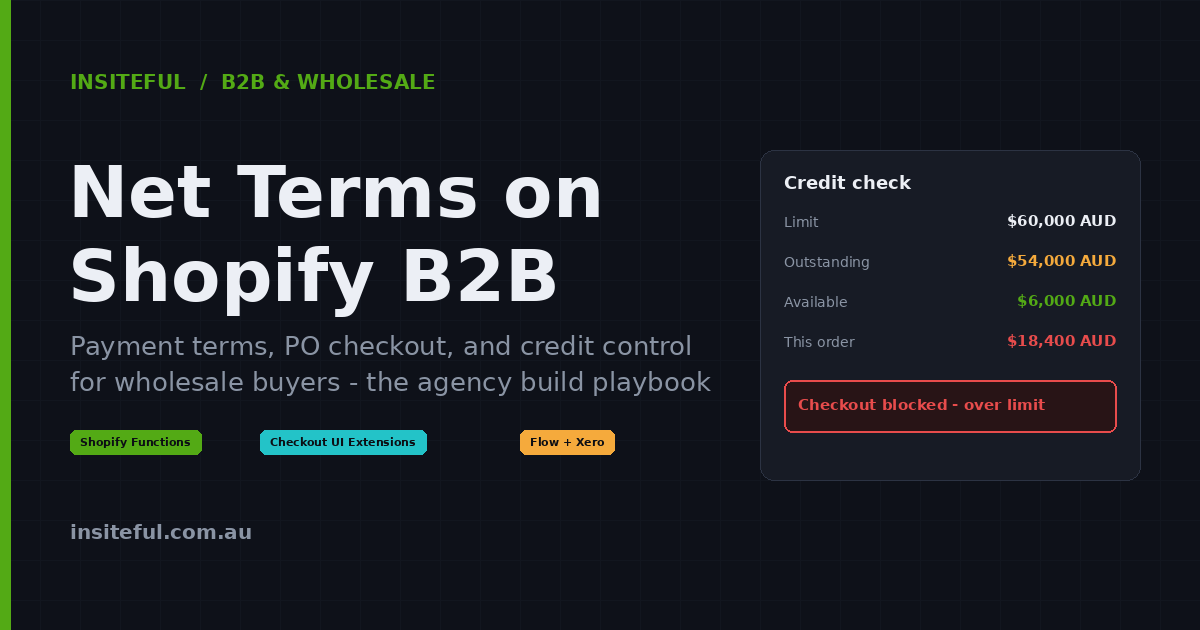
Net terms are the quiet engine of wholesale. A cafe group does not pay for three months of beans the moment the order lands. A boutique chain does not wire money before the autumn range ships to its stores. They buy on Net 30, Net 60, sometimes Net 90, and the supplier who can offer those terms cleanly wins the account. The supplier who cannot offer them, or who runs them on a tangle of emailed invoices and a spreadsheet, loses the order or loses the margin chasing it.
For Australian brands moving wholesale onto Shopify, the question is no longer “can we offer net terms?” It is “how do we offer them without handing every buyer an open credit line we cannot control?” Native Shopify B2B gives you the front half of that answer and almost none of the back half. This article is the build playbook we use at Insiteful: what Shopify B2B payment terms actually do out of the box, the four things they pointedly cannot do, and the exact functions, extensions, and automations we ship to turn a payment-terms toggle into real credit control.
Why net terms are a risk before they are a feature
Offering terms means becoming a short-term lender. That is fine when your buyers pay on time. The trouble is that in this market, most of them do not. Atradius found in its 2025 B2B Payment Practices report for Australia that more than half of the value of B2B invoices was overdue, with around 11% of receivables written off as bad debt, much of it driven by customer financial distress. Separate analysis of Australian businesses in 2025 found that only 37% had their invoices paid on time. Days Beyond Terms have been climbing, and the wholesale sector specifically has responded by tightening credit checks through services like CreditorWatch before issuing trade credit at all.
Put plainly: if you switch on net terms and do nothing else, you are extending unsecured credit to a buyer base where roughly one invoice in two arrives late and one dollar in ten may never arrive. A single wholesale account going under on Net 60 can wipe a five-figure hole in the month. We have seen a Melbourne homewares brand carry $140,000 AUD in overdue wholesale receivables across forty accounts because the store happily took terms orders with no limit and no automated chase. The platform was never the constraint on growth. The lack of control around it was. So the build is not “add net terms”. The build is “add net terms with guardrails”.
There is a cash-flow cost hiding underneath the bad-debt cost, too. Every extra day your average invoice spends unpaid is a day your own money is tied up funding someone else’s inventory. On a wholesale book turning over $2M AUD a year, dragging your average collection period from 35 days to 50 days quietly removes roughly $80,000 AUD of working capital from the business, money you could have spent on stock, staff, or marketing. That is the real reason the controls matter. They are not about being harsh with buyers. They are about keeping the capital that funds your growth inside your business instead of scattered across forty other people’s balance sheets.
What Shopify B2B gives you natively
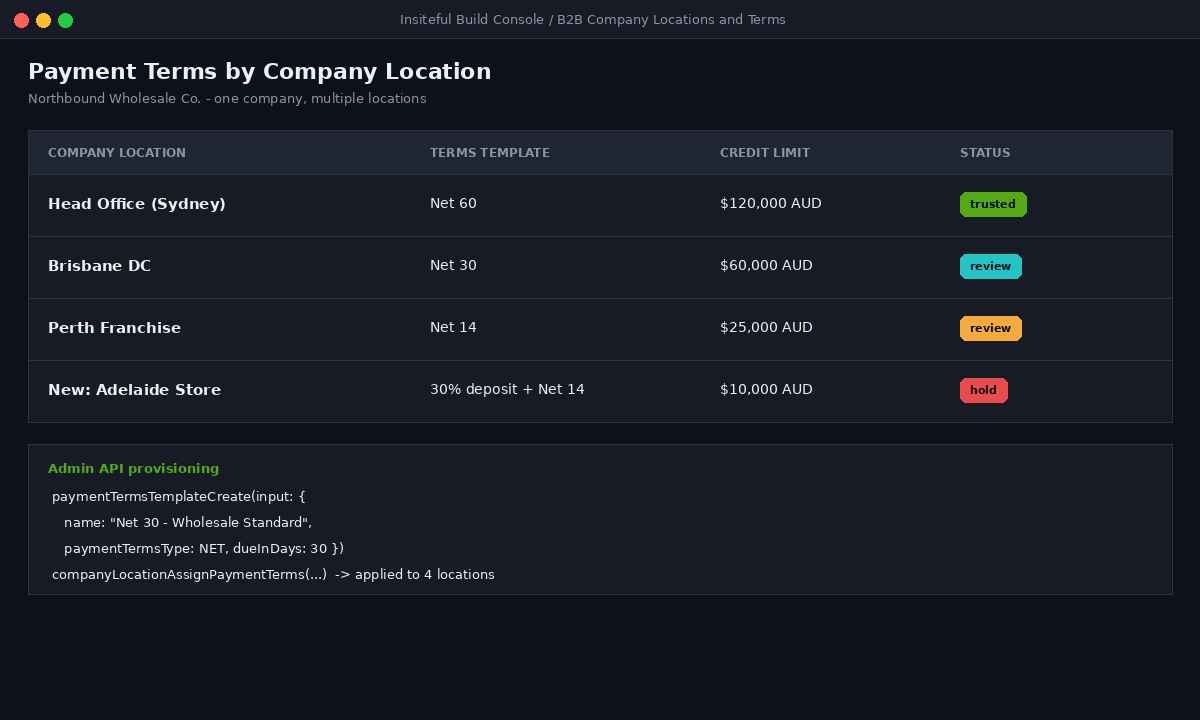
On Shopify Plus, B2B is a first-class part of the platform rather than an app. The relevant primitive is the payment terms template, which you assign to a company location. Shopify ships four template types, per the official B2B documentation: due on receipt, net (a fixed number of days after the order, such as Net 30), fixed date, and due on fulfilment. Once a template is attached to a company location, every buyer at that location sees their terms at checkout automatically and can place the order as “payment pending” with a due date that Shopify records on the order.
You can manage all of this in the admin, but for anything beyond a handful of accounts we provision it through the Admin API so it is repeatable and auditable. Creating a Net 30 template and reading it back looks like this:
mutation CreatePaymentTermsTemplate {
  paymentTermsTemplateCreate(input: {
    name: "Net 30 - Wholesale Standard",
    paymentTermsType: NET,
    dueInDays: 30,
    description: "Standard 30-day terms for approved trade accounts"
  }) {
    paymentTermsTemplate { id name dueInDays paymentTermsType }
    userErrors { field message }
  }
}
Assignment is per company location rather than per customer, which matters more than it first appears. A national retail chain might be one company in Shopify with a dozen locations, and you can hand head office Net 60 while a newly onboarded franchise location sits on a deposit. Once assigned, the terms surface on the order itself: the order shows as “Payment pending” with the due date stamped on it, and finance can filter the orders list by payment status to see exactly what is owed and when. For a brand coming off manual invoicing, that single view is already a step change.
Native terms also cover two things buyers ask for constantly. A purchase order number can be marked required in the B2B checkout settings, so a buyer cannot complete an order without entering their PO reference. And deposits let you take a percentage upfront and defer the rest, for example 25% on order and 75% on Net 30, which is the single most useful lever for de-risking a new account without refusing it terms outright.
That is a genuinely strong foundation, and it is more than most platforms give you. The problem is what sits just past the edge of it.
The four things native terms cannot do
Every wholesale build we take on hits the same four walls, and a buyer or a finance lead will find all of them within the first fortnight.
One: there is no credit limit at checkout. This is the big one. Shopify Plus has no native check that compares a new order against a company’s outstanding balance and available credit. A buyer who has already used $23,000 AUD of a $25,000 AUD limit can place a fresh $30,000 AUD order on terms with zero platform-level friction. As the credit-management guides put it bluntly, Shopify does not natively track available credit or prevent orders that exceed it. Your risk control lives in your accounting system, which finds out about the breach a day later, after the stock is already committed.
Two: there is no automatic dunning. Shopify records the due date but will not chase it. No reminder before the date, no escalation after it. Left alone, the invoice sits silent until someone in finance notices.
Three: there is no real invoice document. The order is not a tax invoice your buyer’s accounts-payable team can process, and Shopify will not push it into your ledger. That reconciliation has to be built.
Four: PO enforcement is shallow. The required-field toggle stops an empty submission, but it does not validate the format, dedupe against PO numbers already used, or guarantee the value reaches the order record in a place your warehouse and finance teams actually read.
None of these are reasons to avoid Shopify B2B. They are simply the four build items that turn a payment-terms toggle into a controlled credit operation. Here is how we close each one.
Build one: enforce credit limits at checkout with Shopify Functions
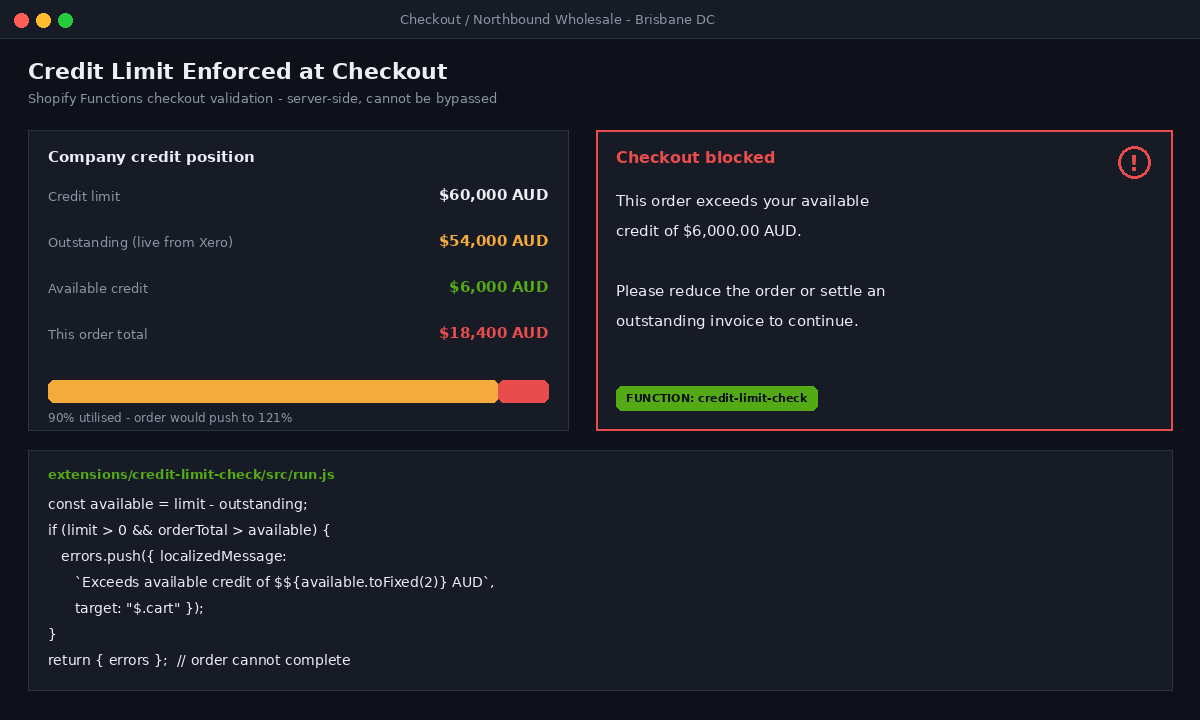
The single highest-value piece of the entire build is a checkout validation function that blocks an order when it would push a company past its credit limit. This is the guardrail native B2B is missing, and Shopify Functions is the correct, native place to put it, because a function runs server-side at checkout and cannot be bypassed by a buyer fiddling with the cart.
The data model is two metafields on the company: a static credit_limit and a outstanding_balance that your accounting integration keeps current. The function reads both, adds the cart total, and rejects the checkout if the sum exceeds the limit.
// extensions/credit-limit-check/src/run.js
export function run(input) {
  const errors = [];

  const limit = parseFloat(
    input.cart.buyerIdentity?.purchasingCompany?.company
      ?.creditLimit?.value ?? "0"
  );
  const outstanding = parseFloat(
    input.cart.buyerIdentity?.purchasingCompany?.company
      ?.outstandingBalance?.value ?? "0"
  );
  const orderTotal = parseFloat(input.cart.cost.totalAmount.amount);

  const available = limit - outstanding;

  if (limit > 0 && orderTotal > available) {
    errors.push({
      localizedMessage:
        `This order exceeds your available credit of ` +
        `$${available.toFixed(2)} AUD. Please reduce the order or ` +
        `settle an outstanding invoice to continue.`,
      target: "$.cart"
    });
  }

  return { errors };
}
The input query pulls the two company metafields and the cart total so the function has everything it needs in one pass:
# extensions/credit-limit-check/src/run.graphql
query Input {
  cart {
    cost { totalAmount { amount } }
    buyerIdentity {
      purchasingCompany {
        company {
          creditLimit: metafield(
            namespace: "credit", key: "limit"
          ) { value }
          outstandingBalance: metafield(
            namespace: "credit", key: "outstanding"
          ) { value }
        }
      }
    }
  }
}
Because this is a checkout validation function, the buyer sees the message inline and the order genuinely cannot complete. That is the difference between a warning in the cart, which a determined buyer can ignore, and an enforced limit. For accounts you want to warn rather than hard-stop, we soften the same function to allow the order through but tag it for finance review, which is the pattern most brands want for their long-standing, trusted buyers.
In practice we run a three-tier policy off a single credit_status metafield. Accounts marked hold are hard-blocked at the limit, the default for newer or higher-risk buyers. Accounts marked review are allowed over the limit but the order is tagged credit-review and held back from auto-fulfilment until finance clears it. Accounts marked trusted pass straight through, on the assumption that a buyer with five years of clean history has earned the benefit of the doubt. The same function reads all three states, so the policy is one deploy rather than three separate apps, and changing a buyer’s tier is a single metafield edit rather than a code change. That flexibility is the difference between a credit control your finance team will actually use and one they quietly disable because it keeps blocking good orders.
Build two: keep the limit honest with a live balance feed
A credit limit is only as good as the outstanding_balance it checks against. If that number is stale, the function either blocks good orders or waves through bad ones. So the second build is the feedback loop that keeps the balance current, and in Australia that loop runs through Xero more often than anything else.
The flow is straightforward once it is wired: a terms order in Shopify creates a draft invoice in Xero, and when Xero marks that invoice paid, a webhook writes the new outstanding total back to the company metafield. We run the Shopify-to-Xero leg through a rules-based connector and the paid-status leg back through a small webhook handler that updates the metafield:
// On Xero "invoice paid" webhook -> recompute and write back
async function syncOutstanding(companyId, gid) {
  const owing = await xeroOutstandingForContact(companyId); // AUD

  await shopifyAdmin.graphql(`
    mutation($mf: [MetafieldsSetInput!]!) {
      metafieldsSet(metafields: $mf) {
        metafields { id value }
        userErrors { field message }
      }
    }`,
    { mf: [{
        ownerId: gid,                 // Company GID
        namespace: "credit",
        key: "outstanding",
        type: "number_decimal",
        value: owing.toFixed(2)
    }]}
  );
}
Now the checkout function in build one is reading a number that reflects reality within minutes of a payment landing, not a figure someone last touched a fortnight ago. This is also where the wholesale build connects to the rest of the operations stack; the same discipline we apply when we wire a store’s 3PL and inventory systems together applies to the finance side. The ledger is a source of truth, and the storefront has to respect it.
Build three: make the PO number actually useful
Native B2B can force a PO number to be present, but “present” is a low bar. Buyers paste in “TBC”, finance cannot match it, and the warehouse never sees it. We replace the bare required field with a checkout UI extension that validates the format and writes the value somewhere everyone downstream can read.
// PO field in a checkout UI extension (Checkout::Dynamic::Render)
import {
  reactExtension, TextField, useApplyAttributeChange, useBuyerJourneyIntercept
} from "@shopify/ui-extensions-react/checkout";

export default reactExtension("purchase.checkout.block.render", () => <PoField />);

function PoField() {
  const applyAttributeChange = useApplyAttributeChange();

  useBuyerJourneyIntercept(({ canBlockProgress }) => {
    return canBlockProgress && !validPo
      ? { behavior: "block", reason: "PO number required",
          errors: [{ message: "Enter a valid PO number (min 4 chars)." }] }
      : { behavior: "allow" };
  });

  return (
    <TextField
      label="Purchase order number"
      onChange={(v) =>
        applyAttributeChange({ type: "updateAttribute", key: "po_number", value: v })
      }
    />
  );
}
The value lands as an order attribute, and a short Shopify Flow workflow copies it onto the order’s metafields and into the order note so it appears on the packing slip and in the Xero invoice. The PO stops being a checkbox and becomes a reference that ties the buyer’s paperwork, your warehouse, and your ledger together. If you want the deeper treatment of what is possible at this layer, we covered it in our guide to Shopify checkout UI extensions.
The dedupe matters more than it sounds. Wholesale buyers reuse PO numbers, and a duplicated PO that slips through means two shipments billed against one approval, which is the kind of error that costs you a relationship rather than just a reconciliation. We keep a running list of issued PO numbers per company in a metafield and have the extension flag a clash before the buyer can submit. It is a small piece of validation that quietly prevents one of the most common and most expensive wholesale billing disputes.
Build four: automate the chase before it becomes a collection
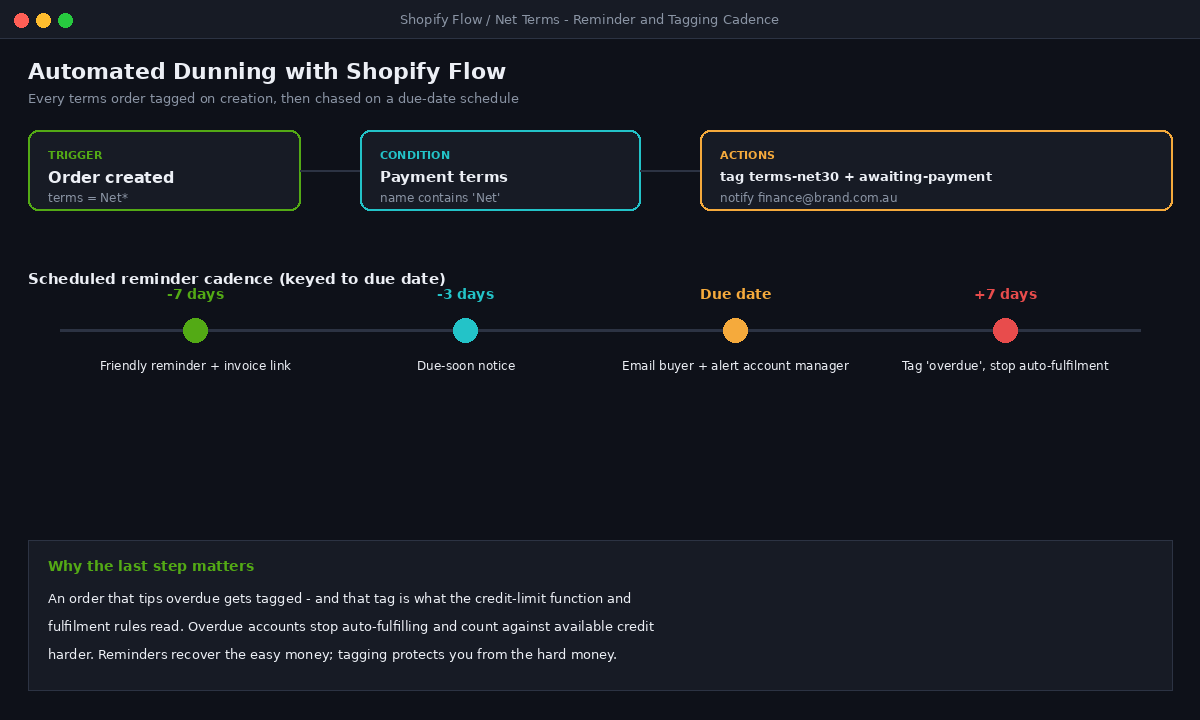
The cheapest dollar in wholesale is the one you collect on time, and the difference between on-time and overdue is almost always a reminder that went out before the due date instead of after it. Shopify Flow handles this without a single line of bespoke code. We tag every terms order on creation, then schedule a three-touch reminder cadence keyed to the due date.
Trigger:  Order created
Condition: Payment terms template name contains "Net"
Actions:
  - Add order tag: "terms-net30"
  - Add order tag: "awaiting-payment"
  - Send internal notification to finance@brand.com.au

# Companion scheduled workflow keyed to due date
7 days before due  -> email buyer: friendly reminder + invoice link
3 days before due  -> email buyer: due-soon notice
On due date        -> email buyer + alert account manager
+7 days overdue    -> tag "overdue", remove from auto-fulfilment
The detail that matters is the last line. An account that tips into overdue gets tagged, and that tag is what your credit-limit function and your fulfilment rules read. Overdue accounts stop auto-fulfilling and start counting against available credit harder. The reminders recover the easy money; the tagging protects you from the hard money. Together they are the operational layer that the manual, spreadsheet-driven wholesale operation never has, which is exactly why those operations carry six-figure overdue balances they cannot explain.
Deposits and staged risk for new accounts
The last piece is less code and more policy made enforceable. Not every account should get the same terms on day one. Our default for new trade accounts is a deposit structure, native to Shopify B2B, that takes a percentage upfront and defers the balance, then graduates the account to full terms once it has a clean payment history. A typical ladder looks like this: new accounts pay a 30% deposit with the balance on Net 14, accounts with three clean payments move to Net 30 with no deposit, and only established accounts with twelve months of history reach Net 60. The credit limit metafield rises with each tier. Because the limit is enforced at checkout by build one, the policy is not a note in someone’s inbox. It is the storefront’s actual behaviour. This staged approach pairs naturally with how we structure B2B pricing and catalogues, where the same company-location object drives both what a buyer pays and how they are allowed to pay it.
How we do it at Insiteful
When a wholesale brand comes to us wanting net terms on Shopify, we never start with the payment-terms toggle. We start with the risk model. Who gets credit, how much, on what terms, and what happens when they breach it. That conversation usually happens with the founder and the bookkeeper in the same room, because the answers live half in the business and half in Xero.
From there the build is the four pieces above, layered in order: native payment-terms templates provisioned per company location, a Shopify Functions credit check at checkout, a live balance feed from the accounting ledger, a validated PO capture through a checkout extension, and a Flow-driven reminder and tagging cadence that does the chasing automatically. We assign every company location its template and credit metafields through the Admin API so a hundred accounts are provisioned the same way as one, and we test the credit function against real breach scenarios before launch rather than discovering the gap with live money. The whole thing is native Shopify. No buyer is logging into a bolt-on portal, and no finance lead is reconciling a black box. That same company-location object is the backbone of how we approach B2B portal design too, so the credit model and the buying experience are built on one source of truth rather than two.
The outcome we are aiming for is specific. A buyer places an order, the platform checks their credit before it lets them, captures a clean PO, writes a tax invoice into the ledger, and chases the due date on its own. The founder stops being the accounts-receivable department. That is the difference between offering net terms and running them, and it is the part of a wholesale build that quietly decides whether the channel makes money or just makes orders.
Ready to run terms without the risk
If you are extending wholesale credit on Shopify and your only control is a spreadsheet and a hope, that is the gap worth closing before it costs you an account. We scope the credit model, the functions, and the automations as one build so the guardrails ship with the terms, not a year later. See the wholesale and Plus builds we have shipped, then book a build assessment and we will map your terms, limits, and reconciliation into a single native Shopify implementation.