
Most wholesale problems that land on our desk are not pricing problems. They are structure problems. A brand adds a B2B channel, wires up a single “wholesale” customer account, tapes on a discount code, and within three months the account manager is fielding emails from four different buyers at the same retail group who all want their own order history, their own delivery address, and an invoice that reconciles against their own purchase order. The pricing was fine. The account model was never built for how the business actually buys.
Shopify’s B2B system solves exactly this, and as of April 2026 it is no longer locked behind Shopify Plus. The company, location, and contact model now ships on Basic, Grow, and Advanced plans as well, which means a far larger set of Australian brands can run proper trade accounts without a platform migration. The catch is that the data model is genuinely different from the single-customer D2C model most merchants know, and getting the hierarchy wrong at setup is expensive to undo once real orders and payment terms are attached.
This is the architecture piece we wish every merchant read before they built their wholesale channel. It covers how companies, locations, and contacts actually relate, how buyer permissions and ordering-on-behalf work, how catalogues and payment terms attach to the hierarchy, and the Winter ’26 features that changed how order approvals and spending limits are enforced. Every section includes the build artefact we use on client work.
Why the account model matters more than the discount
The demand is not in question. The global B2B ecommerce market is estimated at US$32.11 trillion in 2025 and is forecast to reach US$36.16 trillion in 2026, growing at roughly 14.5% a year. The behaviour underneath that number is what matters for how you build: 83% of B2B purchasers now prefer self-service ordering through online platforms, 73% are willing to place orders over US$50,000 through digital self-service, and 61% prefer a rep-free digital buying experience. Digital channels now account for 56% of B2B revenue, up from 32% in 2020.
Read those figures as a build brief, not a trend report. Your trade buyers do not want to email a rep and wait for a proforma invoice. They want to log in, see their negotiated pricing, order against a purchase order number, and reconcile it against their own account, at eleven at night if that is when the reorder gets done. That experience is impossible to deliver if every buyer at a retail group shares one login and one order history. The company and location model exists so that a single trade customer can be many people, buying for many sites, under one negotiated commercial relationship.
Get the structure right and self-service works. Get it wrong and you are back to managing wholesale over email, which is precisely the manual load the channel was supposed to remove.
The company, location, and contact hierarchy
Shopify B2B has three objects, and they are not the same thing as your D2C customer record. Understanding how they nest is the single most important decision in a wholesale build.
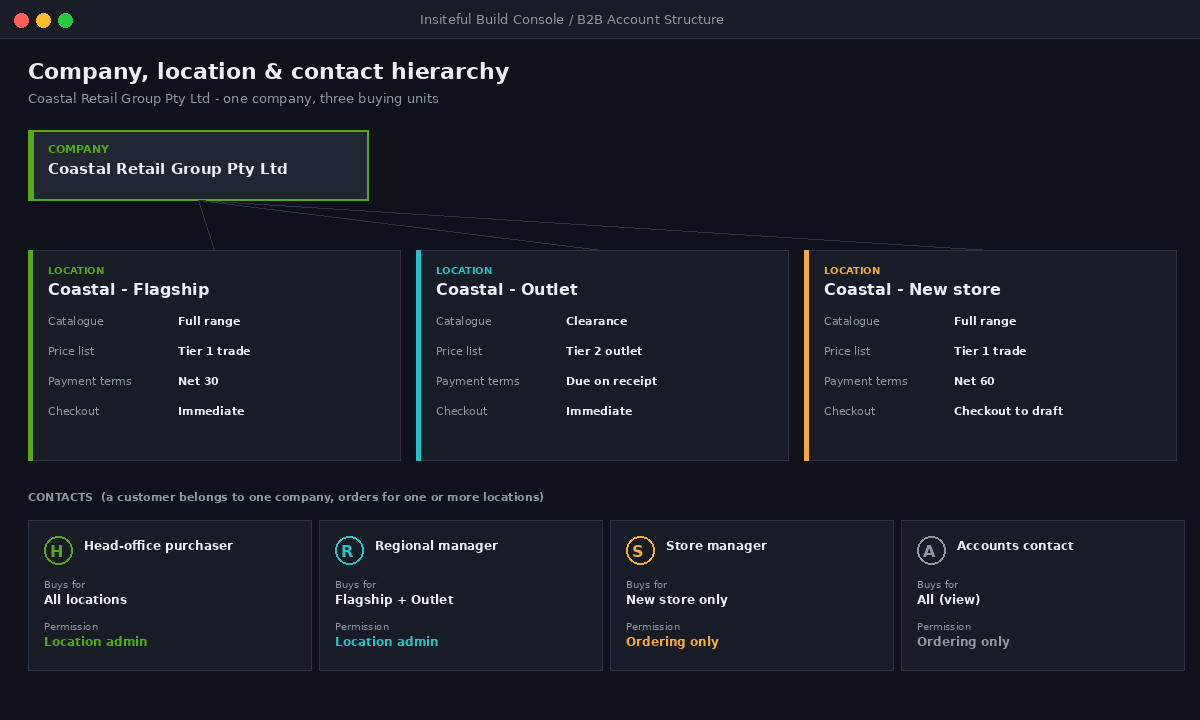
A company is the parent organisation you have a commercial relationship with. Think of the trading entity: “Coastal Retail Group Pty Ltd”. A company location is a specific buying unit under that company, and this is where almost all the commercially important settings live. Each location carries its own tax ID, tax exemptions, shipping and billing addresses, assigned catalogue and price list, payment terms, and its own contacts. A contact is a customer record connected to the company, given permission to buy for one or more of its locations.
The rule that trips people up: a customer can belong to only one company, but can be attached to multiple locations within that company. So one buyer at head office can order for three regional stores, while a store manager only sees their own location. Here is the hierarchy we hand to clients at kickoff:
| Object | What it represents | Key settings it holds |
|---|---|---|
| Company | The trading entity / customer relationship | Company name, main contact, notes, overall status |
| Company location | A buying unit: branch, store, warehouse, purchasing dept | Tax ID, tax exemptions, addresses, catalogue, price list, payment terms, checkout-to-draft settings |
| Contact | A person authorised to buy | Permission level, which locations they can order for |
When you query the model through the Admin API, the nesting is explicit. This is the read we use to audit an existing setup before a migration, so we can see every location and its attached price list in one call:
query CompanyStructure {
  companies(first: 50) {
    edges {
      node {
        name
        contactCount
        locations(first: 25) {
          edges {
            node {
              name
              billingAddress { country }
              buyerExperienceConfiguration {
                checkoutToDraft
                paymentTermsTemplate { name }
              }
            }
          }
        }
      }
    }
  }
}
The reason we start every B2B engagement with this query rather than the storefront is simple: if the location layer is thin or missing, the brand has effectively rebuilt the single-customer D2C model with a wholesale coat of paint, and every downstream feature (per-site pricing, per-site terms, delivery to the right branch) will fight them. The location is where wholesale lives.
Buyer permissions and ordering on behalf
Once the hierarchy is set, the next decision is who can do what. Shopify gives each contact a permission level per location, and the practical difference between the two levels is larger than it looks.
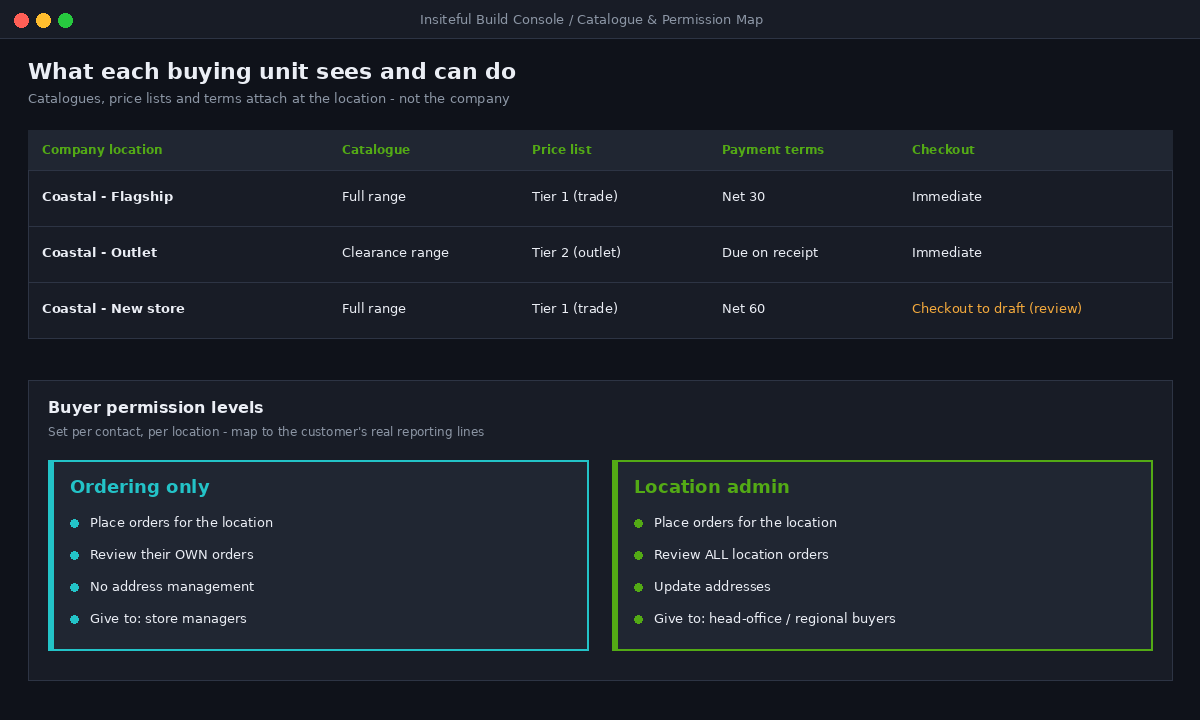
Ordering only lets a contact place orders and review their own orders for that location. Location admin lets a contact place orders, review all orders for the location, and update addresses. The second permission is what a head-office buyer or purchasing manager needs when they order on behalf of several branches; the first is what you give a store manager who should only see and reorder their own stock.
This is the permission matrix we configure against a client’s actual org chart before we touch a single account:
| Buyer role | Locations assigned | Permission level | What they can do |
|---|---|---|---|
| Head-office purchaser | All company locations | Location admin | Order for any branch, see all orders, manage addresses |
| Regional manager | Their region’s locations | Location admin | Order and oversee their region only |
| Store manager | Their single store | Ordering only | Reorder and view own store’s history |
| Accounts contact | All locations (view) | Ordering only | Placed as a light-touch contact for invoicing visibility |
The mistake we unwind most often is granting Location admin to everyone because it is easier at setup. Six months later the brand cannot work out why a store manager can see and edit another store’s orders, and the retail group’s head office is annoyed. Permission is not a convenience setting; it is the boundary between buying units, and it should be mapped to the customer’s real reporting lines on day one.
Catalogues and payment terms attach to the location
Here is where the location layer earns its keep. A catalogue in Shopify B2B is a combination of a product list and a price list, and it is assigned at the company-location level. That means two locations under the same company can see different products at different prices, which is exactly how real trade relationships work: the flagship store buys the full range at tier-one pricing, the outlet location sees a narrower range at clearance pricing.
Payment terms attach the same way. Each location can carry its own terms template (net 30, net 60, due on receipt), and the buyer experience configuration controls whether that location checks out and pays immediately or whether the order is captured as a draft for the account team to review. That single checkoutToDraft flag is the difference between a self-service channel and a managed one, and different locations under the same company can be set differently.
The artefact we build for every wholesale client is a catalogue-to-location map, so nobody has to guess which buying unit sees what:
| Company location | Catalogue | Price list | Payment terms | Checkout |
|---|---|---|---|---|
| Coastal Retail – Flagship | Full range | Tier 1 (trade) | Net 30 | Immediate |
| Coastal Retail – Outlet | Clearance range | Tier 2 (outlet) | Due on receipt | Immediate |
| Coastal Retail – New store | Full range | Tier 1 (trade) | Net 60 | Checkout to draft (review) |
We have covered how the pricing tiers themselves get built in our piece on Shopify B2B pricing catalogues and volume breaks, and the credit-control side of net terms in our net terms and PO checkout guide. What matters structurally is that both of those live on the location, not the company. Build the locations properly and pricing and terms have somewhere to attach. Skip the location detail and you end up applying one price list and one term to an entire retail group that never buys as a single unit.
Order approvals and spending limits after Winter ’26
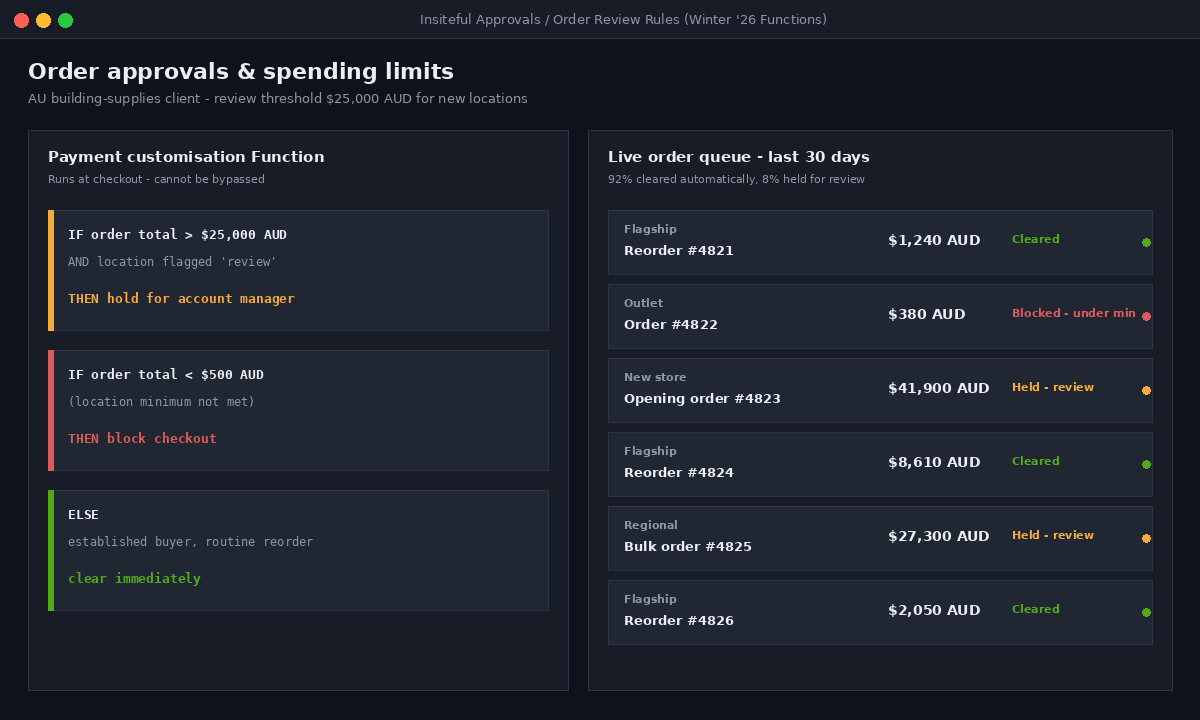
The Winter ’26 edition changed how control is enforced on B2B orders, and it is worth understanding because it moves this logic out of apps and into the platform. Not every order needs the same scrutiny. An established buyer placing a routine reorder should process instantly. A high-value order from a new location should be held for review. Previously that logic lived in third-party apps; now it is built on Shopify Functions through dynamic payment terms and order review rules.
In practice we configure a payment customisation Function that inspects the order against the location and decides whether it clears or gets held. The pattern looks like this:
export function run(input) {
  const order = input.cart;
  const total = parseFloat(order.cost.totalAmount.amount);
  const location = input.buyerIdentity.purchasingCompany.location;

  // Hold high-value orders from locations flagged for review
  if (total > 25000 && location.metafield.value === "review") {
    return {
      operations: [{ hold: { message: "Awaiting account manager approval" } }]
    };
  }
  return { operations: [] };
}
Spending limits work on the same foundation. Common configurations we deploy include enforcing a minimum order value per location, applying tiered shipping rules by weight and region, and holding any order that matches specific criteria for review. Because this runs as a Function at checkout rather than as an app callback, it is fast and it cannot be bypassed by a buyer who knows the direct checkout URL.
For an Australian building-supplies client we set the review threshold at $25,000 AUD for any new location in its first 60 days, then lifted it automatically once payment history was established. The account team stopped manually screening every large order and only saw the ones that genuinely needed a human. That is the point of moving approvals into the platform: the exceptions surface, the routine flows through.
Tax, GST, and Australian trade pricing per location
Australian wholesale has a specific requirement that the location model handles cleanly, and it is one of the more common reasons a trade channel feels wrong to buyers. Trade buyers are GST-registered businesses claiming input credits, so wholesale invoices are conventionally displayed ex-GST, with GST added at checkout. Your retail D2C storefront, by contrast, shows GST-inclusive pricing because that is what consumers expect and what the law requires for consumer-facing display.
Because tax settings and catalogues attach at the location level, you can run both correctly on one store. The B2B catalogue is configured for tax-exclusive pricing on the trade channel while the consumer storefront stays inclusive, and each company location carries its own tax ID and any exemptions that apply. The buyer sees the ex-GST figures they expect, the invoice reconciles against their ABN, and you are not maintaining two separate stores to achieve it.
The configuration checklist we run for every AU wholesale build:
- B2B price lists set to tax-exclusive display so trade buyers see ex-GST figures
- Each company location’s tax ID (ABN) recorded, with exemptions applied where relevant
- Consumer storefront left GST-inclusive so nothing changes for D2C shoppers
- Checkout confirming GST is added and itemised so the buyer’s accounts team can claim input credits
This is a small set of settings, but getting it wrong is one of the fastest ways to lose a trade buyer’s trust. An invoice that does not reconcile against their accounting expectations reads as amateur, regardless of how good the pricing is.
Automating company creation and onboarding
The last piece is operational: how companies and locations get created without your team hand-keying every field. At any scale beyond a handful of accounts, manual creation becomes the bottleneck, and Winter ’26 added several ways to remove it.
Shopify Flow can create and update company records from triggers, so a wholesale application form submission can spin up a company, its first location, and its primary contact automatically. Sidekick, Shopify’s AI assistant, can now create B2B company profiles from a natural-language prompt, filling in contact information, addresses, and payment terms. And for buyers who trade over EDI, you can now sync EDI purchase orders from SPS Commerce and Crstl directly into Shopify as draft orders, approve them, and print shipping labels in the admin, bringing EDI workflows onto the platform for the first time.
The Flow trigger we most commonly wire up on client stores looks like this:
Trigger: Customer submits wholesale application (form app)
Condition: Application status is "Approved"
Actions:
  1. Create company (name from ABN lookup)
  2. Create company location (address from form)
  3. Assign catalogue "Trade - Tier 2"
  4. Assign payment terms "Net 30"
  5. Send buyer their account activation email
  6. Notify account manager in Slack
The onboarding that used to take an account manager fifteen minutes per account now runs in seconds, and the data is consistent because a machine filled the fields. For a brand onboarding dozens of stockists after a trade show, that difference is the channel scaling or not scaling. We connect the wider stack (ERP, EDI, invoicing) using the same integration approach we describe in our Shopify ERP integration guide, so company and location data stays in sync with the systems the back office actually runs on.
Common architecture mistakes we fix
Across wholesale builds and rescues, the same structural errors recur. They are all fixable, but every one is cheaper to avoid at setup than to unwind once live orders and payment terms are attached.
The first is the flat account: one company, one location, one shared login for an entire retail group. It works until the second buyer appears, then order history and delivery addresses collide. The second is over-permissioning, granting Location admin to every contact, which erases the boundary between buying units. The third is attaching pricing and terms at the wrong level, or assuming a single price list can serve a company that buys as separate units. The fourth, specific to Australia, is running GST-inclusive pricing on the trade channel and confusing every accounts department that receives an invoice.
None of these show up in a demo. They surface at the third or fourth real order, which is exactly when the channel is starting to matter and exactly when a rebuild is most disruptive. The company and location model is not complicated, but it is unforgiving of shortcuts taken to move faster at launch.
How We Do It at Insiteful
When we build a wholesale channel, the storefront is the last thing we touch. We start with the account structure, because everything commercial hangs off it. Our first session with a client is a mapping workshop: we take their real trade relationships, their reporting lines, and their reorder behaviour, and we translate them into a company and location hierarchy on a whiteboard before anything goes into Shopify.
From there we run the audit query above against any existing setup, build the permission matrix against the customer’s org chart, and lay out the catalogue-to-location map so pricing, terms, and tax have a defined home. We configure order approvals and spending limits as Functions rather than apps, so the control logic is fast and cannot be bypassed. We wire company creation into Flow so onboarding scales without adding headcount. And for Australian clients we lock the ex-GST trade display and ABN handling in before the first buyer ever logs in.
The result is a wholesale channel that behaves like the business behind it. A retail group with a head-office buyer and eight stores looks like that in the account model, not like eight disconnected logins. A build like this typically runs from $30,000 to $80,000 AUD depending on the number of price tiers, integrations, and the state of the data being migrated, and it pays for itself the moment the account team stops managing wholesale over email. We would rather spend a day getting the hierarchy right than spend a quarter rebuilding it after launch.
Build the structure first
Shopify B2B is one of the strongest native wholesale systems on the market, and now that companies and locations are available across the plan range, the barrier to running proper trade accounts is lower than it has ever been. But the platform gives you a data model, not a decision. How you map your real buyers, buying units, and commercial terms into that model determines whether self-service actually works or whether you are back to email within a quarter.
If you are adding a wholesale channel, or your current B2B setup has started to strain as real orders pile up, the fix almost always starts with the account structure rather than the storefront. Book a build assessment and we will map your company and location hierarchy against how your buyers actually order, then show you exactly what a channel built for that would look like.