
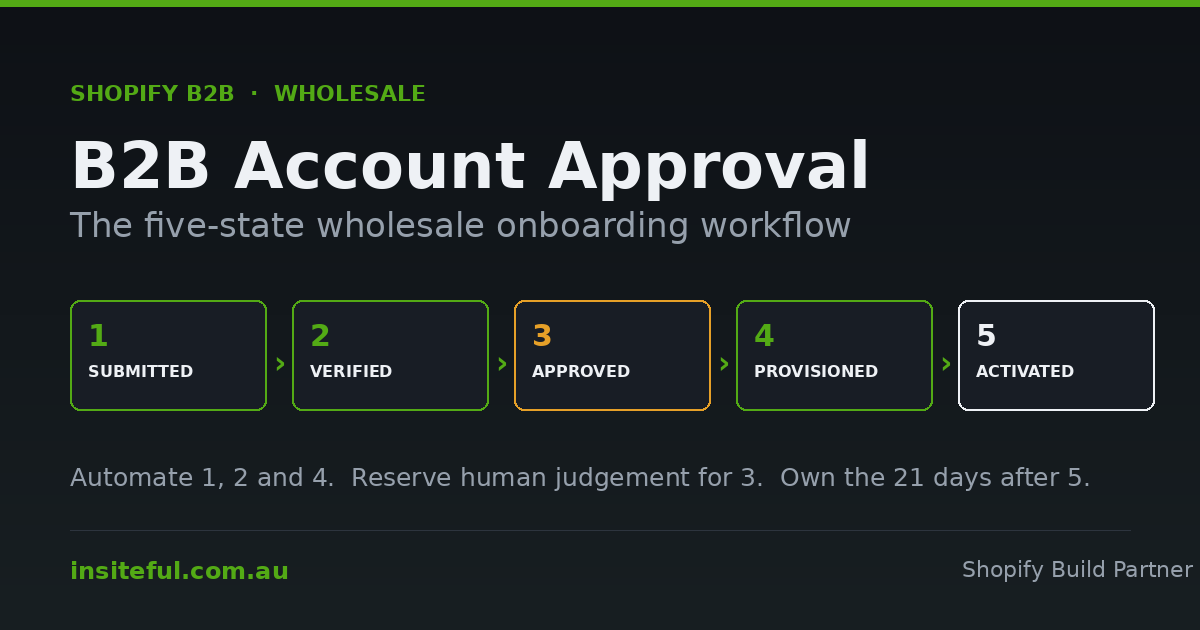
A wholesale applicant fills in your trade form on a Tuesday afternoon. They have an ABN, twelve years of trading history, three retail sites in regional Victoria, and a genuine intention to place a $9,000 AUD opening order. Six days later nobody has replied, because the submission landed in a shared inbox behind forty other emails, and the person who checks that inbox was waiting on someone else to confirm whether this account should sit on Tier 2 or Tier 3 pricing.
That account is gone. Not lost to a competitor with a better catalogue, lost to latency.
This is the least glamorous part of a Shopify B2B build and it is the part that most reliably leaks revenue. Everyone budgets for the catalogue, the quantity rules, the quick order form. Almost nobody budgets for the twelve to seventy-two hours between “I would like to buy from you” and “I am able to buy from you.” That window is where wholesale acquisition actually happens.
The numbers make the case better than we can. 83% of B2B purchasers now prefer self-service ordering through online platforms, and 61% say they would rather buy without a rep involved at all. Digital channels account for 56% of B2B revenue, up from 32% in 2020. Buyers are not nervous about size either: 73% will place orders over $50,000 through self-service, and 39% will go above $500,000, up from 28% in 2022. In Australia specifically, the B2B segment is forecast to grow at 13.12% CAGR through 2031 against a total market worth roughly USD 51 billion in 2026.
Buyers have decided they want to serve themselves. Most Australian wholesale stores are still asking them to wait for a human.
What Shopify actually hands you out of the box
Shopify’s native B2B tooling has quietly become good at this, and a lot of merchants are still running a third-party form because they set it up in 2023 and never revisited it.
The current native path is company account requests, built on Shopify Forms. When a prospect submits, Shopify creates three linked objects in one motion: a Company, a Company Location, and a Customer attached to that location as a company contact. No manual re-keying, no CSV, no copy-paste from an email into the admin.
The critical default: companies created this way cannot place orders and cannot see B2B pricing until someone explicitly allows it. That is the correct default. It means the gate is closed by design rather than by discipline, and every approval decision is an affirmative act rather than an oversight.
Shopify also ships a Flow template called Allow ordering for companies created by company account requests, which flips that switch automatically for every submission. It exists so you can get to zero-touch quickly. We almost never recommend using it unmodified, because auto-approving every form fill means auto-approving your competitor’s junior buyer, three bots, and someone who typed their home address into the trading address field. The template is a starting skeleton, not a policy.
The gap between that skeleton and a real onboarding workflow is the subject of the rest of this article.
A wholesale applicant moves through five states, not two
The single most useful thing we do at the start of one of these builds is force the client to stop thinking in “pending” and “approved” and instead map five distinct states. Two-state thinking is why applications stall: everything that is not yet approved sits in one undifferentiated pile, so nobody can tell the difference between an application waiting on a credit decision and one waiting on nothing at all.
| State | What it means | System of record | Exit criteria | Target dwell |
|---|---|---|---|---|
| 1. Submitted | Form received, company + location + contact created, ordering off | Shopify Company object | ABN returns a result | Under 60 seconds |
| 2. Verified | ABN active, GST status known, entity name reconciled to trading name | trade.abn_verified_at metafield |
Trading terms decision made | Under 4 business hours |
| 3. Approved | A human or a rule has said yes to this business at this tier | Company tag + tier metafield | Catalogue and terms assigned | Under 24 business hours |
| 4. Provisioned | Catalogue attached, payment terms set, ordering enabled | Catalog context + buyer experience config | Welcome email delivered | Immediate, API-driven |
| 5. Activated | First order placed | Order history | None. This is the goal. | Under 21 days |
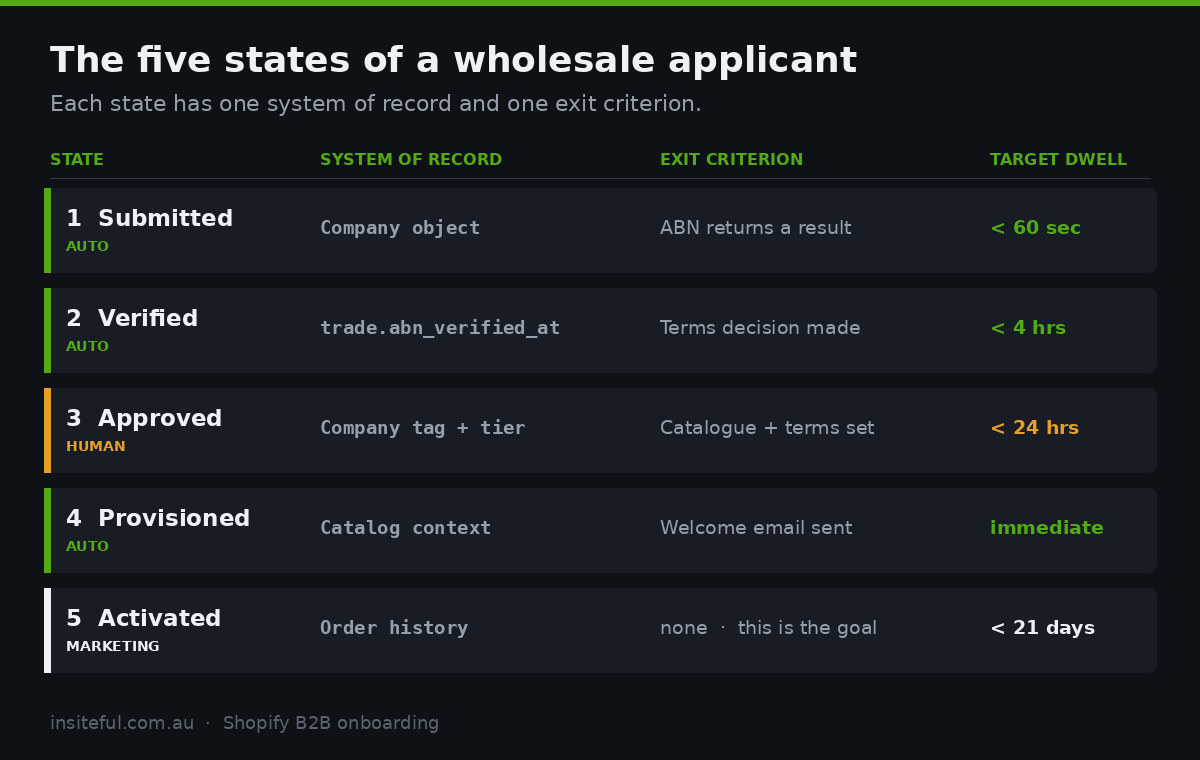
The separation matters operationally. States 1, 2 and 4 should be fully automated. State 3 is the only one that ever needs a human, and only for a subset of applicants. State 5 is a marketing problem, not an operations problem, and it is the one nobody owns.
When we audit an existing wholesale operation, we ask for a count of accounts sitting in each state. If the client cannot produce that number, the workflow does not exist. There is just a form and some goodwill.
Designing the application form: fewer fields, better fields
Every additional field on a wholesale application costs you completions. Every missing field costs you a round trip of emails, which costs you far more. The resolution is not “ask less”, it is “ask only what changes a decision or provisions an account.”
Run every candidate field through one test: does this field either (a) change whether we approve, (b) change which catalogue they land on, or (c) get written into a system automatically? If it does none of those three, it belongs in the welcome call, not the form.
| Field | Why it earns its place | Where it lands |
|---|---|---|
| ABN | Gates everything. Machine-verifiable in under a second. | company.metafield trade.abn |
| Registered business name | Reconciled against the ABR response to catch typos and fraud | Company name |
| Trading name | Often differs from the registered entity. Used on packing slips. | Company Location name |
| Delivery address + state | Determines freight zone and, for some clients, rep territory | Company Location shipping address |
| Channel type | Single strongest signal for tier assignment | trade.channel |
| Years trading | Proxy for credit risk when you have no other data | trade.trading_years |
| Estimated annual spend | Self-reported and unreliable, but it segments the follow-up | trade.est_spend |
| Existing brands stocked | Qualitative, but it is the field reps actually read | Company note |
What we deliberately leave off: ACN (derivable from the ABN response), phone number for a second contact (collect at activation), resale certificate uploads (a compliance step for a later state, not an acquisition step), and any free-text “tell us about your business” box longer than a single line. That box generates prose nobody reads and gives applicants an excuse to abandon.
Define the metafields before you build the form, not after. Free-text notes are where wholesale data goes to die.
# Company metafield definitions. Create once, then every applicant
# writes into the same typed slots instead of free-text notes.

- namespace: trade
  key: abn
  type: single_line_text_field
  owner: COMPANY
  validations: [{ name: "regex", value: "^[0-9]{11}$" }]

- namespace: trade
  key: abn_verified_at
  type: date_time
  owner: COMPANY

- namespace: trade
  key: gst_registered
  type: boolean
  owner: COMPANY

- namespace: trade
  key: channel
  type: single_line_text_field   # independent | buying_group | distributor | export
  owner: COMPANY

- namespace: trade
  key: trading_years
  type: number_integer
  owner: COMPANY

- namespace: trade
  key: application_source
  type: single_line_text_field   # form | rep | tradeshow | erp_import
  owner: COMPANY
Company metafield definitions, declared as configuration. Every downstream automation reads these typed slots rather than parsing notes.
ABN validation: the Australian step almost nobody automates
This is the single highest-value automation in the entire workflow and it takes about half a day to build.
The ABN Lookup web services are free. You register, receive an authentication GUID, and you can then verify an ABN and pull back entity name, entity type, ACN, GST registration status, state and postcode. The whole call takes a few hundred milliseconds.
The subtlety that catches most implementations: ABN status and GST registration are separate fields and they disagree more often than you would expect. A business can hold a perfectly active ABN while its GST registration has been cancelled. If you are extending trade pricing on the assumption that your customer is GST-registered, and they are not, your tax handling is wrong from the first invoice. Check both. Store both. Store the timestamp of the check, because in two years somebody will ask when you last verified this account and “we checked at some point” is not an answer.
// ABR web services: validate the ABN and read GST status separately.
// Runs in a Shopify Flow "Send HTTP request" step or a custom app webhook handler.

const ABR_GUID = process.env.ABR_AUTH_GUID; // free, register at abr.business.gov.au

async function verifyAbn(abn) {
  const clean = abn.replace(/[^0-9]/g, "");
  if (clean.length !== 11) return { ok: false, reason: "ABN must be 11 digits" };

  const url = "https://abr.business.gov.au/json/AbnDetails.aspx"
            + "?abn=" + clean + "&guid=" + ABR_GUID;

  const raw = await fetch(url).then(r => r.text());
  // ABR returns JSONP, so strip the callback wrapper before parsing
  const data = JSON.parse(raw.replace(/^callback\(/, "").replace(/\)$/, ""));

  if (data.Message) return { ok: false, reason: data.Message };

  return {
    ok: data.AbnStatus === "Active",
    entityName: data.EntityName,
    entityType: data.EntityTypeName,
    abnStatus: data.AbnStatus,
    gstRegistered: Boolean(data.Gst),   // NOT the same as AbnStatus
    gstFrom: data.Gst || null,
    postcode: data.AddressPostcode,
    state: data.AddressState,
    checkedAt: new Date().toISOString()  // store this. audit trail.
  };
}
ABR verification with the GST status read separately. The JSONP unwrap is the part that trips people up on first implementation.
Three rules we apply to the response:
- Never auto-approve on a cancelled ABN. Not “flag for review”. Reject, with a polite message telling them to check their ABN and resubmit. This costs you nothing and saves your finance team real work.
- Fuzzy-match the returned entity name against what they typed. An exact match is rare because people type trading names into registered-name fields. A similarity score below roughly 0.6 is worth a human glance. A wildly different name is either a typo or someone using an ABN that is not theirs.
- Write the check to a metafield, dated.
trade.abn_verified_atis the single field that turns your customer list into an auditable record.
One Melbourne homewares wholesaler we worked with was manually checking ABNs by pasting them into the ABR website, one at a time, roughly forty a month. The check itself took ninety seconds. The queue it created added an average of two days to every application, because it was batched into a Friday afternoon job. Automating it removed two days from the median approval time and nobody’s role changed.
The approval decision: three models, and how to choose
State 3 is the only genuinely judgemental step. There are three defensible models and the wrong one for your business will either cost you accounts or cost you bad debt.
Model A: manual review on everything. Every application goes to a human. Correct when average order values are high, when you offer credit terms by default, or when your catalogue includes anything territorially exclusive. Costs you speed. Only viable if the human is actually watching, with an SLA and an escalation path when they are on leave.
Model B: auto-approve on verification. Anyone with an active, GST-registered ABN whose entity name reconciles gets an account, on prepaid terms, on your entry tier. Correct for most Australian consumer-goods wholesalers with sub-$5,000 AUD opening orders. The risk is not fraud, it is margin: you have just given trade pricing to anyone who can obtain an ABN in ten minutes, which in Australia is anyone.
Model C: tiered auto-approval. Our default recommendation. Verification passes automatically and the account is provisioned automatically, but onto a deliberately conservative tier with prepaid terms. Better pricing and payment terms are earned through order history rather than granted at signup. A human reviews only the applications that fail a rule or self-report above a spend threshold.
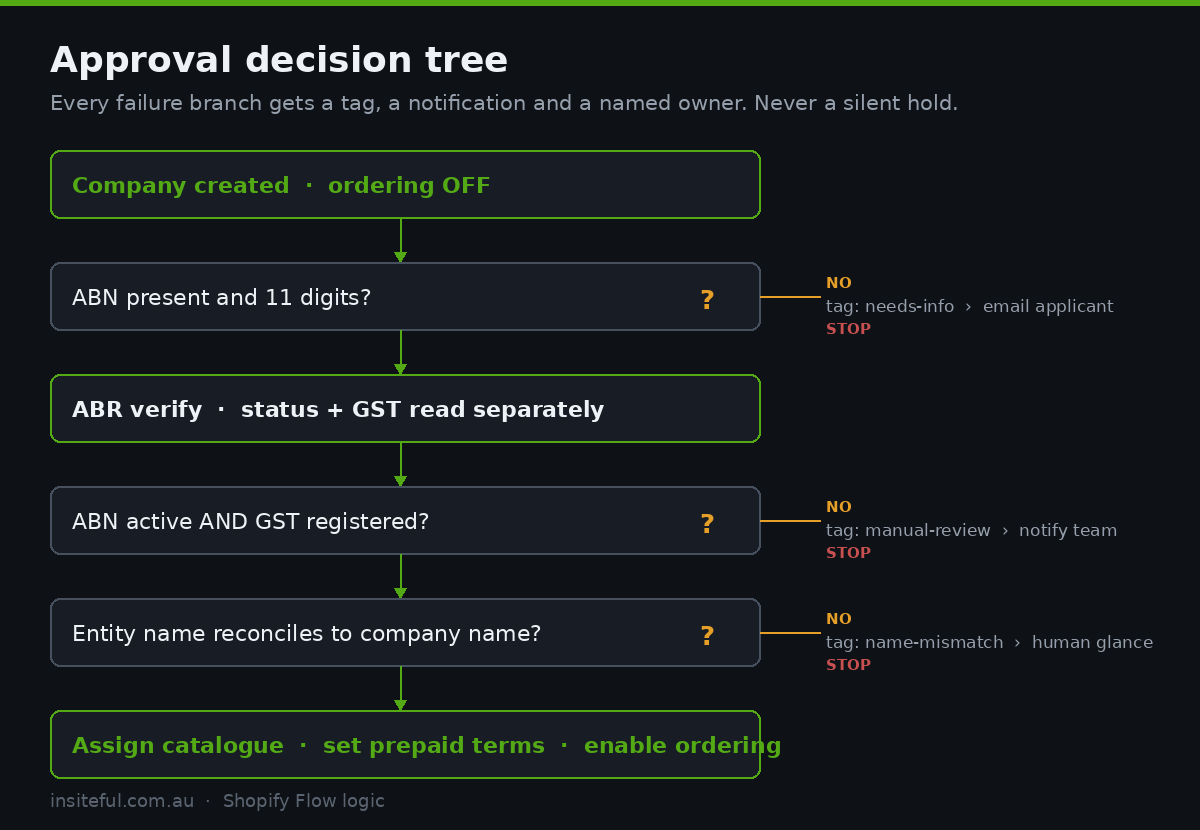
Model C works because it separates two decisions that stores routinely conflate: should this business be able to buy from us (almost always yes, and answerable by machine) and on what commercial terms (a genuine judgement, and reversible).
Trigger:  Company created
  |
  +-- Condition: company.metafield(trade.abn) is set?
  |     NO  -> Send internal email "Application missing ABN" -> Tag company: needs-info -> STOP
  |     YES -> continue
  |
  +-- Action: Send HTTP request -> ABR verify endpoint
  |
  +-- Condition: response.ok == true AND response.gstRegistered == true
  |     NO  -> Tag company: manual-review -> Notify #wholesale-apps -> STOP
  |     YES -> continue
  |
  +-- Condition: response.entityName fuzzy-matches company.name
  |     NO  -> Tag company: name-mismatch -> manual review -> STOP
  |     YES -> continue
  |
  +-- Action: Update company metafields (abn_verified_at, gst_registered)
  +-- Action: Add company to catalog "Tier 3 - Opening Account"
  +-- Action: Set payment terms template "Prepaid"
  +-- Action: Allow ordering for company location
  +-- Action: Send customer email "Your trade account is open"
  +-- Action: Create Slack message in #wholesale-apps
The Flow logic as a decision tree. Every STOP branch has a named owner and a notification, which is the part that separates a working process from a queue.
Note what happens at every failure branch: a tag, a notification, and a stop. Never a silent hold. An application sitting in an unlabelled pending state with nobody notified is the exact failure mode we are engineering against.
Catalogue assignment is what approval actually means
“Approved” is not a status field in Shopify B2B. It is the sum of three concrete API operations, and if you only do one or two of them the buyer gets a broken experience.
A company location needs a catalog attached, which carries both the price list and the product publication. It needs a buyer experience configuration, which determines whether their orders go straight through or land as draft orders for review, and which payment terms template applies. And it needs ordering enabled. Get the first two right and skip the third and your newly approved buyer logs in to see retail prices, which is worse than never letting them in at all.
# Approval, expressed as API calls. This is what "approved" actually means.

mutation ApproveWholesaleAccount(
  $locationId: ID!
  $catalogId: ID!
  $termsTemplateId: ID!
) {
  # 1. Attach the price list + product publication the buyer will see
  catalogContextUpdate(
    catalogId: $catalogId
    contextsToAdd: { companyLocationIds: [$locationId] }
  ) {
    catalog { id title }
    userErrors { field message }
  }

  # 2. Set how they pay. Net 30 is a credit decision, not a checkbox.
  companyLocationAssignStaffMembers: companyLocationUpdate(
    companyLocationId: $locationId
    input: {
      buyerExperienceConfiguration: {
        checkoutToDraft: false
        paymentTermsTemplateId: $termsTemplateId
        editableShippingAddress: false
      }
    }
  ) {
    companyLocation { id name }
    userErrors { field message }
  }
}

# 3. Only now flip ordering on.
mutation EnableOrdering($companyId: ID!) {
  companyAssignCustomerAsContact(companyId: $companyId, customerId: $customerId) {
    companyContact { id }
    userErrors { field message }
  }
}
Approval as three sequenced operations. Order matters: attach pricing before enabling ordering, never the reverse.
We cover the pricing structure itself in more depth in our guide to Shopify B2B pricing and catalogues, and the multi-site case in companies and locations. The point here is narrower: the moment of approval should be a single atomic operation, triggered once, that leaves the account in a fully usable state. If your process involves a person doing four things in the admin in the right order, it will eventually be done in the wrong order.
Payment terms deserve their own decision rather than a default. Assigning a Net 30 template at approval is a credit decision made by whoever built the automation, which is rarely who should be making it. Our standing recommendation is prepaid at signup, with terms applications handled as a separate workflow once there is order history to assess. We go deeper on the mechanics in Shopify B2B payment terms.
GST handling on wholesale orders has its own set of traps, particularly around whether prices display inclusive or exclusive for trade buyers. That is covered separately in GST on Shopify B2B.
The first-order window is a marketing problem
State 5 is where the money is and it is almost universally unowned. An approved account that never places an order is worse than a rejected one: it consumed the same operational effort and returns nothing.
The welcome email that Shopify sends by default is a functional notification. It is not an activation asset. The version we build does four things:
- Names the tier and what it means in dollars. “Your account is on Tier 3, which is 35% off RRP with a $500 AUD minimum order.” Vague approvals produce hesitant buyers.
- Links directly to the quick order form, not the homepage. If you have built a quick order experience, this is the single highest-value link in the entire lifecycle.
- Includes an opening-order suggestion. Six to ten SKUs, chosen by channel type, priced out. Buyers new to a brand do not know what to order first and a blank cart is a decision they will postpone.
- Names a human. With a direct email address, not a support alias.
Then a three-touch sequence at day 3, day 10 and day 21 for accounts that have not ordered. Not “just checking in.” Day 3 is a product suggestion, day 10 is a case study from a similar retailer, day 21 is a direct offer of a fifteen-minute call. We have seen this sequence move activation from roughly one in three approved accounts to better than one in two, which on a book of 300 new accounts a year is a material revenue difference at any realistic order value.
Where these builds break
Six failure modes we see repeatedly, in rough order of how much damage they do:
- The silent pending pile. No tag, no notification, no owner. Applications accumulate. Nobody discovers it until someone asks why wholesale acquisition flattened. Every state transition needs a notification with a named recipient.
- Approval without catalogue assignment. Ordering is enabled but no catalog is attached, so the buyer logs in and sees retail pricing. They assume the trade account did not work and they email, if you are lucky, or they leave.
- Auto-approve inherited from the Flow template. The default template is switched on during setup, nobody revisits it, and eighteen months later trade pricing has been handed to several hundred unvetted accounts including some who are reselling on marketplaces at a price that undercuts your own stockists.
- ABN captured as free text with no validation. Spaces, dashes, ten digits, eleven digits, an ACN entered by mistake. By the time finance needs to reconcile, the data is unusable and there is no dated verification record.
- Company Location proliferation. A buyer applies twice, six months apart, from two email addresses. Two companies, two locations, two catalogues, split order history, and a rep who cannot see the full account. Deduplicate on ABN at submission, before the company is created.
- Payment terms assigned by automation. Net 30 granted at signup because it was hardcoded in the Flow. Discovered during a bad-debt review. Credit decisions belong to people.
What to measure
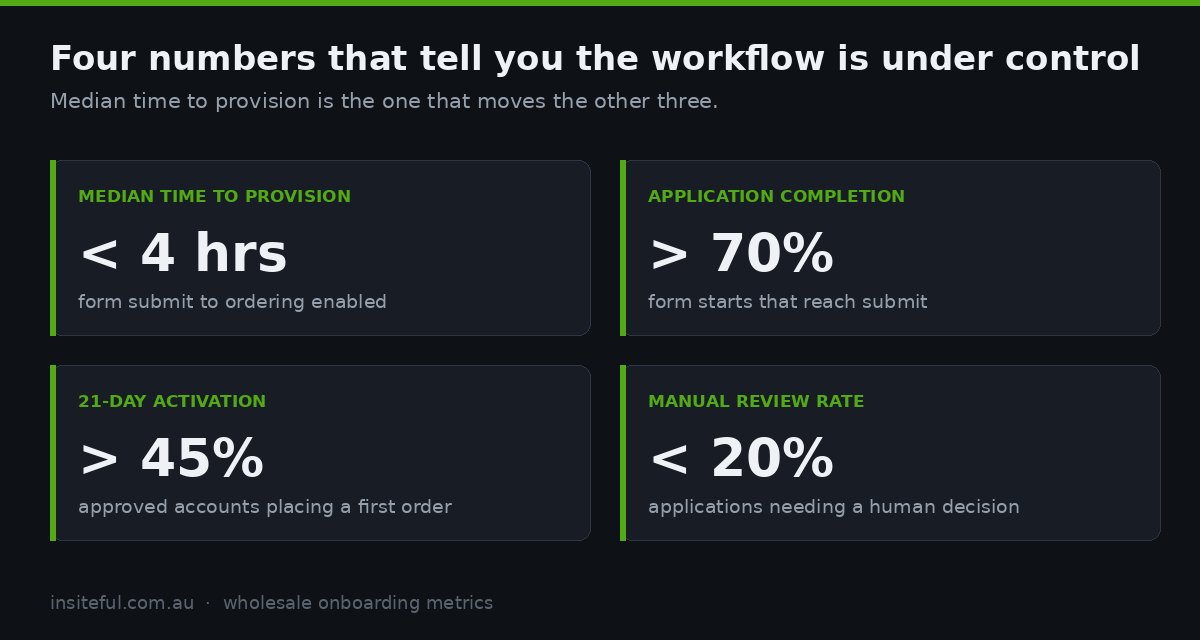
Four numbers. If you are tracking these, the workflow is under control. If you are not, you are guessing.
| Metric | Definition | What good looks like |
|---|---|---|
| Median time to provision | Form submit to ordering enabled | Under 4 business hours |
| Application completion rate | Form starts that reach submit | Above 70% on an 8-field form |
| Activation rate | Approved accounts placing a first order within 21 days | Above 45% |
| Manual review rate | Applications requiring a human decision | Under 20% once rules are tuned |
Manual review rate is the diagnostic. If it sits above 20% after a few months, your rules are not encoding the decisions your team is actually making, and the fix is to sit with whoever approves accounts, watch them do twenty, and write down what they are really looking at.
How we do it at Insiteful
We build wholesale onboarding as a defined workflow with named states before we write a line of Liquid, because the technical work is straightforward and the process design is not.
The sequence on a typical engagement: we map the five states with the client and get agreement on which are automated and who owns the one that is not. We define company metafields as configuration, so field names are decided once rather than negotiated per automation. We build ABN verification early because it is cheap and it removes the largest single source of delay. We wire the Flow decision tree with a notification on every branch, including the failure branches, and we test it with deliberately bad applications: cancelled ABNs, mismatched entity names, duplicate submissions, ten-digit numbers.
Then we assign catalogues and payment terms as a single atomic operation rather than a checklist, so an account is never half-provisioned. We instrument the four metrics from day one, because a workflow you cannot measure will drift back to a shared inbox within a year.
Australian wholesale has its own texture. ABN and GST verification, freight zones that make a Perth account structurally different from a Sydney one, buying groups that need a company structure rather than a discount code, and rep territories that have usually been drawn by hand over twenty years. We have built on Shopify for twenty-five years and roughly 200 sites a year, and native Shopify B2B handles all of it without a separate wholesale store, provided the onboarding workflow is designed rather than assembled. If you are still weighing that architectural question, we set out the trade-offs in B2B on Shopify versus a separate wholesale store.
We do not build headless for this. Everything described here runs on a native Shopify theme with Flow, Forms and the Admin API, which is why it stays maintainable after we hand it over.
The short version
Your wholesale application form is not the onboarding process. It is the first of five states, and the four that follow it are where accounts are won or quietly lost. Automate verification and provisioning, reserve human judgement for commercial terms, notify on every branch including the failures, and own the twenty-one days after approval as deliberately as you own the form itself.
The buyers have already decided they want to serve themselves. The build just has to let them.
Running a wholesale operation on Shopify and not sure where applications are getting stuck? We start every engagement with a build assessment that maps your current workflow against the five states and shows you exactly where the latency sits. See how our build process works.