
A shopper picks a size, taps Add to cart, and nothing happens. The button spins for a second, stops, and the page looks exactly as it did before. She taps again. Still nothing. On the third tap she gives up, or she opens the cart in a new tab and finds two of the item sitting there, one more than she wanted. Your analytics recorded three add to cart events. Your support inbox will record one confused email on Thursday.
That moment is almost never designed. The theme was built and tested on the happy path, a product in stock, a quantity of one, a fast connection, and the failure paths were left to whatever the starter theme shipped with. On a store doing real volume, those failure paths are where a surprising share of lost add to carts goes to die, and nobody is looking at them because nothing in the dashboard says “failed.”
This article is the build we use at Insiteful to handle it: what the Shopify cart endpoint actually returns when an add fails (we tested it against live stores this week, and some of it contradicts the documentation), why matching error text is a trap, a small classifier that decides what happened by reading the cart, the accessible way to tell the shopper, and a copy table you can hand to whoever writes your microcopy. It is written for store owners who want to know what to ask for, and for developers who will build it.
What a failed add to cart really looks like
Shopify’s Cart Ajax API is the endpoint behind almost every Add to cart button on Online Store 2.0 themes: a POST to /cart/add.js. The documentation describes the shape of a failure clearly. Every cart error comes back as HTTP 422 with a JSON body holding status, message and description. If the requested quantity is more than the stock available, the cart adds the maximum available and returns an error. If the product is sold out, nothing is added. A variant that cannot be found returns “Cannot find variant,” and the documentation advises retrying with increasing delays for newly created variants, because changes made through the Admin API can take a few seconds to reach the cart.
Read that again and notice what it means for design. A single error status covers at least four different realities: nothing was added, some of it was added, the variant does not exist yet, and the cart is throttled. They need four different messages and four different next steps. Yet most themes show the same grey line for all of them, or nothing at all.
On 27 October 2026 we sent real add requests to a public Shopify store (Allbirds, chosen because its product feed is public and it is not a client) and recorded what came back. We used the items array form of the request, one fresh session per case, and read the cart afterwards. No store was harmed: each test cart was an anonymous session that was never checked out.
| Request | HTTP | What the body said | What the cart held afterwards |
|---|---|---|---|
| In stock variant, quantity 1 | 200 | The line item | 1 unit |
| Same variant, quantity 9,999 | 422 | “Only 2 items were added to your cart due to availability.” | 2 units (a partial add) |
| Sold out variant, quantity 1 | 422 | “The product ‘…’ is already sold out.” | 0 units |
| Variant ID that does not exist | 422 | “Cart Error” / “Cannot find variant” | 0 units |
| One in stock item plus one sold out item in the same call | 422 | The sold out message | 0 units (the good item was rejected too) |
Two rows deserve a second look. The partial add is an error status on a request that changed the cart: the shopper now owns two pairs of shoes she did not choose to cap at two, and if your theme treats every 422 as “nothing happened,” it will show a failure while the cart count quietly goes up. And the mixed call is an all or nothing rejection. If your bundle builder or quick order form posts several lines at once, one sold out line sinks the lot, so you need to know which line caused it before you can tell the shopper anything useful.
Do not match error text: it has already changed twice
The tempting fix is to read description and branch on the words. Shopify has shown why that breaks. A changelog entry removed the old “All (count) (name) are in your cart” response and folded it into “You can’t add more (name) to the cart,” telling developers to stop checking for the removed string. A later changelog, dated 4 March 2025, introduced two new messages for add, change and update: “Only (available quantity) items were added to your cart” when nothing from that variant was in the cart and the request exceeded stock, and “The maximum quantity of this item is already in your cart” when all available stock was already there.
Now compare that with the table above. The live store answered “Only 2 items were added to your cart due to availability.” That is neither the wording in the cart reference nor the wording in the March 2025 changelog. We are not suggesting anything is wrong at Shopify. The platform is moving, the strings are customer-facing copy rather than a contract, and a store can see different text from the docs. The lesson is practical: any theme that decides what to show by matching those sentences will eventually show the wrong thing, and it will do so silently.
What stays stable is structure. The HTTP status, the presence of status in the body, and above all the cart itself. So the build rule is: classify by what the cart now contains, and use the error text only as display copy of last resort.
A payload quirk we cannot fully explain
While testing we noticed something we want to flag carefully, because we have seen it on several stores but cannot explain it from the documentation. A request in the single item form, { id, quantity }, for a variant that the product feed marks as unavailable returned HTTP 200 and the cart then held one unit. The same variant requested through the items array returned the 422 sold out error and an empty cart. We reproduced the pattern on four public stores (Allbirds, ColourPop, Kylie Cosmetics and Rare Beauty), in both orders, and with a form encoded body.
We did not take any of those carts to checkout, so we do not know whether checkout then rejects the line, and we do not claim this is a bug: it may be inventory settings we cannot see from outside, such as reserved or in transit stock, or a caching layer on the availability flag in the public feed. What we can say is the engineering conclusion that does not depend on the cause: the response to a single add call is not enough evidence of what is in the cart. Read the cart. That one habit protects you from this quirk, from partial adds, and from the next wording change.
There is one more documented trap in the same family. The sections parameter, which lets an add request also return re-rendered theme sections in one round trip, can return HTTP 400 for the whole request when a section ID or sections_url value is invalid, even though the cart change itself may have succeeded. If you build your drawer on that parameter, as we describe in our guide to the Section Rendering API, a 400 does not mean the item failed to add. Another reason to confirm against the cart.
What the default theme does, and where it stops
Shopify’s reference theme, Dawn, is a fair baseline because so many custom themes begin as a copy of it, so we read its product form script. Three behaviours matter. It checks the status field inside the parsed JSON body rather than the HTTP code, shows the error description in a dedicated message element, and, for sold out, disables the button. It uses aria-disabled as the in-flight guard, so a second tap during the request is ignored. And network failures are caught and dispatched as a service unavailable cart error event.
That is a sensible start. What the script does not have is also worth knowing: there is no abort controller and no request timeout, so a stalled connection leaves the button in its loading state until the browser gives up. And it shows the platform’s sentence as the message, so whatever Shopify says is what your shopper reads, including the partial add case where the error text and the cart disagree about what happened. None of this is a criticism of Dawn, which is a general purpose starting point. It is a list of the jobs a custom build has to pick up.
Six outcomes your Add to cart button has to handle
Before any code, agree the states. We design these on a one page spec that the designer, the developer and the person who owns customer service all sign off, because each state has a visual treatment, a message and a next action.
| State | How we detect it | What the shopper needs |
|---|---|---|
| Added | Cart quantity rose by the amount requested | Confirmation, cart count update, a way to checkout |
| Partial | Cart rose by less than requested | A plain statement of how many were added and why |
| Sold out or capped | Cart quantity did not change, cart readable | Which item, and an alternative: another size, back in stock alert |
| Unknown variant | 422 with “Cannot find variant” | A reload prompt, plus one silent retry for fresh variants |
| Throttled | HTTP 429 | A short wait message, button disabled for a few seconds |
| Network or timeout | Fetch failed or abort fired | “Check your connection and try again,” with the button re-enabled |
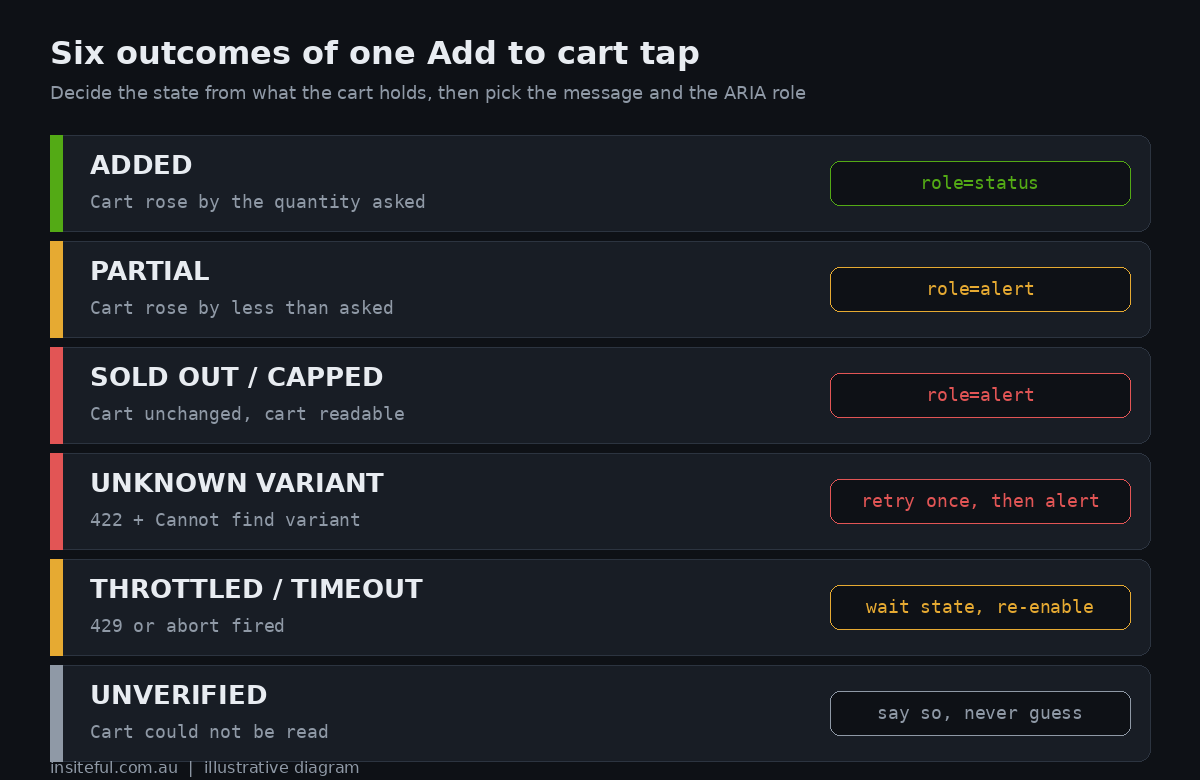
The documentation says repeated failed adds to the same cart are throttled with a 429. We fired fifteen failed adds back to back at one cart and every one came back as a normal 422, so you will not hit the throttle by accident in testing. Treat it as real but rare, and make sure the state exists, because the shopper who hits it during a flash sale is the one you least want to lose.
There is a seventh state that is not an error at all: unverified. If the cart cannot be read after the add, the honest answer is that you do not know what happened, and your interface should say so rather than guess in either direction. We will come back to this in the code.
The classifier: decide by reading the cart
This is the module we put under every Add to cart button, including the sticky bar and quick view covered in our guides to the sticky add to cart and the cart drawer. It reads the quantity of the variant in the cart before and after the add, applies a timeout through an abort controller, and returns one of the states above rather than a string.
// cart-add.mjs  Classify an add to cart by what the cart holds, not by error wording.
export async function addToCart(origin, variantId, qty = 1, { timeoutMs = 8000, fetchImpl = fetch, headers = {} } = {}) {
  const ctl = new AbortController();
  const timer = setTimeout(() => ctl.abort(), timeoutMs);
  const json = { 'Content-Type': 'application/json', Accept: 'application/json', ...headers };
  try {
    const before = await readQty(origin, variantId, ctl.signal, fetchImpl, json);
    const res = await fetchImpl(origin + '/cart/add.js', {
      method: 'POST', headers: json, signal: ctl.signal,
      body: JSON.stringify({ items: [{ id: variantId, quantity: qty }] }),
    });
    if (res.status === 429) return { state: 'THROTTLED', added: 0 };
    const body = await res.json().catch(() => ({}));
    const after = await readQty(origin, variantId, ctl.signal, fetchImpl, json);
    if (before === null || after === null) return { state: 'UNVERIFIED', status: res.status, raw: body.description };
    const added = after - before;
    if (res.ok && added === qty) return { state: 'ADDED', added };
    if (added > 0 && added < qty) return { state: 'PARTIAL', added, wanted: qty };
    if (res.status === 422 && /find variant/i.test(body.description || '')) return { state: 'UNKNOWN_VARIANT', added: 0 };
    if (added === 0) return { state: 'SOLD_OUT_OR_CAPPED', added: 0, raw: body.description };
    return { state: 'MISMATCH', added, wanted: qty, status: res.status };
  } catch (e) {
    return { state: e.name === 'AbortError' ? 'TIMEOUT' : 'NETWORK', added: 0 };
  } finally { clearTimeout(timer); }
}

async function readQty(origin, id, signal, f, headers) {
  const r = await f(origin + '/cart.js', { headers, signal });
  const c = await r.json().catch(() => null);   // a challenge or maintenance page is HTML, not JSON
  if (!r.ok || !c) return null;
  return c.items.filter(i => i.variant_id === id).reduce((n, i) => n + i.quantity, 0);
}
One deliberate choice: the only text it ever inspects is “find variant” for the unknown variant case, because that is the one state the cart cannot tell you about, and even there it is a hint rather than a requirement. Everything else is arithmetic on quantities.
We ran it against the live store with a cookie jar so the cart persisted between the before and after reads. This is the real output, not a mock:
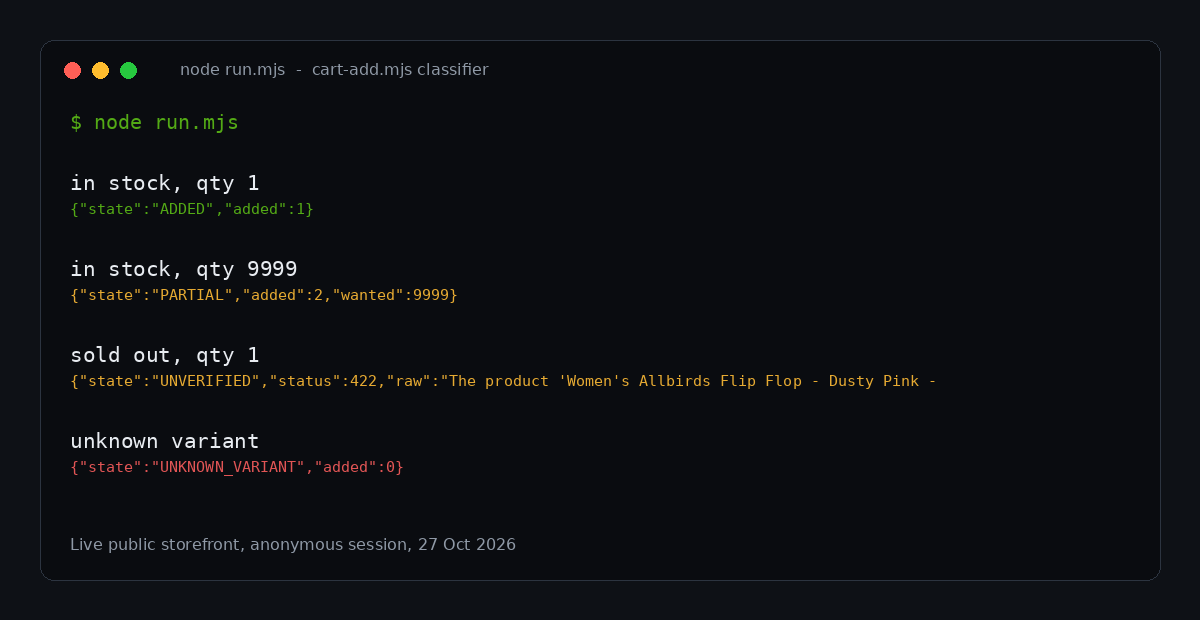
The first two rows are what you would expect: one unit added cleanly, and a partial add that reports two units against the 9,999 requested. The sold out row came back as UNVERIFIED, and that is the most instructive line in the run. Our cookie-less test session got an HTML page instead of JSON when it read an empty cart straight after a rejected add, probably a bot protection response on the storefront. In a real browser with the cart cookie this would classify as sold out. The point is what the script did when it could not verify: it did not claim success and it did not claim failure, it handed the interface an honest “unknown.” Your design needs a sentence for that case, such as “We couldn’t confirm that was added, check your cart before you leave.”
Tell people in a way assistive technology can hear
A visible message that is not announced to a screen reader is a failure for the shopper who relies on one, and it is also a compliance question. WCAG 2.2 success criterion 4.1.3, Status Messages, is Level AA, and it requires that status messages can be programmatically determined through role or properties so assistive technology can present them without moving focus. W3C’s own worked example is an Add to Shopping Cart button: after the press, text such as “5 items” appears near the cart icon and should carry a status role so a screen reader announces it. The guidance adds that if the text changes from “0 items” to “3 items,” the whole string should be the live region, with aria-atomic, or a screen reader user may hear only “three.”
In Australia this is not a nice to have. The Australian Human Rights Commission’s guidelines under the Disability Discrimination Act, updated in April 2025 according to Deque’s summary of the changes, recommend WCAG 2.2 Level AA as the minimum standard, replacing the old 2.0 reference. We are not lawyers and none of this is legal advice, but a cart that fails silently for blind shoppers is exactly the kind of defect we would not want to explain.
The rule for roles is simple and W3C states it plainly. Use role=”status” for results, such as added or partially added. Use role=”alert” for errors that need attention when focus does not move. Putting an alert role on unimportant content is listed as a failure. So one region, two roles, chosen by outcome:
<!-- Render once, near the button. The region must exist in the DOM before it speaks. -->
<div class="atc-feedback">
  <p id="atc-status" role="status" aria-atomic="true"></p>
  <p id="atc-alert" role="alert" aria-atomic="true"></p>
</div>

<script type="module">
  import { addToCart } from '/assets/cart-add.js';
  const status = document.getElementById('atc-status');
  const alert = document.getElementById('atc-alert');
  const COPY = {
    ADDED: (r) => ({ el: status, text: 'Added to your cart.' }),
    PARTIAL: (r) => ({ el: alert, text: 'We added ' + r.added + ' because that is all we have in stock. Your cart is updated.' }),
    SOLD_OUT_OR_CAPPED: () => ({ el: alert, text: 'That option is sold out right now. Try another size or ask us to tell you when it is back.' }),
    UNKNOWN_VARIANT: () => ({ el: alert, text: 'This product changed while you were looking. Reload the page and try again.' }),
    THROTTLED: () => ({ el: alert, text: 'Lots of people are shopping right now. Wait a few seconds and try again.' }),
    TIMEOUT: () => ({ el: alert, text: 'That took too long. Check your connection and try again.' }),
    NETWORK: () => ({ el: alert, text: 'We could not reach the store. Check your connection and try again.' }),
    UNVERIFIED: () => ({ el: alert, text: 'We could not confirm that was added. Check your cart before you leave.' }),
    MISMATCH: () => ({ el: alert, text: 'Your cart changed in a way we did not expect. Please check it.' }),
  };
  document.querySelector('[data-atc]').addEventListener('click', async (e) => {
    const btn = e.currentTarget;
    if (btn.getAttribute('aria-disabled') === 'true') return;
    btn.setAttribute('aria-disabled', 'true');
    status.textContent = ''; alert.textContent = '';
    const result = await addToCart(location.origin, Number(btn.dataset.variantId), Number(btn.dataset.qty || 1));
    const { el, text } = COPY[result.state](result);
    el.textContent = text;
    if (result.state !== 'SOLD_OUT_OR_CAPPED') btn.removeAttribute('aria-disabled');
  });
</script>
Two details are easy to miss. The live regions are in the page from the start and only their text changes, because a region inserted at the moment of speaking is often not announced. And we clear both regions before each attempt, so a second identical failure is announced again rather than ignored as unchanged text. We keep the button focusable and use aria-disabled rather than the disabled attribute, matching what Dawn does, so a keyboard user does not lose their place when the button locks.
A word on restraint. The 2026 WebAIM Million report, which analysed the top one million home pages in February 2026, found detectable WCAG 2 failures on 95.9 per cent of them, an average of 56.1 errors per page, and 51 per cent of pages with form inputs missing labels. It also found pages using ARIA averaged more detected errors (59.1) than pages without it (42), although the authors caution that ARIA pages are also more complex. We read that as a reminder rather than a verdict: two correct roles in the right place beat a theme smothered in attributes.
Write the words once, in a table
Microcopy for failure states is where the design lead and the customer service lead should be in the same room. Our rules are the same for every client: say what happened in the first clause, say what the shopper can do in the second, never blame them, never expose a platform string, and never use an exclamation mark on a bad outcome.
| State | Weak (what themes ship) | What we write | Next action offered |
|---|---|---|---|
| Partial | “Only 2 items were added to your cart due to availability.” | “We added 2, the last we have in stock.” | View cart; notify me for more |
| Sold out | “The product ‘…’ is already sold out.” | “Size 5 just sold out. Sizes 6 and 7 are in stock.” | Switch size; back in stock alert |
| Unknown variant | “Cart Error” | “This product was just updated. Reload to see the latest.” | Reload button |
| Network | Nothing, or a stuck spinner | “We couldn’t reach the store. Try again.” | Retry button |
| Unverified | Nothing | “We couldn’t confirm that was added. Check your cart.” | Open cart |
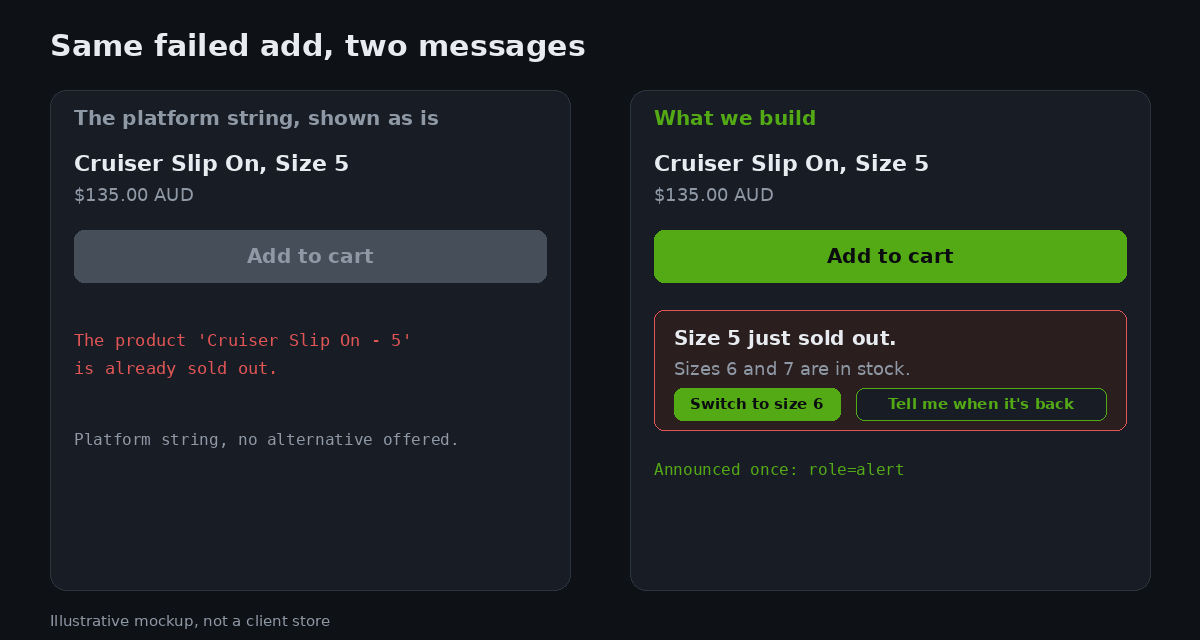
The sold out row shows the difference between a message and a recovery. “Sold out” ends a journey. “Size 5 just sold out, sizes 6 and 7 are in stock” continues it. That second sentence needs the other variants’ availability on the page already, which is one more reason the variant picker and the Add to cart button should share a single source of truth, as we lay out in our variant picker design guide.
What a silent failure costs in Australian dollars
We would rather give you a model you can check than a statistic we cannot source, so here is a worked example with every assumption on the table. Treat the inputs as placeholders and swap in your own from analytics.
| Input | Assumption |
|---|---|
| Product page sessions per month | 40,000 |
| Add to cart attempt rate | 6 per cent (2,400 attempts) |
| Share of attempts that hit any failure state | 3.75 per cent (90 attempts) |
| Walk away rate when the failure is unexplained | 40 per cent |
| Walk away rate when the message gives a clear recovery | 15 per cent |
| Average order value | $142 AUD |
Ninety failed attempts at 40 per cent walking away loses 36 shoppers a month. At 15 per cent it loses 13.5. The difference is 22.5 shoppers, and at $142 AUD each, that is $3,195 AUD a month, or about $38,000 AUD a year, from copy and one small module. Those walk away rates are our planning assumptions, not measured industry figures, and we say so because you should replace them with your own session data before putting the number in front of a board. The point of the model is the structure: failure frequency times the gap between a bad and a good message times order value. For most of the stores we audit, the surprise is not the size of the answer but that nobody had ever put a number on the first input.
Measure the failure states you just created
Once the classifier returns a state, logging it is nearly free, and it gives you the first honest picture of your own failure rate. We send each non-ADDED state as a custom event with the variant ID, requested quantity, state and elapsed milliseconds. Three views are worth building in your analytics tool. The first is failures by state per week, which tells you whether you have a stock problem (sold out and partial dominate) or a platform problem (unknown variant, timeout and unverified dominate). The second is failures by variant, which usually puts a short list of products at the top, the ones whose inventory is wrong or whose size curve is broken. The third is retry behaviour: how often a shopper tapped again within five seconds of a failure, which is the closest thing to a direct measure of confusion.
A spike in unknown variant after an inventory or catalogue sync is a classic. If your ERP or PIM writes variants through the Admin API and the storefront starts showing them before the cart can find them, the documented few seconds of delay is the cause, and the single silent retry in the table above clears most of it. A spike in partial adds is a merchandising signal, not an engineering one: it means shoppers want more units than you hold, and your back in stock capture is probably where the revenue is hiding.
A discount and limit edge case worth knowing
One more item from the field, because it affects stores that cap quantities per customer. A December 2025 post on the Shopify developer community reported that changing a line quantity above an Add to Cart limit returned a 422 with the “Only X items were added” message without a discount code, but a 200 with the cart silently capped when a discount code was applied. A Shopify staff member replied a week later that they could not reproduce it on a test store with a limit of 50 and that, through the Cart Ajax API, they saw a 422 either way. They also noted that the Storefront GraphQL cartLinesUpdate mutation returns a 200 with a warnings array carrying the code MERCHANDISE_NOT_ENOUGH_STOCK when quantity is adjusted, which they described as by design. The thread had no resolution.
We include it because it is the cleanest argument for reading the cart. Two different Shopify APIs report the same underlying event in two different ways, 422 with an error or 200 with a warning, and the person reporting a third variant could not get a stable answer. A classifier that compares quantities before and after handles all three without caring which one it got.
How we do it at Insiteful
Every theme we build ships with the cart add module above, or a variant of it, as part of the product form rather than an afterthought. In our build process the failure states get designed in the same Figma frame as the happy path: our design team draws the added, partial, sold out and error treatments next to the default button, and the copy table goes into the same review as the visuals. A theme that has only a happy path design is not finished, and we do not hand it over.
In QA we test the failure states on purpose. Before launch we run a short script against the staging store: a sold out variant, an over quantity request, a bogus variant ID, an offline toggle in the browser, and a screen reader pass with NVDA and VoiceOver to confirm each message is announced once and only once. We keep the results in the handover pack so the store owner can see what was verified. After launch the state events feed a simple dashboard we set up for the client, which is usually the first time they see how often their own store says no to a shopper.
If you run a store with the usual cart error behaviour, we would be glad to look at it. Our build process starts with an assessment of what is on your theme today, including how it behaves when the Add to cart button is pressed under bad conditions, and you can read how that works on our process page. We will tell you plainly if your current theme is already fine.
The checklist
| Check | Pass condition |
|---|---|
| Classify by cart quantity | No branching on description wording beyond the unknown variant hint |
| Partial add | Message states exactly how many were added |
| Multi line adds | Failure identifies the line; shopper is told the whole call was rejected |
| Timeout | Abort controller in place, button re-enabled on failure |
| Throttle | 429 handled with a wait state |
| Unknown variant | One silent retry, then a reload prompt |
| Unverified | Distinct message, never reported as success |
| Announcements | role=status for results, role=alert for errors, regions present on load |
| Section parameter | A 400 does not trigger an error message until the cart is read |
| Telemetry | State, variant and elapsed time logged for every non-ADDED outcome |
None of this makes a store more beautiful, which is probably why it is so often skipped. It is also the part of the product form that decides whether a shopper who has already chosen what she wants gets to pay for it. A store that handles the bad day well feels trustworthy on the good days, and that trust is worth more than another carousel.
If you would like us to run the failure state test against your store and send you the results, start with our build assessment.
Sources and further reading
- Shopify Cart Ajax API reference: add.js behaviour, 422 error shape, throttling, sections parameter.
- Shopify changelog, 4 March 2025: Cart Ajax API inventory error message updates.
- Shopify changelog: removal of the “All (count) (name) are in your cart” response.
- Shopify developer community: add to cart limit with a discount code, 422 vs 200 (December 2025, unresolved).
- Shopify Dawn, product-form.js.
- W3C: Understanding SC 4.1.3 Status Messages.
- WebAIM: The WebAIM Million, 2026 report.
- Deque: accessibility updates in Australia, including the AHRC adoption of WCAG 2.2 AA.
Live store tests in this article were run on 27 October 2026 against public storefronts using anonymous sessions. Behaviour can differ by store, theme and date, so test your own.