
A distributor with two warehouses and a Shopify store opens the admin on a Monday and finds 11 orders for stock that is not on the shelf. The ERP says the product is in. The 3PL says it is not. Shopify said it was, until the orders arrived. Nobody changed a setting and no integration threw an error. The three systems simply drifted apart over a fortnight, one unit at a time, and nothing in the stack was built to notice.
This is the article on how we catch and correct that drift. It covers why Shopify and an ERP or 3PL disagree even when every integration is healthy, the comparison rule that stops you reconciling the wrong numbers, a nightly reconciliation job built on a bulk query, a classifier you can run today against an export, and the write pattern that corrects stock without ever overwriting a sale that landed mid-run. It is written for operations leads running Shopify against NetSuite, Cin7, Unleashed or a warehouse system, and for the developers who keep those connections alive.
Why healthy integrations still drift
Most inventory sync advice assumes drift is a bug. In practice it is a property of having two systems that each believe they are the source of truth for the same number. Every webhook is a message that can arrive late, twice, or in an order you did not expect, and every ERP has batch jobs that move stock without telling the storefront. Our post on Shopify webhook reliability covers the delivery side. This article starts from the assumption that delivery will occasionally fail and asks what catches the residue.
The Shopify documentation adds a structural reason. Inventory in Shopify is split into states: available, committed, reserved, damaged, safety stock, quality control and incoming. The documentation describes these states as mutually exclusive, and defines on_hand as the sum of the available, committed, reserved, damaged, safety stock and quality control quantities. It also says that changes to committed, reserved, damaged, safety stock and quality control “don’t trigger webhooks”, so an app has to query those states directly. In other words, a webhook-only sync is blind to a large part of how Shopify moves stock around. Our guide to Shopify inventory states explains each one.
When we audit a store with a stock accuracy complaint, the cause is almost always one of six things.
| Cause | What happens | Typical size | Caught by webhooks? |
|---|---|---|---|
| Missed or late webhook | ERP receipt never reaches Shopify, or arrives after a later adjustment | One to ten units per event | No, by definition |
| Committed mismatch | Shopify holds units for unfulfilled orders the ERP has not pulled yet | Equals open order lines | No, committed changes send nothing |
| Manual admin edit | Someone corrects stock in Shopify and not in the ERP | Any size | Yes, but nothing writes it back |
| POS and returns | Returned items restocked in store, not in the warehouse system | One or two units | Partly |
| Bundles and kits | One bundle sale decrements components differently in each system | Multiples of the kit size | Partly |
| Mapping error | Location code or SKU re-pointed after a warehouse change | Whole location | No |
Notice the sizes. Five of the six produce small, steady, plausible-looking errors. The sixth, a mapping error, produces enormous ones. Treating them the same way is the most common reconciliation mistake we see, and the classifier later in this article exists mainly to separate the two.
Compare like with like before you compare anything
The single most useful rule in inventory reconciliation is to compare physical stock to physical stock. Your ERP almost certainly reports an on-hand figure and a free or available figure. Shopify reports on_hand, available and committed. Comparing the ERP’s on-hand figure to Shopify’s available figure produces a mismatch on every SKU with an open order, and a team that sees 40 per cent of the catalogue flagged will conclude the whole job is broken and switch it off.
| Question you are asking | ERP or 3PL field | Shopify state | Verdict |
|---|---|---|---|
| Is the physical count the same? | On hand | on_hand | Correct comparison |
| Is the sellable number right? | On hand less allocated | available | Valid only if you also model committed |
| Are open orders in sync? | Allocated or reserved | committed | Separate check, order-level not stock-level |
| Is inbound stock visible? | On order, ASN | incoming | Informational, never overwrite |
We reconcile on_hand to on_hand and treat committed as a separate order-level question. That keeps the stock job small and the output meaningful: a difference means a unit exists in one system and not the other, which is a statement a warehouse manager can go and check with a trolley and a scanner.
Retailers have been fighting this for decades at a much bigger scale. IHL Group estimated that inventory distortion, the combined cost of out-of-stocks and overstocks, cost retailers worldwide about $1.77 trillion in 2023, or 7.2 per cent of retail sales. That is a global retail figure rather than a Shopify one, but it is a fair reminder that the underlying problem is not a software bug you can patch once.
The architecture: webhooks for speed, a bulk query for truth
We run two loops. The fast loop is the integration you already have: webhooks and ERP events keep the two systems close during the day. The slow loop is a nightly reconciliation that assumes the fast loop has missed things. It exports every inventory level from Shopify, compares it with a snapshot from the ERP or 3PL taken at a known time, classifies each difference, corrects the small ones automatically and queues the rest for a person.
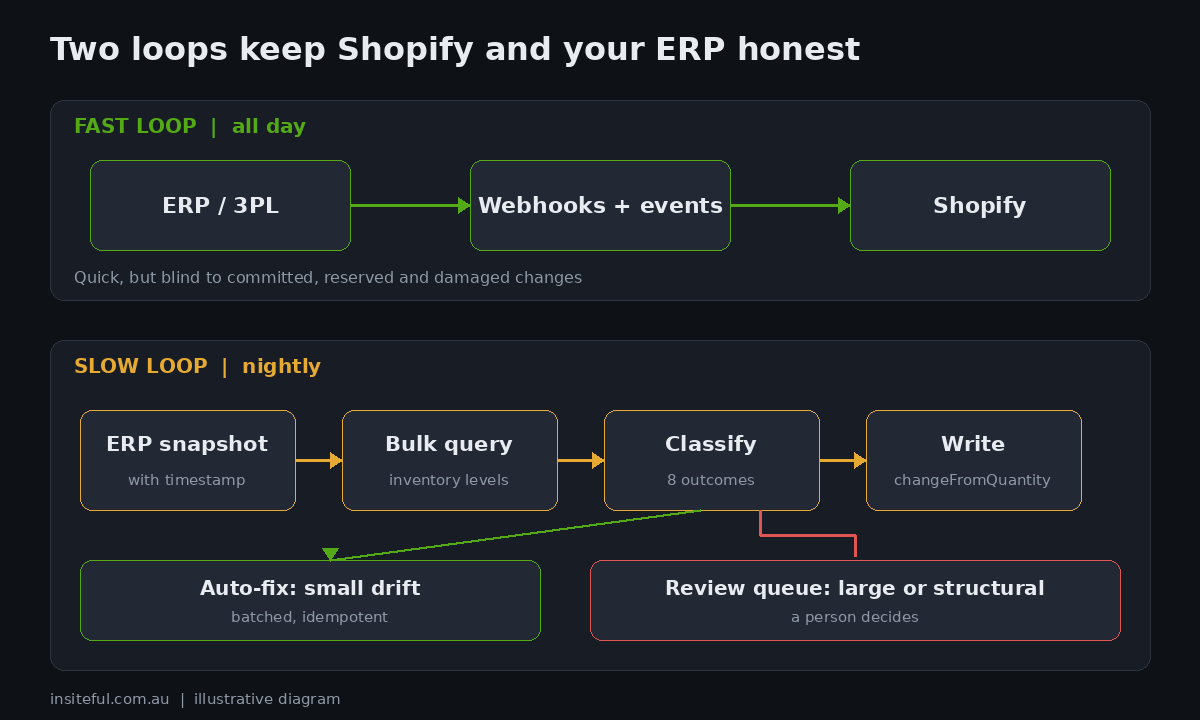
The Shopify bulk operations API is the right tool for the slow loop because it exports the whole catalogue without eating your rate limit. The documentation says a bulk query’s execution does not count against normal rate limits, results come back as JSONL, and the download URL is signed and expires after a week. From API version 2026-01 an app can run up to five bulk query operations per shop at once, where earlier versions allowed one of each type. A query can have at most five connections and nest two levels deep, which is enough for inventory items and their levels. Our bulk operations guide covers the polling and failure handling, and the rate limits post explains why paging through the catalogue with ordinary queries is the wrong approach at this size.
mutation {
  bulkOperationRunQuery(query: """
    {
      inventoryItems {
        edges { node {
          id
          sku
          tracked
          inventoryLevels {
            edges { node {
              id
              location { id }
              quantities(names: ["available", "committed", "on_hand"]) { name quantity }
              updatedAt
            } }
          }
        } }
      }
    }
  """) {
    bulkOperation { id status }
    userErrors { field message }
  }
}
The result is a JSONL file in which each inventory level appears on its own line after its parent item and carries a __parentId that points back to it. The Shopify documentation notes that __parentId is not part of the schema, so you cannot request it, you just read it. Here is the shape we parse.
{"id":"gid://shopify/InventoryItem/50001","sku":"SKU-0001","tracked":true}
{"id":"gid://shopify/InventoryLevel/0","location":{"id":"gid://shopify/Location/1002"},"quantities":[{"name":"available","quantity":66},{"name":"committed","quantity":4},{"name":"on_hand","quantity":70}],"updatedAt":"2026-10-22T21:14:00Z","__parentId":"gid://shopify/InventoryItem/50001"}
Two timestamps decide whether a difference is real. The first is the time the ERP snapshot was taken, which you must record. The second is the updatedAt on each Shopify inventory level, which tells you whether Shopify changed the number after the snapshot. If it did, the two systems are not disagreeing, they are just looking at different moments, and correcting the number would overwrite a legitimate change.
A classifier you can run against your own export
The script below is the core of our reconciliation job, reduced to the part you can test without touching a store. It reads an ERP CSV with SKU, location code and on-hand quantity, reads the Shopify JSONL, and sorts every row into one of eight outcomes (seven of which appeared in this run). It writes two files: batched correction payloads with the compare value already set, and a review queue for everything a person should look at.
import csv, json, hashlib, uuid
from collections import Counter
from datetime import datetime

TOLERANCE_UNITS = 3     # auto-correct up to this many units
TOLERANCE_PCT = 0.10    # or this share of Shopify on_hand, whichever is larger
BATCH = 100             # items per inventorySetQuantities call

def classify(erp, shop, snapshot_time):
    delta = erp - shop["on_hand"]
    if delta == 0:
        return "MATCH", delta
    if shop["updated"] > snapshot_time:
        return "IN_FLIGHT", delta           # Shopify moved after the snapshot
    limit = max(TOLERANCE_UNITS, int(shop["on_hand"] * TOLERANCE_PCT))
    if abs(delta) <= limit:
        return "DRIFT_AUTOFIX", delta
    return "DRIFT_REVIEW", delta            # too big to be a miscount: look for a mapping fault

def correction(item_id, location_id, erp, shop_on_hand):
    return {"inventoryItemId": item_id, "locationId": location_id,
            "quantity": erp, "changeFromQuantity": shop_on_hand}
The full script also handles the structural cases: an ERP SKU that does not exist in Shopify, a Shopify item that the ERP does not report, a location code with no mapping, and an item that is not stocked at a location. We test it against a synthetic fixture of 240 SKUs across two locations, with drift, in-flight changes and structural faults injected at known rates. This is not client data and it is not a benchmark, it is a way to prove the classifier behaves. Here is the real output from that run.
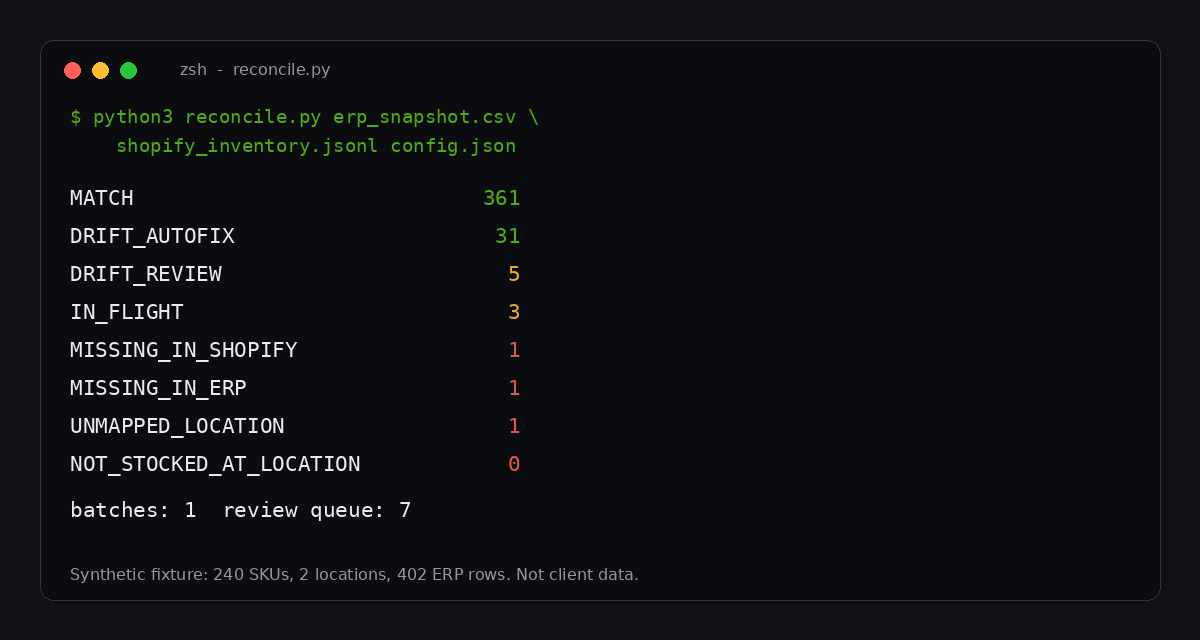
| Outcome | Count | What we do |
|---|---|---|
| MATCH | 361 | Nothing |
| DRIFT_AUTOFIX | 31 | Correct automatically, with a compare value |
| DRIFT_REVIEW | 5 | Queue for a person; deltas of 35 to 60 units are not miscounts |
| IN_FLIGHT | 3 | Skip; re-check on the next run |
| MISSING_IN_SHOPIFY | 1 | Queue; a SKU exists in the ERP only |
| MISSING_IN_ERP | 1 | Report only; a Shopify item the ERP does not list |
| UNMAPPED_LOCATION | 1 | Queue; a retired location code is still in the ERP export |
Read the proportions, not the numbers. Of 402 ERP rows, 361 matched, 31 were small enough to correct automatically, and only seven landed in the review queue. That ratio is why the nightly job is worth building: the person reviewing the queue looks at seven lines, not four hundred. The five large deltas are the interesting ones. A 60-unit difference is not a miscount. It is nearly always a case-quantity mix-up, a unit-of-measure change or a location mapped to the wrong warehouse, and auto-correcting it would hide the real fault.
Writing the correction without overwriting a sale
The dangerous moment in any reconciliation is the write. Between the moment you read Shopify’s number and the moment you set it, a customer can buy the product. If you set an absolute quantity, you silently erase that sale from the count.
Shopify’s inventorySetQuantities mutation is built for this. Each item in the request carries the new quantity and a changeFromQuantity, the value you expect Shopify to hold right now. The documentation says that from API version 2026-04 the field is required, that the update applies only if the persisted quantity matches, and that otherwise the item returns a stale-quantity error rather than writing. Passing an explicit null opts out of the check, and we treat that as a code-review failure for anything automated. Before 2026-04 the equivalent was compareQuantity with an ignoreCompareQuantity escape hatch, so older integrations may already have the safe pattern or may be bypassing it.
The same documentation page says the @idempotent directive is optional from 2026-01 and required from 2026-04. That matters for a nightly job, because a retried batch must not apply twice. We derive the idempotency key from the snapshot time and the exact contents of the batch, so a retry of the same batch produces the same key, and a changed batch produces a new one. The pattern is described in more depth in our guide to idempotent Shopify API writes.
mutation Reconcile($input: InventorySetQuantitiesInput!, $key: String!) {
  inventorySetQuantities(input: $input) @idempotent(key: $key) {
    inventoryAdjustmentGroup {
      id
      reason
      referenceDocumentUri
      changes { name delta }
    }
    userErrors { field message code }
  }
}

# variables
{
  "key": "3c5e8fcb-72ae-5841-4aea-03312a941af4",
  "input": {
    "name": "on_hand",
    "reason": "correction",
    "referenceDocumentUri": "logistics://erp/reconcile/2026-10-23T03:00:00Z#0",
    "quantities": [
      { "inventoryItemId": "gid://shopify/InventoryItem/50001",
        "locationId": "gid://shopify/Location/1002",
        "quantity": 73,
        "changeFromQuantity": 70 }
    ]
  }
}
The referenceDocumentUri is the cheapest audit trail in the platform and most integrations skip it. The Shopify documentation describes it as a way to record the system and document behind an adjustment. Ours names the ERP, the job and the snapshot, so any adjustment in the Shopify inventory history can be traced to the exact run that made it. When a warehouse manager asks why a number changed last Tuesday, the answer is one click away instead of a half-day investigation.
When a stale error comes back, the right response is to skip the item and let the next run pick it up. A stale error means a sale or a manual edit landed between your read and your write, which is exactly the situation the check exists to protect. Retrying with a refreshed compare value inside the same run is tempting, and it defeats the point.
Tolerances: what to fix, what to queue
The auto-fix threshold is a business decision disguised as a number. Set it too high and a mapping error gets corrected into the wrong quantity every night. Set it too low and the review queue becomes a daily chore that nobody opens. We set it per class of stock, because a miscount of three units on a $9 consumable and on a $2,400 AUD appliance are not the same event.
| SKU class | Auto-fix up to | Review above | Why |
|---|---|---|---|
| Low value, fast moving | 5 units or 10 per cent | That | Counting noise dominates; speed matters more than precision |
| Mid value | 3 units or 5 per cent | That | Default for most catalogues |
| High value or serialised | 0 units | Any difference | One missing unit is a theft, damage or receiving question |
| Kits and bundles | 0 units | Any difference | Component logic differs between systems; fix the rule, not the count |
| New SKU, under 14 days | 0 units | Any difference | Usually a mapping problem, not a count problem |
Two guard rails matter more than the thresholds. First, cap the number of automatic corrections per run. If the job wants to correct more than a few per cent of all rows in one night, something upstream has broken, and the correct action is to stop and alert. Second, never auto-correct in the direction of more stock when the SKU has a recent oversell. Rounding errors toward optimism cost you a refund, and rounding errors toward caution cost you a sale you can usually recover.
What drift costs a mid-sized Australian store
Here is a worked model, with every assumption stated so you can replace ours with your own. It is a model, not a benchmark, and the inputs are the ones we ask merchants for in a scoping call.
| Input | Assumption |
|---|---|
| Annual online revenue | $6,000,000 AUD |
| Average order value | $120 AUD (50,000 orders a year) |
| Orders hitting stock that is not there | 1.5 per cent (750 orders) |
| Cost to resolve one oversold order | $35 AUD (support time, shipping credit, apology discount) |
| Sales lost to stock showing as zero when it is not | 0.5 per cent of revenue |
| Line | Calculation | Annual cost |
|---|---|---|
| Oversold orders | 750 x $35 AUD | $26,250 AUD |
| Phantom stock-outs | 0.5 per cent of $6,000,000 AUD | $30,000 AUD |
| Total | $56,250 AUD |
The second line is the one merchants forget. Drift is not only oversells. When Shopify shows less stock than the shelf holds, you lose sales you never see, because the product page says sold out and the customer leaves. A reconciliation job that corrects in both directions recovers that revenue quietly. If your own rates are half ours, the case for a nightly job still comes out at five figures a year, which is a small fraction of what a custom integration costs to build.
There is also a consumer-law dimension in Australia. Selling stock you do not hold, then cancelling, exposes a store to complaints about misleading availability and to refund obligations under the Australian Consumer Law. We are an agency, not a law firm, so treat that as a prompt to check your cancellation terms with your adviser rather than as advice. The operational point stands either way: the cheapest oversell to handle is the one that never happens.
Monitoring: the three numbers that matter
A reconciliation job that runs silently is a liability. We report three numbers after every run and alert on movement in any of them.
| Metric | Healthy | Alert when | What it usually means |
|---|---|---|---|
| Drift rate (rows with a difference, share of all rows) | Under 5 per cent | Above 10 per cent, or doubled week on week | A fast-loop integration is failing |
| Review queue length | Under 20 rows | Above 50, or the same SKU two nights running | Mapping fault or unit-of-measure change |
| Stale-write rate (share of writes rejected) | Under 2 per cent | Above 5 per cent | Run window overlaps peak trading; move it |
The drift rate is the headline. A store sitting at 3 per cent drift for months and then jumping to 14 per cent overnight has not suddenly started miscounting. Something changed upstream: a connector was updated, a warehouse was added, a new 3PL began sending quantities in cartons. The nightly job turns that from a surprise in the order queue into a message the following morning.
Run the job at the quietest trading hour for the warehouse, not for the store. Shopify can take orders at 3am, but a 3PL is usually mid-batch at the end of a shift, and a snapshot taken during a batch is a snapshot of nothing in particular. We agree a snapshot time with the warehouse in writing, and we record it in the run metadata.
Mistakes we keep finding
Most reconciliation failures are not technical. They are decisions that were never made. These are the ones we see most often when we are called in to fix a store that already has an integration.
| Mistake | Consequence | Fix |
|---|---|---|
| Comparing ERP on-hand to Shopify available | Every SKU with an open order flags as drift | Compare on_hand to on_hand |
| Setting absolute quantities with no compare value | Sales that land mid-run vanish from the count | Always send changeFromQuantity |
| No snapshot timestamp | Cannot tell drift from timing | Record the snapshot time; check updatedAt |
| One tolerance for the whole catalogue | Big faults auto-corrected, small ones queued | Threshold by SKU class |
| Auto-correcting large deltas | A mapping fault is written into stock nightly | Anything over the limit goes to a person |
| No audit reference on adjustments | Nobody can explain a number after the fact | Set referenceDocumentUri on every write |
| Reconciling only available stock | Damaged and reserved units are invisible | Query the states that send no webhooks |
The last row is worth a second look. Because Shopify does not send webhooks for changes to committed, reserved, damaged, safety stock or quality control, a warehouse team that moves 30 units to damaged in the admin changes the sellable number with no event at all. Only a scheduled query will ever see it. If you also run a 3PL, our 3PL integration guide covers where those movements originate, and the ERP integration comparison covers how NetSuite, Cin7 and Unleashed each report quantities.
How we do it at Insiteful
On every inventory integration we build, the nightly reconciliation ships with the connector, not as an afterthought three months later. We agree three things with the client before writing code: which system is the source of truth for physical stock, what time the warehouse snapshot is taken, and who owns the review queue. The third is the one that decides whether the job survives. A queue with no owner is a queue nobody opens.
The build itself is deliberately small. A bulk export, a classifier, a batched write with a compare value and an idempotency key, a reference URI on every adjustment, and a morning summary posted to the channel the operations team already reads. We do not build a dashboard until there is a month of run history to put on it. The tolerances are set per SKU class with the client, and we write them down so that when someone asks why a four-unit difference was fixed overnight, there is an answer on file.
We also keep the job honest. The fixture test in this article is a cut-down version of what we run in CI: injected drift, injected in-flight changes, injected mapping faults, and an assertion that the classifier puts each one in the right bucket. When a client changes warehouse, the first thing we change is the fixture, because that is where a broken assumption shows up first.
Want your stock numbers to agree with each other?
If your ERP, your 3PL and Shopify disagree more often than you would like, we can run the classifier against an export of your current stock, show you the drift rate and the review queue it would produce, and scope the smallest build that keeps them aligned. See how our build assessment works on the Insiteful process page and book yours.
Sources
- Shopify.dev: inventorySetQuantities mutation
- Shopify.dev: Build inventory management apps (states and webhooks)
- Shopify.dev: Perform bulk operations with the GraphQL Admin API
- Shopify.dev: InventoryLevel object
- Shopify.dev: inventoryItems query
- Retail TouchPoints: IHL Group inventory distortion study, 2023