
The message arrives at 11:40 on the Friday of a sale weekend. “Stock levels on the site are wrong. We’ve oversold the black medium twice.” The warehouse system is fine. Shopify is fine. What broke is the sync between them: a middleware job that walks every product, every location, every hour, and has been quietly getting throttled since Tuesday because the catalogue crossed 6,000 variants. Nobody noticed, because the job swallows the error and reports success.
We see some version of this on most stores that come to us with an integration problem. It is rarely the ERP, the 3PL or the marketing platform that fails. It is the assumption, baked into a connector years ago, that Shopify will accept whatever volume of API calls you throw at it. It will not, and in 2026 the rules for what it will accept are more specific than most integration code allows for.
This is the reference we work from when we design or repair an integration: what the limits are right now, how the throttle actually behaves under the hood, the four patterns that keep a connector under the ceiling at Black Friday volumes, and the monitoring that tells you about a problem on Tuesday rather than at 11:40 on Friday.
The Numbers in 2026, by Plan
Shopify publishes one table for this and it changes more often than people assume. The version live on shopify.dev as we write this puts the GraphQL Admin API at 100 points per second on Standard, 200 on Advanced, 1,000 on Shopify Plus and 2,000 on Shopify for enterprise (Commerce Components). Those are restore rates: the speed at which your bucket refills. The changelog entries from 2023 that most blog posts still quote (500 points per second for Plus, 100 for Advanced) are out of date by a factor of two.
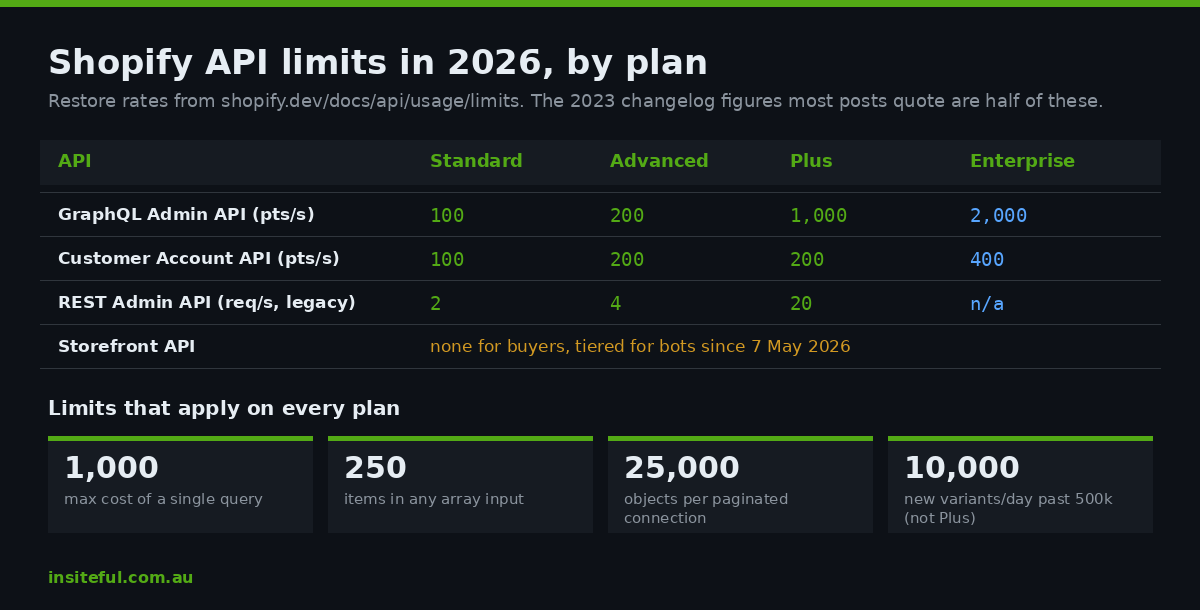
| API | Method | Standard | Advanced | Plus | Enterprise |
|---|---|---|---|---|---|
| GraphQL Admin API | Calculated query cost | 100 pts/s | 200 pts/s | 1,000 pts/s | 2,000 pts/s |
| Storefront API | None for real buyers, tiered for bots | n/a | n/a | n/a | n/a |
| Customer Account API | Calculated query cost | 100 pts/s | 200 pts/s | 200 pts/s | 400 pts/s |
| REST Admin API | Request count (legacy since 1 Oct 2024) | 2 req/s | 4 req/s | 20 req/s | n/a |
Three further limits sit alongside the rate table and cause more production incidents than the rate table does. A single GraphQL query cannot cost more than 1,000 points regardless of plan, so a Plus store’s deeper bucket buys you more queries, not bigger ones. Any input argument that accepts an array is capped at 250 items. And pagination through any connection stops at 25,000 objects; counts above that return 25,001 as a signal that the real number is higher. If your connector paginates “all orders” on a store doing 40,000 orders a month, it is already broken and you have not found out yet.
There is one resource-based limit as well: once a store holds 500,000 variants, productCreate, productUpdate and productVariantCreate are capped at 10,000 new variants per day. That limit does not apply on Plus, which is one of the less-advertised reasons large catalogue merchants end up there.
The REST Admin API is the other thing that has moved. It has been a legacy API since 1 October 2024, and since 1 April 2025 no new public app can be submitted that uses it. It still answers, and plenty of AU middleware still speaks it, but it is a dead end for anything you build now. We covered the audit process for finding REST dependencies in our deprecation calendar piece; this article assumes you are on GraphQL.
How the Throttle Actually Behaves
Every Shopify API uses a leaky bucket. Your app and the store share one bucket; a different app on the same store gets its own, and the same app on a different store gets its own. Each request drops some number of points in, the bucket drains at the restore rate, and when a request would overflow it, you are throttled until enough has drained.
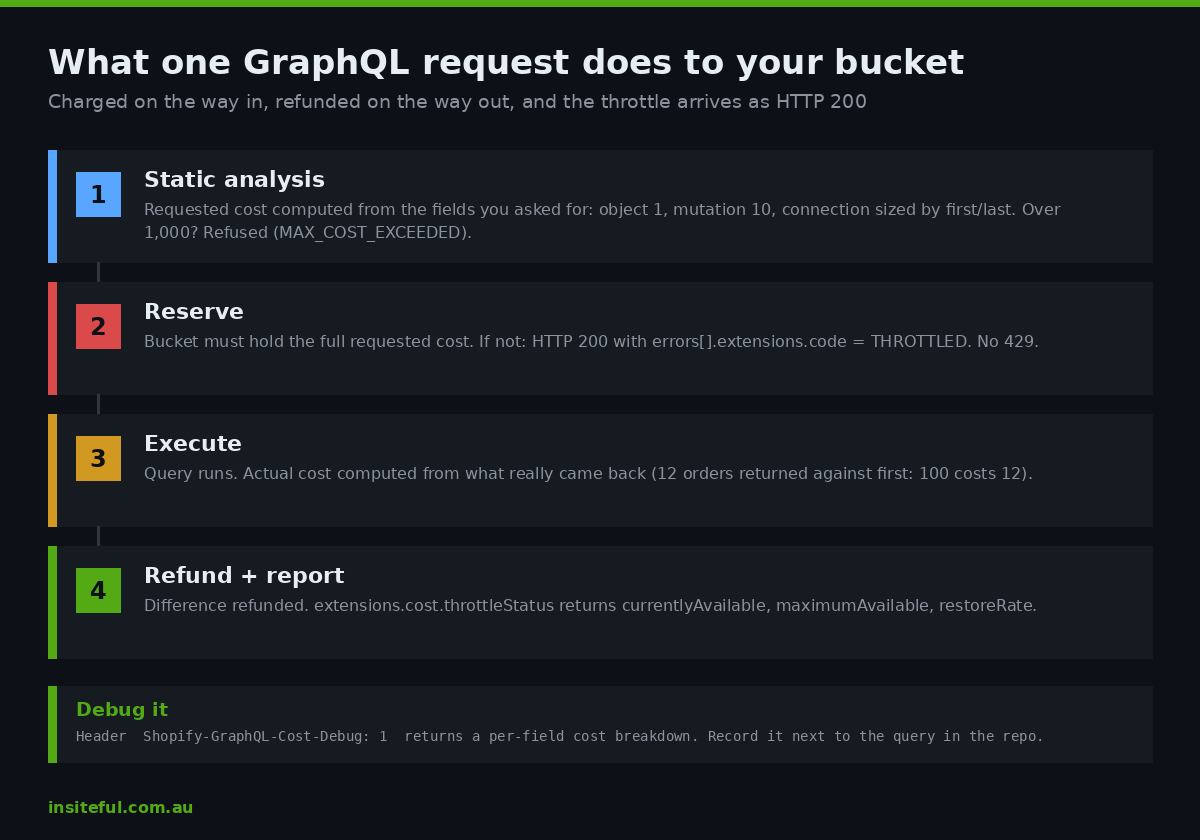
The detail that matters for GraphQL is that a request is charged twice. Before execution, Shopify statically analyses the query and computes a requested cost: every object field costs 1, every mutation 10, scalars and enums are free, and a connection is sized by its first or last argument. Your bucket must have room for the full requested cost or the query is refused before it runs. After execution, Shopify computes the actual cost from what was really returned and refunds you the difference. Ask for first: 100 orders and get 12 back, and you pay for 12.
Every response tells you exactly where you stand:
"extensions": {
  "cost": {
    "requestedQueryCost": 342,
    "actualQueryCost": 118,
    "throttleStatus": {
      "maximumAvailable": 2000.0,
      "currentlyAvailable": 1882.0,
      "restoreRate": 100.0
    }
  }
}
When you do overflow, GraphQL does not send a 429. The HTTP status is 200 and the throttle arrives inside the body as an error with extensions.code set to THROTTLED, alongside the same throttleStatus block. Connectors written against REST habits check the status code, see 200, and carry on as if the mutation succeeded. That is the exact failure mode in the oversold-black-medium story at the top.
Two more headers are worth wiring into every client from day one. Sending Shopify-GraphQL-Cost-Debug: 1 returns a per-field breakdown of where the requested cost came from, which is how you find the one nested connection that is costing 80 per cent of a query. And on REST, a 429 carries a Retry-After header in seconds; honour it rather than guessing.
The Three Ways Integrations Get Throttled
After enough post-mortems, the causes sort into three buckets of their own.
Polling instead of listening. A job that fetches “orders updated in the last five minutes” every five minutes costs a fixed amount whether or not anything changed, and it scales with catalogue and order volume rather than with change volume. On a quiet Tuesday it is harmless. On Black Friday, when Shopify’s own infrastructure peaked at 31.8 million API requests per minute across the platform in 2025, the same job is competing with your checkout for the same bucket.
Fan-out per record. One query to list orders, then one query per order for line items, then one per line item for the variant’s inventory. Each individual call is cheap. Multiplied by a 1,200-order afternoon, it is 40,000 calls where a single nested query with the right first arguments would have been 1,200, and a bulk operation would have been one.
Mutations one at a time. Updating 3,000 inventory levels via 3,000 inventoryAdjustQuantities calls, at 10 points each plus object cost, burns the entire Standard bucket every 20 seconds or so and leaves nothing for the rest of the stack. The array-input mutations exist specifically so this does not happen.
Pattern One: A Cost-Aware Client
The single change that fixes most connectors is to stop treating the API as a function call and start treating it as a metered resource. Every request goes through one client that reads throttleStatus from the previous response, keeps a local estimate of the bucket, and waits before sending anything the bucket cannot afford. This is the shape of the one we ship, trimmed to the essentials:
class ShopifyClient {
  constructor(shop, token, { reserve = 0.2 } = {}) {
    this.url = `https://${shop}/admin/api/2026-07/graphql.json`;
    this.token = token;
    this.reserve = reserve;          // keep 20% headroom for the storefront and other jobs
    this.available = null;           // learned from the first response
    this.max = null;
    this.restore = null;
    this.lastSeen = Date.now();
  }

  estimateAvailable() {
    if (this.available === null) return Infinity;
    const elapsed = (Date.now() - this.lastSeen) / 1000;
    return Math.min(this.max, this.available + elapsed * this.restore);
  }

  async query(doc, variables, expectedCost = 100) {
    const floor = this.max ? this.max * this.reserve : 0;
    while (this.estimateAvailable() - expectedCost < floor) {
      const deficit = floor + expectedCost - this.estimateAvailable();
      await sleep((deficit / (this.restore || 100)) * 1000 + 50);
    }
    const res = await fetch(this.url, {
      method: "POST",
      headers: { "X-Shopify-Access-Token": this.token, "Content-Type": "application/json" },
      body: JSON.stringify({ query: doc, variables }),
    });
    const body = await res.json();
    const cost = body.extensions?.cost;
    if (cost) {
      this.available = cost.throttleStatus.currentlyAvailable;
      this.max = cost.throttleStatus.maximumAvailable;
      this.restore = cost.throttleStatus.restoreRate;
      this.lastSeen = Date.now();
    }
    const throttled = body.errors?.find(e => e.extensions?.code === "THROTTLED");
    if (throttled) {
      await sleep(((expectedCost / (this.restore || 100)) * 1000) + 250);
      return this.query(doc, variables, expectedCost);   // one retry after the bucket refills
    }
    return body;
  }
}
Three decisions are hidden in there. The client reserves headroom, because your integration is never the only consumer of that bucket; Shopify Flow, the merchant’s other apps and the admin itself do not draw from it, but a second job in your own middleware does. It learns the real limits from the first response rather than hard-coding a plan tier, so the same code runs on a Standard store and a Plus store without configuration. And it treats THROTTLED as a retry signal with a computed wait, not as a fixed one-second sleep and not as success.
The expectedCost parameter is the part teams skip. Run each query once with the cost-debug header, record its requested cost, and pass it in. A client that knows a query costs 342 points can decide not to send it when 300 are available; a client that does not know will send it, get throttled, and start a retry storm at the worst possible moment.
Pattern Two: Bulk Operations for Anything Over a Few Thousand Records
The rate table stops mattering the moment you use bulk operations. A bulkOperationRunQuery runs asynchronously on Shopify’s side, has no per-query cost cap and no rate limit, and delivers the result as a JSONL file you download from a signed URL when the operation reports COMPLETED. Since API version 2026-01, each app can run up to five bulk query operations per shop at the same time, up from one of each type in earlier versions, and an operation has ten days to finish before Shopify marks it failed.
Our rule of thumb: any read that touches more than roughly 2,500 objects, or any nightly reconciliation, goes through bulk. A full catalogue export with variants, inventory levels and metafields for an 8,000-SKU store costs zero bucket points as a bulk query and would cost well over an hour of careful pagination as a synchronous one. We detailed the mechanics, including the bulk_operations/finish webhook that tells you when to download, in our bulk operations guide, so here is only the decision matrix we apply.
| Job | Volume signal | Mechanism | Bucket cost |
|---|---|---|---|
| Nightly stock reconciliation | Every variant at every location | Bulk query, then batched inventorySetQuantities |
Mutations only |
| Order feed to ERP | Continuous, low latency | orders/create webhook plus one nested query per order |
~60 to 120 pts per order |
| Catalogue import from PIM | Hundreds to thousands of products | bulkOperationRunMutation with productSet |
None |
| Price update for a sale | Up to 250 variants per call | productVariantsBulkUpdate |
10 pts plus objects, per call |
| Customer export for a CDP | Entire customer base | Bulk query with query filter on updated_at |
None |
Pattern Three: Webhooks In, Queue in the Middle, Budget Out
The architecture that survives peak looks the same on every store we build it for, whether the far end is NetSuite, Cin7, a 3PL or Klaviyo. Shopify pushes change events as webhooks. Those land in a queue, not in a request handler, so a burst of 900 orders in a minute becomes 900 queued jobs and not 900 concurrent API calls. A worker pulls from the queue and calls Shopify through the cost-aware client, which paces it against the bucket. Each store gets its own worker lane, because each store has its own bucket and a throttled store must not stall a healthy one.
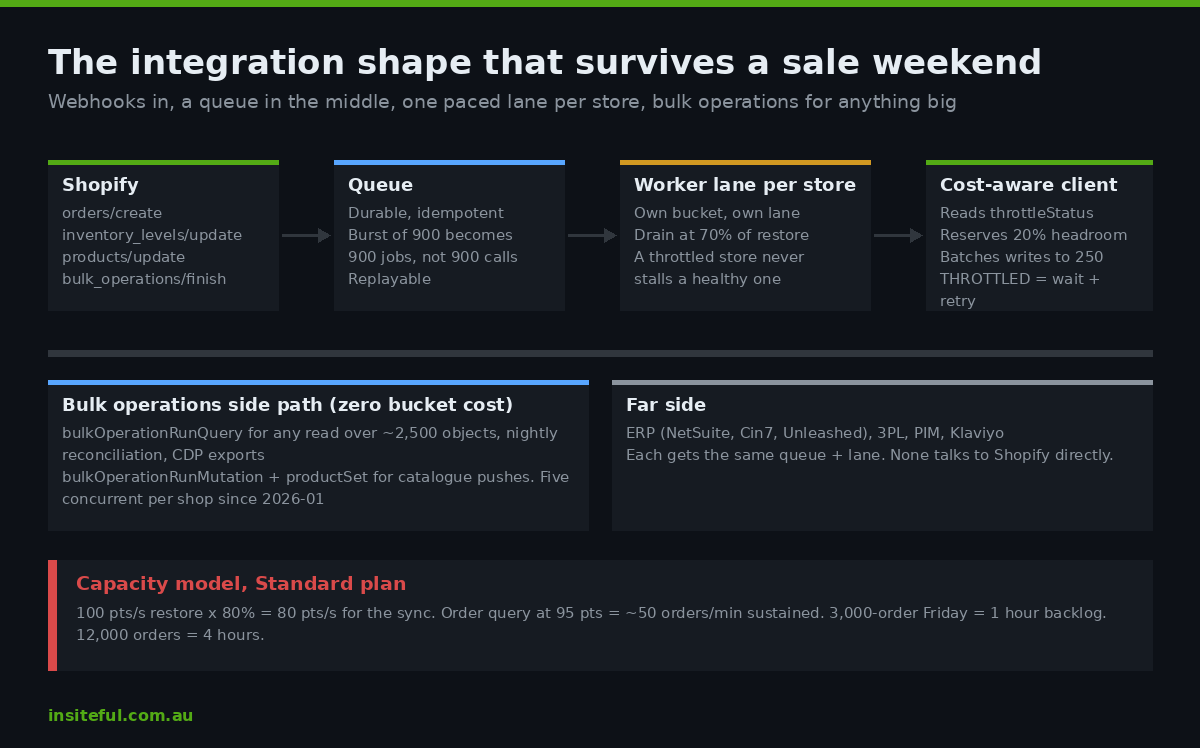
The queue is also where you get idempotency and replay, which is the reliability half of this story and one we wrote up separately in our webhooks reliability playbook. For rate-limit purposes the point is simpler: a queue converts spikes into a steady drain rate that you control. If the drain rate is set to 70 per cent of the restore rate, the bucket never empties, the storefront never competes with the sync, and a two-hour backlog on Black Friday clears itself by dinner without a single throttle error.
The worker’s per-store budget is the number that decides everything, so we set it explicitly rather than letting the code discover it. On a Standard plan with a 100 point per second restore rate and a 20 per cent reserve, the sync gets 80 points per second. If the order-to-ERP query costs 95 points, that is roughly 50 orders a minute, sustained, forever. A store forecasting a 3,000-order Friday needs an hour of drain time at that rate, which is fine. A store forecasting 12,000 orders has a four-hour backlog and a decision to make: slim the query, move to Plus, or accept the lag and say so in the warehouse SLA. That conversation is cheap in September and expensive in November.
Pattern Four: Batch the Writes
The 250-item input cap is a ceiling, but it is also a hint about how Shopify wants to be written to. inventorySetQuantities takes up to 250 quantity entries in one mutation. productVariantsBulkUpdate takes up to 250 variants for one product. productSet replaces an entire product, variants and media included, in one call and is the right primitive for a PIM push. Wherever a synchronous mutation is unavoidable, the connector should accumulate changes and flush them in batches of 250, not write on every event.
mutation SetStock($input: InventorySetQuantitiesInput!) {
  inventorySetQuantities(input: $input) {
    inventoryAdjustmentGroup { createdAt reason }
    userErrors { field message code }
  }
}

{
  "input": {
    "name": "available",
    "reason": "correction",
    "ignoreCompareQuantity": false,
    "quantities": [
      { "inventoryItemId": "gid://shopify/InventoryItem/44", "locationId": "gid://shopify/Location/7", "quantity": 18, "compareQuantity": 21 },
      { "inventoryItemId": "gid://shopify/InventoryItem/45", "locationId": "gid://shopify/Location/7", "quantity": 0, "compareQuantity": 2 }
    ]
  }
}
The compareQuantity field is the one that stops the overselling. It tells Shopify what the connector believes the current quantity is; if the store disagrees, because a POS sale landed between the read and the write, the entry is rejected with a userError rather than silently clobbered. That makes the batch safe to retry after a throttle, which is the property you need before you can let a queue retry anything automatically. Batching also has a pleasant side effect on cost: one mutation with 250 entries is charged 10 points plus the returned objects, where 250 individual mutations would be 2,500 points before object costs.
The Storefront Side Changed in May
Everything above concerns the Admin API. The Storefront API has no fixed request limit for real buyers, and Shopify’s position is that it scales to any flash sale a merchant can generate. What changed on 7 May 2026 is how Shopify treats traffic that is not a real buyer. Bots and agents hitting the Storefront API or Shopify-hosted store pages are now rate-limited on a tiered basis: anonymous, unsigned traffic gets the strictest limits, and traffic that signs its requests with Web Bot Auth, an IETF draft standard, is allowed more.
That matters to integrations in two ways that are easy to miss. First, if your feed generator, price-comparison export or uptime monitor crawls your own storefront, it is a bot, and after May it is a throttled bot unless it signs; Shopify now exposes ready-made Web Bot Auth signatures in the admin for exactly that case. Second, requests that look malicious return a 430 Shopify Security Rejection, and server-side Storefront API calls that omit the buyer IP header are far more likely to look malicious. A separate checkout-level throttle limits how many checkouts a Storefront API client can create per minute and returns 200 Throttled when tripped, so headless-adjacent checkout creation needs its own queue with exponential backoff.
We build native Shopify storefronts, so the second issue rarely lands on our clients directly. The first one does: the fastest fix we made in May was signing a client’s Google Merchant Centre supplemental feed crawler after its nightly run started returning partial catalogues.
What to Measure So Tuesday’s Problem Is Found on Tuesday
A connector that respects the bucket is necessary. A connector you can see is what keeps it that way after the next app install or catalogue expansion. Every response through the client above already contains the three numbers you need, so we log them as a time series per store and put three alerts on top.
metric shopify.bucket.available   tags: shop, job      value: throttleStatus.currentlyAvailable
metric shopify.query.cost         tags: shop, job, op  value: actualQueryCost
metric shopify.throttled          tags: shop, job      value: 1 per THROTTLED error

alert  bucket_headroom_low   when p5(available / maximumAvailable) < 0.25 over 10m
alert  throttled_any         when sum(throttled) > 0 over 5m
alert  cost_drift            when avg(query.cost by op) rises > 30% week on week
The third alert is the one nobody sets and everyone needs. Query cost drifts as data grows: a product query that cost 60 points when the client had four variants per product costs 200 when the range expands to twelve. Nothing in the code changed, but the same job now empties the bucket three times as fast. A week-on-week cost check catches that in the week it happens rather than at the first sale weekend afterwards.
For clients on Plus we also chart bucket headroom against orders per minute during peak events, because the two lines together answer the question “do we have room to add one more integration” with data rather than a guess. On one Melbourne apparel client with a 1,000 point per second Plus bucket, the whole stack (ERP sync, 3PL, Klaviyo, a loyalty app and our own reporting export) peaked at 38 per cent of restore rate during their 2025 Black Friday, which told us they could absorb the returns platform they were considering without touching the architecture.
How We Do It at Insiteful
An integration rebuild is usually scoped at $12,000 to $30,000 AUD depending on how many systems sit on the far side, and the rate-limit work is a fixed part of that scope rather than an optional extra, because it is cheaper to design in than to bolt on after the first oversell. The sequence we run looks like this.
We start with a read-only audit of the existing connector: which API it speaks, whether it polls or listens, what each query really costs with the debug header on, and how it handles a THROTTLED response. Most of the time that last answer is “it doesn’t”, and that single finding justifies the project. The audit produces the per-store capacity model described under pattern three, with the client’s own peak-day forecast plugged in, so the merchant can see the backlog hours before anyone writes code.
The build replaces polling with webhooks into a queue, routes every synchronous call through the cost-aware client with a reserved headroom, moves every large read and every catalogue push to bulk operations, and batches all writes to the 250 cap with compare-and-swap on inventory. Every query’s expected cost is recorded in the repo next to the query itself, and a CI check fails the build if a query’s requested cost exceeds a budget we set per operation. That check is what stops cost drift from being reintroduced by the next developer.
Before handover we run a load rehearsal: a replay of the client’s busiest historical hour, at two times volume, against a development store on the same plan tier, with the dashboard open. If the bucket dips below 25 per cent headroom during the rehearsal, we slim queries or re-tier before go-live rather than after. The client gets the dashboard, the alerts and a one-page runbook for what a bucket_headroom_low alert means and what to do about it, which is generally “nothing yet, but book a review”.
Where to Start If This Is Your Store
If you have a Shopify integration older than about two years, the odds are high that it polls, speaks REST, and treats a throttle as success. You do not need to rebuild it to find out; you need one afternoon with the cost-debug header and the logs. If what you find is a connector that is already close to its ceiling, or one that has never been tested at the volume you are planning for this November, we can run the audit and capacity model as the first step of a build assessment, and you will know the backlog number before the sale does.