
There is a moment every omnichannel retailer knows. A shopper buys the last size 10 online at 9:14am. At 9:16am someone carries the same pair to the counter and the staff member sells it, because the register still says one. One of those two customers is about to get an apology email.
Overselling is usually described as a stock control problem. It is not. It is an architecture problem, and it is almost always caused by treating inventory as a single number that gets overwritten, when Shopify models it as eight separate states that move between each other under rules.
The gap matters more every year. Australians spent a record $82.6 billion AUD online across 2025, up 14 per cent year on year, with 9.8 million households shopping online, according to the Australia Post eCommerce Report 2026. Online was 12.7 per cent of Australian retail turnover in the final ABS Retail Trade release for June 2025. The remaining share still walks through a door, and increasingly it walks through a door to collect something it bought on a phone.
So the two numbers have to agree. This article is about the mechanism that makes them agree: the states Shopify actually tracks, the object model underneath them, the one mutation field that prevents a double sale, and the reconciliation job that catches the drift nobody notices until stocktake.
The Eight States Behind One Number
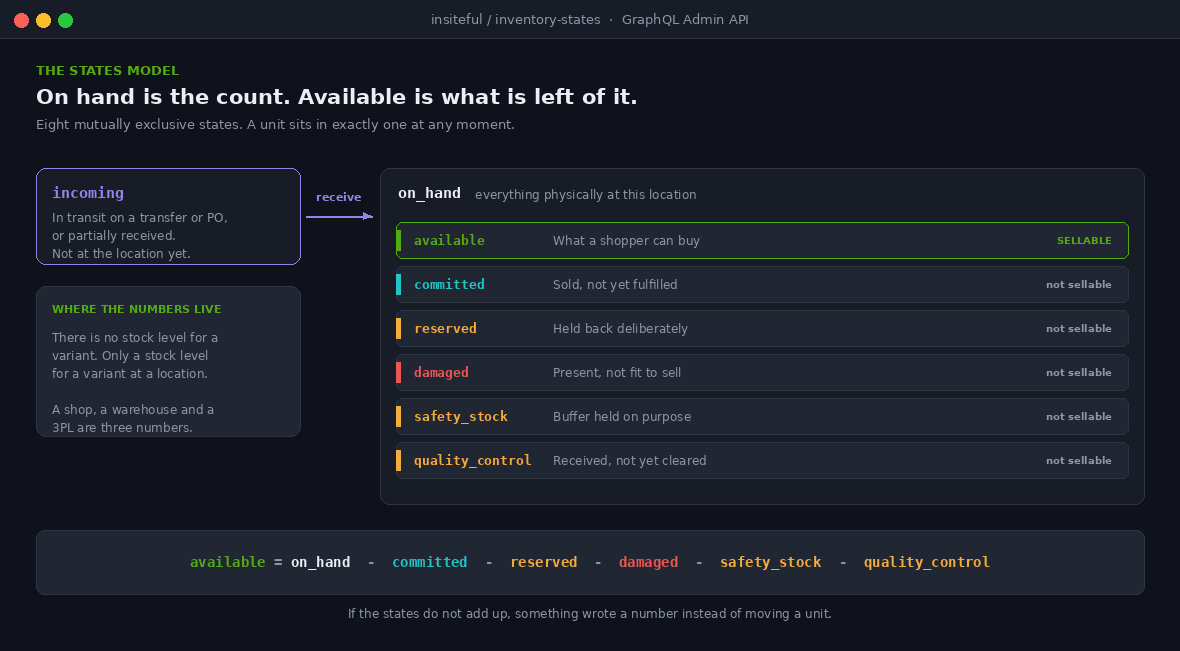
Shopify does not store a stock level. It stores quantities in named states, and the number a shopper sees is derived from them. The GraphQL Admin API exposes them as an enum on the quantities field of an InventoryLevel.
query {
  inventoryLevel(id: "gid://shopify/InventoryLevel/69407473686?inventory_item_id=32889739542550") {
    quantities(names: [
      "incoming", "on_hand", "available", "committed",
      "reserved", "damaged", "safety_stock", "quality_control"
    ]) {
      name
      quantity
    }
    location { id name }
  }
}
Those eight names are the whole vocabulary. Everything an inventory app, an ERP or a 3PL feed does to your store is a movement between them. Reading them correctly is the difference between an accurate storefront and a queue of refunds.
| State | What it means | Sellable |
|---|---|---|
on_hand | Everything physically at the location, sellable or not | Not directly |
available | What a shopper can buy right now. The derived number | Yes |
committed | Sold on a placed order, not yet fulfilled | No |
incoming | In transit on a transfer or purchase order, or partially received | No |
reserved | Held back deliberately, for example against a draft order | No |
damaged | Physically present, not fit to sell | No |
safety_stock | A buffer held back on purpose to absorb timing gaps | No |
quality_control | Received but not yet cleared for sale | No |
The states are mutually exclusive, which is the important structural fact. A unit is in exactly one of them at a time. That is what makes an audit possible: if the states do not add up, something wrote a number instead of moving a unit.
Where Available Actually Comes From
Available is not the physical count. It is what is left of the physical count after everything that cannot be sold has been taken out of it. In practice that means:
available = on_hand
          - committed
          - reserved
          - damaged
          - safety_stock
          - quality_control
This single line explains most of the support tickets a retail client ever raises about stock. A store owner counts 12 jackets on the rack, opens the admin, sees 4 available, and concludes the system is broken. It is not. Six are committed to click and collect orders that have not been picked yet, and two are sitting in quality control because they came in on a transfer that a staff member received but never cleared.
The number on the shelf and the number on the site are both correct. They are answering different questions. A build that does not surface that distinction to staff will generate mistrust in the system, and staff who do not trust the system start keeping a second count on paper, which is where accuracy really dies.
The Object Model That Trips Up Every Integration
Before any of the states can be written correctly, the integration has to address the right object. This is where most custom stock feeds go wrong, and the failure is quiet.
| Object | Holds | Relationship |
|---|---|---|
ProductVariant | Merchandising data: price, title, image | One to one with an inventory item |
InventoryItem | The physical goods record, including SKU | One per variant, many inventory levels |
InventoryLevel | The actual quantities, per state | Joins one item to one location |
Location | A shop, warehouse, pop up or 3PL node | Many inventory levels |
The consequence is that there is no such thing as the stock level of a variant. There is only the stock level of a variant at a location. A retailer with a Melbourne shop, a Brisbane shop and a 3PL has three numbers per SKU, and the storefront figure is a sum across the locations that can actually fulfil for that buyer.
The InventoryLevel global ID reflects this. It is parameterised, because a level is meaningless without knowing which item it belongs to:
gid://shopify/InventoryLevel/69407473686?inventory_item_id=32889739542550Two failure modes follow directly from this model, and we check for both on every retail build. The first is writing to a location where the item was never stocked, which returns an ITEM_NOT_STOCKED_AT_LOCATION error. The item has to be activated at that location first with inventoryActivate, which also lets you seed its opening available and on hand quantities. Feeds that ignore this error silently skip new SKUs at new locations, and nobody notices until a store reports that a whole delivery never appeared in the system.
The second is a feed that writes a total instead of a per location figure, which concentrates all stock at whichever location the integration defaults to. If you run ship from store routing, that single mistake will send every order to one node and strand inventory everywhere else.
Compare and Swap: The Field That Stops a Double Sale
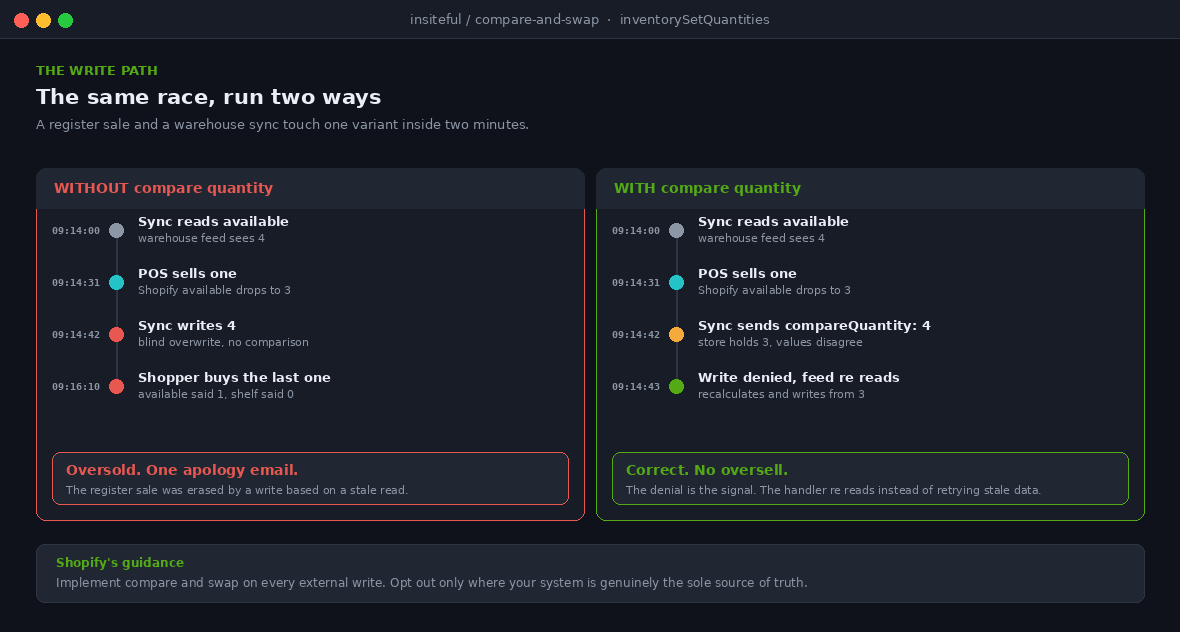
Now back to the size 10 at 9:14am. Two systems tried to change the same number at almost the same moment. The classic naive integration reads the level, calculates a new value, and writes it. Between the read and the write, the register sold one. The write lands anyway and overwrites reality.
Shopify’s answer is optimistic concurrency, exposed through the compare quantity field on inventorySetQuantities. You state what you believe the current quantity to be. If the store disagrees, the write is rejected rather than applied.
mutation {
  inventorySetQuantities(input: {
    name: "available",
    reason: "correction",
    referenceDocumentUri: "uri://wms.example.com.au/sync/2026-08-29T09:14:02Z",
    quantities: [
      {
        inventoryItemId: "gid://shopify/InventoryItem/32889739542550",
        locationId: "gid://shopify/Location/35239591958",
        quantity: 3,
        compareQuantity: 4
      }
    ]
  }) {
    inventoryAdjustmentGroup { createdAt reason changes { name delta } }
    userErrors { field message }
  }
}
If available is still 4, the write succeeds and the level becomes 3. If the register already took it to 3, the comparison fails and the mutation is denied. Your integration then has to do the only correct thing: re read the current state and recalculate, rather than retry the same stale number.
Shopify’s own guidance is to implement compare and swap, with one documented exception. If your system is genuinely the source of truth and you do not care what Shopify currently holds, you can opt out. In practice that exception applies far less often than integrators assume. A store running POS is never a case where the external system is the sole authority, because sales are being created inside Shopify all day.
A denied write is not an error to swallow. It is a signal that the world moved. We treat compare and swap denials as a first class metric, because a rising rate of them means two systems are fighting over the same SKUs, which is a design problem no amount of retrying will fix.
Write a Reason, Not Just a Number
Every quantity change accepts a reason code. Most integrations send correction for everything, which is legal and almost useless. The reason field is what turns a stock ledger into something you can audit, because it records why a unit moved rather than only that it did.
| Reason | Use it when |
|---|---|
correction | A genuine error is being fixed, or no better reason applies |
cycle_count_available | A count found a discrepancy against the recorded figure |
movement_received | A transfer or purchase order has been received, with created, updated and canceled variants for the rest of the lifecycle |
restock | A returned unit is going back into available stock to be resold |
damaged | Units are being removed from the sellable count due to damage |
shrinkage | Actual stock is lower than recorded because of theft or loss |
safety_stock | On hand units are being set aside to guard against overselling |
reservation_created | Units are being held, for example against a draft order |
Pair the reason with referenceDocumentUri, a freeform URI pointing at whatever caused the change. It can be a Shopify resource such as an order ID, or an external identifier such as a warehouse job. Six months later, when a client asks why a SKU lost 40 units in March, that URI is the difference between an answer and a shrug.
For Australian retailers this is not only an operational nicety. Shrinkage that is coded as shrinkage can be reported, trended by location and acted on. Shrinkage that is coded as correction is invisible, and a store quietly losing $2,000 AUD a month to a process fault looks identical to a store with a sloppy data feed.
Move Stock Between States Instead of Deleting It
When a unit becomes unsellable, the instinct is to reduce available by one. That is wrong, because the unit is still physically in the building. Reducing available without moving the unit breaks the relationship between on hand and the states beneath it, and the store’s own numbers stop reconciling.
The correct operation is a state transition with inventoryMoveQuantities, which moves quantities between available and the unavailable states, or between two unavailable states.
mutation {
  inventoryMoveQuantities(input: {
    reason: "damaged",
    referenceDocumentUri: "uri://ops.example.com.au/incident/4821",
    changes: [
      {
        inventoryItemId: "gid://shopify/InventoryItem/32889739542550",
        quantity: 2,
        from: { locationId: "gid://shopify/Location/35239591958", name: "available" },
        to:   { locationId: "gid://shopify/Location/35239591958", name: "damaged" }
      }
    ]
  }) {
    inventoryAdjustmentGroup { reason changes { name delta } }
    userErrors { field message }
  }
}
On hand is unchanged. Available drops by two. Damaged rises by two, and the store can now report on damage by location and by month. This is the pattern behind a working returns flow too: a unit coming back from a customer moves into quality control, gets inspected, then either moves to available with a restock reason or to damaged. If you build in store returns, that inspection step is what decides whether returned stock is trustworthy.
The API also supports scheduled transitions, where you declare that quantities are expected to move from one state to another on a date, most commonly incoming to available when a shipment lands. Note the version constraint: scheduled changes require an API version between 2024-01 and 2026-04, so any integration relying on them needs a migration plan rather than a routine version bump.
What Changed in 2026
Three changes over the last eight months have altered how we build the retail side of this, and two of them quietly fix problems we used to write custom code for.
Checkout stopped counting stock it cannot ship
On 20 January 2026 Shopify changed how availability is evaluated for market specific inventory. Previously, negative total stock across all locations, including retail locations, could make an item appear sold out and block checkout even when the buyer’s own market had stock on hand. Checkout now considers only the inventory at locations that can actually fulfil for that buyer’s market.
If you have ever had a store go dark on a best seller because one shop carried a negative count from a mis scan, that is the bug. It is worth re testing any custom availability logic written before that date, because a workaround built against the old behaviour may now be suppressing sellable stock.
Retail locations are declared, not inferred
On 28 January 2026 Shopify added a physical storefront toggle to Locations in the admin. Retail locations are no longer inferred from POS activity alone, so a customer facing shop can be separated explicitly from a pop up, a test location or a warehouse. The toggle is enabled by default, and location names shown to customers in Shop match the name in the admin.
Two consequences. Audit your location names, because internal shorthand like MEL-WH-02 is now a customer facing string. And if you run multi location POS, review which locations carry the storefront flag, since it feeds discovery and reporting rather than being cosmetic.
Transfers moved onto the shop floor
Shopify POS 10.20 brought a complete inventory transfer workflow to the POS device. Staff fulfil outgoing transfers from the Orders tab and receive incoming ones from the Products tab, scanning items to confirm movement and tracking status in real time, without relying on the admin or a third party app. It requires POS Pro, and Shopify’s guidance is to remove the older Stocky powered transfers extension from the smart grid in favour of the native flow.
Alongside it, February 2026 added two transfer reports in Analytics: a Transfer Orders and Shipments report covering what was ordered, shipped, received, accepted or rejected, and a Transfers report summarising all transfers including drafts. Both filter by transfer ID, origin, destination, status, variant and date range.
This matters for the incoming state specifically. Incoming has historically been the least trustworthy number in a multi site retailer, because receiving happened in the back office hours or days after the carton landed. Moving receiving onto the device with a scan closes that gap, which is the highest leverage accuracy fix available to most Australian retailers right now.
Buffer or Oversell: The Decision Behind Safety Stock
Once the states are modelled properly, there is a commercial decision to make. Shopify gives you two levers for the gap between a sale happening and a system knowing about it, and they pull in opposite directions.
| Lever | What it does | Costs you | Fits |
|---|---|---|---|
safety_stock | Holds units back from available at a location | Sellable stock sits idle | Fast moving lines, busy shop floors, low margin for error |
| Continue selling when out of stock | Lets checkout proceed past zero | Backorders and apology emails | Made to order, pre order, reliable replenishment |
| Neither | Sells to exactly zero | Occasional oversell on race conditions | Single location, low velocity, or fully synchronous stock |
| Both, per line | Buffer on retail lines, continue selling on core lines | Configuration overhead | Mixed catalogues, which is most retailers |
The sizing question has a simple answer that people overcomplicate. Safety stock should cover your worst case sync lag multiplied by your peak sell rate for that line. If a line sells 6 units an hour across three shops on a Saturday and your worst observed lag is 10 minutes, a buffer of one unit per location is enough. If the lag is 4 hours because a nightly batch does the reconciling, no buffer will save you and the batch is the thing to fix.
Safety stock is compensation for latency. The cheaper long term fix is usually to reduce the latency, because idle buffer stock across a wide catalogue ties up real working capital.
The Reconciliation Job That Catches Drift
Even a correct integration drifts. Staff adjust counts on the floor, a webhook is missed, an app writes without a reason, a transfer is received twice. The build is not finished until something is checking.
We run reconciliation as a scheduled job that reads every level in bulk and compares Shopify against the operational source, rather than trusting event streams alone. Webhooks are for latency, a nightly sweep is for truth. The two together are what makes an event driven stock feed safe to rely on.
# Nightly sweep. Bulk read every level, then diff against the source of truth.
mutation {
  bulkOperationRunQuery(
    query: """
    {
      inventoryItems {
        edges { node {
          id
          sku
          inventoryLevels {
            edges { node {
              location { id name }
              quantities(names: ["on_hand", "available", "committed", "incoming"]) {
                name
                quantity
              }
            } }
          }
        } }
      }
    }
    """
  ) {
    bulkOperation { id status }
    userErrors { field message }
  }
}
A bulk operation is the right tool here because a paginated query across a real catalogue will hit rate limits long before it finishes. Shopify runs the query asynchronously and hands back a JSONL file, which is the same approach we use for any large scale admin read.
What the job should flag, in order of severity: any level where the state quantities do not reconcile against on hand, any negative available, any SKU whose committed figure has not moved in more than 14 days, and any location where the count of items in quality control is rising week on week. The last one is not a data fault. It is a staff training signal, and it usually means receiving is being done without the clearing step.
Alert on the exceptions, not the run. A job that emails a 4,000 row report every morning gets filtered into a folder within a fortnight and never read again.
The Stock Accuracy Audit We Run
This is the checklist we work through when a retail client tells us their numbers cannot be trusted. It is deliberately ordered so the cheap structural checks come before the expensive behavioural ones.
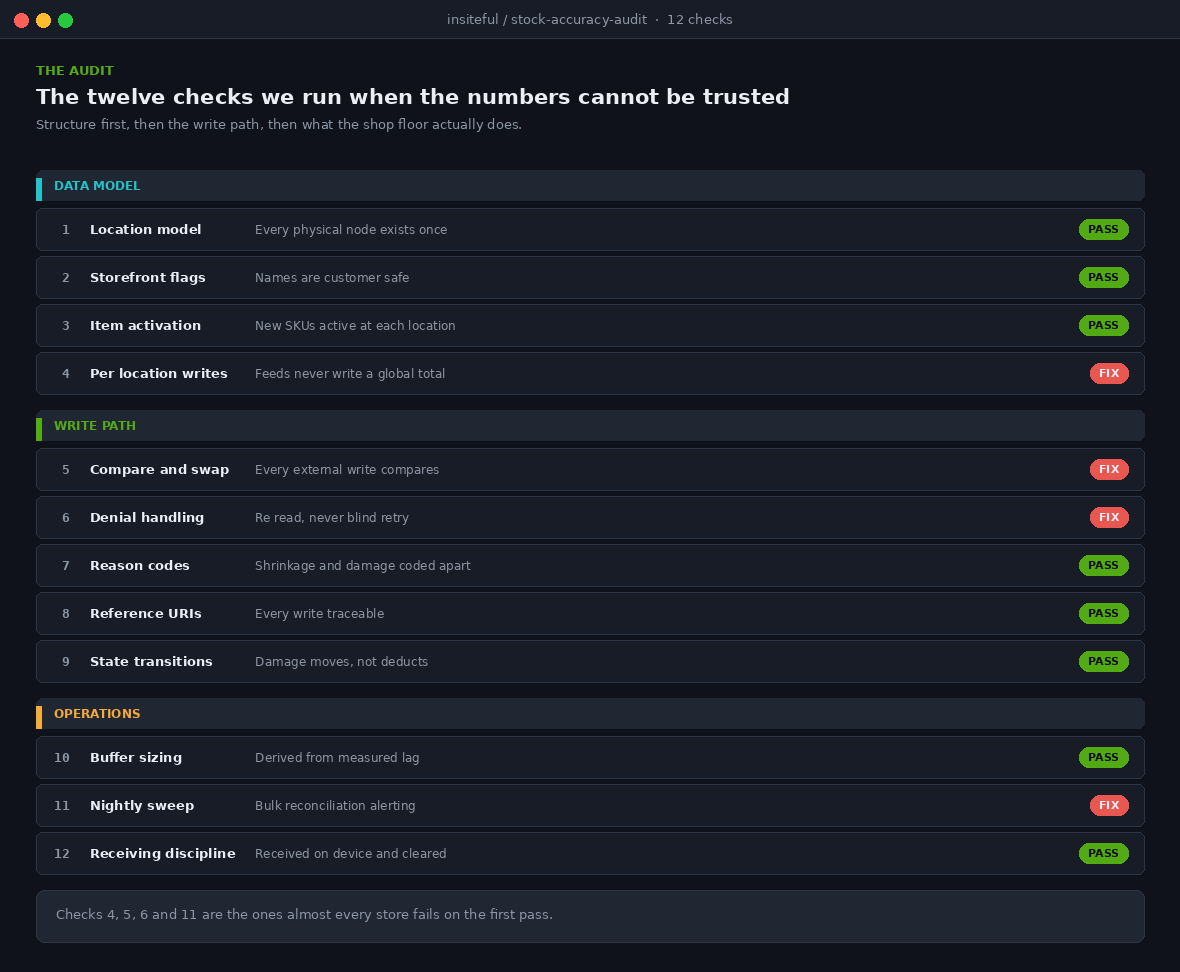
| # | Check | What a pass looks like |
|---|---|---|
| 1 | Location model | Every physical node exists as a location, none doubling up |
| 2 | Storefront flags | Physical storefront toggle reviewed, names customer safe |
| 3 | Item activation | New SKUs activated at every location that stocks them |
| 4 | Per location writes | Feeds address a location, never a global total |
| 5 | Compare and swap | All external writes send a compare quantity |
| 6 | Denial handling | Failed writes re read and recalculate, never blind retry |
| 7 | Reason codes | Shrinkage, damage and restock coded distinctly |
| 8 | Reference URIs | Every write traceable to a document or job |
| 9 | State transitions | Damage and returns move states, not just reduce available |
| 10 | Buffer sizing | Safety stock derived from measured lag, not a guess |
| 11 | Nightly sweep | Bulk reconciliation running, exceptions alerting |
| 12 | Receiving discipline | Transfers received on device, quality control cleared |
How We Do It at Insiteful
We treat inventory as the first thing to design on any retail build, before themes and before checkout, because everything downstream inherits its accuracy.
We start by mapping locations against physical reality, including the nodes clients forget: the consignment rack, the photography samples, the stock in a director’s car boot for a market stall. Anything holding sellable units either becomes a location or becomes an explicit exclusion, written down.
Then we define the write path. Exactly one system is nominated as the authority for each state, and that decision is documented per state rather than per system. Typically Shopify owns committed and available, the warehouse owns on hand and incoming, and the shop floor owns damaged and quality control. Ambiguity here is what produces the fights between systems that surface later as compare and swap denials.
Every integration we build sends a compare quantity, a reason code and a reference URI. Not sometimes. It is a code review item, and a feed that writes bare numbers does not ship. The nightly reconciliation job goes in during the build, not after go live, because the first fortnight is when the drift patterns reveal themselves and that is exactly when you want the data.
On the retail side we hold a short session with store staff on the states model. Ten minutes explaining why the rack says 12 and the screen says 4 removes more inventory complaints than any amount of engineering, because it converts an apparent system fault into a legible number. Staff who understand committed stop treating the system as wrong.
We build on native Shopify and Shopify Plus, so the whole architecture uses the inventory primitives Shopify already maintains rather than a parallel stock table in an app database. Fewer moving parts, one ledger, and an upgrade path that does not depend on us.
Where to Start
If your team keeps a spreadsheet alongside the admin, or your staff check the shelf before promising a click and collect order, your inventory architecture is telling you something. The fix is rarely a new app. It is usually the write path, and it is usually cheaper to correct than the refunds and the goodwill it is currently costing.
A reasonable first move is to run checks five and six from the audit above against your own integrations. If every external write already sends a compare quantity and handles denials by re reading, you are in better shape than most. If not, you have found the source of the 9:14am problem.
We design and build Shopify and Shopify Plus stores for Australian retailers, and the inventory architecture described here is part of every retail build we do. If you want the audit run against your store, start with our build assessment and we will show you where the two numbers are drifting apart.