
A sync job times out halfway through a Friday night inventory push. Your code does what most code does: it logs the failure and retries. The first attempt, however, had already reached Shopify. The retry lands a second time and 40 units of stock vanish from a SKU that only ever sold 20. Nothing errors. Nothing alerts. The store simply stops selling a product that is physically on the shelf, and nobody notices until Monday.
That failure mode has a name, and as of Shopify Admin GraphQL API version 2026-04 it has a platform-level answer that is no longer optional. Seventeen inventory, refund and location mutations now require an @idempotent directive carrying a unique key. Every integration we maintain for a client, whether it is an ERP connector, a 3PL feed or a marketplace sync, writes to at least one of those mutations. This article is the engineering guide we wish had existed when the change was announced: what exactly changed, how to design keys that survive real retries, and how to prove it works before a client’s peak trading period.
What Changed in API 2026-04 and Why Existing Sync Code Breaks
Shopify announced the change in its developer changelog on 12 December 2025. The first post made the @idempotent directive optional from API version 2026-01 on 17 mutations. The follow-up post made it mandatory from version 2026-04. Shopify’s wording is that calling an affected mutation without the directive “will result in an error at runtime”. The schema itself does not enforce it, so a static query validator will happily pass code that fails in production.
The affected list covers more than inventory counts. It includes refundCreate, the full set of inventory quantity mutations (inventoryAdjustQuantities, inventorySetQuantities, inventoryMoveQuantities, inventorySetOnHandQuantities), the inventory transfer and shipment mutations, inventoryActivate, and the two location mutations locationActivate and locationDeactivate. We group them in the diagram below because the grouping decides how much work each integration needs.
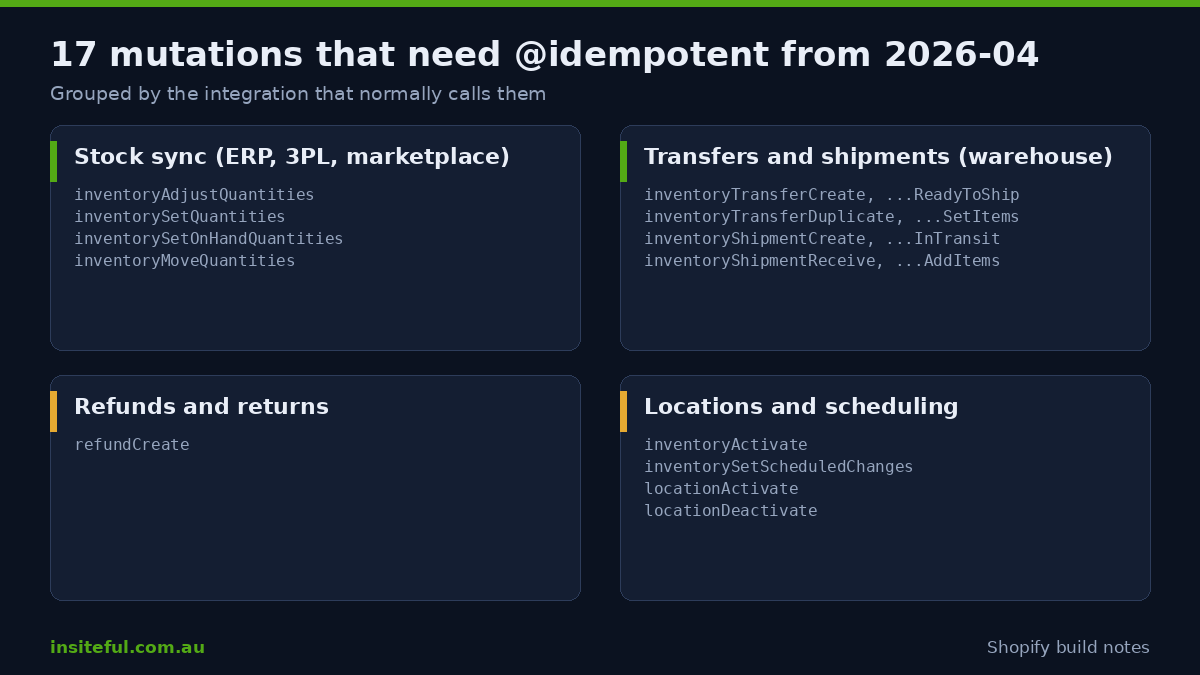
There is a second reason this matters now: the current inventorySetQuantities reference shows the directive in every example, and recommends compareQuantity on every call. If your sync still uses ignoreCompareQuantity: true to force values through, Shopify warns this can produce inaccurate quantities when requests run concurrently. Idempotency and compare-and-set solve different problems, and a safe sync uses both.
One rollout caveat from the field. A developer reported on the Shopify community forum that calls on 2026-01 and 2026-04 succeeded with and without the directive. A Shopify staff member explained that the update was being rolled out to stores in batches. The practical lesson is that “my staging store accepted it” is not evidence that production will. Add the directive everywhere before you move an app to 2026-04, not after the first runtime error.
Why Duplicate Writes Happen: The Four Retry Paths
Most teams assume duplicate writes come from bugs. In our audits they mostly come from correct code behaving sensibly under bad conditions. A request is sent, the connection drops, and the caller cannot know whether Shopify processed it. Retrying is the right instinct. Without a key, retrying is also a gamble.
There are four paths we check on every integration review:
| Retry path | How it duplicates a write | Typical symptom |
|---|---|---|
| Client timeout | Your HTTP client gives up at 30 seconds, Shopify finishes at 31 | Stock decremented twice for one sale |
| Queue redelivery | A worker crashes after the API call but before acknowledging the message | Refund created twice on the same order line |
| Webhook replay | The source system resends an event because your endpoint was slow | Received quantity booked twice at a warehouse |
| Operator re-run | Someone presses “sync again” on a job that partly succeeded | Transfer created twice, stock in transit doubled |
Our webhook reliability guide covers inbound events. This article is the outbound half: protecting the writes your system sends back. If you have read our API rate limits guide, note the interaction. A throttled request that you retry after a back-off is exactly the situation where an unkeyed write double-fires.
Third-party APIs make this worse because their own retry guidance pushes you toward more retries, not fewer. Amazon’s Selling Partner API documentation describes a token bucket model and states that a 429 is “a retry-able status code”, with limits that can be dynamic per selling partner. When a marketplace connector retries against Amazon and then writes the resulting order to Shopify inventory, every layer in the chain is allowed to repeat itself. The only safe place to stop duplicates is at the point of the Shopify write, with a key derived from the source event.
The Anatomy of an Idempotent Mutation
The mechanics are small. You add the directive to the mutation field and pass a key as a variable. Shopify remembers the key. If it sees the same key again with the same parameters, it returns the original result instead of running the operation a second time. Here is the pattern for an absolute stock set with compare-and-set, based on the shape in Shopify’s reference:
mutation SetStock($input: InventorySetQuantitiesInput!, $idempotencyKey: String!) {
  inventorySetQuantities(input: $input) @idempotent(key: $idempotencyKey) {
    inventoryAdjustmentGroup {
      reason
      referenceDocumentUri
      changes {
        name
        delta
        quantityAfterChange
      }
    }
    userErrors {
      code
      field
      message
    }
  }
}
Two rules about this snippet. First, the key is a separate variable, never a string literal built into the query text, because a literal makes every query document unique and defeats query caching in your own client. Second, always read userErrors.code. Shopify defines two idempotency codes that you must handle explicitly:
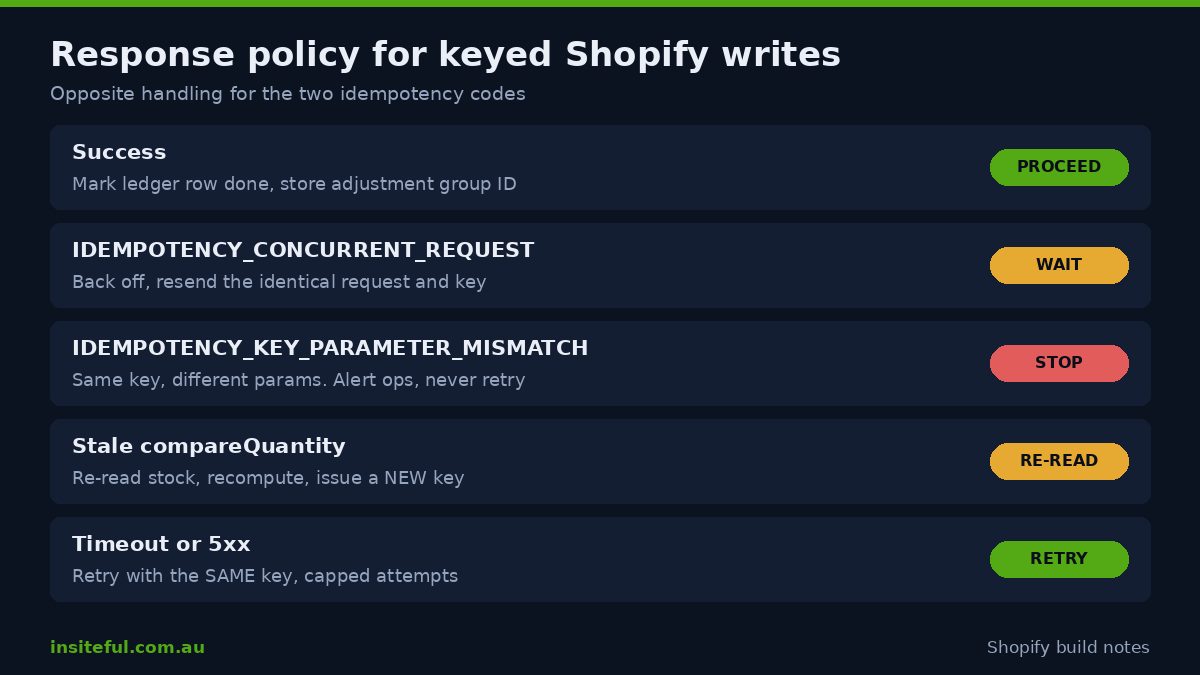
IDEMPOTENCY_CONCURRENT_REQUESTmeans another request with the same key is still being processed. Wait and re-send the identical request. Do not generate a new key.IDEMPOTENCY_KEY_PARAMETER_MISMATCHmeans the same key was used with different parameters. This is always a bug in your key design, and it must page someone rather than silently retry.
On the question of how long a key lives, Shopify’s documentation pages do not state a retention window. A Shopify staff member did answer it on the developer community forum, saying reuse of an identical key on 2026-01 and later fails for duplicates made up to 24 hours after the original. Treat that as a working figure from a staff reply, not a documented guarantee, and design for it: anything you might retry after more than a day needs your own ledger. We cover that below.
Key Design: Derive Keys From the Source Event, Not From Random Numbers
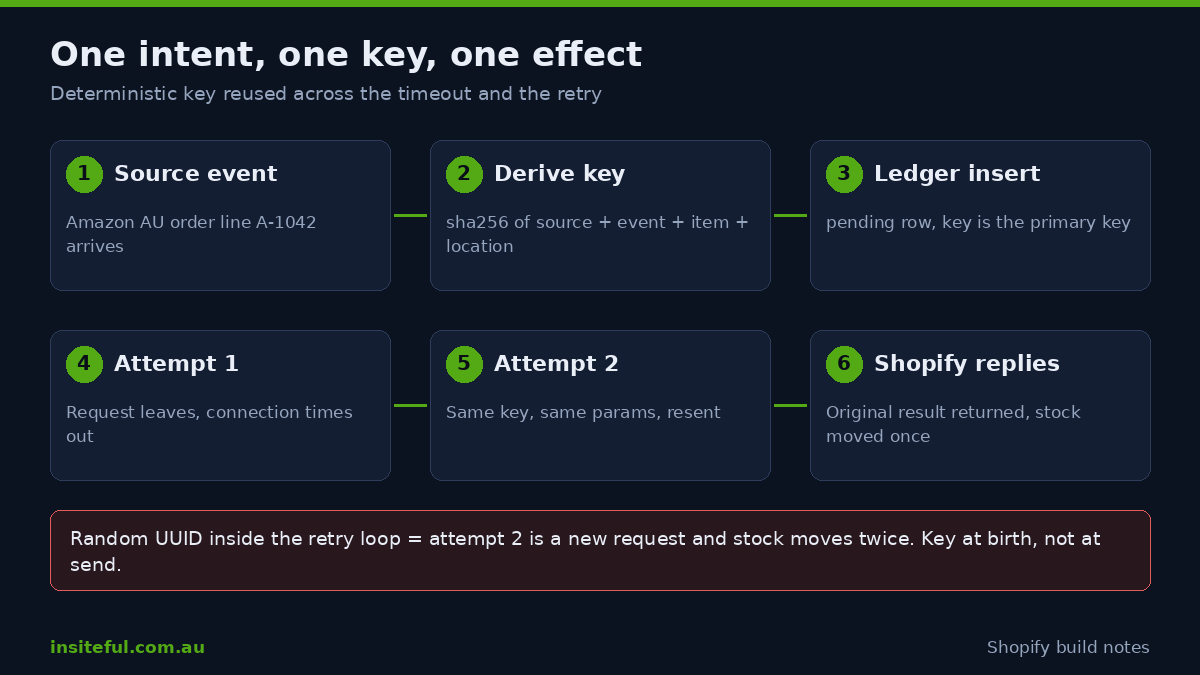
Shopify’s guidance recommends a UUID and says to regenerate it on page load and after successful operations. That advice fits a merchant-facing admin screen, where a person clicks a button once. A server-side integration is different. If your worker generates a fresh UUID inside the retry loop, every retry is a brand new request and the directive protects nothing. The key has to be created once, at the point where the intent is born, and stored with that intent.
Our rule is that the key is a deterministic function of the business event. For a stock push it is the combination of the source system, the event identifier, the inventory item, the location and the quantity name. For a refund it is the source return or credit note identifier plus the order line. The result, hashed for length, is the same on the first attempt, the retry, and the operator re-run an hour later.
import { createHash } from "node:crypto";

type StockEvent = {
  source: "amazon-au" | "erp" | "3pl";
  eventId: string;        // ID from the source system, never generated by us
  inventoryItemId: string;
  locationId: string;
  quantity: number;
};

export function stockKey(e: StockEvent): string {
  const raw = [e.source, e.eventId, e.inventoryItemId, e.locationId, "available"].join("|");
  // Quantity is deliberately NOT in the key. If the same event arrives with
  // a different quantity, we want IDEMPOTENCY_KEY_PARAMETER_MISMATCH to fire.
  return createHash("sha256").update(raw).digest("hex").slice(0, 36);
}
The comment in that snippet is the part teams get wrong. If you put the quantity into the key, a source system that resends an event with a corrected quantity produces a different key, and Shopify applies both writes. If you leave the quantity out, the same event with a different quantity trips the mismatch error, which is exactly the alarm you want. Keys identify the intent. Parameters describe it. When they disagree, a human should look.
Handling Both Error Codes Without Creating New Bugs
The two codes need opposite treatment, and conflating them is how an idempotency rollout creates new incidents. A concurrent-request error is a signal to wait. A parameter-mismatch error is a signal to stop. We wrap every keyed call in the same small function so the policy lives in one place:
export async function keyedWrite(run: () => Promise<Result>, key: string) {
  for (let attempt = 0; attempt < 5; attempt++) {
    const res = await run();                       // same key every time
    const codes = (res.userErrors ?? []).map((u) => u.code);

    if (codes.includes("IDEMPOTENCY_KEY_PARAMETER_MISMATCH")) {
      await alertOps("Key reused with different params", { key });
      throw new Error("MISMATCH: do not retry");
    }
    if (codes.includes("IDEMPOTENCY_CONCURRENT_REQUEST")) {
      await sleep(250 * 2 ** attempt);             // wait, then resend unchanged
      continue;
    }
    return res;                                    // success or a business error
  }
  throw new Error("Gave up after 5 attempts: " + key);
}
Notice what the loop does not do. It never regenerates the key, and it never retries a mismatch. It also leaves ordinary business errors, such as a stale compareQuantity, to the caller. A compare failure means someone else changed the stock between your read and your write. The correct response is to re-read, recompute and issue a new intent with a new key, because the parameters are now genuinely different.
Worked Example: A Marketplace Sync That Cannot Oversell Twice
Marketplaces are where duplicate writes cost real money, so we model one. The numbers below are illustrative, not client data. Take a brand turning over $3,000,000 AUD a year, selling on its Shopify store and on Amazon Australia, with 1,400 SKUs and around 6,000 marketplace units a month.
The context is worth a sentence. Pattern’s 2026 Marketplace Consumer Report, as reported by eCommerceNews Australia, found Amazon reached 60% of Australian shoppers, with 8.8 million active shoppers, and that 93% of Australians made a marketplace purchase in the past 12 months. The 2025 edition put Amazon at 10% of Australia’s total online shopping spend. Marketplaces are no longer a side channel for local brands, which is why the plumbing behind them deserves the same care as checkout.
Now the failure arithmetic. Suppose 1.5% of marketplace order events trigger a duplicate inventory decrement because of timeouts and queue redeliveries. That is 90 phantom units a month. At an average selling price of $42 AUD, 90 units of hidden stock is $3,780 AUD of sales that never happen because the storefront shows sold out while the shelf is full. Over a year, that is $45,360 AUD, before counting the reverse failure where a duplicated receive books stock that does not exist and the store oversells instead.
| Scenario (modelled) | Duplicate rate | Phantom units per month | Hidden sales per month at $42 AUD |
|---|---|---|---|
| Careful retry logic, no keys | 0.5% | 30 | $1,260 AUD |
| Typical queue-based sync, no keys | 1.5% | 90 | $3,780 AUD |
| Peak week with throttling and retries | 4.0% | 240 | $10,080 AUD |
| Deterministic keys plus ledger | Near zero | Only mismatches, which alert | Negligible |
A note on tooling before anyone assumes an app solves this. Shopify Marketplace Connect lists Amazon, Target Plus, Walmart and eBay, with the first 50 synced orders per month free and a 1% fee per additional order capped at US$99 per month. Shopify’s help pages we reviewed do not name Australia as a supported country or marketplace, and say only that you register in the Amazon region where you plan to sell. If you are choosing between an app and a custom connector, confirm Australian coverage directly with the app vendor before you plan around it, and ask how their writes behave on retry. Our ERP integration comparison uses the same questions.
The architecture that removes the duplicate risk is simple. Each marketplace order line becomes a row in an inbound table. The row carries the marketplace order identifier and line, and a worker derives the Shopify key from them. The worker writes to Shopify with that key. On success, it marks the row done. On a timeout, it retries with the same key. The result is that 1,000 retries and one attempt produce the same stock level.
The Ledger: Covering What the Key Window Cannot
If a staff reply is accurate about the 24 hour window, any retry after that window is a new request as far as Shopify is concerned. Weekend outages, dead-letter queues and operator re-runs all routinely cross it. The fix is a small ledger table in your own database. It records every intent before it is sent and its outcome after.
CREATE TABLE shopify_write_ledger (
  idempotency_key  TEXT PRIMARY KEY,
  mutation         TEXT NOT NULL,
  source_event_id  TEXT NOT NULL,
  payload_hash     TEXT NOT NULL,
  status           TEXT NOT NULL DEFAULT 'pending',  -- pending | done | failed
  shopify_group_id TEXT,
  first_sent_at    TIMESTAMPTZ,
  completed_at     TIMESTAMPTZ
);

-- Before sending: insert, or find the existing row.
-- If status = 'done', skip the call entirely.
-- If status = 'pending' and older than 24h, reconcile against
-- inventory_levels/update webhooks before deciding to re-send.
The primary key does the heavy lifting: a second insert for the same intent fails at the database, which is a stronger guarantee than any retry policy. The pending-and-old case is the dangerous one. When you do not know whether an old write landed, do not guess. Compare the item’s current available quantity and its recent inventory_levels/update webhook history, which Shopify staff themselves suggested as the way to verify adjustments without polling the API. Our inventory states guide explains why the available, committed and on-hand quantities need separate treatment when you do this reconciliation.
Mutations With No Key: Orders and Your Own Duplicate Guard
The 17 mutations are not the whole story. Importing a marketplace order into Shopify with orderCreate is the other write that duplicates in practice, and the orderCreate reference says nothing about idempotency keys or duplicate prevention. It does state that trial and development stores can create a maximum of five new orders per minute, which matters when you load-test, and that the mutation requires the write_orders scope and an offline token.
So for order imports the guard is yours. Before every orderCreate, query for an existing order carrying the marketplace order number in a tag or metafield, and write that identifier on creation. Combine it with the ledger row so a crash between “order created” and “row marked done” cannot create a second order on restart. This is the same discipline as the keyed inventory writes, applied where the platform gives you no help. If you also run a fulfilment partner, the same pattern protects the handoff described in our 3PL integration guide.
Bulk Operations: Keys Per Row, Not Per Job
Large stock loads usually go through bulk mutations, and Shopify’s idempotency documentation is specific here: with @idempotent, the key is passed as a variable in each JSONL row, so idempotency applies per row rather than to the whole bulk operation. That is the behaviour you want, but it changes how you build the file.
{"input":{"name":"available","reason":"correction","quantities":[{"inventoryItemId":"gid://shopify/InventoryItem/1001","locationId":"gid://shopify/Location/55","quantity":12,"compareQuantity":10}]},"idempotencyKey":"7c1e...a90"}
{"input":{"name":"available","reason":"correction","quantities":[{"inventoryItemId":"gid://shopify/InventoryItem/1002","locationId":"gid://shopify/Location/55","quantity":0,"compareQuantity":3}]},"idempotencyKey":"b42f...03d"}
Build each row’s key from the same deterministic function as any single write, so that re-submitting a partly failed bulk job produces the same keys for the rows that already succeeded. Shopify skips the repeats, and only the failed rows have an effect. Without that, a re-run of a 40,000 row job is the fastest way we know to double a warehouse count.
Proving It Works: Four Chaos Checks Before Go-Live
An idempotent design that has never been attacked is a hope, not a design. Before an integration moves to 2026-04 we run four checks on a development store and then one controlled run on production. Note that development stores are rate-limited on order creation, so run the order import checks at low volume.
| Check | How we run it | Pass condition |
|---|---|---|
| Double fire | Send the identical mutation and key twice, back to back | Stock changes once, second call returns the original result |
| Kill mid-flight | Terminate the worker after the request leaves but before the ack | On restart the retry produces no second change |
| Parameter drift | Reuse a key with a different quantity | IDEMPOTENCY_KEY_PARAMETER_MISMATCH fires and an alert is raised |
| Concurrent race | Send the same key from two workers at once | One succeeds, the other waits on IDEMPOTENCY_CONCURRENT_REQUEST and resolves |
Log the key, mutation, outcome and Shopify’s returned adjustment group for every write. When a stock level is disputed in six months, that log is the difference between a ten minute answer and a two day forensic exercise.
Upgrade Checklist for Moving an Integration to 2026-04
This is the order we work in, and it fits inside a single sprint for most connectors.
- Search the codebase for every call to the 17 affected mutations, including ones buried in older scripts and Flow HTTP actions.
- Add
@idempotent(key: $idempotencyKey)to each, with the key passed as a variable. - Replace any random key generation inside retry loops with a key derived from the source event.
- Remove
ignoreCompareQuantity: truewherever it was used as a shortcut, and supplycompareQuantity. - Add the two idempotency error codes to your error handler with the opposite policies above.
- Add the ledger table and the pending-over-24-hours reconciliation job.
- Run the four chaos checks on a development store, then one supervised batch on production.
- Only then change the pinned API version and watch the logs for runtime errors for a full sales cycle.
If you plan to run the upgrade alongside other deprecation work, our API deprecation audit shows how we sequence it so one release does not carry five unrelated risks.
How We Do It at Insiteful
Every integration we build or inherit gets the same treatment. We start with a read-only inventory of every Shopify write the system makes, classified by whether the mutation takes a key, whether it needs one from 2026-04, and what the caller does on a timeout. That inventory is usually a surprise to the client, because writes accumulate in scripts, Flow actions and old app code nobody remembers adding.
Then we apply four defaults. Keys are deterministic and derived from the source event. A ledger table sits in front of every write that matters. Parameter mismatches page a person rather than retry. And each integration ships with the four chaos checks written as automated tests, so the next developer who touches the code cannot quietly break the guarantee. For Australian retailers running stock through Cin7, Unleashed, NetSuite or a 3PL, this is the part of the build that decides whether Black Friday is a trading event or a reconciliation project.
We keep the scope honest, too. Not every store needs a custom connector. A brand with one location and a single marketplace feed often does better with a well-configured app and a monthly stock audit. We say so in the scoping call, and we put the idempotency work where the money is: multi-location stock, refunds, and anything feeding a warehouse.
Get Your Integration Checked Before API 2026-04 Does It For You
If your store syncs stock, refunds or transfers from an ERP, 3PL or marketplace, ask your developer one question this week: what happens when the same write is sent twice? If the answer is a pause or a guess, the build needs work before the version change reaches your store. We run a fixed-scope integration review that inventories every write, shows the exposure in dollars, and returns a prioritised fix list. See how we scope and run builds on our process page, then book your build assessment from there.