

Open the network waterfall on a Shopify collection page and look at the very first bar. Before a single image downloads, before any script runs, before the browser has anything at all to paint, there is a block of dead time while the server decides what the HTML should say. On a well built storefront that block is about half a second. On a storefront carrying six years of theme edits and a product card snippet that queries eleven metafields per tile, it can be two. Nothing you do to your images, your fonts or your JavaScript makes that first bar shorter.
That bar is Time to First Byte, and it is the one Core Web Vitals input that lives entirely on the server side of the wire. It is not itself a Core Web Vital, which is why it gets ignored. But every millisecond of it is inherited by First Contentful Paint and by Largest Contentful Paint, which is scored. You cannot render a hero image the browser has not been told about yet.
This is the diagnostic and build playbook we run at Insiteful when a Shopify storefront has a server-side problem. It completes the set alongside our CLS playbook, INP playbook and image optimisation guide. Every fix below is native Liquid and theme architecture. No headless rewrite, no edge worker, no app.
What TTFB actually measures on a Shopify storefront
TTFB is the elapsed time from the moment a shopper requests a URL to the moment the first byte of the HTML response arrives back in the browser. It is one number that hides four distinct stages, and only one of those stages is yours.
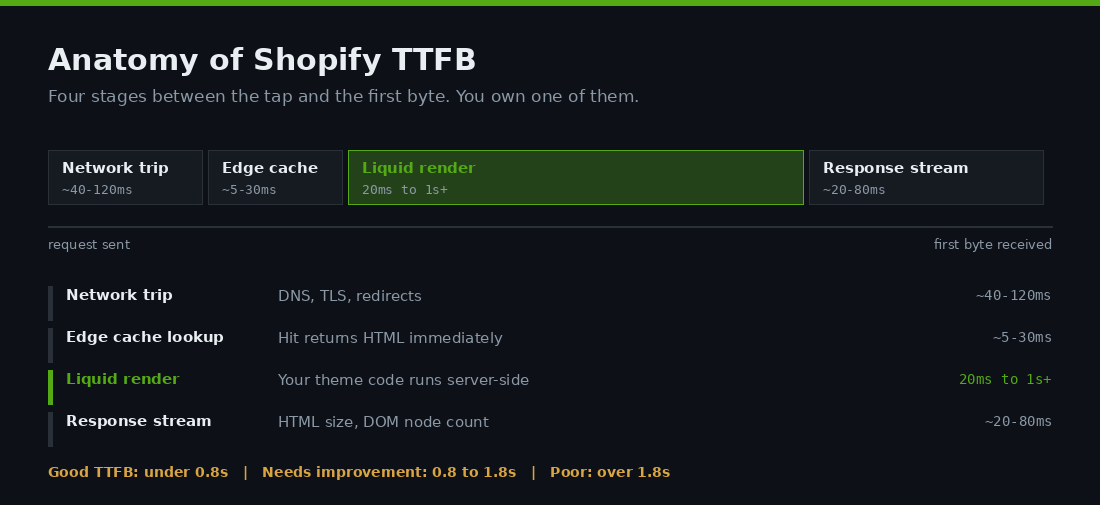
Stage one, the network trip. DNS lookup, TCP connection, TLS negotiation, and any redirect chain sitting in front of the page. Shopify serves storefronts from a global CDN, so for an Australian shopper this is usually well under 100 milliseconds. It gets ugly when a store has stacked redirects, for example a bare domain that redirects to www, which then redirects to a trailing-slash variant. Each hop is a full round trip.
Stage two, the cache lookup. Shopify caches rendered pages at the edge. On a cache hit the server does almost no work and the HTML comes back nearly instantly. On a miss, the request goes back to the storefront renderer.
Stage three, the Liquid render. This is your code. Every for, assign, capture, render and metafield lookup in your theme executes on Shopify’s renderer before a byte leaves the building. This stage is the one you own, and it is the one that varies by an order of magnitude between a clean theme and a neglected one.
Stage four, the response. The HTML streams back. Bigger documents take longer, which is where 5,000-node mega menus start to matter.
The bar is 0.8 seconds. Above 0.8 and up to 1.8 seconds is the needs-improvement band, above 1.8 seconds is poor. Shopify sits comfortably inside that on average, with commonly cited platform measurements putting a typical Shopify storefront TTFB near 0.51 seconds against roughly 1.4 seconds on self-hosted alternatives. Shopify’s own performance team is blunt about it: a genuinely bad TTFB is rare on the platform, and when they do see one, complex Liquid is the first suspect.
That framing matters commercially. If your store has a 1.4 second TTFB, you are not fighting the platform. You are fighting your own theme, and that is fixable in a sprint rather than a replatform.
Read the server before you touch the theme
Most speed work on Shopify starts in the wrong place, because Lighthouse hands you a list of image and JavaScript opportunities and says nothing useful about the server. Two measurements tell you whether you have a server-side problem at all.
Measurement one: is the gap before FCP, or is it TTFB itself? Shopify’s performance team calls these directional clues. A slow TTFB with FCP and LCP arriving quickly afterwards points at server response. A fast TTFB with a long gap to FCP points at render-blocking resources or an anti-flicker snippet, and no amount of Liquid tuning will help you. Pull the three numbers from field data before you commit to a direction.
You can read them straight out of the browser on any page of your own store. Paste this into the console and load the page fresh.
const nav = performance.getEntriesByType("navigation")[0];
console.table({
  redirect: Math.round(nav.redirectEnd - nav.redirectStart),
  dns:      Math.round(nav.domainLookupEnd - nav.domainLookupStart),
  tls:      Math.round(nav.connectEnd - nav.secureConnectionStart),
  waiting:  Math.round(nav.responseStart - nav.requestStart),
  ttfb:     Math.round(nav.responseStart),
  download: Math.round(nav.responseEnd - nav.responseStart)
});
// Shopify emits Server-Timing on storefront responses
console.table(nav.serverTiming.map(t => ({ name: t.name, ms: t.duration })));
The waiting figure is the server thinking. If waiting is 90 milliseconds and your total TTFB is 1.6 seconds, your problem is redirects or connection setup, not Liquid. If waiting is 900 milliseconds, keep reading. The serverTiming entries are the more interesting half: Shopify emits timing marks on storefront responses covering processing duration, database time, render time and the resolved page type. They are undocumented and subject to change, so treat them as a diagnostic signal rather than a contract, but they are the fastest way to see whether a request was served from cache or rendered from scratch.
Measurement two: the Liquid flame graph. The Shopify Theme Inspector for Chrome renders the server-side profile of a page as a flame graph, node by node, with filename and line number attached. You need the Themes staff permission or a collaborator account, and it cannot profile checkout or development stores. Open DevTools, select the Shopify tab, click Load Profile.
The flame graph is the headline, but the sandwich view is where the diagnosis usually lands. It aggregates self time and total time per node, so a filter that runs in 50 microseconds looks harmless until you see it executed 2,000 times on one collection page. Shopify’s documentation uses exactly that example: filter:image_url at roughly 0.05ms a call, multiplied out across a grid, becomes a material share of render time.
One caveat the docs are careful about. Total Liquid render time is not TTFB. It excludes the network overhead of getting the request to Shopify’s backend, which for most users should be under 100 milliseconds. So treat render time as your controllable budget and TTFB as the number the shopper actually experiences.
The 100 millisecond render budget
Set a number before you optimise, or you will chase the flame graph forever. Ours is 100 milliseconds of total Liquid render time per page, measured on the heaviest template in the store, which is almost always the collection page. That figure is the working consensus across Shopify performance practitioners, and it leaves enough headroom under the 0.8 second TTFB bar to absorb a slow mobile network and a cache miss on the same request.
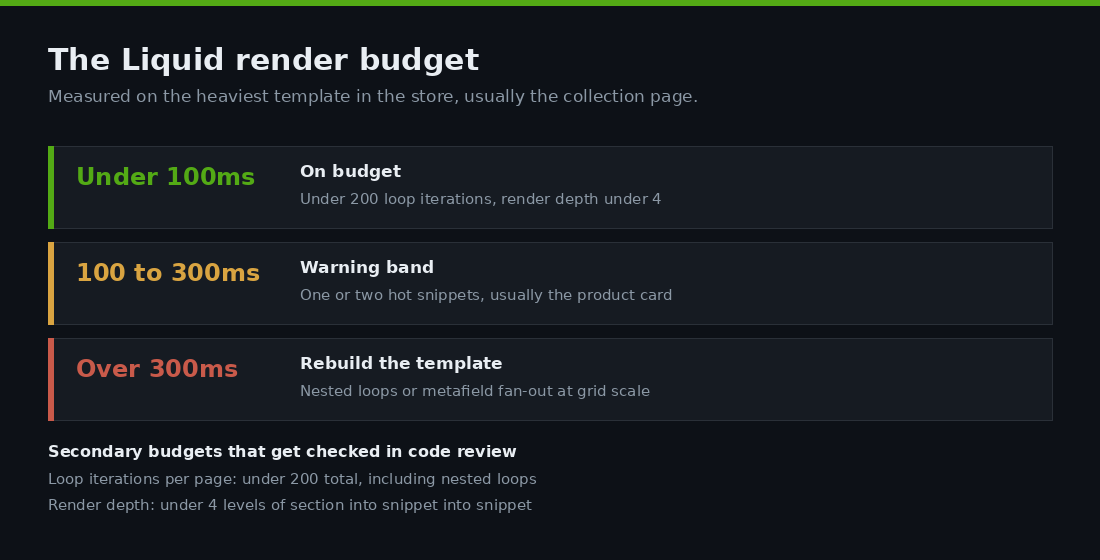
Underneath the total, two secondary budgets do the real work in code review.
Loop iterations per page: under 200. Not 200 products. Total iterations across every loop on the template, including the nested ones. A collection page showing 24 products, where each product card loops 4 variants for swatches and 3 badges, is already at 24 plus 96 plus 72, or 192 iterations, before the mega menu. Well optimised pages typically run 24 to 50 iterations in their primary loop.
Render depth: under 4 levels. Section renders snippet renders snippet renders snippet is where profiles go bad, because each level multiplies against the loop it sits inside.
Write both numbers into the theme’s contributing guide. A budget that only lives in a performance audit gets breached by the next feature ticket.
Five patterns that blow the budget
Across the storefront audits we run, slow Liquid comes back to the same five shapes. They are ordered here by how often we find them, not by how hard they are to fix.
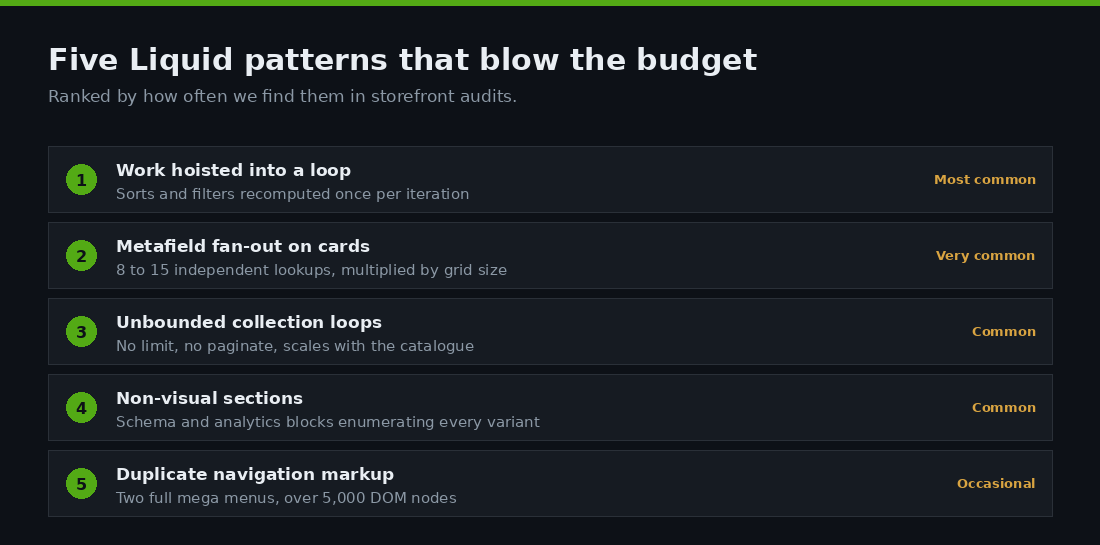
1. Work hoisted into a loop that does not belong there
The single most common defect, and the one Shopify’s own documentation leads with. A sort, a filter or a map is computed inside the loop even though its value never changes per iteration.
{%- for product in collection.products -%}
  {% assign products_by_price = collection.products | sort: "price" %}
  {%- comment -%} card markup {%- endcomment -%}
{%- endfor -%}
On a 24 product collection that sorts the entire collection 24 times. The fix is to move it out.
{% assign products_by_price = collection.products | sort: "price" %}

{%- for product in collection.products -%}
  {%- comment -%} card markup, products_by_price still in scope {%- endcomment -%}
{%- endfor -%}
The same shape hides inside snippets. A product card that runs collection.products | where: 'tags', 'bestseller' to decide whether to show a badge is doing a full collection scan per card. Compute the set once in the section and pass it in.
2. Metafield fan-out on product cards
Metafields are cheap individually and expensive in aggregate. We routinely find product card snippets checking eight to fifteen metafields per tile for badges, swatches, delivery promises, review counts and app flags. Shopify’s performance team has documented an edge case with hundreds of metafield property checks on a single product page.
The pattern to look for is a chain of independent existence checks.
{%- if product.metafields.custom.badge_new != blank -%}...{%- endif -%}
{%- if product.metafields.custom.badge_sale != blank -%}...{%- endif -%}
{%- if product.metafields.custom.badge_local != blank -%}...{%- endif -%}
{%- if product.metafields.reviews.rating != blank -%}...{%- endif -%}
Two fixes. Consolidate related flags into a single JSON metafield so one lookup returns the whole badge set. And guard the block so the work only runs where the data is actually rendered, which on a collection grid is usually the first row rather than all 24 tiles.
{%- assign flags = product.metafields.custom.badges.value -%}
{%- if flags -%}
  {%- for badge in flags limit: 2 -%}
    <span class="badge badge--{{ badge.type }}">{{ badge.label }}</span>
  {%- endfor -%}
{%- endif -%}
3. Unbounded collection loops
Liquid will happily iterate a collection of 900 products if you ask it to. Any loop over collection.products, collections, linklists or product.variants without a limit or pagination is a defect waiting for the catalogue to grow. The store that was fast at 80 SKUs is slow at 800, and nothing in the theme changed.
{%- comment -%} Bad: scales with the catalogue {%- endcomment -%}
{% for product in collections.all.products %}

{%- comment -%} Good: bounded, and paginated where a full list is required {%- endcomment -%}
{% for product in collections.all.products limit: 12 %}

{% paginate collection.products by 24 %}
  {% for product in collection.products %}
{% endpaginate %}
Search the theme for for occurrences without a following limit or paginate and you will usually find three or four. Add the constraint even where today’s data makes it moot.
4. Non-visual sections doing real work
SEO blocks, analytics wrappers, schema generators and app embed sections render nothing a shopper can see, yet they sit in the render path. A JSON-LD block that loops every variant and every image of a product to build structured data is not free, and it runs on every product page view.
Shopify’s guidance is to evaluate whether each non-visual section is necessary and refactor the ones that stay. In practice we cap what schema blocks enumerate, because search engines do not need all 40 variants inline.
{%- comment -%} Cap enumeration in structured data {%- endcomment -%}
"offers": [
  {%- for variant in product.variants limit: 10 -%}
    { "@type": "Offer", "price": "{{ variant.price | divided_by: 100.0 }}" }
    {%- unless forloop.last -%},{%- endunless -%}
  {%- endfor -%}
]
5. Duplicate navigation markup
Two full mega menus, one for mobile and one for desktop, hidden from each other with CSS. Shopify has documented a real example carrying 2,868 nodes in the mobile nav and 2,223 in the desktop nav, over 5,000 of a 6,800 node page. That costs you twice: Liquid render time to build both trees, and response size to ship them.
The fix is one markup tree styled two ways with modern CSS, or a server-rendered first level with the deeper tiers fetched on interaction. Keep at least one full menu server-rendered so crawlers still see your site architecture. You can measure the damage in one line in DevTools by selecting the nav element and running a node count on it.
// select the nav in the Elements panel first, then:
$0.querySelectorAll("*").length
Defer the work you cannot delete
Some sections are genuinely expensive and genuinely wanted. A recently-viewed rail, a complex size-and-fit table, a store locator, a reviews feed. The answer is not to delete them, it is to move them off the critical render path using the Section Rendering API, which lets you request an individual section’s HTML after the document has loaded.
// Fetch a below-fold section after first paint
const url = new URL(window.location.href);
url.searchParams.set("section_id", "recently-viewed");

const io = new IntersectionObserver(async (entries, obs) => {
  if (!entries[0].isIntersecting) return;
  obs.disconnect();
  const html = await (await fetch(url)).text();
  document.querySelector("#recently-viewed").innerHTML = html;
}, { rootMargin: "600px" });

io.observe(document.querySelector("#recently-viewed"));
Two rules keep this honest. Never defer anything above the fold, because you trade server time for a layout shift and a slower LCP, and CLS is scored while TTFB is not. And never defer content you need indexed, because the crawler will not run your observer. This is a tool for the bottom two thirds of the page.
The same API is what makes native cart drawers, filter updates and quick-add work without a full page reload. If you are already using it for those, extending it to below-fold sections is a small change with a direct effect on render time. We covered the mechanics in detail in our Section Rendering API guide.
Stop breaking your own cache
Every optimisation above assumes the page renders. The bigger win, when it is available, is not rendering at all. When a page is served from Shopify’s edge cache, server processing drops to near zero and the browser gets HTML immediately.
Three theme habits reliably push pages off the cached path or reduce how useful a cached response is.
Personalisation in the document. Rendering a customer name, a loyalty tier or a customer-specific price into the server HTML makes that HTML valid for exactly one person. Render the shell for everyone, then hydrate the personal fragment client-side from a small fetch. Note the deliberate exception: B2B catalogue and price list logic genuinely does belong server-side, which is a design decision about correctness rather than speed.
Query parameter sprawl. Marketing links carrying long unique parameter strings can fragment how requests are matched. Normalise campaign parameters where you control the links, and strip anything that does not change what the page should show.
Redirect chains. insiteful.com.au itself is www-canonical, and every bare-domain link a partner publishes costs a round trip before the real request starts. Audit your internal links, your email templates and your ad destination URLs for the canonical host and the trailing slash form your site actually serves. This is the cheapest TTFB win available to most stores and it takes an afternoon.
Verify in field data, not in the lab
Lab numbers move the moment you deploy. The number that matters is measured on real Chrome sessions at the 75th percentile over a rolling 28 day window, and it lags your release by weeks. Wire the loop before you ship, not after.

Before. Theme Inspector profile of home, collection, product and cart, saved with node counts and the sandwich view’s top ten. Field TTFB, FCP and LCP from CrUX so you know the starting distribution and not just one lab run.
During. Every change lands as a reviewed pull request on the theme repository against a preview theme, re-profiled on the same four templates. A change that improves render time by 40 milliseconds and adds a layout shift is not a win.
After. Real user monitoring on the live store, because CrUX only reports origins with enough traffic and only in 28 day aggregate. A few lines of the web-vitals library shipped to a sample of sessions gives you TTFB by template and by device class, which is what tells you whether the collection page fix actually reached mobile shoppers on regional connections.
import { onTTFB, onLCP } from "web-vitals/attribution";

const send = (metric) => navigator.sendBeacon("/apps/rum", JSON.stringify({
  name: metric.name,
  value: Math.round(metric.value),
  template: window.Shopify?.template,
  attribution: metric.attribution
}));

onTTFB(send);
onLCP(send);
Two comparisons keep the programme honest. Compare cached against uncached responses, because an averaged TTFB hides a bad render behind a good cache hit rate. And compare mobile against desktop, because Australian mobile sessions on regional networks carry more connection overhead on top of whatever your server spends.
How we do it at Insiteful
Server-side work is the least glamorous performance engagement we run and one of the most reliable, because the profile tells you where the time went and the fix verifies in the same tool. After 25 years and more than 200 Shopify builds, the process is fixed.
Profile before opinion. Theme Inspector flame graphs and sandwich views across the four core templates, plus the Server-Timing and Navigation Timing figures on cached and uncached requests. Every finding gets a row: template, node, self time, call count, estimated saving. Sorted by saving, not by how satisfying the fix looks.
Budgets in the repository. 100 milliseconds render time, under 200 loop iterations, render depth under four. Those numbers live in the theme’s contributing guide and get checked in code review, which is the only reason they survive the next three feature tickets.
Native fixes, version controlled. Hoisted assigns, bounded loops, consolidated metafields, capped schema blocks and deduplicated navigation land as pull requests against a preview theme. No app is installed to solve a problem the theme created. This is the same reasoning behind our position on building fast on the native stack rather than reaching for a headless rewrite the moment a page feels slow.
Held open until the field agrees. For a Sydney homewares client turning over roughly $410,000 AUD a month, the collection template was profiling at 680 milliseconds of Liquid render, driven by a product card that resolved eleven metafields and re-sorted the collection inside the grid loop. Consolidating the badge metafields, hoisting the sort and bounding two unlimited loops took render time to 96 milliseconds. Field TTFB at the 75th percentile on mobile moved from 1.42 seconds to 0.58, LCP followed it down from 3.4 to 2.3 seconds, and the collection to product click-through rose 9 per cent over the following month with no design change at all.
That last number is the point. Nobody browsing a storefront on the train notices a server timing. They notice that the page was there when they looked at it.
Find out what your server is actually doing
If your Lighthouse score keeps stalling no matter how many images you compress, the answer is probably upstream of the browser. Profile the Liquid before you touch anything else. Read the flame graph, count the loop iterations, check whether the response was cached, and set a render budget you can defend in code review.
Most Shopify stores with a genuine TTFB problem are not being let down by the platform. They are carrying a product card that does eleven times more work than it needs to, on a grid that renders it 24 times, on the page that gets the most traffic in the store.
If you want that profile done properly and the fixes shipped against a preview theme with the field data to prove it, start with a build assessment. We will tell you exactly where your server time is going, what it is costing you, and what it takes to get it back.