

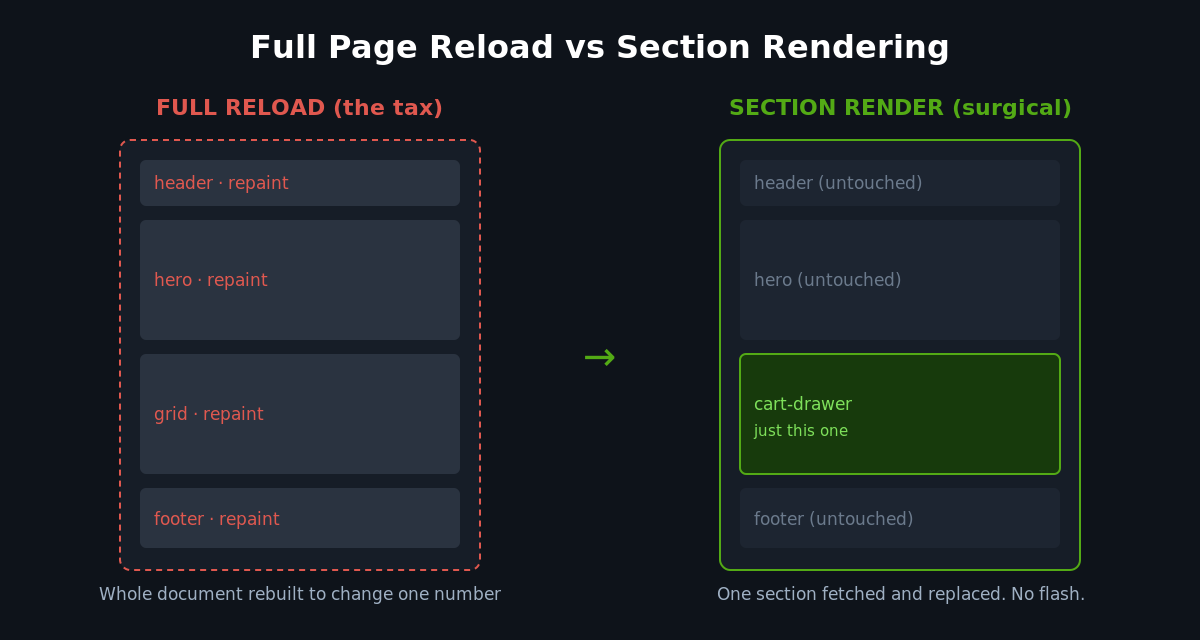
Click “Add to cart” on most Australian Shopify stores and you can watch the whole page blink. The header reloads. The hero image repaints. The browser throws away a fully rendered document and rebuilds it from scratch, just to tell the shopper that the cart count went from 1 to 2. It is wasteful, it is slow, and on mobile it is where carts go to die.
For years the supposed fix was to go headless: rip the storefront off Shopify, rebuild it as a single-page React app, and chase that “instant” feel. We have rebuilt enough of those projects back onto native Shopify to know the truth. You do not need a headless stack to make a storefront feel instant. You need the Section Rendering API, used properly.
This is the native tool Shopify gives every theme for updating part of a page without reloading the whole thing. Done well, it is the difference between a cart drawer that snaps open with the right line item already in it and one that makes a shopper wait through a full navigation. This article is the build playbook we use at Insiteful: what the API actually does, the three highest-leverage places to use it, the code to do it, and the guardrails that stop it quietly breaking your SEO and your Core Web Vitals.
What the Section Rendering API actually is
The Section Rendering API is not a separate service or an app you install. It is a behaviour baked into every Shopify storefront: you can append a sections or section_id query parameter to almost any storefront URL, and Shopify will return just that section’s rendered HTML instead of the full page.
Request a single section and you get raw HTML back:
// Returns the rendered HTML for one section
fetch(window.Shopify.routes.root + 'collections/sale?section_id=main-collection')
  .then(res => res.text())
  .then(html => {
    document.getElementById('shopify-section-main-collection').innerHTML = html;
  });
Request multiple sections with the sections parameter and you get a JSON object keyed by section ID, with each value being that section’s HTML. You can ask for up to five sections in a single round trip:
fetch(window.Shopify.routes.root + '?sections=cart-drawer,cart-bubble,cart-live-region')
  .then(res => res.json())
  .then(data => {
    // data = { "cart-drawer": "<div ...>", "cart-bubble": "...", ... }
    for (const [id, html] of Object.entries(data)) {
      const el = document.getElementById('shopify-section-' + id);
      if (el && html) el.innerHTML = html;
    }
  });
The mechanism is deliberately boring, and that is the point. The same Liquid that renders your section on a normal page render renders it here. There is no second templating layer to maintain, no API schema to keep in sync, no separate front-end deploy. Your section’s settings, blocks, and data come straight from the theme. As the official Shopify documentation notes, any query parameter the full page respects, such as q for search or page for pagination, is respected when you render the section too.
That single property is what makes this the native alternative to headless. You keep the entire merchandising and theming surface that Shopify gives marketers, and you still get surgical, partial updates on the parts that matter.
The number that decides whether this is worth it
Speed is not a vanity metric on a storefront. It is the conversion funnel. Research compiled across the industry shows that 47% of consumers expect a page to load in two seconds or less, and 53% will abandon a site that takes longer than two seconds to load or refresh. Every full-page reload you trigger on an add-to-cart or a filter change is a fresh roll of that two-second dice.
The stakes are highest exactly where Australian stores already leak the most revenue. The current average ecommerce conversion rate sits at roughly 1.8% as of Q3 2025, against an average cart abandonment rate of 70.22%, and mobile abandonment runs harder still at 79 to 85% versus 67 to 70% on desktop. When most of your traffic is on a phone on a patchy 4G connection somewhere between Bondi and Ballarat, the reload tax is brutal. The Section Rendering API removes that tax on the interactions that decide a sale.
The cart drawer: the highest-leverage build
If you do one thing with this API, do the cart drawer. Keeping a shopper in the flow of browsing while they add to cart, rather than throwing them to a full /cart page, is consistently the strongest single lever. Data aggregated across more than 20,000 stores found that cart drawers delivered roughly three times more revenue than traditional cart pages.
The trick is that the cart drawer is a perfect case for bundled section rendering. When you add an item using the Cart AJAX API, you can ask it to return the freshly rendered cart sections in the same response, so you never make a second request to repaint the drawer. Here is the pattern we ship:
async function addToCart(variantId, quantity = 1) {
  const res = await fetch(window.Shopify.routes.root + 'cart/add.js', {
    method: 'POST',
    headers: { 'Content-Type': 'application/json' },
    body: JSON.stringify({
      items: [{ id: variantId, quantity }],
      // Ask the Cart API to render these sections in the same round trip
      sections: ['cart-drawer', 'cart-bubble'],
      sections_url: window.location.pathname
    })
  });

  const data = await res.json();

  // data.sections = { "cart-drawer": "<div>...", "cart-bubble": "..." }
  for (const [id, html] of Object.entries(data.sections)) {
    const el = document.getElementById('shopify-section-' + id);
    if (el && html) el.innerHTML = html;
  }

  openDrawer(); // your existing open/focus logic
}
One request adds the line item and returns the rendered drawer and the header cart bubble together. No flash, no full reload, no second network trip. The shopper taps “Add”, the drawer slides in with the right item already in it, and they carry on browsing.
A word of caution that matters more than the win itself: a drawer is not automatically better. The same A/B testing that shows drawers winning overall also found they can help desktop conversion by around 17% while hurting mobile by 8.4% when the mobile execution is poor. A drawer that is hard to dismiss, that traps scroll, or that hides the checkout button below the fold will cost you money on the exact device where most of your traffic lives. The API gives you the speed. The interaction design has to earn the conversion. That is a distinction we will come back to.
Faceted filtering without the page jump
The second-highest-leverage use is collection filtering. Shopify’s storefront filtering already works through URL parameters, which means it works through the Section Rendering API with almost no extra plumbing. When a shopper ticks “Size 10” or “Under $100”, you fetch the collection section for that filtered URL and swap it in, while updating the browser URL so the state is shareable and the back button behaves.
const collectionSection = 'main-collection';
async function applyFilters(form) {
const params = new URLSearchParams(new FormData(form)).toString();
const url = `${form.action}?${params}`;
const res = await fetch(`${url}§ion_id=${collectionSection}`);
const html = await res.text();
// Replace only the product grid + facets, not the page
const parsed = new DOMParser().parseFromString(html, 'text/html');
document
.getElementById('shopify-section-' + collectionSection)
.replaceWith(parsed.getElementById('shopify-section-' + collectionSection));
// Keep the URL in sync so the state is shareable and SEO-safe
history.pushState({}, '', url);
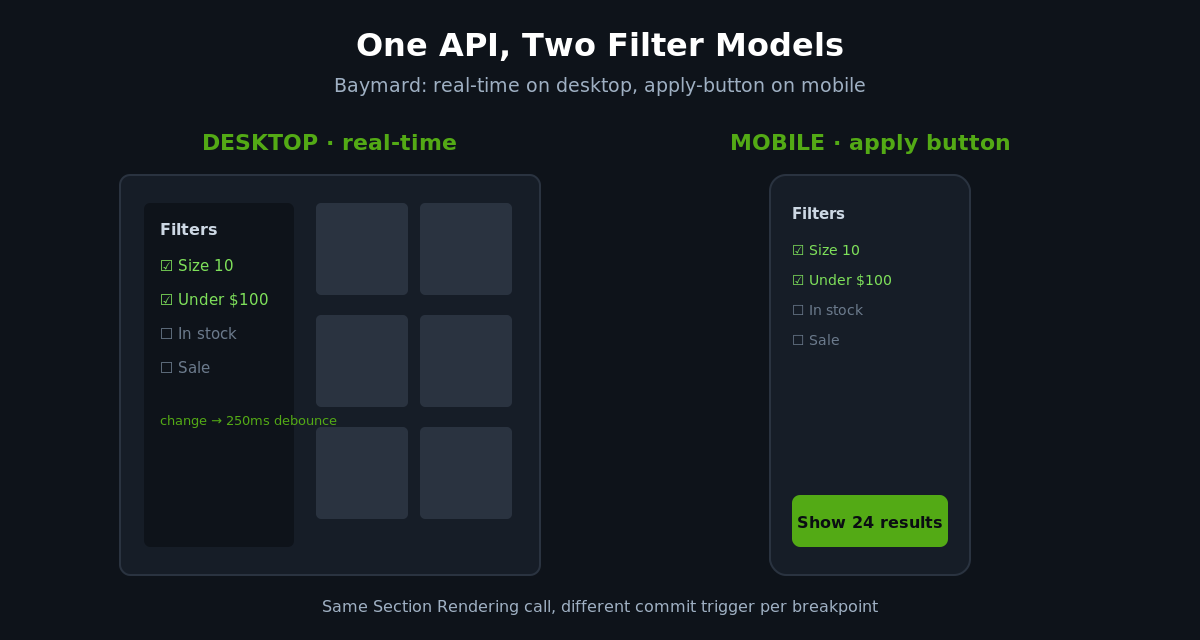
}Here is where build experience separates a good filter from a frustrating one, and the evidence is clear about the rule. Baymard Institute’s research finds that on desktop, real-time filtering, where results update the moment a facet is selected, is the preferred pattern because it feels responsive and removes a step. On mobile it is the opposite: an explicit “Show 24 results” apply button performs better, because instant updates mid-interaction feel disorienting and shoppers usually want to stack several filters before committing.
So the same API call drives two different interaction models depending on the breakpoint. On desktop we wire the fetch to the change event with a short debounce. On mobile we collect the selections behind an apply button and fire one request. Same engine, two behaviours, because the data says they convert differently.
// Desktop: debounce so rapid ticks don't fire a request each
let t;
filterForm.addEventListener('change', () => {
  clearTimeout(t);
  t = setTimeout(() => applyFilters(filterForm), 250);
});
Predictive search and paginated results
The third place this earns its keep is search and pagination. The documentation’s own headline example is paginating search results without a full reload, and the same approach drives a predictive search panel that updates as the shopper types.
async function liveSearch(query) {
const url = window.Shopify.routes.root +
`search?q=${encodeURIComponent(query)}§ion_id=predictive-results`;
const res = await fetch(url);
document.getElementById('shopify-section-predictive-results').innerHTML =
await res.text();
}
// Debounced keystroke handler
let timer;
searchInput.addEventListener('input', (e) => {
clearTimeout(timer);
timer = setTimeout(() => liveSearch(e.target.value), 200);
});For pagination, the page parameter is respected automatically. Intercept the “Next” link, fetch ?page=2§ion_id=main-collection, and either replace the grid or append to it for an infinite-scroll feel, all without leaving the page. The shopper never loses their scroll position or their place in the catalogue.
The guardrails teams get wrong
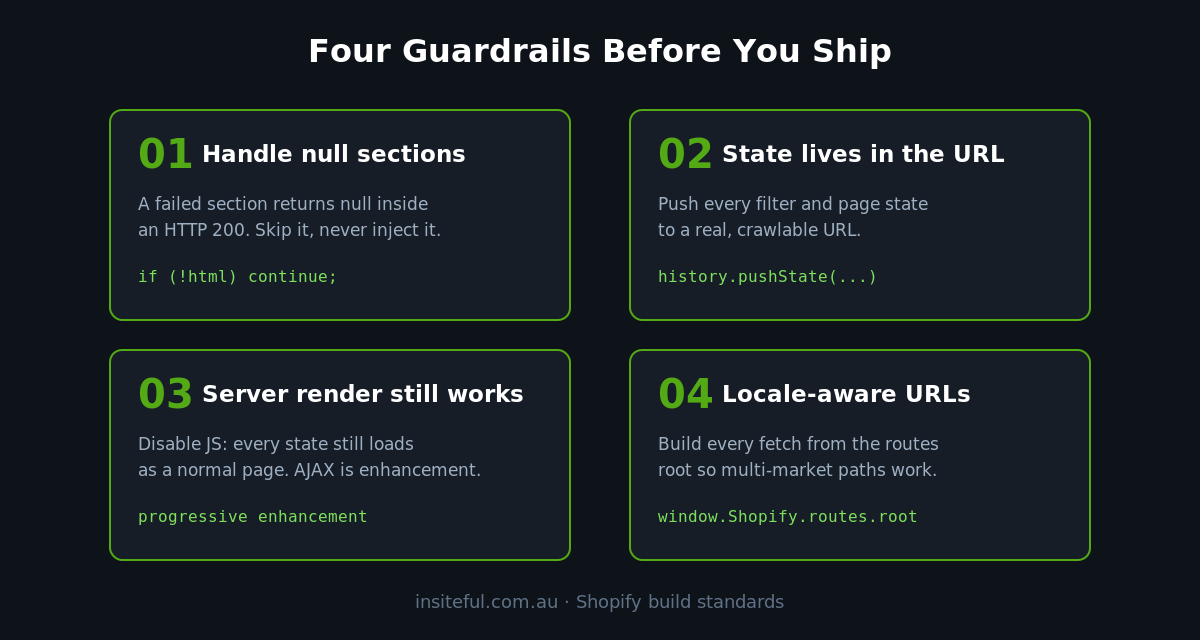
This is the part that separates a storefront that feels fast from one that quietly breaks. The Section Rendering API is easy to start with and easy to ship badly. Four guardrails are non-negotiable in every build we hand over.
Null sections still return HTTP 200. A section that fails to render, including one that does not exist on the published theme, comes back as null inside an otherwise successful response. Shopify is explicit that you can get a 200 status with one or more sections silently missing. If you blindly inject the response you will wipe a region of the page with nothing. Always guard:
for (const [id, html] of Object.entries(data.sections)) {
  if (!html) continue; // skip nulls, leave the old markup in place
  const el = document.getElementById('shopify-section-' + id);
  if (el) el.innerHTML = html;
}
Mind the Referer context. When you use bundled section rendering through the Cart API without setting sections_url, Shopify renders the section in the context of the current page based on the Referer header, not in the context of /cart. This caught a lot of teams out when the behaviour changed in the developer changelog. If your cart drawer section relies on data that only exists on the cart template, set sections_url: '/cart' explicitly so it renders in the context you expect.
Protect SEO with the History API. AJAX-only filtering is invisible to search engines, and faceted navigation is already a minefield for crawl budget. The fix is the rule we coded above: every filter and pagination state must be reflected in a real, crawlable URL via history.pushState, and the underlying full-page render must still work for a bot or a shopper landing cold on /collections/sale?size=10. The AJAX is a progressive enhancement on top of working URLs, never a replacement for them. We cover the broader picture in our piece on Shopify Core Web Vitals.
Use locale-aware URLs. For any Australian brand selling into multiple markets or currencies, hardcoding /cart/add.js breaks the moment a shopper is on a localised path. Always build from window.Shopify.routes.root, which carries the correct locale prefix. It is one token, and it is the difference between a storefront that works in three markets and one that works in one.
There is a performance dimension here too. Replacing innerHTML on a large section forces the browser to re-parse and re-render that chunk of DOM, which shows up in Interaction to Next Paint, the responsiveness metric in Core Web Vitals. Swap the smallest section that does the job, keep the markup lean, and avoid re-running heavy scripts on every injection. We dig into this in our guide to Shopify INP optimisation.
What this looks like on a real Australian store
Numbers make this concrete. We recently took on a mid-market apparel brand turning over around $4M AUD a year on a native Shopify theme that the founder was certain needed a headless rebuild. The quotes they had been given for that rebuild started at $85,000 AUD plus an ongoing front-end retainer. Their actual problem was narrow: the collection pages did a full reload on every filter tick, and the add-to-cart bounced shoppers to a standalone cart page.
We did not touch the platform. We converted the collection grid and facets to section-rendered filtering with the desktop and mobile models split as described above, and replaced the cart page with a bundled-section-rendered drawer. The filter interaction went from a full navigation to a sub-300-millisecond partial swap. The add-to-cart stopped throwing shoppers out of their browsing flow entirely. The merchandising team kept every theme-editor control they had, because nothing about the underlying section architecture changed. The brand spent a fraction of the headless quote and carried zero ongoing specialist maintenance.
That is the pattern almost every time. The “we need headless” conviction is usually two or three specific interactions paying the full-reload tax, and the Section Rendering API addresses them directly.
When not to reach for it
Being honest about the limits is part of doing this well. The Section Rendering API renders Liquid sections, so it is the right tool when the content you are updating is already a theme section driven by Shopify data: carts, collections, search, product recommendations. It is the wrong tool when you genuinely need client-side state that has nothing to do with a rendered section, such as a complex multi-step configurator holding interim state in JavaScript, where re-fetching server-rendered HTML on every change would be slower, not faster.
It is also not a data API. You cannot pass arbitrary section setting values through it, and you should not bend it into one by smuggling state through query parameters it was never meant to carry. When a requirement starts to look like that, the answer is usually a small, well-scoped app block or the Storefront API for that specific component, with the Section Rendering API still handling the cart, filter, and search interactions around it. Matching the tool to the job, rather than reaching for one hammer, is exactly the judgement we cover in our breakdown of Shopify theme blocks.
A build checklist for section-rendered interactions
This is the spec we work through on every section-rendering build before it ships. It is worth treating as a hard gate, because every line on it is a failure mode we have seen in the wild.
- Sections are small and self-contained. Each section you re-render owns its own markup and does not depend on siblings being repainted at the same time.
- Null responses are handled. Every injection skips
nullsections and leaves existing markup intact. - State lives in the URL. Filters, search, and pagination all call
history.pushStatewith a real, full-page-renderable URL. - Server render still works. Disable JavaScript and every filtered, searched, paginated state still loads as a normal page. The AJAX is enhancement, not dependency.
- Locale-aware everywhere. Every fetch is built from
window.Shopify.routes.root. - Desktop and mobile filter models differ. Real-time on desktop, apply-button on mobile, per the conversion evidence.
- Scripts re-initialise safely. Any behaviour bound inside a re-rendered section (quantity steppers, swatches, lazy images) is re-bound after injection without duplicating listeners.
- INP is measured. The injection cost is profiled on a mid-range Android, not just a developer’s laptop.
A storefront that passes this list feels like a native app and still behaves like a properly indexed, crawlable Shopify store. That is the whole proposition: the speed of headless with none of the maintenance debt, the SEO risk, or the marketer lockout that a custom React storefront drags along behind it.
How We Do It at Insiteful
When a brand comes to us frustrated that their store “feels slow” and convinced they need to go headless to fix it, the Section Rendering API is almost always the real answer. We have rebuilt headless storefronts back onto native Shopify and recovered both the speed the brand wanted and the marketer control they had lost, often saving them a recurring rebuild bill that ran well past $40,000 AUD a year in specialist front-end maintenance.
Our process starts with measurement, not code. We profile the actual interactions that matter, the add-to-cart, the filter, the search, on real mid-range devices, and we find where the reload tax is being paid. Then we build the section-rendered version of each, working through the checklist above as a hard gate. Every interaction ships with the server-rendered fallback intact, the URL state wired up, and INP measured before and after, so the speed win is provable rather than vibes.
Crucially, we do this without taking anything away from the people who run the store day to day. Because the rendering still runs through native Liquid sections, your team keeps every block, setting, and merchandising control in the theme editor. Nobody has to file a developer ticket to move a banner. That is the line we hold on every build: instant where it counts, native everywhere, and the marketing team never locked out of their own storefront. You can see how that philosophy plays out across a full build in our work on native Shopify stack performance without headless.
The native path is the fast path
The instinct to chase “instant” by going headless is understandable, but it solves the wrong problem at enormous cost. The reason most native Shopify storefronts feel slow is not the platform. It is full-page reloads on interactions that should be surgical, and the Section Rendering API is the tool Shopify built to fix exactly that. Cart drawers, faceted filtering, predictive search, and pagination can all feel instant on a native theme, as long as the build respects the guardrails: null handling, real URLs, locale awareness, and a server-rendered fallback that never disappears.
If your store still blinks on every add-to-cart, or you are weighing a headless rebuild to chase speed you could get natively, that is precisely the kind of problem we scope. Book a build assessment with Insiteful and we will show you exactly which interactions are costing you conversions and what it takes to make them instant, the native way. You can also see the kind of work this produces across our recent projects.