
Most Plus teams treat the Send HTTP request action in Shopify Flow like a doorbell. Order paid, ring the 3PL, move on. It works for months, until a 3PL has a bad Tuesday and the doorbell rings twice. Or not at all, quietly, for six hours. Then someone in operations spends a Thursday matching Shopify orders against warehouse picks by hand.
This article is the engineering view of that one action: what Shopify documents it as doing, where the documented behaviour leaves gaps your receiver has to cover, and the exact settings, payloads and tests we use when a Flow workflow talks to a system we do not control. It sits next to our broader Flow automation guide and our piece on webhook reliability, but goes much further on the outbound side. Everything below was checked against Shopify Help and the Shopify changelog, and the code runs. Where a detail is not documented, we say so.
The stakes are real. Australia Post puts 2025 online spend at $82.6 billion AUD, up 13.9% year on year, across 9.8 million households, with an average basket of $96 (IPC summary of the Australia Post Annual eCommerce Report). At a $96 basket, one duplicated fulfilment costs you the product, the freight and the handling, not the margin. Volume is rising and baskets are not, so every handoff error is a larger share of what you earn per order.
What Send HTTP request does, and what the docs leave out
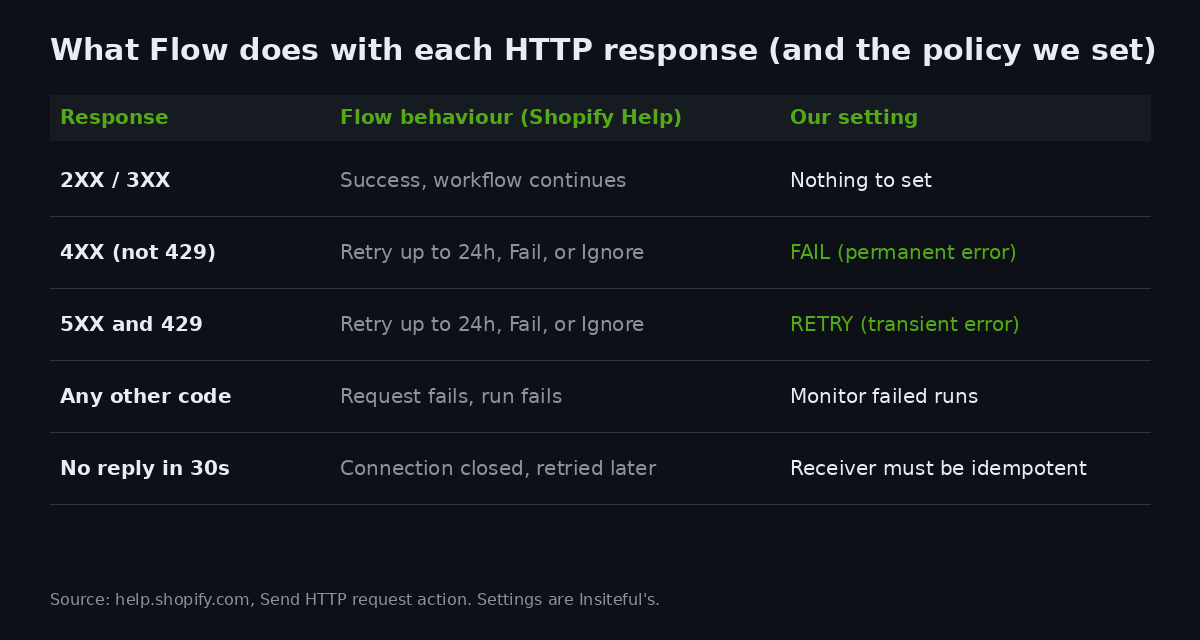
Here is the documented behaviour, taken from the Send HTTP request reference. Flow supports seven methods (GET, HEAD, OPTIONS, POST, PUT, PATCH, DELETE), lets you set headers and a body, and lets you store secrets on the Flow Settings page. Flow waits up to 30 seconds for a response code. A 2XX or 3XX is a success. A 4XX, 5XX or 429 is handled by the policy you choose per error class: retry, fail or ignore. Retries run for up to 24 hours. Any other code, or a timeout during retries, fails the request and the run, and later actions do not execute. The action is available on the Grow, Advanced and Plus plans, per the Flow limits page.
What the page does not cover is just as useful. It gives no response size limit, no IP allowlist you can hand to a network team, no request signing, and no retry interval. That has three practical consequences. You cannot firewall your receiver to a published Flow IP range, so authentication has to live in the request. You cannot sign the payload, so a secret bearer token in a header is your proof of origin. And you cannot assume the retry cadence, so the receiver must tolerate the same request arriving again at any time in a 24-hour window.
| Behaviour | Documented | Gap your design must cover |
|---|---|---|
| Response wait | 30 seconds, then connection closed and retried later | Receiver may have committed work before the client gave up |
| Retry window | Up to 24 hours for 4XX, 5XX, 429 when set to Retry | Duplicate delivery up to a day later |
| Secrets | Stored on Flow Settings, redacted from run logs | Anything in the body or URL is not a secret |
| Response data | Available as the sendHttpRequest variable; parse with Run code | No built-in JSON parsing, so schema errors surface late |
| IP allowlist / signing | Not documented | Authenticate in the header, validate in the receiver |
Set the retry policy by error class, not by habit
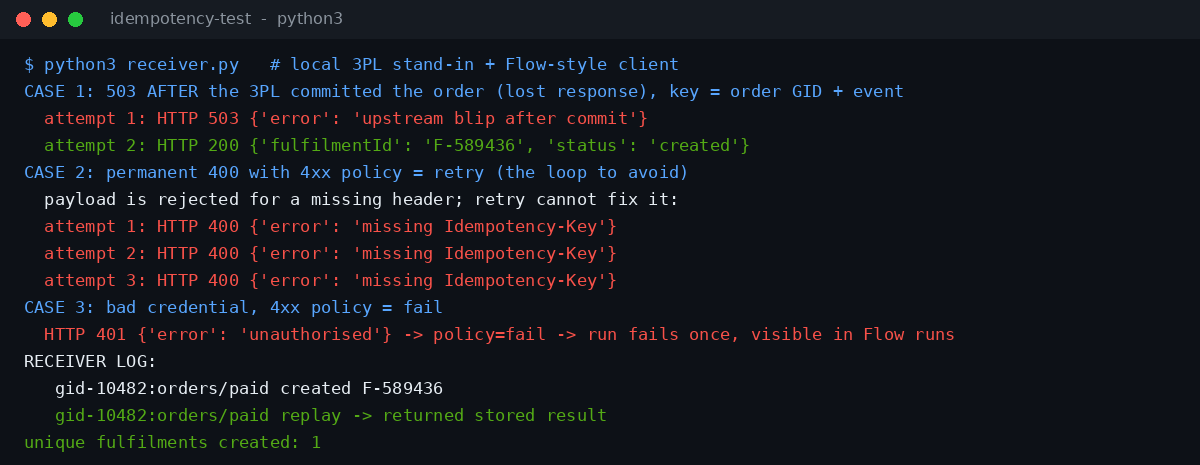
The default instinct is to tick Retry everywhere because retry sounds safe. It is not safe for client errors. A 400 means your payload is wrong, a 401 means your credential is wrong, a 422 means the receiver rejected the data. Retrying changes none of those, so you burn 24 hours of attempts and a run sits in limbo while the order waits. We run the test shown below for exactly this case: a permanent 400 with the 4XX policy set to Retry produces three identical failures in a row, and in production Flow would keep going.
Our standing rule is simple. Set 4XX to Fail so a bad payload or expired token fails loudly on the first run and shows up in the run list. Set 5XX and 429 to Retry because those are the receiver telling you it is temporarily unable to cope. Flow groups 429 with the server errors, which suits the common case of a rate-limited endpoint. Slack incoming webhooks, for example, answer with an HTTP 429 and a Retry-After header when you exceed their per-second limit (Slack rate limits), which is a transient condition worth retrying.
One exception: for non-critical notifications (a Slack ping, an internal email relay) we choose Ignore on 5XX. A missed alert should not fail an order workflow. For anything that moves stock, money or a customer promise, we choose Retry and make the receiver safe, which is the next section.
Idempotency: the receiver has to survive a replay
Here is the failure that causes the expensive problem. Flow sends POST /orders. Your 3PL creates the fulfilment, then its load balancer hiccups and returns a 503, or the response simply takes longer than 30 seconds. From Flow’s side the request failed, so it retries. From the 3PL’s side the order already exists. Without a guard, the second request creates a second pick. This is the standard at-least-once delivery problem. It is not specific to Shopify, but Flow’s documented 24-hour retry window makes it a certainty over a long enough period rather than a theoretical one. Our post on idempotent API writes covers the same principle on the Admin API side.
The fix is a deterministic idempotency key that Flow can build and your receiver can store. Flow’s Run code action cannot generate random values or read the clock, so do not try to mint a UUID there. Derive the key from stable data instead: the order GID plus the event name. If someone manually retries the workflow run, the same key is produced, which is exactly what you want.
POST https://api.your3pl.example/orders
Authorization: Bearer {{secrets.threepl_token}}
Idempotency-Key: {{ order.id }}:orders/paid
Content-Type: application/json
The body carries the same key for receivers that read it from the payload, plus only the fields the other system needs. Keep it small. Every extra field is one more thing that can break parsing on the other side.
{
  "idempotency_key": "{{ order.id }}:orders/paid",
  "order_name": {{ order.name | json }},
  "currency": "AUD",
  "total": {{ order.totalPriceSet.shopMoney.amount | json }},
  "lines": [
    {% for item in order.lineItems %}
    { "sku": {{ item.sku | json }}, "qty": {{ item.quantity }} }{% unless forloop.last %},{% endunless %}
    {% endfor %}
  ]
}
On the receiver, the rule is one sentence: write the key and the result in the same transaction, and answer a repeated key with the stored result, not a fresh run. A unique constraint on the key closes the race between two simultaneous attempts.
def create_fulfilment(key, payload):
    # one row per key, written in the same transaction as the fulfilment itself
    row = db.get(key)
    if row:                      # replay: return the stored result, do nothing else
        return 200, row.response
    result = threepl.create(payload)
    db.put(key, result)          # unique constraint on key closes the race
    return 200, result
We tested this pattern against a local stand-in for a 3PL. The first attempt commits the fulfilment and then returns a 503 to simulate a lost response. The retry arrives with the same key, the receiver returns the stored result, and exactly one fulfilment exists afterwards.
Secrets, headers and what ends up in the run log
Flow stores secrets on the Flow Settings page with a handle, a value and a description, and you reference them as the secrets handle inside double braces. Values are never shown in the Flow interface and are redacted from run logs, per the Help reference. The May 2025 changelog entry that introduced this describes them as encrypted and obfuscated in Flow, and notes that it lists no other authentication methods. So bearer tokens, API keys and basic-auth passwords go in secrets, and OAuth flows that need token refresh do not fit here without a middleware layer.
The rule we apply: a secret goes in a header, never in the URL or the body. Query strings end up in receiver access logs, proxies and error trackers. A header is the place a receiver expects credentials and the place logging tools already scrub. Name secrets by system and purpose (threepl_token, erp_api_key) so the rotation owner knows what breaks when a value changes, and put the rotation date in the description field. A secret that expires silently produces 401s, and with the 4XX policy set to Fail you will see it on the next run rather than a day later.
| Put here | Not here | Why |
|---|---|---|
| Header value (secret) | URL query string | Query strings are logged by default on most receivers and proxies |
| Header value (secret) | Request body | Bodies get stored in 3PL and ERP audit tables |
| Settings description: rotation date | Workflow name | Workflow names are visible to every staff user with Flow access |
| One secret per system | One shared secret for every workflow | Rotation then touches one system, not the whole store |
Parsing the response with Run code
Flow returns the full HTTP response to the workflow as the sendHttpRequest variable. A second use in the same workflow becomes sendHttpRequest1, and that name cannot be changed. To use fields from the response body in later steps, Shopify directs you to a Run code action that calls JSON.parse and declares an output schema.
Run code has hard limits worth designing around, all from the Run code reference. The language is ECMA2020 JavaScript with no NodeJS or CommonJS APIs. Code cannot call fetch and cannot use random or clock-based functions. The code is capped at 50,000 characters, the input query at 5,000, the output schema at 5,000, output plus console.log at 50KB combined, execution at 5 seconds and memory at 10MB. Only console.log is supported for logging. Those limits are generous for parsing a small JSON response and tight for anything that tries to do real work, so keep this step to parse and validate.
Our standard parser never trusts the shape of the body. A 3PL gateway error page returning HTML with a 200 is rare, but we have seen it, and JSON.parse throwing inside Run code fails the run in a confusing place. This version catches the parse failure, logs the first 200 characters, and returns a typed result that the next condition can branch on. The input query shown is the shape we use; confirm the field path in the variable picker in your editor, because Flow builds that query against its own environment, not the Admin API.
// Flow Run code: ECMA2020, no fetch, no clock. Input comes from the query, output typed by SDL.
export default function main(input) {
  const body = input.sendHttpRequest.body;
  let parsed;
  try { parsed = JSON.parse(body); } catch (e) { console.log("unparseable body: " + String(body).slice(0, 200)); return { ok: false, fulfilmentId: "", status: "unparseable" }; }
  const id = typeof parsed.fulfilmentId === "string" ? parsed.fulfilmentId : "";
  return { ok: id !== "", fulfilmentId: id, status: String(parsed.status || "") };
}
The output type is declared in GraphQL Schema Definition Language, and Flow only returns the variables later steps use.
type Output {
  ok: Boolean!
  fulfilmentId: String!
  status: String!
}
We ran this function in Node against three bodies: a valid response, an HTML gateway error and a JSON body missing the fulfilment ID. The output was ok true with ID F-1B2C3D, ok false with status unparseable (and the logged snippet), and ok false with an empty ID. That third case matters most. A 200 with no fulfilment ID is a failed handoff that looks like a success, and the condition after Run code is where you catch it, by tagging the order and routing it to a human queue.
HTTP request, Admin API request, or native fields?
Not every Flow job needs an outbound call. On 24 March 2026 Shopify announced that Flow natively supports almost all Admin API fields, including fields that need an argument such as product.inCollection with a collection ID. Previously you built a manual Send HTTP request to the Admin API to read those. Shopify recommends the native fields because Flow maintains them as the API changes, and existing HTTP-request workflows keep working, so you can migrate at your own pace.
The separate Send Admin API request action calls most GraphQL mutations. It does not support queries, deprecated mutations, asynchronous mutations or mutations that return a Job type, and the mutation list follows the API version Flow uses, so a version change can break it. Use this decision table before adding an HTTP call.
| Job | Use | Reason |
|---|---|---|
| Read a Shopify field that needs an argument | Native field (post 24 Mar 2026) | Maintained by Shopify, no JSON handling |
| Change Shopify data Flow has no action for | Send Admin API request | Stays inside Shopify auth; mutations only |
| Bulk or async Shopify work | Not Flow; see our bulk operations guide | Job-type mutations are unsupported |
| Call a 3PL, ERP, Slack or internal service | Send HTTP request | Only action that reaches non-Shopify systems |
| Anything needing HTTP inside custom logic | Separate steps: HTTP request, then Run code | Run code cannot call fetch |
If you are migrating legacy manual HTTP calls to native fields, do it one workflow at a time on a development store first. Our Plus environments post covers the safe setup, and the API rate limits article explains why a Flow loop over thousands of products still needs throttling thinking.
The failure that costs real money: an AUD model
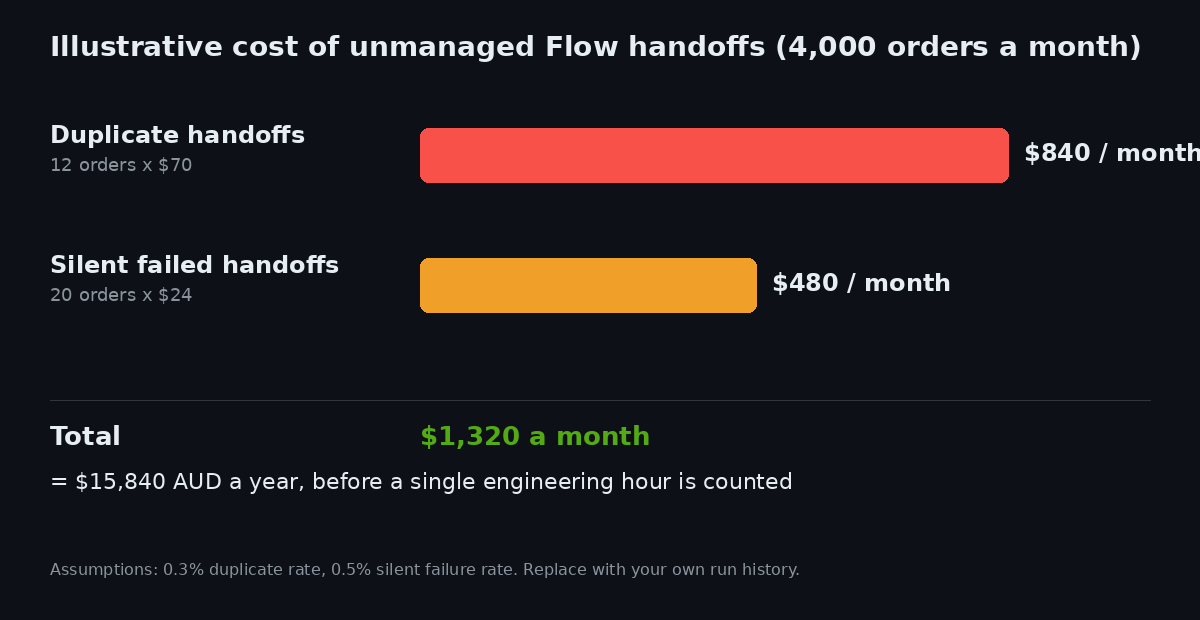
Finance teams approve engineering time against numbers, so here is the model we use to size the problem. The inputs are assumptions you should replace with your own Flow run history. Take a store doing 4,000 orders a month. Assume 0.3% of handoffs are duplicated by retry after a lost response, which is 12 orders. Each duplicate costs roughly $38 of product, $13.50 of outbound freight, $6.50 of pick and pack, and $12 of customer service and returns handling, so $70 each, or $840 AUD a month.
Add silent failures. Assume 0.5% of handoffs fail in a way nobody notices for hours: 20 orders. Each costs about $9 of customer service contact and $15 of expedited freight to recover the promise date, so $24 each and $480 a month. Together that is $1,320 AUD a month, or $15,840 AUD a year, before anyone counts the hours spent reconciling. Even if your rates are a third of those assumed, a day of build and test time repays itself inside the year.
One more local check. The Australian Taxation Office expects business records to be kept for five years, and a reconciliation trail between a Shopify order, a fulfilment ID and a payment is easier to defend when the fulfilment ID is written back to the order. That is the job of the Run code output and a follow-up metafield or tag step, so the link between systems is stored on the order itself.
Test it before it touches a real order
Our pre-launch test for any Flow workflow that calls an external system has four cases, all runnable on a development store and a stand-in receiver. First, the happy path: one order, one fulfilment, the ID written back. Second, a 5XX after commit, to prove the same key returns the stored result. Third, a permanent 400, to prove the 4XX policy fails the run on the first attempt and does not loop. Fourth, an expired secret, to confirm the failure is visible in the run list the same day. We keep the stand-in receiver in the client repository so the next engineer can re-run the test after an API version bump.
Watch the version bump in particular. The Send Admin API request action follows the Admin API version Flow uses, and Flow moved to GraphQL Admin API version 2026-01 (as noted in a third-party changelog summary, which we treat as secondary until confirmed against your own store). The practical response is to re-run the four-case test whenever Shopify announces a Flow API version change.
How We Do It at Insiteful
On Plus builds that connect Flow to a 3PL, ERP or helpdesk, the same sequence runs every time. We start by writing the receiver contract before any workflow: the endpoint, the idempotency header, the status codes it returns for permanent and temporary errors, and who owns the endpoint at the other end. The Flow workflow is then built to that contract, with 4XX set to Fail and 5XX/429 set to Retry for anything that moves stock.
Every outbound call is followed by a Run code step shaped like the one above and a condition that tags the order when the returned ID is empty. That tag drives a saved view for the operations team, so a failed handoff is a visible list, not a surprise. Secrets are named per system with the rotation date in the description, and the handoff doc names the person who rotates them. We hand over the stand-in receiver and the four-case test with the build, and we re-run it on each Flow or Admin API version change.
The point is not that Flow is fragile. It is a solid scheduler with documented retry behaviour. The point is that the receiver on the other end was probably never designed for it, and the cost of that mismatch lands on your margin, not ours. Our build assessment process covers how we scope this kind of integration work.
Pre-launch checklist
| Check | Pass condition |
|---|---|
| Idempotency key | Built from order GID plus event; stored by the receiver with the result |
| Retry policy | 4XX = Fail, 5XX and 429 = Retry for stock and money handoffs |
| Secrets | In headers only, one per system, rotation date recorded |
| Response parsing | Run code catches bad JSON and empty IDs; typed output declared |
| Failure visibility | Tag or metafield on failed orders and a saved view for operations |
| Receiver test | Four-case test passes on a dev store after each API version change |
Where to go next
If you run Flow against a 3PL or ERP today, pull the last 90 days of failed and retried runs and count how many orders touched more than one attempt. That number, multiplied by your cost per duplicate, is the business case. If you would like us to review the workflow and receiver, start with our build assessment, and we will tell you plainly whether the integration needs a change or just a safer policy setting.