
Shopify’s B2B feature set has grown up fast. Company accounts, location-scoped catalogues, net payment terms and B2B checkout are all native now, and since the Spring ’26 Edition the core of it ships on every plan from Basic up, with up to three B2B catalogues included before you ever touch Plus. Shopify says B2B GMV on the platform grew 96% year on year. Wholesale on Shopify is no longer the experiment. It is the default.
And yet there is still no “Request a quote” button in the box. A wholesale buyer who wants pricing on 240 units with freight to a Dandenong South warehouse has no native way to ask for it from your storefront. That single missing workflow is the reason a lot of Australian merchants believe they need a quoting app, a separate wholesale platform, or a Plus upgrade they do not actually need.
They usually need none of those things. Shopify already has a quote engine. It is called a draft order, and once you wire a storefront request form into it, you get a quoting workflow that applies company pricing automatically, respects net terms at checkout, and lands in the same admin your team already works in. This is the build we do for wholesale clients, step by step.
Why Quotes Still Matter in a Self-Serve Wholesale World
The self-serve numbers are real. Around 83% of B2B buyers prefer to order through self-service channels, and McKinsey’s B2B Pulse research found 73% of buyers are comfortable spending US$50,000 or more without ever talking to a rep. Global B2B ecommerce is tracking toward US$36 trillion in 2026, growing at roughly 14.5% a year. If your catalogue pricing is right, most reorders should never involve a human.
Quotes cover everything that self-serve cannot. In the Australian wholesale accounts we build for, three order types keep showing up in the quote pile:
- Volume beyond the published breaks. Your catalogue prices 1 to 499 units. The buyer wants 2,400 for a chain rollout. That price is a negotiation, not a lookup.
- Freight-inclusive project pricing. A commercial fitout firm pricing a $180,000 AUD job wants one landed number for product plus delivery to three sites, not a cart total with a shipping estimate bolted on.
- Configured or cut-to-order product. Custom lengths, printed packaging, bundled spares. Anything where the SKU does not fully describe the thing being bought.
The mistake is treating these as exceptions that live in an inbox. Every emailed spreadsheet quote is invisible to your pipeline reporting, disconnected from company pricing, and re-keyed by hand when it converts. The build below keeps the request, the quote and the resulting order in one system.
The Architecture: Request In, Draft Order Out
The whole workflow is four moves, and only the first one needs any front-end work:
- Capture. A logged-in B2B buyer submits a quote request from the product page or cart. The request carries the variant IDs, quantities, their company location and a free-text note.
- Build. A rep (or an automation) creates a draft order against that buyer’s purchasing entity. Catalogue pricing, currency and payment terms attach themselves from the company location. The rep adjusts pricing and adds freight as a line.
- Send. Shopify emails the buyer an invoice link. The quote is now a real object in your admin with a name, a total and an owner, not a PDF in someone’s sent folder.
- Convert. The buyer opens the link and completes B2B checkout. Net terms apply automatically, so “payment” can mean an invoice due in 30 days rather than a card charge. The draft becomes an order and flows into fulfilment and your accounting stack like any other.
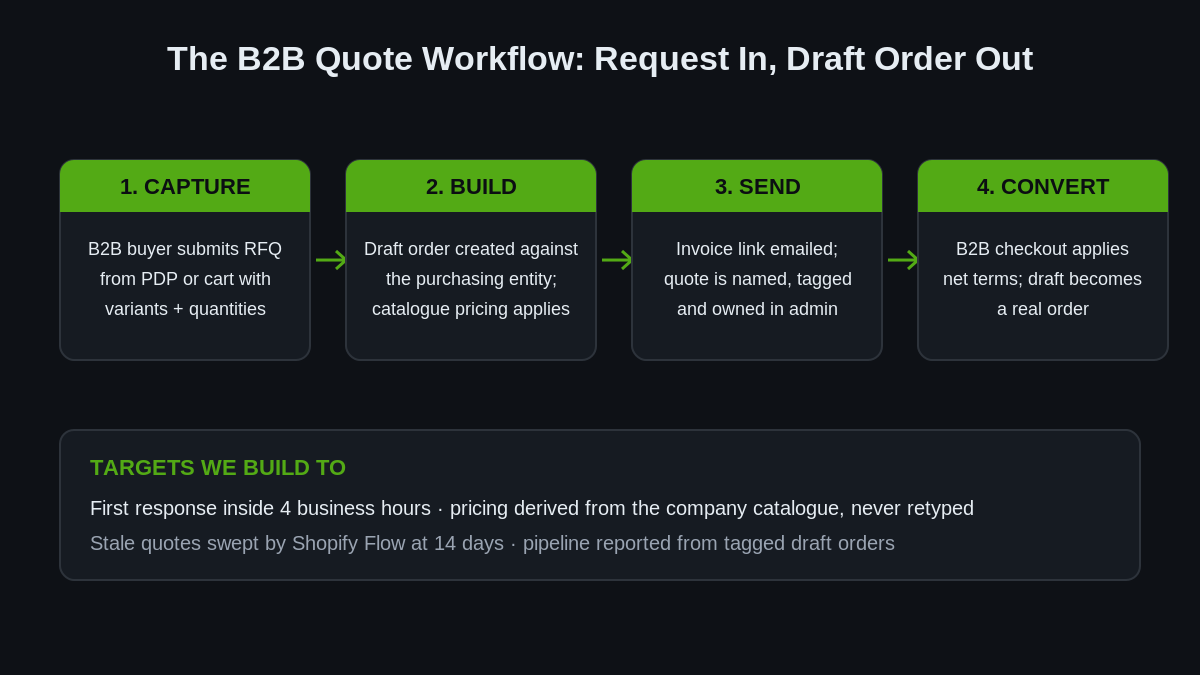
Two numbers we hold every quote pipeline build to: the first response lands inside four business hours, and quoted pricing matches the company’s contracted pricing 100% of the time because it is derived from the catalogue, not retyped. Speed wins quotes. In wholesale, the first usable number on the buyer’s desk very often ends the conversation.
Step 1: Capture the Request on the Storefront
Native Shopify gives you the buyer context you need for free. When a B2B customer is logged in, Liquid exposes customer.b2b? and their current company location, so the theme can show a quote path to wholesale buyers without DTC shoppers ever seeing it:
{% if customer.b2b? %}
  <div class="rfq-block">
    <button type="button"
      class="button button--secondary rfq-button"
      data-variant-id="{{ product.selected_or_first_available_variant.id }}"
      data-company-location="{{ customer.current_location.id }}">
      Request a quote
    </button>
    <p class="rfq-hint">Volume beyond the published breaks? Send us the quantities and we will price the whole order, freight included.</p>
  </div>
{% endif %}
The button feeds a form section (we build it as an Online Store 2.0 section with a schema, so merchandisers can edit the copy) that serialises the line items and posts them somewhere structured. On smaller builds that target is simply an email to the sales inbox plus a tagged metaobject entry for reporting. On larger builds it is an app proxy endpoint that writes the request into a metaobject and pings the rep’s Slack. Either way the request arrives with variant IDs and quantities attached, which is the difference between “can you price some of the 90mm ones” and a quote your rep can build in three minutes.
On the structured version, the metaobject definition is worth doing properly rather than dumping JSON into a note. We define a quote_request metaobject with fields for the requesting company location (a reference field), a line items field holding variant ID and quantity pairs, a free-text requirements field, a status field (new, quoted, won, lost) and a reference to the draft order once one exists. That last field is the join that makes reporting possible: every request can be traced to the quote it produced and the order it became, or to the reason it died. The submission handler validates that the logged-in customer actually belongs to the company location on the request before writing anything, because a quote form is still a form on the public internet and it will eventually be poked at by someone who is not a stockist.
A design note from the portal work we covered in our B2B portal article: keep “Add to cart” and “Request a quote” side by side for B2B buyers. Hiding the cart entirely forces every small reorder through a rep, which is exactly the self-serve behaviour the stats above say buyers will abandon you over. The quote path is for the orders that need a human, not a toll gate for all of them.
Step 2: The Draft Order Is the Quote Engine
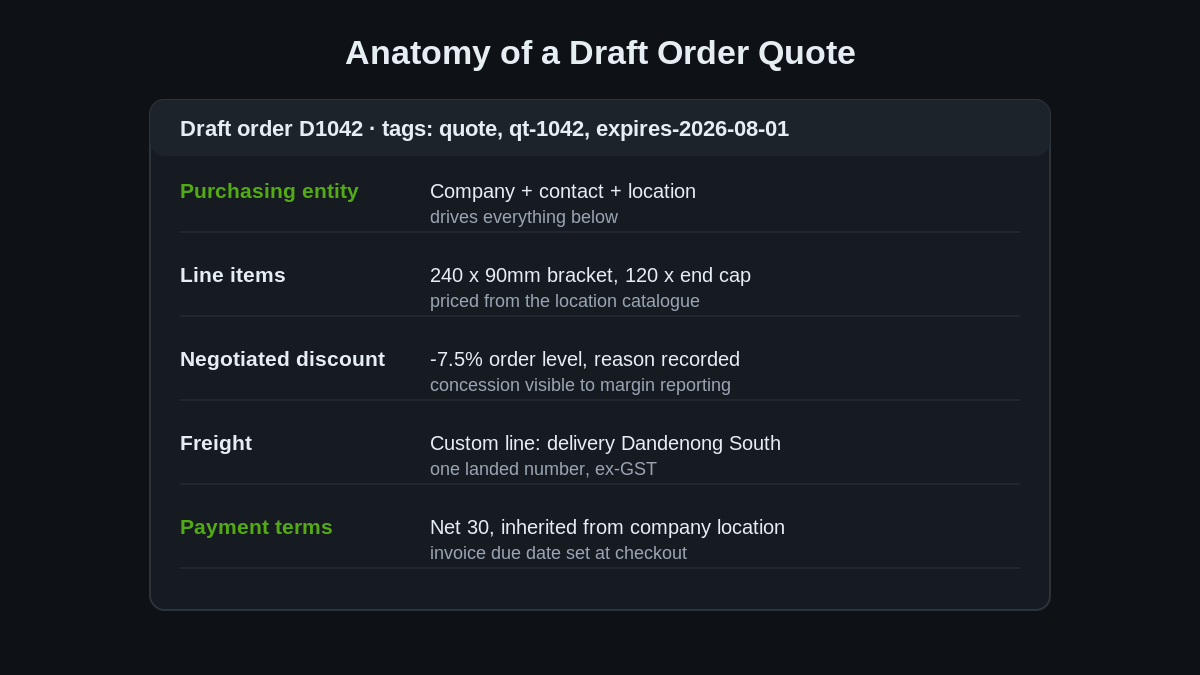
This is the part most merchants have not internalised: a draft order created against a B2B purchasing entity is not a neutral cart. Assign the company location and Shopify applies that location’s catalogue pricing, quantity rules, currency and payment terms to the draft automatically. Your quote starts from the buyer’s contracted numbers by default, and the rep only edits what the negotiation actually changes.
In the admin that is a matter of choosing the company in the draft order’s customer field. Programmatically, it is one mutation with a purchasingEntity:
mutation CreateQuoteDraft {
  draftOrderCreate(input: {
    purchasingEntity: {
      purchasingCompany: {
        companyId: "gid://shopify/Company/1207959552",
        companyContactId: "gid://shopify/CompanyContact/544735232",
        companyLocationId: "gid://shopify/CompanyLocation/94371840"
      }
    },
    lineItems: [
      { variantId: "gid://shopify/ProductVariant/447512389", quantity: 240 },
      { variantId: "gid://shopify/ProductVariant/447512390", quantity: 120 }
    ],
    note: "Quote QT-1042. Freight to Dandenong South included. Valid to 1 Aug.",
    tags: ["quote", "qt-1042", "expires-2026-08-01"]
  }) {
    draftOrder { id name invoiceUrl status totalPriceSet { shopMoney { amount } } }
    userErrors { field message }
  }
}
The pieces that matter in a quoting context:
- Negotiated pricing goes on as discounts. Line-level or order-level, with a reason string. That keeps the catalogue price and the concession visible separately, which your margin reporting will thank you for later.
- Freight is a custom line item. One landed price, exactly as project buyers ask for it.
- The quote has a name. Draft orders number themselves (D1042 style), and we tag them with a quote reference and expiry tag as in the mutation above. Your quote pipeline is now a filtered draft order list, visible to anyone in the admin.
Draft orders do not expire on their own, so we close the loop with Shopify Flow:
Trigger:  Scheduled time (daily, 6:00 am)
Condition: draftOrder.tags CONTAINS "quote"
           AND draftOrder.createdAt is more than 14 days ago
           AND draftOrder.status = OPEN
Action 1:  Send internal email to the account rep with the draft order name
Action 2:  Add tag "quote-stale" for the weekly pipeline review
Stale quotes get chased or killed instead of rotting in the admin. If you run the numbers monthly, quote-to-order conversion and average days-to-decision fall straight out of the draft order data.
Step 3: Terms, Deposits and the Checkout Moment
The reason this workflow beats a PDF quote is what happens when the buyer says yes. The invoice link drops them into B2B checkout, and the payment terms configured on their company location apply on their own. A net 30 account checks out without paying a cent today, and the order lands in your admin with a due date and a payment status you can chase.
How we typically map terms to quote types for Australian wholesale clients:
- Due on receipt for first orders from a new account, before credit is established. The quote still carries the negotiated pricing, the buyer just pays at checkout.
- Net 30 or net 60 for established stockists, set once on the company location and inherited by every quote and reorder after that. We covered the credit-control side in our net terms article.
- Deposit up front, balance on terms for made-to-order and long-lead product. Since the Winter ’26 Edition this no longer needs a workaround: dynamic payment terms and deposit requirements can be driven by Shopify Functions, so a 30% deposit on quoted orders over a threshold is enforced at checkout rather than by a rep remembering to ask.
The same Winter ’26 round of B2B updates added company-location store credit and more first-party payment rails in supported regions, which matters if you quote into the US. For local accounts, invoice payments reconciled through your accounting integration remain the standard pattern, and because the quote converted inside Shopify, the order flows to Xero or your ERP with the rest of them. No re-keying, which is where emailed quotes go to die.
One Australian specific worth getting right on day one: GST presentation. Trade buyers here expect quoted pricing ex-GST, and a quote that mixes GST-inclusive product lines with an ex-GST freight line will generate a confused phone call every single time. We set B2B catalogue pricing exclusive of tax and let checkout apply the 10% on top, so the draft order the buyer receives reads the way every other supplier quote on their desk reads: line items ex-GST, GST as its own line, landed total at the bottom. If your DTC store runs tax-inclusive pricing, this is a settings and catalogue decision that needs to be made deliberately, not discovered after the first stockist queries an invoice for being $1,637 AUD higher than the number they signed off.
When Native Draft Orders Are Not Enough
We build the native workflow first because it is free, it lives in the admin your team already uses, and it inherits company pricing and terms with zero sync risk. But it has honest limits, and pretending otherwise is how agencies end up rebuilding things twice. Reach for an RFQ app on top of the draft order flow when you need:
- Buyer-side negotiation. Native quoting is one-directional: the rep revises, the buyer accepts. If buyers must be able to counter-offer inside the storefront across multiple rounds, that interface has to come from an app.
- Quote requests from guests.
customer.b2b?requires a login. If unauthenticated trade buyers are a meaningful lead source, an app-backed public RFQ form captures them (we still convert the accepted quote through a draft order so terms apply). - Hide-price catalogues. Call-for-price merchandising across hundreds of SKUs is app territory.
- Formal quote documents. Some procurement teams require a branded, versioned quote PDF with validity dates for their paper trail. Apps do this properly; a draft order invoice email does not.
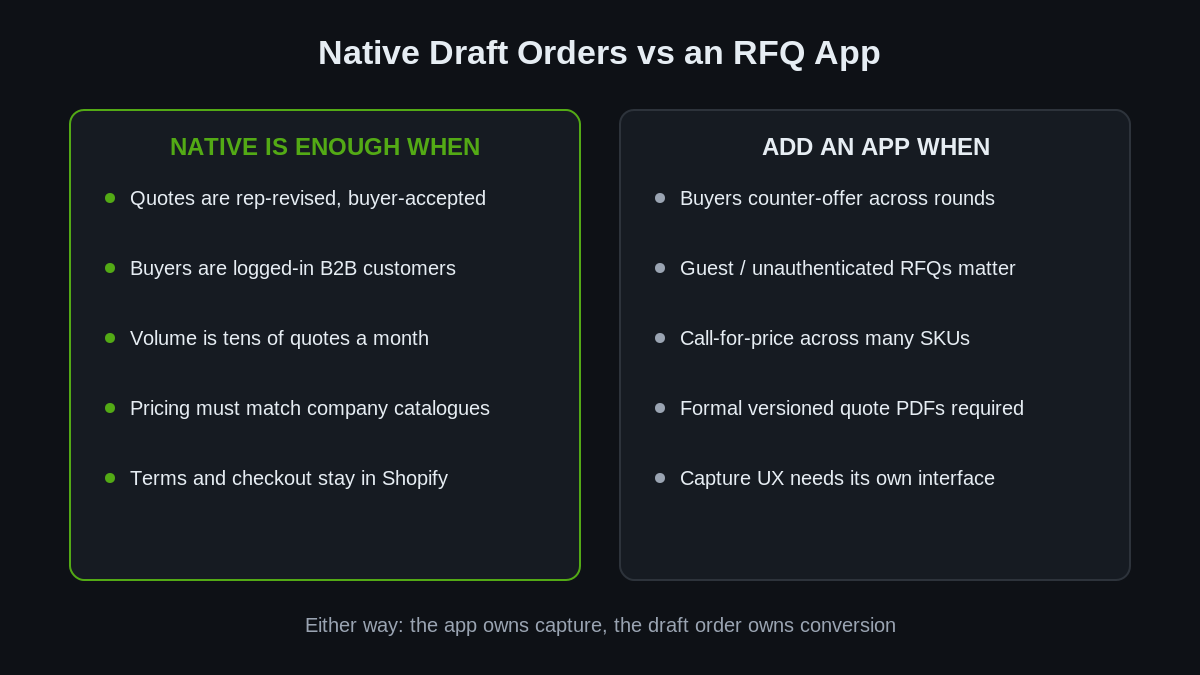
The architecture stays the same either way: the app owns capture and negotiation, the draft order owns conversion. Keep that boundary and you can swap the app later without touching pricing, terms or your accounting flow. Lose it, and your quotes live in a third-party database that your company structure knows nothing about.
Measuring the Quote Pipeline
Because every quote in this workflow is a draft order, the pipeline reports itself. A filtered draft order export (tag contains quote) gives you the raw table, and four numbers out of it tell you whether the workflow is earning its keep:
- First response time. Request submitted to draft order sent. We target four business hours; the merchants we audit before a build are usually sitting somewhere between two and four days, and they can name accounts they lost in that gap.
- Quote-to-order conversion. Won drafts over total drafts, monthly. Anything under about a third is usually a pricing feedback signal, not a sales effort problem: the catalogue breaks are set too far from where real negotiations land.
- Quoted value versus ordered value. How much gets trimmed between the first draft and the accepted one. A consistent trim percentage is margin you are giving away by habit, and it shows up here long before it shows up in your P&L.
- Expiry losses. Drafts that hit the 14-day Flow sweep without a decision. These are follow-up failures, and they are the cheapest revenue you will recover all year.
None of this needs a BI stack on day one. A monthly export into a spreadsheet works, and when the volume justifies it the same data is sitting in the Admin API for whatever reporting layer you already run. The point is that the moment quoting moves out of the inbox and into draft orders, these numbers exist at all. For a wholesale operation quoting a couple of dozen jobs a month at four and five figures each, visibility into that pipeline is worth more than most of the conversion tweaks on the DTC side of the store.
How We Do It at Insiteful
Quoting is usually one workstream inside a larger wholesale build, and we scope it the same way every time. In discovery we pull three months of emailed quotes and classify them: how many were volume-break requests, how many were freight-inclusive projects, how many were configured product. That split decides how much of the workflow above you need, and whether an app earns a place in the stack. Most of the Australian merchants we audit are quoting perhaps 15 to 30 times a month, and for that volume the native draft order engine with a well-built capture form wins on cost, speed and data cleanliness.
The build itself follows our standard process: the capture section goes into the theme as a proper OS 2.0 section with a schema, the draft order conventions (tags, quote references, expiry, discount reasons) get documented as a one-page SOP for the sales team, and the Flow automations ship alongside it. We test with the client’s real company records in a duplicated theme and a staging company before anything touches live wholesale accounts, because the fastest way to lose a stockist’s trust is to send them a quote with someone else’s contracted pricing on it.
Then we measure. Quote-to-order conversion, first-response time and days-to-decision come out of the draft order data monthly. On accounts where the pipeline was previously an inbox, simply making those three numbers visible has changed rep behaviour more than any tooling we shipped.
If wholesale quoting is still living in your sent folder, or you are sizing up a B2B build and want the quote workflow designed in from day one rather than bolted on, start with a build assessment. We will map your current quote traffic, spec the capture-to-checkout workflow, and give you a fixed-price proposal for the build. We have designed wholesale architecture on Shopify from catalogue pricing to full separate-store decisions, and the quoting layer is where a surprising amount of wholesale revenue quietly leaks.