
A distributor sells 4,000 SKUs to trade customers at 35 to 45 per cent under retail. The sales team wants the prices behind a login so competitors and retail shoppers cannot see them. The developer wraps the price in a Liquid condition, checks the product page logged out, sees “Log in to see price”, and calls it done. Three weeks later a competitor’s buyer has the full price list in a spreadsheet. Nobody hacked anything. The prices were sitting in places the Liquid condition never touched.
This is the article on how we gate wholesale prices on Shopify without leaking them: the native pattern that works, the six places a price still turns up for a logged-out visitor, a script you can run against your own store in two minutes, and the decision about whether you should be gating prices at all. It is written for wholesalers and distributors running B2B on Shopify, and for the developers and agencies building those stores.
Decide first: are you hiding prices or protecting them?
Those are different problems and they need different builds. Hiding a price is a merchandising decision: you do not want a $48 trade price sitting next to a $95 retail price on the same page, or you want a conversation before a quote. Protecting a price is a commercial-confidentiality decision: a competitor knowing your trade tier would cost you real margin. Hiding takes one Liquid condition. Protecting takes an architecture, and sometimes it means the catalogue itself goes behind the login.
We ask the client one question before touching a theme: if a competitor saw your trade price list tomorrow, would it cost you money or just embarrassment? The answer sorts the build into one of three tiers.
| Tier | What the client says | Build | Residual exposure |
|---|---|---|---|
| 1. Tidy | “We just don’t want retail shoppers seeing trade prices.” | Liquid gate on price, add to cart and cart icon | Prices present in feeds and endpoints; low commercial risk |
| 2. Guarded | “Competitors browsing our list would hurt us.” | Liquid gate plus structured data, feed and search hardening, plus a monitoring script | Pixel block and JSON endpoints need a decision per surface |
| 3. Closed | “Our price list is the business.” | Catalogue behind login; public site carries brand, specs and a trade application form only | Near zero for prices; you give up public product SEO |
Most of our wholesale clients land in tier 2. Tier 1 is fine when you are honest with yourself that it is cosmetic. Tier 3 is the right answer more often than agencies admit, because it is the only tier where the answer to “can a logged-out visitor get a price” is a clean no.
What Shopify gives you natively
Shopify’s theme documentation for B2B is explicit that dedicated wholesale stores “might want to show certain online store content only to verified B2B customers”, and it names the usual suspects: product prices, the cart icon in the header, add to cart buttons and other calls to action on the product page. The mechanism is the customer.b2b? Liquid property, which is true when the logged-in customer is acting on behalf of a company location.
Two things matter about that property. First, it is evaluated on the server, per request, for the customer making it, so a Liquid condition on it is a real gate for the HTML your theme renders. Second, it only covers what your theme renders. Everything below depends on that distinction.
Here is the price block we use as a starting point. It shows the price to a B2B customer, and shows a login prompt to everyone else, including logged-in retail customers who are not attached to a company location.
{%- comment -%}
  snippets/price-gated.liquid
  Render with: {% render 'price-gated', product: product %}
{%- endcomment -%}

{%- if customer.b2b? -%}
  <div class="price" data-company="{{ customer.current_company.name | escape }}">
    <span class="price__current">{{ product.price | money }}</span>
    {%- if product.compare_at_price > product.price -%}
      <s class="price__was">{{ product.compare_at_price | money }}</s>
    {%- endif -%}
    <span class="price__ex">ex GST</span>
  </div>
{%- else -%}
  <p class="price price--gated">
    <a href="{{ routes.account_login_url }}">Log in to see trade pricing</a>
    or <a href="{{ routes.root_url }}pages/trade-application">apply for a trade account</a>.
  </p>
{%- endif -%}
Notice we do not compute a price. We print product.price and let Shopify resolve it. A Shopify developer-forum answer on company-location catalogs is blunt about this: on an Online Store theme, the Liquid product and variant price fields return the catalog-adjusted price for the logged-in buyer, and they are the source of truth. If a company location has a 10 per cent catalog on a $250 product, Liquid gives you $225 without any of your code knowing a catalog exists. The same answer warns that a company location catalog takes precedence over a market catalog, so localization.market is not a reliable way to work out which price applied. Use it for currency and language UI, never for pricing logic.
The same Shopify documentation page covers the account-switching side. A buyer attached to several locations needs to see which one is active and switch between them, using customer.current_location, customer.company_available_locations and location.url_to_set_as_current. If you gate prices without building that switcher, a purchasing officer who manages three branches will see one location’s prices and assume they apply to all three.
Hide the add to cart button and the cart icon with the same condition. A price that is hidden next to a live add to cart button invites a support email asking why the product has no price, and a buyer who adds it to cart will see the price in the cart drawer, which is a second leak that the product-page check never catches. The related build detail, how companies and locations map to pricing, is in our guide to Shopify B2B companies and locations.
The six places a price still turns up
A theme is only one of the ways a price leaves a Shopify store. Anything that serialises product data without going through your Liquid condition is a separate surface, and each one is public by default. We audit six.
| Surface | Where it lives | Gated by your Liquid condition? | What we do |
|---|---|---|---|
| Rendered theme HTML | Product, collection, search pages | Yes | Gate with customer.b2b? |
| Section Rendering API | ?sections= on any URL | Yes, same Liquid, same customer | Nothing extra; verify in the audit |
| Product JSON endpoints | /products/handle.js, /products.json | No | Decide per tier; tier 3 removes the public catalogue |
| Predictive search | /search/suggest.json | No | Replace theme calls with a price-free render |
| Structured data | JSON-LD in the page head | Only if you gate it | Emit Product markup without an Offer for logged-out visitors |
| Web pixels bootstrap | Inline script in the page source | No | Platform-controlled; treat as public and decide the tier accordingly |
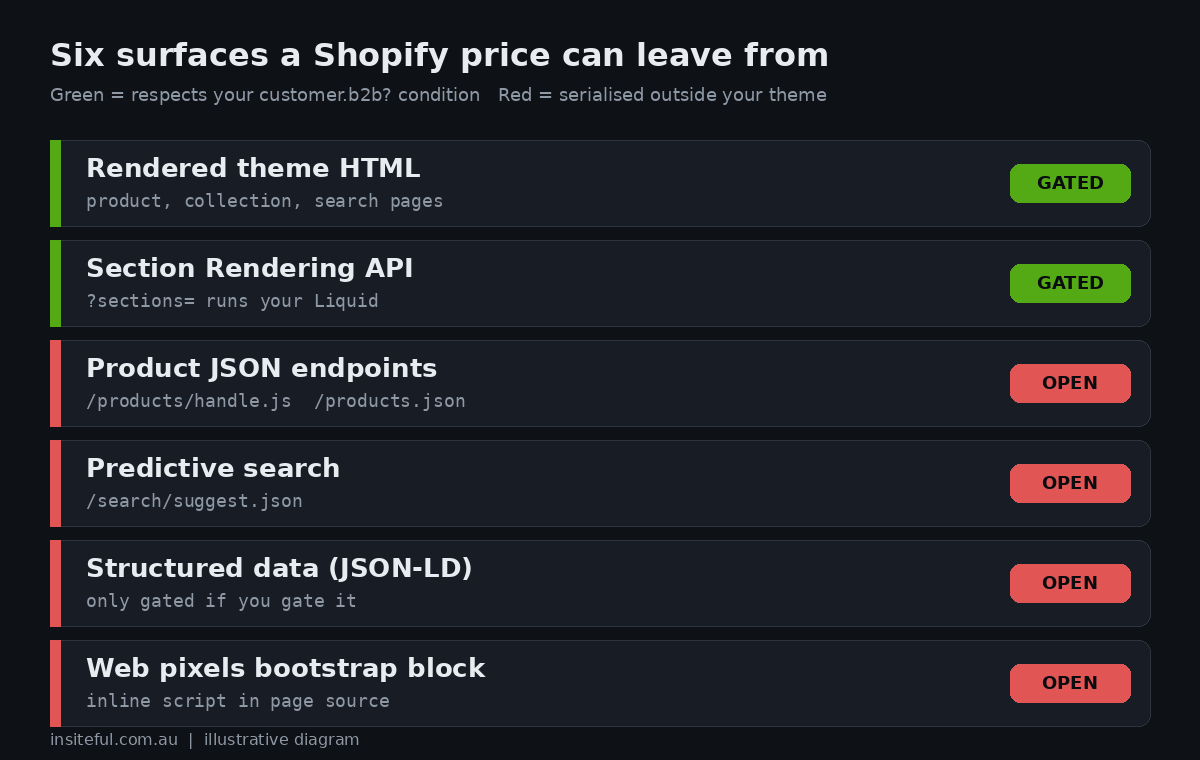
We ran our audit against two public Shopify stores to see the real behaviour (both are ordinary retail stores with no gating, so a LEAK result there simply confirms the surface exists). On the first store, the /products/handle.js endpoint returned a price in cents for every variant. The /products.json feed returned the variant price as a plain string. The predictive search endpoint, /search/suggest.json, returned product objects with prices. And the page source carried an inline script block whose productVariants array included a price object with an amount and currency code for the viewed product. None of those four outputs passed through a theme template. A customer.b2b? condition in the product page cannot touch them.
The inline block is the one that surprises people. It belongs to Shopify’s web pixels bootstrap, the code that initialises analytics and marketing pixels, and it sits in the HTML of the product page. In May 2026 a merchant posted in the Shopify developer community that their gated wholesale pricing was visible in the page source to logged-out visitors and crawlers, inside that analytics block. At the time of writing the thread had no staff reply and no accepted fix. The merchant reported that Shopify Support suggested either restricting store access to logged-in B2B customers only or customising the Web Pixels API to omit price data for unauthenticated sessions, and rejected the first because it would hide the brand from the public. We have not been able to confirm a supported way to strip the field, so our position is simple: treat that block as public, and choose the tier accordingly.
A two-minute audit you can run against your own store
We do not trust a gate until we have tested it as a stranger. The script below checks the surfaces from the table with no cookies and no login, which is exactly what a crawler or a competitor sees. Run it against a product handle on your store. On a store with a properly gated price, you want every line to read clean or n/a.
#!/usr/bin/env python3
"""Logged-out price leak audit for a Shopify storefront.
Usage: python3 price_leak_audit.py https://store.example.com product-handle
Run it with no cookies, exactly as a crawler or competitor would."""
import re, sys, json, urllib.request, urllib.parse

UA = {"User-Agent": "Mozilla/5.0 (price-leak-audit)"}

def get(url):
    req = urllib.request.Request(url, headers=UA)
    with urllib.request.urlopen(req, timeout=30) as r:
        return r.status, r.read().decode("utf-8", "ignore")

def main(base, handle):
    base = base.rstrip("/")
    results = []

    # 1. Product .js endpoint (price in cents)
    try:
        s, body = get(f"{base}/products/{handle}.js")
        results.append((".js endpoint", "LEAK" if json.loads(body).get("price") is not None else "clean"))
    except Exception as e:
        results.append((".js endpoint", f"blocked ({e})"))

    # 2. products.json feed
    try:
        s, body = get(f"{base}/products.json?limit=1")
        v = json.loads(body)["products"][0]["variants"][0].get("price")
        results.append(("products.json", "LEAK" if v else "clean"))
    except Exception as e:
        results.append(("products.json", f"blocked ({e})"))

    # 3. Predictive search endpoint
    try:
        q = urllib.parse.quote(handle.split("-")[0])
        s, body = get(f"{base}/search/suggest.json?q={q}&resources[type]=product")
        prods = json.loads(body)["resources"]["results"]["products"]
        results.append(("search/suggest.json", "LEAK" if prods and prods[0].get("price") else "clean"))
    except Exception as e:
        results.append(("search/suggest.json", f"blocked ({e})"))

    # 4. Page source: web pixels block and JSON-LD
    s, html = get(f"{base}/products/{handle}")
    wpm = re.search(r'"productVariants":\[\{"price":\{"amount":([0-9.]+)', html)
    results.append(("web-pixels inline block", "LEAK" if wpm else "clean"))
    ld = re.findall(r'<script type="application/ld\+json">(.*?)</script>', html, re.S)
    prod_ld = [b for b in ld if '"Product"' in b]
    if not prod_ld:
        results.append(("JSON-LD offers", "n/a (no Product JSON-LD)"))
    else:
        results.append(("JSON-LD offers", "LEAK" if any('"price"' in b for b in prod_ld) else "clean"))

    # 5. Section Rendering API
    try:
        s, body = get(f"{base}/products/{handle}?sections=main-product")
        results.append(("Section Rendering API", "LEAK" if re.search(r'price', body) and re.search(r'[$][0-9]', body) else "clean"))
    except Exception as e:
        results.append(("Section Rendering API", f"n/a ({str(e)[:30]})"))

    width = max(len(n) for n, _ in results)
    for name, res in results:
        print(f"{name.ljust(width)}  {res}")

if __name__ == "__main__":
    main(sys.argv[1], sys.argv[2])
Here is the real output from running it against the first public store above, which has no price gating at all. It is the baseline: every surface that serialises product data reports a price. Your gated store should look different on at least the rendered surfaces.
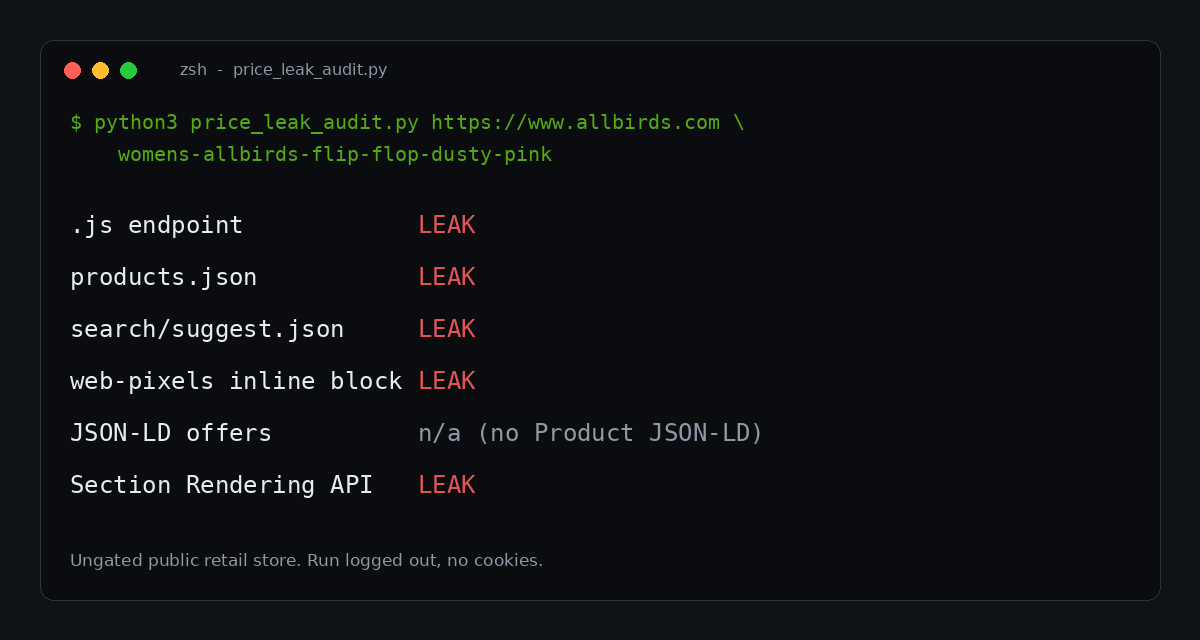
The second store gave a slightly different picture, which is the point of running it yourself: its theme emitted a Product JSON-LD block containing a price, and its Section Rendering response for the main product section came back clean. Themes differ, and apps add their own surfaces. The audit takes seconds, so run it after every theme update and every new app install. We schedule it for retainer clients and have it post to Slack only when a line changes.
Structured data: the leak that is also an SEO problem
Product JSON-LD is where hiding a price gets awkward, because the same block feeds search features. Google’s merchant listing documentation lists price and priceCurrency as required Offer properties, defines price as the current, active offer price, and requires it to be greater than zero. Google’s general structured data policy says not to mark up content that is not visible to readers of the page, and that structured data describing hidden material may not produce a rich result and can draw a manual action that removes rich result eligibility.
Put those together and the rule for a gated page is clear. If the visitor cannot see a price, the markup must not contain one. Equally, a Product with no offer will not be eligible for merchant listing experiences, which require a price. For a tier 2 store that is the correct outcome: you are choosing not to compete in shopping surfaces with a number you will not show.
Most themes emit product markup with the structured_data Liquid filter. We keep that for B2B sessions and swap in a minimal, offer-free block for everyone else. The name, description, image, brand and SKU remain, so the product page still describes what it is.
{%- if customer.b2b? -%}
  <script type="application/ld+json">
    {{ product | structured_data }}
  </script>
{%- else -%}
  <script type="application/ld+json">
  {
    "@context": "https://schema.org",
    "@type": "Product",
    "name": {{ product.title | json }},
    "description": {{ product.description | strip_html | truncate: 300 | json }},
    "image": {{ product.featured_image | image_url: width: 1200 | prepend: "https:" | json }},
    "brand": { "@type": "Brand", "name": {{ product.vendor | json }} },
    "sku": {{ product.selected_or_first_available_variant.sku | json }}
  }
  </script>
{%- endif -%}
Two follow-ups people forget. Your Google Merchant Center feed and any channel app that pushes products to Google will publish prices regardless of the theme, so a wholesale-only catalogue should not be in that feed at all. And if your theme prints Open Graph price tags, check the head of the page logged out and remove them from the gated branch.
Predictive search, cart and the other theme-adjacent leaks
Predictive search is the most common second leak because most themes call /search/suggest.json from JavaScript and render the price field into the dropdown. The fix is a template change, not a platform setting: stop reading the price property from the response, or request the section-rendered version of predictive search, which runs your Liquid and respects the gate. We prefer the latter because it keeps one source of truth for what a price looks like.
// theme.js: use the section-rendered predictive search, not the JSON price
async function predictiveSearch(term) {
const url = `${window.Shopify.routes.root}search/suggest?q=${encodeURIComponent(term)}`
+ `&resources[type]=product§ion_id=predictive-search`;
const res = await fetch(url, { credentials: 'same-origin' });
const html = await res.text();
document.querySelector('#predictive-search-results').innerHTML =
new DOMParser().parseFromString(html, 'text/html')
.querySelector('#shopify-section-predictive-search').innerHTML;
}The cart is the other one. A buyer who can add a product to cart will see the price in the cart drawer, the cart page and, eventually, checkout. That is fine for a verified B2B customer, which is the whole point. It is a leak only if a logged-out visitor can reach it, so the add to cart gate and the price gate need to move together. We also disable the Shop Pay and dynamic checkout buttons in the gated branch, because they sit outside the product form and skip the login prompt.
Quick-order lists and reorder tools deserve the same treatment. If you have built a quick order form, it should only render for customer.b2b? sessions. Our write-up on the B2B pricing model covers how catalogs and price lists resolve once the buyer is inside.
What a leak is worth: a modelled example
Numbers focus the tier decision, so here is a modelled one (illustrative, not a client). A distributor of trade hardware has 120 active trade accounts averaging $85,000 AUD a year each, so about $10.2M AUD in annual wholesale revenue. Its trade price sits 40 per cent below retail. A competitor who obtains the list can undercut selectively on the 200 fastest-moving SKUs. Suppose that costs the distributor a 3 per cent price concession on 40 per cent of revenue to keep those accounts: 10,200,000 × 0.40 × 0.03 = $122,400 AUD a year in margin.
| Input | Modelled value |
|---|---|
| Trade accounts | 120 |
| Average annual spend per account | $85,000 AUD |
| Annual wholesale revenue | $10,200,000 AUD |
| Share of revenue contested | 40% |
| Concession needed to hold accounts | 3% |
| Annual margin at risk | $122,400 AUD |
Against that, a tier 3 build costs a one-off amount and a modest loss of organic traffic to product pages. Whether it is worth it depends on how much of your acquisition comes from search to those pages and how much comes from reps, trade shows and referrals. For a distributor whose growth is rep-led, the margin number usually wins. For one that finds new accounts through product search, tier 2 with a good public brand and category layer is the better balance. The point of the model is to make the client choose with a number in front of them rather than a feeling.
There is also a reason to keep a gate in place that is nothing to do with competitors. Australian businesses are paid slowly: Australian Government payment times reporting for the first half of 2025 put the average time to pay 95 per cent of small business invoices at 64 days. A trade account is a credit relationship, and credit relationships start with knowing who the buyer is. Showing prices only after account approval keeps that sequence honest. We cover the front half of that flow in B2B account approval on Shopify.
Public brand, private price: the pattern we recommend for tier 2
The best wholesale stores we have built do not look like locked doors. They look like a confident supplier with a clear route to a trade account. The pattern is consistent: public brand pages, category pages and product pages with specifications, images and datasheets; no price, no add to cart; a prominent trade application call to action; and a login that lands the buyer on a pre-filtered catalogue for their company location.
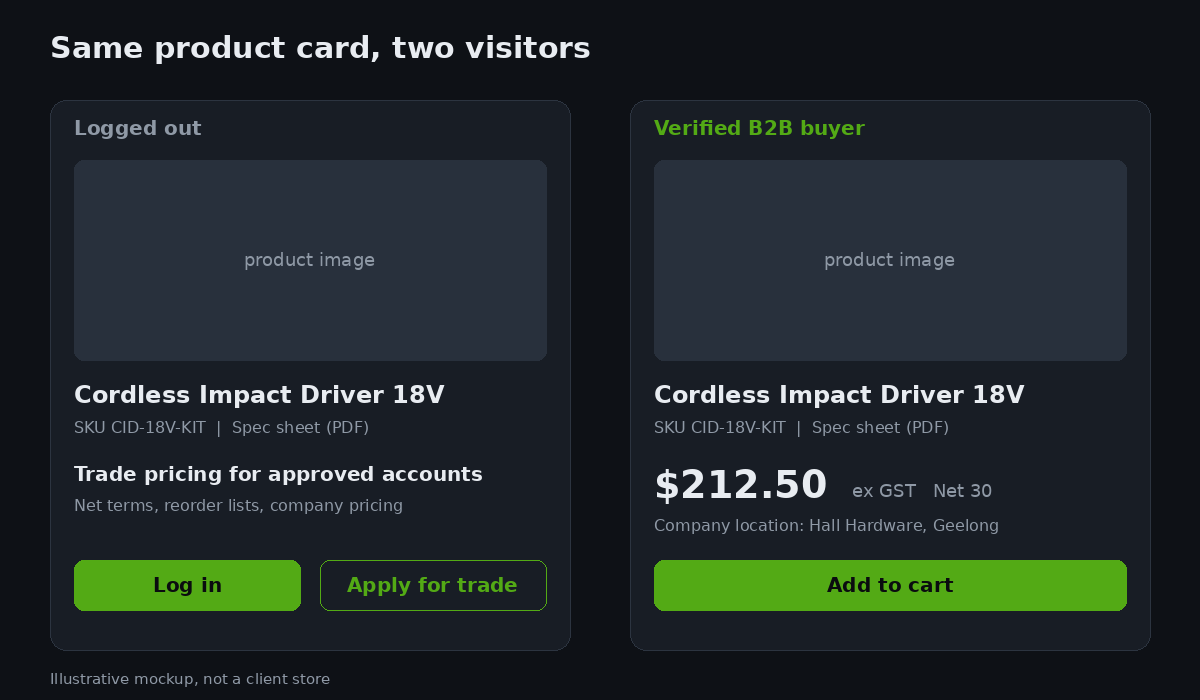
Three details make this convert instead of frustrate. Say what the gate gets the buyer, in plain terms: “Trade pricing, net terms and reorder lists for approved accounts” gives the prompt a reason to exist. Keep the application short enough to finish on a phone, because tradespeople apply from a ute. And return the buyer to the product they were looking at after login, using the return_to parameter on the login URL, so the gate costs them one click.
<a href="{{ routes.account_login_url }}?return_to={{ request.path | url_encode }}">
  Log in to see trade pricing
</a>
How we do it at Insiteful
On every wholesale build we start with the tier conversation, not the theme. We interview the sales lead about what a leaked price list would cost, record the answer in the build brief, and pick the tier before design starts. That one document has settled more scope arguments than any other we write.
For tier 2 builds we ship four things together: the gated price, add to cart and cart snippets; offer-free product markup for logged-out sessions; a predictive search that renders through Liquid instead of reading JSON prices; and the audit script wired into a scheduled check. The audit is not a one-off launch task. Theme updates, new apps and new Shopify features change what a page serialises, so the check runs weekly and tells the client in Slack only when something moves. We would rather find a new surface ourselves than have a competitor find it for the client.
For tier 3 builds we separate the public and private halves properly. The public site carries brand, capability and a trade application form. The catalogue lives behind customer accounts, with company locations, catalogs and payment terms configured natively so that approval, pricing and credit all hang off the same company record. Where the client is on Shopify Plus, we also check that the checkout and customer account extensions only render for B2B sessions.
What we do not do is promise a gate we cannot prove. When a client asks whether the web pixels block can be cleaned up, we tell them what we know: the platform controls it, there is no confirmed supported removal, and the honest options are to accept the exposure or move to tier 3. Clients can plan around a stated limit; they cannot plan around a workaround that breaks on the next platform update.
A checklist for your next gated build
If you are about to build or audit a gated store, work through these in order. They map to the surfaces above and to the tier decision.
| # | Check | Pass condition |
|---|---|---|
| 1 | Tier agreed in writing | Client has named what a leaked list would cost |
| 2 | Price, add to cart, cart icon, dynamic checkout buttons | All inside customer.b2b? |
| 3 | Location switcher for multi-branch buyers | Uses customer.company_available_locations |
| 4 | Product JSON-LD and Open Graph tags | No price when logged out |
| 5 | Predictive search | Price-free for logged-out sessions |
| 6 | Google Merchant Center and channel feeds | Wholesale catalogue excluded |
| 7 | Audit script run logged out | Only accepted surfaces report a price |
| 8 | Web pixels block decision recorded | Accepted exposure or tier 3 |
| 9 | Audit scheduled weekly | Alerts on change, silent otherwise |
Most stores we audit fail at items 4 to 6 on day one. Fixing them takes a day. Discovering them from a competitor’s quote takes much longer.
Want wholesale prices that stay where you put them?
If your trade pricing is meant to be private, we can run the audit on your store, show you exactly which surfaces expose a price today, and map the shortest build to the tier you need. See how our build assessment works on the Insiteful process page and book yours.
Sources
- Shopify.dev: Support B2B customers in your theme
- Shopify developer community: company location catalog price and Liquid as source of truth
- Shopify developer community: gated B2B pricing exposed in the web pixels block (May 2026)
- Google Search Central: Merchant listing structured data
- Google Search Central: Structured data general guidelines
- Payment Times Reporting Regulator update, January 2026