
On 1 October 2026 Shopify started refusing app deployments that include checkout extension versions older than 2026-01. If you run a store with a handful of custom checkout extensions, that date came and went without a banner in your admin. Your live checkout probably still works. The risk sits with whoever has to ship the next change: a developer runs a deploy, the CLI rejects the bundle, and the delivery-estimate banner you wanted live before Black Friday is stuck on a laptop.
The version cut-off is only half of the story. The other half is a number: 64 KB. Checkout UI extensions on the newer API versions are held to a 64 KB compressed JavaScript bundle, enforced per extension at deploy. Most extensions we audit on Australian stores were written when the practical limit was your patience, and they land at 90 to 150 KB once gzipped. This article is the playbook we use to get them under budget: what the rules are, how to measure a bundle properly, which swaps buy the most bytes, what we measured when we tested the usual suspects, and how to decide between a rebuild, a trim and an exception request.
It is written for developers and the founders who sign off their invoices. If you are the founder, the sections on the business case and the audit worksheet are for you. If you are the developer, the scripts and import swaps are for you. Every number in the measurement section came from a build we ran for this post, and the script output further down is real.
What actually changed, and when
Three separate things happened to checkout extensions over the past year, and they get blurred together in forum threads. Separating them makes it clear which ones are your problem today.
| Change | What it means | Who it hits |
|---|---|---|
| 64 KB compressed bundle limit | UI extensions on API version 2025-10 and later are limited to a 64 KB compressed JavaScript bundle, enforced per extension at deploy. Full-page customer account extensions get 128 KB. | Anyone upgrading an extension to a current API version |
| Polaris web components and Remote DOM | From 2025-10 the default UI layer is Polaris web components (s-stack, s-button and friends) rendered through Remote DOM, with Preact as the supported framework. The old React reconciler path is the thing that made bundles heavy. | Extensions still on the React renderer |
| Older versions blocked at deploy | Per Shopify Engineering, from 1 October 2026 deployments that include extension versions earlier than 2026-01 are blocked. | Any app with an old extension version, including custom apps built for you years ago |
| Non-blocking by default | Shopify’s 26 January 2026 changelog: checkout UI extensions that support blocking now default to non-blocking, and merchants must explicitly switch on Allow app to block checkout. | Extensions used to enforce rules at checkout |
The first three are about the build. The fourth is about behaviour, and it matters for how much weight your bundle can carry: if an extension that was previously blocking now quietly stops blocking, the right response is to move the rule into a Function, not to add more JavaScript to the extension. We come back to that in the failure-modes section.
One honest caveat on dates. Shopify’s developer docs state the 64 KB figure for 2025-10 and later, while Shopify Engineering describes the 2026-01 CLI as the one enforcing it. We treat 2026-01 as the working floor, because that is also the version that the October 2026 deploy block keys off. If you are on 2025-10 and under 64 KB, you are fine either way. If you are on 2025-10 and over, you will meet the limit the moment you move to 2026-01, so there is no reason to wait.
Why 64 KB is a real constraint, not a rounding error
Shopify rebuilt its own Checkout Blocks app on the new stack and published the result. The five extensions in that family render on around a third of customised checkouts. They started at 300 to 356 KB raw, roughly 100 to 112 KB gzipped, so each was more than double the new limit. After moving from React to Preact and Polaris web components, transferred bundle sizes fell between 40 and 85 per cent, with the payment-icons extension dropping 84.4 per cent. Extension Load Time, weighted by checkout volume, improved about 8 per cent at the median and 7 per cent at the 90th percentile.
Two lessons are worth stealing. The largest single saving, about 89 KB, came from removing react-reconciler by switching to Preact. And the team replaced liquidjs, around 73 KB minified, with a purpose-built parser of roughly 13 KB gzipped. In other words, the big wins were not clever minification. They were deleting whole libraries that the extension did not need to ship to every buyer.
Why does this matter for a store rather than for Shopify? Because checkout is where the money is decided. Baymard’s aggregate of 50 studies puts average cart abandonment at 70.22 per cent, and among the reasons shoppers give, 17 per cent cite a checkout that is too long or complicated and another 17 per cent cite website errors or crashes. A heavy extension does not cause those directly, but every extra script and every failed render sits on the same list. A 64 KB cap is Shopify forcing the ecosystem to stay off that list.
What we measured: the cost of the usual suspects
Before touching a client extension we wanted our own numbers rather than blog-post folklore. We bundled each common dependency on its own with esbuild 0.28.2, minified, in production mode, then gzipped at level 9. Each row is one import in isolation, so real extensions will vary a little with tree-shaking, but the order of magnitude is the point.
| Dependency (version tested) | Gzipped | Share of 64 KB budget | Cheaper replacement |
|---|---|---|---|
| react-reconciler 0.34 with React 19 | 43.1 KB | 67% | Preact render: 4.5 KB |
| liquidjs 10.30 | 22.9 KB | 36% | Render in Liquid or a Function; send a string |
| lodash 4.18 (full import) | 26.2 KB | 41% | lodash-es debounce only: 1.1 KB |
| moment 2.31 | 20.3 KB | 32% | Intl.DateTimeFormat: 0.1 KB |
| axios 1.20 | 19.1 KB | 30% | fetch: 0.1 KB |
| markdown-to-jsx on React | 31.1 KB | 49% | Pre-render to HTML server-side, or alias React to Preact as Shopify did |
| date-fns format (one function) | 5.6 KB | 9% | Fine if you need locale logic |
| dayjs 1.11 | 3.3 KB | 5% | Fine |
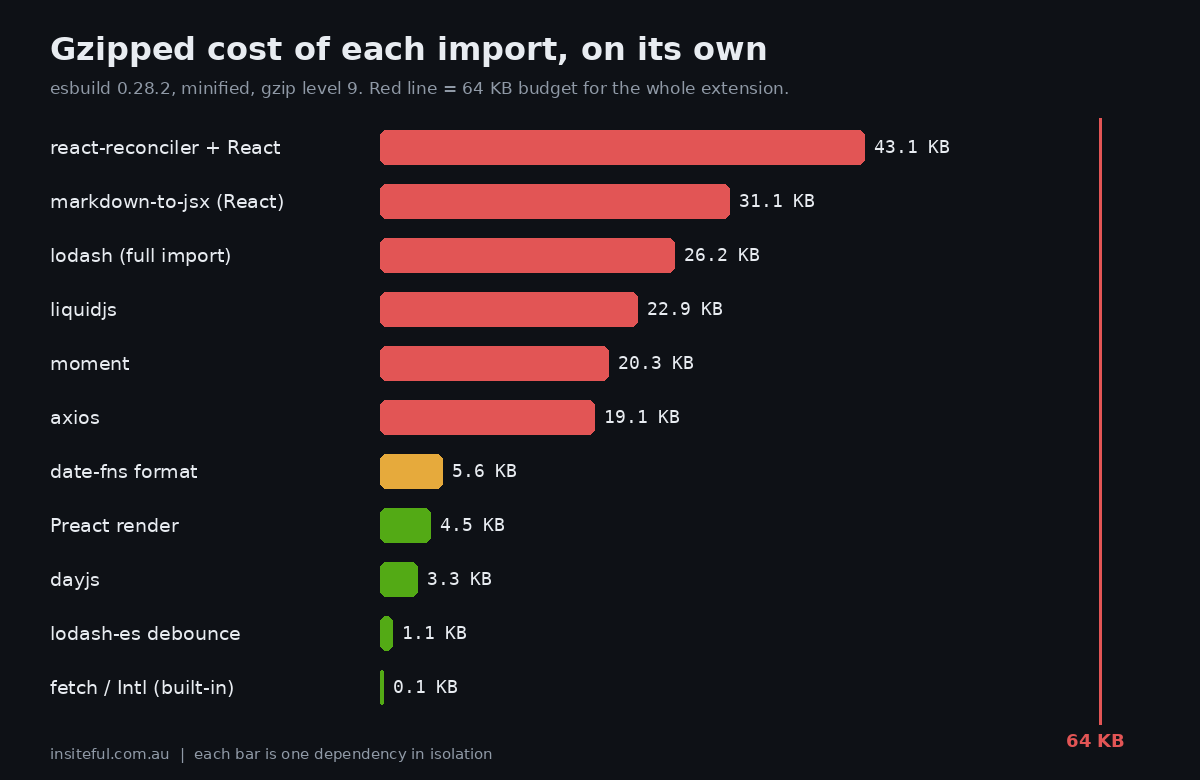
Read that table as a shopping list for deletion. A legacy extension that imports React, react-reconciler, moment, axios and the whole of lodash has already spent 109 KB gzipped before a line of business logic is written. An extension that renders with Preact, formats dates with the browser’s own Intl and calls fetch spends under 6 KB on the same jobs. That is the difference between an extension that cannot deploy and one that has 58 KB of headroom.
Measure first: the metafile and a CI budget script
Guessing which dependency is heavy is how teams spend a week shaving 2 KB off the wrong thing. Shopify’s bundle-size guidance is to run shopify app build on Shopify CLI 3.92.0 or higher, which writes an esbuild metafile (.metafile.json) into each extension’s dist/ folder. That file lists every input module and how many bytes it contributed to the output. You can drop it into the esbuild bundle analyzer, or read it yourself.
We read it ourselves, in CI, so a bundle that creeps over budget fails the pull request instead of failing the deploy. The script below reads the built bundle, gzips it the way a CDN would, groups the metafile by package, prints the top five offenders, and exits non-zero when the gzip size passes 64 KB. It warns at 80 per cent so the team sees the cliff coming.
// bundle-budget.mjs - fail CI when an extension bundle exceeds its gzip budget
import fs from 'node:fs'; import zlib from 'node:zlib'; import path from 'node:path';
const dir = process.argv[2]; const BUDGET = 64 * 1024; const WARN = 0.8;
const js = fs.readdirSync(dir).find(f => f.endsWith('.js'));
const bundle = fs.readFileSync(path.join(dir, js));
const gz = zlib.gzipSync(bundle, { level: 9 }).length;
const meta = JSON.parse(fs.readFileSync(path.join(dir, '.metafile.json'), 'utf8'));
const out = Object.values(meta.outputs)[0].inputs;
const byPkg = {};
for (const [file, v] of Object.entries(out)) {
  const m = file.match(/node_modules\/((?:@[^/]+\/)?[^/]+)/);
  const k = m ? m[1] : 'your code';
  byPkg[k] = (byPkg[k] || 0) + v.bytesInOutput;
}
const total = Object.values(byPkg).reduce((a, b) => a + b, 0);
console.log(`${js}: ${(gz / 1024).toFixed(1)} KB gzip of ${(BUDGET / 1024)} KB budget (${Math.round(gz / BUDGET * 100)}%)`);
for (const [k, v] of Object.entries(byPkg).sort((a, b) => b[1] - a[1]).slice(0, 5))
  console.log(`  ${k.padEnd(18)} ${String(Math.round(v / 1024)).padStart(4)} KB min  ${(v / total * 100).toFixed(0).padStart(3)}%`);
if (gz > BUDGET) { console.log('FAIL over budget'); process.exit(1); }
console.log(gz > BUDGET * WARN ? 'WARN above 80% of budget' : 'PASS');
To test it we built a representative “delivery estimate” banner twice. The before version is what we keep finding in the wild: Preact for rendering, then moment for the date, axios for the request, the whole of lodash for one debounce, and liquidjs to template a single string. The after version swaps those for Intl.DateTimeFormat, fetch and a single lodash-es function. Same behaviour, same UI. This is the real output of the script against each:
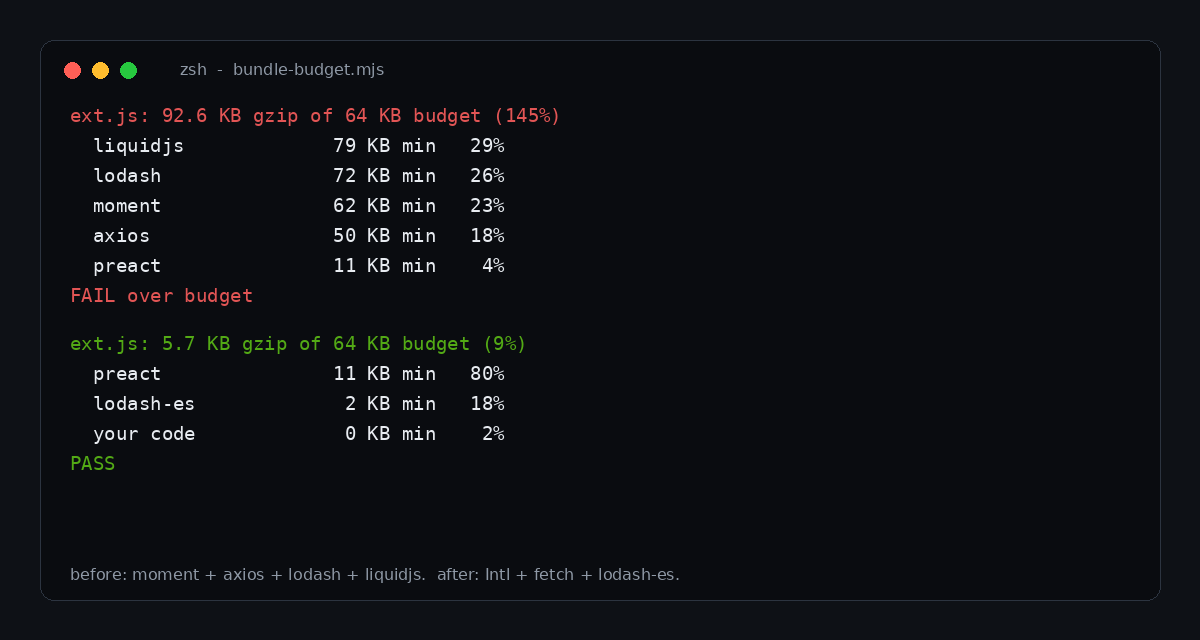
The before build is 92.6 KB gzipped, 145 per cent of the budget, and the script exits with a failure. The after build is 5.7 KB, 9 per cent of the budget. Notice what the breakdown says about the before build: liquidjs, lodash, moment and axios are 96 per cent of the minified bytes between them, and Preact, the part that actually draws the banner, is 4 per cent. The extension was almost entirely dependencies.
The swaps, in the order they pay back
Once you have the breakdown, work down it from the biggest line. This is the order we use, and roughly what each step is worth on a typical legacy extension.
| Step | Typical saving (gzipped) | Effort | Risk |
|---|---|---|---|
| 1. Move rendering from React to Preact with web components | 40 KB or more | Medium to high; touches every component | Medium. Visual regression on every block |
| 2. Delete template engines and markdown parsers; render server-side | 20 to 30 KB | Medium | Low if the output is a plain string |
| 3. Replace whole-library imports (lodash, moment) with named imports or built-ins | 15 to 25 KB | Low | Low |
| 4. Replace axios with fetch | about 19 KB | Low | Low. Check error handling semantics |
| 5. Move static data into metafields or metaobjects | Varies, often 5 to 20 KB | Low to medium | Low |
| 6. De-duplicate versions of the same package | Varies | Low | Low |
Steps three and four are an afternoon and often rescue an extension on their own. Step one is the project. It is also the step that makes the others permanent, because once you are on Preact and the platform’s own web components you stop shipping a UI kit with every extension.
Move data out of the bundle
Shopify’s guidance lists a few moves that are easy to miss: store app data in metafields or metaobjects instead of hard-coding it, deliver translations through each surface’s native localisation APIs, and host larger images and reference them by URL. We see the cost of ignoring this constantly. A shipping-cutoff extension that embeds a 400-row postcode-to-transit-days table as a JavaScript object has put your depot’s logistics data into every buyer’s download. Put the table in a metaobject, read the one row you need, and the bundle shrinks while the ops team gets an admin screen to edit it.
One feature per extension
The other structural rule from Shopify is to split by feature and not to combine targets that never render together. An extension that serves a banner in one target, a gift message field in another and a pickup picker in a third bundles all three into the same file for every render. Three small extensions each stay far below the cap, load only where used, and fail independently. It costs a little more configuration and buys a lot of resilience.
The upgrade path in code
If your extension is still on React, here is the shape of the move. The snippets follow Shopify’s own upgrade guide for UI extensions. Treat the version numbers as a snapshot from the guide at time of writing and take current versions from the guide itself when you do this.
First the config and dependencies. The API version moves forward, React and its reconciler come out, Preact and signals go in:
# shopify.extension.toml
api_version = "2026-04"

# package.json (dependencies)
"preact": "^10.10.x",
"@preact/signals": "^2.3.x",
"@shopify/ui-extensions": "2026.4.x"

# remove
react, @shopify/ui-extensions-react, react-reconciler, @types/react
Then the extension’s own tsconfig.json so JSX compiles against Preact, with the app’s root config left alone:
{
  "compilerOptions": {
    "jsx": "react-jsx",
    "jsxImportSource": "preact",
    "target": "ES2020",
    "checkJs": true,
    "allowJs": true,
    "moduleResolution": "node",
    "esModuleInterop": true
  },
  "include": ["./src", "./shopify.d.ts"]
}
And the entry point, which loses the factory wrapper and the callback parameters. You render into document.body and read APIs from the global shopify object:
// Before (React)
reactExtension('customer-account.order-status.block.render', () => <Extension />);

// After (Preact + web components)
import "@shopify/ui-extensions/preact";
import { render } from "preact";

export default function extension() {
  render(<Extension />, document.body);
}

function Extension() {
  const title = shopify.target.value.merchandise.title;
  return (
    <s-stack direction="inline" gap="base">
      <s-text>{title}</s-text>
      <s-button variant="primary">Reorder</s-button>
    </s-stack>
  );
}
Component names change shape as well: InlineStack becomes s-stack with a direction attribute, TextField becomes s-text-field, and the guide has a per-component mapping table. Metafield access changes too, with useMetafield and shopify.metafields removed from the customer account side in favour of shopify.appMetafields. That one catches teams out because the code compiles and then renders nothing.
There is a real trade-off worth naming. The web components load from Shopify’s CDN as an unversioned script, and developers on Shopify’s community forum have called that a stability risk, while others have flagged gaps such as the missing Index Table that Polaris React had. We still recommend the move, because the alternative is a deploy block, but we run a visual regression pass on every extension after the upgrade and keep a note of any component we had to replace. If you want the broader picture of what the extension framework can and cannot do, our guide to Shopify checkout UI extensions covers targets and constraints.
Failure modes: what happens when the extension does not run
A bundle that is too big is a deploy-time failure. A bundle that is the right size but slow, or that throws, is a runtime failure, and the runtime failure is the one that touches buyers. This is where the 26 January change matters. Because blocking extensions now default to non-blocking, a checkout extension that throws or fails to load will not stop a buyer from paying unless the merchant has explicitly enabled Allow app to block checkout for that app. That is the right default for conversion. It also means any rule you needed enforced, like a minimum order value for a trade customer, an address check or a restricted-item rule, is not actually enforced by your extension.
| Rule | Wrong home | Right home |
|---|---|---|
| Minimum order value of $150 AUD for wholesale | UI extension that blocks progress | Cart and Checkout Validation Function |
| PO box not allowed for courier delivery | UI extension warning | Validation Function on the address; extension shows the friendly message |
| Show delivery estimate | Fine as an extension | Extension, with the data in a metafield |
| Gift message field | Fine as an extension | Extension writing an attribute or metafield |
| Hide a shipping method for a product type | Extension hiding it visually | Delivery customisation Function |
Shopify’s own changelog recommends custom checkout validation through Cart and Checkout Validation Functions instead of UI extensions, describing them as more secure, performant, and guaranteed to run across supported checkouts. That is Shopify’s claim, and it matches what we see: Functions run on Shopify’s infrastructure with an instruction budget rather than in the buyer’s browser with a byte budget. If you have not tested yours yet, our article on testing Shopify Functions shows how, and checkout validation covers the rules themselves.
The pattern we land on is a split of responsibilities. The Function holds the rule. The extension, kept deliberately tiny, explains the rule to the buyer. When the extension is 6 KB it loads fast and rarely fails. When it fails, the rule still holds.
The business case, in Australian dollars
A founder reading this will ask what it is worth. Shopify has not published a conversion effect for bundle size, and we will not invent one. What we can do is show the break-even, so you can judge it against your own numbers. Take a store turning over $3,000,000 AUD a year through checkout, with a legacy extension set that cannot be redeployed. The work to bring it under budget is roughly 30 to 45 hours of developer time. At an agency rate of $200 AUD an hour, that is $6,000 to $9,000 AUD.
| Assumption (illustrative) | Value |
|---|---|
| Annual checkout revenue | $3,000,000 AUD |
| Remediation cost (30 to 45 hours at $200 AUD) | $6,000 to $9,000 AUD |
| Revenue that needs to be protected to break even in year one | 0.2% to 0.3% of checkout revenue |
| Cost of one blocked deploy: a promo banner stuck for 3 days of a $60,000 AUD sale week, where the banner drives 25% of sales | About $6,400 AUD, the same size as the remediation |
The honest framing is that this is cost avoidance. You are paying to keep the ability to change your checkout, and to keep that checkout light enough that the extensions do not become the reason a buyer waits. For a store with two or three small extensions already under budget, the right answer is to do nothing but add the CI check. For a store with five heavy extensions built by three different developers, the rebuild pays for itself the first time a deploy is needed in a hurry.
Australian buyers are not forgiving about friction. Australia Post’s 2025 data puts online spend at around $82.6 billion AUD, which means the cohort you are asking to wait on your checkout is large and has plenty of alternatives. We would rather your checkout were boring and fast.
Rebuild, trim or ask for an exception?
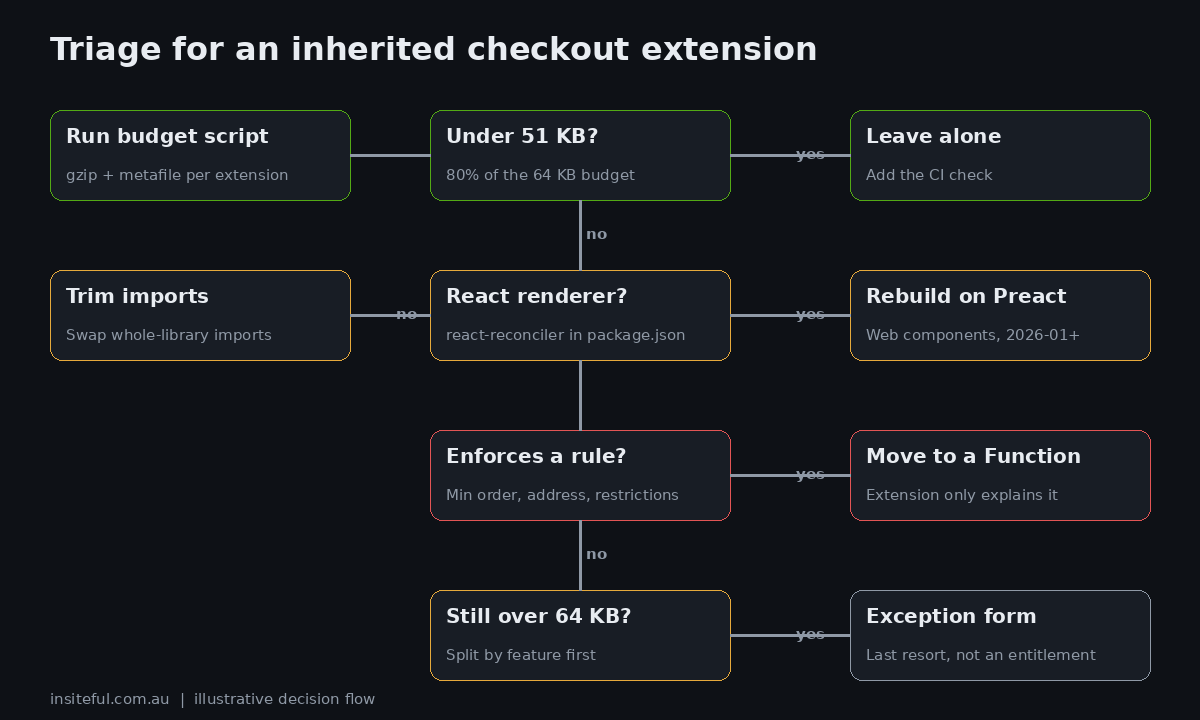
Shopify provides a bundle-size exception form for extensions that are still over the limit after avoidable bloat is removed, on the basis of genuine feature density or a platform gap with no native alternative. It asks for your minified bundle and its esbuild metafile. We have not needed it, and we would be cautious about planning around it, because it is a request and not an entitlement. Use this table to decide.
| Situation | Our call |
|---|---|
| Under 64 KB, on 2026-01 or later | Leave alone. Add the CI budget check. |
| Over 64 KB, mostly whole-library imports | Trim. Steps 3 to 6, usually one to two days. |
| Over 64 KB, React renderer, many components | Rebuild on Preact and web components. Treat as a small project. |
| Over 64 KB after trimming, genuinely dense feature | Split into several extensions first. Exception form last. |
| Extension enforces a rule | Move the rule to a Function, shrink the extension to messaging. |
| Third-party app extension over budget | Raise it with the app developer. You cannot fix their bundle. |
A 30-minute audit you can run this week
You do not need us to find out where you stand. Work through this in order.
| Check | How | Pass looks like |
|---|---|---|
| Inventory | List every extension in every app: yours, your agency’s and third parties’. The Partners dashboard shows app versions. | A written list with owner and API version |
| API versions | Check api_version in each shopify.extension.toml. | All 2026-01 or later |
| Size | Run shopify app build on CLI 3.92.0 or higher, then the budget script on each dist/. | Every extension under 51 KB gzip (80% of budget) |
| Renderer | Search for react-reconciler and @shopify/ui-extensions-react in package.json. | Neither present |
| Enforcement | List rules you believe checkout enforces. Is each one a Function? | Every enforced rule is a Function |
| Blocking | Check the Allow app to block checkout setting for any app that relied on blocking. | Enabled only where intended, with a Function backstop |
| Real-world load | Compare checkout timings before and after changes in your RUM data. | No regression |
The last line is the one people skip. Bundle size is a proxy for load time, and Shopify’s own result was a modest 7 to 8 per cent Extension Load Time improvement from a 40 to 85 per cent bundle reduction. Do not promise a founder a speed-up that large. Promise them an extension that deploys, fails less, and does not drag. If you want to track the real thing, our posts on real user monitoring and performance budgets show how to wire it up.
How we do it at Insiteful
Every checkout extension we ship starts with a budget, not a feature list. Before we write a component we agree three numbers with the client: the gzip ceiling for that extension (we set it at 48 KB, so there is headroom under Shopify’s 64 KB), the API version we are targeting, and the rule that decides whether the job is an extension or a Function. The CI check above runs on every pull request. If a bundle crosses 80 per cent of budget, the pull request is annotated with the dependency breakdown. If it crosses 100 per cent, the merge is blocked.
For inherited stores, we begin with the audit table in this article, then quote one of the three outcomes: leave alone, trim, or rebuild. We split extensions by feature on the way through, move any static data into metaobjects the merchant can edit, and move any enforced rule into a Function with a tested backstop. We keep the extension that explains the rule small and boring, because that is the one buyers see.
We also keep a visual regression pass on the post-upgrade checkout. The Polaris web component change alters spacing and some component behaviour, and we would rather catch that in a preview than in a support ticket. If you want a second opinion on an existing set of extensions, the first step is a short build assessment. You can see how we run that on our process page.
What to do on Monday
Run the inventory and the budget script. If everything is under 51 KB and on 2026-01 or later, add the CI check and you are done for the year. If something is over, trim before you rebuild, move rules to Functions before you move pixels, and treat the exception form as the last resort. Whatever you find, write the numbers down. The next time someone proposes adding a library to the checkout, the first question is how many kilobytes it costs, and the answer should already be on the wall.
Sources: Shopify developer changelog, 26 January 2026 (checkout UI extensions default to non-blocking); Shopify developer docs, optimize bundle size for app extensions; Shopify developer docs, upgrading customer account UI extensions to 2026-01; Shopify Engineering, upgrading the Checkout Blocks app to Polaris web components; InfoQ, 9 October 2026; Baymard Institute, cart abandonment rate statistics (updated 22 September 2025); Australia Post eCommerce reporting via IPC (2025 online spend). Dependency sizes are from our own esbuild 0.28.2 builds, minified and gzipped at level 9, run in October 2026.