
A store can pass every launch check and still look wrong six months later. Nobody changed the logo. Nobody rewrote the style guide. A theme update shipped a new default button radius, an app injected its own stylesheet, a merchandiser nudged a colour scheme in the theme editor, and a web font failed to load on one carrier’s network. Each change was small and defensible. Together they moved the storefront a few degrees off the brand you paid to build.
We call this brand drift, and it is the quiet cost of running a Shopify store that more than one person touches. It rarely shows up in a bug report because nothing is broken. Pages load, carts convert, the button still works. The brand just stops looking like itself, and customers read that as a small drop in trust without ever being able to say why.
The fix is not a stricter style guide PDF. It is a test suite. This article walks through the two-layer check we run on brand-led Shopify builds: a token audit that names the exact property that moved, and a screenshot comparison that catches layout and composition drift the tokens cannot see. Every snippet below was run against a mock storefront while writing this, and the output you see is real.
Why Brand Drift Is a Revenue Problem, Not a Cosmetic One
Australians spent a record $82.6 billion AUD online in 2025, up 13.9 per cent on the year, across 9.8 million households, according to Australia Post’s annual e-commerce report as summarised by IPC. That growth means more first-time visitors landing on more stores, and a first-time visitor has only the visual system to judge whether a store is legitimate. Colour, type and component shape do the work that a shopfront and a staff uniform do in a physical store.
There is also a commonly quoted figure that consistent brand presentation lifts revenue by 10 to 20 per cent. That number comes from a Lucidpress brand consistency report, a 2021 vendor survey of roughly 450 respondents, and the page does not say how the revenue estimate was derived. Treat it as directional, not as a forecast. We do not need it to make the case, because the cost of drift is easier to reason about from the other direction: every unplanned visual change is a change you shipped without testing.
The table below lists where drift comes from on the stores we maintain. The right-hand column is the part most teams skip: who owns catching it.
| Drift source | What changes | Who usually notices |
|---|---|---|
| Theme update | Default radius, spacing or font stack replaced by new theme defaults | Nobody until a customer comments |
| Third-party app | Injected CSS restyles buttons, badges or the cart drawer | The app vendor’s support team, if asked |
| Theme editor edits | Colour scheme, section padding or font weight adjusted by a merchandiser | The designer, weeks later |
| Font loading failure | Fallback serif or sans renders in place of the brand typeface | Only users on affected networks |
| Content changes | Off-ratio images, long titles, missing alt text break the grid | The founder, on mobile, at night |
Step One: Write the Brand Down as Data a Machine Can Check
A style guide describes the brand for humans. A test needs the same facts in a form a script can compare. The first artefact is a small JSON file that lists the handful of properties that carry the brand and the exact value each should compute to. Keep it short. Five to ten checks that never produce false alarms are worth more than fifty that train the team to ignore failures.
We pick checks by asking which properties a customer would notice before they could name them: the primary button fill, its corner radius, the heading typeface, the header colour, and the price colour. Spacing and line-height belong to the screenshot layer, because they vary legitimately with content.
{
  "checks": [
    { "name": "Primary button background", "selector": ".btn", "prop": "background-color", "expect": "rgb(200, 150, 46)" },
    { "name": "Primary button radius",     "selector": ".btn", "prop": "border-radius",    "expect": "2px" },
    { "name": "H1 font family",            "selector": "h1",   "prop": "font-family",      "expect": "Georgia" },
    { "name": "Header background",         "selector": "header","prop": "background-color","expect": "rgb(15, 92, 58)" }
  ],
  "contrast": [ { "name": "Button label on button", "selector": ".btn", "min": 4.5 } ]
}
Two notes on that file. First, computed colour values always come back as rgb() strings, so write the expectation in that form rather than hex. Second, the font check uses includes logic on purpose: browsers return the whole stack, and what you care about is that the brand face is first in line, not that the fallback list is byte-identical.
Layer One: The Token Audit
The audit loads the page in a headless browser, reads computed styles for each selector, and compares them to the file. It also computes a WCAG contrast ratio, because brand colours that drift usually drift toward whatever looks brighter on a designer’s monitor. The WCAG 2.2 minimum contrast criterion requires 4.5:1 for normal text and 3:1 for large text, where large means at least 18 point or 14 point bold.
import { chromium } from '@playwright/test';
import fs from 'node:fs';

const url = process.argv[2];
const spec = JSON.parse(fs.readFileSync('brand-tokens.json', 'utf8'));

const lum = ([r, g, b]) => {
  const f = c => { c /= 255; return c <= 0.03928 ? c / 12.92 : ((c + 0.055) / 1.055) ** 2.4 };
  return 0.2126 * f(r) + 0.7152 * f(g) + 0.0722 * f(b);
};
const rgb = s => s.match(/\d+/g).slice(0, 3).map(Number);

const browser = await chromium.launch();
const page = await browser.newPage();
await page.goto(url);
let fails = 0;

for (const c of spec.checks) {
  const got = await page.$eval(c.selector, (el, p) => getComputedStyle(el)[p], c.prop);
  const ok = got.includes(c.expect);
  if (!ok) fails++;
  console.log(`${ok ? 'PASS' : 'FAIL'}  ${c.name}: expected ${c.expect}, got ${got.slice(0, 48)}`);
}

for (const c of spec.contrast) {
  const [fg, bg] = await page.$eval(c.selector, el => {
    const s = getComputedStyle(el);
    return [s.color, s.backgroundColor];
  });
  const [a, b] = [lum(rgb(fg)), lum(rgb(bg))];
  const ratio = (Math.max(a, b) + 0.05) / (Math.min(a, b) + 0.05);
  const ok = ratio >= c.min;
  if (!ok) fails++;
  console.log(`${ok ? 'PASS' : 'FAIL'}  ${c.name}: ${ratio.toFixed(2)}:1 (min ${c.min}:1)`);
}

await browser.close();
process.exit(fails ? 1 : 0);
We ran it twice against a mock storefront called Northern Ridge. The first run was the clean build. The second was a drifted copy where we changed three things a real update might change: the button gold moved a few shades lighter, the button radius went from 2px to a pill, and the heading face fell back from Georgia to Verdana. The clean run exited 0. The drifted run failed three checks and exited 1.
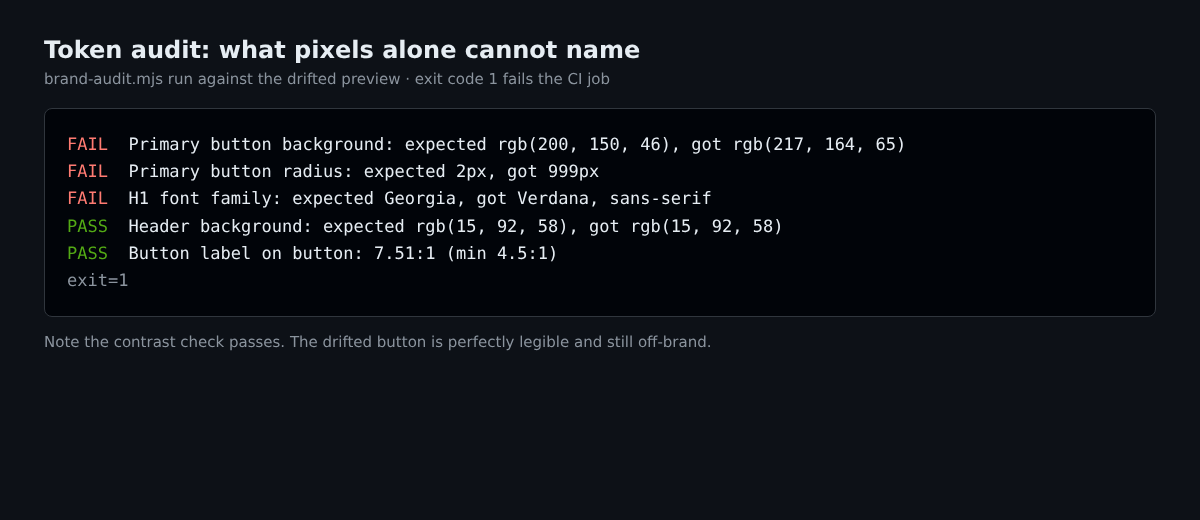
The detail worth noticing is the last line. The drifted button still scored a contrast ratio of 7.51:1, comfortably above the 4.5:1 minimum, so a purely accessibility-minded check would have waved it through. The clean build scored 6.32:1. The lighter gold is more legible and less on-brand at the same time. Accessibility tests and brand tests answer different questions, and you need both.
Layer Two: Screenshot Baselines for Everything the Tokens Cannot See
Token checks are precise but narrow. They will never notice that a hero image now overlaps the headline, that a section has vanished, or that a product grid collapsed to a single column. For that you compare pixels. Playwright’s toHaveScreenshot assertion stores a reference image on the first run and compares every later run against it. According to the Playwright snapshot documentation, you refresh references deliberately with npx playwright test --update-snapshots, and the per-pixel colour threshold defaults to 0.2 on a scale where 0 is strict and 1 is lax.
The config below sets a whole-image budget of 0.2 per cent of pixels, disables CSS animations so mid-transition frames do not cause false failures, and moves baselines into a folder you can commit. The path template is configurable through snapshotPathTemplate, which is useful because by default Playwright appends the browser and operating system to the filename.
// playwright.config.ts
import { defineConfig } from '@playwright/test';

export default defineConfig({
  testDir: './tests',
  snapshotPathTemplate: '{testDir}/__baselines__/{arg}{ext}',
  expect: {
    toHaveScreenshot: {
      maxDiffPixelRatio: 0.002,
      threshold: 0.2,
      animations: 'disabled',
    },
  },
  use: { viewport: { width: 1280, height: 720 }, deviceScaleFactor: 1 },
  projects: [{ name: 'desktop' }],
});

// tests/brand.spec.ts
import { test, expect } from '@playwright/test';

const BASE = process.env.PREVIEW_URL ?? 'http://localhost:9292';

test('home hero and grid hold the brand', async ({ page }) => {
  await page.goto(BASE);
  await page.evaluate(() => document.fonts.ready);
  await expect(page).toHaveScreenshot('home-desktop.png', { fullPage: true });
});
The document.fonts.ready line matters more than it looks. Without it a screenshot can capture the page while the brand typeface is still loading, which produces either a false failure or, worse, a baseline that has the fallback font baked in.
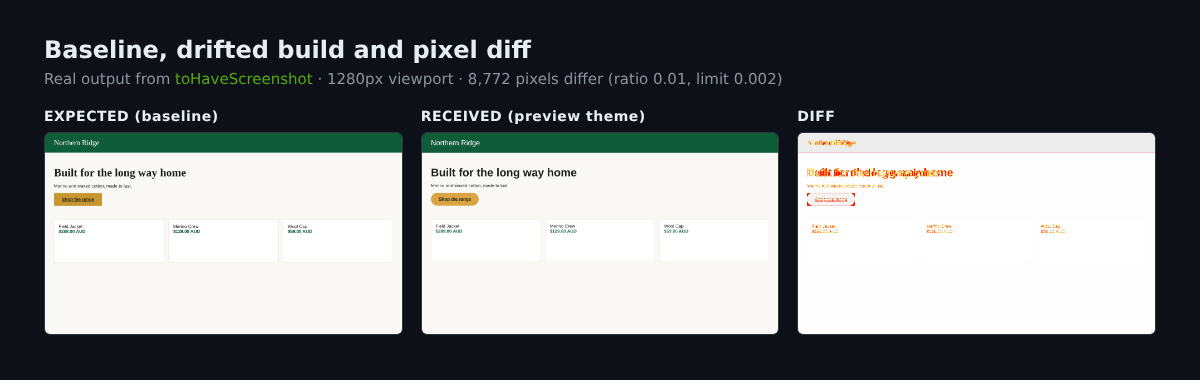
Against the drifted Northern Ridge page, the test failed with Playwright reporting that 8,772 pixels, a ratio of 0.01 of the image, differed from the baseline. That is five times our 0.002 budget. It also wrote three files per failure: the expected image, the received image, and a diff with changed pixels highlighted. Those three images are what a reviewer should see in the pull request.
Setting Thresholds That Do Not Cry Wolf
The fastest way to kill a visual test suite is to let it fail for reasons nobody cares about. A team that sees red three times a week for anti-aliasing noise will start merging past it, and the suite is then worse than useless because it implies protection that is not there. Tune before you ship it.
The table lists the settings we reach for and what each costs you. All the options named exist in Playwright’s assertion API; the values are our starting points, not Playwright’s defaults.
| Setting | Our starting value | Trade-off |
|---|---|---|
maxDiffPixelRatio |
0.002 (0.2%) | Lower catches thin 1px changes; higher forgives anti-aliasing and font hinting |
threshold |
0.2 (Playwright default) | Raising it hides subtle colour shifts like our lighter gold |
animations |
disabled | Stops carousels and fades producing random diffs, but will not test motion |
stylePath |
hide live regions | Removes volatile content, at the cost of not testing those regions |
| Viewports | 390, 768, 1440 | Each adds runtime and a baseline to maintain |
Volatile regions deserve special handling. Announcement bars with countdown timers, review widgets that load third-party stars, and rotating hero carousels will all differ between runs. Playwright’s stylePath option applies a stylesheet during capture, and its documentation gives hiding volatile elements as a use. We keep one shared file for the whole suite.
/* tests/capture.css */
[data-testid="announcement-countdown"],
.shopify-app-block[data-app="reviews"],
.hero-carousel__dots {
  visibility: hidden !important;
}
.hero-carousel__slide:not(:first-child) { display: none !important; }
Using visibility: hidden rather than display: none keeps layout intact, so a hidden review widget still reserves its space and a layout shift next to it is still caught. Reference it per assertion with stylePath: 'tests/capture.css' or set it once in the config.
One environment rule is non-negotiable. The Playwright documentation warns that rendering varies by environment and recommends running tests in the same environment that generated the baselines. A baseline made on a designer’s Mac will fail on a Linux CI runner purely from font rasterisation. Generate baselines in CI, in a pinned container image, and only ever update them there.
Testing a Preview Theme, Never Live
The suite needs a URL to test. Testing production is too late and testing a local dev server misses what Shopify’s renderer and your installed apps actually output. The right target is an unpublished preview theme built from the pull request branch. The Shopify CLI theme push reference documents the flags we use: --unpublished creates a new unpublished theme and pushes to it, --json returns machine-readable output, --store names the shop, and --password takes a Theme Access or Admin API token, which can also be supplied through the SHOPIFY_CLI_THEME_TOKEN environment variable. A separate --allow-live flag exists for pushing to the live theme, and our pipeline never sets it.
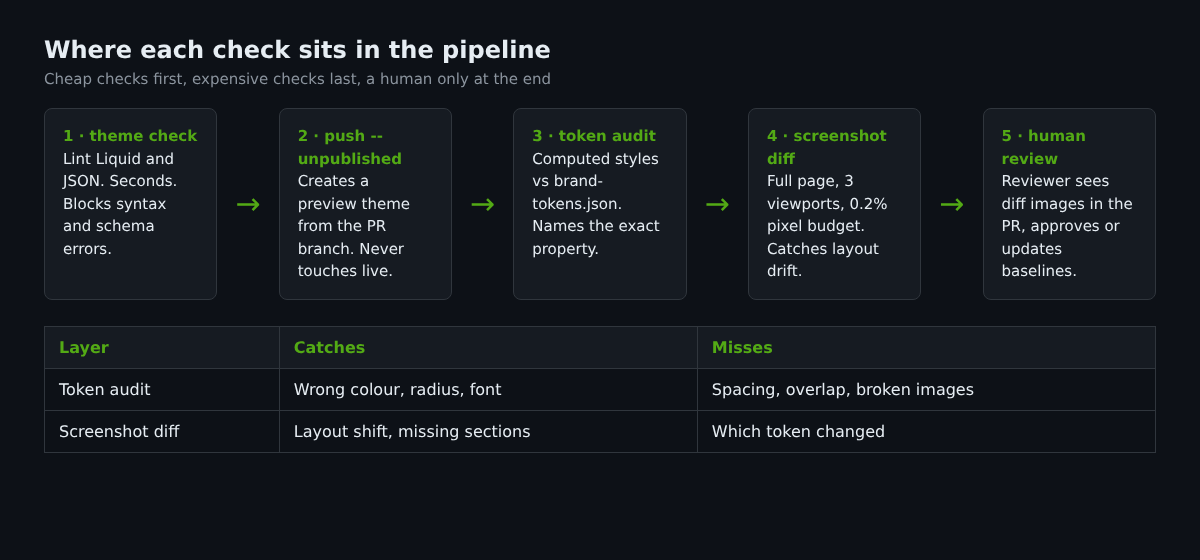
Before the push, we lint. Shopify’s theme check command accepts --fail-level to set the minimum severity that produces a non-zero exit, so a Liquid error stops the job before anything is uploaded. The workflow below chains the five steps from the diagram.
name: brand-guard
on: pull_request

jobs:
  brand:
    runs-on: ubuntu-latest
    container: mcr.microsoft.com/playwright:v1.56.0-noble
    env:
      SHOPIFY_FLAG_STORE: northern-ridge.myshopify.com
      SHOPIFY_CLI_THEME_TOKEN: ${{ secrets.THEME_ACCESS_TOKEN }}
    steps:
      - uses: actions/checkout@v4
      - run: npm ci
      - run: npx shopify theme check --fail-level error
      - name: Push preview theme
        run: |
          npx shopify theme push --unpublished --json --theme "pr-${{ github.event.number }}" > push.json
          echo "THEME_ID=$(node -p "require('./push.json').theme.id")" >> $GITHUB_ENV
      - name: Brand audit and screenshots
        env:
          PREVIEW_URL: https://northern-ridge.myshopify.com/?preview_theme_id=${{ env.THEME_ID }}
        run: |
          node brand-audit.mjs "$PREVIEW_URL"
          npx playwright test
      - uses: actions/upload-artifact@v4
        if: failure()
        with:
          name: brand-diffs
          path: test-results/
Three practical notes. The JSON shape that theme push --json returns can differ between CLI versions, so print push.json once and adjust the node -p expression to match what your version emits. If the store has a storefront password enabled, the test needs to submit it first; check the field name in your theme’s password template and fill it before navigating. And pin the container image to the same Playwright version as your lockfile, so the browser build that rendered the baseline is the one that renders the comparison.
What Drift Costs: A Worked Example in AUD
Here is an illustrative model, with assumptions labelled so you can swap in your own. Take a store turning over $1,200,000 AUD a year. Suppose a theme update ships a restyled add-to-cart button and a fallback heading font on product pages, and it sits live for 25 days before anyone notices. Assume, and this is an assumption rather than a measured figure, that the change reduces product page conversion by 2 per cent relative. Per day, the store does roughly $3,288 AUD. A 2 per cent relative loss across 25 days is about $1,644 AUD in lost revenue.
| Input | Value | Note |
|---|---|---|
| Annual revenue | $1,200,000 AUD | Your figure here |
| Revenue per day | $3,288 AUD | Annual divided by 365 |
| Days drift stays live | 25 | Assumption; manual detection is slow |
| Relative conversion loss | 2% | Assumption, not a benchmark |
| Lost revenue | $1,644 AUD | 3,288 x 25 x 0.02 |
| Same drift, 10 per cent loss | $8,220 AUD | Plausible if a primary button becomes hard to find |
Those numbers are not dramatic, and that is the point. Drift is a leak, not a flood. It happens several times a year, and the sum across a twelve-month theme-update cycle is what matters. The suite described here takes a developer roughly a day to build and a few minutes of runner time per pull request. Even at the low assumption, it pays back inside a year on a store of this size, and the 10 per cent case pays back in a single incident. We would rather you test your own conversion data than trust our assumptions, which is why the model is a table you can edit.
Where This Approach Fails
A screenshot suite is a safety net, not a design review. It tells you something changed, not whether the change is good. A deliberate redesign will fail every test, and you will regenerate the baselines. That is correct behaviour, but it means a human must review the diffs before approving new baselines. If your team approves updates without looking, you have built a machine for blessing drift.
The second limit is coverage. The suite only sees pages and states you script. A cart drawer open with a discount applied, a sold-out variant, a long product title in a narrow column: each is a separate test, and each adds a baseline to maintain. Start with the five templates that carry the most revenue (home, collection, product, cart, and the first checkout step you can reach) and add states only when drift has actually hit one.
Third, third-party content breaks determinism. If a reviews app loads stars from an external service that is slow on a given run, the test flakes. Masking those regions is the answer, but it also means the suite cannot protect them. For apps that inject visual elements, we pair the suite with a code-level audit of what the app adds to the theme, which is the subject of our guide to theme app extensions.
Finally, checkout is largely outside what you can screenshot on a preview theme in full, because checkout styling is configured separately from theme files. Treat checkout branding as its own check, as covered in our checkout branding guide.
How We Do It at Insiteful
On brand-led builds we write the token file during design handoff, not after launch. The same person who signs off the design system signs off the JSON, which means the brand definition and the test are never out of step. If you already keep your values as variables, the design tokens approach we use makes the audit trivial, because the expected values come straight from the source of truth rather than being retyped.
The suite runs on every pull request through the Git workflow we describe in our theme development workflow guide, and the diff images are attached to the pull request so Emma, our design lead, can approve or reject a visual change without opening a terminal. Baselines are only ever updated in CI, by a reviewer, with the reason in the commit message.
We keep the scope small on purpose. A typical client suite has six to ten token checks, five templates at three viewports, and one shared capture stylesheet. We add a test only after a real incident justifies it. That discipline is what keeps the suite green and trusted, and it is the difference between a safety net the team respects and one they route around. We also set colour scheme values in a way that survives merchant edits, following the approach in our colour schemes guide, so the audit has fewer ways to fail in the first place.
Your First Week: A Practical Rollout
You do not need the full pipeline on day one. Sequence the work so each step delivers protection on its own.
- Day one: write brand-tokens.json with five checks and run the audit script by hand against your live store. Fix anything it flags that is not intentional.
- Day two: add the Playwright config and a single home page test. Generate the baseline in a container, commit it.
- Day three: add the capture stylesheet and tune the pixel budget until three clean runs in a row pass.
- Day four: wire up the CLI push to an unpublished theme and run both layers against it.
- Day five: move it into CI, upload diffs on failure, and write down who is allowed to approve a baseline update.
Once it is running, the useful habit is to treat every failure as information. If a token check fails, decide whether the token or the theme is wrong, and fix the right one. If a screenshot fails, look at the diff before anything else. The goal is not a permanently green build. It is knowing, within minutes, when your storefront stopped looking like your brand.
Frequently Asked Questions
Does this work on a store with a storefront password? Yes, with one extra step. The test has to submit the password form before it navigates to the page under test. Store the password as a CI secret and never commit it.
How many viewports do we need? Start with one desktop and one mobile. Add a tablet width only when you have a layout that changes there.
Will merchants be blocked from editing in the theme editor? No. Theme editor changes to live settings are not part of a pull request, so they bypass the pipeline. Run the audit and screenshot suite on a schedule against the live store as well, so edits made in the editor are caught within a day.
Want Someone to Build This Into Your Store?
If your storefront has drifted and you are not sure by how much, we can audit it against your brand and set up the guard rails as part of a build. See how we scope and run projects on our build assessment process.