

Most Shopify brands treat colour as a mood. They pick a hero green, a button blue, a few greys, and bolt them onto a theme one section at a time. Six months later the store has fourteen slightly different blues, three button states that fail contrast, and a brand that looks tighter on Instagram than it does on its own product page. Colour was never the problem. The absence of a colour system was.
This matters more in 2026 than it did even a year ago. On 17 June 2026, Shopify shipped a new color_palette setting type that changes how colour is defined inside themes (Shopify developer changelog). At the same time, the contrast rules that used to be a nice-to-have are now a legal floor: the European Accessibility Act took effect on 28 June 2025, and any Australian brand selling into the EU is on the hook for WCAG 2.1 AA, with fines reaching one million euros for serious breaches (Siteimprove).
So colour on Shopify is now two things at once: a brand asset and a compliance surface. This guide covers how the colour architecture actually works under the hood, how to build a system that scales across a theme, and how we approach it on client builds at Insiteful. There is real code here, because a colour system you cannot maintain is just a moodboard with extra steps.
Two ways Shopify defines colour, and when to use each
Online Store 2.0 themes give you two competing mechanisms for managing colour. Knowing which one you are working in is the first decision on any build.
Colour schemes (color_scheme_group) are the established approach. A scheme is a named bundle of colour roles, such as background, text, button, button label, and border. A modern theme can hold up to 21 of these schemes, and you apply one scheme per section or block (Shopify Liquid docs). Dawn and most Theme Store themes are built this way.
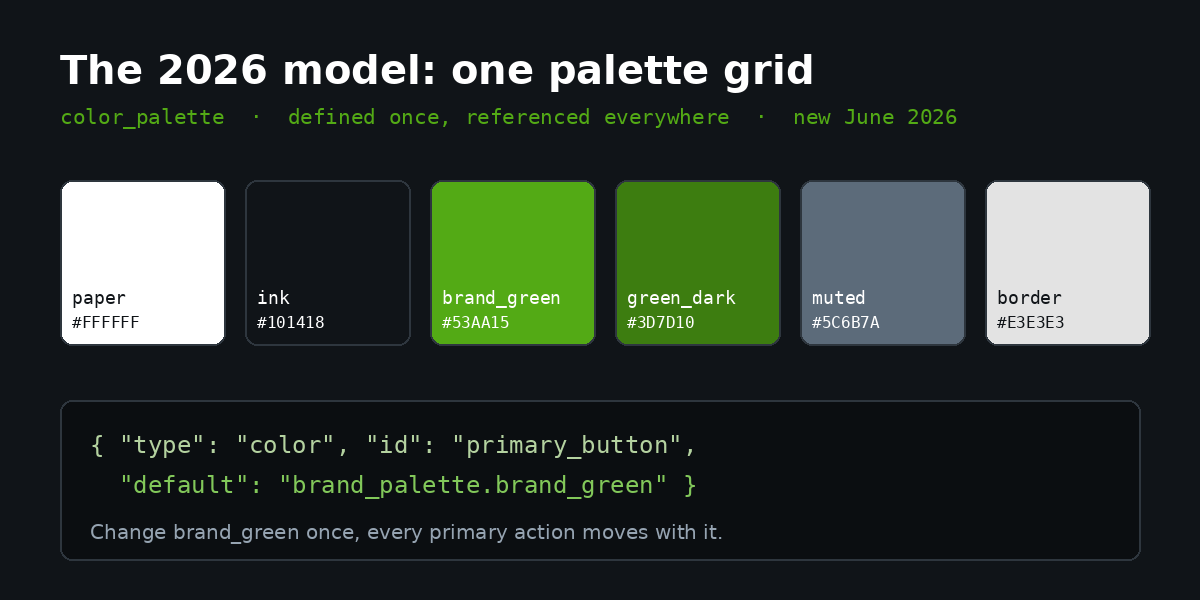
Colour palettes (color_palette) are the new model. A palette is a single global grid of 2 to 20 named colours, defined once, that a merchant edits in one place. Individual color and color_background settings can reference a palette entry as a default, and the merchant can override any colour locally at the section level (Shopify changelog). Shopify has confirmed schemes still work and are not being deprecated, but new theme development is being steered toward palettes because the editing experience is simpler for merchants.
Here is the decision table we hand to clients so the choice is not made by accident:
| Situation | Use | Why |
|---|---|---|
| Editing an existing Dawn-based or Theme Store theme | Colour schemes | The theme is built on schemes; introducing palettes mid-theme creates two sources of truth |
| Building a new custom theme in 2026 | Colour palettes + local overrides | One grid to maintain, fewer orphaned colour values, the direction Shopify is investing in |
| A merchant who reskins seasonally (BFCM, EOFY) | Colour schemes | Swapping the active scheme per section is faster than re-pointing palette references |
| A brand with a strict, small, fixed colour set | Colour palettes | A 6 to 8 colour grid maps cleanly to brand guidelines and resists drift |
The mistake we see most often is mixing both with no rule about which wins. A merchant adds a palette colour, then a developer hard-codes a hex value in a section, and the store now has colour defined in three places. Pick one model per theme and document it.
How colour schemes work under the hood
Schemes live in two files. You declare the structure in config/settings_schema.json and store the values in config/settings_data.json. The split is deliberate: structure is code you ship, values are data the merchant edits.
A minimal scheme group definition looks like this:
{
  "type": "color_scheme_group",
  "id": "color_schemes",
  "definition": [
    { "type": "color", "id": "background", "label": "Background", "default": "#FFFFFF" },
    { "type": "color", "id": "text", "label": "Text", "default": "#1A1A1A" },
    { "type": "color", "id": "button", "label": "Button", "default": "#53AA15" },
    { "type": "color", "id": "button_label", "label": "Button label", "default": "#FFFFFF" },
    { "type": "color", "id": "border", "label": "Border", "default": "#E3E3E3" }
  ],
  "role": {
    "background": "background",
    "text": "text",
    "primary_button": { "background": "button", "text": "button_label" }
  }
}
The role object is the part most tutorials skip, and it is the most important. It tells Shopify which colour does which job, so the theme editor can render accurate previews and so Shopify’s own contrast warnings know what to compare. Define roles properly and the editor does half your QA for you.
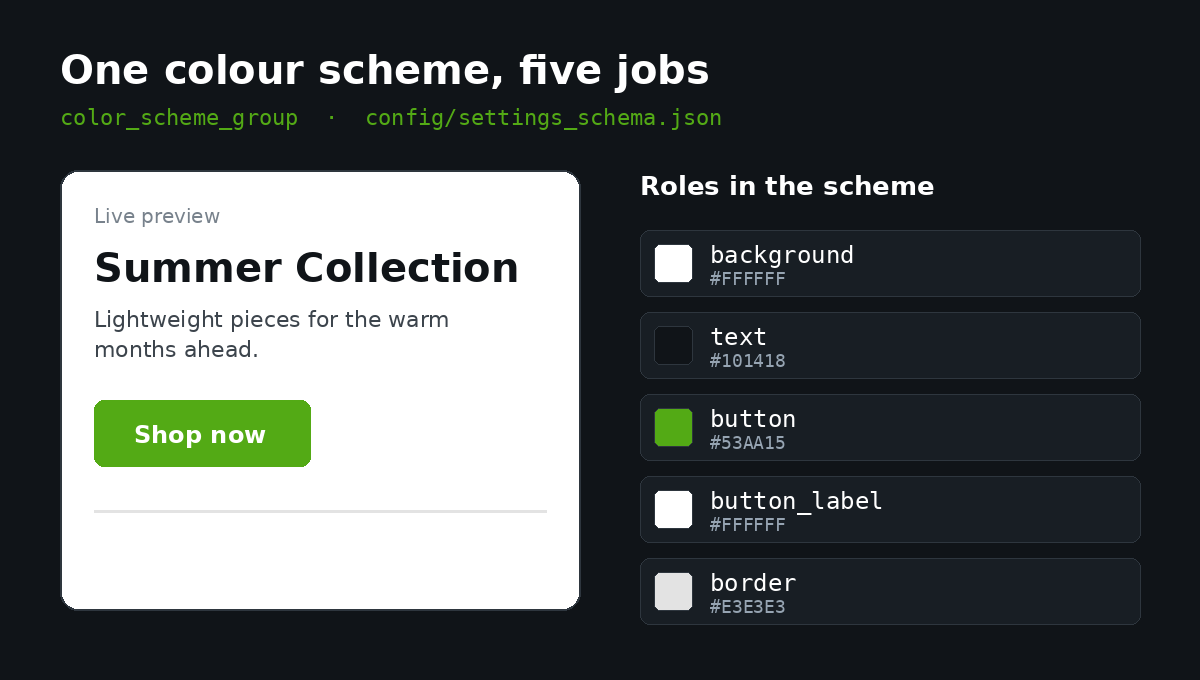
To use a scheme in a section, you reference it with a color_scheme setting and emit the matching class:
{% raw %}{%- liquid
  assign scheme = section.settings.color_scheme
-%}
<div class="color-{{ scheme }} section">
  <h2>{{ section.settings.heading }}</h2>
</div>{% endraw %}
Shopify generates the CSS custom properties for each scheme automatically, exposing them as --color-background, --color-foreground and so on, scoped to a .color-{scheme-id} class. Your section CSS then never references a hex value directly, only the variables:
.section {
  background: rgb(var(--color-background));
  color: rgb(var(--color-foreground));
}
.section .button {
  background: rgb(var(--color-button));
  color: rgb(var(--color-button-label));
}
This is the build artefact that prevents drift: no section CSS contains a literal colour. Every colour resolves through a variable that resolves through a scheme. Change the scheme, and every section using it updates in one move.
Building the brand colour system: from guidelines to tokens
Colour is one half of a brand system; the typography system is the other, and both are built the same way, as tokens rather than one-off choices. A brand book gives you a palette of raw colours. A theme needs roles. The translation layer between the two is where a system is won or lost, so we build it explicitly as a token map before touching a single section.
Start by separating two layers. The first is the raw brand palette, the literal hexes from the brand guidelines. The second is the semantic layer, where each raw colour is assigned a job. Mapping them looks like this:
| Semantic role | Maps to brand colour | Hex | Used for |
|---|---|---|---|
| surface-default | Paper White | #FFFFFF | Page and card backgrounds |
| surface-inverse | Ink | #101418 | Footer, dark sections |
| text-default | Ink | #101418 | Body copy on light surfaces |
| action-primary | Brand Green | #53AA15 | Primary buttons, key links |
| action-on-primary | Paper White | #FFFFFF | Label on primary buttons |
The win here is that designers and merchants talk in brand names (“Brand Green”), developers and accessibility tools talk in roles (“action-primary”), and the theme stores the hex once. When the brand refreshes its green, you change one token and every primary action across the store moves with it.
In a palette-based 2026 build, you express the same idea by defining the grid once and pointing settings at it:
{
  "type": "color_palette",
  "id": "brand_palette",
  "label": "Brand colours",
  "colors": [
    { "id": "paper", "default": "#FFFFFF" },
    { "id": "ink", "default": "#101418" },
    { "id": "brand_green", "default": "#53AA15" },
    { "id": "muted", "default": "#5C6B7A" }
  ]
}
{
"type": "color",
"id": "primary_button_bg",
"label": "Primary button",
"default": "brand_palette.brand_green"
}One grid, referenced everywhere. A merchant who wants to test a darker green for a weekend sale changes brand_green once, sees it apply across every primary action, and reverts it just as fast. That is the difference between a colour system and a colour mess.
Contrast and compliance are now part of the colour system
Colour decisions used to live with the designer. They now live with the lawyer too, and they sit alongside the broader accessibility fixes every Shopify store now needs. WCAG 2.1 AA requires a contrast ratio of at least 4.5:1 for normal text and 3:1 for large text (18px and up, or 14px bold and up), plus 3:1 for interface components such as button edges, form borders and focus rings (WCAG contrast guidelines).
The data says most stores miss this. WebAIM’s 2025 analysis found that 94.8% of home pages had detectable WCAG failures, and low-contrast text was the single most common failure, present on 83% of the pages audited (TestParty, citing WebAIM 2025). Roughly 54% of Shopify stores specifically carry colour-contrast failures. This is not an edge case. It is the default state of an unmanaged colour system.
The stakes are commercial as well as legal. E-commerce sites accounted for 77% of all ADA web accessibility lawsuits in the United States in 2024, with more than 4,600 cases filed (DigitalA11y). In Europe, the European Accessibility Act made WCAG 2.1 AA the binding standard for new digital commerce content from 28 June 2025, with existing content due by 28 June 2030 and penalties up to one million euros (Artemis). For an Australian brand running a six-figure month into the US and EU, a colour palette that fails contrast is a direct revenue and risk exposure, not a styling note. We have seen a single inaccessible checkout button put a brand’s entire international expansion in legal review and stall a planned $250,000 AUD quarter.
The fix is to bake contrast into the token layer. Each semantic colour pairing carries its tested ratio as a documented artefact, so a failing combination is caught in design, not in a demand letter:
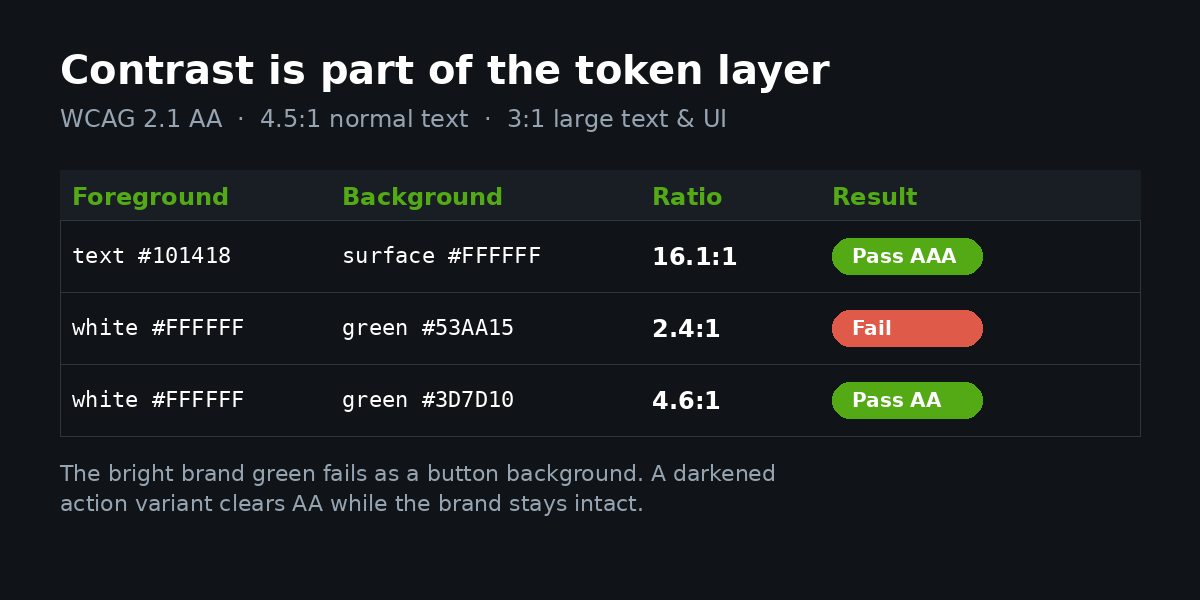
That middle row is the trap. A bright brand green looks great in a logo and fails as a button background with white text. The honest answer is rarely “abandon the brand colour”. It is to define a slightly darkened action variant of the brand colour that clears 4.5:1, keep the original for large display use, and store both as distinct tokens. The brand stays intact and the button stops being a liability.
The colour failures we find in audits
When we audit an inherited Shopify build, colour problems cluster into the same handful of patterns. We turn this into a checklist artefact and run it on every store:
- Hard-coded hexes in section CSS. Search the theme for hex literals (
grep -rE "#[0-9a-fA-F]{3,6}" sections/ snippets/). Any match outside the schema files is a colour that will not move when the brand changes. - Orphaned schemes. Schemes defined in
settings_data.jsonbut referenced by no section. Dead weight that confuses the next developer. - Contrast failures on interactive states. Hover, focus and disabled button states are almost never contrast-tested, yet they are exactly what keyboard and low-vision users rely on.
- Focus rings removed for aesthetics.
outline: nonewith no replacement is a direct WCAG failure and a common one. - Colour as the only signal. Sale prices shown only in red, form errors shown only by a red border. Meaning carried by colour alone fails users who cannot distinguish it.
None of these are exotic. Each one is the predictable result of colour being chosen section by section instead of defined as a system once.
Migrating from schemes to palettes without breaking the store
Because the color_palette setting is new as of June 2026, the most common 2026 question we get is whether to migrate. For a stable, well-built theme on schemes, the answer is usually no: schemes are fully supported and there is no functional reason to move (Shopify changelog). Migrate only when you are already doing a substantial theme update, when the merchant repeatedly struggles to find where a colour is set, or when colour drift has become unmanageable.
When migration is warranted, we do it in a controlled sequence rather than a rip-and-replace:
- Audit first. List every colour value in use and the role it plays. You cannot rebuild a system you have not mapped.
- Define the palette grid from the deduplicated raw colours, 6 to 8 entries for most brands.
- Re-point settings to palette references one section group at a time, on a duplicated unpublished theme.
- Re-run contrast checks on every pairing, because consolidating near-duplicate colours can change a ratio.
- Preview, QA on mobile, then publish. Mobile is where contrast on overlay text and sticky bars most often breaks.
The whole job runs on a duplicated theme so the live store is never exposed to a half-migrated colour system.
Dark sections, seasonal reskins and the mobile reality
A colour system earns its keep at the moments brands most want to change something: a dark footer, a high-contrast announcement bar, a seasonal sale skin. These are exactly the moments where a section-by-section approach falls apart and a system holds.
Take dark sections. A brand wants its footer and newsletter block on the inverse surface, with text and buttons that still read clearly. With schemes, this is a second scheme you define once and apply wherever a dark treatment is needed, rather than a set of one-off overrides on each section:
.color-scheme-inverse {
  --color-background: 16, 20, 24;   /* Ink */
  --color-foreground: 255, 255, 255;
  --color-button: 99, 200, 40;      /* brightened green for dark bg */
  --color-button-label: 16, 20, 24;
}
Note the button colour is not the same green used on light surfaces. A green tuned for white backgrounds can drop below 3:1 against ink, and a green tuned for dark backgrounds can glare on white. A mature colour system carries an action colour per surface, both tested, rather than forcing one green to work everywhere and failing on one of them. This is the detail that separates a store that merely has dark sections from one that has accessible dark sections.
Seasonal reskins, the End of Financial Year and Black Friday moments that drive so much Australian retail revenue, are the same idea on a timer. If colour is a system, a sale skin is swapping the active scheme on a handful of sections or re-pointing two or three palette entries, a change that takes minutes and reverts cleanly. If colour is scattered, the same reskin is a multi-day hunt for every hard-coded value, and the cleanup afterward is worse than the setup.
Mobile is where colour systems are stress-tested hardest, and it is where product page design lives or dies. Overlay text on hero images, sticky add-to-cart bars, and condensed navigation all stack colours in ways the desktop preview hides. We test contrast on the rendered mobile layout, not just the swatch, because a pairing that passes in isolation can fail once a semi-transparent overlay sits between text and image. Treating mobile contrast as a separate check, rather than assuming desktop covers it, is one of the highest-value habits a Shopify team can adopt.
How we do it at Insiteful
Colour is not a step we tack onto a build at the end. It is one of the first systems we define, because nearly every other front-end decision depends on it. On a typical engagement, our process runs in a fixed order.
We start from the brand guidelines and build the two-layer token map: the raw palette, then the semantic roles. We test every text and interactive pairing against WCAG 2.1 AA before any of it reaches a theme, and where a brand colour fails as an action colour, we design a compliant variant rather than quietly weakening the brand. That tested map becomes a documented artefact the merchant keeps, not tribal knowledge that leaves when the project ends.
From there we decide schemes or palettes based on the theme’s architecture and the merchant’s editing habits, never by default, and we enforce one hard rule: no section CSS contains a literal colour. Every value resolves through a variable that resolves through the chosen system. We run the colour audit checklist from this article as a release gate, including the interactive-state and focus-ring checks that most teams skip. Because so many of our clients are Australian brands selling into the US and EU, we treat contrast as a compliance requirement under WCAG 2.1 AA and the European Accessibility Act, not a preference.
The outcome is a store whose colour can be refreshed in minutes instead of days, that passes contrast on every interactive state, and that looks as deliberate on the product page as it does on the brand’s best campaign. That is what we mean by a colour system: brand and compliance handled in the same architecture, built to be maintained by the people who own the store.
Build a colour system that holds up
If your Shopify store has colour scattered across sections, button states that fail contrast, or a brand colour that looks one way in the logo and another way on the page, the cost is not just aesthetic. It is conversion you are leaving on the table and, for any brand selling internationally, a compliance exposure with real penalties attached.
If you want an experienced Shopify team to map your brand into a maintainable, accessible colour system as part of a considered build, see how we scope a build and we will show you exactly how we approach it.