
A buyer for a hardware group in regional Victoria placed an order on a Shopify store we were asked to review. He had a printed trade list showing $46.90 for a brass fitting. The website charged him $51.59. Same fitting, same account, same day, and nobody had touched a price in four months. The list was ex GST. The storefront was GST inclusive. The two numbers had been quietly disagreeing for a month before anyone picked up the phone.
That misunderstanding cost eleven days of email, a credit note, and the account manager’s confidence in the platform. It was not a pricing error. It was an architecture decision nobody had made, so Shopify made it by default and applied it to everybody.
This is the most common unforced error we see on Australian wholesale builds, and the volume behind it is growing fast. Shopify reported B2B GMV up 76 percent year over year in Q2 2026, following 80 percent growth in Q1, on roughly US$9.4 billion of B2B GMV across the first half. Average B2B order value sits near US$1,840, about fourteen times a typical direct to consumer order. In Q1 2026 Shopify pushed company profiles, volume discounts and net payment terms down to standard plans, so wholesale is no longer a Plus only conversation. Most merchants turning it on this year are doing so inside a storefront built for consumers.
The GST layer is where that collision becomes visible. Here is how it actually works, and how to build it so the price on the screen matches the price in the rep’s spreadsheet.
The two prices problem, and why it starts with Australian law
Australian merchants do not get to choose price display format freely. Section 48 of the Australian Consumer Law contains the single price rule: represent a price to a consumer and the total including GST and all mandatory charges must also appear as a single, prominent figure. Break the price into components and those components must sit close to the all inclusive figure and must not be given greater prominence than it.
That is why every Australian consumer storefront shows GST inclusive pricing. It is not a convention. It is the compliance path of least resistance.
The exemption is the part most merchants have never had explained to them. Businesses selling exclusively to other businesses sit outside the single price rule. Trade only price lists, password protected wholesale portals and negotiated contract pricing can all quote ex GST figures, provided the labelling is clear. That is the legal basis for the convention every Australian wholesaler already uses on paper.
So the requirement is not ambiguous. It is just awkward:
| Audience | What must be shown | Where it usually breaks on Shopify |
|---|---|---|
| Consumer, public storefront | Single GST inclusive figure, prominent | Rarely. This is the default. |
| Trade buyer, logged in to a B2B catalogue | Ex GST permitted, must be labelled | Inherits the consumer format from a store level setting |
| Blended store, both audiences on one domain | Both, conditionally | Almost always. One setting cannot serve two audiences. |
| Export order, GST free supply | No GST, but the supply is not exempt | Handled with a tax exempt flag that is the wrong tool |
One store. Two legally distinct audiences. One switch that Shopify applies globally. That is the whole problem, and it has three workable answers.
Where Shopify decides which price format a buyer sees
Three levers produce the number on the screen, and they resolve in a fixed order.
The store level switch
Under Settings, Taxes and duties there is a single checkbox: include tax in prices. For an Australian store selling to Australians it is on, and every catalogue price you enter is treated as GST inclusive. Turn it off and the same stored price becomes the ex GST base. This applies to the entire store, every catalogue.
Merchants reach for this switch first because it produces ex GST display immediately. It also drops every consumer facing price by roughly nine percent unless you re-enter the catalogue, and it puts the consumer storefront on the wrong side of section 48. It is not a wholesale setting.
The market level switch
Under Markets there is a preference labelled include or exclude tax based on your customer’s country. Turn it on and price display becomes dynamic: the tax component is stripped or added according to where the buyer is, so a New Zealand shopper stops paying phantom Australian GST inside the sticker price. For any store shipping across borders this should be on regardless of the wholesale question. We covered the wider setup in our note on Shopify Markets and international SEO.
The catch: dynamic pricing is overridden the moment a fixed price exists for that product in a market or catalogue. Set a hard trade price in a B2B catalogue and the dynamic rule stops applying to it.
What the B2B catalogue does and does not override
A B2B catalogue controls which products a company sees and what they pay. It does not carry its own tax display format. The catalogue price is read using the store level setting, exactly like every other price. So a trade price of $46.90 entered on a tax inclusive store displays as $46.90 including GST, which nets to $42.64 of goods. The rep who quoted $46.90 ex GST has handed away nine percent of margin, and nobody notices until the reconciliation.
The sentence that saves the build: the catalogue sets the number, the store setting decides what that number means.
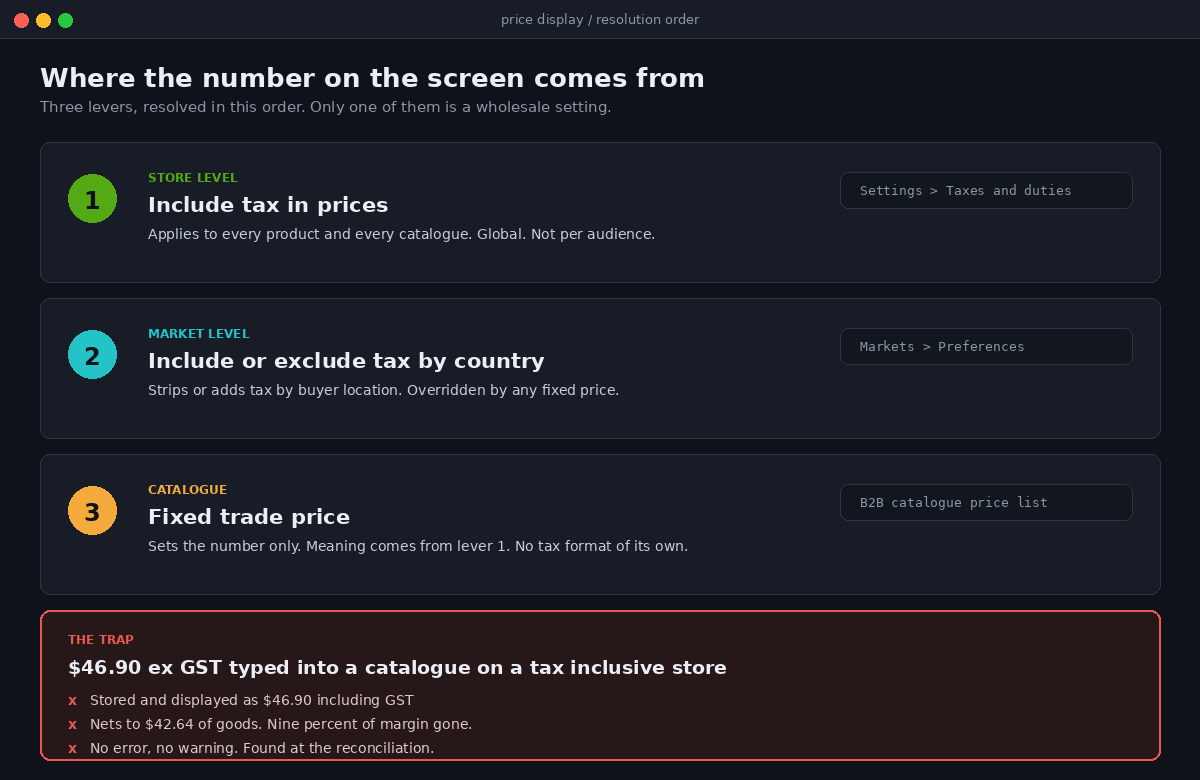
Here is the part that surprises most merchants when we walk them through it. There is no supported per catalogue tax display toggle, so if you want ex GST wholesale figures alongside GST inclusive consumer figures on one domain, the difference has to be produced in the theme, in the checkout, or in the store architecture. Not in a settings screen.
Three architectures that survive contact with a real wholesale list
We have shipped all three. Each is defensible. The right one depends on how far your trade prices sit from your retail prices, and on who has to maintain them.
One: blended store, GST inclusive base, theme level ex GST display. Keep the store tax inclusive so the consumer side stays compliant. Enter trade prices in the B2B catalogue as inclusive figures, computed from the ex GST list by multiplying by 1.1. Then have the theme divide back out for logged in trade buyers and label the result. Cart, checkout and invoice still run on the inclusive base, so nothing downstream changes.
{%- liquid
  assign is_trade = false
  if customer.b2b?
    assign is_trade = true
  endif
-%}

{%- assign v = product.selected_or_first_available_variant -%}

{%- if is_trade and cart.taxes_included -%}
  {%- assign ex_gst = v.price | times: 10 | divided_by: 11 -%}
  <span class="price price--trade">{{ ex_gst | money }}</span>
  <span class="price__note">ex GST</span>
  <span class="price__sub">{{ v.price | money }} inc GST</span>
{%- else -%}
  <span class="price">{{ v.price | money }}</span>
{%- endif -%}
Two details make or break this. Round with times: 10 | divided_by: 11 on the integer cent value rather than dividing by 1.1 in floating point, or line totals will disagree with the cart by a cent on odd quantities. And render the inclusive figure underneath, small. A trade buyer who can see both numbers never rings to ask which one is real.
Two: a dedicated wholesale expansion store. Second store, tax exclusive at the store level, its own domain, its own catalogue, shared inventory through the same Shopify organisation. Wholesale gets a real ex GST base with no theme arithmetic, so quotes, drafts, exports and reports all agree. The cost is a second theme and a second app stack, roughly $18,000 to $32,000 AUD of build depending on how much of the retail theme is reusable. We covered when the split is worth it in our piece on Shopify B2B pricing and catalogues.
Three: tax exclusive base, consumer market adds tax. Flip the store to tax exclusive, enter every price ex GST, and let dynamic tax inclusive pricing add GST back for Australian consumers. Clean in theory. In practice you are one misconfigured market away from advertising ex GST prices to consumers, which is the exact section 48 exposure you were avoiding, and every historical price in the admin now means something different. We recommend it only where retail volume is a rounding error against trade.
| Architecture | Build effort | Ongoing risk | Best fit |
|---|---|---|---|
| Blended, theme level display | 2 to 4 days | Rounding drift, theme upgrades | Trade is under half of revenue |
| Separate wholesale store | $18,000 to $32,000 AUD | Two themes, two app stacks | Trade has its own catalogue and rules |
| Tax exclusive base | 1 to 2 days plus a full price audit | Consumer compliance exposure | Trade dominant, retail incidental |
Capturing an ABN so it means something
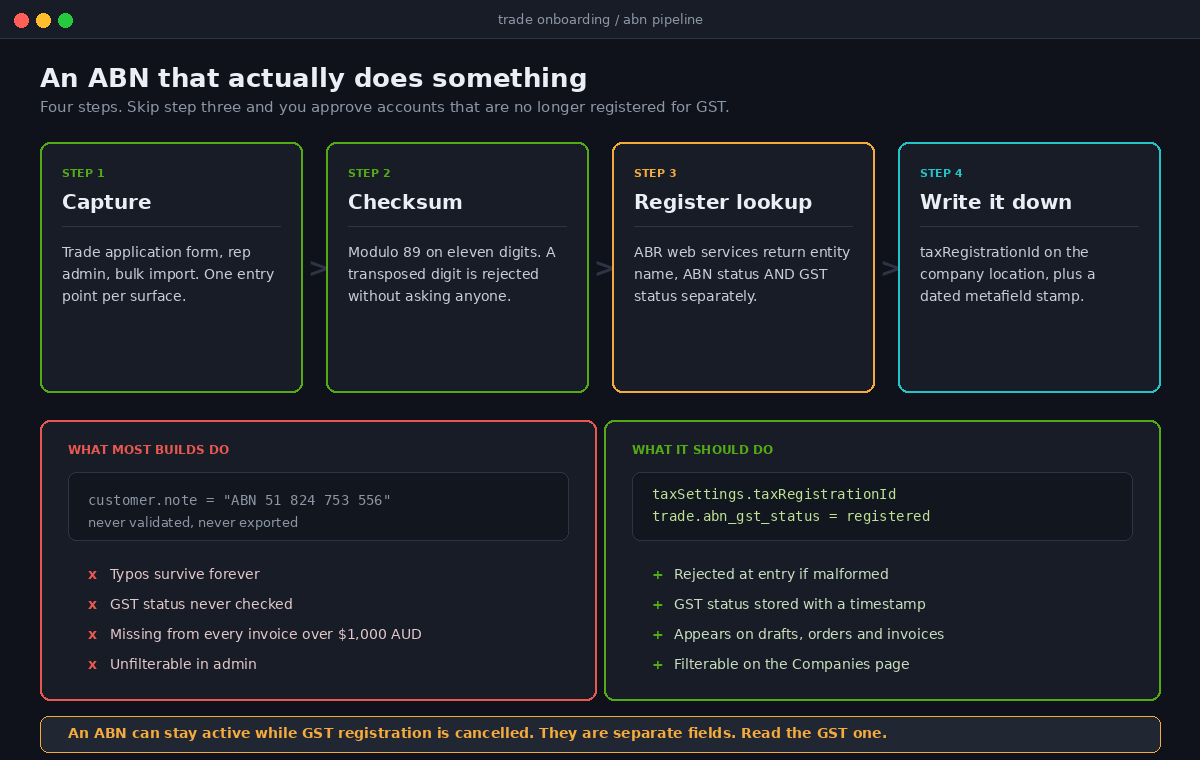
Every Australian wholesale build we inherit has an ABN field somewhere, and almost none of them have an ABN that does anything. It sits in a note on the customer record, typed by a rep, never checked, never used by a downstream system. That is a data entry ritual, not a control. An ABN earns its place when three things are true: it has been validated, it has been checked against the register, and it has been written to the company location where Shopify can use it.
Validate the number before you store it
Validation is where most ABN fields fall over. An ABN is not an arbitrary eleven digit string. It carries a modulo 89 checksum, so a typo is detectable without asking anyone. Reject bad input at the point of entry and you remove an entire category of support ticket.
const ABN_WEIGHTS = [10, 1, 3, 5, 7, 9, 11, 13, 15, 17, 19];

export function isValidAbn(input) {
  const digits = String(input).replace(/[^0-9]/g, '');
  if (digits.length !== 11) return false;

  const nums = digits.split('').map(Number);
  nums[0] = nums[0] - 1;

  const total = nums.reduce(
    (sum, n, i) => sum + n * ABN_WEIGHTS[i],
    0
  );

  return total % 89 === 0;
}
Run this in the trade application form, in the admin app your reps use, and in any bulk import. Three places, one function, no exceptions.
Ask the register whether they are actually registered for GST
A valid checksum only proves the number is well formed. The Australian Business Register web services return considerably more: entity name, entity type, ACN, ABN status, current and historical business names, and GST registration status with effective dates.
That last field is the trap. An ABN can remain active while the entity’s GST registration has been cancelled, because ABN status and GST status are separate fields that move independently. Check onboarding only for an active ABN and you will approve trade accounts for entities no longer registered for GST. Check the GST field specifically, and store the answer with a timestamp, because it decays.
Write it to the company location, not a note field
Shopify has a real home for this. Every company location carries its own tax settings object with a tax registration ID, a tax exempt flag and a list of exemptions, and it is writable from the Admin API. Once the ABN lives there it appears on orders, drafts and invoices instead of being trapped in a comment nobody exports.
mutation SetTradeTax($locationId: ID!, $abn: String!) {
  companyLocationTaxSettingsUpdate(
    companyLocationId: $locationId
    taxRegistrationId: $abn
    taxExempt: false
  ) {
    companyLocation {
      id
      name
      taxSettings {
        taxExempt
        taxRegistrationId
      }
    }
    userErrors {
      field
      message
    }
  }
}
The mutation needs write_customers or write_companies scope and a Plus store. Pair it with a metafield stamp so the next person can see when the register was last asked.
mutation StampAbnCheck($locationId: ID!) {
  metafieldsSet(metafields: [
    {
      ownerId: $locationId
      namespace: "trade"
      key: "abn_gst_status"
      type: "single_line_text_field"
      value: "registered"
    },
    {
      ownerId: $locationId
      namespace: "trade"
      key: "abn_checked_at"
      type: "date_time"
      value: "2026-08-21T09:00:00+10:00"
    }
  ]) {
    metafields { key value }
    userErrors { field message }
  }
}
Company and company location metafields are filterable on the Companies page in admin, so a rep can pull up every trade account whose GST status has not been checked in twelve months without anyone building a report. For the wider company and location model, see our breakdown of Shopify B2B companies and locations.
Tax exempt is not the same as GST free
This is the most expensive misunderstanding on the list, and it is entirely understandable, because Shopify’s own vocabulary was built for a North American resale certificate model rather than an Australian GST model.
In the United States, a wholesaler buying for resale presents an exemption certificate and the seller does not charge sales tax. Shopify’s company location tax settings mirror that directly: collect tax, do not collect tax, or collect tax unless exemptions apply, with a selectable exemption list.
Australian GST does not work that way. A domestic wholesale supply to another Australian business is a taxable supply at ten percent. The buyer is not exempt. The buyer claims an input tax credit later, in their BAS, not in your checkout. So when a rep sees a tax exempt toggle and reasons that a wholesale account should obviously be tax exempt, they are about to under-collect GST on every order that account places. The merchant still owes the ATO that GST, and it comes out of margin.
| Scenario | GST treatment | Correct Shopify setting |
|---|---|---|
| Australian trade buyer, delivered in Australia | Taxable, 10 percent | taxExempt false, ABN in taxRegistrationId |
| Australian trade buyer, goods exported | GST free supply | Shipping destination drives it, not an exemption flag |
| Overseas trade buyer, shipped offshore | GST free supply | Market and destination based tax rules |
| Buyer claims exemption verbally | Still taxable | No change. Their credit is claimed in their BAS. |
The rule of thumb we give clients: in Australia the destination decides whether GST applies, not the buyer’s status. Use the tax exempt flag almost never, and where a location has it set there should be a written reason attached that you could defend in an audit.
What the buyer should see at checkout
A trade buyer arriving at checkout with an ex GST head and an inclusive cart is a support ticket waiting to happen, even when every number is correct. The fix is presentation, and Shopify gives you the surface for it. Checkout UI extensions can branch on customer type, read company and company location metafields, and tell whether completing this checkout produces a draft order rather than a paid order. That last one is the difference between a buyer on payment terms and a buyer paying by card, and it changes what the page should say. Our note on Shopify B2B payment terms covers that flow in detail.
What we put in front of a trade buyer, every time:
- A subtotal labelled explicitly as ex GST, so it matches the price list they were quoted from.
- A separate GST line at ten percent, as its own figure rather than folded into the total.
- The order total including GST, given the most visual weight on the page.
- The company location name and its ABN from taxRegistrationId, so the buyer can see the order is filed against the right entity.
- A purchase order field, required or optional per company, because a buyer whose AP team rejects an invoice without a PO will not order again this month.
One version note worth catching early: as of API version 2026-04, reading and writing checkout metafields inside checkout and customer account UI extensions has been removed. Cart metafields replace them in checkout extensions, order metafields in customer account extensions. A wholesale extension built before that is on borrowed time.
The tax invoice, and the handoff to the accounting stack
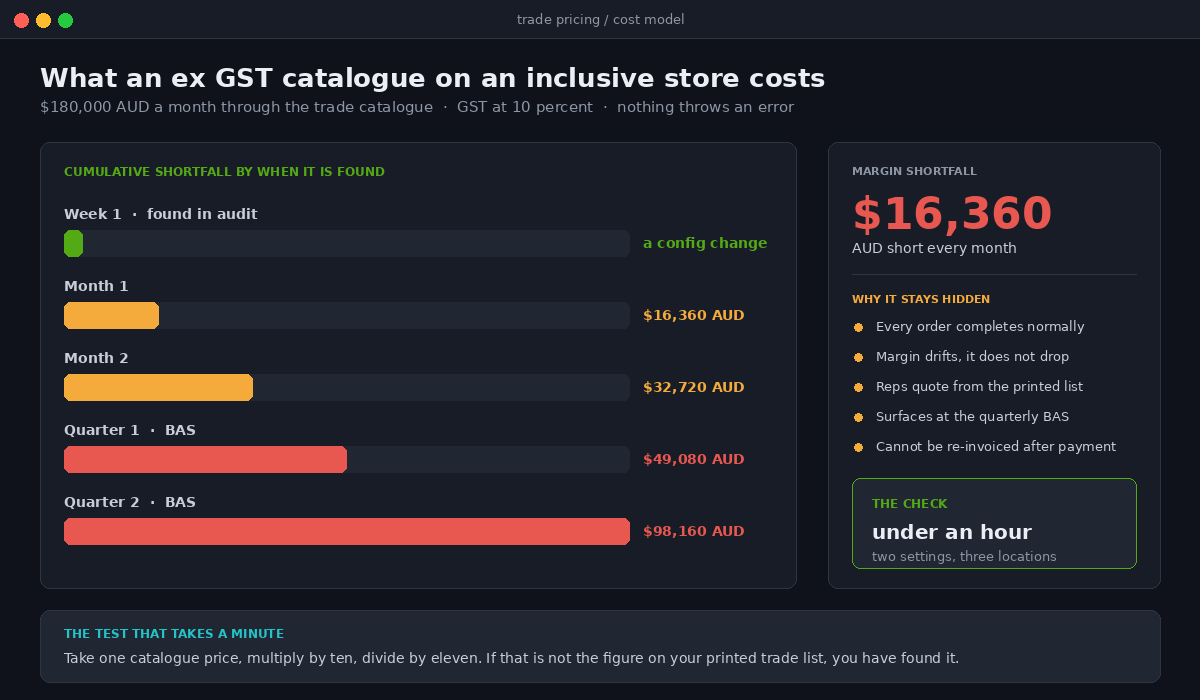
Put a number on the failure, because this is where the misconfiguration stops being a display bug. Take a merchant billing $180,000 AUD a month through a trade catalogue loaded with ex GST figures on a tax inclusive store. The buyer pays $180,000. Shopify treats $16,360 of that as GST and it goes to the ATO. The merchant intended to bank $180,000 and remit $18,000 on top, so they are $16,360 AUD a month short on goods revenue. Found at the quarterly BAS, that is a $49,000 AUD hole, and it cannot be re-invoiced to buyers who have already reconciled and paid.
The document that ends the argument is the tax invoice, and the ATO is specific: the words tax invoice shown prominently, the seller’s identity and ABN, the date of issue, a description of what was sold with quantity and price, the GST amount shown separately or stated as a GST inclusive total, and the extent to which each sale is taxable.
Two thresholds drive the build. Where the GST inclusive total is $1,000 AUD or more, the invoice must also carry the buyer’s identity, which the ATO accepts as name, business name, address or ABN. Given average B2B order values, most wholesale orders clear that line, so the buyer’s ABN needs to be on the document by default rather than on request. A supply under $82.50 AUD including GST does not require a tax invoice unless the buyer asks.
The order payload already carries what the accounting stack needs, provided taxes are configured correctly:
{
  "taxes_included": true,
  "current_subtotal_price": "4689.00",
  "total_tax": "426.27",
  "tax_lines": [
    {
      "title": "GST",
      "price": "426.27",
      "rate": 0.1,
      "channel_liable": false
    }
  ],
  "company": {
    "location_id": 12345678,
    "tax_registration_id": "51824753556"
  }
}
Check three things when you wire this into Xero or MYOB. That taxes_included matches what your accounting file expects, because importing inclusive totals into a system configured for exclusive amounts produces a clean looking import with wrong numbers. That the tax line title lands as GST rather than a generic label your chart of accounts cannot map. And that tax_registration_id is populated on B2B orders, since that is the buyer identity on invoices over $1,000 AUD.
The nine scenarios to test before you turn it on
We run this as a scripted pass on a live theme preview before any wholesale catalogue goes public. Ninety minutes, and it has caught something on every build.
- Logged out consumer, product page. Price is GST inclusive, single prominent figure, no ex GST number given equal weight.
- Logged in trade buyer, same product. Price is ex GST, labelled, inclusive figure visible underneath.
- Trade buyer, quantity 7 of an odd-cent item. Line total matches unit price times quantity to the cent, no rounding drift against the cart.
- Trade buyer at checkout. Subtotal, GST line and total shown separately, GST exactly one eleventh of an inclusive total.
- Trade buyer on payment terms. The flow produces a draft order and the copy says so rather than promising an immediate charge.
- Order over $1,000 AUD. The invoice carries the buyer’s ABN and the words tax invoice.
- Company location with taxExempt true. GST is genuinely zero, and someone can produce the written reason.
- Trade buyer shipping offshore. No GST, and the reason is the destination rule rather than an exemption flag.
- ABN entry form. A transposed digit is rejected, and a valid ABN belonging to an entity not registered for GST is flagged before approval.
Scenario three fails most often, and merchants find it hardest to believe until they see two numbers a cent apart on the same screen.
How We Do It at Insiteful
We have built Shopify stores for twenty five years and we ship around two hundred sites a year, so we have watched this problem arrive from every direction. Our approach on a wholesale build is deliberately boring, because boring is what survives a BAS.
We start with a tax architecture decision made on paper before anyone opens the admin. Which of the three architectures, why, and what the trade off is. That document goes to the merchant’s accountant before we write a line of Liquid, because the accountant has to live with the output and is usually the only person in the room who catches a bad assumption immediately.
We then treat the ABN as a validated field rather than a text box. Checksum at entry, register lookup on approval, GST status stored as a metafield with a timestamp, and a scheduled re-check at twelve months. Half a day of work, and it removes an entire class of quiet failure.
Display logic lives in one theme snippet with one entry point, not scattered across product cards, cart drawers, quick views and collection templates, which is where it ends up when it grows organically. One snippet, one rounding rule, one label. When Shopify ships a theme change we have one place to check.
And we run the nine scenarios above as a scripted pass, recorded, with the recording handed to the merchant. Not because anyone will watch it, but because six months later when a rep insists the site has always shown the wrong price, there is a dated artefact that settles it in a minute.
Where to start
Two checks will tell you where you stand inside an hour.
Open Settings, Taxes and duties and note whether include tax in prices is on. Then take one price from your B2B catalogue, multiply it by ten and divide by eleven. If that answer is the number on your printed trade list, the catalogue is loaded correctly. If the printed list matches the catalogue figure exactly, you are quoting inclusive prices to buyers reading them as exclusive, and giving away roughly nine percent on every line.
Then open any three company locations and look at the tax settings. An empty tax registration ID means your invoices over $1,000 AUD are missing the buyer identity the ATO expects. A tax exempt flag set true on an Australian location is something to explain today, not at the next BAS.
If those checks turn up something you do not like, that is a scoping conversation rather than a rebuild. Our build assessment walks the tax architecture, the catalogue data and the checkout surface in one pass and tells you what it takes to put right. The answer is usually smaller than merchants expect, and always smaller than a quarter of under-collected GST.