
Shopify retired two checkout APIs this year and most merchants have no idea it happened. As of API version 2026-04, the Checkout Branding API and the Checkout Profile API are both deprecated, replaced by a single Checkout and Accounts Configuration API that controls branding across checkout, customer accounts and sign-in from one place. If your store has custom checkout styling, or you are paying an agency to maintain it, this change affects how that work gets done from now on.
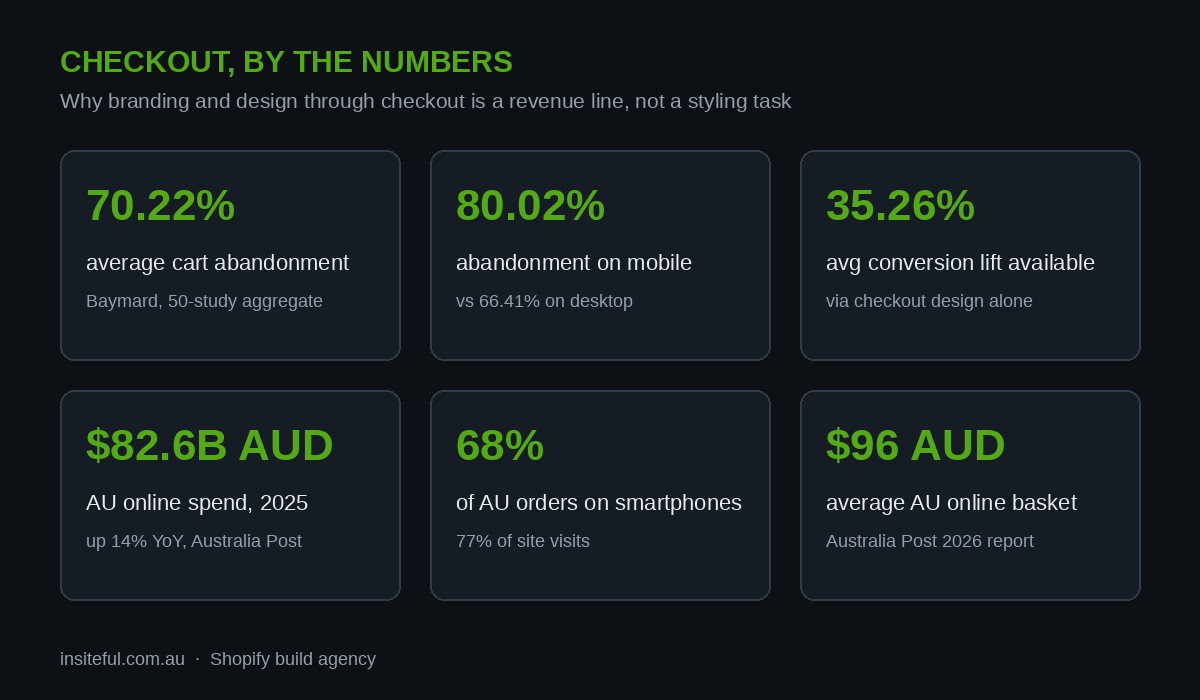
This matters because checkout is where the money either lands or leaks. Baymard Institute’s aggregate of 50 studies puts average cart abandonment at 70.22 percent, and their large-scale checkout testing shows the average large ecommerce site can lift conversion by 35.26 percent through better checkout design alone. Australians spent $82.6 billion AUD online in 2025, up 14 percent year on year according to Australia Post’s 2026 eCommerce Report. A meaningful slice of that is decided in the sixty seconds between “add to cart” and “pay now”.
In this guide we cover what the new API does, what you can customise on each Shopify plan, how the designTokens and surfaces model works, and how to migrate cleanly off the deprecated Checkout Branding API. Code included throughout.
Why checkout branding is worth real money
Checkout branding sounds cosmetic. The data says otherwise. The moment a customer moves from your carefully designed storefront into checkout, any visual discontinuity registers as risk. Different fonts, different colours, a generic white page where your brand used to be. Customers notice, and on mobile they notice more.
The numbers that should shape your checkout roadmap:
- 70.22 percent of carts are abandoned on average, and mobile is worse at 80.02 percent versus 66.41 percent on desktop (Baymard, 2026). Australian stores skew mobile heavily, with 77 percent of site visits and 68 percent of orders happening on smartphones (Marketix, 2026).
- Nearly 1 in 5 shoppers have abandoned a purchase because the checkout process was too long or complicated, and 39 percent abandon when surprised by extra fees (Baymard).
- 35.26 percent is the average conversion gain available to large sites through checkout design improvements alone, with an estimated $260 billion USD recoverable across the US and EU (Baymard).
- $35 billion AUD is where Australian mobile commerce is projected to land by the end of 2026, close to half of all local ecommerce revenue (Marketix, 2026).
- $96 AUD is the average Australian online basket (Australia Post via Marketix). At that basket size, a store doing $2M AUD a year that recovers even five percent of its abandoned checkouts adds roughly $100,000 AUD in annual revenue without spending another dollar on traffic.
Branding consistency through checkout is one of the cheapest trust signals you can buy. The new API makes it programmable, versionable and repeatable, which is exactly how it should have worked all along.
What changed in API version 2026-04
On 13 May 2026 Shopify announced the Checkout and Accounts Configuration API in the developer changelog. The headline changes:
- Two APIs deprecated. The Checkout Profile API and the Checkout Branding API (the
checkoutBrandingUpsertmutation you may have scripts built around) are both deprecated as of 2026-04. They still respond on older API versions, but new work should not target them. - One unified configuration. Branding for checkout, customer account pages and the sign-in surface now lives in a single configuration object, edited through
checkoutAndAccountsConfigurationUpdate. - Shared design tokens. Set typography, colour and corner radius once as designTokens and they apply consistently across all three surfaces. Section styles like padding, shadows, borders and border radius, previously checkout-only, now extend to customer account pages.
- Direct colour settings. You can now set HEX values directly on sections like
main,headerandorderSummaryinstead of mapping everything through a limited set of colour schemes. There is also an editable palette of up to 20 named brand colours. Update a palette colour once and it changes everywhere it is referenced. - Per-market branding. Configuration overrides let you vary branding by market, so your AU checkout and your US checkout can carry different logos, colours or messaging from the same store.
The catch: the new API is exclusive to Shopify Plus. Standard plans keep the checkout editor in admin, which covers logo, colours and fonts but nothing programmatic. We break down what that means per plan below. Note also that Shopify Scripts, the old Ruby-based customisation layer, stops working entirely on 30 June 2026, so if you are still running Scripts you have a second, more urgent migration on your plate. Our guide to Shopify Functions covers that path.
What each plan can customise in 2026
Before scoping any checkout branding work, be clear about what your plan allows. This table is the version we use in build scoping calls:
| Capability | Basic / Shopify / Advanced | Shopify Plus |
|---|---|---|
| Logo, brand colours, fonts via checkout editor | Yes | Yes |
| Programmatic branding via GraphQL | No | Yes (Checkout and Accounts Configuration API) |
| Custom fonts uploaded from files | No | Yes |
| Direct HEX colours per section (main, header, order summary) | No | Yes |
| 20-colour editable brand palette | No | Yes |
| Branding across customer accounts and sign-in | Limited | Yes, shared tokens plus per-surface overrides |
| Per-market branding overrides | No | Yes |
| Checkout UI extensions (custom fields, banners, upsells) | Yes, on Checkout Extensibility | Yes |
If you are on a standard plan, the honest advice is that the checkout editor gets you 80 percent of visual consistency: logo, one accent colour, system or Shopify-hosted fonts. The remaining 20 percent, and everything dynamic, needs Plus. Whether that gap justifies Plus pricing depends on your volume. We ran the maths in our Shopify Plus cost-benefit breakdown, and for most brands the checkout line item alone starts making sense somewhere north of $3M AUD in annual revenue.
The three building blocks: designTokens, components, surfaces
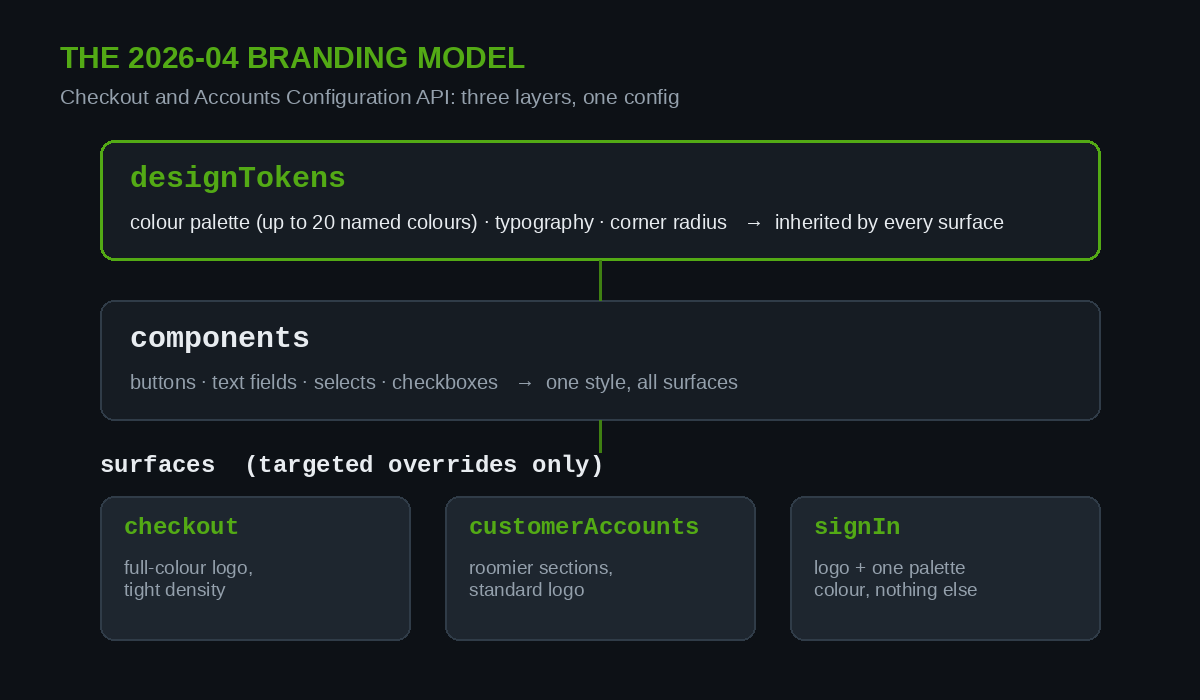
The new configuration model has three layers, and understanding the hierarchy saves you hours of trial and error.
designTokens are your global variables: colour palette, typography scale, corner radius. Set once, inherited everywhere. This is the layer that should encode your brand guidelines document.
components control how specific UI elements render across all surfaces: buttons, text fields, selects, checkboxes. A button radius or a field border style set here applies in checkout, in account pages and on the sign-in screen.
surfaces are the targeted overrides: surfaces.checkout, surfaces.customerAccounts and surfaces.signIn. Anything set here beats the inherited token for that surface only. Different logo lockup in checkout than on sign-in? This is where it goes.
The input schema reflects that hierarchy directly:
input CheckoutAndAccountsConfigurationInput {
  branding: CheckoutAndAccountsConfigurationBrandingInput
  overrides: [CheckoutAndAccountsConfigurationOverrideInput!]
}

input CheckoutAndAccountsConfigurationBrandingInput {
  components: CheckoutAndAccountsConfigurationBrandingComponentsInput
  designTokens: CheckoutAndAccountsConfigurationBrandingDesignTokensInput
  surfaces: CheckoutAndAccountsConfigurationBrandingSurfacesInput
}
The mental model we teach our developers: tokens are the brand, components are the controls, surfaces are the exceptions. If you find yourself repeating a value across multiple surfaces, it belongs one layer up.
Build walkthrough: setting brand tokens once
Here is the shape of a real update. This mutation sets a brand palette and typography at the token layer, then applies a checkout-specific header treatment. Requires the write_checkout_and_accounts_configurations access scope on API version 2026-04 or later:
mutation ApplyBrand($configuration: CheckoutAndAccountsConfigurationInput!, $id: ID!) {
  checkoutAndAccountsConfigurationUpdate(configuration: $configuration, id: $id) {
    configuration {
      id
    }
    userErrors {
      field
      message
    }
  }
}
With variables along these lines:
{
  "id": "gid://shopify/CheckoutAndAccountsConfiguration/123456",
  "configuration": {
    "branding": {
      "designTokens": {
        "colors": {
          "palette": [
            { "name": "Ink", "value": "#101418" },
            { "name": "Brand Green", "value": "#53aa15" },
            { "name": "Paper", "value": "#fafaf7" }
          ]
        },
        "typography": {
          "primary": { "shopifyFontGroup": { "name": "Archivo" } }
        },
        "cornerRadius": "SMALL"
      },
      "surfaces": {
        "checkout": {
          "header": { "alignment": "CENTER" }
        }
      }
    }
  }
}
Three practical notes from shipping this on client stores. First, always request userErrors and check them: the mutation returns 200 even when a field is rejected, and a silent partial apply is worse than a loud failure. Second, query the current configuration and store it in version control before you write anything, because there is no undo. Third, palette colours are referenced by name, so treat renames as breaking changes the same way you would treat renaming a CSS variable.
Surface overrides: one brand, three surfaces
The biggest practical win in the new API is that customer accounts and sign-in stop being second-class citizens. Under the old model, a Plus store could have a beautifully branded checkout and a default-looking sign-in page, because the Checkout Branding API simply did not reach that surface. Password reset emails dropped customers onto a page that looked nothing like the store they bought from.
Now the flow is: set shared tokens, then override only where a surface genuinely needs to differ. A pattern we use on nearly every build:
- Checkout gets the full-colour logo and the tightest visual density. Customers here are mid-task. Nothing decorative, no distractions from the payment path.
- Customer accounts get slightly more generous section padding and the standard logo. Customers here are browsing order history, not converting, so the design can breathe.
- Sign-in gets the simplest treatment: logo, one background colour from the palette, nothing else. Every extra element on a sign-in page is a thing that can go wrong on a phone screen.
Because section styles (padding, shadows, borders, border radius) now work on customer account pages too, you can finally make the post-purchase experience feel like part of the same product as the pre-purchase one. For brands with high repeat-purchase rates, and most of the AU brands we work with target exactly that, the account surface is not an afterthought. It is where your best customers spend their time.
Branding is only half the checkout story. If you are adding functional elements like custom fields, delivery instructions or trust badges, that work happens in checkout UI extensions, and rule enforcement lives in checkout validation functions. The configuration API styles the stage; extensions put actors on it.
Per-market branding: one store, different faces
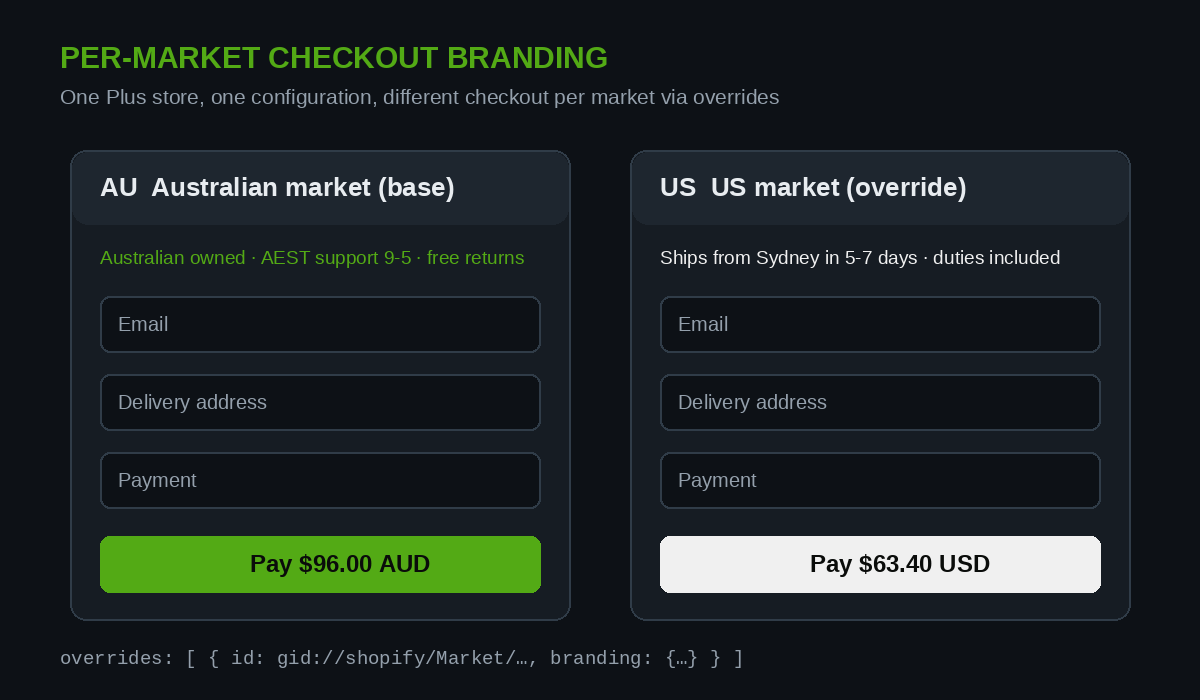
Configuration overrides accept a market ID, which means a single Plus store can present different branding per market. Before this existed, brands wanting a genuinely localised checkout either ran multiple stores or accepted a compromise.
Where we see this earning its keep for Australian brands:
- Localised trust signals. Your AU checkout can carry Australian-owned messaging and local support hours in the header, while the US market override swaps in USD-specific messaging and a different returns note.
- Sub-brand separation. A store running a premium line and an outlet line through Shopify Markets can give each a distinct checkout treatment from one configuration, one codebase, one app stack.
- Seasonal variation without redeploys. Because overrides are data, not code, a BFCM checkout skin for the AU market is a mutation on a schedule, not a theme release.
The overrides array takes a branding input and an ID per entry, so the same schema you learned for the base configuration applies per market. If you are weighing up whether Markets or a separate store fits your expansion plans, our comparison of Shopify Markets versus multi-store setups walks through the decision in detail. Per-market checkout branding removes one of the last arguments for the multi-store route.
Migrating off the deprecated Checkout Branding API
Deprecated does not mean dead tomorrow, but it does mean every new integration, script or agency engagement should target the new API. Our migration checklist, in the order we run it:
- Inventory what you have. Query your current checkout profile and branding on your existing API version and commit the JSON to your repo. This is your rollback reference and your migration spec in one.
- Audit for hardcoded scheme mappings. The old API forced colours through colour schemes. The new one supports direct HEX per section. Anything in your old config that exists purely to satisfy scheme limitations can usually be simplified rather than ported one-to-one.
- Rebuild as tokens first. Resist copying surface-level values across. Extract the actual brand values into designTokens and the palette, then add surface overrides only where the old config genuinely differed per surface. Most migrations we have run end up smaller than the config they replaced.
- Bump API version and scopes. Target 2026-04 or later and request
write_checkout_and_accounts_configurations. The oldwrite_checkout_settingsscope also works, but new scope names make intent clearer in app review. - Test all three surfaces plus one market override. Checkout, an account page, the sign-in screen, on a phone, before and after. Screenshot each for the record. Then verify a market override applies and, critically, that markets without overrides still inherit the base branding.
Budget half a day for a straightforward store and up to two days if you have per-market complexity or an app that writes branding on your behalf. The most common surprise is discovering a third-party app was quietly upserting branding via the old API on every settings save, overwriting your changes. Find those before you migrate, not after.
The mistakes we keep seeing
Branding the checkout, forgetting the emails. Order confirmation and shipping notification templates are separate from this API. If checkout is on-brand and the confirmation email is default Shopify, the discontinuity just moved one step later.
Custom fonts without weights. Uploading a single font file and wondering why bold renders as faux-bold. Upload the full weight set your design actually uses.
Low-contrast palette choices. A light grey brand colour on a white checkout fails WCAG contrast and quietly hurts mobile conversion. Test your palette against accessibility standards before it ships, not when a customer complains.
Treating the config as click-ops. Making changes in the checkout editor UI with no exported record. When something breaks, nobody knows what changed. Export the configuration JSON to version control on every change, same as theme code.
Skipping the mobile pass. With 68 percent of Australian orders on smartphones, a checkout branding review that happens on a desktop monitor is a review of the minority experience.
How we do it at Insiteful
Checkout branding work at Insiteful sits inside our conversion build process, not as a standalone styling task. The sequence:
- Baseline first. We pull your current checkout conversion rate, mobile versus desktop, from analytics before touching anything. Branding changes get measured against that baseline, because “it looks better” is not a result.
- Tokens from your brand system. We translate your existing brand guidelines into a designTokens set and a named palette, reviewed against WCAG contrast requirements. One source of truth, applied across checkout, accounts and sign-in.
- Configuration as code. Every configuration state is exported and committed. Changes go through the same review discipline as theme pull requests. Rollback is a one-mutation operation, not an archaeology project.
- Surface and market overrides only where earned. We start from shared tokens and add overrides when there is a documented reason. Smaller configs, fewer surprises, cheaper maintenance.
- Verify on real devices. Every checkout change ships with before-and-after screenshots from actual phones, because that is where four out of five abandoned checkouts happen.
We have built and rebuilt checkouts across more than 200 Shopify projects over 25 years in ecommerce, and the pattern holds: stores that treat checkout as part of the designed product outperform stores that treat it as a settings page.
Where to from here
If your store is on Plus, the move is straightforward: inventory your current branding config, rebuild it as tokens on the new API, and put the result in version control. If you are on a standard plan, get the checkout editor basics right, then let the numbers tell you when Plus and full checkout control pay for themselves.
And if you would rather have it done properly than do it yourself, that is the business we are in. Book a build assessment and we will review your checkout, your branding configuration and your conversion data, and give you a straight answer on what is worth changing and what is not.