
If you run a Shopify Plus store with member logins, a loyalty portal, a subscription hub, or any external app that signs customers in, there is a deadline quietly moving toward you. Classic customer accounts, the login system most established Plus brands still run on, have been deprecated. And Multipass, the single sign-on mechanism a generation of Australian membership and subscription brands was built on, is being retired alongside them.
This is not a cosmetic change you can defer to a “phase 2” backlog. Multipass and the new identity system are architecturally different. One is a shared-secret token you mint on your own server. The other is a standards-based OAuth 2.0 and OpenID Connect handshake brokered by Shopify. Moving between them is a real engineering project with a customer-facing cutover, and the brands that leave it until Shopify forces an automatic upgrade are the ones who will discover their member login broke on a Saturday.
This article walks through what changed, how the old and new systems actually work at the protocol level, and the exact migration sequence we run when we move a Plus client from Multipass to a connected identity provider before the sunset lands.
What actually changed, and the timeline that matters
For years, Shopify shipped two ways to sign a customer in: classic customer accounts (the email-and-password system with a customer-facing login page you could theme) and, for Plus merchants, Multipass, which let an external system log a customer straight into the storefront with a signed token. That was the toolkit, and it was stable enough that most brands never thought about it again after launch.
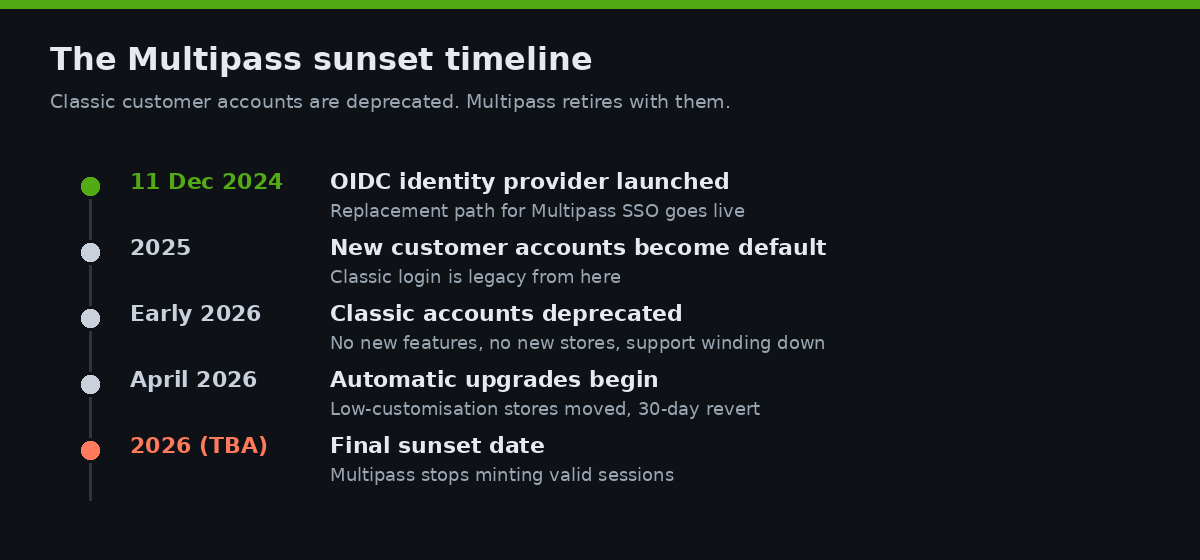
Then Shopify rebuilt the whole layer. New customer accounts, the passwordless email-code system tied to the Shop login network, became the default. Classic accounts were deprecated: they are no longer offered to new stores, no longer receive feature updates or technical support, and a final sunset date is expected to be announced during 2026. From April 2026, Shopify began automatically upgrading stores that had little or no customisation on classic accounts, with merchants given a notification and a 30-day window to revert.
The catch for Plus operators is in that phrase “little or no customisation.” Multipass is a customisation. A loyalty integration is a customisation. A subscriptions app that writes into the account area is a customisation. Stores with those integrations are explicitly excluded from the easy auto-upgrade path and need a dedicated migration plan. Multipass only ever worked with classic accounts, so when classic accounts sunset, Multipass goes with them. There is no version of Multipass for new customer accounts.
The replacement arrived on 11 December 2024, when Shopify shipped the ability for Plus merchants to connect their own OpenID Connect identity provider to customer login. As of February 2026, new customer accounts give you four sign-in paths: email one-time codes, social login, Shop login, and advanced flows through your own OAuth/OIDC provider. That last option is the one that replaces Multipass for any brand that needs a single identity across multiple properties.
| Milestone | When | What it means for you |
|---|---|---|
| OIDC identity provider launched | 11 Dec 2024 | The replacement path for Multipass SSO is live |
| New customer accounts become default | 2025 | Classic login is legacy from here on |
| Classic accounts deprecated | Early 2026 | No new features, no new stores, support winding down |
| Automatic upgrades begin | April 2026 | Low-customisation stores moved automatically, 30-day revert |
| Final sunset date | To be announced in 2026 | Multipass stops working when this lands |
If you are reading this in the second half of 2026, the planning window is now, not when the sunset email arrives.
How Multipass actually worked
To understand why this is a migration and not a settings toggle, you need to see what Multipass was doing under the hood. It was elegant and entirely server-side. You held a shared secret, generated in your Shopify admin, and you used it to mint a login token your own server signed.
The token generation is a fixed recipe. You take the Multipass secret and run it through SHA-256. The first 16 bytes of that digest become your AES encryption key; the second 16 bytes become your HMAC signing key. You build a small JSON payload describing the customer (email, name, and a created_at timestamp), encrypt it with AES-128 in CBC mode using a random initialisation vector, then sign the IV-plus-ciphertext blob with HMAC-SHA256. You concatenate the IV, the ciphertext, and the 32-byte signature, base64url-encode the result, and append it to the Multipass URL.
# Multipass token, conceptually (Ruby-style pseudocode)
key = OpenSSL::Digest::SHA256.digest(multipass_secret)
enc_key  = key[0, 16]   # AES-128-CBC key
sign_key = key[16, 16]  # HMAC-SHA256 key

payload = {
  "email": "member@example.com.au",
  "created_at": Time.now.iso8601
}.to_json

iv  = SecureRandom.random_bytes(16)
ct  = aes_128_cbc_encrypt(payload, enc_key, iv)
sig = hmac_sha256(iv + ct, sign_key)
token = base64url(iv + ct + sig)

redirect_to "https://shop.example.com.au/account/login/multipass/#{token}"
Shopify rejects any token older than 90 seconds, so you mint it at the moment of redirect, never in advance. Land the customer on the Multipass URL within that window and Shopify decrypts the token, matches or creates the customer by email, and drops them into a logged-in session. No password, no OAuth round trip, no redirect dance.
The reason this is a dead end is structural. Multipass is a one-way assertion: your server tells Shopify “trust me, this is member@example.com.au” and Shopify trusts the shared secret. There is no token exchange, no standard discovery, no logout propagation, and it is bound entirely to the classic account system Shopify is switching off. You cannot bolt it onto new customer accounts because the account model underneath it no longer exists.
It is worth being honest about what you lose and what you gain in the swap. Multipass was operationally simple: one shared secret, no redirects, no second login screen, sub-second sign-in. The trade-off was that the security model rested entirely on that one secret. If it leaked, anyone could impersonate any customer until you rotated it, and rotating it meant redeploying every system that minted tokens. The OIDC model is more moving parts but a far stronger security posture: short-lived tokens, signed and verifiable against a published key set, with revocation and logout built into the standard. For a brand holding the personal data of tens of thousands of Australian members, that shift from a single static secret to standards-based, revocable tokens is not just Shopify housekeeping. It is a privacy and risk improvement you would have wanted anyway.
The replacement: connecting your own identity provider
The new model inverts the trust relationship. Instead of your server asserting an identity to Shopify, Shopify becomes a relying party that delegates authentication to your identity provider over the OAuth 2.0 authorization code flow. Your provider, whether that is Auth0, Descope, Okta, Microsoft Entra, or a custom OIDC service you run yourself, owns the login screen and the credentials. Shopify receives a verified identity token in return.
The handshake is the standard authorization-code dance. When a customer clicks login, Shopify redirects them to your provider’s authorisation endpoint. The customer authenticates there, your provider redirects back to Shopify with a short-lived authorization code, and Shopify exchanges that code at your token endpoint for an ID token and access token. The ID token carries the customer’s verified email, which Shopify uses as the unique key to match or create the customer record.
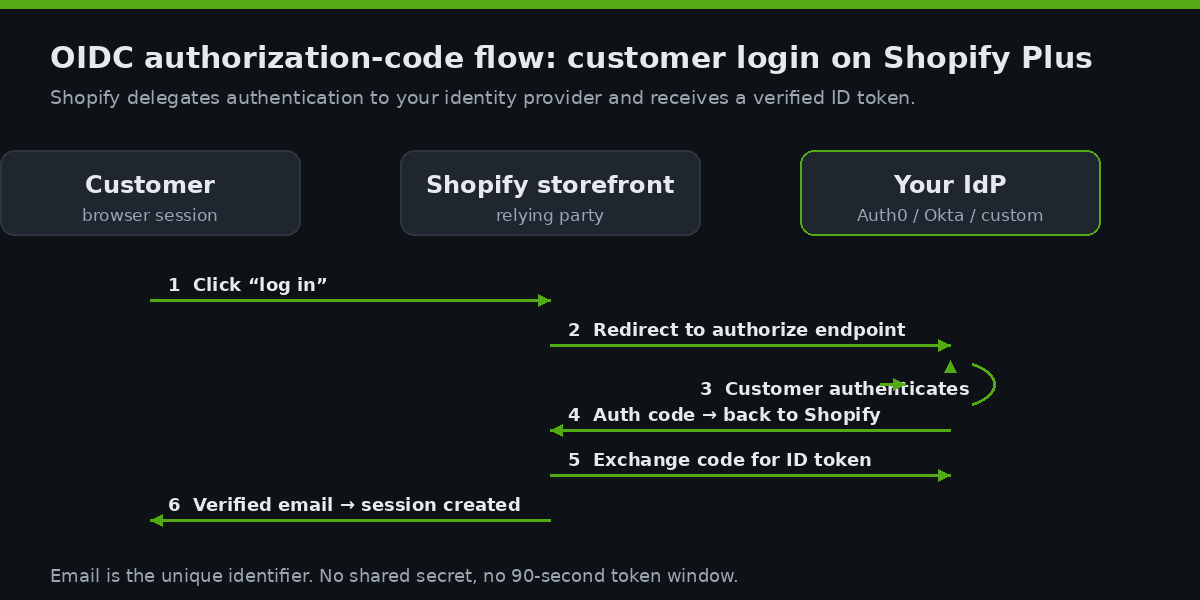
Three requirements decide whether a provider qualifies. It must be OpenID Connect compliant and support the OAuth 2.0 authorization code flow. It must support OpenID Connect RP-Initiated Logout 1.0, so that logging out of Shopify can propagate a logout to your provider and vice versa. And it must use email as the unique identifier, with email verification built into registration. That email-verification requirement is the one that catches teams out, because a homegrown auth system that never verified email addresses will need that gap closed before it can connect.
Setting it up: the discovery endpoint and configuration
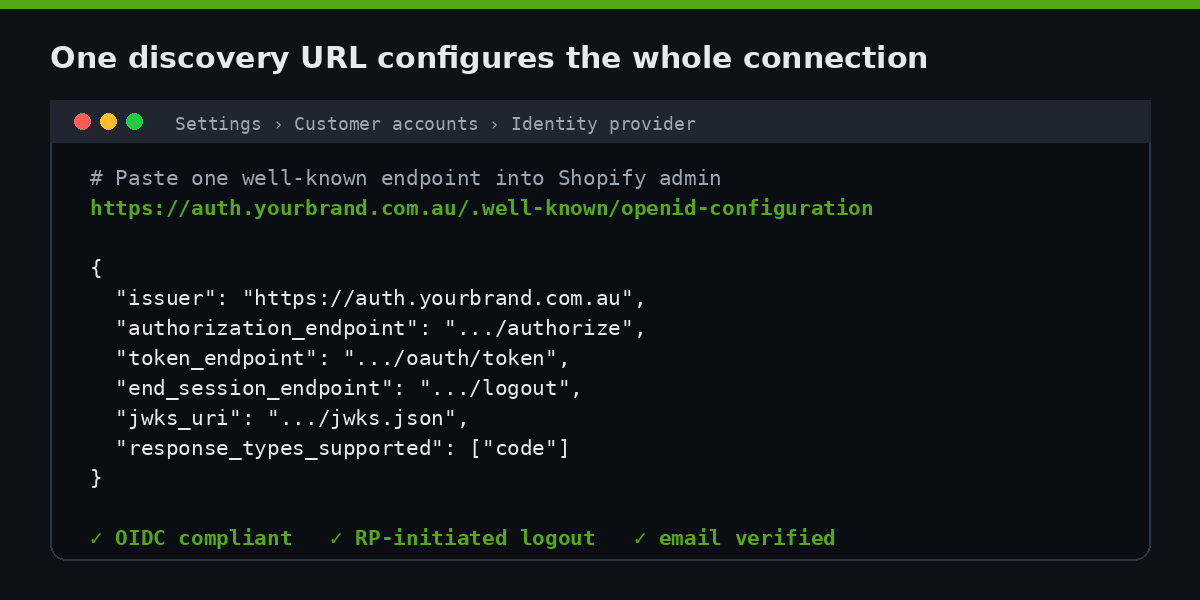
The mechanical setup is refreshingly short, which is exactly why it is dangerous to treat the whole project as short. In the Shopify admin you go to Settings, then Customer accounts, then the Identity provider section, choose Manage, and Connect to provider. The single most important field there is the OpenID configuration URL, the well-known discovery endpoint your provider exposes.
Every compliant OIDC provider publishes a discovery document at a predictable path. That JSON tells Shopify where every other endpoint lives, so you paste one URL instead of hand-configuring five.
# Your provider's discovery endpoint
https://auth.yourbrand.com.au/.well-known/openid-configuration

# Returns a JSON document Shopify reads automatically
{
  "issuer": "https://auth.yourbrand.com.au",
  "authorization_endpoint": "https://auth.yourbrand.com.au/authorize",
  "token_endpoint": "https://auth.yourbrand.com.au/oauth/token",
  "userinfo_endpoint": "https://auth.yourbrand.com.au/userinfo",
  "end_session_endpoint": "https://auth.yourbrand.com.au/logout",
  "jwks_uri": "https://auth.yourbrand.com.au/.well-known/jwks.json",
  "scopes_supported": ["openid", "email", "profile"],
  "response_types_supported": ["code"]
}
Shopify reads that document, registers itself as a client, and you supply the client ID and secret your provider issues. The connection then fully replaces the default login page across every Shopify surface: the storefront, checkout, customer accounts, and any headless or app surface that uses Shopify customer authentication. One identity, one login, every property. That is the capability Multipass gave you, rebuilt on open standards instead of a proprietary shared secret.
The reason this matters commercially is the same reason it always did. A returning, logged-in customer is the most valuable customer you have. Across ecommerce the average returning customer rate sits around 28 percent, repeat buyers spend roughly 67 percent more per order than first-timers, and acquiring a new customer costs between 5 and 25 times more than getting an existing one to buy again. A login wall that breaks, frustrates, or forgets a member is not a technical inconvenience. It is a direct hit to the cohort that funds your growth.
The migration plan we run
The mechanical connection is an afternoon. The migration is the project. Here is the sequence we run when we move a Plus client off Multipass, ordered so that nothing customer-facing breaks during the changeover.
1. Inventory every integration that touches login. Loyalty, subscriptions, B2B portals, membership gates, headless front ends, mobile apps, gated content. Anything that currently calls Multipass or reads the customer session is in scope. We map each one to whether it can speak OIDC natively or needs an adapter.
2. Reconcile customers by email. Both systems key on email, which is the saving grace. We audit for duplicate, unverified, or malformed emails in the existing customer base, because the new system will refuse to merge an unverified address. This is where we usually find a few thousand records that need cleaning before cutover.
3. Stand up and harden the identity provider. We configure the provider, enable email verification and RP-initiated logout, and publish the discovery endpoint. If the brand had no real identity provider before and was relying entirely on Multipass plus Shopify, this is net-new infrastructure we build and document.
# Pre-cutover verification checklist (run against staging)
- discovery endpoint returns 200 and valid JSON   [ ]
- authorization_code flow completes end to end     [ ]
- ID token contains verified email claim           [ ]
- RP-initiated logout propagates both directions   [ ]
- duplicate / unverified emails reconciled          [ ]
- loyalty + subscription apps re-authenticate       [ ]
- checkout + storefront sessions persist            [ ]
4. Parallel-run on a development store. We connect the provider on a Plus dev store first and drive real journeys through it: log in, log out, place an order, hit the loyalty balance, open the subscription portal. Every integration gets exercised before a single production customer sees it.
5. Schedule the cutover, not the surprise. We pick a low-traffic window, communicate to members in advance, switch the connection, and watch authentication rates in real time. Because email is the shared key, customers do not need to re-register; their first login on the new system matches them to their existing record. The goal is a changeover most members never notice.
6. Keep a rollback path open. For the first days after cutover we keep the previous configuration documented and reversible, monitor failed-login rates against the pre-cutover baseline, and have a defined trigger for rolling back if authentication success drops. A migration you cannot reverse is a migration you should not run on a live customer base. The point of the parallel-run and the rollback plan together is that the cutover stops being a leap of faith and becomes a controlled switch with a safety net underneath it.
For a mid-sized membership or subscription brand turning over around $6M AUD a year, this is typically a two to four week engagement depending on how many integrations sit on top of login. The cost of doing it deliberately is a fraction of the cost of an emergency rebuild when an auto-upgrade breaks the member portal mid-campaign.
What breaks if you do nothing
Inaction is itself a decision here, and it is the expensive one. If you leave a Multipass-dependent store untouched, one of two things happens. Either Shopify’s automatic upgrade eventually moves you, and because you have customisations it either skips you (leaving you on an unsupported, frozen system) or moves you in a way that severs the Multipass link your loyalty and subscription apps depend on. Or the final sunset date lands and Multipass simply stops minting valid sessions, at which point every external login flow returns an error.
The failure mode is rarely a clean error message. It is a member clicking “log in”, being bounced to a broken redirect, and quietly not completing their order. For a consumables or beauty brand, where repeat rates run 35 to 45 percent and 30 to 40 percent respectively, that login cohort is the majority of your revenue. The brands most exposed to this change are precisely the brands with the most to lose from it.
Edge cases worth planning for
A few situations need extra thought before cutover. Subscription apps that authenticate customers into a management portal need to be confirmed OIDC-ready or fronted by an adapter, because a subscriber who cannot reach their portal will churn fast. Loyalty programs that issue points against a customer ID need their identity mapping verified end to end. B2B stores running company-level logins (see our piece on Shopify B2B pricing and B2B payment terms) have an extra layer, because business buyers and their roles must survive the move.
And if you have ever been tempted toward a headless build to get more control over login, this is a good moment to note that you do not need one. Native Shopify customer accounts with a connected identity provider give you full control of the login experience without taking on the maintenance burden of a separate front end. We make that argument in detail in native Shopify stack performance without headless, and identity is one more reason the native path holds up. The same goes for anyone weighing checkout UI extensions as part of a broader Plus build: the platform now gives you the extensibility without the rebuild.
How we do it at Insiteful
We are a Shopify and Shopify Plus build agency, and identity migrations like this are squarely in our lane because they are exactly the kind of high-stakes, low-glory engineering that brands cannot afford to get wrong but rarely have the in-house specialists to handle. We do not coach you through it or hand you a checklist and wish you luck. We do the build.
Our process starts with an audit of every system that touches customer login, because the integrations are where the risk lives, not the Shopify setting. We reconcile the customer base, stand up or harden the identity provider, configure RP-initiated logout properly so sessions do not strand, and parallel-run the entire flow on a Plus development store before we touch production. When we cut over, we do it in a planned window with monitoring on authentication rates, not on a Friday with our fingers crossed. Across 25 years and more than 200 builds, the pattern we trust is the boring one: verify everything in staging, communicate to customers, and make the changeover invisible.
If you are on Multipass today, the work is finite and the deadline is real. The brands that move deliberately in 2026 will treat this as a routine upgrade. The brands that wait will treat it as an incident.
Plan your move before the sunset
If your Plus store still runs on Multipass or classic customer accounts, the time to map the migration is before Shopify maps it for you. We will audit your login stack, identify every integration at risk, and give you a clear plan and timeline to move to a connected identity provider without breaking a single member session.