
For most of Shopify’s history, the checkout was the one part of the store you could not really touch. If you were on Shopify Plus you got checkout.liquid, a single file where a developer could hand-code changes, and everyone else got the default. That era is over. Shopify deprecated checkout.liquid for the information, shipping, and payment steps on 13 August 2024, and finished the job by retiring it for the Thank You and Order Status pages on 28 August 2025. Every store on the platform, Plus or not, now runs on the same foundation: Checkout Extensibility.
This is not a small change, and the brands that treated it as a compliance deadline rather than an opportunity have left money on the table. The checkout is where the conversion either happens or evaporates. Baymard Institute, aggregating 49 separate studies, puts the average documented cart abandonment rate at 70.22%, and estimates that roughly $260 billion in lost orders across the US and EU is recoverable through better checkout flow and design alone. The checkout is the highest-leverage surface in the entire store, and it is now programmable in a clean, supported, versioned way for the first time.
The mechanism that replaced the old hand-coded approach is Checkout UI Extensions. This is the part of the system that lets you add custom components, fields, and logic to the checkout without forking a theme file that Shopify will eventually break. This article is the build playbook we use at Insiteful when a client needs something the default checkout does not do. It covers what the extensions actually are, the targets worth using, a full worked component, how to validate without blocking real buyers, and the mistakes that cost stores conversions.
What Checkout UI Extensions Actually Are
A Checkout UI Extension is a small, sandboxed app surface that renders inside Shopify’s checkout at a defined slot. You write it in JavaScript or TypeScript using a React-style component model, Shopify runs it in an isolated web worker, and it renders using Shopify’s own components rather than raw HTML. That sandbox is the whole point. Because your code never touches the checkout’s DOM directly, Shopify can keep the checkout fast, PCI-compliant, and upgrade-safe while still letting you add functionality. The trade is that you work within a component library and a set of approved capabilities, not a blank canvas.
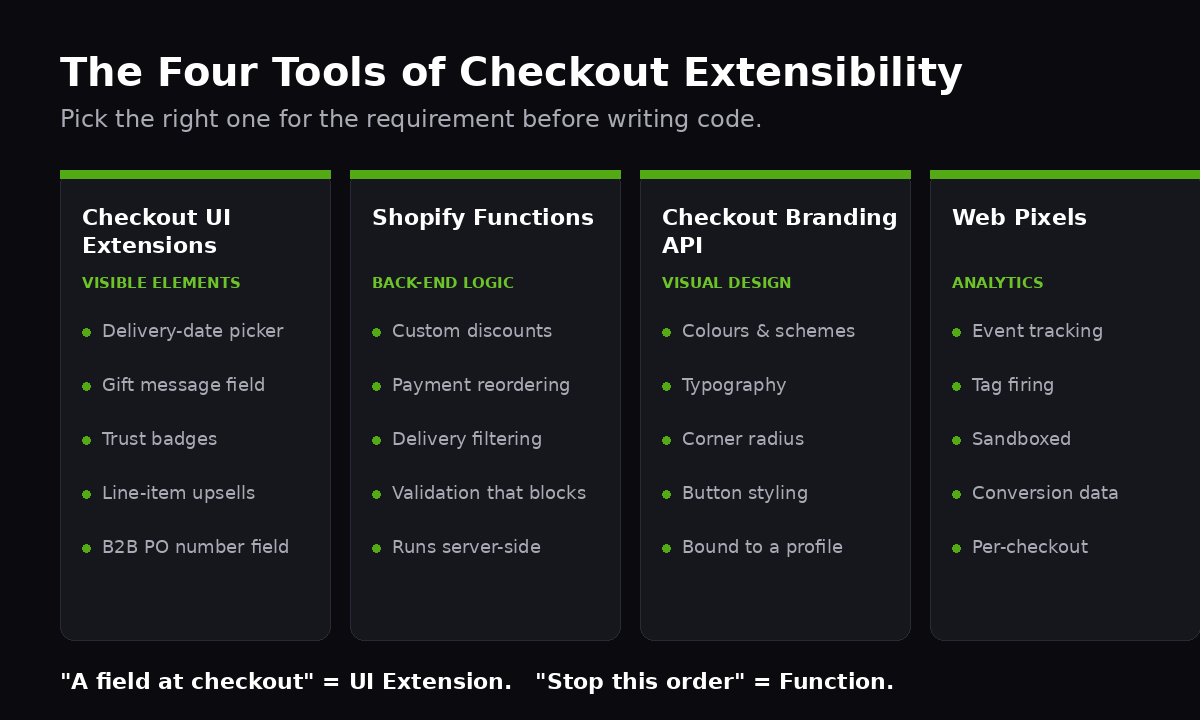
It helps to see where UI Extensions sit in the wider Checkout Extensibility model, because they are one of four tools and choosing the wrong one is the most common architectural mistake we see:
- Checkout UI Extensions add visible elements: a delivery-date picker, a gift message field, a trust badge, a line-item upsell, a B2B purchase-order number field.
- Shopify Functions change back-end logic with no UI: custom discounts, payment-method reordering, delivery-option filtering, and validation that blocks checkout.
- The Checkout Branding API controls visual design: colours, typography, corner radius, button styling, layout.
- Web Pixels handle analytics and tag firing inside the checkout sandbox.
If a client says “we want a field at checkout,” that is UI Extensions. If they say “we want to stop people checking out with a PO box address,” that is a Function. Conflating the two leads to people trying to enforce rules in the UI layer, where a determined buyer can bypass them. We will come back to that.
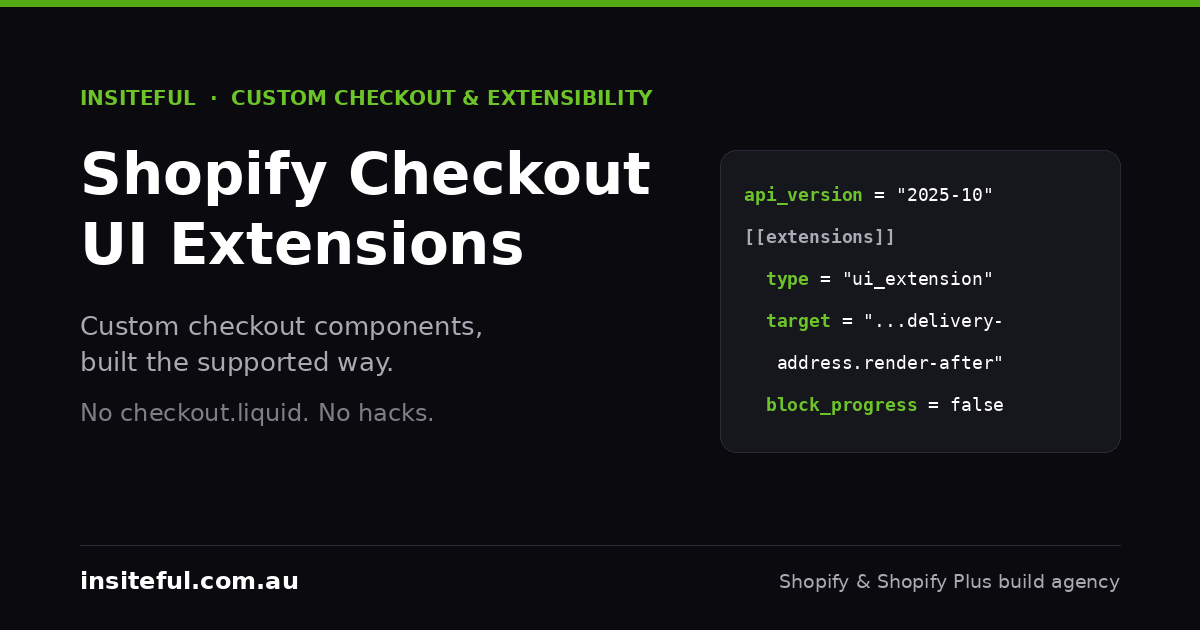
An extension is defined by a configuration file, shopify.extension.toml, which declares the API version, the targets it renders at, and any capabilities or settings it needs. Here is the shape of a real one for a delivery-date picker, pinned to the current stable API version:
api_version = "2025-10"

[[extensions]]
name = "delivery-date-picker"
handle = "delivery-date-picker"
type = "ui_extension"

  [[extensions.targeting]]
  target = "purchase.checkout.delivery-address.render-after"
  module = "./src/DeliveryDate.jsx"

  [extensions.capabilities]
  api_access = true
  network_access = false
  block_progress = false

  [extensions.settings]
    [[extensions.settings.fields]]
    key = "cutoff_hour"
    type = "number_integer"
    name = "Same-day cutoff hour (24h)"
Two things in that file matter commercially. The api_version is pinned, which means a Shopify checkout update will not silently change your extension’s behaviour. You upgrade on your schedule, test, and redeploy. And block_progress = false is a deliberate choice: this extension informs the buyer, it does not stop them. Setting that flag to true is a decision with real conversion consequences, and it should never be the default.
One hard constraint to plan around: rendering UI Extensions in the main checkout requires Shopify Plus. The Thank You and Order Status pages accept extensions on every plan, but if a client on the standard plan wants custom fields in the checkout itself, the honest answer is that the Plus upgrade is part of the scope. We cover where that line sits in our Shopify Plus cost-benefit breakdown.
The Extension Targets We Actually Use
A target is the named slot where your component renders. Shopify exposes dozens, and the API documentation lists them all, but in practice the useful ones fall into two groups, and knowing the difference changes how you build.
Static targets render in a fixed place regardless of what else is in the checkout. The workhorse here is purchase.checkout.block.render, a free-floating block the merchant can drag anywhere in the checkout editor. It always renders, which makes it the safe choice for anything that is not tied to a specific checkout feature, such as a trust banner or a returns-policy note.
Dynamic targets render relative to a specific part of the checkout and only appear when that part is present. These are the ones that make an extension feel native:
// Static: merchant places it anywhere via the checkout editor
purchase.checkout.block.render

// Dynamic: anchored to real checkout sections
purchase.checkout.delivery-address.render-before
purchase.checkout.delivery-address.render-after
purchase.checkout.shipping-option-list.render-after
purchase.checkout.payment-method-list.render-after
purchase.checkout.cart-line-item.render-after

// Post-purchase, available on every plan
purchase.thank-you.block.render
customer-account.order-status.block.render
The distinction has a practical edge. A dynamic target like delivery-address.render-after only fires when delivery is actually required, so a digital-goods order will never show your shipping-related component. If you placed that same content in a static block, you would have to write logic to hide it on digital orders. Choosing the right target removes whole categories of conditional code. We default to dynamic targets wherever the content is feature-specific, and reserve the static block for genuinely placement-flexible content.
A Worked Example: A Delivery-Date Estimator
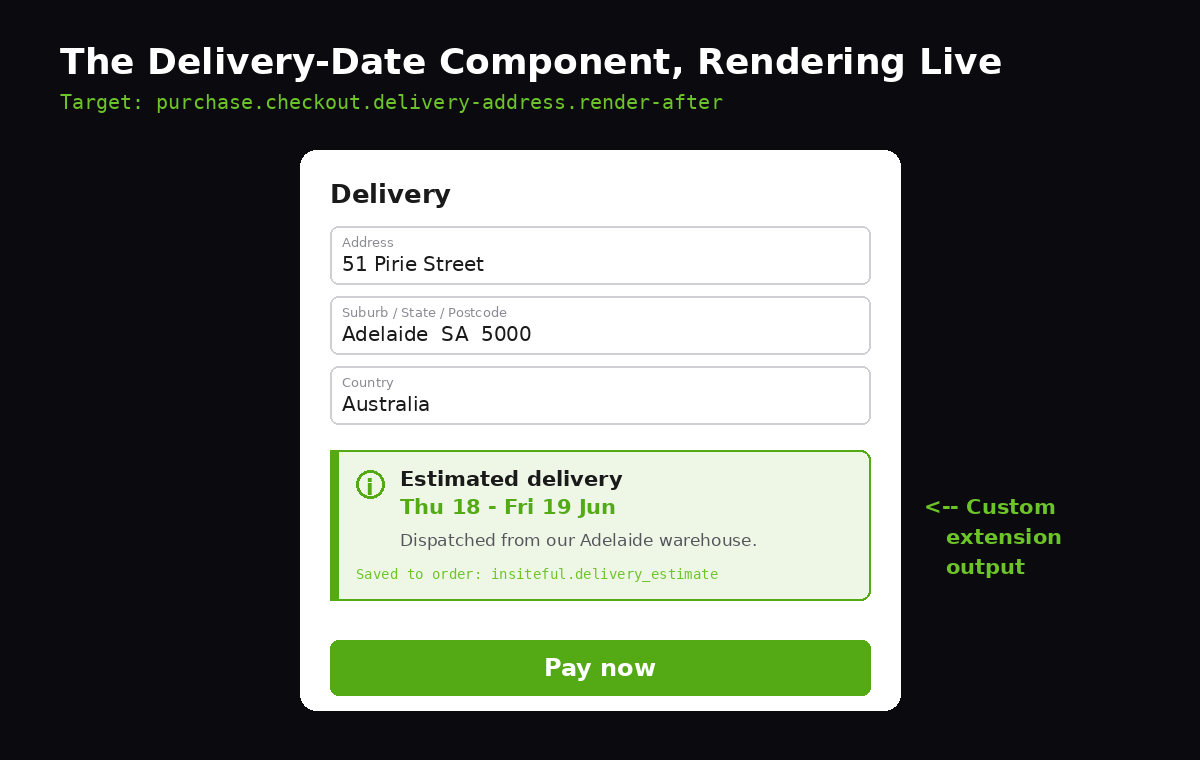
The single most requested checkout component for Australian brands is a delivery estimate, because the country’s geography makes shipping time a real purchase concern. A Sydney buyer ordering from a Perth warehouse wants to know whether the parcel arrives this week or next, and the gap between “ships in 1-2 days” and a concrete date is the difference between a completed order and an abandoned one.
Here is a working extension component. It reads the delivery address, computes an estimated arrival window against a same-day cutoff, and writes the buyer’s chosen preference back to the order as a metafield so the warehouse can read it later:
import {
  reactExtension,
  BlockStack,
  Text,
  Banner,
  useApi,
  useShippingAddress,
  useApplyMetafieldsChange,
  useSettings,
} from "@shopify/ui-extensions-react/checkout";

export default reactExtension(
  "purchase.checkout.delivery-address.render-after",
  () => <DeliveryDate />
);

function DeliveryDate() {
  const { extension } = useApi();
  const address = useShippingAddress();
  const { cutoff_hour = 12 } = useSettings();
  const applyMetafieldsChange = useApplyMetafieldsChange();

  // No estimate until we know where it is going
  if (!address?.provinceCode) {
    return (
      <Text appearance="subdued">
        Enter your address to see an estimated delivery date.
      </Text>
    );
  }

  const leadDays = estimateLeadDays(address.provinceCode, cutoff_hour);
  const window = formatWindow(leadDays);

  // Persist the estimate to the order for the fulfilment team
  applyMetafieldsChange({
    type: "updateMetafield",
    namespace: "insiteful",
    key: "delivery_estimate",
    valueType: "string",
    value: window,
  });

  return (
    <BlockStack spacing="tight">
      <Banner status="info" title={`Estimated delivery: ${window}`}>
        Based on dispatch from our {warehouseFor(address.provinceCode)} warehouse.
      </Banner>
    </BlockStack>
  );
}
Three details in that component are the difference between a build that holds up and one that does not. First, it returns a graceful prompt when the address is incomplete rather than rendering a broken or empty estimate. Second, it reads its cutoff hour from useSettings(), so the merchant can change the rule in the checkout editor without a redeploy. Third, it writes the estimate to a metafield, which means the data the buyer saw at checkout follows the order into fulfilment. That last point is what separates a decorative widget from an operational one, and it is the question we ask on every component: where does this data go after the sale?
Validating Checkout Without Blocking Real Buyers
The most dangerous thing you can do at checkout is stop a buyer who was about to pay. So validation needs a clear rule: inform in the UI layer, enforce in the Functions layer, and reserve hard blocks for cases where letting the order through genuinely costs more than losing it.
For soft validation inside a UI Extension, you use a buyer-journey interceptor. This can block progress, but it should be used sparingly and only with a clear, actionable message. Here is the pattern for requiring a delivery-instructions field on orders going to a known parcel-locker network, where a missing instruction means a failed delivery:
import { useBuyerJourneyIntercept, useShippingAddress }
  from "@shopify/ui-extensions-react/checkout";

useBuyerJourneyIntercept(({ canBlockProgress }) => {
  const needsInstructions = isParcelLocker(address?.address1);

  if (canBlockProgress && needsInstructions && !instructions) {
    return {
      behavior: "block",
      reason: "Delivery instructions required for parcel lockers",
      perform: (result) => {
        if (result.behavior === "block") {
          setErrorBanner("Add a locker access note so we can deliver.");
        }
      },
    };
  }
  return { behavior: "allow" };
});
Notice the canBlockProgress guard. Since API version 2024-07, an extension has to check the available instructions before it calls capabilities like blocking, because the buyer may be using an accelerated checkout such as Shop Pay where the standard journey does not apply. Skipping that check is a classic source of extensions that work in testing and then throw errors for the very buyers, the returning Shop Pay users, who convert best. Shop Pay alone delivers around a 9% conversion lift across all checkouts and as much as a 50% lift over guest checkout, so breaking it is an expensive bug.
For anything that truly must be enforced, the rule belongs in a Shopify Function, not the UI. A Cart and Checkout Validation Function runs server-side, cannot be bypassed by editing the page, and applies no matter how the buyer reaches checkout. We treat the UI interceptor as a helpful nudge and the Function as the actual gate. The same principle underpins our work on Shopify Functions and custom payment methods on Plus, where the logic that protects revenue has to live where the buyer cannot reach it.
Matching the Checkout to the Brand
A custom component looks wrong if it renders in default Shopify styling against a heavily branded storefront. The Checkout Branding API is how you bring the checkout into line, and it is a GraphQL surface rather than a CSS file, which throws people who expect to write stylesheets. You declare design intent and Shopify applies it consistently across every checkout slot, including your extensions.
mutation SetCheckoutBrand($id: ID!) {
  checkoutBrandingUpsert(
    checkoutProfileId: $id
    checkoutBranding: {
      designSystem: {
        colors: {
          schemes: {
            scheme1: {
              base: { background: "#0B0B0F", text: "#FFFFFF" }
              primaryButton: {
                background: "#53AA15"
                text: "#FFFFFF"
                border: "#53AA15"
              }
            }
          }
        }
        cornerRadius: { base: 8, small: 4 }
      }
      customizations: {
        primaryButton: { blockPadding: "LOOSE" }
        headingLevel1: { typography: { weight: BOLD } }
      }
    }
  ) {
    checkoutBranding { designSystem { colors { schemes { scheme1 { base { background } } } } } }
    userErrors { field message }
  }
}
Because branding is set through the API and bound to a checkout profile, it becomes a versioned, reproducible asset rather than a pile of CSS overrides nobody can find later. On a multi-store or international build this matters even more: each market’s checkout profile can carry its own branding while sharing the same extension code. When we wire this into a brand’s design tokens, the checkout finally matches the storefront down to the corner radius, and it stays matched after the next Shopify update, which CSS hacks on the old checkout.liquid never did.
A recent example makes the point. A Brisbane homewares brand we worked with had spent heavily on a refined, muted storefront, then sent every buyer into a stock-blue Shopify checkout with sharp corners and a button colour that appeared nowhere else in the brand. The disconnect was jarring enough that it read as a different company, the kind of small wrongness that makes a nervous first-time buyer hesitate at the worst possible moment. Porting the brand’s colour scheme, corner radius, and button treatment into a checkout profile took an afternoon, because the design decisions already existed as tokens. The hard part was never the API. It was having a defined design system to feed it, which is why we treat the branding step as the downstream output of a brand system rather than a styling task done in isolation.
The JavaScript Budget Nobody Watches
Every extension you add ships JavaScript into the checkout, and the checkout is the worst place in the store to be slow. A buyer who has entered their card details and is waiting on a laggy interface is a buyer reconsidering the purchase. Shopify sandboxes extensions so one cannot crash the whole checkout, but it cannot save you from your own bundle weight.
We hold checkout extensions to a tighter standard than the storefront. The rules we apply on every build: one extension per genuine job, never a single mega-extension doing five things; no network calls from an extension unless the value is unambiguous, because network_access adds latency and a point of failure on the most important screen in the store; and prefer Shopify’s built-in components over importing UI libraries, which defeats the lightweight model entirely. The same discipline we describe in our work on Core Web Vitals applies here, except the stakes are higher because the buyer has already committed.
A simple test settles most arguments: deploy the extension, open the checkout on a throttled mobile connection in DevTools, and watch when your component appears relative to the pay button. If your widget is still rendering after the buyer could already have paid, it is costing conversions, not adding them. Cut it back until it is invisible in the timeline.
The Mistakes We See Most
Most checkout-extension projects that land on our desk for a rescue share the same handful of errors. They are worth naming because they are all avoidable.
- Too many fields. The most common and most costly mistake. Every custom field you add is friction, and the research is consistent that over-asking at checkout drives an 18-22% jump in abandonment. If the order can complete without a field, it should not be there. We push back on “nice to have” fields harder than clients expect.
- Enforcing rules in the UI. A validation written only in a UI Extension can be bypassed by accelerated checkouts and by anyone who knows how. Revenue-critical rules go in a Function.
- Ignoring the instructions check. Calling block or buyer-identity APIs without first confirming they are available throws errors for Shop Pay buyers, the segment you least want to break.
- No graceful empty state. Components that assume the address or cart is already populated render broken on first paint. Always handle the not-yet-known state first.
- Treating it as a one-off. An extension pinned to an API version needs an owner who upgrades and retests it each cycle. Fire-and-forget extensions rot.
How We Do It at Insiteful
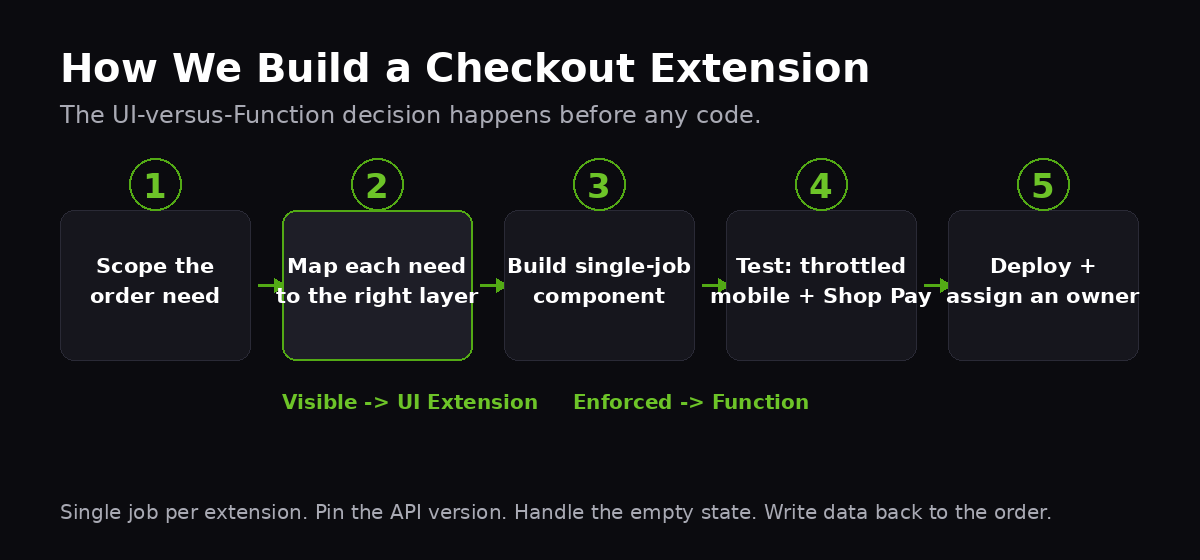
When a brand comes to us for checkout work, we do not start in code. We start with the order: what does the business actually need the buyer to see, decide, or tell us at the point of payment, and what is the revenue cost of getting each of those wrong. Half the requested fields usually do not survive that conversation, which is the cheapest conversion win available because removing friction costs nothing to maintain.
For the requirements that do survive, we map each one to the right layer before building. Visible elements become UI Extensions, enforced rules become Functions, design becomes Branding API entries tied to the brand’s tokens, and tracking goes through Web Pixels. We build each extension as a single-job component, pin the API version, handle the empty state, and write the buyer’s choices back to the order as metafields so the data is useful downstream. Then we test it on throttled mobile and through Shop Pay specifically, because that is where naive extensions fail.
This is agency work, not a plugin install, and it sits inside a Plus build that typically runs from $8,500 to $25,000 AUD depending on scope, for the kind of brands doing $2M+ AUD in annual revenue where a one or two point lift at checkout is worth more than the entire build cost in the first quarter. The checkout is the last place a store should be running someone’s generic app, and the first place a real lift hides. You can see how we scope and run these builds on our process page, and the kind of work it produces in our recent projects.
If checkout was the part of your store you could never touch, that constraint is gone. The question now is whether the people touching it know the difference between a component that lifts conversion and one that quietly leaks it. For a deeper map of what is now possible, our overview of Shopify checkout extensibility and our breakdown of post-purchase upsells are the natural next reads.
Build a Checkout That Earns Its Place
If your checkout is still running the default flow, or a pile of apps each fighting for the same space, there is almost certainly a conversion lift sitting in it. We will tell you exactly where, and what it is worth, before you commit to anything. Book a build assessment with Insiteful and we will audit your checkout against the four tools of extensibility and show you the highest-leverage change first.