
Almost every Shopify Plus brand we audit has the same blind spot at checkout. They have spent six figures on the storefront, obsessed over the product page, A/B tested the hero image to death, and then left the payment step exactly as Shopify shipped it. The result is a checkout that shows a 22-year-old buying sneakers the same payment lineup as a $40,000 AUD trade account placing a quarterly restock. Neither buyer is being served, and both are quietly costing the brand orders.
Payment configuration is one of the highest-leverage, least-glamorous areas of a Shopify build. Get it right and you reduce abandonment, support local buyer behaviour, and stop paying for processing you do not need. Get it wrong and you either bolt on three apps that fight each other, or you tell a developer to “build a custom payment method” without understanding that the phrase means at least three completely different pieces of engineering.
We have been building and maintaining Shopify and Shopify Plus stores for over 25 years across more than 200 client projects. This article is our working position on custom payment methods in 2026: what the term actually means, when a brand genuinely needs one, the three approaches we use, and the compliance and cost realities specific to selling in Australia. Every section includes the build artefact, code, or numbers we would put in front of a client.
Why Payment Choice Is a Revenue Line, Not a Setting
The numbers make this concrete. The Baymard Institute puts the average documented cart abandonment rate at 70.19%, and 13% of shoppers will abandon a checkout outright if the store does not offer their preferred payment method. A 2026 Worldpay study of 26,000 consumers across 40 countries found that merchants offering six or more payment options saw payment-related abandonment fall to 4.9%, against 13.4% for merchants offering three or fewer. Payment range is not a nice-to-have. It is a measurable conversion variable.
In Australia the buyer expectations are sharper again. Roughly one in three Australians use buy-now-pay-later, the online segment accounted for 68.72% of the local BNPL market in 2025, and Afterpay alone counts about 3.5 million local users. Meanwhile real-time account-to-account rails are scaling fast: there are now more than 27 million PayID registrations, and account-to-account payments delivered an estimated $3.6 billion AUD in net benefits to small merchants in 2024, with around a third of those merchants reporting revenue growth after adopting them. An Australian storefront that only offers Visa, Mastercard, and PayPal is leaving a structural chunk of demand on the table.
So the question is rarely “should we offer more payment methods.” It is almost always “which buyer should see which method, in what order, and which of these do we actually need to engineer versus configure.” That distinction is where most teams get lost.
What “Custom Payment Method” Actually Means on Shopify
When a client says “we need a custom payment method,” they could mean any of three very different things. We always disambiguate before scoping a single hour of work, because the three sit at wildly different points on the cost and complexity curve.
- Payment customisation — controlling which existing methods appear, in what order, and to whom. This is a Shopify Plus feature powered by Shopify Functions. No new gateway, no PCI scope change. This is what 80% of “custom payment” requests actually resolve to.
- A payments app extension — building an actual new way to take money: a proprietary processor, a regional gateway Shopify does not natively support, or a store-credit / wallet flow. This uses the Payments Apps API and the payments extension framework. Real engineering, real ongoing maintenance.
- Manual and offline payment methods — bank transfer, purchase order, account-on-terms, cash on delivery. No code at all in the simplest case, but a real operational and accounting workflow behind it. Critical for B2B and wholesale.
The diagram below is the decision map we walk clients through in the first scoping call. It routes a request to the right approach in under five minutes and saves a great deal of money in misdirected development.
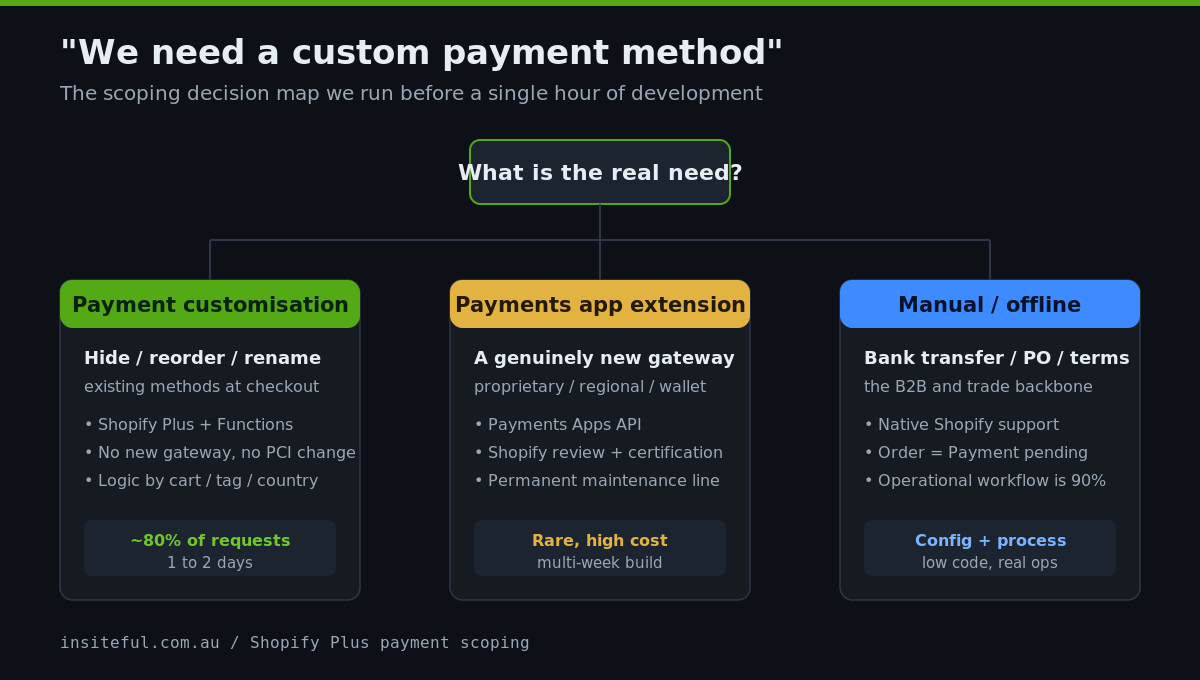
Getting this routing right early matters because the cost difference between the branches is enormous. A payment customisation is typically a day or two of work. A full payments app extension with certification and ongoing maintenance can run into tens of thousands of dollars and a multi-week timeline. We have seen brands quoted $30,000 AUD to “build a custom payment method” when what they actually needed was a half-day Function to hide bank transfer from retail customers.
Approach 1: Payment Customisation with Shopify Functions
This is the Shopify Plus capability most brands are really asking for. The Payment Customization Function API lets you hide, reorder, or rename the payment methods already available at checkout, using server-side logic based on cart value, customer tags, shipping country, product type, or any other order attribute. It runs on Shopify Functions, which means the logic executes inside Shopify’s own infrastructure with no third-party script weight added to the page.
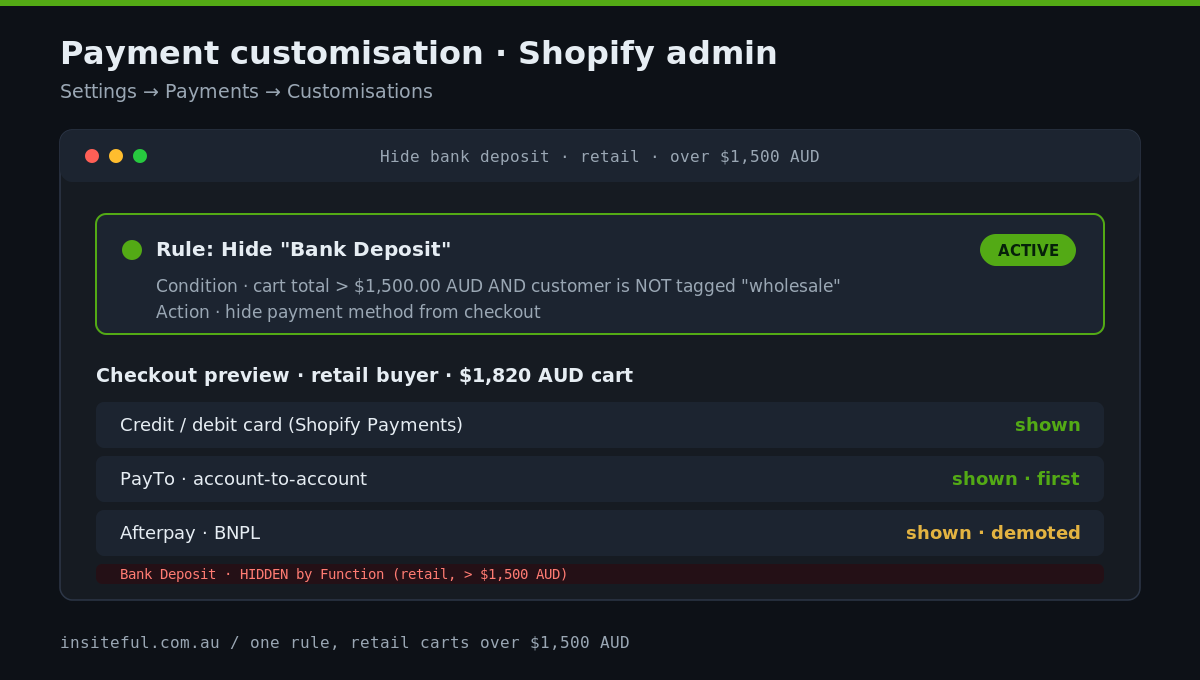
Common jobs we solve with a single Function: hide bank-transfer and purchase-order options from retail customers so only wholesale accounts see them; push BNPL down the list for high-value carts where the merchant absorbs a larger fee; surface a local gateway first for Australian buyers and a different one for New Zealand; or hide a method entirely above a cart threshold. Here is the shape of a real customisation that hides “Bank Deposit” for any cart over $1,500 AUD unless the customer carries a wholesale tag.
// run.js — Payment Customization Function (Shopify Functions)
export function run(input) {
  const THRESHOLD = 150000; // $1,500.00 AUD in cents
  const cartTotal = parseInt(input.cart.cost.totalAmount.amount * 100, 10);
  const isWholesale = input.cart.buyerIdentity?.customer?.hasWholesaleTag ?? false;

  const hideBankDeposit = cartTotal > THRESHOLD && !isWholesale;
  if (!hideBankDeposit) return { operations: [] };

  const target = input.paymentMethods.find(
    (m) => m.name.includes("Bank Deposit")
  );
  if (!target) return { operations: [] };

  return {
    operations: [{ hide: { paymentMethodId: target.id } }],
  };
}
The companion input.graphql query is what makes this efficient. You only request the fields the logic needs, which keeps the Function fast and within Shopify’s instruction limits.
query Input {
  cart {
    cost { totalAmount { amount } }
    buyerIdentity {
      customer { hasWholesaleTag: hasTags(tags: ["wholesale"]) }
    }
  }
  paymentMethods { id name }
}
In practice we rarely deploy a single rule. A typical Australian Plus store ends up with three or four stacked customisations: hide account-on-terms from anyone without a wholesale tag, reorder so a sub-1% account-to-account method appears first on carts above $500 AUD, push BNPL below the fold on carts above $1,000 AUD where the 4% to 6% merchant fee bites hardest, and surface a New Zealand gateway only for NZ shipping addresses. Each is a few lines of Function logic, all version-controlled, all testable. The compounding effect is a checkout that quietly optimises for both conversion and margin on every order, with zero added page weight.
What we like about this approach is that it changes nothing about how money is processed. There is no new gateway to certify, no PCI scope expansion, and no app subscription bleeding into the page-speed budget. It is configuration expressed as code, deployed as a Function, and versioned in the same repo as the theme. If you want the broader context on what Functions replace, we covered that in our piece on Shopify Functions and the apps they make redundant.
Approach 2: Building a Payments App Extension
This is the real thing: engineering a genuinely new way to take money inside Shopify checkout. It uses the Payments Apps API and the payments extension framework, and it is what you build when the method you need simply does not exist as a native Shopify payment option. Shopify supports five payment extension types: custom credit card, custom onsite, offsite (redirect), redeemable (gift card and store credit style), and a couple of alternative-method shapes. Each integrates with checkout to create, authorise, capture, and refund payment sessions.
The offsite extension is the most common in this category. The buyer selects your method at checkout, Shopify hands control to your app, the app redirects them to a hosted page to complete payment, and your backend then calls the Payments Apps API to resolve the session. The mutation that closes the loop looks like this.
mutation ResolveSession($id: ID!) {
  paymentSessionResolve(id: $id) {
    paymentSession { id status { code } }
    userErrors { field message }
  }
}
We only recommend this path when one of a small set of conditions is true. The brand has a proprietary or in-house processor it must route through for commercial reasons. There is a regional or industry gateway that Shopify does not support natively and that the brand’s customers expect. Or the brand runs a closed-loop wallet or store-credit economy that needs to behave like a real payment method at checkout rather than a discount code. Outside those cases, a custom payments app is almost always the wrong tool, because you inherit certification, fraud handling, settlement reconciliation, and ongoing maintenance that a native gateway handles for you.
The honest cost picture: a production-grade payments app extension is a multi-week build, requires Shopify review before it can be used by other merchants, and carries a permanent maintenance line because payment APIs and compliance requirements move. For a single brand solving a genuine commercial need, that can still be worth it. For a brand that just wants Afterpay further down the list, it is a catastrophic over-build. This is exactly the kind of branch we talk a client out of in scoping, the same discipline we apply when we help brands decide on a B2B versus separate wholesale store architecture.
Approach 3: Manual and Offline Payments for B2B and Trade
The third branch is the one retail-focused developers forget exists, and it is the one that matters most for wholesale and trade brands. Shopify supports manual payment methods natively: bank transfer (EFT), purchase order, account-on-terms, and cash on delivery. When a buyer selects one, Shopify creates the order with a Payment pending status. The merchant verifies that the money has arrived or that the account is in good standing, then marks the order as paid, and only then does fulfilment proceed.
For an Australian trade business, this is the backbone of the wholesale channel. A net-30 account placing a $12,000 AUD restock does not pay by card. It places the order against terms, receives an invoice, and pays by EFT inside the agreed window. The build work is not in taking the payment, it is in making sure the right accounts see the right options and that the back office can reconcile what comes in. We typically pair a manual method with a payment customisation Function so that only tagged wholesale customers ever see “Account on terms,” and retail buyers never do.
The order lifecycle below is the artefact we hand the client’s operations team so finance, fulfilment, and customer service all share one definition of when an order is real, when it ships, and when it is reconciled.
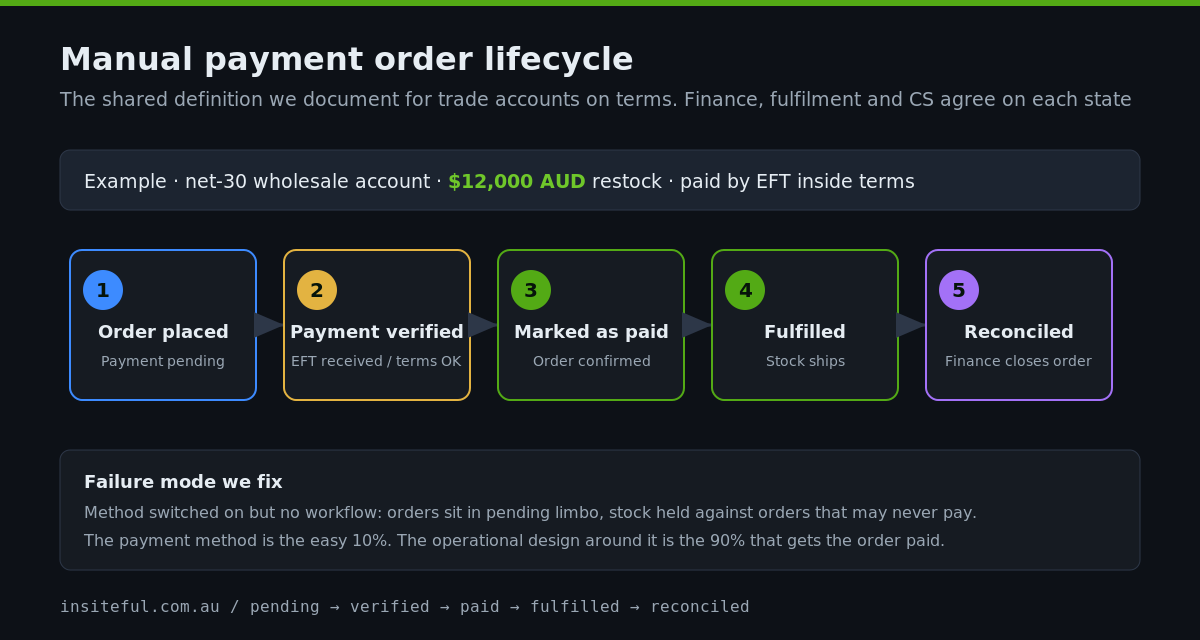
The failure mode we see constantly is a trade brand that turned on a manual method but never built the workflow around it. Orders sit in pending limbo, sales chases finance, finance chases the bank statement, and stock is held against orders that may never be paid. The payment method was the easy 10%. The operational design around it was the 90% nobody scoped.
The Compliance and Cost Reality in Australia
Custom payment work in Australia now sits inside a tighter regulatory frame than it did even a year ago. From June 2025, buy-now-pay-later is formally regulated as credit under the National Consumer Credit Protection Act, which means BNPL providers operate under credit licensing and responsible-lending obligations. This does not stop you offering Afterpay or Zip, but it does mean the way these methods are presented and disclosed at checkout is now a compliance surface, not just a design choice. We treat BNPL placement as something to get explicitly right rather than leave to a default.
Then there is the cost of the methods themselves. BNPL merchant fees in Australia typically land in the 4% to 6% range, meaningfully higher than the roughly 1.5% to 1.75% of standard domestic card processing. Surcharging rules from the RBA permit passing on the cost of acceptance but not profiting from it, and the regulatory direction of travel on card surcharging is actively shifting. The practical upshot for a build: which method a high-value cart sees is a margin decision, not just a UX one. Hiding a 5%-fee method on a $2,000 AUD order, or steering it toward a sub-1% account-to-account rail, is real money. That is the commercial logic behind most of the payment customisation Functions we deploy.
This is also where the account-to-account opportunity becomes a concrete build decision rather than an abstract trend. With more than 27 million PayID registrations and PayTo now supported across the major banks, real-time bank-rail payments are a viable checkout option for Australian brands, and they typically clear at a fraction of card or BNPL acceptance cost. On a high-value cart, steering a willing buyer toward a sub-1% rail instead of a 5% method is a direct margin gain on every transaction. We treat the presence and ordering of these rails as a deliberate engineering choice, configured per buyer segment, not as whatever the payment provider’s default happened to be.
PCI scope is the last piece. The reason we steer brands away from custom credit-card extensions wherever possible is that the moment your application touches raw card data, your PCI obligations expand dramatically. Native Shopify Payments and the offsite-redirect model keep that scope contained. A custom onsite card extension does not. For the overwhelming majority of brands, the right answer is to keep card data entirely inside Shopify’s certified environment and use customisation and manual methods to do the differentiation.
How We Do It at Insiteful
When a brand comes to us with a payment requirement, we run the same sequence every time, and it almost always starts by talking them out of the expensive option.
First, we route the request through the decision map. We establish whether the real need is customisation, a new gateway, or a manual method, because the cost difference between those branches is the difference between a two-day job and a two-month one. Second, we map the buyer segments. Retail, wholesale, international, high-value: each is a distinct payment audience, and we define which methods each should see and in what order before any code is written. Third, we build the customisation Functions, version them alongside the theme, and test them against real cart scenarios in a development store rather than in production.
For B2B and trade clients, we design the manual-payment workflow end to end: the customer tags that gate the methods, the order lifecycle the operations team follows, and the reconciliation path so finance is not chasing bank statements against pending orders. Only when a genuine commercial case survives all of that do we scope a full payments app extension, and even then we cost the maintenance line honestly so the client is deciding with their eyes open. The same discipline runs through how we approach checkout e