
On 26 August 2026, the Thank you and Order status pages on every non-Plus Shopify store stop running the tracking scripts merchants have been pasting into them for the better part of a decade. Plus stores already went through this: checkout.liquid, additional scripts and script tags were sunset there on 28 August 2025, with forced upgrades rolling from January 2026. Now it is everyone else’s turn, and the deadline is eleven days away as this goes live.
Most Australian merchants we talk to think this is a checkout design change. It is not. It is a tracking change. The visual work of migrating to checkout extensibility is usually a fortnight of tidy build effort. The tracking work is where stores quietly lose the ability to measure their own revenue, and they generally do not find out until a fortnight after the switch when the Meta account starts bidding on data that is 30 per cent thinner than it was.
This article covers the Web Pixels API properly: what the sandbox actually permits, which events you can rely on, how consent is wired, and the audit we run before we touch a client’s tracking. There is code, there is a capability matrix, and there is arithmetic in Australian dollars for what a broken migration costs.
What actually changed under the checkout
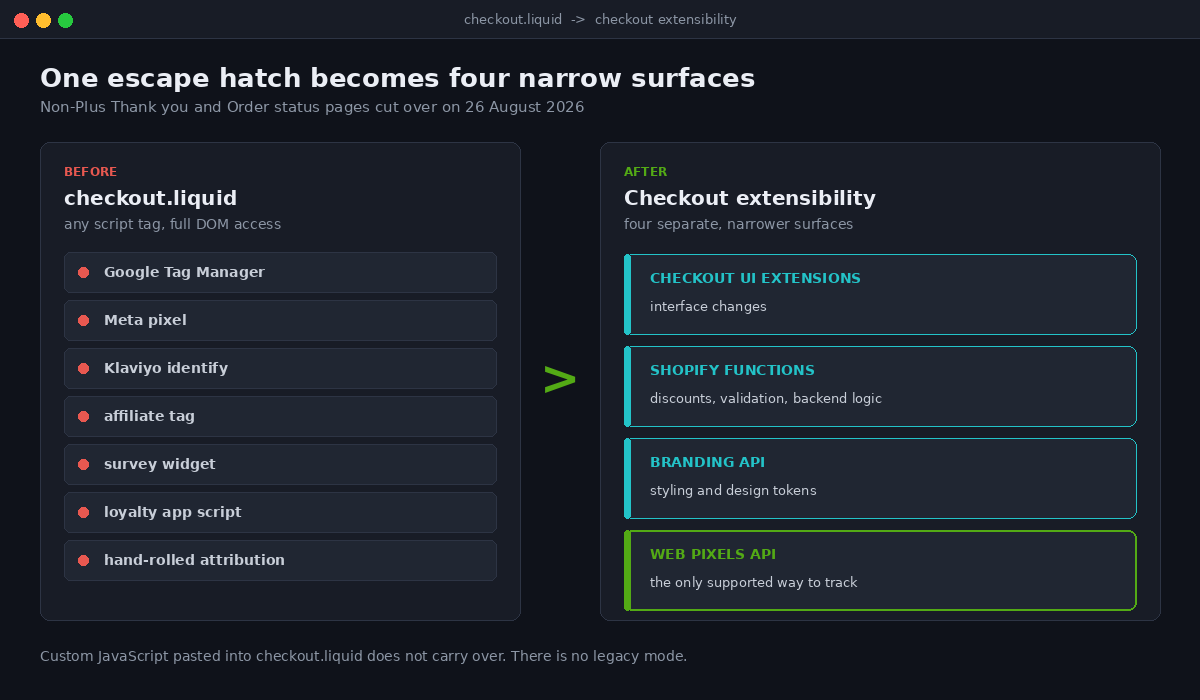
Old checkout was a Liquid template. If you could write a script tag, you could put anything on the Thank you page: Google Tag Manager, a Meta pixel, a Klaviyo identify call, a survey widget, three different affiliate tags and a bit of jQuery someone’s cousin wrote in 2019. That freedom is exactly why Shopify killed it. Arbitrary third-party JavaScript running on a page that handles payment is a security and performance problem, and it was Shopify’s problem to own.
Checkout extensibility replaces that single escape hatch with four separate, narrower surfaces. Checkout UI extensions handle interface changes. Shopify Functions handle backend logic like discounts and validation. The branding API handles styling. And web pixels handle tracking, which is the one most teams under-plan.
The critical detail: the Web Pixels API is now the only supported way to fire tracking events from checkout. There is no fallback, no legacy mode, no “just for this one tag” exception. Custom JavaScript you pasted into checkout.liquid does not carry over. If your tracking stack was built around that pattern, and most Australian stores built between 2018 and 2023 were, you have a gap that needs closing before the deadline rather than after it.
The sandbox is the whole story
Web pixels do not run on the page. They run in an isolated iframe sandbox with a deliberately small API surface. Shopify runs two sandbox modes: lax for custom pixels that a merchant creates in the admin, and strict for app pixels installed by an app. Strict is more restricted again.
Inside either sandbox you get four things on the API object:
analytics: subscribe to Shopify’s customer eventsbrowser: asynchronous, proxied access to cookie, localStorage and sessionStorage in the top frameinit: a snapshot of the page at render time, including context, cart, customer and customer privacy statesettings: a JSON settings object, available to app pixels only and not to custom pixels
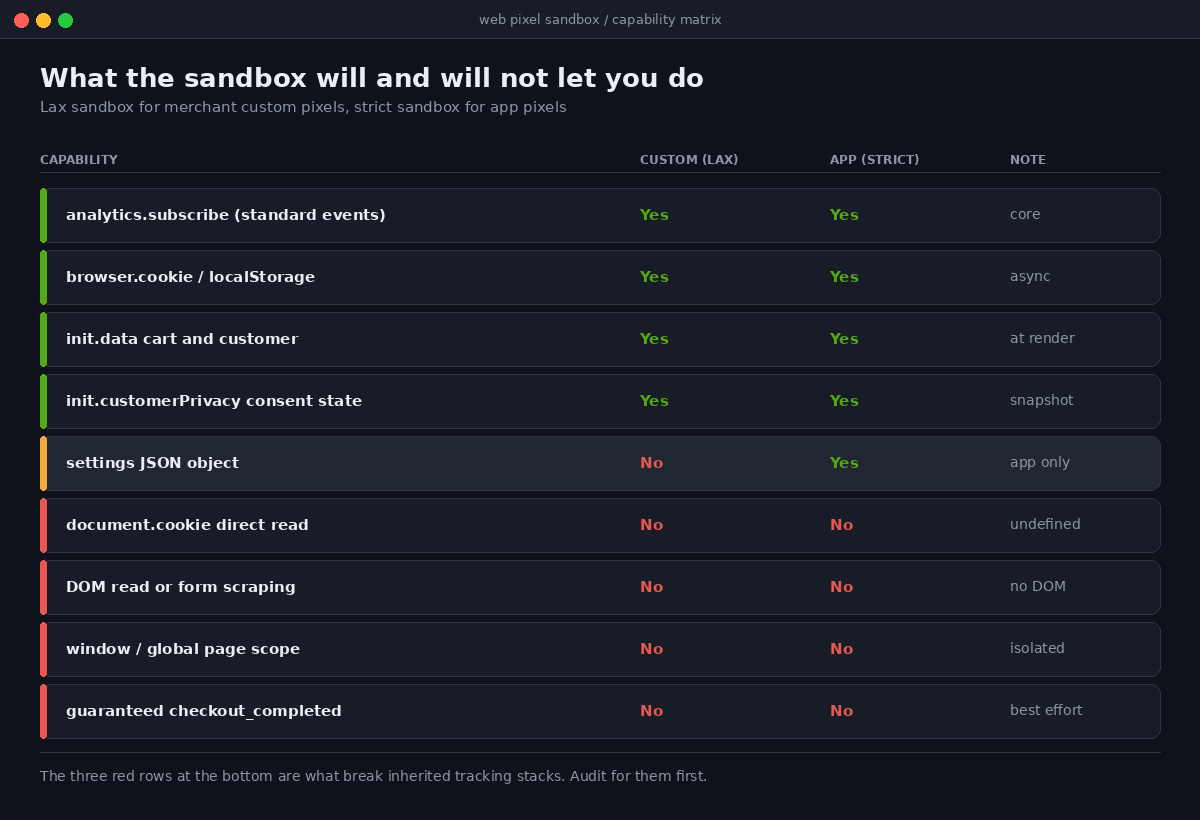
That is the list. What is not on it matters more than what is. This is the capability matrix we hand to clients before they commit to a migration plan, because it tells you immediately which of your existing tags survive and which need rebuilding or replacing.
Two limitations catch nearly everyone. First, document.cookie returns undefined inside the sandbox. Any tag that reads a cookie directly, and that includes a lot of hand-rolled attribution and affiliate code, silently reads nothing. You have to go through browser.cookie.get(), which is asynchronous and returns a promise. Code written against the synchronous DOM API does not fail loudly; it just resolves to nothing and keeps going.
Second, anything that scrapes the DOM stops working. Tags that automatically harvest email addresses or phone numbers out of form fields, which is how several popular marketing tools historically identified visitors at checkout, have no DOM to read. If your Klaviyo or SMS identity resolution depended on form scraping, it needs to move to the event payload instead.
The event you cannot fully trust
Shopify publishes a fixed catalogue of standard events. The ones that carry commercial weight are page_viewed, product_viewed, product_added_to_cart, checkout_started, payment_info_submitted and checkout_completed. You can also subscribe in bulk with all_events, all_standard_events, all_custom_events and all_dom_events, though the contents of those bundles change as Shopify adds events, so we avoid them in production code.
Here is the part that is buried in the documentation and that nobody plans for. To keep the post-purchase experience fast, Shopify does not guarantee that checkout_completed fires for every purchase. The customer can close the tab, the redirect can be interrupted, the network can drop. The event is best effort, not a ledger.
That single sentence is the reason client-side pixels alone can no longer be your source of truth for revenue. Not because of the sandbox, not because of ad blockers, but because the purchase event itself is explicitly non-guaranteed by the platform emitting it. Any architecture that reconciles ad spend against a browser-fired purchase event is building on a foundation the vendor has told you not to trust.
Writing a custom pixel that holds up
Custom pixels are created in Shopify admin under Settings, then Customer events. The analytics, browser and init variables are pre-deconstructed, so you skip the register() boilerplate that app pixels need.
Here is a working pattern we use as the base for client builds. It reads the cart token from the event context so a downstream server can reconcile, it uses keepalive so the request survives the page unloading, and it never assumes the purchase event will arrive.
// Custom pixel: Settings > Customer events > Add custom pixel

const ENDPOINT = 'https://collect.yourbrand.com.au/e';

function send(event, extra) {
  const body = {
    name: event.name,
    id: event.id,
    ts: event.timestamp,
    clientId: event.clientId,
    ctx: {
      url: event.context.document.location.href,
      ref: event.context.document.referrer,
      ua: event.context.navigator.userAgent
    },
    data: extra || {}
  };

  fetch(ENDPOINT, {
    method: 'POST',
    headers: { 'Content-Type': 'application/json' },
    body: JSON.stringify(body),
    keepalive: true
  });
}

analytics.subscribe('checkout_started', (event) => {
  const co = event.data.checkout;
  send(event, {
    token: co.token,
    value: co.totalPrice.amount,
    currency: co.totalPrice.currencyCode,
    items: co.lineItems.length
  });
});

analytics.subscribe('checkout_completed', (event) => {
  const co = event.data.checkout;
  send(event, {
    token: co.token,
    orderId: co.order.id,
    value: co.totalPrice.amount,
    currency: co.totalPrice.currencyCode
  });
});
Three things to notice. The endpoint is a first-party subdomain on the merchant’s own domain, not a third-party analytics host, which keeps the request out of the first tier of blocklists. The clientId travels on every event, so a server can stitch a session together even when one event in the chain goes missing. And the checkout token is on both the started and completed events, which is what lets you match a browser session to an order that you learn about later through a webhook rather than through the browser.
That last point is the design principle. Treat the pixel as a signal source, not a system of record.
Consent is wiring, not a banner
Australian merchants selling into the EU or the UK have had to think about this for years. The reform pressure on the Australian Privacy Act has made it a domestic question too, and the practical answer is the same either way: tracking has to respond to consent state, and it has to do so without a page reload.
Shopify gives you two hooks. init.customerPrivacy is a snapshot of consent at page render. The customerPrivacy standard API lets you subscribe to visitorConsentCollected, which is currently the only event that subscription accepts, and update your state when a visitor interacts with a banner mid-session.
let consent = init.customerPrivacy;

api.customerPrivacy.subscribe('visitorConsentCollected', (event) => {
  consent = event.customerPrivacy;
  // {
  //   analyticsProcessingAllowed: boolean,
  //   marketingAllowed: boolean,
  //   preferencesProcessingAllowed: boolean,
  //   saleOfDataAllowed: boolean
  // }
});

analytics.subscribe('product_added_to_cart', (event) => {
  if (!consent.marketingAllowed) return;
  send(event, { gated: false });
});
App pixels can declare their consent requirements up front in shopify.extension.toml under a [customer_privacy] block, and Shopify’s pixel manager simply will not load the pixel unless permission exists for everything declared. Custom pixels declare the same requirements through the admin interface.
One warning worth stating plainly, because we have inherited stores where a previous developer did exactly this. Setting consent values to true on page load so the tags fire is not a workaround. It is not valid consent under GDPR Article 7 or Article 5(3) of the ePrivacy Directive, and it defeats the purpose of the API. If a consent management platform is installed, let it own the decision.
The arithmetic that decides your architecture
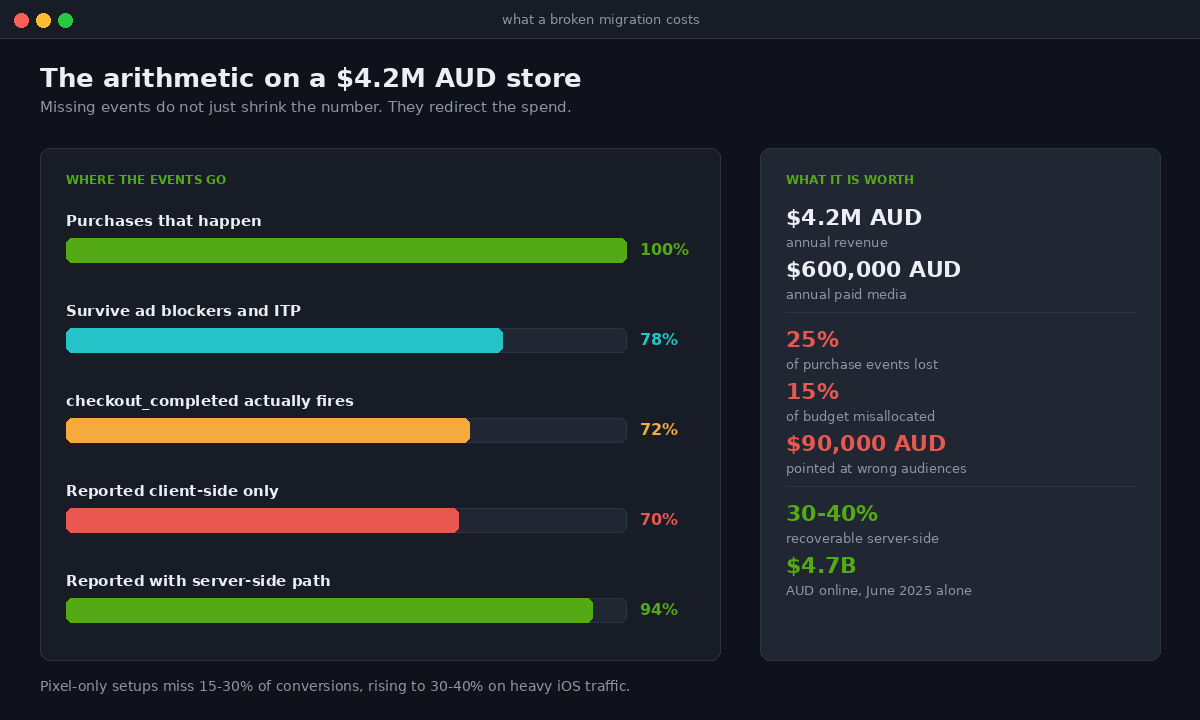
Client-side tracking has been degrading for years and the numbers are not marginal. Pixel-only setups miss roughly 15 to 30 per cent of conversions on a typical Shopify store, and that climbs to 30 to 40 per cent where iOS or European traffic is heavy. Safari’s Intelligent Tracking Prevention caps JavaScript-set cookies at seven days, so _ga, _fbp and _ttp expire after a week of inactivity. Server-side implementations recover somewhere in the region of 30 to 40 per cent of what browsers block.
Now put Australian numbers on it. Australians spent $82.6 billion AUD online in 2025, up 13.9 per cent year on year, across roughly 9.8 million households, with an average basket around $96 AUD. The NAB Online Retail Sales Index put the twelve months to September 2025 at $66.23 billion AUD with online sitting at 14.9 per cent of retail. Meanwhile the average Shopify store converts at about 1.4 per cent, with top performers clearing 4.7 per cent.
Take a mid-sized Australian store doing $4.2 million AUD a year with $600,000 AUD of annual paid media. If the migration lands and 25 per cent of purchase events stop reporting, the ad platforms do not simply show a smaller number. They optimise toward a distorted picture. Campaigns that are actually profitable look marginal and get cut. Campaigns that happen to serve audiences whose events still fire look strong and get scaled. On $600,000 AUD of spend, a 15 per cent misallocation is $90,000 AUD a year pointed at the wrong audiences, and that is before the compounding effect of the algorithm learning from bad signal for a quarter.
This is why we no longer treat the web pixel as the whole tracking layer. The pixel captures browser-side intent and context. A server-side path, fed by Shopify webhooks rather than by the browser, captures the order. Meta’s Conversions API and Google’s Enhanced Conversions accept the server-side event and deduplicate against the browser event using a shared event ID. The pixel becomes one of two inputs rather than the single point of failure.
The migration audit we run first
Before anyone writes a pixel, we inventory what is currently firing. On an established Australian store this usually surfaces between eight and twenty distinct tracking mechanisms, and the merchant is typically aware of about six of them.
The audit produces one row per tag with five columns: what it is, where it currently lives, what it depends on, whether it survives the sandbox, and who owns the rebuild. The dependency column is the one that does the work, because it is where you discover that the affiliate tag reads a cookie, the survey tool scrapes the DOM, and the loyalty app writes to window.
The outcomes sort into four buckets:
- Already an app pixel. Klaviyo, Gorgias and most major vendors migrated their own extensions well ahead of the deadline. Verify the app is on a current version and confirm the pixel appears under Customer events. No work beyond checking.
- Rebuildable as a custom pixel. Straightforward conversion tags that only need standard event data. Rewrite against the sandbox API and test.
- Needs a server-side path. Anything that depends on guaranteed delivery, cookie reads, or identity resolution. These move to a webhook-fed server endpoint.
- Retire it. On most audits, a third of what is firing serves no current business purpose. It is a tag from a tool the store stopped paying for. Deleting it is a performance win as well as a tidy one.
That fourth bucket is consistently the largest surprise and the easiest value. Every tag you retire is a network request you no longer make on a page where speed converts, which is the same discipline we apply to Core Web Vitals work.
Testing before you are relying on it
Shopify provides a preview and debug mode for custom pixels in the admin, and it is genuinely usable, but it does not replace an end-to-end test order. Our sequence is fixed.
Place a real order on the live store using a discount code that takes the total to a small amount, with a card that will actually settle. Watch the network tab on the collection endpoint, not the browser console, because sandbox logging is proxied and lags. Confirm each expected event arrived server-side with a matching client ID. Then check the same order appears in Meta Events Manager and GA4 within the expected window, and confirm the deduplication worked rather than double counting.
Then do the negative test that almost nobody does. Decline consent in the banner, place a second order, and confirm the marketing events did not fire while the order still completed cleanly. A tracking layer that cannot prove it respects a refusal is a compliance exposure sitting on your checkout.
Finally, abandon a checkout deliberately. Get to payment_info_submitted and close the tab. You should see the earlier funnel events and no purchase event, which confirms your server is reconciling on the order webhook rather than waiting on a browser event that may never come.
How We Do It at Insiteful
We have run this migration across a large share of the Shopify stores we look after, and the pattern is settled.
We start with the tag inventory before touching a line of code, because the build estimate is meaningless until you know whether you are rebuilding four tags or fourteen. The audit takes a day and it has never once matched what the client expected.
We build the pixel and the server endpoint in the same sprint rather than sequentially. Splitting them is how stores end up in the gap where the old tracking is gone and the new tracking is half connected, which is worse than either state on its own. Both go live together or neither does.
We run the new stack in parallel with the old one for as long as the old one still exists, which on non-Plus stores means the window between now and 26 August. Two weeks of overlapping data is what lets you say with confidence that the new numbers are right, rather than hoping they are. Where a client has left it too late for a genuine parallel period, we ship the server-side path first, because it is the half that does not depend on a deadline.
And we do not build headless to solve this. It comes up in most scoping conversations, usually because someone has read that a custom front end gives you full control of tracking. It does, along with a permanent maintenance liability and a checkout you still do not own. Native Shopify with a correctly built pixel and a server-side path gets the same measurement outcome, which is the reasoning we set out in detail on what checkout extensibility actually makes possible.
The stores that will handle 26 August without incident are the ones treating it as an architecture decision made once, not a tag to reinstate. The Web Pixels API is narrower than what it replaced, and that is the point. Build inside the constraint, put the system of record on your own server, and the deadline stops being an event.
Where to start this week
If you are on a non-Plus store and have not started, the useful order of operations is: inventory your tags today, identify which of them your reporting genuinely depends on, and get a server-side path standing for the purchase event before you worry about the long tail. Everything else can be rebuilt after the deadline. The order data cannot be recovered retrospectively.
If you would like a second set of eyes on what is currently firing on your checkout and what breaks on 26 August, that is the kind of thing our build assessment covers. We will tell you whether this is a two-day job or a two-week one before you commit to anything.
Related reading on the surrounding surfaces: checkout UI extensions, checkout branding, and building custom Shopify apps.
Sources: Shopify Web Pixels API and Pixel Privacy documentation (shopify.dev); Shopify Help Center, Custom pixels and Testing custom pixels; Australia Post eCommerce Report 2026; NAB Online Retail Sales Index, twelve months to September 2025; Littledata Shopify conversion benchmarks 2026.