
For about ten years, the way an app talked to a Shopify theme was to go looking for it. Find the variant select. Listen for a change event. Read the price node, patch the text, hope nobody renamed the class. If that failed, wrap window.fetch and watch for cart requests going past. It was fragile and everyone knew it, but it worked often enough that an entire app ecosystem was built on top of it.
That pattern is now breaking on Australian stores, and it is breaking quietly. Shopify’s Horizon-era themes moved the storefront’s interactive parts into web components, some of them behind a shadow root. A shadow root is a boundary. document.querySelector does not cross it. So the app that has been quietly upselling on your product page since 2022 does not throw an error when it lands on a component-based theme. It just stops firing, and nobody notices until someone reads the revenue report.
On 17 June 2026 Shopify published the replacement: a standard communication layer of events and actions that every Liquid storefront gets whether the theme author does anything or not. This is the piece most of the commentary has missed. The story is not that themes got a new look. It is that the front end grew a documented contract, and the stores that treat it as one will spend a lot less money over the next two years than the stores that keep patching selectors.
This is a build-level look at how that architecture actually works, what it breaks, and how we scope around it.
What actually changed in the theme layer
Pull the Horizon source down and the shape of the decision is obvious immediately. The assets directory carries 125 files. Eighty-one of them are JavaScript modules. Three are CSS. Thirty-five are inline SVG icons. There is no bundler output, no vendor chunk, no framework runtime. The only package.json in the assets folder contains a single key setting the module type, which tells you everything about the intent: these are native ES modules loaded by the browser, not build artefacts.
Compare that to what a typical Australian store was shipping in 2023. A theme with a jQuery dependency it could not remove, a carousel library, a modal library, a bundled app loader, and roughly 400 KB of JavaScript before a single app tag fired. The old model asked the browser to download a general-purpose toolkit and then use four per cent of it. The component model asks the browser to download small, named modules that map one to one onto the things a shopper can actually touch.
The blocks directory tells the same story from the Liquid side. Horizon ships 95 block files. Under the current platform limits a theme can carry 300 theme block files, nest them 8 levels deep excluding the section level, and place 50 blocks in a single section or 1,250 across a JSON template. Individual Liquid files cap at 256 KB. Those are not trivia. They are the budget you design a component library inside, and a build that ignores them tends to discover the ceiling in week six rather than week one.
The practical read for a merchant: the front end stopped being one large program with sections bolted on, and became a set of small programs that agree on how to talk to each other. Which means the interesting question is no longer “what does this theme look like” but “what is the contract between the parts”.
Inside the component base class
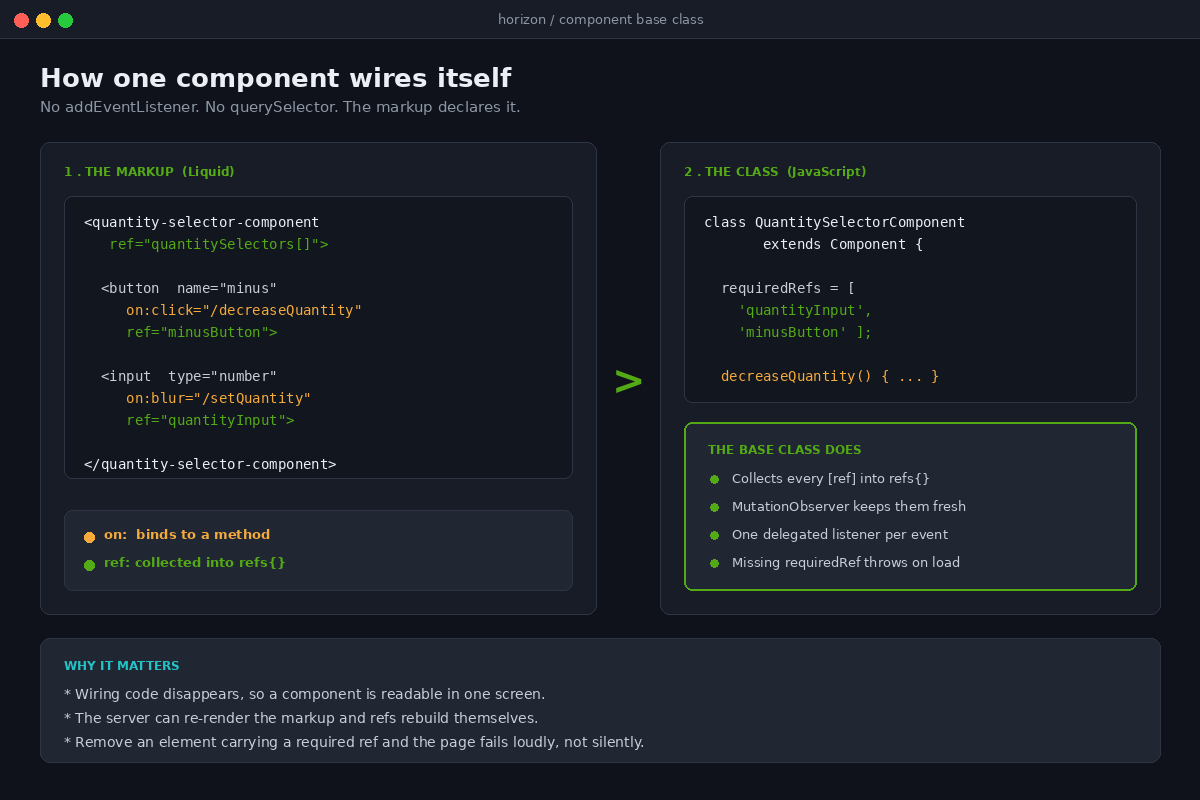
Every interactive element in Horizon extends a base class called Component, which itself extends a thin wrapper handling declarative shadow DOM. That base class does three jobs, and understanding them is most of understanding the theme.
The first job is references. Instead of each component running its own querySelector calls, child elements are tagged in Liquid with a ref attribute and the base class collects them into a refs object. Append square brackets to the name and you get an array instead of a single node. A component can also declare requiredRefs, and if one is missing the class throws rather than failing silently three interactions later. That is a deliberate choice: the theme would rather break loudly at load than misbehave quietly during a checkout.
The second job is keeping those references honest. The base class attaches a MutationObserver to its own subtree, filtered to the ref attribute, and rebuilds the reference map whenever the DOM underneath it changes. It defers attaching that observer to idle time so it does not compete with first paint. This is the part that makes server-rendered re-renders safe, which matters more than it sounds, and we will come back to it.
The third job is event binding, and it is the piece most developers coming from Dawn find genuinely different. There are no addEventListener calls scattered through the component. Instead the theme registers one delegated listener per event type on the document, in capture phase, covering eleven common events plus two pointer events treated separately because they are expensive. Markup declares its intent with an attribute.
Here is the real quantity selector from the Horizon source, trimmed to the parts that matter:
<quantity-selector-component
  class="quantity-selector"
  data-variant-id="{{ variant.id }}"
  ref="quantitySelectors[]"
>
  <button type="button" name="minus"
    on:click="/decreaseQuantity"
    ref="minusButton">...</button>

  <input type="number" name="quantity"
    value="{{ in_cart_quantity | default: 1 }}"
    min="{{ min_quantity }}"
    on:blur="/setQuantity"
    on:focus="/selectInputValue"
    ref="quantityInput">

  <button type="button" name="plus"
    on:click="/increaseQuantity"
    ref="plusButton">...</button>
</quantity-selector-component>
The on:click="/decreaseQuantity" attribute says: when this is clicked, walk up to the closest component and call the method named after the slash. You can put a selector before the slash to target a component that is not an ancestor, and you can append a second segment to pass data, which the cart uses to hand a line index straight into the handler. The matching class then reads as ordinary JavaScript with no wiring code in it at all.
export class QuantitySelectorComponent extends Component {
  requiredRefs = ['quantityInput', 'minusButton', 'plusButton'];

  connectedCallback() {
    super.connectedCallback();
    const { minusButton, plusButton } = this.refs;
    this.serverDisabledMinus = minusButton.disabled;
    this.serverDisabledPlus = plusButton.disabled;
    this.updateButtonStates();
  }
}
Note what the component does not do. It does not update the cart. It dispatches a quantity update event and lets whichever parent owns the cart decide what that means, because the same selector appears on a product page, in a cart drawer and in a quick order list, and each of those wants different behaviour. Shopify’s own comment in the source describes it as a pure event-driven architecture with parents filtering events from their own children to stop two cart update strategies fighting each other. That is a pattern worth stealing whether or not you ever touch Horizon.
Why the shadow boundary broke a decade of app integrations
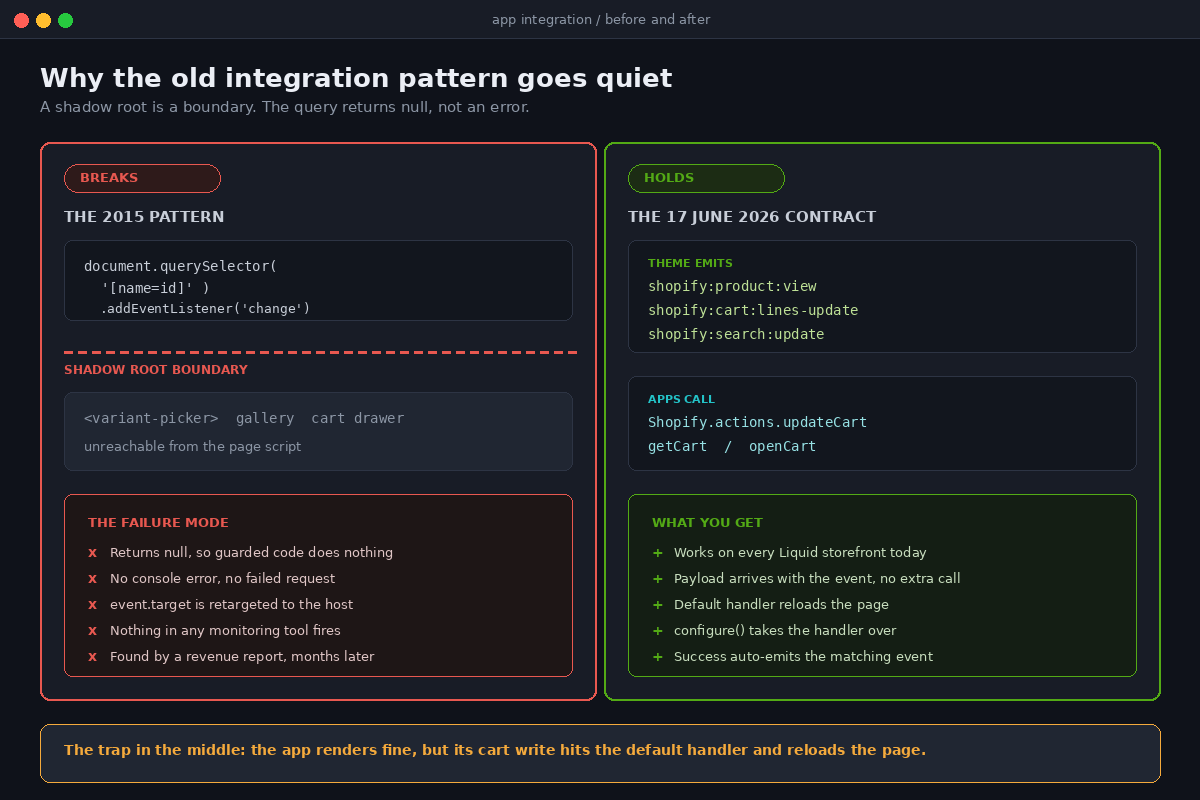
Now the expensive part. Some of these components render into a shadow root, and a shadow root changes the rules of DOM access in ways that are easy to state and painful to discover.
An app script running on the page calls document.querySelector for the variant picker. If that picker lives inside a shadow root, the query returns null. Not an error. Null. The app’s own code then usually guards against null by doing nothing, which is exactly the behaviour that makes this so hard to catch: no console error, no failed network request, no alert in any monitoring tool. The button simply never gets its listener attached.
The same applies to the three surfaces that carry the most third-party code on a typical Australian store: the variant picker, the media gallery and the cart drawer. Those are precisely where upsell apps, bundle apps, subscription widgets, stock notification apps and reviews apps like to insert themselves.
Event handling is a second trap, and a subtler one. Horizon’s delegated listener does not read event.target directly. It reads the first entry of event.composedPath(), because for an event originating inside a shadow root the browser retargets event.target to the host element, and the real element that was clicked is only visible in the composed path. Any app code doing its own delegation with plain event.target gets the wrong node and takes the wrong branch.
There is one more failure mode Shopify’s own engineers documented in the source, and it is instructive. Because these are native custom elements, an element can exist in the DOM before the module defining it has executed. A shopper on a slow connection can click a button whose component has not upgraded yet, and the event would be dropped. Horizon handles this by calling customElements.upgrade synchronously at the moment of the event, and if the element still is not a component it logs an explicit warning rather than swallowing it. The comment in the source notes this silent failure mode caused the bulk of their recent test flakiness. If it caught out the team who wrote the framework, it will catch out an app vendor.
The contract Shopify shipped to replace it
This is the part worth reading twice, because it changes what “app compatibility” even means.
The 17 June 2026 changelog introduced standard storefront events and actions: a two-way interface between themes and the code running on them. Themes emit DOM events for commerce interactions, namespaced and named by category and action, such as shopify:product:view, shopify:cart:lines-update and shopify:search:update. Apps subscribe with plain JavaScript and receive the payload directly, with no follow-up API call, and the payload follows the Storefront GraphQL shape in camelCase.
Actions run the other way. Shopify.actions.updateCart, getCart and openCart are available on every Liquid storefront right now, whether or not the theme author has done anything. That is the detail merchants keep missing. An app can call updateCart on your theme today with zero work from you.
The catch is what the default implementation does. Because it has to work on any theme in existence, it writes through the Storefront API and then, when it cannot recognise your cart markup, falls back to a full page reload. A reload throws away scroll position, any text the shopper had typed, and whatever animation state your cart drawer was in. On a mobile-heavy Australian storefront that is a visible, ugly regression, and it is the default your store gets by doing nothing.
The fix is that themes can configure an action to take over the handler, and Shopify’s own theme does exactly that. The pattern is a handler that receives the default implementation and decides whether to call it:
Shopify.actions.updateCart.configure({
  eventTarget: (meta) => document.querySelector('cart-items-component'),

  async handler(defaultHandler, payload, options) {
    const result = await defaultHandler();
    await refreshCartUI(result.cart);
    return result;
  },
});
Two things follow from this that are easy to get wrong. First, when a configured action succeeds, the action runtime emits the matching standard event automatically, so an app calling updateCart must not also dispatch shopify:cart:lines-update or every listener fires twice. Second, your theme now needs to tell the difference between a cart change it caused and one an app caused. Horizon does this by checking whether the event target sits inside the cart component; if it does not, the update came from outside and needs a render, and if it does, re-rendering would clobber form state the component is already managing.
The strategic read: app compatibility has moved from “does this app know my theme” to “does this app use the documented interface”. That is a much better question, and for the first time it is one you can put in a scope document.
How state survives a server-rendered update
The component model would fall apart without an answer to one problem: if the server re-renders a section, every component inside it gets replaced, and every bit of client state goes with it. Shopify’s answer is worth understanding because it is the reason this architecture can be both server-rendered and interactive.
Instead of swapping innerHTML, the theme fetches the new markup through the Section Rendering API and morphs it into the existing DOM, walking both trees and only touching nodes that differ. The morph explicitly skips any subtree where the old and new nodes are equal. Components expose an updatedCallback that fires only when the morph actually changed something inside them, at which point they flush pending mutation records and rebuild their reference map.
Alongside that sits deferred hydration. Sections marked for it are rendered again at idle time after the document is ready, guarded by a data-hydrated flag so it happens once, and the hydration pass only updates elements carrying a hydration key so untargeted nodes keep their markup and state. In plain terms: the critical HTML arrives from the server for a fast first paint, and the personalised or expensive parts fill in afterwards without a layout shift.
There is also a measurement layer. The theme marks and measures its own interactions using the browser’s Performance API, prefixed and named per interaction, and can measure from the original event timestamp rather than from when the handler ran. That distinction matters: it captures the delay a shopper actually felt, including the time the main thread was busy, which is the same thing Interaction to Next Paint is measuring. If you have read our piece on improving INP on Shopify, this is that work moved inside the theme.
What this changes about the way a build gets scoped
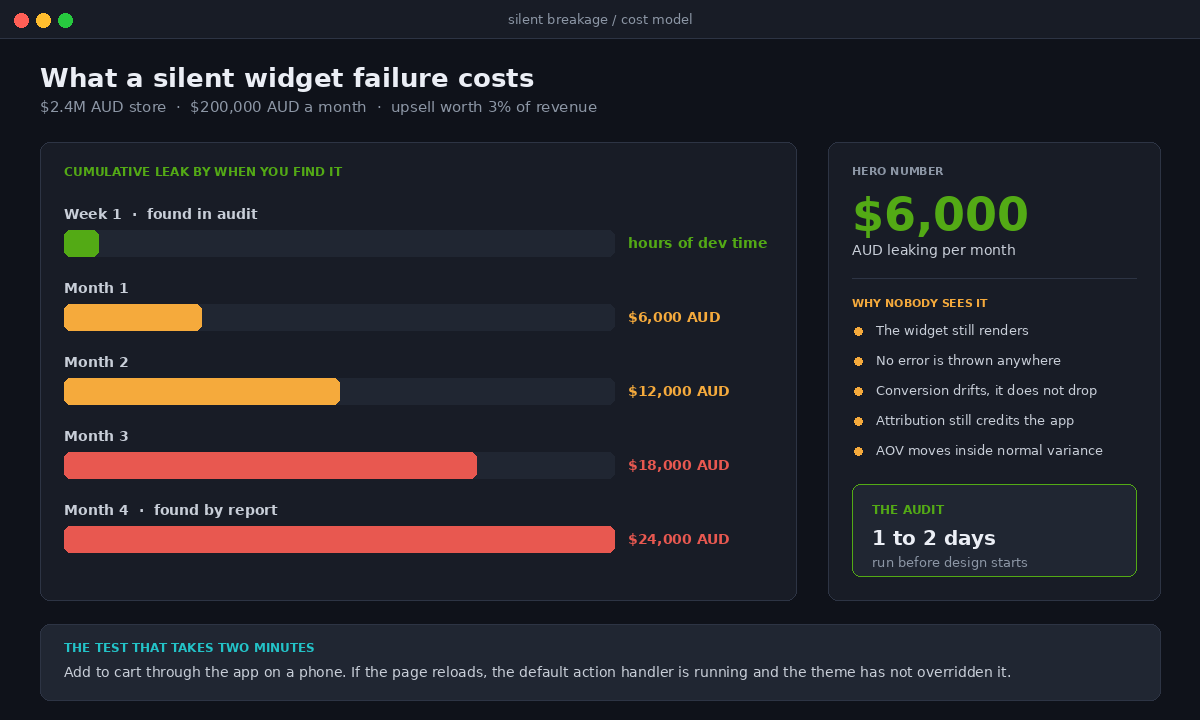
Put numbers on it, because this is where the architecture becomes a commercial decision rather than an aesthetic one.
A mid-sized Australian store running a mature app stack typically has between eight and fourteen apps injecting front-end code. On a component-based theme, our experience is that a minority break outright, a minority are already using the standard interface and are fine, and the awkward middle group half-works: the widget renders but its cart interaction triggers the default reload path. That middle group is the one that damages conversion without ever looking broken.
The cost of finding out late is straightforward to model. Say a store turns over $2.4M AUD a year, which is $200,000 AUD a month, with roughly 55 per cent of sessions on mobile. If a broken upsell widget on the cart drawer was contributing 3 per cent of revenue and it silently stops firing, that is about $6,000 AUD a month leaking with no error in any dashboard. Find it in the first week of a build and it costs a few hours of developer time. Find it in month four because someone finally queried why average order value drifted, and you have lost roughly $24,000 AUD plus the cost of the investigation.
That single number is why we front-load the app audit rather than treating it as a launch-week task. It is also why “we will just keep the old theme” is a more expensive position than it looks. The old theme still works, but every new app you install is being written against the new interface, and every developer you hire is learning the new model.
The audit we run before touching a component-based theme
This is the actual checklist, in order, and it takes a day or two rather than a week.
- Inventory the injected scripts. Every app block, every script tag, every theme app extension. Name the surface each one touches: product form, gallery, cart, search, account.
- Test each one against a shadow boundary. Open the component in dev tools and check whether the node the app expects is inside a shadow root. If it is, the app needs the standard interface or a vendor fix, and there is no third option.
- Grep the app bundles for the old patterns. A raw
document.querySelectoraimed at a variant selector, awindow.fetchwrapper, or delegation onevent.targetwithoutcomposedPathare all reliable indicators. - Watch for the reload. Trigger every app-driven cart change and see whether the page reloads. A reload means the default action handler is running and the theme has not configured an override for that surface.
- Check for double-fired events. Subscribe a temporary listener to each standard cart event and count. Two hits for one shopper action means something is dispatching an event the action runtime already emitted.
- Confirm required refs. Any customisation that removes an element carrying a required ref will throw on load. This is the most common way a well-meaning tweak takes down a product page.
- Measure before and after. Capture interaction timings on the surfaces you are about to change, so the improvement is a number rather than an opinion.
Run that list and you will usually find two or three genuine problems and a longer tail of things that are fine. The value is in the certainty, not the length of the list.
How We Do It at Insiteful
We have built and rebuilt around 200 Shopify storefronts across 25 years, and the pattern we keep seeing with architectural shifts is that the damage comes from partial adoption, not from the shift itself. A store half-migrated to a component model, with three apps on the standard interface and five still scraping the DOM, is in a worse position than a store that has not moved at all.
So we treat the front-end contract as a deliverable in its own right. Before design work starts, we produce the script inventory and the shadow boundary test for every app on the store, and that document goes to the client with a plain recommendation against each app: keep, replace, or ask the vendor. Where a vendor has no answer, we say so early enough that a replacement can be chosen calmly rather than in launch week.
On the build itself, we write components against the same base-class conventions Shopify uses rather than inventing our own, because the next developer who touches the store should not have to learn a house dialect. Refs are declared in Liquid, required refs are listed explicitly so failures are loud, event binding is declarative, and cart mutations go through the configured action so the reload path never runs on a real shopper. Every component ships with the interaction timing marks already in place.
We also build native. We do not sell headless rebuilds, and the component architecture is a large part of why: nearly everything teams used to leave the platform to get, meaning encapsulated components, a real event bus, granular re-rendering and client-side state that survives a server render, now exists inside a Liquid theme without the operating cost of a separate front end. Our related work on theme blocks, the Section Rendering API and theme app extensions covers the neighbouring pieces of the same system.
Builds in this territory land between $8,500 and $25,000 AUD depending on how much of the front end is being rewritten and how much of the app stack needs replacing. The audit is the cheapest part and the part that most changes the number, which is why we insist on doing it first.
Where to start this week
If you take one action from this, make it the reload test. Open your store on a phone, add something to the cart through whatever app is driving your upsell or bundle offer, and watch whether the page reloads. If it does, an app is calling the default action handler and your theme is not configured to handle it. That is a small fix with a visible payoff, and it tells you immediately whether the rest of this applies to you.
After that, count your injected scripts. Not the apps in your admin, the scripts on the page. Most Australian merchants we speak to are carrying two or three they no longer use, and every one of them is a candidate to break on the next theme change.
If you would rather have someone run the whole audit properly, that is the first thing we do on every engagement. You can see how we scope and sequence that work on our build process page, or start a conversation there about your store.